brake light Acura NSX 2017 Owner's Guide
[x] Cancel search | Manufacturer: ACURA, Model Year: 2017, Model line: NSX, Model: Acura NSX 2017Pages: 116, PDF Size: 7.19 MB
Page 26 of 116
46 || 47
INSTRUMENT PANELINSTRUMENT PANEL
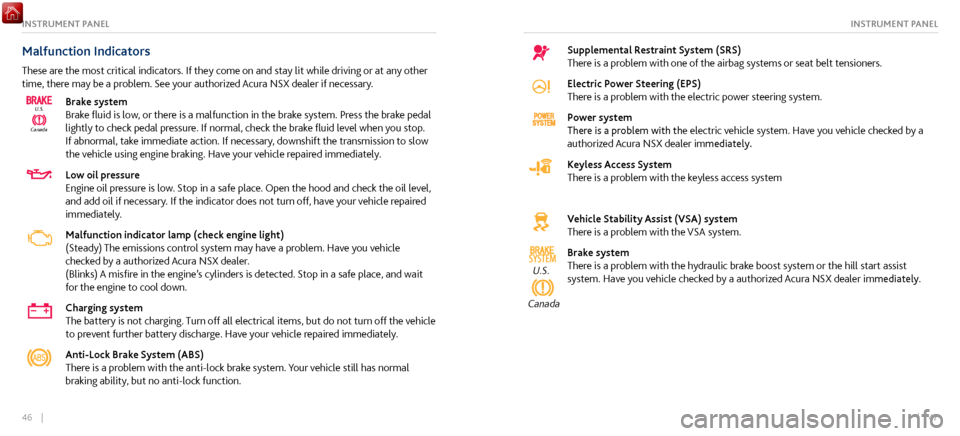
Malfunction Indicators
These are the most critical indicators. If they come on and stay lit while driving or at any other
time, there may be a problem. See your authorized Acura NSX dealer if necessary.
CanadaU.S.
Brake system
Brake fluid is low, or there is a malfunction in the brake system. Press the brake pedal
lightly to check pedal pressure. If normal, check the brake fluid level when you stop.
If abnormal, take immediate action. If necessary, downshift the transmission to slow
the vehicle using engine braking. Have your vehicle repaired immediately.
Low oil pressure
Engine oil pressure is low. Stop in a safe place. Open the hood and check the oil level,
and add oil if necessary. If the indicator does not turn off, have your vehicle repaired
immediately.
Malfunction indicator lamp (check engine light)
(Steady) The emissions control system may have a problem. Have you vehicle
checked by a authorized Acura NSX dealer.
(Blinks) A
misfire in the engine’s cylinders is
detected. Stop in a safe place, and wait
for the engine to cool down.
Charging system
The battery is not charging. Turn off all electrical items, but do not turn off the vehicle
to prevent further battery discharge. Have your vehicle repaired immediately.
Anti-Lock Brake System (ABS)
There is a problem with the anti-lock brake system. Your vehicle still has normal
braking ability, but no anti-lock function.
Supplemental Restraint System (SRS)
There is a problem with one of the airbag systems or seat belt tensioners.
Electric Power Steering (EPS)
There is a problem with the electric power steering system.
Power system
There is a problem with the electric vehicle system. Have you vehicle checked by a
authorized Acura NSX dealer immediately.
Keyless Access System
There is a problem with the keyless access system
Vehicle Stability Assist (VSA) system
There is a problem with the VSA system.
SYSTEMU.S.
Canada
Brake system
There is a problem with the hydraulic brake boost system or the hill start assist
system. Have you vehicle checked by a authorized Acura NSX dealer immediately.
Page 28 of 116
50 || 51
INSTRUMENT PANELINSTRUMENT PANEL
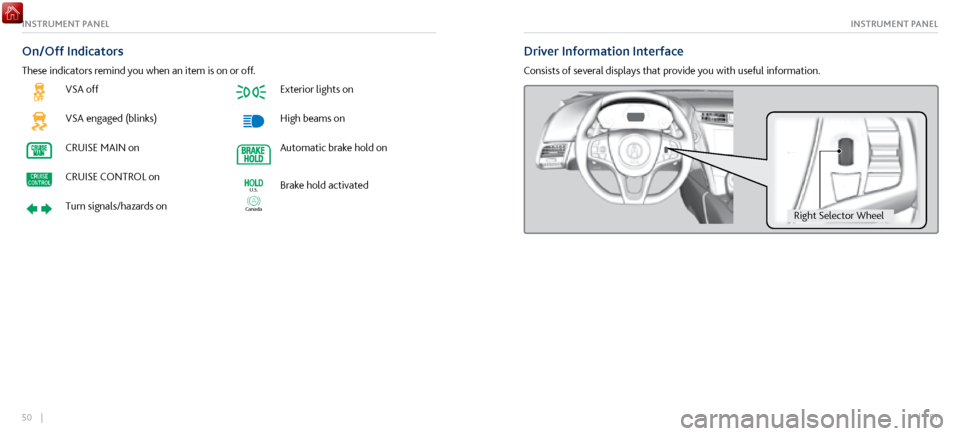
VSA off
VSA engaged (blinks)
CRUISE MAIN on
CRUISE CONTROL on
Turn signals/hazards on
Exterior lights on
High beams on
Automatic brake hold on
Canada
U.S.Brake hold activated
On/Off Indicators
These indicators remind you when an item is on or off.
Driver Information Interface
Consists of several displays that provide you with useful information.
Right Selector Whee l
Page 65 of 116
124 || 125
DRIVINGNAVIGATION
n Traffic
View traffic flow and incidents in select metr
o areas. Traffic alerts are accompanied by an
audible beep. Pop-up messages and traffic information can be viewed when you are on the
map screen. You can also select traffic to avoid. Traffic coverage is limited in Canada.
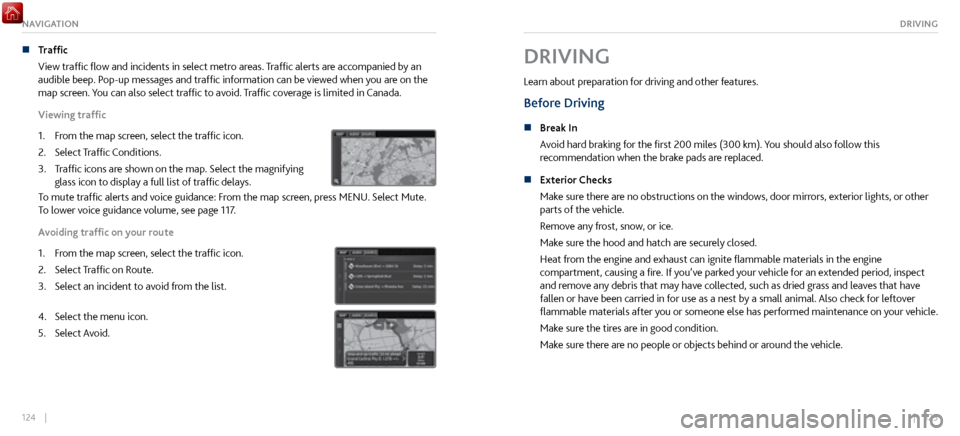
Viewing traffic
1.
From the map scr
een, select the traffic icon.
2.
Select Traffic Conditions.
3.
Traffic icons are shown on
the map. Select the magnifying
glass icon to display a full list of traffic delays.
To mute traffic alerts and voice guidance: From the map screen, press MENU. Select Mute.
To lower voice guidance volume, see page 117.
Avoiding traffic on your route
1.
From the map scr
een, select the traffic icon.
2.
Select Traffic on R
oute.
3.
Select an incident to avoid fr
om the list.
4. Select the menu icon.
5.
Select Avoid.
DRIVING
Learn about preparation for driving and other features.
Before Driving
n Break In
Avoid har d braking for the first 200 miles (300 km). You should also follow this
recommendation when the brake pads are replaced.
n
Exterior Checks
Make sure ther
e are no obstructions on the windows, door mirrors, exterior lights, or other
parts of the vehicle.
Remove any frost, snow, or ice.
Make sure the hood and hatch are securely closed.
Heat from the engine and exhaust can ignite flammable materials in the engine
compartment, causing a fire. If you’ve parked your vehicle for an extended period, inspect
and remove any debris that may have collected, such as dried grass and leaves that have
fallen or have been carried in for use as a nest by a small animal. Also check for leftover
flammable materials after you or someone else has performed maintenance on your vehicle.
Make sure the tires are in good condition.
Make sure there are no people or objects behind or around the vehicle.
Page 68 of 116

130 || 131
DRIVINGDRIVING
Starting to Drive
The keyless access system allows simple push-button start.
n
Before Starting the Engine
Check
that the parking brake is applied (pull up on the switch
and look for the indicator light), then depress the brake pedal.
Keep your foot firmly on the brake pedal when starting the
engine.
The engine will be harder to start in cold weather and in
thinner air found at altitudes above 8,000 feet (2,400
m). When starting the engine in cold weather, turn off all
electrical accessories such as the lights, climate control
system, and rear defogger in order to reduce battery drain.
The vehicle will not start if the High Voltage battery
temperature drops below -4F (-20C). Plan your driving and
storage appropriately if you expect this to happen.
Brake pedal
n Changing the Power Mode
Accessory
or On mode: Press the ENGINE START/STOP
button once without pressing the accelerator pedal for
Accessory mode. Press it again for On mode.
Starting the power system: Make sure the parking brake
is applied. Then, press the brake pedal while you press
the ENGINE START/STOP button once. Do not press the
accelerator.
•
When IDS is in QUIET mode: Whether the engine starts
depends on the
engine temperature and the charge in the
High Voltage batteries.
•
When IDS is in SPORT mode: The engine
will start.
Turning the power system off: Select Park (P), then press
the ENGINE START/STOP button.
Page 72 of 116
138 || 139
DRIVINGDRIVING
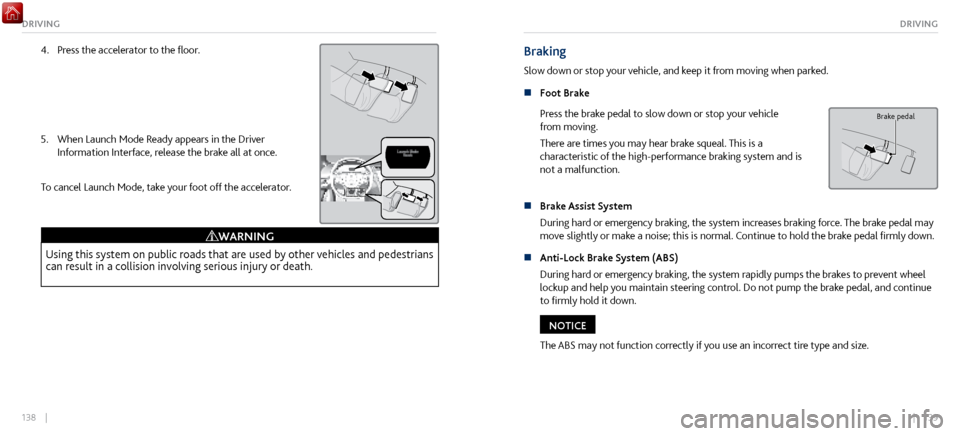
4. Press the accelerator to the floor.
5.
When Launch Mode Ready appears in the Driver
Information Interface, r
elease the brake all at once.
To cancel Launch Mode, take your foot off the accelerator.
Using this system on public roads that are used by other vehicles and pedestrians
can result in a collision involving serious injury or death.
WARNING
Braking
Slow down or stop your vehicle, and keep it from moving when parked.
n
Foot Brake
Press the
brake pedal to slow down or stop your vehicle
from moving.
There are times you may hear brake squeal. This is a
characteristic of the high-performance braking system and is
not a malfunction.
Brake pedal
n Brake Assist System
During hard or emer
gency braking, the system increases braking force. The brake pedal may
move slightly or make a noise; this is normal. Continue to hold the brake pedal firmly down.
n
Anti-Lock Brake System (ABS)
During har
d or emergency braking, the system rapidly pumps the brakes to prevent wheel
lockup and help you maintain steering control. Do not pump the brake pedal, and continue
to firmly hold it down.
The ABS may not function correctly if you use an incorrect tire type and size.
NOTICE
Page 73 of 116

140 || 141
DRIVINGDRIVING
n Parking Brake
Keep the
vehicle from moving when it is parked.
To apply: Pull up the switch. The parking brake indicator
appears in the instrument panel.
To release: Press the brake pedal and make sure your seat
belt is fastened. Press the switch down to release.
You can also lightly press the accelerator pedal if your seat
belt is fastened, the vehicle is on, and not in Park or Neutral.
Electric Parking Brake Switch
Electric Parking Brake Switch
Accelerator Pedal
Automatic Brake Hold
Maintains rear brake hold even after the brake pedal is released. Make sure the vehicle is on and
your seat belt is fastened when operating this feature.
1.
Press the BRAKE HOLD button. The BRAKE HOLD indicator
appears in
the instrument panel.
2.
With the transmission in D, M, or N, pr
ess the brake pedal and
come to a complete stop. The HOLD indicator appears, and
brake hold is applied. Release the brake pedal.
Press the accelerator pedal to cancel brake hold and start
moving.
Accelerator Peda lBrake PedalAutomatic Brake
Hold Button
Off
On OnGoes
On
On
On
U.S.
Canada
Accelerator Peda
lBrake PedalAutomatic Brake
Hold Button
Off
On OnGoes
On
On
On
U.S.
Canada
To turn off brake hold: Press the brake pedal and press the BRAKE
HOLD button again.
Automatic brake hold cancels when:
•
Braking is applied for more than 10 minutes.
•
The driver’
s seat belt is unfastened.
•
The power system is turned off.
Accelerator Peda lBrake PedalAutomatic Brake
Hold Button
Off
On OnGoes
On
On
On
U.S.
Canada
Page 86 of 116

166 || 167
HANDLING THE UNEXPECTEDHANDLING THE UNEXPECTED
Tire Repair Kit
If a tire has a small puncture, you can use the tire repair kit to temporarily repair it. The puncture
must be smaller than 3/16-inch (4 mm) and not in the tire sidewall. Go to a authorized Acura
NSX dealer to have the full-size tire permanently repaired or replaced.
n
Before Repairing
the Tire
•
Park the v
ehicle on a firm, level, and non-slippery surface.
•
Make sure the
vehicle is in Park (P), and apply the parking brake.
•
Turn on the hazard warning
lights, and turn the power system off. n
Getting Ready to R
epair the Tire
1. Open the hatch.
2.
Loosen the tool box tie-downs and
remove the tool box
lid.
3.
Take the kit out of the tool
box.
4.
Place the kit face up on
flat ground near the punctured
tire and away from traffic. Do not place the kit on its side.
Follow the instructions in the kit to repair the tire.Lid Tie Down
Tire Repair Kit
Do not use an unapproved puncture-repairing agent other than the one provided in the kit
that came with your vehicle. If a different agent is used, you may permanently damage the
tire pressure sensor.
NOTICE
Page 87 of 116
168 || 169
HANDLING THE UNEXPECTEDHANDLING THE UNEXPECTED
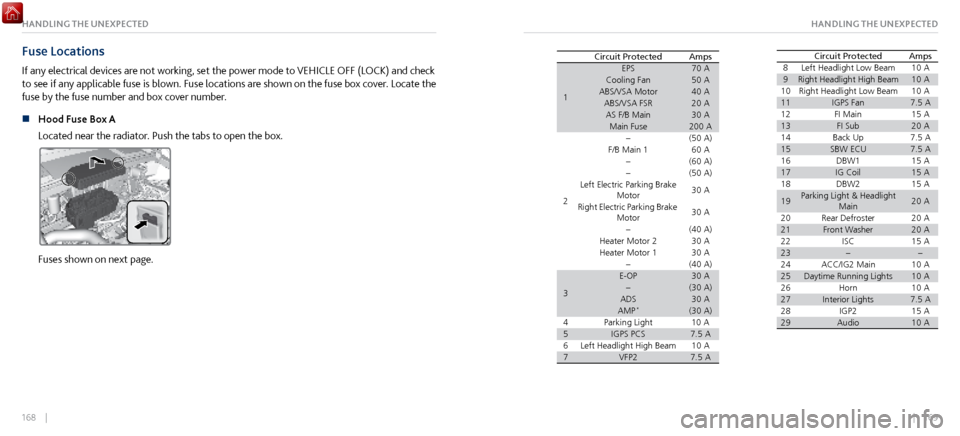
Fuse Locations
If any electrical devices are not working, set the power mode to VEHICLE OFF (LOCK) and check
to see if any applicable fuse is blown. Fuse locations are shown on the fuse box cover. Locate the
fuse by the fuse number and box cover number.
n
Hood Fuse Box A
Located near the
radiator. Push the tabs to open the box.
Fuses shown on next page.
Circuit Protected Amps
1
70A50A40A20A30A200A
2(50 A) 60 A
(6 0A )
(5 0A )
30 A
30 A
(4 0A )
30 A
30 A
3
(40A )30A(30 A)30A
4 (30 A)10
A
57.5A
610 A
77.5ALeft Headlight High Beam VFP2EPS
Cooling Fan
ABS/VSA Motor ABS/VSA FS R
AS F/B Main Main Fuse
F/B Main 1
Left Electric Parking Brake Motor
Right Electric Parking Brake Motor
Heater Motor 2
Heater Motor 1
E-OP
ADS
AMP
*
Parking Light IGPS PCS 8
Left Headlight Low Beam 10 A
9Right Headlight High Beam
10 10
A
Right Headlight Low Beam10 A
11IGPS Fan 7.5 A
12 FI Main15A
13FI Sub14 20
A
Back Up7.5A
15SBW ECU16 7.5 A
DBW 115A
17IG Coil15 A
18 DBW215A
19Parking Light & Headlight Main 20
A
20 Rear Defroste r
20A
21Front Washer 20A
22 ISC15A
23
24 ACC/IG2 Main 10 A
2510 A
26 Daytime Running Lights
Horn10A
27Interior Lights 7.5 A
28 IGP215A
29Audio10 A
AmpsCircuit Protecte dCircuit Protected Amps
1
70A50A40A20A30A200A
2(50 A) 60 A
(6 0A )
(5 0A )
30 A
30 A
(4 0A )
30 A
30 A
3
(40A )30A(30 A)30A
4 (30 A)10
A
57.5A
610 A
77.5ALeft Headlight High Beam VFP2EPS
Cooling Fan
ABS/VSA Motor ABS/VSA FS R
AS F/B Main Main Fuse
F/B Main 1
Left Electric Parking Brake Motor
Right Electric Parking Brake Motor
Heater Motor 2
Heater Motor 1
E-OP
ADS
AMP
*
Parking Light IGPS PCS 8
Left Headlight Low Beam 10 A
9Right Headlight High Beam
10 10
A
Right Headlight Low Beam10 A
11IGPS Fan 7.5 A
12 FI Main15A
13FI Sub14 20
A
Back Up7.5A
15SBW ECU16 7.5 A
DBW 115A
17IG Coil15 A
18 DBW215A
19Parking Light & Headlight Main 20
A
20 Rear Defroste r
20A
21Front Washer 20A
22 ISC15A
23
24 ACC/IG2 Main 10 A
2510 A
26 Daytime Running Lights
Horn10A
27Interior Lights 7.5 A
28 IGP215A
29Audio10 A
AmpsCircuit Protecte d
Page 90 of 116
174 || 175
MAINTENANCEHANDLING THE UNEXPECTED
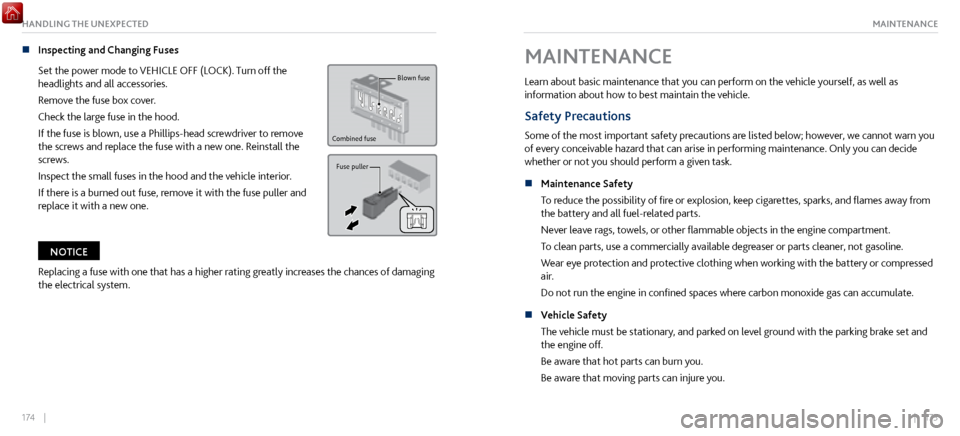
n Inspecting and Changing Fuses
Set the power mode to
VEHICLE OFF (LOCK). Turn off the
headlights and all accessories.
Remove the fuse box cover.
Check the large fuse in the hood.
If the fuse is blown, use a Phillips-head screwdriver to remove
the screws and replace the fuse with a new one. Reinstall the
screws.
Inspect the small fuses in the hood and the vehicle interior.
If there is a burned out fuse, remove it with the fuse puller and
replace it with a new one.
Blown fuse
Combined fuse
Fuse puller
Replacing a fuse with one that has a higher rating greatly increases the chances of damaging
the electrical system.
NOTICE
MAINTENANCE
Learn about basic maintenance that you can perform on the vehicle yourself, as well as
information about how to best maintain the vehicle.
Safety Precautions
Some of the most important safety precautions are listed below; however, we cannot warn you
of every conceivable hazard that can arise in performing maintenance. Only you can decide
whether or not you should perform a given task.
n
Maintenance Safety
To reduce the possibility
of fire or explosion, keep cigarettes, sparks, and flames away from
the battery and all fuel-related parts.
Never leave rags, towels, or other flammable objects in the engine compartment.
To clean parts, use a commercially available degreaser or parts cleaner, not gasoline.
Wear eye protection and protective clothing when working with the battery or compressed
air.
Do not run the engine in confined spaces where carbon monoxide gas can accumulate.
n
Vehicle Safety
The vehicle must be stationary
, and parked on level ground with the parking brake set and
the engine off.
Be aware that hot parts can burn you.
Be aware that moving parts can injure you.
Page 106 of 116

206 || 207
MAINTENANCEMAINTENANCE
Testing of Readiness Codes
Your vehicle has readiness codes as part of the onboard self-diagnostic system. Some states use these
codes for testing to verify your vehicle’s emissions components are working properly. The codes may
not be read if you go through the testing just after the battery has gone dead or been disconnected.
To check if they are set, turn the vehicle on without starting the engine. The malfunction indicator
lamp will come on for several seconds. If it goes off, the readiness codes are set. If it blinks five times,
the readiness codes are not set.
If you are required to have your vehicle tested before the readiness codes are set, prepare the vehicle
for retesting by doing the following:
1.
Fill the gas tank to appro
ximately 3/4 full.
2.
Park the v
ehicle and leave the power system off for 6 hours or more.
3.
Make sure the ambient
temperature is between 40°F and 95°F (4°C and 35°C).
4.
Turn the power system on without
touching the accerator pedal, and let it idle for 20 seconds.
5.
Still in Park (P), increase the engine speed
to 2.000 rpm and hold it for about three minutes.
6.
Let the engine idle for 20 seconds without
touching the accelerator.
7.
Select a nearby, lightly
traveled major highway where you can maintain a speed of 50 mph (80
km/h) for at least 20 minutes. Drive on the highway with the vehicle in D and in SPORT mode. Do
not use cruise control.
8.
Drive in city or suburban traffic
for at least 10 minutes. When traffic conditions allow, let the
vehicle coast for several seconds without using the accelerator pedal or the brake pedal.
9.
Park the v
ehicle and leave the power system off for 40 minutes.
The readiness codes are erased when the battery is disconnected, and set again only after several
days of driving under a variety of conditions.
If a testing facility determines that the readiness codes are not set, you may be requested to return at
a later date to complete the test, or see your authorized Acura NSX dealer.
Long-Term Storage
If you need to park your vehicle for an extended period (more than one month), there are
several things you should do to prepare it for storage. This helps reduce possible deterioration of
vehicle components and overall condition, which allows you to get the vehicle back on the road
with minimal delay. These are:
•
If possible, store your NSX in a garage
or enclosed area.
•
Fill the fuel tank completely
.
•
Change the engine oil and filter
.
•
Wash and dry the exterior completel
y.
•
Clean the interior. Make sur
e the carpeting, floor mats, etc., are completely dry.
•
Put the transmission in (P). Release
the parking brake.
•
Leave one window
open slightly (if the vehicle is being stored indoors).
•
Connect the 12-volt battery
to an accessory battery charger. For more information on how
to maintain your 12-volt battery, consult an authorized Acura NSX dealer.
•
If the vehicle is
to be stored for a longer period of time, it should be supported on jack
stands to raise the tires off the ground to prevent tire flat spotting. Consult an authorized
Acura NSX dealer for information about the correct jack stands.
•
Support the front wiper
blade arms with a folded towel or rag so they do not touch the
windshield.
•
Cover
the vehicle with a breathable cover, one made from a porous material such as cotton.
Nonporous materials (such as plastic sheeting) may trap moisture, which can damage the
paint.