I stop Acura NSX 2017 Service Manual
[x] Cancel search | Manufacturer: ACURA, Model Year: 2017, Model line: NSX, Model: Acura NSX 2017Pages: 473, PDF Size: 16.01 MB
Page 233 of 473
232
Features
Customized Features
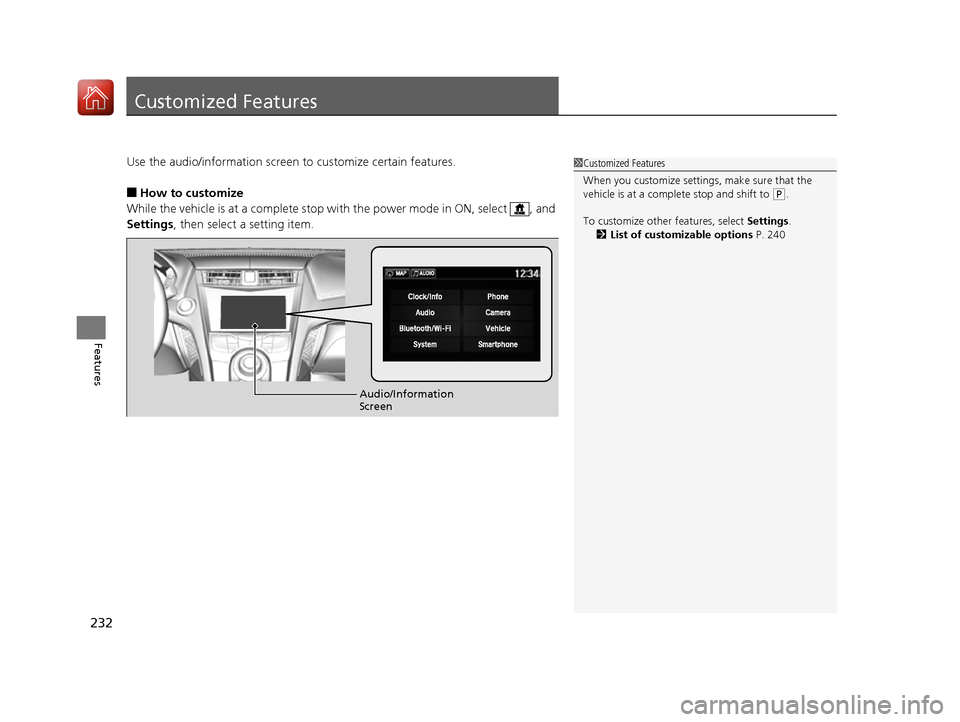
Use the audio/information screen to customize certain features.
■How to customize
While the vehicle is at a complete stop with the power mode in ON, select , and
Settings , then select a setting item.
1Customized Features
When you customize settings, make sure that the
vehicle is at a complete stop and shift to
(P.
To customize other features, select Settings .
2 List of customizable options P. 240
Audio/Information
Screen
17 NSX-31T6N6000.book 232 ページ 2016年4月22日 金曜日 午後3時44分
Page 256 of 473
255
Features
HomeLink® Universal Transceiver
The HomeLink ® Universal Transceiver can be pr ogrammed to operate up to three
remote controlled devices around your home, such as garage doors, lighting, or
home security systems.
Refer to the safety information that came wi th your garage door opener to test that
the safety features are functioning properly. If you do not have the safety
information, contact the manufacturer.
Before programming HomeLink, make sure th at people and objects are out of the
way of the garage or gate to prevent potential injury or damage.
When programming a garage door opener, pa rk just outside the garage door’s path.
■Important Safety Precautions
1HomeLink ® Universal Transceiver
Before programming HomeLi nk to operate a garage
door opener, confirm that the opener has an external
entrapment protection system, such as an “electronic
eye,” or other safety and re verse stop features. If it
does not, HomeLink may not be able to operate it.
17 NSX-31T6N6000.book 255 ページ 2016年4月22日 金曜日 午後3時44分
Page 261 of 473
uuBluetooth ® HandsFreeLink ®u Using HFL
260
Features
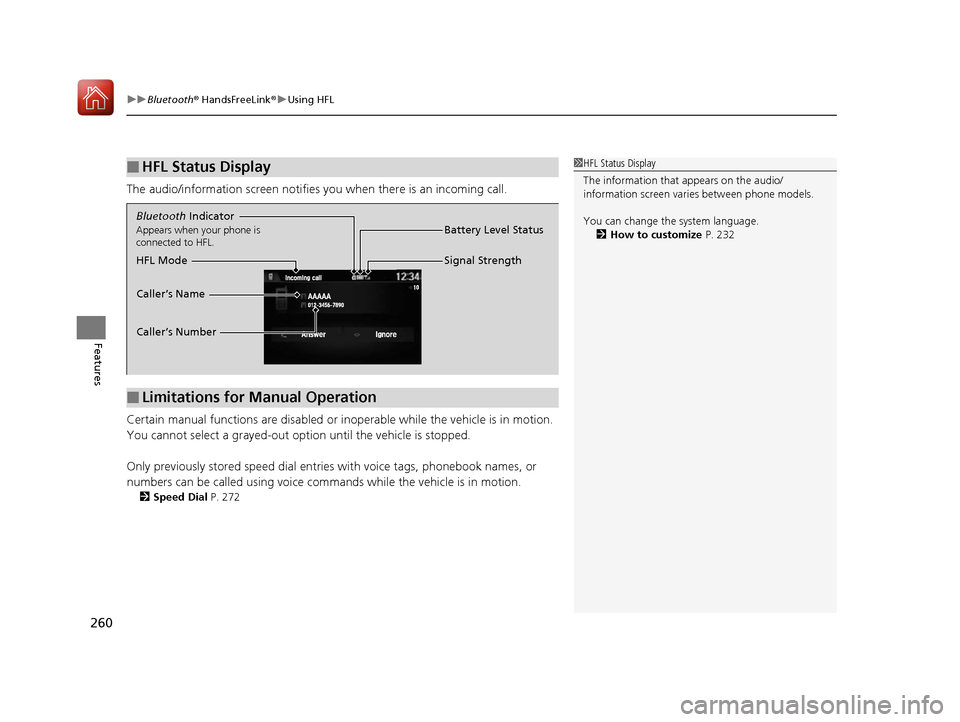
The audio/information screen notifies you when there is an incoming call.
Certain manual functions are disabled or i noperable while the vehicle is in motion.
You cannot select a grayed-out option until the vehicle is stopped.
Only previously stored speed dial entries with voice tags, phonebook names, or
numbers can be called using voice commands while the vehicle is in motion.
2 Speed Dial P. 272
■HFL Status Display1HFL Status Display
The information that appears on the audio/
information screen vari es between phone models.
You can change the system language. 2 How to customize P. 232
■Limitations for Manual Operation
Bluetooth Indicator
Appears when your phone is
connected to HFL.
Signal Strength
HFL Mode Battery Level Status
Caller’s Name
Caller’s Number
17 NSX-31T6N6000.book 260 ページ 2016年4月22日 金曜日 午後3時44分
Page 266 of 473
265
uuBluetooth ® HandsFreeLink ®u HFL Menus
Continued
Features
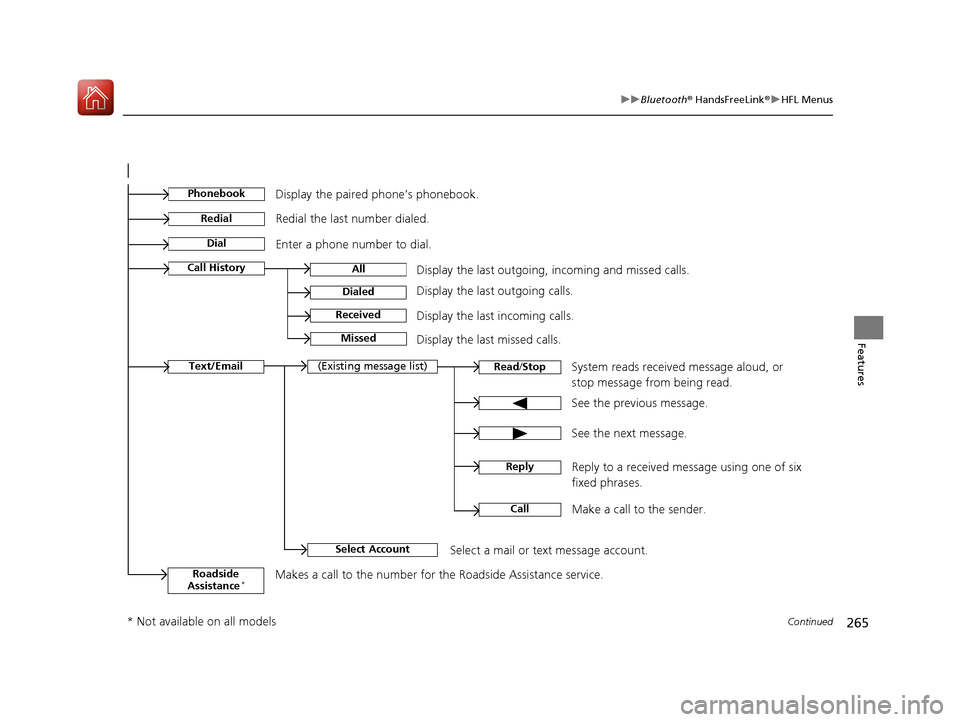
See the previous message.
Text/EmailRead /Stop(Existing message list)
See the next message. System reads received message aloud, or
stop message from being read.
Select AccountSelect a mail or text message account.
Reply to a received message using one of six
fixed phrases.
CallMake a call to the sender.
Reply
Display the last outgoing, incoming and missed calls.Call HistoryAll
Dialed
Received
Display the last outgoing calls.
Display the last incoming calls.
MissedDisplay the last missed calls.
Dial
Redial
Enter a phone number to dial. Redial the last number dialed.
PhonebookDisplay the paired phone’s phonebook.
Roadside
Assistance*Makes a call to the number for the Roadside Assistance service.
* Not available on all models
17 NSX-31T6N6000.book 265 ページ 2016年4月22日 金曜日 午後3時44分
Page 286 of 473

Continued285
uuBluetooth ® HandsFreeLink ®u HFL Menus
Features
HFL can display newly received text or e-mail messages as well as 20 of the most
recently received messages on a linked cell phone. Each received message can be
read aloud and replied to using a fixed common phrase.
1.A pop-up appears and notifies you of a new
text or e-mail message.
2. Select Read to listen to the message.
u The text or e-mail message is displayed.
The system automatica lly starts reading
out the message.
3. To discontinue the mess age read-out, select
Stop .
■Receiving a Text/E-mail Message1Receiving a Text/E-mail Message
The system does not display any received messages
while you are driving. You can only hear them read
aloud.
The system can only receive messages that are sent as
text (SMS) messages. Messages sent using data
services will not be displayed in the list.
With some phones, you may be able to display up to
20 most recent text and e-mail messages.
State or local laws may limit your use of the HFL text
/e-mail message feature. Only use the text /e-mail
message feature when conditions allow you to do so
safely.
When you receive a text or e-mail message for the
first time since the phone is paired to HFL, you are
asked to turn the New Message Notification
setting to On .
2 To turn on or off the text/e-mail notice
P. 269
17 NSX-31T6N6000.book 285 ページ 2016年4月22日 金曜日 午後3時44分
Page 290 of 473

Continued289
uuBluetooth ® HandsFreeLink ®u HFL Menus
Features
■Read or Stop reading a message
1. Go to the text or e-mail message screen.
u The system automatica lly starts reading
the message aloud.
2 Displaying Messages P. 287
2.Select Stop to stop reading.
Select Read again to start reading the
message from the beginning.
■Reply to a message
1. Go to the text or e-mail message screen.
u The system automatica lly starts reading
the message aloud.
2 Displaying Messages P. 287
2.Select Reply.
3. Select the reply message.
u The pop-up menu appears on the screen.
4. Select Send to send the message.
u Complete appears on the screen when
the reply message was successfully sent.
1 Reply to a message
The available fixed reply messages are as follows:
•Talk to you later, I’m driving.•I’m on my way.
•I’m running late.
•OK•Yes
•No
You cannot add, edit, or delete reply messages.
17 NSX-31T6N6000.book 289 ページ 2016年4月22日 金曜日 午後3時44分
Page 295 of 473
uuAcuraLink ®*u
294
Features
Your subscribed telematics service provider can track your vehicle’s location,
remotely lock or unlock doors, and help you find your vehicle.
To use these features, you need your us er ID and personal identification number
(PIN).
■Stolen vehicle tracking
This feature searches and tracks down your ve hicle position even if it is on the move.
If you believe that your vehicle has been stolen, contact the police as well as the
provider. Tracking requests must be initiated by the police.
■Remote door lock/unlock
The provider can remotely lock or unlock doors upon your request.
■Vehicle finder
This feature is convenient to use when trying to locate yo ur vehicle in large areas,
such as a crowded parking lot. If you cannot locate your vehicle after using the
remote transmitter’s answerback function, you can contact the provider which can
then flash your vehicle’s exterior lights and sound the horn.
■Security alarm notification
If the security system in your vehicle detects an abnormal condition, such as
someone tampering with the lock on your vehicle, the provider notifies you by email
or SMS.
■Security Features1 Security Features
The contact information of your provider, your user
ID and PIN will be given when you subscribe to
AcuraLink. If you forget any of the above, contact an
authorized Acura NSX dealer, or go to
owners.acura.com (in U.S.) or www.acura.ca (in
Canada).
You can also activate the remote door lock/unlock
and vehicle finder features from the Internet or using
your smartphone app. Ask an authorized Acura NSX
dealer, or visit owners.acura.com (in U.S.) or
www.acura.ca (in Canada) for details.
1Vehicle finder
The lights will stop flas hing and horn will stop
sounding under the foll owing conditions:
•When 30 seconds have elapsed.
•You unlock the doors using the remote transmitter.
•You unlock the doors using the keyless access
system.
•You unlock the doors us ing the built-in key.
•The power mode is set to ACCESSORY or ON.
17 NSX-31T6N6000.book 294 ページ 2016年4月22日 金曜日 午後3時44分
Page 298 of 473
297
Driving
This chapter discusses driving, refueling, and information on items such as accessories.
Before Driving
Driving Preparation .......................... 298
Maximum Load Limit........................ 301
High-Performance Driving ................ 303
Towing a Trailer Towing Your Vehicle ........................ 308
When Driving Turning on the Power ...................... 309
Precautions While Driving................. 312
Dual Clutch Transmission ................. 313
Shifting ............................................ 314
Integrated Dynamics System (IDS)..... 323
Launch Control ................................ 328 Cruise Control ................................. 330
Vehicle Stabilit
y Assist (VSA®), aka Electronic
Stability Control (ESC), System........... 333
Agile Handling Assist System............ 337
SPORT HYBRID Super Handling-All Wheel DriveTM (SPORT HYBRID SH-AWD®) .... 338
Tire Pressure Monitoring System (TPMS) ...... 339
Tire Pressure Monitoring System (TPMS) - Required Federal Explanation ......... 341
High Voltage Battery ........................ 343
Braking Brake System ................................... 344 Anti-lock Brake System (ABS) ........... 349
Brake Assist System ......................... 350
Parking Your Vehicle When Stopped ................................ 351
Parking Sensor System
*................... 352
Multi-View Rear Camera .................. 356
Refueling Fuel Information .............................. 357
How to Refuel ................................. 358
Fuel Economy and CO
2 Emissions .... 359
Turbo Engine Vehicle ....................... 360
* Not available on all models
17 NSX-31T6N6000.book 297 ページ 2016年4月22日 金曜日 午後3時44分
Page 307 of 473
306
uuBefore Driving uHigh-Performance Driving
Driving
• Inspect all exhaust mounts for cracks or signs of wear
• Inspect tailpipe active exhaust valves to ensure they are functioning correctly. You
can do this by cycling the IDS switch between SPORT and TRACK modes, while
the engine is idling
WHILE DRIVING
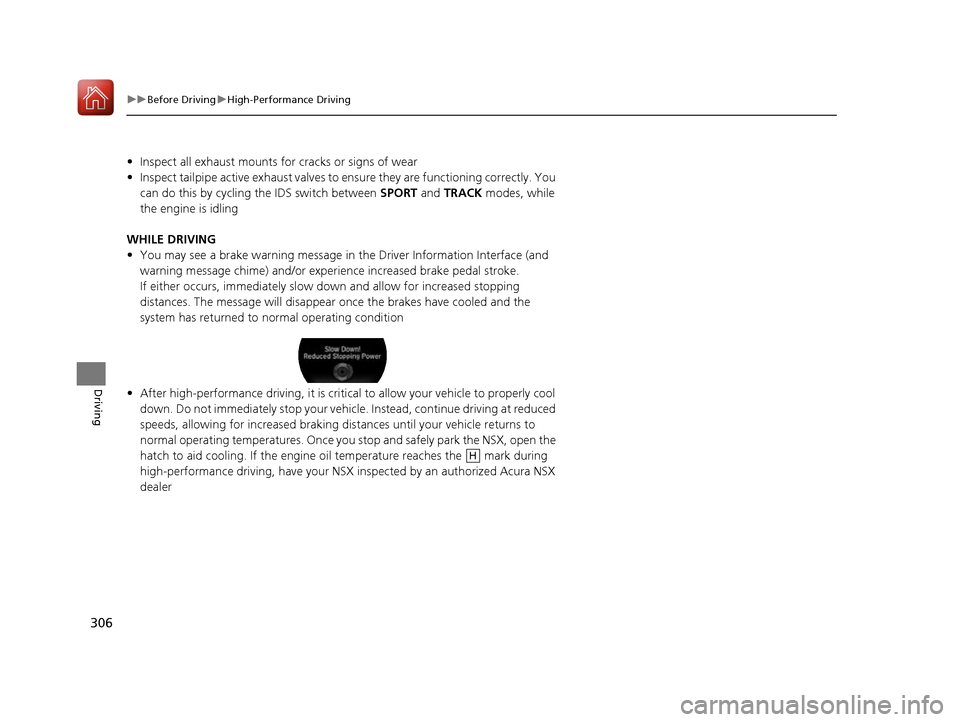
• You may see a brake warning message in the Driver Information Interface (and
warning message chime) and/or expe rience increased brake pedal stroke.
If either occurs, immediately slow do wn and allow for increased stopping
distances. The message will disappear once the brakes have cooled and the
system has returned to normal operating condition
• After high-performance driving, it is critic al to allow your vehicle to properly cool
down. Do not immediately stop your vehicle. Instead, continue driving at reduced
speeds, allowing for increased braking di stances until your vehicle returns to
normal operating temperatures. Once you st op and safely park the NSX, open the
hatch to aid cooling. If the engine oil temperature reaches the mark during
high-performance driving, have your NSX inspected by an authorized Acura NSX
dealer
H
17 NSX-31T6N6000.book 306 ページ 2016年4月22日 金曜日 午後3時44分
Page 311 of 473

uuWhen Driving uTurning on the Power
310
Driving
3. Press the ENGINE START/STOP button
without depressing the accelerator pedal.
u The Ready To Drive message appears
on the driver information interface.
u When the ambient temperature is
extremely low, the vehicle does not move
until certain conditions are met.
A warning message appears instead of
Ready To Drive .
2Driver Information Interface
Warning and Information Messages
P. 90
u If the High Voltage battery is fully ch arged, the gasoline engine may not start.
u The gasoline engine starts either accord ing to the temperature of the engine or
when the High Voltage batte ry charge level is low.
u Regardless of the High Voltage battery charge level, the gasoline engine always
starts.
u Gasoline engine starts with a louder sound than QUIET mode.
When engine temperature or High Volt age battery temperature are low, or
when High Voltage battery charge level is low, gasoline engine starts at the
same sound level as QUIET mode.
You can turn the power system off when the vehicle is completely stopped.
1. Select
(P.
2. Press the ENGINE START/STOP button.
1Turning on the Power
The immobilizer system pr otects your vehicle from
theft.
If an improperly coded de vice is used, the power
system does not activate. 2 Immobilizer System P. 122
Bring the keyless access remote close to the ENGINE
START/STOP button if the battery in the keyless
access remote is weak.
2 If the Keyless Access Remote Battery is
Weak P. 432
The power system may not activate if the keyless
access remote is subjected to strong radio waves.
Do not hold the ENGINE START/STOP button to
start the power system.
If the power system does not start, wait at least 30
seconds before trying again.
You can set the IDS mode to be selected when you
set the power mode to ON.
2 Customized Features P. 232
■Stopping the Power System
When the IDS is in QUIET mode
When the IDS is in SPORT mode
17 NSX-31T6N6000.book 310 ページ 2016年4月22日 金曜日 午後3時44分