change wheel ACURA NSX 2020 User Guide
[x] Cancel search | Manufacturer: ACURA, Model Year: 2020, Model line: NSX, Model: ACURA NSX 2020Pages: 491, PDF Size: 20.24 MB
Page 217 of 491
215
uuAudio System Basic OperationuSiri® Eyes Free
Features
Siri ® Eyes Free
You can talk to Siri using the (Talk) button on the steering wheel when your
iPhone is paired to the Bluetooth® HandsFreeLink ® (HFL) system.
2 Phone Setup P. 278
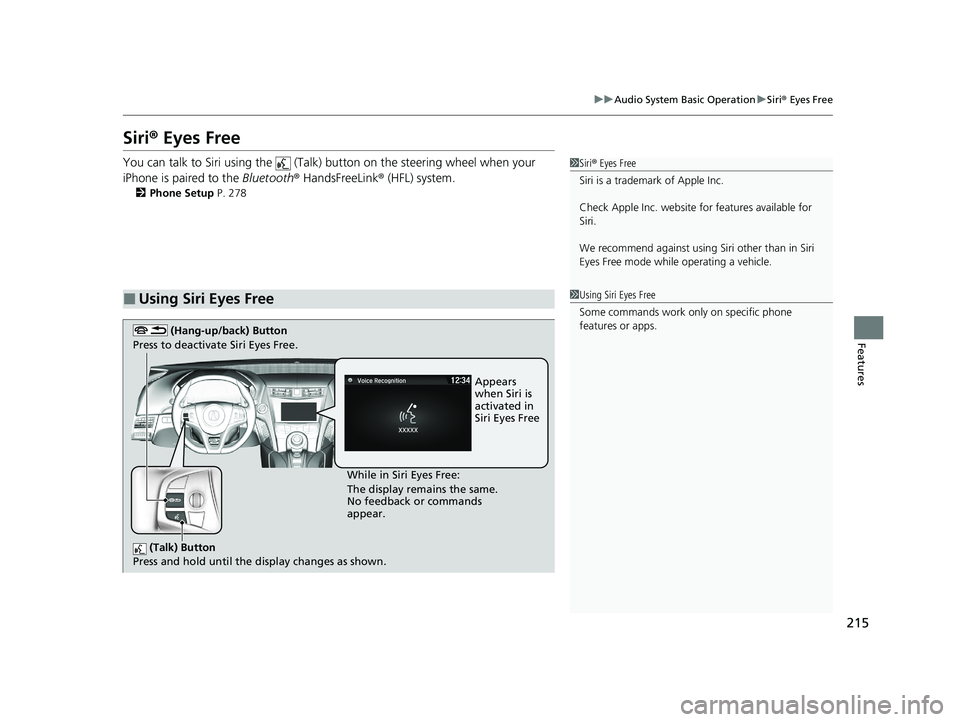
■Using Siri Eyes Free
1Siri® Eyes Free
Siri is a trademark of Apple Inc.
Check Apple Inc. website for features available for
Siri.
We recommend against using Si ri other than in Siri
Eyes Free mode whil e operating a vehicle.
1Using Siri Eyes Free
Some commands work only on specific phone features or apps.
(Talk) Button
Press and hold until the display changes as shown.
(Hang-up/back) Button
Press to deactivate Siri Eyes Free.
While in Siri Eyes Free:
The display remains the same.
No feedback or commands
appear. Appears
when Siri is activated in
Siri Eyes Free
20 ACURA NSX PMC-31T6N6300.book 215 ページ 2019年9月11日 水曜日 午後4時51分
Page 255 of 491
253
uuCustomized Featuresu
Continued
Features
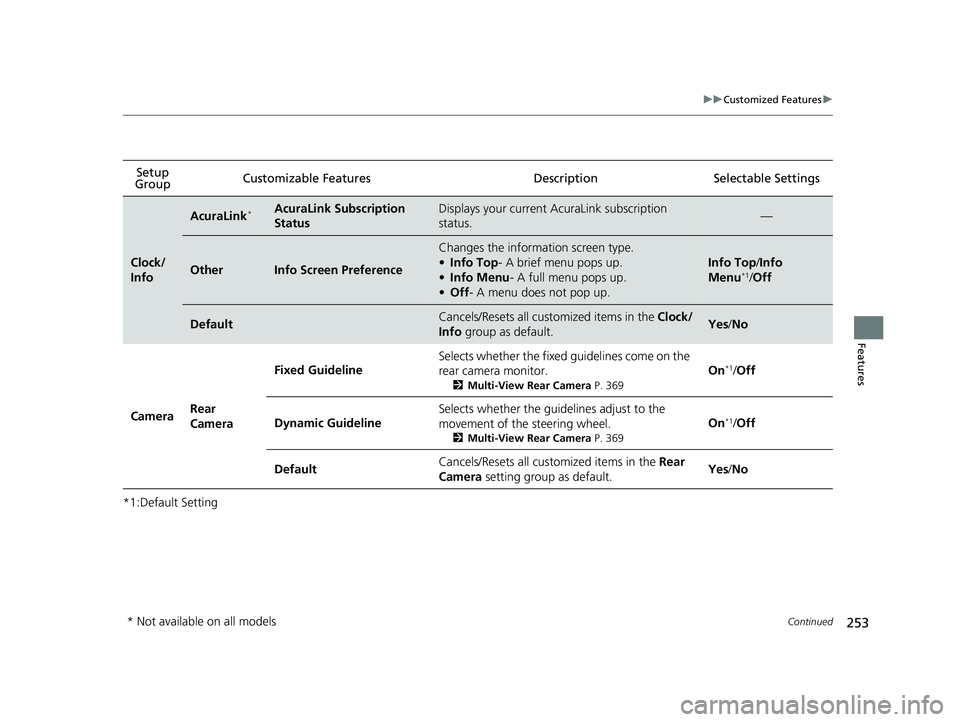
*1:Default SettingSetup
Group Customizable Features Desc
ription Selectable Settings
Clock/
Info
AcuraLink*AcuraLink Subscription
StatusDisplays your current AcuraLink subscription
status.—
OtherInfo Screen Preference
Changes the information screen type. •
Info Top - A brief menu pops up.
• Info Menu - A full menu pops up.
• Off - A menu does not pop up.
Info Top /Info
Menu *1
/Off
DefaultCancels/Resets all cust omized items in the Clock/
Info group as default.Yes/No
Camera Rear
Camera Fixed Guideline
Selects whether the fixed guidelines come on the
rear camera monitor.
2Multi-View Rear Camera P. 369On
*1
/Off
Dynamic Guideline Selects whether the guidelines adjust to the
movement of the steering wheel.
2Multi-View Rear Camera P. 369On
*1
/Off
Default Cancels/Resets all cust
omized items in the Rear
Camera setting group as default. Yes
/No
* Not available on all models
20 ACURA NSX PMC-31T6N6300.book 253 ページ 2019年9月11日 水曜日 午後4時51分
Page 272 of 491
270
Features
Bluetooth® HandsFreeLink ®
Bluetooth® HandsFreeLink ® (HFL) allows you to place and receive phone calls using
your vehicle’s audio system, without handling your cell phone.
Using HFL
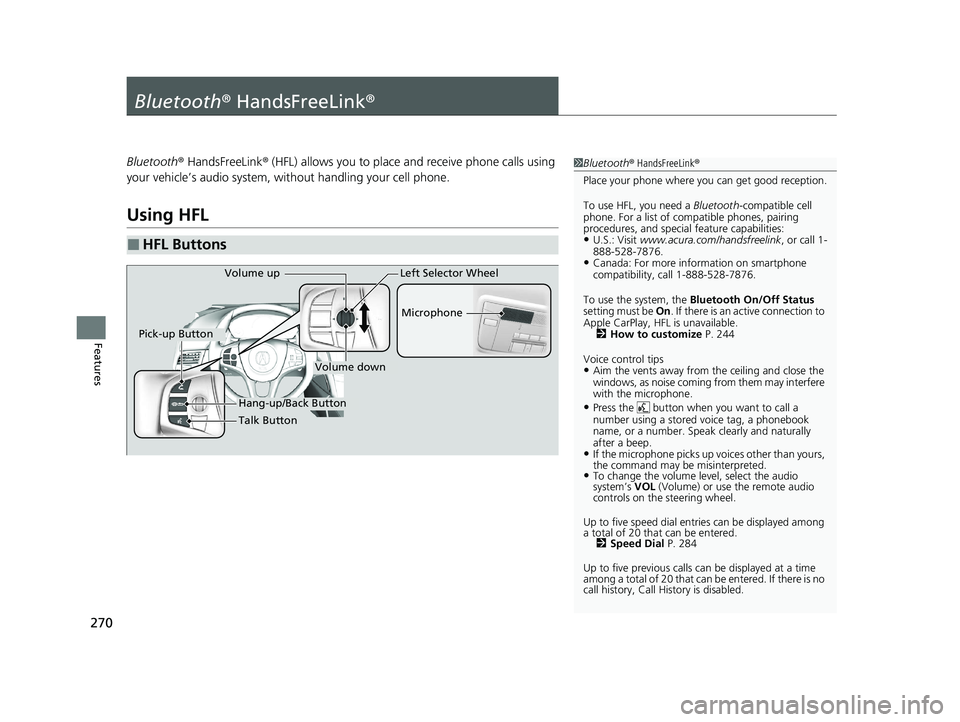
■HFL Buttons
1Bluetooth ® HandsFreeLink ®
Place your phone where y ou can get good reception.
To use HFL, you need a Bluetooth-compatible cell
phone. For a list of compatible phones, pairing
procedures, and special feature capabilities:
• U.S.: Visit www.acura.com/handsfreelink , or call 1-
888-528-7876.
• Canada: For more info rmation on smartphone
compatibility, call 1-888-528-7876.
To use the system, the Bluetooth On/Off Status
setting must be On. If there is an active connection to
Apple CarPlay, H FL is unavailable.
2 How to customize P. 244
Voice control tips • Aim the vents away from the ceiling and close the
windows, as noise coming from them may interfere
with the microphone.
• Press the button when you want to call a
number using a stored voice tag, a phonebook
name, or a number. Spe ak clearly and naturally
after a beep.
• If the microphone picks up vo ices other than yours,
the command may be misinterpreted.
• To change the volume level, select the audio system’s VOL (Volume) or use the remote audio
controls on the steering wheel.
Up to five speed dial en tries can be displayed among
a total of 20 that can be entered. 2 Speed Dial P. 284
Up to five previous calls can be displayed at a time
among a total of 20 that can be entered. If there is no
call history, Call History is disabled.
Talk Button Microphone
Hang-up/Back Button
Pick-up Button
Volume up
Volume down
Left Selector Wheel
20 ACURA NSX PMC-31T6N6300.book 270 ページ 2019年9月11日 水曜日 午後4時51分
Page 333 of 491

Continued331
uuWhen DrivinguShifting
Driving
Use the paddle shifters to change between 1st and 9th gears without removing your
hands from the steering wheel. The transmission will switch to the sequential mode. ■ When the transmi ssion is in
(D (D-paddle shift mode):
The vehicle will go into the sequential m ode momentarily, and the gear selection
indicator becomes more prominent.
The sequential mode is automatically canc eled and the gear selection indicator
returns to ordinary display under the following conditions. • Hold the
(+ paddle shifter for a few seconds.
• Once you start traveling at a constant speed.
• The vehicle comes to a complete stop.
• When you change to another Integrated Dynamics System mode.
The sequential mode automatically shifts under following condition • Accelerator pedal depressed beyond the click.
• Engine speed reaches near the tachometer’s red zone.
• Engine speed reaches idle speed while deceleration.
■Sequential Mode1Sequential Mode
When sequential mode is selected, the gasoline
engine powers the vehicle.
20 ACURA NSX PMC-31T6N6300.book 331 ページ 2019年9月11日 水曜日 午後4時51分
Page 349 of 491

Continued347
uuWhen DrivinguVehicle Stability AssistTM
(VSA ®), aka Electronic Stability Control (ESC), System
Driving
This button is on the driver side control panel.
This button is used to change VSA ® modes.
See below for more information. VSA ® is turned on every time you turn the
power system on, even if you press the button
the last time you drove the vehicle.
■ When the Integrated Dynamics Syst em mode is in QUIET mode, SPORT
mode, or SPORT+ mode To enter Stuck Vehicle Assist mode, press
the VSA ® OFF button until a single beep is
heard and the VSA ® OFF indicator illuminates.
uThis message appears on the driver
information interface for a few seconds.
If the Integrated Dyna mics System mode is
changed, VSA ® will remain in Stuck Vehicle
Assist mode.
To exit Stuck Vehicle Assist mode, press the
VSA ® OFF button until a single beep is heard
and the VSA ® OFF indicator extinguishes.
■VSA ® On and Off1Vehicle Stability Assist TM
(VSA ®), aka Electronic Stability Control
(ESC), System
In Stuck Vehicle Assist mode, your vehicle will have
normal braking and corn ering ability, but VSA®
traction and stability enhancement becomes less
effective.
In certain unusual conditions when your vehicle gets
stuck in shallow mud or fr esh snow, it may be easier
to free it with Stuck Vehicle Assist mode.
In Stuck Vehicle Assist mode, the traction control
function becomes less effective. This allows for the
wheels to spin more freely at low speed. You should
only attempt to free your vehicle with the button
pressed if you are not ab le to free it without.
Immediately after freeing your vehicle, be sure to
press the button again. We do not recommend driving your vehicle with Stuck Vehicle Assist mode.
You may hear a motor sound coming from the front
of the vehicle while system checks are being
performed immediately after turning the power
system on or while driving. This is normal.VSA ® OFF Indicator
20 ACURA NSX PMC-31T6N6300.book 347 ページ 2019年9月11日 水曜日 午後4時51分
Page 366 of 491

364
Driving
Parking Your Vehicle
When Stopped 1.Depress the brake pedal firmly.
2. With the brake pedal depressed, pull up th e electric parking brake switch slowly,
but fully.
3. Change the gear position to
(P .
4. Turn off the power system.
uThe electric parking brake indicator goes off in about 15 seconds.
Always confirm the electric parking brake is se t, in particular if you are parked on an
incline.
During Auto Engine Stop, th e gear position changes to
(P and the engine restarts
automatically under the following conditions:
• You unfasten the driver side seat belt and open the door.
1Parking Your Vehicle
Do not park your vehicle near flammable objects,
such as dry grass, oil, or timber.
Heat from the exhaust can cause a fire.
3WARNING
The vehicle can roll aw ay if left unattended
without confirming that Park is engaged.
A vehicle that rolls away could cause a crash
resulting in seriou s injury or death.
Always keep your foot on the brake pedal
until you have confirmed that
(P is shown
on the gear position indicator.
1When Stopped
NOTICE
The following can damage the driveline: • Depressing the accelera tor and brake pedals
simultaneously.
• Changing to
(P before the vehicle stops completely.
When facing uphill, do not hold the vehicle by
depressing the accelerator pedal.
Doing so may cause the power system to overheat
and fail.
In extremely cold temperatures, the parking brake may
freeze up if applied. If such temperatures are expected, do
not apply the parking brake. If parking on a slope, either
turn the steering wheel so one of the front tires will contact
the curb or block the wheels to keep the vehicle from
moving. If you do not take either precaution, the vehicle
may roll unexpectedly, leading to a crash.
When the Integrated Dynamics System mode is in QUIET mode or SPORT mode
20 ACURA NSX PMC-31T6N6300.book 364 ページ 2019年9月11日 水曜日 午後4時51分
Page 371 of 491

369
Continued
Driving
Multi-View Rear Camera
About Your Multi-View Rear Camera
The audio/information screen
can display your vehicle’s rear view. The display
automatically changes to the rear view when the gear position is changed to
(R.
■Multi-View Rear Camera Display Area
1About Your Multi-View Rear Camera
The rear camera view is restricted. You cannot see
the corner ends of the bumper or what is underneath the bumper. Its unique le ns also makes objects
appear closer or farther than they actually are.
Visually confirm that it is safe to drive before backing
up. Certain conditions (such as weather, lighting, and
high temperatures) may also restrict the rear view. Do
not rely on the rearview display which does not give
you all information about conditions at the back of
your vehicle.
If the camera lens is cove red with dirt or moisture,
use a soft, moist cloth to keep the lens clean and free of debris.
You can change the Fixed Guideline and Dynamic
Guideline settings.
2 Customized Features P. 244
Fixed Guideline On : Guidelines appear when you select
(R.
Off : Guidelines do not appear.
Dynamic Guideline On : Guidelines move according to the steering wheel
direction.
Off : Guidelines do not move.
Top Down View Mode
Normal View Mode
Wide View Mode
Guidelines
Bumper
Camera
Approx. 39 inches (1 m)
Approx. 20 inches (50 cm)
20 ACURA NSX PMC-31T6N6300.book 369 ページ 2019年9月11日 水曜日 午後4時51分
Page 449 of 491

447
uuPower System Won’t StartuEmergency Power System Off
Handling the Unexpected
Emergency Power System Off The ENGINE START/STOP button may be used to turn the power system off due to
an emergency situation even while driving. If you must turn the power system off,
do either of the following operations: • Press and hold the ENGINE START/STOP button for about two seconds.
• Firmly press the ENGINE START/STOP button three times.
The steering wheel will not lock. However, because turning off the engine disables
the power assist the engine provides to the steering and braking systems, it will
require significantly more physical effort an d time to steer and slow the vehicle. Use
both feet on the brake pedal to slow down the vehicle and stop immediately in a
safe place. The gear position automatically changes to
(P after the vehicle comes to a complete
stop. Then, the power mode changes to VEHICLE OFF.
1Emergency Power System Off
Do not press the button while driving unless it is
absolutely necessary for the power system to be
turned off.
20 ACURA NSX PMC-31T6N6300.book 447 ページ 2019年9月11日 水曜日 午後4時51分
Page 471 of 491

469
uuSpecificationsu
Information
■Brake Fluid
■Dual Clutch Transmission Fluid
■Twin Motor Unit Fluid
SpecifiedAcura Heavy Duty Brake Fluid DOT 4
SpecifiedAcura Automatic Transmission Fluid
ATF DW-1
Capacity Change 2.75 US qt (2.6 L)
SpecifiedAcura Gear Oil GO-Type 2.0
Capacity Change 4.86 US qt (4.6 L)
SpecifiedAcura Automatic Transmission Fluid
ATF DW-1
Capacity Change 2.56 US qt (2.42 L)
Clutch
Transmission
■Engine Oil
■Engine Coolant
■Inverter Coolant
RecommendedUltimate Full Synthetic Motor Oil, Type3,
0W-40
Capacity Change 7.7 US qt (7.3 L)
Change
including filter
8.3 US qt (7.9 L)
SpecifiedAcura Long Life Antifreeze/Coolant Type2
Ratio 50/50 with distilled water
Capacity
4.1 US gal (15.5 L)
(change including the remaining
0.34 US gal (1.29 L) in the reserve tank and
heater)
SpecifiedAcura Long Life Antifreeze/Coolant Type2
Ratio 50/50 with distilled water
Capacity0.50 US gal (1.90 L)
(change including the remaining
0.12 US gal (0.46 L) in the reserve tank)
■Tire
Regular
Size
Front
245/35ZR19 (93Y) Rear
305/30ZR20 (103Y)
Pressure
psi (kPa [kgf/cm 2
])Front
32 (220 [2.2])
Rear
32 (220 [2.2])
Wheel Size Regular Front
19 X 8 1/2J
Rear
20 X 11J
20 ACURA NSX PMC-31T6N6300.book 469 ページ 2019年9月11日 水曜日 午後4時51分