ECO mode ACURA NSX 2020 Owner's Manual
[x] Cancel search | Manufacturer: ACURA, Model Year: 2020, Model line: NSX, Model: ACURA NSX 2020Pages: 491, PDF Size: 20.24 MB
Page 86 of 491

84
uuIndicatorsuDriver Information Interface Warning and Information Messages
Instrument Panel
MessageConditionExplanation
•Appears when there is a problem with the sensor on
the 12-volt battery.•Have your vehicle checked by an authorized Acura NSX dealer.
2Checking the 12-Volt Battery P. 417
•Appears after the driver’s door is opened when the
power mode is in ACCESSORY.•Press the ENGINE START/STOP button twice with your
foot off the brake pedal to change the power mode to
VEHICLE OFF.
• Appears when the power mode is in ACCESSORY.
—
20 ACURA NSX PMC-31T6N6300.book 84 ページ 2019年9月11日 水曜日 午後4時51分
Page 87 of 491

85
uuIndicatorsuDriver Information Interface Warning and Information Messages
Continued
Instrument Panel
MessageConditionExplanation
•Appears when you close the door with the power mode
in ON without the keyless access remote inside the
vehicle.•Disappears when you bring the keyless access remote
back inside the vehicle and close the door.
2Keyless Access Remote Reminder P. 129
•Appears when the keyless access remote battery
becomes weak.• Replace the battery as soon as possible.
2Replacing the Button Battery P. 418
•Appears if the keyless access remote battery is too weak
to turn on the power system or the key is not within
operating range to turn on the power system.
A beeper sounds six times.• Bring the keyless access remote in front of the ENGINE
START/STOP button to be touched with.
2 If the Keyless Access Remote Battery is Weak P. 446
•Appears three seconds after you bring the keyless
access remote in front of the ENGINE START/STOP
button when To Start, Hold Remote Near Start
Button appears. To Start Engine: Brake + Push
appears sequentially.• Unless you bring the keyless access remote in front of the ENGINE START/STOP button, this message does
not appear. 2If the Keyless Access Remote Battery is Weak P. 446
•Appears when you set the power mode to ACCESSORY or ON.
2 Turning on the Power P. 321
•Appears if you press the ENGINE START/STOP button
while the vehicle is moving.• The message will disappear after six seconds or when
the power mode is set to VEHICLE OFF.
20 ACURA NSX PMC-31T6N6300.book 85 ページ 2019年9月11日 水曜日 午後4時51分
Page 88 of 491

86
uuIndicatorsuDriver Information Interface Warning and Information Messages
Instrument Panel
MessageConditionExplanation
•Appears when you turn the power system on with the
transmission not in
(P .
•Press the (P button.
•Appears when you try to chan ge the gear position after
the position has automati cally been changed to
(P
with the driver’s door open and the driver’s seat belt unfastened.
• Press the (P button if you leave the vehicle.
•Appears when you set the po wer mode to ON without
fastening the driver’s seat belt.
• Appears when you change the gear position after
(P
has been automatically select ed with the driver’s door
open, the driver’s seat belt unfastened, then the brake pedal is released.
• Fasten the seat belt properly before you start to drive.
2Shift Operation P. 328
•Appears when you try to change the gear position
without depressing the brake pedal.• Depress the brake pedal, then select a shift button.
•Appears when you try to change the gear position
without releasing your foot off the accelerator pedal.• Release your foot from the accelerator pedal, depress
the brake pedal, then select a gear.
20 ACURA NSX PMC-31T6N6300.book 86 ページ 2019年9月11日 水曜日 午後4時51分
Page 89 of 491
87
uuIndicatorsuDriver Information Interface Warning and Information Messages
Continued
Instrument Panel
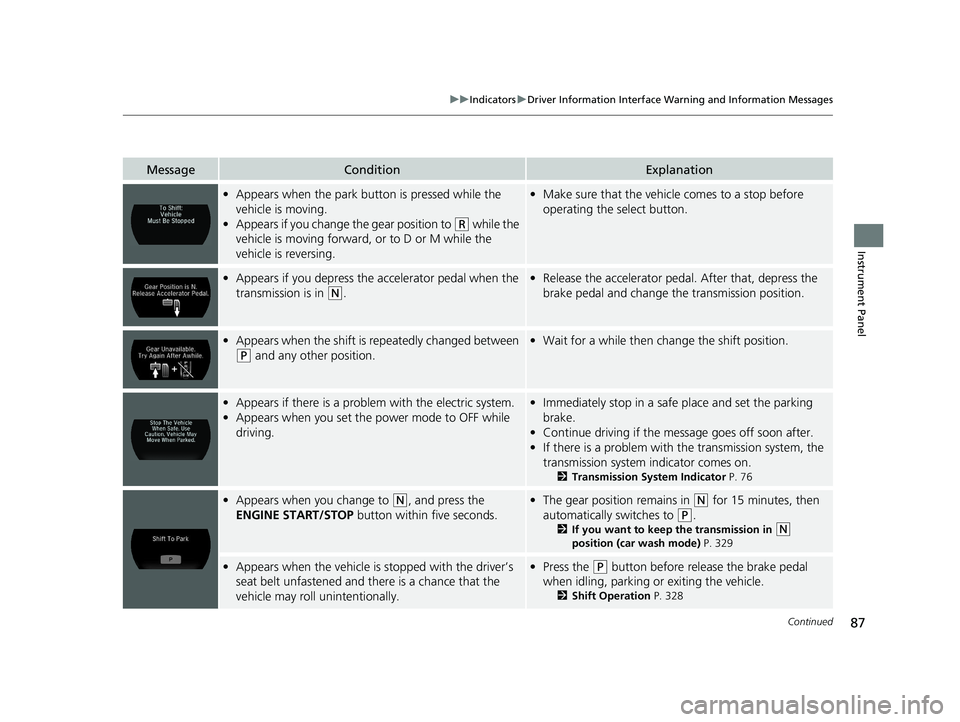
MessageConditionExplanation
•Appears when the park bu tton is pressed while the
vehicle is moving.
• Appears if you change the gear position to
(R while the
vehicle is moving forward, or to D or M while the
vehicle is reversing.
• Make sure that the vehicle comes to a stop before
operating the select button.
• Appears if you depress the accelerator pedal when the
transmission is in
(N .
•Release the accelerator pedal. After that, depress the
brake pedal and change the transmission position.
•Appears when the shift is repeatedly changed between
(P and any other position.
•Wait for a while then ch ange the shift position.
•Appears if there is a proble m with the electric system.
• Appears when you set the power mode to OFF while
driving.•Immediately stop in a safe place and set the parking
brake.
• Continue driving if the message goes off soon after.
• If there is a problem with the transmission system, the
transmission system indicator comes on.
2 Transmission System Indicator P. 76
•Appears when you change to (N , and press the
ENGINE START/STOP button within five seconds.•The gear position remains in (N for 15 minutes, then
automatically switches to
(P .
2 If you want to keep the transmission in
(N
position (car wash mode) P. 329
•Appears when the vehicle is stopped with the driver’s
seat belt unfastened and there is a chance that the
vehicle may roll unintentionally.• Press the (P button before release the brake pedal
when idling, parking or exiting the vehicle. 2Shift Operation P. 328
20 ACURA NSX PMC-31T6N6300.book 87 ページ 2019年9月11日 水曜日 午後4時51分
Page 90 of 491

88
uuIndicatorsuDriver Information Interface Warning and Information Messages
Instrument Panel
MessageConditionExplanation
•Appears if any door or the trunk (hatch) is not
completely closed.
• Appears if any door or the trunk (hatch) is opened while
driving. The beeper sounds.•Goes off when all doors and the trunk (hatch) are closed.
•Appears if there is a problem with the radiator system.•Drive slowly to prevent overheating and have your
vehicle checked by an author ized Acura NSX dealer as
soon as possible.
• Appears when there is a pr oblem with the headlights.•Appears while driving - The low beam headlights
may not be on. When conditions allow you to drive
safely, have your vehicle checked by an authorized
Acura NSX dealer as soon as possible.
• Appears if there is a problem with the parking sensor
system.• Check if the area around the sensor(s) is covered with
mud, ice, snow, etc. If the indicator(s) stays on even
after you clean the area, have the system checked by an
authorized Acura NSX dealer.Models with
parking sensor
system
20 ACURA NSX PMC-31T6N6300.book 88 ページ 2019年9月11日 水曜日 午後4時51分
Page 93 of 491
91
uuIndicatorsuDriver Information Interface Warning and Information Messages
Continued
Instrument Panel
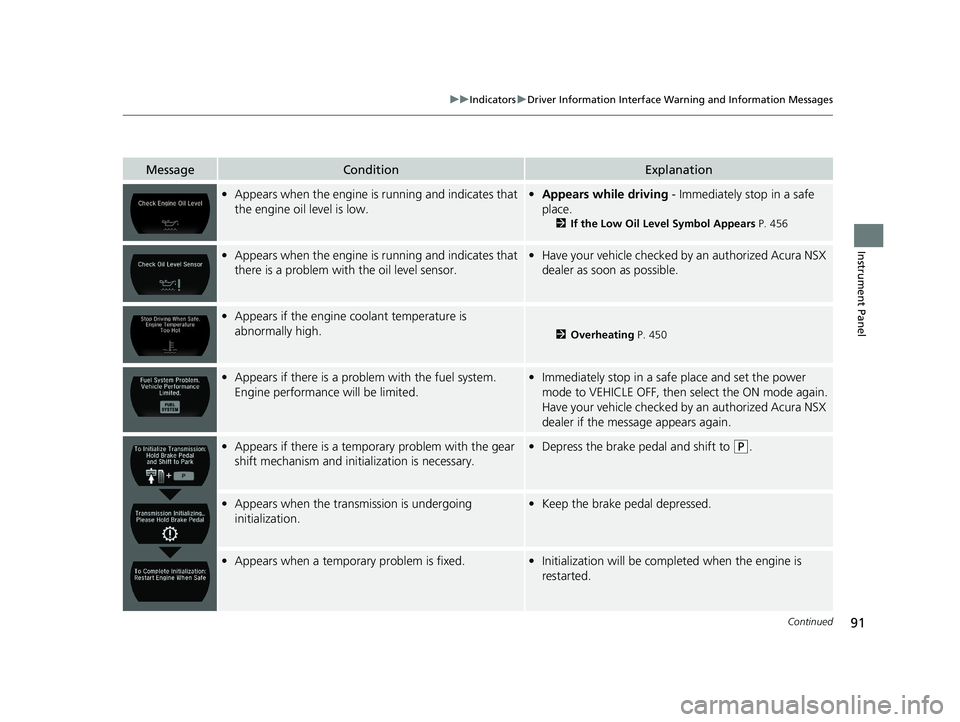
MessageConditionExplanation
•Appears when the engine is running and indicates that
the engine oil level is low.• Appears while driving - Immediately stop in a safe
place. 2If the Low Oil Level Symbol Appears P. 456
•Appears when the engine is running and indicates that
there is a problem with the oil level sensor.• Have your vehicle checked by an authorized Acura NSX
dealer as soon as possible.
• Appears if the engine coolant temperature is
abnormally high.
2 Overheating P. 450
•Appears if there is a probl em with the fuel system.
Engine performance will be limited.• Immediately stop in a safe place and set the power
mode to VEHICLE OFF, then select the ON mode again.
Have your vehicle checked by an authorized Acura NSX
dealer if the message appears again.
• Appears if there is a tempor ary problem with the gear
shift mechanism and initia lization is necessary.•Depress the brake pedal and shift to (P .
•Appears when the transmission is undergoing
initialization.• Keep the brake pedal depressed.
•Appears when a tempor ary problem is fixed.•Initialization will be completed when the engine is
restarted.
20 ACURA NSX PMC-31T6N6300.book 91 ページ 2019年9月11日 水曜日 午後4時51分
Page 95 of 491

93
uuIndicatorsuDriver Information Interface Warning and Information Messages
Continued
Instrument Panel
MessageConditionExplanation
•Appears for a few seconds if you have not pressed the
(N button long enough to initiate Neutral-Hold mode.2 If you want to keep the transmission in (N position
(car wash mode) P. 329
•Appears when you press and hold (N button for more
than 2 seconds.• Disappears when you set the gear position to other than
(N .
2 If you want to keep the transmission in
(N position
(car wash mode) P. 329
•Appears when the device for starting the vehicle is too hot.• Wait until message disappears.
20 ACURA NSX PMC-31T6N6300.book 93 ページ 2019年9月11日 水曜日 午後4時51分
Page 96 of 491

94
uuIndicatorsuDriver Information Interface Warning and Information Messages
Instrument Panel
MessageConditionExplanation
•Appears when launch control cannot be used due to
the condition of your vehicle.
2 Launch Control P. 341
•Appears if you shift the gear or do anything else after
Launch Mode is ready.
2 Launch Control P. 341
•Appears when Launch Mode is ready.
2 Launch Control P. 341
•Appears when the temperature of the transmission is
not in the operable range for launch control.
2 Launch Control P. 341
•Appears if the Integrated Dynamics System mode
cannot be changed due to ce rtain situations, such as a
system error or adverse driving conditions.
2 Integrated Dynamics System P. 336
20 ACURA NSX PMC-31T6N6300.book 94 ページ 2019年9月11日 水曜日 午後4時51分
Page 100 of 491
98
uuGauges and DisplaysuDriver Information Interface
Instrument Panel
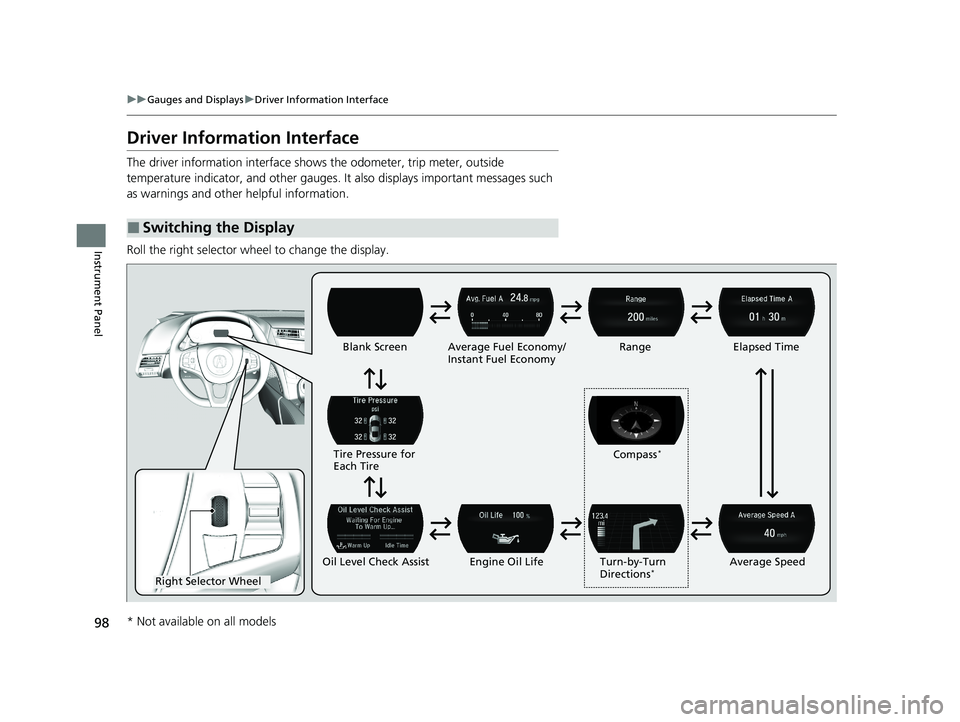
Driver Information Interface
The driver information interface shows the odometer, trip meter, outside
temperature indicator, and other gauges. It also displays important messages such
as warnings and other helpful information.
Roll the right selector wheel to change the display.
■Switching the Display
Right Selector Wheel Engine Oil LifeElapsed Time
Blank Screen
Average Speed
Range
Average Fuel Economy/
Instant Fuel Economy
Tire Pressure for
Each Tire
Turn-by-Turn
Directions*
Oil Level Check Assist Compass
*
* Not available on all models
20 ACURA NSX PMC-31T6N6300.book 98 ページ 2019年9月11日 水曜日 午後4時51分
Page 106 of 491
104
Controls
Clock
Adjusting the Clock
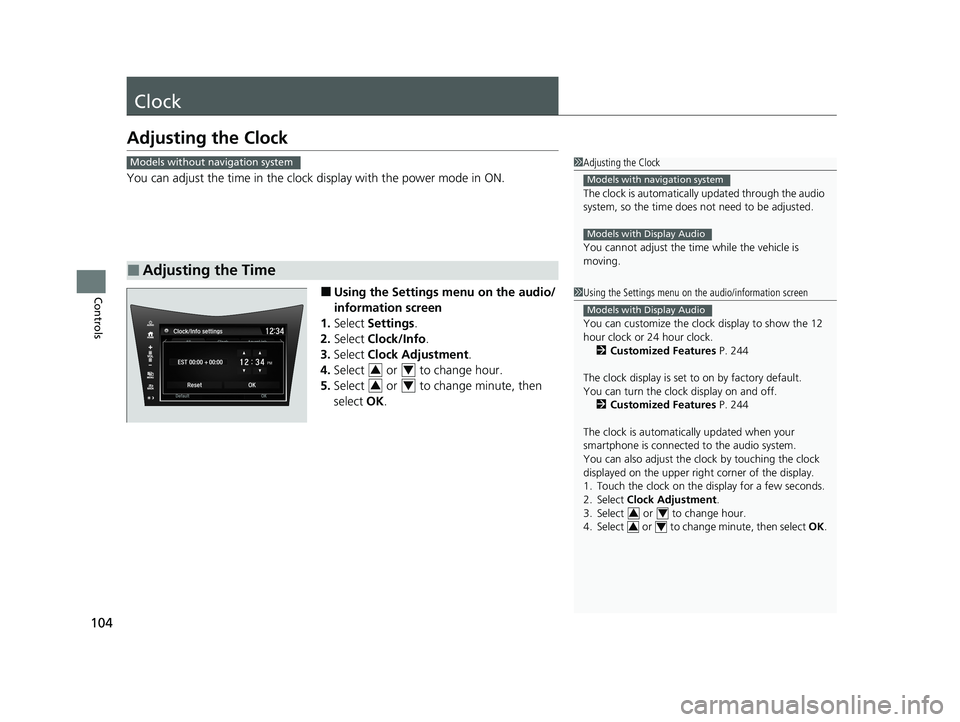
You can adjust the time in the clock display with the power mode in ON.
■ Using the Settings menu on the audio/
information screen
1. Select Settings .
2. Select Clock/Info .
3. Select Clock Adjustment .
4. Select or to change hour.
5. Select or to change minute, then
select OK.
■Adjusting the Time
1Adjusting the Clock
The clock is automatically updated through the audio
system, so the time does not need to be adjusted.
You cannot adjust the time while the vehicle is moving.
Models with navigation system
Models with Display Audio
Models without navigation system
1Using the Settings menu on the audio/information screen
You can customize the clock display to show the 12
hour clock or 24 hour clock.
2 Customized Features P. 244
The clock display is set to on by factory default.
You can turn the clock display on and off. 2 Customized Features P. 244
The clock is automatica lly updated when your
smartphone is connected to the audio system.
You can also adjust the clock by touching the clock
displayed on the upper right corner of the display.
1. Touch the clock on the di splay for a few seconds.
2. Select Clock Adjustment .
3. Select or to change hour.
4. Select or to change minute, then select OK.
Models with Display Audio
34
34
34
34
20 ACURA NSX PMC-31T6N6300.book 104 ページ 2019年9月11日 水曜日 午後4時51分