warning ACURA NSX 2022 Owner's Manual
[x] Cancel search | Manufacturer: ACURA, Model Year: 2022, Model line: NSX, Model: ACURA NSX 2022Pages: 492, PDF Size: 16.2 MB
Page 96 of 492

94
uuIndicators uDriver Information Interface Wa rning and Information Messages
Instrument Panel
MessageConditionExplanation
•Appears when the transmission temperature is too low
to operate (approx. -13°F [-25°C] or below).• You can start the engine an d use the climate control
system to warm up the interior, which will also warm
the transmission enough for you to drive the vehicle.
• The engine speed does not increase even if you fully
depress the accelerator pedal.
•Appears when the High Volt age battery temperature is
extremely low (-4°F [-20°C]).• Contact an authorized Acura NSX dealer immediately.
• To prevent the message to come on, store the vehicle in
the garage or drive in advance to warm up the High
Voltage battery.
• The minimum operation guarantee environmental
temperature is -4°F [-20°C].
•Appears when the twin motor unit fluid temperature is
extremely low.•Vehicle speed is limited to 81 mph (130 km/h) until twin
motor unit fluid warms up.
• Appears if the AWD system has a problem due to a
hybrid system or power distribution control failure.•Drives with the rear wheels only in this state.
Have your vehicle checked by an authorized Acura NSX
dealer.
•Appears when the engine is running and indicates that
the engine oil level is low.• Appears while driving - Immediately stop in a safe
place.
2 If the Check Engine Oil Level Warning Appears
P. 459
22 ACURA NSX PMC-31T6N6500.book 94 ページ 2021年9月28日 火曜日 午後4時7分
Page 104 of 492

102
uuGauges and Displays uDriver Information Interface
Instrument Panel
Driver Information Interface
The driver information interface shows in formation such as the estimated travelable
distance and fuel economy of the vehicle. It also displays messages such as warnings
and other helpful information.
Roll the right selector wheel to change the display.
■Switching the Display
Right Selector Wheel Engine Oil LifeElapsed Time
Blank Screen
Average Speed
Range
Average Fuel Economy/
Instant Fuel Economy
Tire Pressure for
Each Tire
Turn-by-Turn
Directions
Oil Level Check Assist Compass
22 ACURA NSX PMC-31T6N6500.book 102 ページ 2021年9月28日 火曜日 午後4時7分
Page 130 of 492
128
Controls
Opening and Closing the Windows
Opening/Closing the Power Windows
The power windows can be opened and closed when the power mode is in ON,
using the switches on the doors. The driver’s side switches can be used to open and
close both windows.
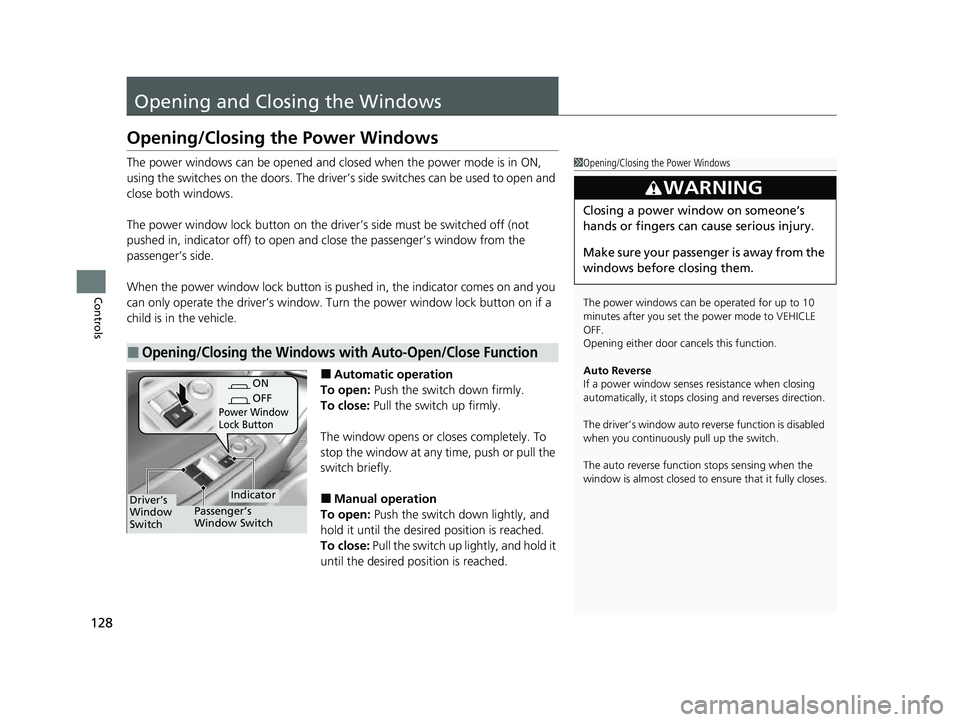
The power window lock button on the driver’s side must be switched off (not
pushed in, indicator off) to open and close the passenger’s window from the
passenger’s side.
When the power window lock button is pu shed in, the indicator comes on and you
can only operate the driver’s window. Turn the power window lock button on if a
child is in the vehicle.
■Automatic operation
To open: Push the switch down firmly.
To close: Pull the switch up firmly.
The window opens or cl oses completely. To
stop the window at any time, push or pull the
switch briefly.
■Manual operation
To open: Push the switch down lightly, and
hold it until the desired position is reached.
To close: Pull the switch up lightly, and hold it
until the desired position is reached.
■Opening/Closing the Windows with Auto-Open/Close Function
1 Opening/Closing the Power Windows
The power windows can be operated for up to 10
minutes after you set the power mode to VEHICLE
OFF.
Opening either door cancels this function.
Auto Reverse
If a power window senses resistance when closing
automatically, it stops clos ing and reverses direction.
The driver’s window auto re verse function is disabled
when you continuously pull up the switch.
The auto reverse function stops sensing when the
window is almost closed to en sure that it fully closes.
3WARNING
Closing a power window on someone’s
hands or fingers can cause serious injury.
Make sure your passenger is away from the
windows before closing them.
ON
OFF
Power Window
Lock Button
IndicatorDriver’s
Window
SwitchPassenger’s
Window Switch
22 ACURA NSX PMC-31T6N6500.book 128 ページ 2021年9月28日 火曜日 午後4時7分
Page 133 of 492

131
uuOperating the Switches Around the Steering Wheel uENGINE START/STOP Button
Continued
Controls
If you leave the vehicle for more than 30 minutes with the transmission in (P and
the power mode in ACCESSORY, the vehicl e will automatically go into VEHICLE OFF
(LOCK) mode to prevent draining the 12-volt battery.
If you open the driver’s door when the pow er mode is set to ACCESSORY, a warning
buzzer will sound.
■Automatic Power Off
■Power Mode Reminder
22 ACURA NSX PMC-31T6N6500.book 131 ページ 2021年9月28日 火曜日 午後4時7分
Page 134 of 492

uuOperating the Switches Around the Steering Wheel uENGINE START/STOP Button
132
Controls
When the power mode is set to any mode
other than OFF and you remove the keyless
access remote from the vehicle and shut the
door, an alarm will sound. If the alarm
continues to sound, place the keyless access
remote in another location.
■When the power mode is in
ACCESSORY
The alarm will sound from outside the vehicle.
■When the power mode is in ON
An alarm will sound both inside and outside
the vehicle. In addition, a warning indicator
will appear on the instrument panel.
■Keyless Access Remote Reminder1 Keyless Access Remote Reminder
When the keyless access remote is within the
system’s operational ra nge, and both doors are
closed, the warni ng function cancels.
If the keyless access remote is taken out of the vehicle
after the power system has been turned on, you can
no longer change the ENGINE START/STOP button
mode or restart the power system. Always make sure
if the remote is in your vehicle when you operate the
ENGINE START/STOP button.
Removing the keyless access remote from the vehicle
through a window does not activate the warning
buzzer.
Do not put the keyless access remote on the
dashboard or in the glove box. It may cause the
warning buzzer to go off. Under some other
conditions that can prevent the vehicle from locating
the remote, the warning buzzer may also go off even
if the remote is within the system’s operational
range.
22 ACURA NSX PMC-31T6N6500.book 132 ページ 2021年9月28日 火曜日 午後4時7分
Page 145 of 492
143
uuOperating the Switches Around the Steering Wheel uAdjusting the Steering Wheel
Controls
Adjusting the Steering Wheel
The steering wheel height and distance from your body can be adjusted so that you
can comfortably grip the steering wheel in an appropriate driving posture.
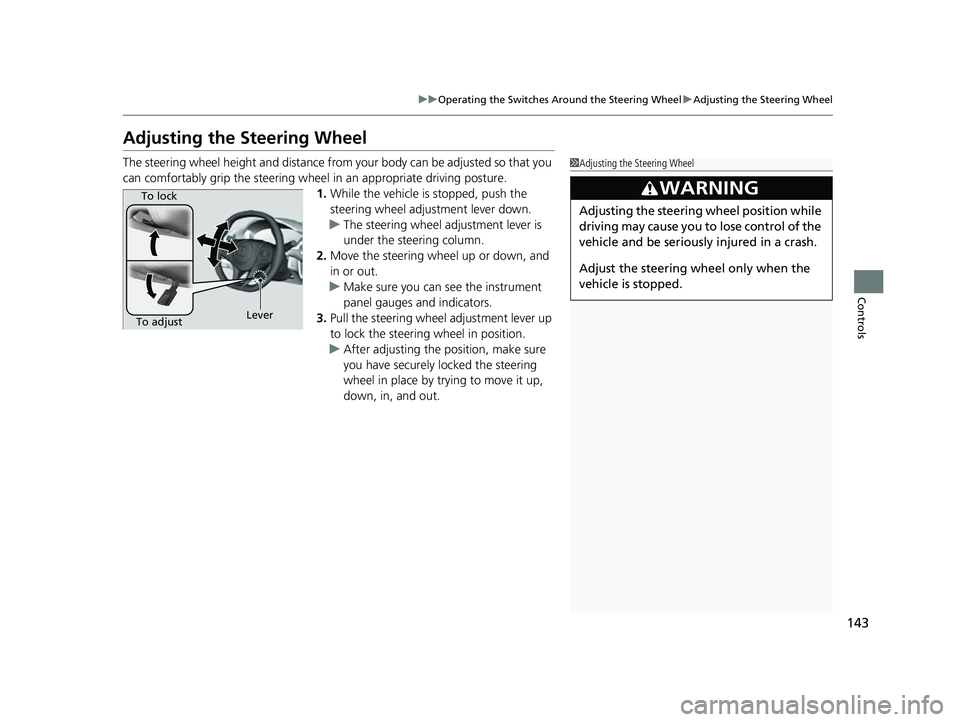
1. While the vehicle is stopped, push the
steering wheel adjustment lever down.
u The steering wheel adjustment lever is
under the steering column.
2. Move the steering wheel up or down, and
in or out.
u Make sure you can see the instrument
panel gauges and indicators.
3. Pull the steering wheel adjustment lever up
to lock the steering wheel in position.
u After adjusting the position, make sure
you have securely locked the steering
wheel in place by trying to move it up,
down, in, and out.1Adjusting the Steering Wheel
3WARNING
Adjusting the steering wheel position while
driving may cause you to lose control of the
vehicle and be seriously injured in a crash.
Adjust the steering wheel only when the
vehicle is stopped.
To adjustTo lock
Lever
22 ACURA NSX PMC-31T6N6500.book 143 ページ 2021年9月28日 火曜日 午後4時7分
Page 148 of 492

146
Controls
Adjusting the Seats
Adjust the driver’s seat as far back as possible
while allowing you to maintain full control of
the vehicle. You should be able to sit upright,
well back in the seat and be able to
adequately depress the pedals without
leaning forward, and grip the steering wheel
comfortably. The passenger’s seat should be
adjusted in a similar manner, so that it is as far
back from the front airbag in the dashboard
as possible.
■Adjusting the power seats
1Adjusting the Seats
The National Highway Traffic Safety Administration
and Transport Cana da recommend that drivers allow
at least 10 inches (25 cm) between the center of the
steering wheel and the chest.
Always make seat adjustments before driving.
3WARNING
Sitting too close to a front airbag can result
in serious injury or death if the front
airbags inflate.
Always sit as far back from the front
airbags as possible while maintaining
control of the vehicle.
Move back.
Allow sufficient
space.
■Adjusting the Seat Positions
Horizontal
Position
Adjustment
Seat-back Angle
Adjustment
Driver’s seat is shown.
22 ACURA NSX PMC-31T6N6500.book 146 ページ 2021年9月28日 火曜日 午後4時7分
Page 150 of 492
uuAdjusting the Seats u
148
Controls
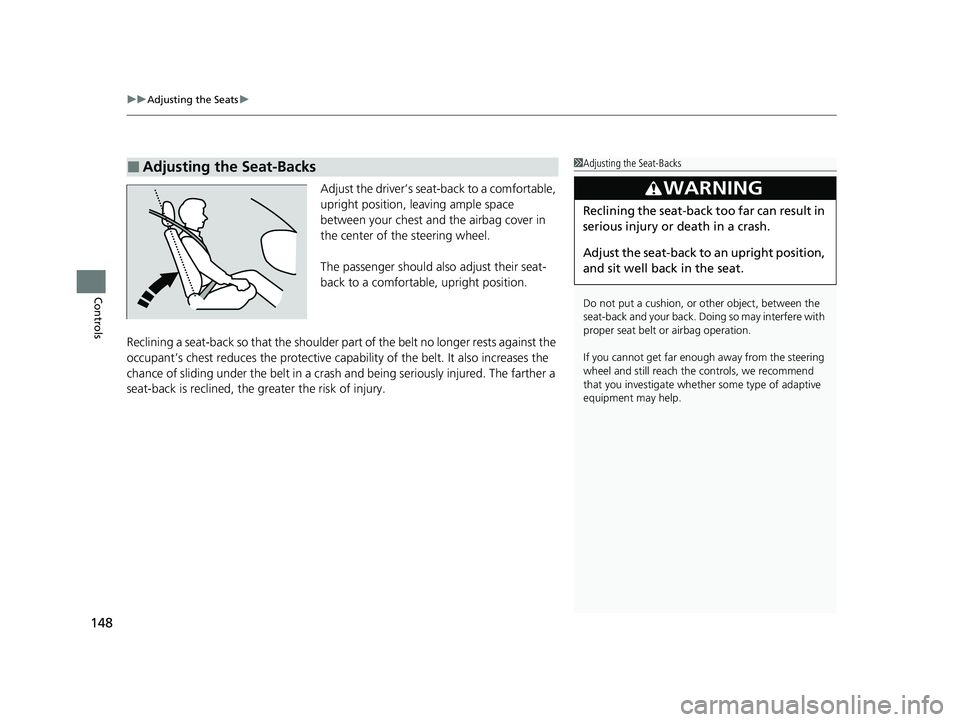
Adjust the driver’s sea t-back to a comfortable,
upright position, leaving ample space
between your chest and the airbag cover in
the center of the steering wheel.
The passenger should also adjust their seat-
back to a comfortable, upright position.
Reclining a seat-back so that the shoulder part of the belt no longer rests against the
occupant’s chest reduces the protective capa bility of the belt. It also increases the
chance of sliding under the belt in a crash and being seriously injured. The farther a
seat-back is reclined, the gr eater the risk of injury.
■Adjusting the Seat-Backs1Adjusting the Seat-Backs
Do not put a cushion, or other object, between the
seat-back and your back. Do ing so may interfere with
proper seat belt or airbag operation.
If you cannot get far e nough away from the steering
wheel and still reach th e controls, we recommend
that you investigate whether some type of adaptive
equipment may help.
3WARNING
Reclining the seat-back too far can result in
serious injury or death in a crash.
Adjust the seat-back to an upright position,
and sit well back in the seat.
22 ACURA NSX PMC-31T6N6500.book 148 ページ 2021年9月28日 火曜日 午後4時7分
Page 151 of 492
149
uuAdjusting the Seats uMaintain a Sitting Proper Position
Controls
Maintain a Sitting Proper Position
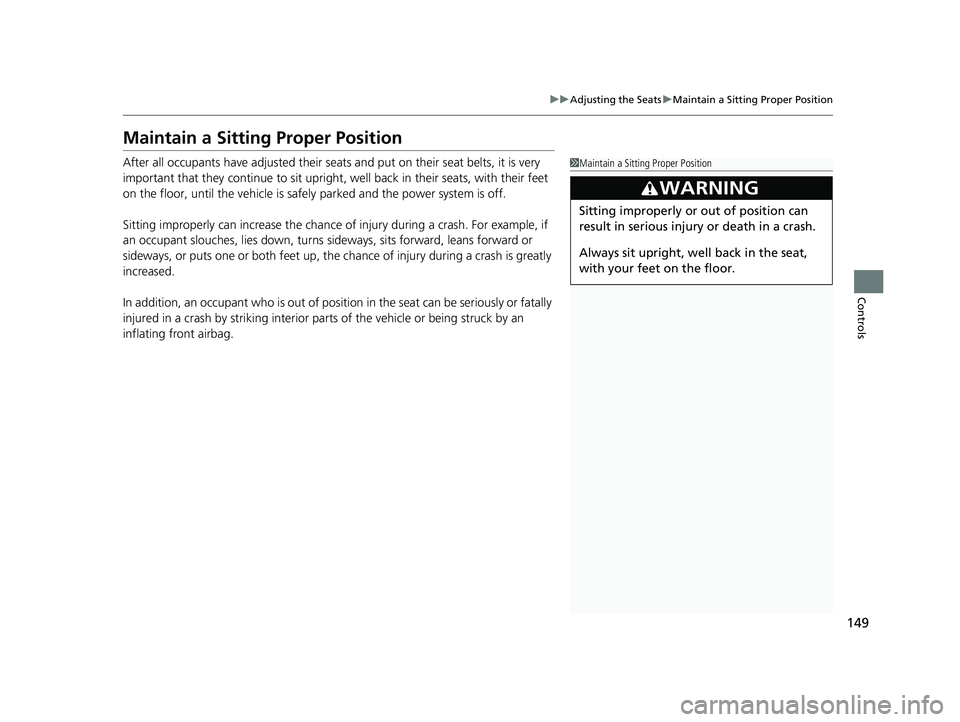
After all occupants have adjusted their seat s and put on their seat belts, it is very
important that they continue to sit upright, well back in their seats, with their feet
on the floor, until the vehicle is safely parked and the power system is off.
Sitting improperly can increase the chance of injury during a crash. For example, if
an occupant slouches, lies down, turns si deways, sits forward, leans forward or
sideways, or puts one or both feet up, the chance of injury during a crash is greatly
increased.
In addition, an occupant who is out of position in the seat can be seriously or fatally
injured in a crash by striking interior parts of the vehicle or being struck by an
inflating front airbag.1 Maintain a Sitting Proper Position
3WARNING
Sitting improperly or out of position can
result in serious injury or death in a crash.
Always sit upright, well back in the seat,
with your feet on the floor.
22 ACURA NSX PMC-31T6N6500.book 149 ページ 2021年9月28日 火曜日 午後4時7分
Page 154 of 492

152
uuInterior Convenience Items uStorage Items
Controls
Storage Items
Pull the handle to open the glove box.
You can lock the glove box with the built-in
key.
Pull the lid to open th e console compartment.
■Glove Box1Glove Box
3WARNING
An open glove box can cause serious injury
to your passenger in a crash, even if the
passenger is wearing the seat belt.
Always keep the glove box closed while
driving.
Glove Box
Handle
■Console Compartment
22 ACURA NSX PMC-31T6N6500.book 152 ページ 2021年9月28日 火曜日 午後4時7分