change time ACURA NSX 2022 Owners Manual
[x] Cancel search | Manufacturer: ACURA, Model Year: 2022, Model line: NSX, Model: ACURA NSX 2022Pages: 492, PDF Size: 16.2 MB
Page 6 of 492
Contents
This owner’s manual should be considered a permanent part of the
vehicle and should remain with the vehicle when it is sold.
The Navigation Manual is available online at owners.acura.com
(U.S.) or acura.ca (Canada). If you are the firs t registered owner
of your vehicle, you may request a complimentary printed
copy of the Navigation Manual within the first six months of
vehicle purchase. To request a copy, visit owners.acura.com. In
Canada, please request a copy from your Acura dealer.
This owner’s manual covers all models of your vehicle. You may find
descriptions of equipment and features that are not on your
particular model.
Images throughout this owner’s ma nual (including the front cover)
represent features and equipment that are available on some, but
not all, models. Your particular mo del may not have some of these
features.
This owner’s manual is for vehicles sold in the United States and
Canada.
The information and specifications in cluded in this publication were
in effect at the time of approval for printing. Honda Motor Co., Ltd.
reserves the right, however, to discontinue or change specifications
or design at any time without notice and without incurring any
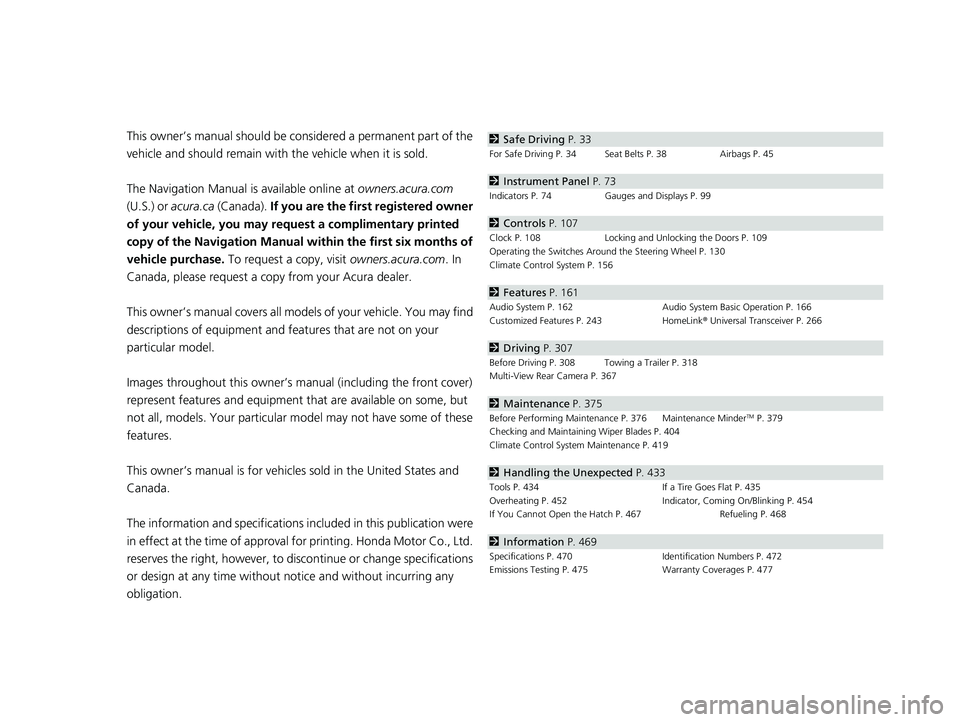
obligation.2 Safe Driving P. 33
For Safe Driving P. 34 Seat Belts P. 38 Airbags P. 45
2Instrument Panel P. 73
Indicators P. 74 Gauges and Displays P. 99
2Controls P. 107
Clock P. 108 Locking and Unlocking the Doors P. 109
Operating the Switches Around the Steering Wheel P. 130
Climate Control System P. 156
2 Features P. 161
Audio System P. 162 Audio System Basic Operation P. 166
Customized Features P. 243 HomeLink® Universal Transceiver P. 266
2 Driving P. 307
Before Driving P. 308 Towing a Trailer P. 318
Multi-View Rear Camera P. 367
2Maintenance P. 375
Before Performing Maintenance P. 376 Maintenance MinderTM P. 379
Checking and Maintaining Wiper Blades P. 404
Climate Control System Maintenance P. 419
2Handling the Unexpected P. 433
Tools P. 434 If a Tire Goes Flat P. 435
Overheating P. 452 Indicator, Coming On/Blinking P. 454
If You Cannot Open the Hatch P. 467 Refueling P. 468
2Information P. 469
Specifications P. 470 Identification Numbers P. 472
Emissions Testing P. 475 Warranty Coverages P. 477
22 ACURA NSX PMC-31T6N6500.book 4 ページ 2021年9月28日 火曜日 午後4時7分
Page 27 of 492

25
Quick Reference Guide
Driving (P 307)
Electronic Gear Selector (P 324)
●Select (P and depress the brake pedal when turning on the power.
Park
Press the
(P button.
Used when parking or before turning the power on or off.
Transmission is locked.
Reverse
Press back the
( R button.
Used when reversing.
Neutral
Press the
( N button.
Used to keep the transmission di sengaged from the engine and motor.
Drive/Manual
Each time you press the button, the mode switches between D (drive) and M (manual) mode.
●Normal driving (gears change between 1st and 9th automatically)●Temporarily driving in the sequential mode
●Driving in the sequential mode
D/M
D (Drive)
M (Manual)
Gear Position Indicator/Gear
Selection Indicator
The gear position indicator, the
gear selection indicator and the
shift button indicator indicate
the current gear selection.
Gear Position Indicator Shift Button
Indicator
●Gear selection
Gear Selection Indicator
*
Not available on all models
22 ACURA NSX PMC-31T6N6500.book 25 ページ 2021年9月28日 火曜日 午後4時7分
Page 37 of 492
35
uuFor Safe Driving uImportant Safety Precautions
Safe Driving
■Pay appropriate attention to the task of driving safely
Engaging in cell phone conversation or other activities that keep you from paying
close attention to the road, other vehicles, and pedestrians could lead to a crash.
Remember, situations can change quickly, and only you can decide when it is safe to
divert some attention away from driving.
■Control your speed
Excessive speed is a major factor in crash injuries and deaths. Generally, the higher
the speed, the greater the risk, but serious injuries can also occur at lower speeds.
Never drive faster than is safe for current conditions, regardless of the maximum
speed posted.
■Keep your vehicle in safe condition
Having a tire blowout or a mechanical failure can be extremely hazardous.
To reduce the possibility of such problems, check your tire pressures and condition
frequently, and perform all regul arly scheduled maintenance.
■Do not leave children unattended in the vehicle
Children, pets, and people needing assistance left unattended in the vehicle may be
injured if they activate one or more of the vehicle controls. They may also cause the
vehicle to move, resulting in a crash in wh ich they and/or another person(s) can be
injured or killed. Also, depending on the am bient temperature, the temperature of
the interior may reach extreme levels, which can result in harm or death.
Even if the climate control system is on, never leave them in the vehicle unattended
as the climate control system can shut off at any time.
22 ACURA NSX PMC-31T6N6500.book 35 ページ 2021年9月28日 火曜日 午後4時7分
Page 104 of 492

102
uuGauges and Displays uDriver Information Interface
Instrument Panel
Driver Information Interface
The driver information interface shows in formation such as the estimated travelable
distance and fuel economy of the vehicle. It also displays messages such as warnings
and other helpful information.
Roll the right selector wheel to change the display.
■Switching the Display
Right Selector Wheel Engine Oil LifeElapsed Time
Blank Screen
Average Speed
Range
Average Fuel Economy/
Instant Fuel Economy
Tire Pressure for
Each Tire
Turn-by-Turn
Directions
Oil Level Check Assist Compass
22 ACURA NSX PMC-31T6N6500.book 102 ページ 2021年9月28日 火曜日 午後4時7分
Page 107 of 492

Continued105
uuGauges and Displays uDriver Information Interface
Instrument Panel
Shows the estimated average fuel economy of each trip meter in mpg or l/100 km.
The display is updated at set intervals. Wh en a trip meter is reset, the average fuel
economy is also reset.
Shows the instant fuel economy as a bar graph in mpg or l/100 km.
Shows the estimated distance you can travel on the remaining power and fuel. This
distance is estimated from the fuel economy of your previous trips.
Shows the time elapsed since Trip A or Trip B was reset.
Shows the average speed in mph or km/h since Trip A or Trip B was reset.
■Average Fuel Economy
■Instant Fuel Economy
■Range
■Elapsed Time
■Average Speed
1Average Fuel Economy
You can change when to reset the average fuel
economy.
2 Customized Features P. 243
1Range
The displayed ra nge may change even when the
vehicle is stationary.
1 Elapsed Time
You can change when to reset the elapsed time.
2 Customized Features P. 243
1Average Speed
You can change when to reset the average speed.
2 Customized Features P. 243
22 ACURA NSX PMC-31T6N6500.book 105 ページ 2021年9月28日 火曜日 午後4時7分
Page 110 of 492
108
Controls
Clock
Adjusting the Clock
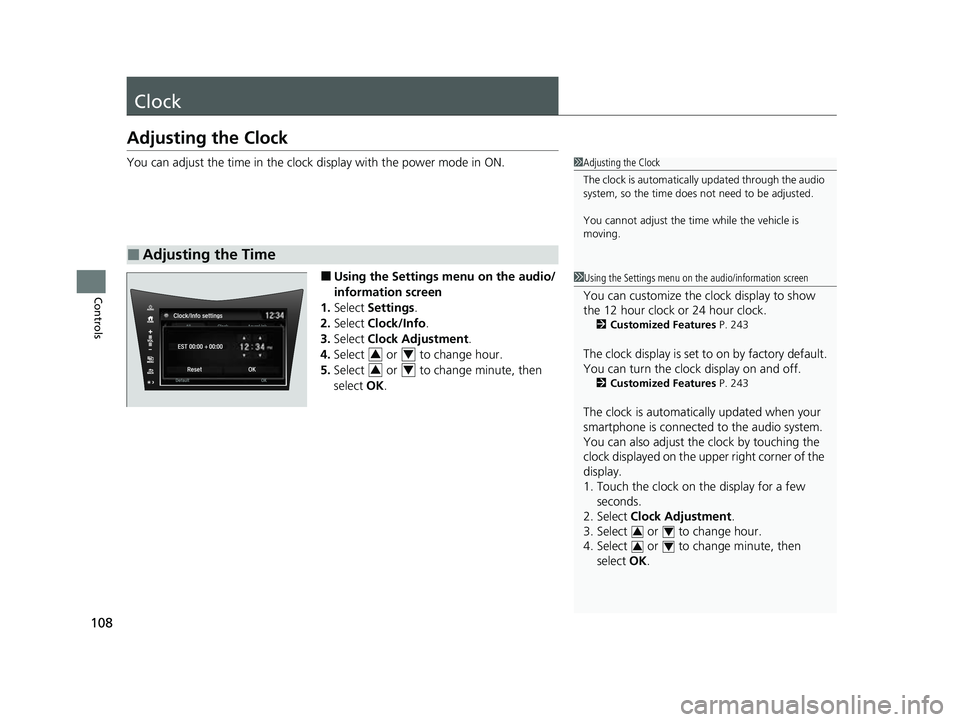
You can adjust the time in the clock display with the power mode in ON.
■Using the Settings menu on the audio/
information screen
1. Select Settings .
2. Select Clock/Info .
3. Select Clock Adjustment .
4. Select or to change hour.
5. Select or to change minute, then
select OK.
■Adjusting the Time
1Adjusting the Clock
The clock is automatically updated through the audio
system, so the time does not need to be adjusted.
You cannot adjust the time while the vehicle is
moving.
1Using the Settings menu on th e audio/information screen
You can customize the clock display to show
the 12 hour clock or 24 hour clock.
2Customized Features P. 243
The clock display is set to on by factory default.
You can turn the clock display on and off.
2Customized Features P. 243
The clock is automatically updated when your
smartphone is connected to the audio system.
You can also adjust the clock by touching the
clock displayed on the upper right corner of the
display.
1. Touch the clock on the display for a few
seconds.
2. Select Clock Adjustment .
3. Select or to change hour.
4. Select or to change minute, then
select OK.
34
34
34
34
22 ACURA NSX PMC-31T6N6500.book 108 ページ 2021年9月28日 火曜日 午後4時7分
Page 117 of 492

Continued115
uuLocking and Unlocking the Doors uLocking/Unlocking the Doors from the Outside
Controls
■Locking the doors
Press the lock button.
Once: u Some exterior lights flash, both doors
lock, both outer door handles pop in,
and the security system sets.
Twice (within five se conds after the first
push): u The beeper sounds and verifies the
security system is set.
■Using the Remote Transmitter1Using the Remote Transmitter
If you do not open a door within 30 seconds of
unlocking the vehicle with the remote transmitter,
the doors will automaticall y relock and the outer
handles of the doors will au tomatically pop back in.
You can change the relock timer setting.
2 Customized Features P. 243
If the interior light switch is in the door activated
position, the interior light s come on when you press
the unlock button.
No doors opened: The li ghts fade out after 30
seconds.
Doors relocked with the remote: The lights go off
immediately. 2 Interior Lights P. 150
The remote transmitter us es low-power signals, so
the operating range may vary depending on the
surroundings.
The remote will not lock th e vehicle when a door is
open.
LED
Unlock
Button Lock
Button
22 ACURA NSX PMC-31T6N6500.book 115 ページ 2021年9月28日 火曜日 午後4時7分
Page 128 of 492

uuSecurity System uSecurity System Alarm
126
Controls
■Setting the security system alarm
The security system alarm automatically sets when the following conditions have
been met:
• The power mode is set to VEHICLE OFF.
• The hood and hatch are closed.
• Both doors are locked fro m outside with the key, remote transmitter or keyless
access system.
■When the security system alarm sets
The security system indicator in the in strument panel blinks. When the blinking
interval changes after about 15 seconds, the security system is set.
■To cancel the security system alarm
The security system is canceled when th e vehicle is unlocked using the remote
transmitter, keyless ac cess system, or when the pow er mode is set to ON. The
security system indicator goes off at the same time.
1 Security System Alarm
Do not set the security system alarm when someone
is in the vehicle or a window is open. The system can
accidentally activate when:
•The door is unlocked with the lock tab.•The hatch is opened with the hatch release button
on the driver’s door or wi th the emergency hatch
opener.
•The gear position is shifted out of ( P.
•The hood is opened with the hood release.
If the 12-volt battery goes dead after you have set the
security system alarm, the security alarm may go off
once the 12-volt battery is recharged or replaced.
If this occurs, deactivate the security system alarm by
unlocking a door using the remote transmitter or
keyless access system.
Do not alter the system or add other devices to it.
Doing so may damage the system and make your
vehicle inoperable.
Do not open the hatch with the key unless it is an
emergency.
Opening the hatch with the key will trigger the
security system. 2 If You Cannot Open the Hatch P. 467
22 ACURA NSX PMC-31T6N6500.book 126 ページ 2021年9月28日 火曜日 午後4時7分
Page 138 of 492

uuOperating the Switches Around the Steering Wheel uLight Switches
136
Controls
The headlights automatically come on when the wipers are used several times within
a certain interval with the headlight switch in AUTO.
The headlights automatically go off a few minutes later if the wipers are stopped.
The headlights, all other exterior lights, an d the instrument panel lights turn off 15
seconds after you set the power mode to VE HICLE OFF, take the remote with you,
and close the driver’s door.
If you set the power mode to VEHICLE OFF with the headlight switch on, but do not
open the door, the lights turn off after 10 minutes (3 minutes, if the switch is in the
AUTO position).
The lights turn on again when you unlock or open the driver’s door. If you unlock
the door, but do not open it within 15 seconds, the lights go off. If you open the
driver’s door, you will hear a reminder chime alerting you that the lights are on.
■Headlight Integration with Wipers
■Automatic Lighting Off Feature
1Headlight Integration with Wipers
This feature activates when the headlights are off in
AUTO .
The instrument panel br ightness does not change
when the headlights come on.
At dark ambient light leve ls, the automatic lighting
control feature turns on the headlights, regardless of
the number of wiper sweeps.
You can turn the headlight integration with wipers
function on and off.
2 Customized Features P. 243
1Automatic Lighting Off Feature
You can change the headli ght auto off timer setting.
2 Customized Features P. 243
22 ACURA NSX PMC-31T6N6500.book 136 ページ 2021年9月28日 火曜日 午後4時7分
Page 140 of 492

138
uuOperating the Switches Around the Steering Wheel uWipers and Washers
Controls
Wipers and Washers
The windshield wipers and washers can be
used when the power mode is in ON.
■MIST
The wipers run at high speed until you release
the lever.
■Wiper switch (OFF, INT, LO, HI)
Change the wiper switch setting according to
the amount of rain.
■Adjusting wiper operation
Turn the adjustment ri ng to adjust wiper
operation.
■Washer
Sprays while you pull the lever toward you.
When you release the lever for more than one
second, the spray stops, the wipers sweep two
or three more times to clear the windshield,
then stop.
■Windshield Wiper/Washer1 Wipers and Washers
NOTICE
Do not use the wipers when the windshield is dry.
The windshield will get sc ratched, or the rubber
blades will get damaged.
NOTICE
In cold weather, the blades may freeze to the
windshield.
Operating the wipers in th is condition may damage
wipers. Use the de froster to warm the windshield,
then turn the wipers on.
If the vehicle speeds up while the wipers are
operating intermittently, the length of the wipe
interval shortens.
When the vehicle speeds up, the wiper operation’s
shortest delay setting ( ) and the LO setting become
the same.
Turn the washers off if no washer fluid comes out.
The pump may get damaged.
The wiper motor may stop motor operation
temporarily to prevent an overload. Wiper operation
will return to normal within a few minutes, once the
circuit has returned to normal.
If the wipers stop operating due to any obstacle such
as the buildup of snow, park the vehicle in a safe
place.
Rotate the wiper switch to OFF, and set the power
mode to ACCESSORY or VEHICLE OFF, then remove
the obstacle.
MIST
OFF
LO: Low speed wipe
HI : High speed wipe Pull to
use
washer.
INT : Low speed with
intermittent
Lower speed, fewer sweeps
Higher speed, more sweeps
22 ACURA NSX PMC-31T6N6500.book 138 ページ 2021年9月28日 火曜日 午後4時7分