change time Acura RDX 2012 Workshop Manual
[x] Cancel search | Manufacturer: ACURA, Model Year: 2012, Model line: RDX, Model: Acura RDX 2012Pages: 518, PDF Size: 26.43 MB
Page 297 of 518

Auxiliary Input Jack
The auxiliary input jack is on the disc
changer unit. The system will accept
auxiliary input from standard audio
accessories.
When the audio system is on and you
plug in a mini-jack cable between a
compatible audio unit and the jack,
you will see AUX in the display and
the system automatically switches to
AUX mode.Radio Theft Protection
If your vehicle
’s battery is
disconnected or goes dead, the audio
system disables itself. If this
happens, you will see ‘‘ENTER
CODE ’’in the frequency display next
time you turn on the system. Use the
preset bars (Icons on models with
navigation system) to enter the five-
digit code. The code is on the Anti-
theft Identification Card included in
your owner ’s manual kit. When it is
entered correctly, the radio will start
playing.
The Anti-theft Identification Card
also lists your audio serial number. It
is best to store the card in a safe
place at home. In addition, you
should write the audio system ’s
serial number in this owner ’s manual
CONTINUED
Auxiliary Input Jack, Radio Theft Protection
291
Features
11/06/16 17:42:51 12 ACURA RDX MMC North America Owner's M 50 31STK650 enu
Page 299 of 518
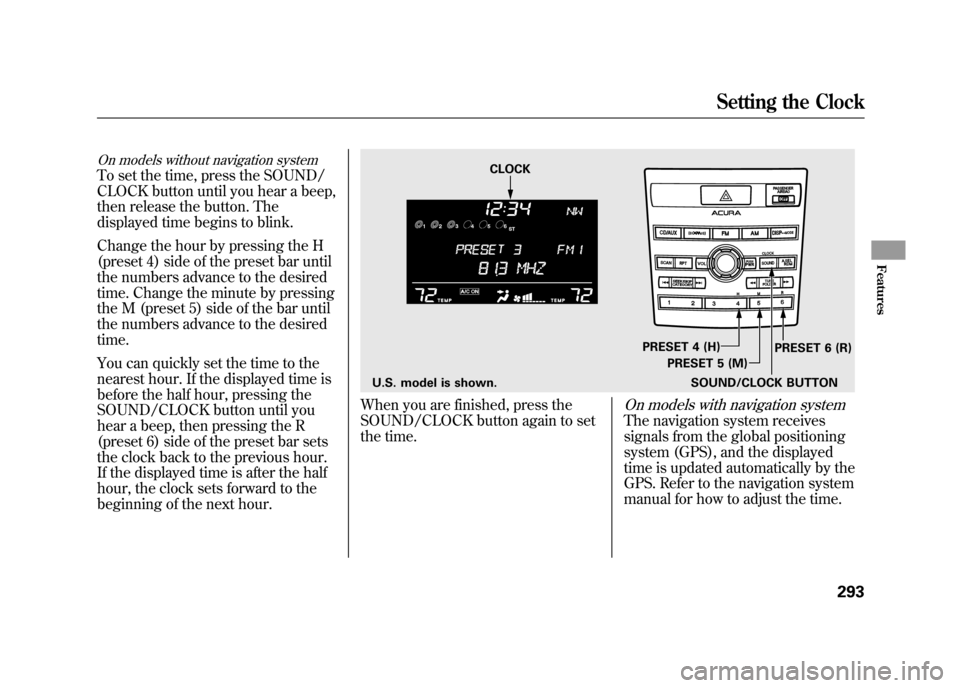
On models without navigation systemTo set the time, press the SOUND/
CLOCK button until you hear a beep,
then release the button. The
displayed time begins to blink.
Change the hour by pressing the H
(preset 4) side of the preset bar until
the numbers advance to the desired
time. Change the minute by pressing
the M (preset 5) side of the bar until
the numbers advance to the desired
time.
You can quickly set the time to the
nearest hour. If the displayed time is
before the half hour, pressing the
SOUND/CLOCK button until you
hear a beep, then pressing the R
(preset 6) side of the preset bar sets
the clock back to the previous hour.
If the displayed time is after the half
hour, the clock sets forward to the
beginning of the next hour.
When you are finished, press the
SOUND/CLOCK button again to set
the time.
On models with navigation systemThe navigation system receives
signals from the global positioning
system (GPS), and the displayed
time is updated automatically by the
GPS. Refer to the navigation system
manual for how to adjust the time.
U.S. model is shown.SOUND/CLOCK BUTTONPRESET 6 (R)
PRESET 4 (H)
PRESET 5 (M)
CLOCK
Setting the Clock
293
Features
11/06/16 17:42:51 12 ACURA RDX MMC North America Owner's M 50 31STK650 enu
Page 302 of 518
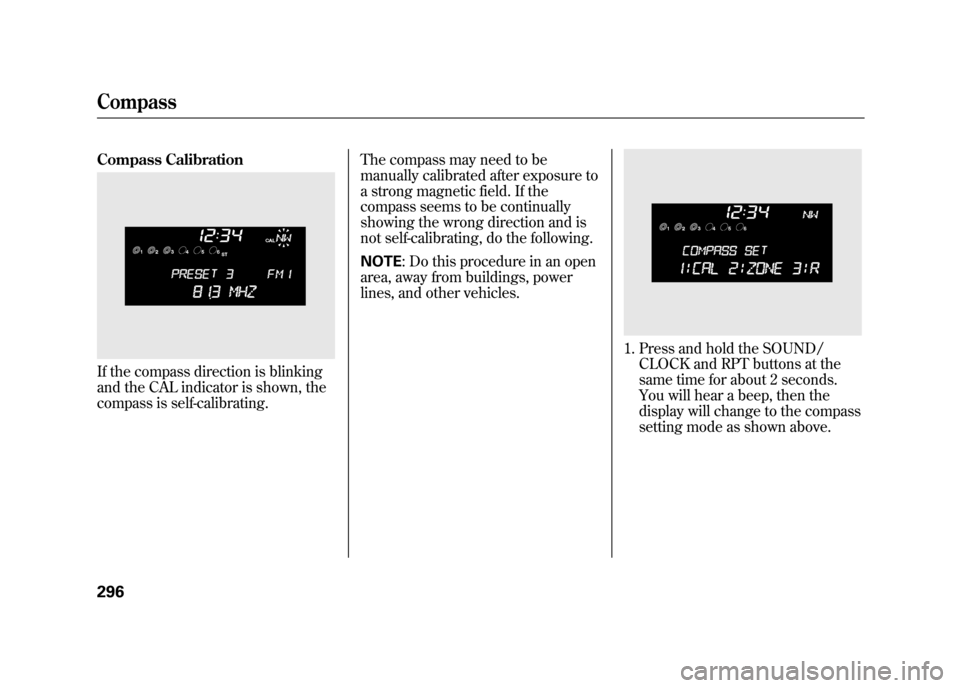
Compass CalibrationIf the compass direction is blinking
and the CAL indicator is shown, the
compass is self-calibrating.The compass may need to be
manually calibrated after exposure to
a strong magnetic field. If the
compass seems to be continually
showing the wrong direction and is
not self-calibrating, do the following.
NOTE
: Do this procedure in an open
area, away from buildings, power
lines, and other vehicles.
1. Press and hold the SOUND/ CLOCK and RPT buttons at the
same time for about 2 seconds.
You will hear a beep, then the
display will change to the compass
setting mode as shown above.
Compass29611/06/16 17:42:51 12 ACURA RDX MMC North America Owner's M 50 31STK650 enu
Page 304 of 518
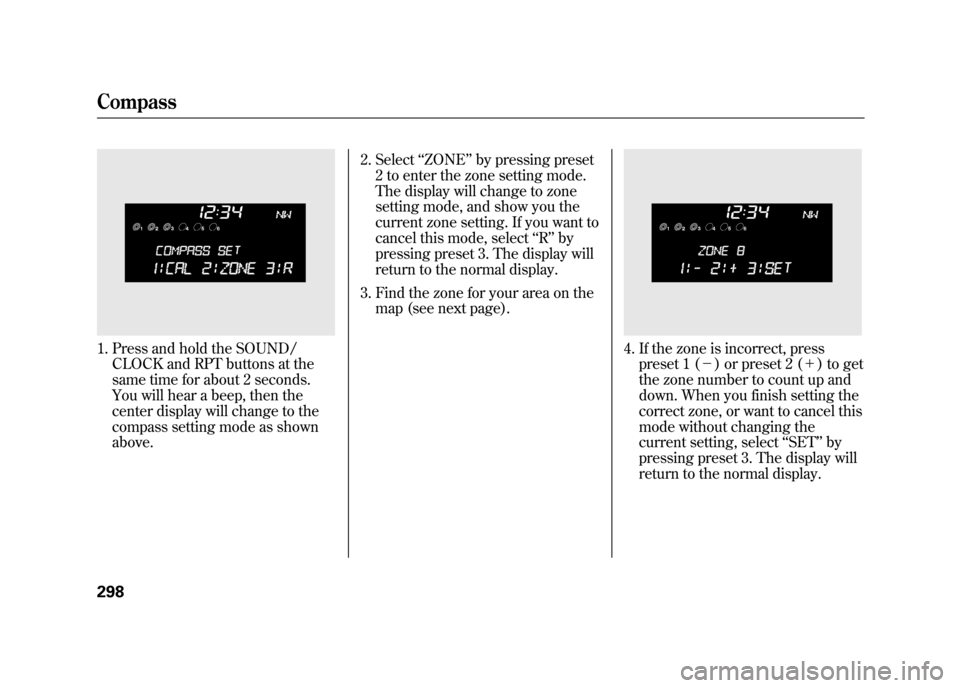
1. Press and hold the SOUND/CLOCK and RPT buttons at the
same time for about 2 seconds.
You will hear a beep, then the
center display will change to the
compass setting mode as shown
above. 2. Select
‘‘ZONE ’’by pressing preset
2 to enter the zone setting mode.
The display will change to zone
setting mode, and show you the
current zone setting. If you want to
cancel this mode, select ‘‘R ’’ by
pressing preset 3. The display will
return to the normal display.
3. Find the zone for your area on the map (see next page).
4. If the zone is incorrect, presspreset 1 (- ) or preset 2 (+ ) to get
the zone number to count up and
down. When you finish setting the
correct zone, or want to cancel this
mode without changing the
current setting, select ‘‘SET ’’by
pressing preset 3. The display will
return to the normal display.
Compass29811/06/16 17:42:51 12 ACURA RDX MMC North America Owner's M 50 31STK650 enu
Page 313 of 518

Voice Control Tips●Air or wind noise from the
dashboard and side vents and all
windows may interfere with the
microphone. Adjust or close them
as necessary.
●Press and release the HFL Talk
button each time you want to make
a command. After the beep, speak
in a clear, natural tone.●Try to reduce all background
noise. If the microphone picks up
voices other than yours,
commands may be misinterpreted.
●Many commands can be spoken
together. For example, you can say
‘‘Call 123-456-7890 ’’or ‘‘Dial Peter. ’’●When HFL is in use, navigation
voice commands cannot be
recognized.●To change the volume level of
HFL, use the audio system volume
knob or the steering wheel volume
controls.
MICROPHONE
CONTINUED
Bluetooth
®HandsFreeLink
®
307
Features
11/06/16 17:42:51 12 ACURA RDX MMC North America Owner's M 50 31STK650 enu
Page 318 of 518
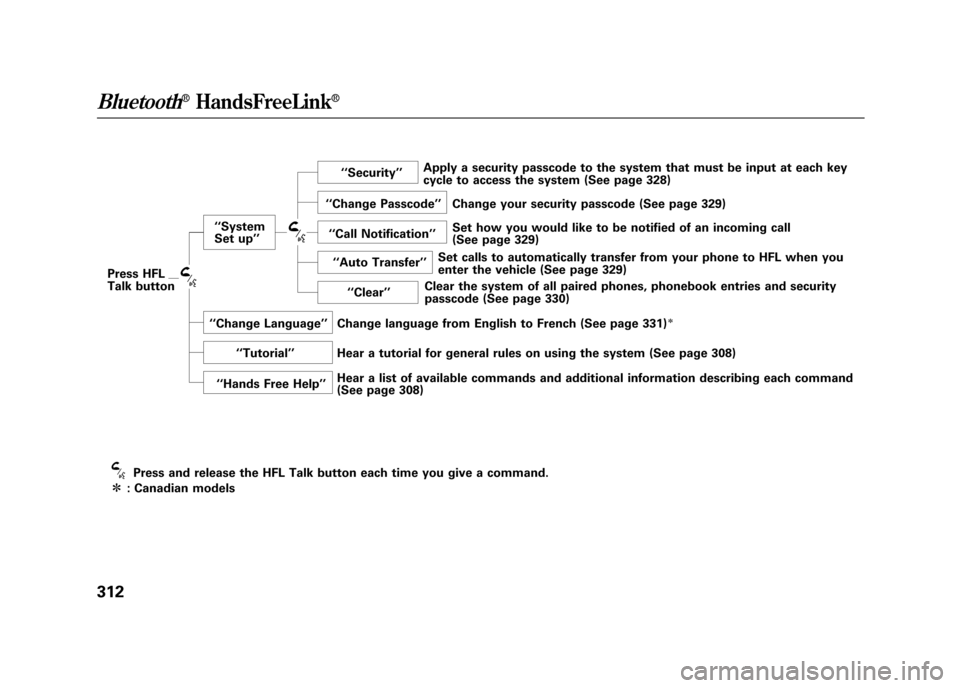
Press HFL
Talk button‘‘
System
Set up ’’ ‘‘
Security ’’
‘‘ Change Passcode ’’
‘‘ Call Notification ’’
‘‘ Auto Transfer ’’
‘‘ Clear ’’
‘‘ Change Language ’’
‘‘ Tutorial ’’
‘‘ Hands Free Help ’’
Press and release the HFL Talk button each time you give a command.
ᤳ : Canadian models Apply a security passcode to the system that must be input at each key
cycle to access the system (See page 328)
Change your security passcode (See page 329)
Set how you would like to be notified of an incoming call
(See page 329)
Set calls to automatically transfer from your phone to HFL when you
enter the vehicle (See page 329)
Clear the system of all paired phones, phonebook entries and security
passcode (See page 330)
Change language from English to French (See page 331)
ᤳ
Hear a tutorial for general rules on using the system (See page 308)
Hear a list of available commands and additional information describing each command
(See page 308)
Bluetooth
®HandsFreeLink
®
31211/06/16 17:42:51 12 ACURA RDX MMC North America Owner's M 50 31STK650 enu
Page 321 of 518

To hear which paired phone iscurrently linked:Press and release the HFL Talk
button before a command.
1. Say ‘‘Phone setup .’’
2. Say ‘‘Status ’’after the prompts.
3. HFL will tell you which phone is linked to the system.
To change from the currently linkedphone to another paired phone:Press and release the HFL Talk
button before a command.
1. Say ‘‘Phone setup .’’
2. Say ‘‘Next Phone ’’after the
prompts.
3. HFL will tell you which phone is linked to the system.
4. Once another phone is found, it is linked to the system. HFL will
inform you which phone is now
linked.
If no other phones are found or
paired, HFL will inform you that the
original phone is linked again.
To change the pairing code setting:Press and release the HFL Talk
button before a command.
1. Say ‘‘Phone setup .’’
2. Say ‘‘Set pairing code ’’after the
prompts.
3. If you want HFL to create a random code each time you pair a
phone, say ‘‘Random .’’ If you want
to choose your own 4-digit code to
be used each time, say ‘‘Fixed ’’
and follow the HFL prompts.
CONTINUED
Bluetooth
®HandsFreeLink
®
315
Features
11/06/16 17:42:51 12 ACURA RDX MMC North America Owner's M 50 31STK650 enu
Page 334 of 518

System Setup
This command group allows you to
change or customize HFL basic
settings.
To set a 4-digit passcode to lock theHFL system for security purposes:Press and release the HFL Talk
button before a command.
1. Say ‘‘System setup .’’
2. Say ‘‘Security ’’after the prompts.
3. Follow the HFL prompts and say the 4-digit passcode you want to
set.
4. Follow the HFL prompts to confirm the number. NOTE
: Once a passcode is set, you
will need to enter it to use HFL each
time you start the vehicle. If you
forget the code, your dealer will have
to reset it for you, or you will have to
clear the entire system (see page
330).
Bluetooth
®HandsFreeLink
®
32811/06/16 17:42:51 12 ACURA RDX MMC North America Owner's M 50 31STK650 enu
Page 342 of 518

Delete-Select this option to delete
the current message.
Voice -Select this option to hear a
voice read the entire message. This
gives you more information than the
screen can display at one time. When
you select the Voice option, it
changes to a Stop Reading option.
Select the option again to stop the
voice.
Call -Select this button to call a
phone number embedded in the
message. When you select Call,theBluetooth
®HandsFreeLink
®(HFL)
dials the number for you.
To make a call, your
Bluetooth
®
compatible phone must be paired to
your vehicle's HandsFreeLink
system, have its power on, and be
inside the vehicle (see page 313). Find Nearest Acura Dealer
-
Select this option to find the nearest
Acura dealer using the navigation
system.
Call Your Acura Dealer -Select
this button to call the Acura dealer
you purchased your vehicle from.
AcuraLink also directs you to this
dealer so you can schedule a
maintenance appointment or receive
information about a message. If you
visit another dealer for service two
times within a 14-month period,
AcuraLink will reset to call that
dealer.
Diagnostic Info -Select this
button to get more information about
the current diagnostic message. To
use this option, your cell phone must
be linked to the HFL and have a
compatible data service available.
Access the Owner Link website to
find out which data services are
currently compatible with AcuraLink. Message Preferences
To set your AcuraLink preferences
(the types of messages you want to
receive, if any), visit the My Acura
website at
www.owners.acura.com
If you do not have internet access,
call Acura Client Relations at
(800) 382-2238; they can set your
message preferences for you.
AcuraLink
®(U.S. models only)
33611/06/16 17:42:51 12 ACURA RDX MMC North America Owner's M 50 31STK650 enu
Page 347 of 518

Select the received message, then
press ENTER. You will see the
message as shown. To make an
appointment, select‘‘Schedule
Dealer Appt. ’’then press ENTER.
The system will automatically
connect to the Acura server, then
show you an appropriate
appointment date and time on the
navigation screen. If you accept this
appointment, select ‘‘Confirm
Appointment, ’’then press ENTER.
The confirmation message will be
displayed on the screen. Make sure
to confirm the appointment date,
time and dealer. If it is OK, press
ENTER.
If you want to change or reschedule
the appointment date, select
‘‘Cancel,’’ then press ENTER.
CONTINUED
AcuraLink
®(U.S. models only)
341
Features
11/06/16 17:42:51 12 ACURA RDX MMC North America Owner's M 50 31STK650 enu