change time Acura RDX 2012 Service Manual
[x] Cancel search | Manufacturer: ACURA, Model Year: 2012, Model line: RDX, Model: Acura RDX 2012Pages: 518, PDF Size: 26.43 MB
Page 249 of 518
2. Insert a disc into the disc slotwhen the disc load indicator turns
green, and ‘‘LOAD ’’appears on the
upper display at the same time.
Insert the disc only about halfway;
the drive will pull it in the rest of
the way. You will see the disc
number blinking on the upper
display, and the disc load indicator
turns red again and blinks as the
CD is loaded.
Do not try to insert a disc until
‘‘ LOAD ’’appears. You could
damage the audio unit.
3. You will see ‘‘DISC READ ’’on the
upper display, then the system
begins to play the CD.
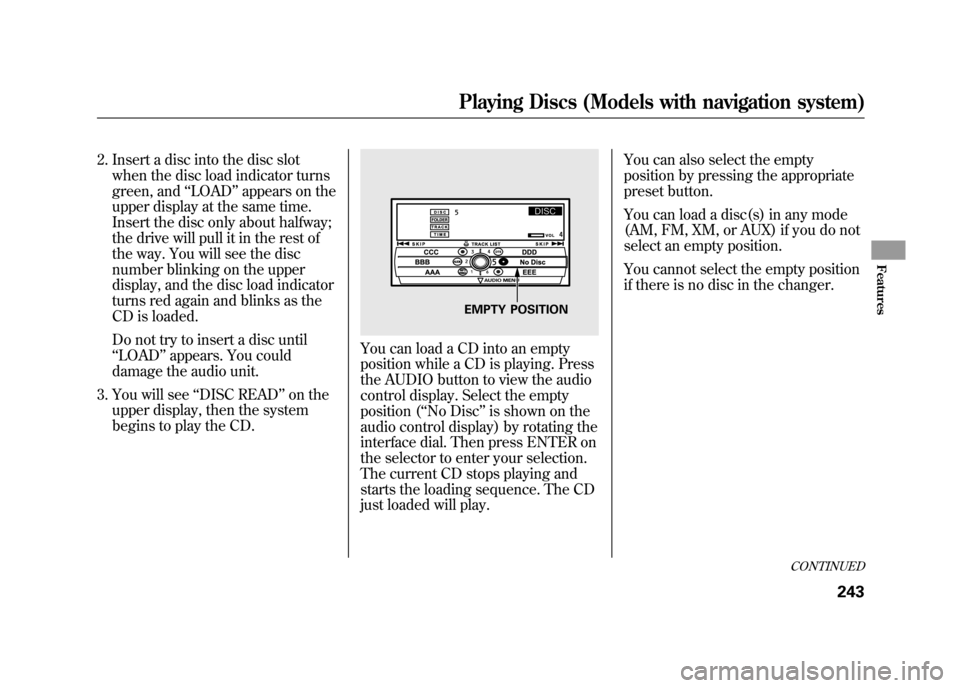
You can load a CD into an empty
position while a CD is playing. Press
the AUDIO button to view the audio
control display. Select the empty
position (‘‘ No Disc’’is shown on the
audio control display) by rotating the
interface dial. Then press ENTER on
the selector to enter your selection.
The current CD stops playing and
starts the loading sequence. The CD
just loaded will play. You can also select the empty
position by pressing the appropriate
preset button.
You can load a disc(s) in any mode
(AM, FM, XM, or AUX) if you do not
select an empty position.
You cannot select the empty position
if there is no disc in the changer.
EMPTY POSITION
CONTINUED
Playing Discs (Models with navigation system)
243
Features
11/06/16 17:42:51 12 ACURA RDX MMC North America Owner's M 50 31STK650 enu
Page 250 of 518
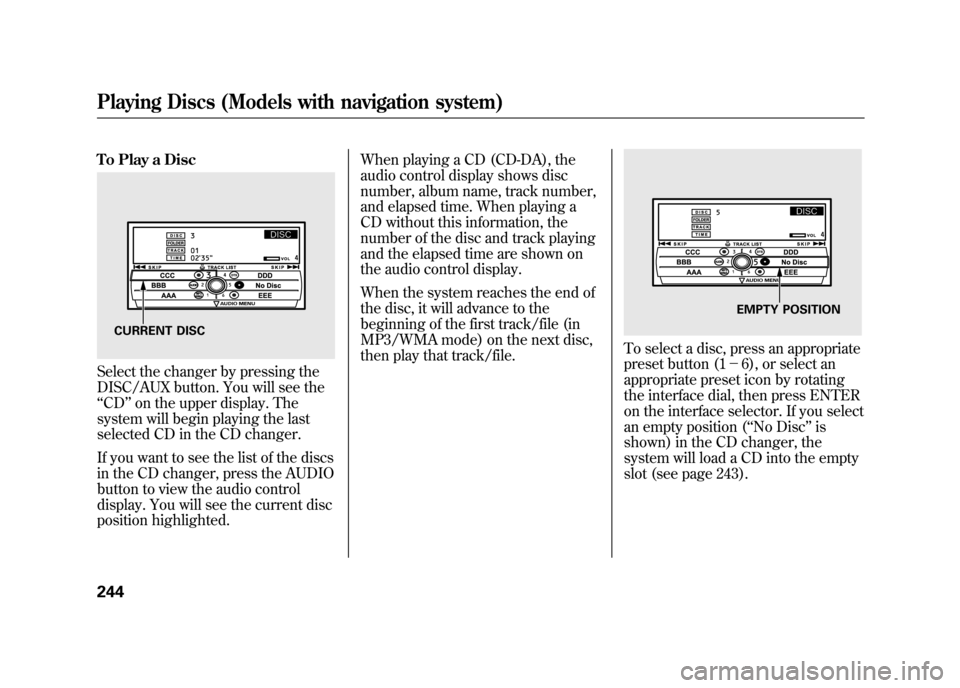
To Play a DiscSelect the changer by pressing the
DISC/AUX button. You will see the
‘‘CD ’’on the upper display. The
system will begin playing the last
selected CD in the CD changer.
If you want to see the list of the discs
in the CD changer, press the AUDIO
button to view the audio control
display. You will see the current disc
position highlighted. When playing a CD (CD-DA), the
audio control display shows disc
number, album name, track number,
and elapsed time. When playing a
CD without this information, the
number of the disc and track playing
and the elapsed time are shown on
the audio control display.
When the system reaches the end of
the disc, it will advance to the
beginning of the first track/file (in
MP3/WMA mode) on the next disc,
then play that track/file.
To select a disc, press an appropriate
preset button (1
-6), or select an
appropriate preset icon by rotating
the interface dial, then press ENTER
on the interface selector. If you select
an empty position ( ‘‘No Disc’’ is
shown) in the CD changer, the
system will load a CD into the empty
slot (see page 243).
CURRENT DISC
EMPTY POSITION
Playing Discs (Models with navigation system)24411/06/16 17:42:51 12 ACURA RDX MMC North America Owner's M 50 31STK650 enu
Page 251 of 518

Playing an MP3/WMA Disc
The CD changer can also play CD-Rs
and CD-RWs compressed in MP3
and WMA format. When playing a
disc in MP3 or WMA, you will see
‘‘MP3 ’’or ‘‘WMA ’’on the upper
display. A disc can support more
than 99 folders, and each folder can
hold up to 255 playable files.
When there are more than 99 folders
on a disc, the upper display only
shows two digits. NOTE
: If a file on an MP3 or WMA
disc is protected by digital rights
management (DRM), the audio unit
displays FORMAT, and then skips to
the next file.
When playing a CD compressed in
MP3/WMA format, the audio control
display shows disc number, folder
name, file number, and elapsed time.
When playing a CD without this
information, the disc number, track
number, and the elapsed time are
shown on the audio control display. If the disc has a complex structure, it
will take a while to read the disc
before the system begins to play it.
Depending on the software the files
were made with, it may not be
possible to play some files, or display
some text data.
CONTINUED
Playing Discs (Models with navigation system)
245
Features
11/06/16 17:42:51 12 ACURA RDX MMC North America Owner's M 50 31STK650 enu
Page 252 of 518

To Change or Select Tracks/FilesWhile a disc is playing you can use
the SEEK/SKIP bar to select
passages and change tracks (files in
MP3/WMA mode).
In MP3/WMA mode, use the
TUNE/FOLDER bar to select folders
on the disc, and use the SEEK/SKIP
bar to change files.SEEK/SKIP
-Each time you press
and release the
side of the
SEEK/SKIP bar, the system skips
forward to the beginning of the next
track (file in MP3/WMA mode).
Press and release the
side of the
bar to skip backward to the
beginning of the current track/file.
Press it again to skip to the
beginning of the previous track/file.
To move rapidly within a track/file,
press and hold the
or
side of
the SEEK/SKIP bar.
You can also change tracks/files on
the audio control display. Press the
AUDIO button to view the display,
then push the selector on the
interface dial to the right to skip
forward to the beginning of the next
track/file. Push the selector left to
skip backward to the beginning of
the current track/file. Press it again
to skip to the beginning of the
previous track/file.
SKIP ICON
Playing Discs (Models with navigation system)24611/06/16 17:42:51 12 ACURA RDX MMC North America Owner's M 50 31STK650 enu
Page 257 of 518

DISC SCAN-The disc scan
function samples the first track/file
(in MP3/WMA mode) on each disc
within the changer in numerical
order. To activate this feature, press
the SCAN button twice. In the MP3/
WMA mode, press the SCAN button
three times. The first track/file on
each disc plays for about 10 seconds.
You will see ‘‘SCAN ’’next to the
DISC icon on the audio control
display. You will also see ‘‘SCAN ’’
and the disc number blinking on the
upper display. To hear the rest of the
track/file on the disc currently
scanning, press and hold the SCAN
button for more than 2 seconds.
If you don't, the system advances to
the next disc, plays about 10 seconds
of it, and continues through the rest
of the discs the same way.
Each time you press and release the
SCAN button, the mode changes
from scan, to folder scan, to disc
scan, then to normal play. RANDOM (Random within a
disc)
-This feature plays the tracks
(all files in each folder in MP3/WMA
mode) within a disc in random order.
To activate random play, press the
AUDIO button to view the audio
control display, then push down the
selector on the interface dial. Rotate
the interface dial to select TRACK
RANDOM. Press ENTER on the
selector to enter your selection.SCAN INDICATOR
DISC SCAN ICON
CONTINUED
Playing Discs (Models with navigation system)
251
Features
11/06/16 17:42:51 12 ACURA RDX MMC North America Owner's M 50 31STK650 enu
Page 260 of 518

To remove a different disc from the
changer, first select it by pressing
the corresponding number on the
preset button or turning the interface
knob, and pressing ENTER on the
interface selector. When that disc
begins playing, press the eject
button.
Press and hold the eject button until
you hear a beep to remove all the
discs from the changer.
You can also eject discs when the
ignition switch is off by pressing the
eject button. The disc that was last
selected is ejected first. You can eject
the rest of the discs one at a time.Protecting Discs
For information on how to handle
and protect compact discs, see page
257.
Disc Changer Error Messages
For information, see page 255.
Adjusting the Sound
For information, see page 224.Playing Discs (Models with navigation system)25411/06/16 17:42:51 12 ACURA RDX MMC North America Owner's M 50 31STK650 enu
Page 270 of 518
To Change or Select FilesUse the SKIP bar while an iPod is
playing to select passages and
change files.
SKIP-Each time you press and
release the
side of the SEEK/
SKIP bar, the system skips forward
to the beginning of the next file.
Press and release the
side of the
bar, to skip backward to the
beginning of the current file. Press it
again to skip to the beginning of the
previous file.
To move rapidly within a file, press
and hold either side (or
)of
the SEEK/SKIP bar.
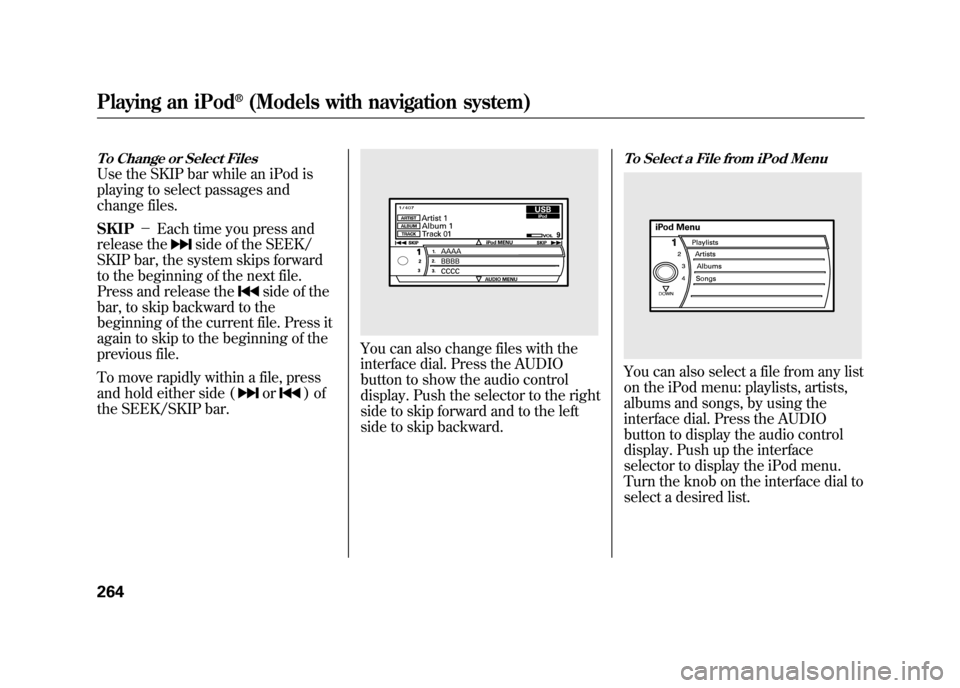
You can also change files with the
interface dial. Press the AUDIO
button to show the audio control
display. Push the selector to the right
side to skip forward and to the left
side to skip backward.
To Select a File from iPod MenuYou can also select a file from any list
on the iPod menu: playlists, artists,
albums and songs, by using the
interface dial. Press the AUDIO
button to display the audio control
display. Push up the interface
selector to display the iPod menu.
Turn the knob on the interface dial to
select a desired list.
Playing an iPod
®(Models with navigation system)
26411/06/16 17:42:51 12 ACURA RDX MMC North America Owner's M 50 31STK650 enu
Page 280 of 518
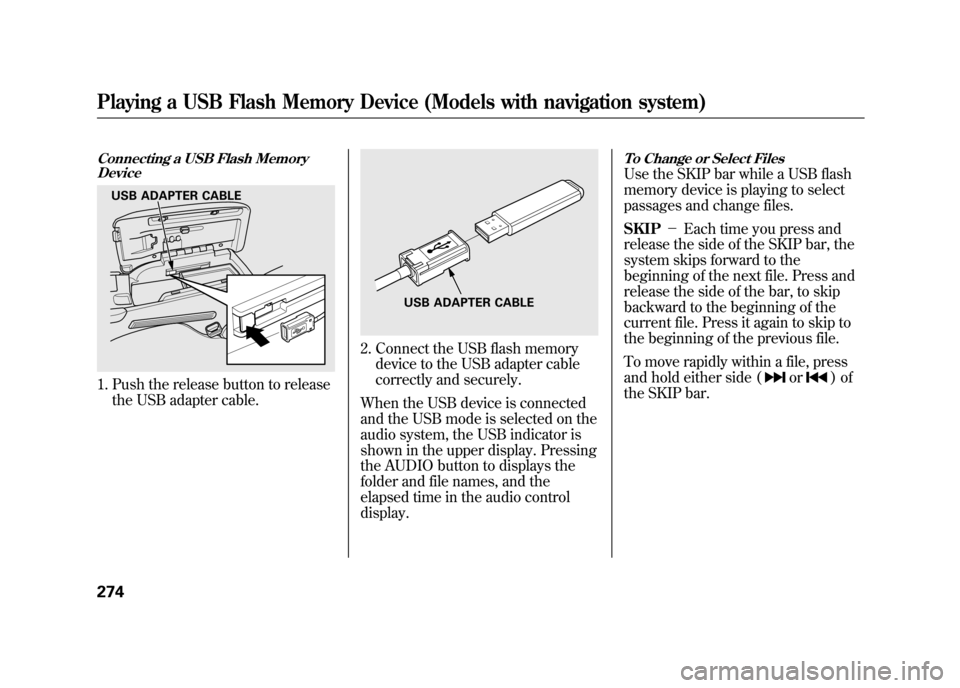
Connecting a USB Flash MemoryDevice1. Push the release button to release
the USB adapter cable.
2. Connect the USB flash memorydevice to the USB adapter cable
correctly and securely.
When the USB device is connected
and the USB mode is selected on the
audio system, the USB indicator is
shown in the upper display. Pressing
the AUDIO button to displays the
folder and file names, and the
elapsed time in the audio control
display.
To Change or Select FilesUse the SKIP bar while a USB flash
memory device is playing to select
passages and change files.
SKIP -Each time you press and
release the side of the SKIP bar, the
system skips forward to the
beginning of the next file. Press and
release the side of the bar, to skip
backward to the beginning of the
current file. Press it again to skip to
the beginning of the previous file.
To move rapidly within a file, press
and hold either side (
or
)of
the SKIP bar.
USB ADAPTER CABLE
USB ADAPTER CABLE
Playing a USB Flash Memory Device (Models with navigation system)27411/06/16 17:42:51 12 ACURA RDX MMC North America Owner's M 50 31STK650 enu
Page 295 of 518

Three controls for the audio system
are mounted in the steering wheel
hub. They let you control basic
functions without removing your
hand from the steering wheel.
The VOL button adjusts the volume
up (
) or down (
). Press the top or
bottom of the button, hold it until the
desired volume is reached, then
release it.
The MODE button changes the mode.On vehicles without navigation systemPressing the MODE button
repeatedly cycles through all
possible media sources whether they
are present or not.On vehicles with navigation systemPressing the MODE button
repeatedly cycles through all
present, connected media sources.
Media sources that are not present
or connected will not appear when
cycling with the MODE button. If you are listening to the radio, use
the CH button to change stations.
Each time you press and release the
top (+
) of the button, the system
goes to the next preset station on the
band you are listening to. Press and
release the bottom (- ) to go back to
the previous station.
To activate the seek function, press
and hold the top (+ ) or bottom (-)
of the CH button until you hear a
beep. The system searches up or
down from the current frequency to
find a station with a strong signal.
MODE BUTTON
VOL BUTTON CH BUTTON
CONTINUED
Remote Audio Controls
289
Features
11/06/16 17:42:51 12 ACURA RDX MMC North America Owner's M 50 31STK650 enu
Page 296 of 518

If you are playing a disc, the system
skips to the beginning of the next
track (file in MP3 or WMA format)
each time you press the top (+)of
the CH button. Press the bottom (- )
to return to the beginning of the
current track/file. Press it twice to
return to the previous track/file.
To select a different disc (folder in
MP3/WMA mode), press and hold
the top (+ ) or bottom (- ) of the CH
button until you hear a beep. If you are listening to XM Radio, use
the CH button to change channels.
Each time you press the top (+
)of
the button, the system goes to the
next preset channel. Press the
bottom (- ) to go back to the
previous preset channel.
To go to the next channel of the
category you are listening to, press
and hold the top (+ ) or bottom (-)
of the CH button until you hear a
beep. If you are playing a USB flash
memory device or iPod with the USB
adapter cable, press and release the
top (+
) of the CH button to skip
forward to the beginning of the next
file. Press the bottom (- ) to skip
backward to the beginning of the
current file. Press it twice to return to
the previous file.
When playing a USB flash memory
device, you can also use the seek
function to skip the folder. To
activate this, press and hold either
side of the CH button until you hear
a beep.Remote Audio Controls29011/06/16 17:42:51 12 ACURA RDX MMC North America Owner's M 50 31STK650 enu