SSA Acura RDX 2017 Owner's Guide
[x] Cancel search | Manufacturer: ACURA, Model Year: 2017, Model line: RDX, Model: Acura RDX 2017Pages: 449, PDF Size: 10.88 MB
Page 77 of 449
76
uuIndicators u
Instrument Panel
*1:On the left: Models without full color display
On the right: Models with full color display
*2:Models with full color display
*3:Models without full color display
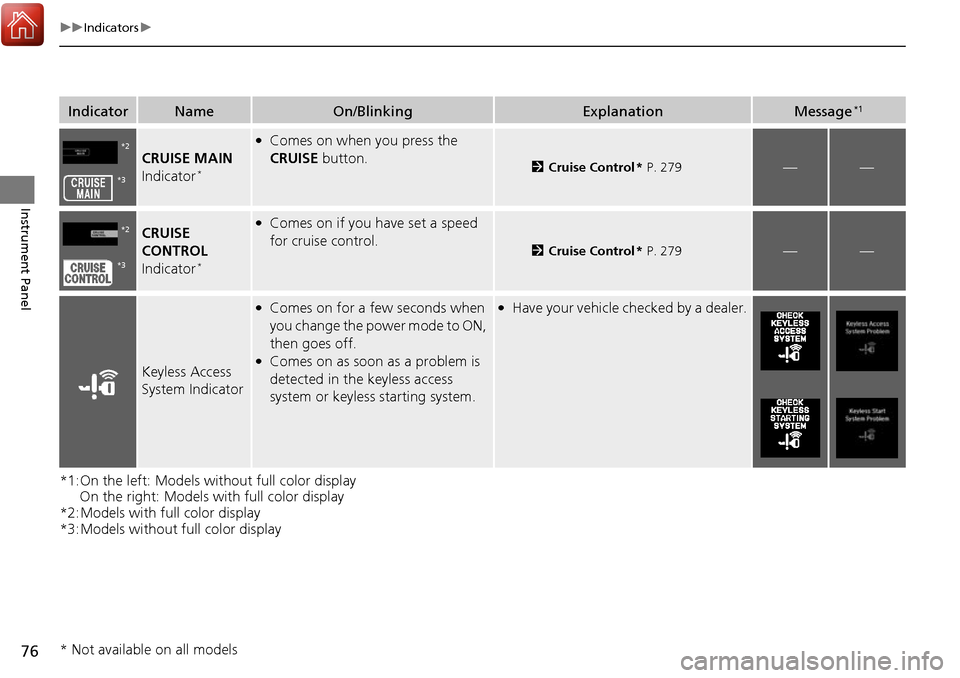
IndicatorNameOn/BlinkingExplanationMessage*1
CRUISE MAIN
Indicator*
●Comes on when you press the
CRUISE button.
2Cruise Control * P. 279——
CRUISE
CONTROL
Indicator
*
●Comes on if you have set a speed
for cruise control.
2 Cruise Control * P. 279——
Keyless Access
System Indicator
●Comes on for a few seconds when
you change the power mode to ON,
then goes off.
●Comes on as soon as a problem is
detected in the keyless access
system or keyless starting system.
●Have your vehicle ch ecked by a dealer.
*2
*3
*2
*3
* Not available on all models
Page 78 of 449
77
uuIndicators u
Continued
Instrument Panel
*1:On the left: Models wi thout full color display
On the right: Models with full color display
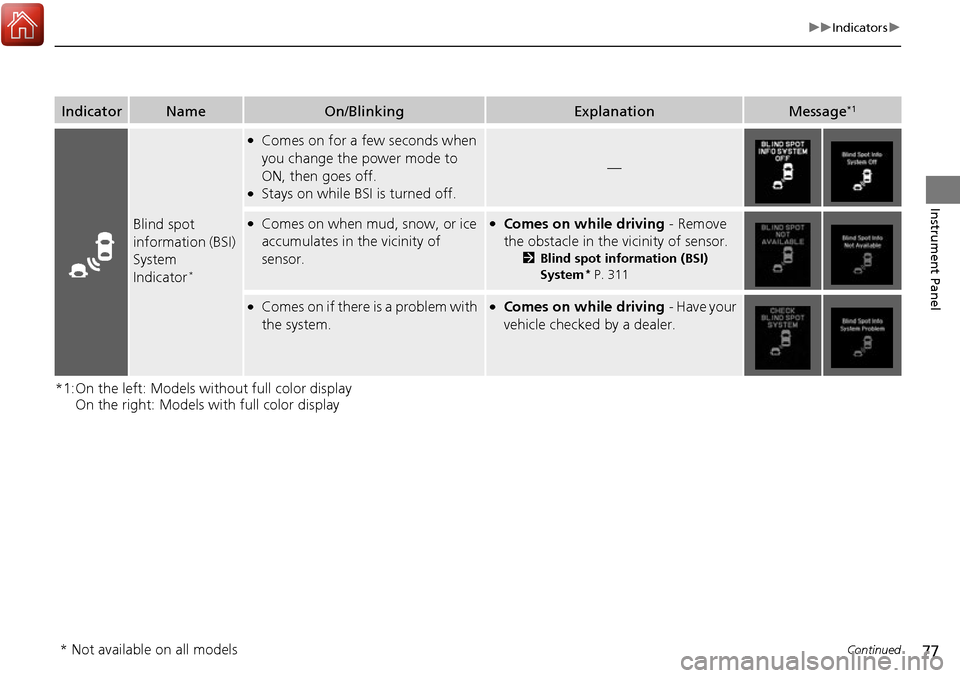
IndicatorNameOn/BlinkingExplanationMessage*1
Blind spot
information (BSI)
System
Indicator
*
●Comes on for a few seconds when
you change the power mode to
ON, then goes off.
●Stays on while BS I is turned off.
—
●Comes on when mud, snow, or ice
accumulates in the vicinity of
sensor.●Comes on while driving - Remove
the obstacle in the vicinity of sensor.
2 Blind spot information (BSI)
System* P. 311
●Comes on if there is a problem with
the system.●Comes on while driving - Have your
vehicle checked by a dealer.
* Not available on all models
Page 79 of 449

78
uuIndicators u
Instrument Panel
IndicatorNameOn/BlinkingExplanationMessage
Lane Departure
Warning (LDW)
Indicator
●Comes on for a few seconds when
you change the power mode to ON,
then goes off.
●Comes on if there is a problem with
the LDW system.
●Stays on constantly - Have your vehicle
checked by a dealer.
●Comes on when the LDW system
shuts itself off.●Stays on - The temperature inside the
camera is too high.
Use the climate control system to cool down
the camera.
The system activates when the temperature
inside the camera cools down.
2 Front Sensor Camera* P. 282
●Stays on - The area around the camera is
blocked by dirt, mud, etc. Stop your vehicle
in a safe place, and wipe it off with a soft
cloth.
●Have your vehicle checked by a dealer if the
indicator and message come back on after
you cleaned the area around the camera.
2 Front Sensor Camera* P. 282
Models with LDW
* Not available on all models
Page 80 of 449

79
uuIndicators u
Continued
Instrument Panel
IndicatorNameOn/BlinkingExplanationMessage
Adaptive Cruise
Control (
ACC)
Indicator (Amber)*
●Comes on for a few seconds when
you set the power mode to ON, then
goes off.
●Comes on if there is a problem with
ACC.
●Comes on while driving - Have your
vehicle checked by a dealer.
Adaptive Cruise
Control (
ACC)
Indicator (Green)*
●Comes on when you press the MAIN
button.
2 Adaptive Cruise Control (ACC)* P. 284—
Lane Keeping
Assist System
(LKAS ) Indicator
(Amber)
*
●Comes on for a few seconds when
you set the power mode to ON, then
goes off.
●Comes on if there is a problem with
the LKAS.
●Stays on constantly - Have your vehicle
checked by a dealer.
Lane Keeping
Assist System
( LKAS ) Indicator
(Green)
*
●Comes on when you press the MAIN
button.
2 Lane Keeping Assist System (LKAS)*
P. 301—
* Not available on all models
Page 81 of 449

80
uuIndicators u
Instrument Panel
IndicatorNameOn/BlinkingExplanationMessage
Collision
Mitigation
Braking System
TM
(CMBSTM)
Indicator
●Comes on for a few seconds when
you change the power mode to ON,
then goes off.
●Comes on when you deactivate the
CMBSTM. A multi-information display
message appears for five seconds.
●Comes on if there is a problem with
the CMBSTM.
●Stays on constantly without the
CMBSTM off - Have your vehicle checked by
a dealer.
2 Collision Mitigation Braking SystemTM
(CMBSTM)* P. 322
Models with CMBSTM
* Not available on all models
Page 82 of 449

81
uuIndicators u
Instrument Panel
IndicatorNameOn/BlinkingExplanationMessage
Collision
Mitigation
Braking System
TM
(CMBSTM)
Indicator
●Comes on when the CMBSTM system
shuts itself off.●Stays on - The area around the camera is
blocked by dirt, mud, etc. Stop your vehicle
in a safe place, and wipe it off with a soft
cloth.
2 Front Sensor Camera* P. 282
●When the radar sensor gets dirty, stop your
vehicle in a safe place, and wipe off dirt
using a soft cloth.
●Have your vehicle checked by a dealer if the
message does not disappear even after you
clean the sensor cover.
2Collision Mitigation Braking SystemTM
(CMBSTM)* P. 322
●Stays on - The temperature inside the
camera is too high. Us e the climate control
system to cool down the camera. The
system activates wh en the temperature
inside the camera cools down.
2 Front Sensor Camera* P. 282
Models with CMBSTM
* Not available on all models
Page 83 of 449
82
uuIndicators uMulti-Information Display Warn ing and Information Messages
Instrument Panel
Multi-Information Display Warn ing and Information Messages
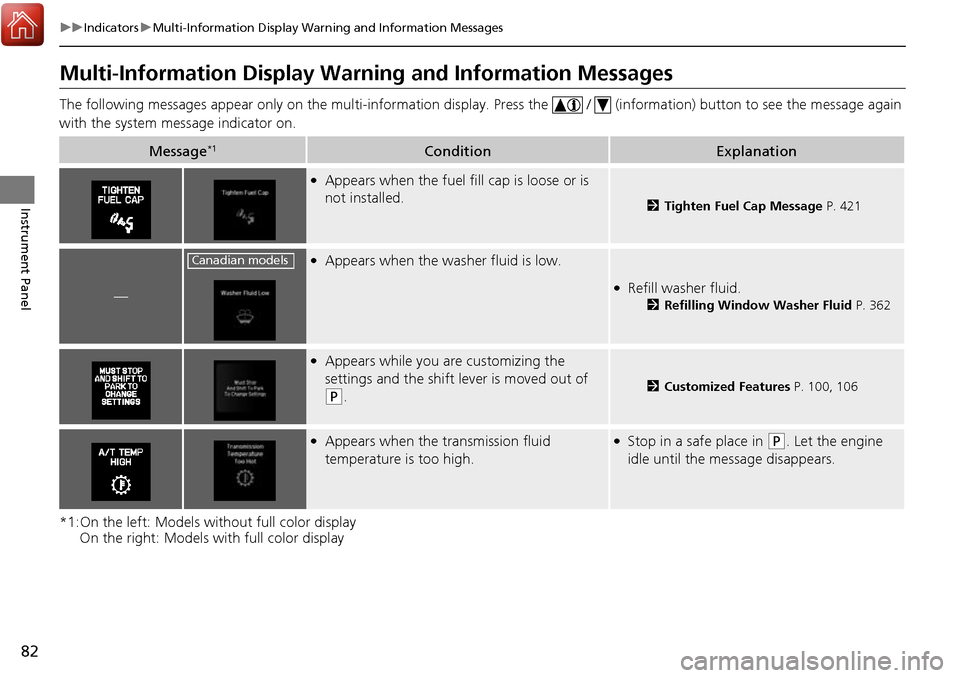
The following messages appear only on the multi-information display. Press the / (information) button to see the message again
with the system me ssage indicator on.
*1:On the left: Models without full color display On the right: Models with full color display
Message*1ConditionExplanation
●Appears when the fuel fill cap is loose or is
not installed.
2Tighten Fuel Cap Message P. 421
—
●Appears when the washer fluid is low.
●Refill washer fluid.
2Refilling Window Washer Fluid P. 362
●Appears while you are customizing the
settings and the shift lever is moved out of
(P.2Customized Features P. 100, 106
●Appears when the transmission fluid
temperature is too high.●Stop in a safe place in (P. Let the engine
idle until the message disappears.
Canadian models
Page 84 of 449
83
uuIndicators uMulti-Information Display Warning and Information Messages
Continued
Instrument Panel
*1:On the left: Models wi thout full color display
On the right: Models with full color display
Message*1ConditionExplanation
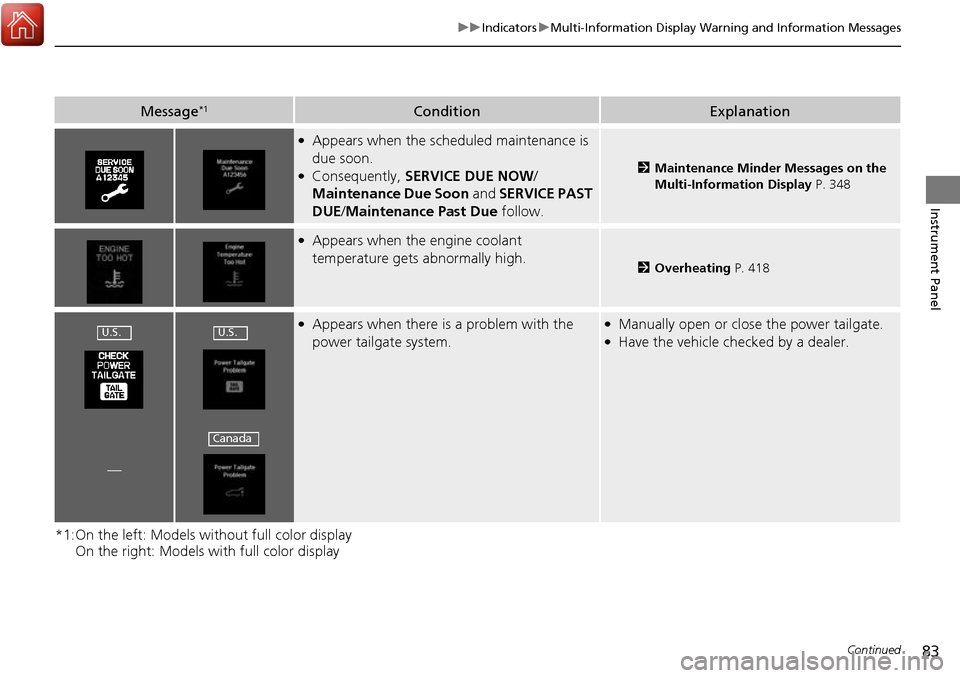
●Appears when the scheduled maintenance is
due soon.
●Consequently, SERVICE DUE NOW /
Maintenance Due Soon and SERVICE PAST
DUE /Maintenance Past Due follow.2Maintenance Minder Messages on the
Multi-Information Display P. 348
●Appears when the engine coolant
temperature gets abnormally high.
2Overheating P. 418
●Appears when there is a problem with the
power tailgate system.●Manually open or close the power tailgate.●Have the vehicle checked by a dealer.
—
U.S.U.S.
Canada
Page 85 of 449
84
uuIndicators uMulti-Information Display Warn ing and Information Messages
Instrument Panel
*1:On the left: Models without full color display
On the right: Models with full color display
Message*1ConditionExplanation
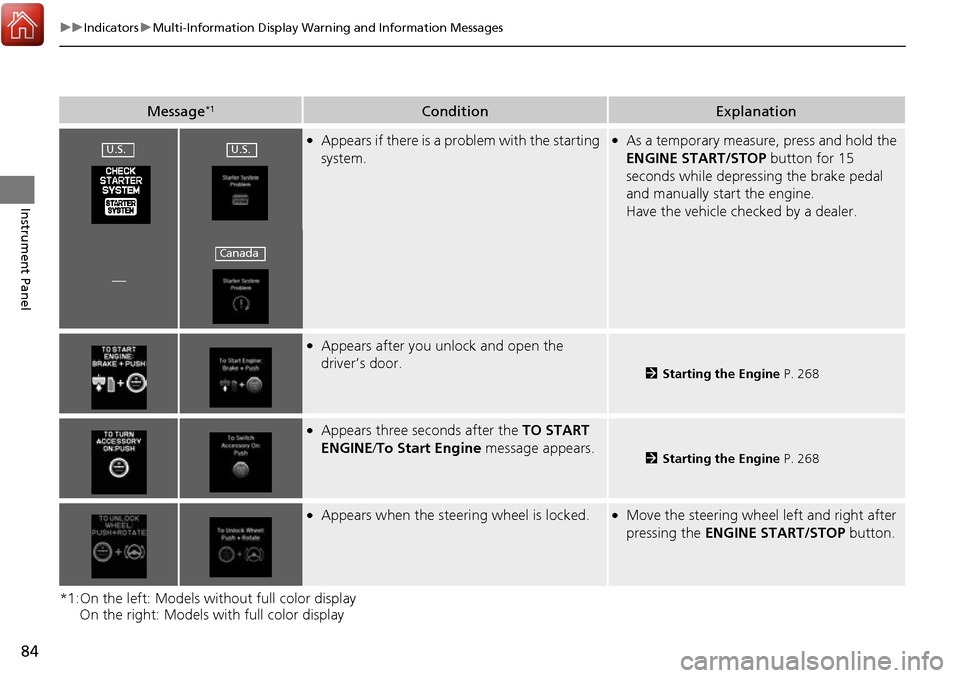
●Appears if there is a problem with the starting
system.●As a temporary measure, press and hold the
ENGINE START/STOP button for 15
seconds while depressing the brake pedal
and manually start the engine.
Have the vehicle checked by a dealer.
—
●Appears after you unlock and open the
driver’s door.
2 Starting the Engine P. 268
●Appears three seconds after the TO START
ENGINE/ To Start Engine message appears.
2Starting the Engine P. 268
●Appears when the steering wheel is locked.●Move the steering wheel left and right after
pressing the ENGINE START/STOP button.
U.S.U.S.
Canada
Page 86 of 449
85
uuIndicators uMulti-Information Display Warning and Information Messages
Continued
Instrument Panel
*1:On the left: Models wi thout full color display
On the right: Models with full color display
Message*1ConditionExplanation
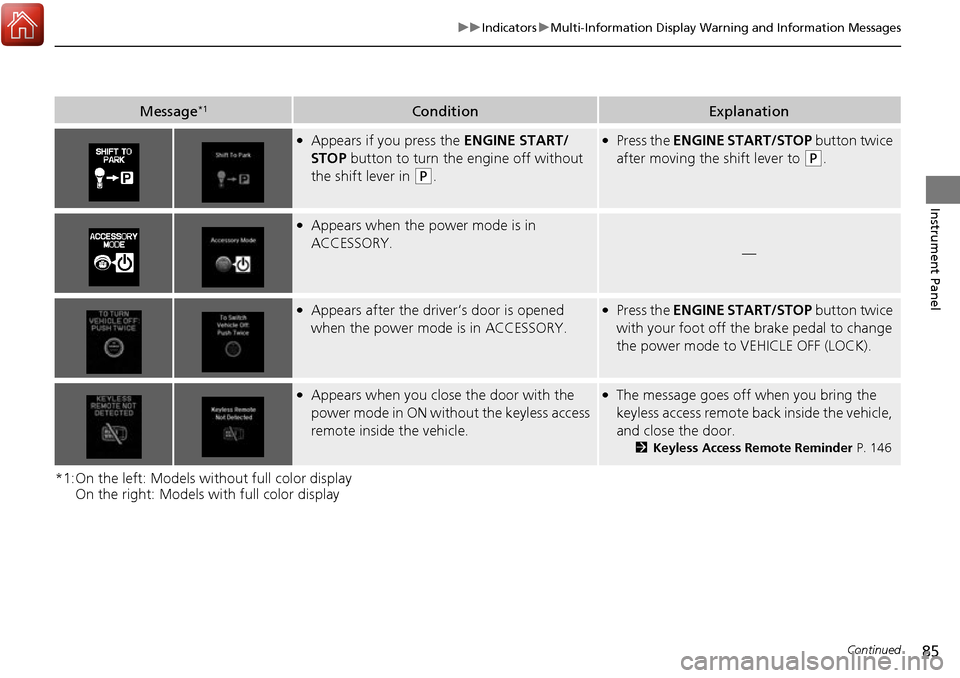
●Appears if you press the ENGINE START/
STOP button to turn the engine off without
the shift lever in
(P.
●Press the ENGINE START/STOP button twice
after moving the shift lever to
(P.
●Appears when the power mode is in
ACCESSORY.
—
●Appears after the driver’s door is opened
when the power mode is in ACCESSORY.●Press the ENGINE START/STOP button twice
with your foot off the brake pedal to change
the power mode to VEHICLE OFF (LOCK).
●Appears when you close the door with the
power mode in ON without the keyless access
remote inside the vehicle.●The message goes off when you bring the
keyless access remote back inside the vehicle,
and close the door.
2Keyless Access Remote Reminder P. 146