audio Acura RDX 2019 Owner's Manual
[x] Cancel search | Manufacturer: ACURA, Model Year: 2019, Model line: RDX, Model: Acura RDX 2019Pages: 649, PDF Size: 33 MB
Page 510 of 649
509
uuSurround View Camera System*uDisplaying an Image From the Surround View Cameras
Continued
Driving
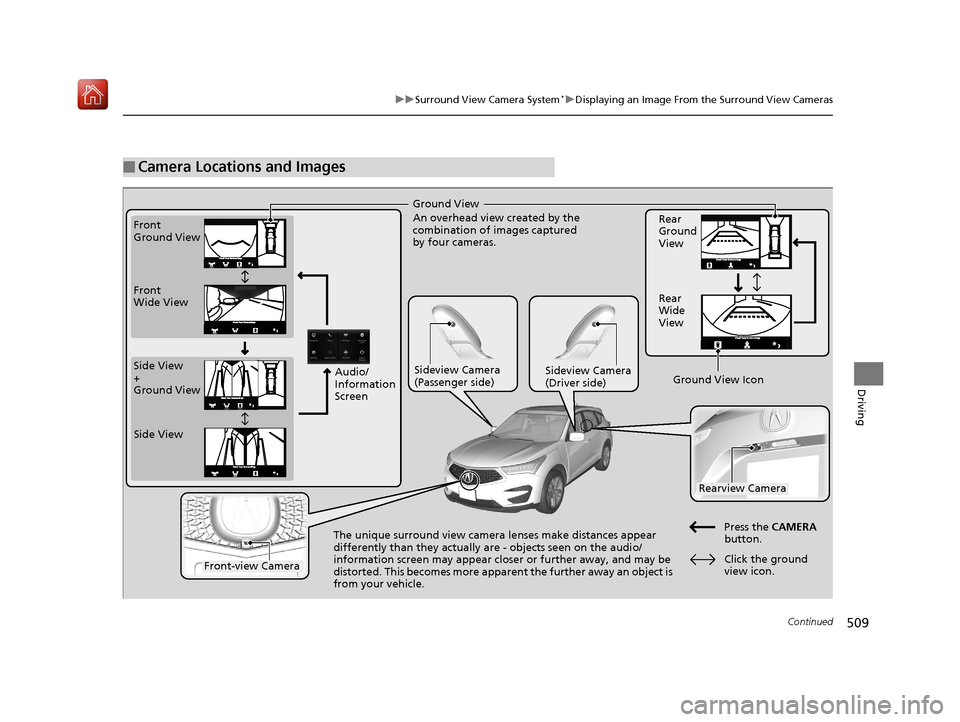
■Camera Locations and Images
Ground View
An overhead view created by the
combination of images captured
by four cameras.
Front
Ground View
Side View
+
Ground View Front
Wide View
Sideview Camera
(Passenger side)Sideview Camera
(Driver side)
The unique surround view camera lenses make distances appear
differently than they actually are - objects seen on the audio/
information screen may appear closer or further away, and may be
distorted. This becomes more apparent
the further away an object is
from your vehicle. Rear
Ground
View
Rear
Wide
View
Press the CAMERA
button.
Rearview Camera
Front-view Camera
Side View
Audio/
Information
Screen
Click the ground
view icon.
Ground View Icon
19 ACURA RDX-31TJB6000.book 509 ページ 2018年4月26日 木曜日 午後4時51分
Page 511 of 649
uuSurround View Camera System*uDisplaying an Image From the Surround View Cameras
510
Driving
Following can be displayed when the system is on.
Guide lines: Help you to get a sense of a distance between your vehicle and the
rear surroundings. The distan ce may appear differently than the actual distance.
Projection lines: Indicate vehicle direction while the steering wheel is in the current
position.
■Reference Lines and Guides1 Reference Lines and Guides
The positions/distances indi cated by the guide lines
and camera views on the display may differ from the
actual positions/distances due to the changes in the
vehicle height, road conditions, and other factors.
The guide lines should be used as a reference only.
The guide lines can be tu rned on and off using the
audio/information screen.
2 Customized Features P. 358
If you turn the guide lines off, they remain off until
you turn them back on.
19 ACURA RDX-31TJB6000.book 510 ページ 2018年4月26日 木曜日 午後4時51分
Page 512 of 649
511
uuSurround View Camera System*uUsing the Surround View Camera System
Continued
Driving
Using the Surround View Camera System
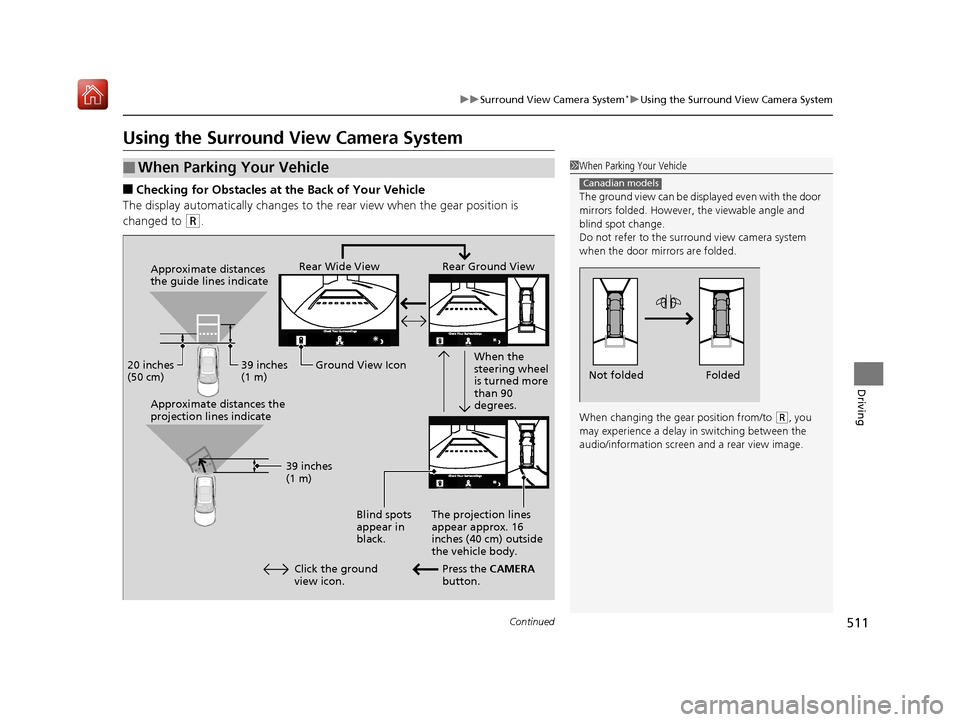
■Checking for Obstacles at the Back of Your Vehicle
The display automatically changes to the rear view when the gear position is
changed to
(R.
■When Parking Your Vehicle1 When Parking Your Vehicle
The ground view can be disp layed even with the door
mirrors folded. However, the viewable angle and
blind spot change.
Do not refer to the surround view camera system
when the door mirrors are folded.
When changing the gear position from/to
( R, you
may experience a delay in switching between the
audio/information screen and a rear view image.
Canadian models
Folded
Not folded
Rear Wide View Rear Ground View
When the
steering wheel
is turned more
than 90
degrees.
The projection lines
appear approx. 16
inches (40 cm) outside
the vehicle body.
Blind spots
appear in
black.
Press the CAMERA
button.
Approximate distances
the guide lines indicate
Approximate distances the
projection lines indicate
39 inches
(1 m)
20 inches
(50 cm)
39 inches
(1 m)
Ground View Icon
Click the ground
view icon.
19 ACURA RDX-31TJB6000.book 511 ページ 2018年4月26日 木曜日 午後4時51分
Page 513 of 649
uuSurround View Camera System*uUsing the Surround View Camera System
512
Driving
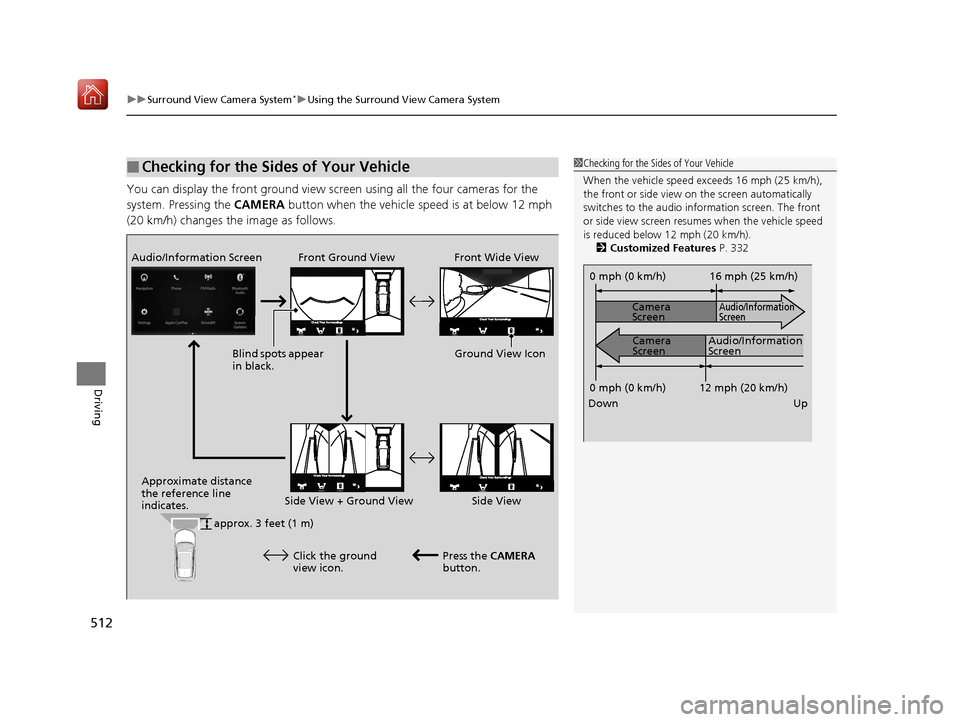
You can display the front ground view screen using all the four cameras for the
system. Pressing the CAMERA button when the vehicle speed is at below 12 mph
(20 km/h) changes the image as follows.
■Checking for the Sides of Your Vehicle1 Checking for the Sides of Your Vehicle
When the vehicle speed exceeds 16 mph (25 km/h),
the front or side view on the screen automatically
switches to the audio information screen. The front
or side view screen resumes when the vehicle speed
is reduced below 12 mph (20 km/h).
2 Customized Features P. 332
0 mph (0 km/h)
Down Up Camera
Screen
Camera
Screen
Audio/Information
Screen
Audio/Information
Screen 16 mph (25 km/h)
12 mph (20 km/h)
0 mph (0 km/h)
Front Ground View Front Wide View
Audio/Information Screen
Approximate distance
the reference line
indicates. Press the CAMERA
button.
approx. 3 feet (1 m) Blind spots appear
in black.
Click the ground
view icon. Ground View Icon
Side View + Ground View Side View
19 ACURA RDX-31TJB6000.book 512 ページ 2018年4月26日 木曜日 午後4時51分
Page 515 of 649
514
uuSurround View Camera System*uUsing the Surround View Camera System
Driving
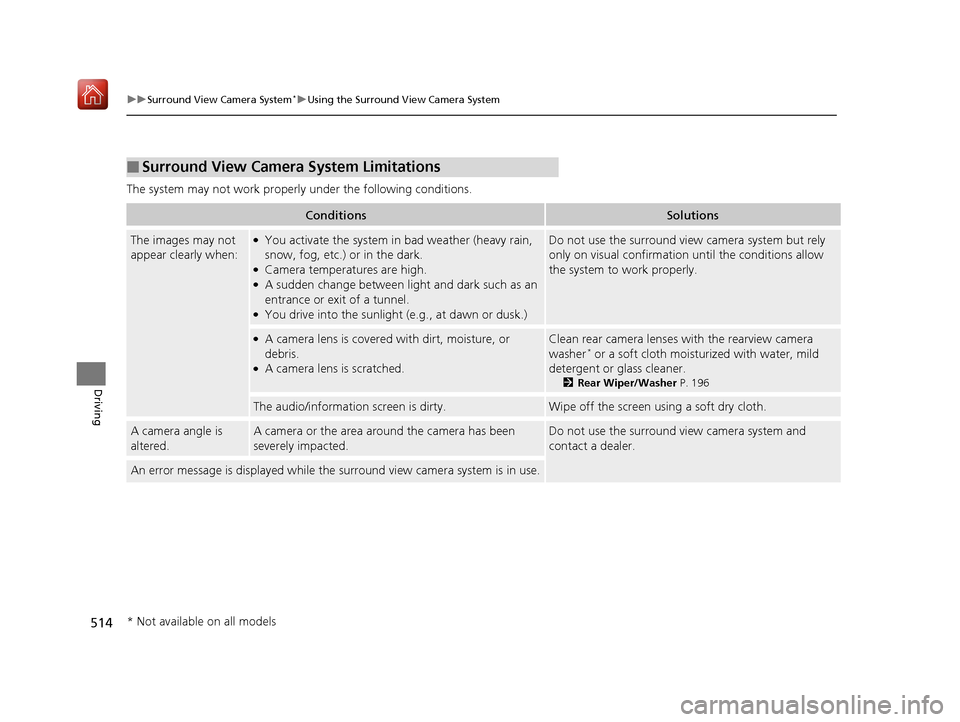
The system may not work properly under the following conditions.
■Surround View Camera System Limitations
ConditionsSolutions
The images may not
appear clearly when:●You activate the system in bad weather (heavy rain,
snow, fog, etc.) or in the dark.
●Camera temperatures are high.●A sudden change between lig ht and dark such as an
entrance or exit of a tunnel.
●You drive into the sunlight (e.g., at dawn or dusk.)
Do not use the surround view camera system but rely
only on visual confirmation until the conditions allow
the system to work properly.
●A camera lens is covered with dirt, moisture, or
debris.
●A camera lens is scratched.
Clean rear camera lenses with the rearview camera
washer* or a soft cloth moisturized with water, mild
detergent or glass cleaner.
2 Rear Wiper/Washer P. 196
The audio/information screen is dirty.Wipe off the screen using a soft dry cloth.
A camera angle is
altered.A camera or the area around the camera has been
severely impacted.Do not use the surround view camera system and
contact a dealer.
An error message is displayed while the surround view camera system is in use.
* Not available on all models
19 ACURA RDX-31TJB6000.book 514 ページ 2018年4月26日 木曜日 午後4時51分
Page 532 of 649
531
uuMaintenance MinderTMuTo Use Maintenance MinderTM
Maintenance
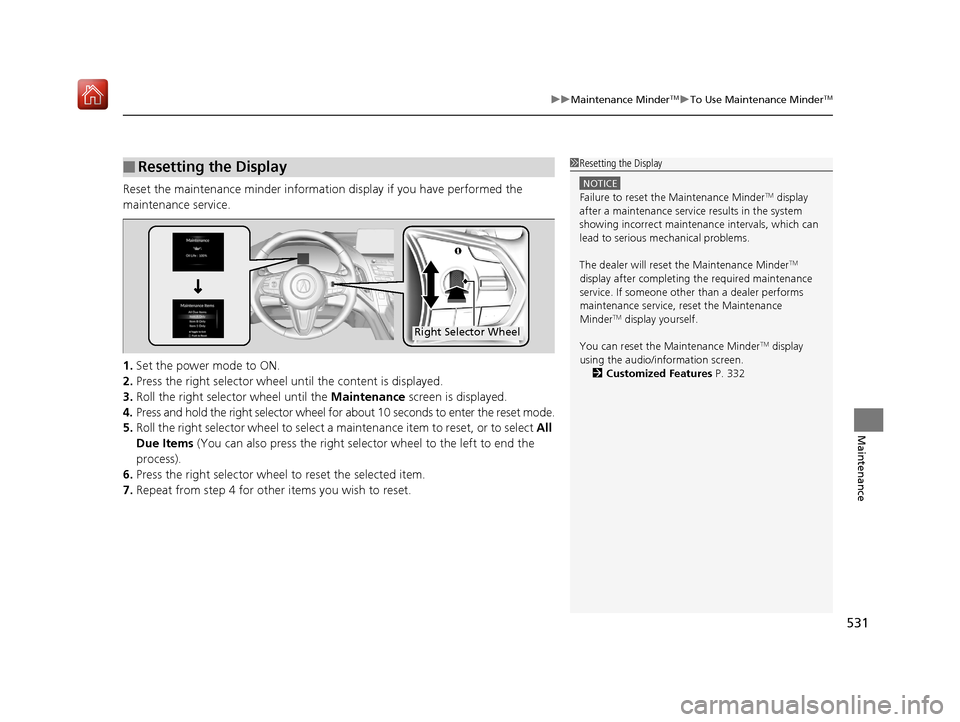
Reset the maintenance minder information display if you have performed the
maintenance service.
1. Set the power mode to ON.
2. Press the right selector wheel until the content is displayed.
3. Roll the right selector wheel until the Maintenance screen is displayed.
4. Press and hold the right selector wheel for about 10 seconds to enter the reset mode.
5. Roll the right selector wheel to select a ma intenance item to reset, or to select All
Due Items (You can also press the right selector wheel to the left to end the
process).
6. Press the right selector wheel to reset the selected item.
7. Repeat from step 4 for other items you wish to reset.
■Resetting the Display1Resetting the Display
NOTICE
Failure to reset the Maintenance MinderTM display
after a maintenance servic e results in the system
showing incorrect maintena nce intervals, which can
lead to serious mechanical problems.
The dealer will reset the Maintenance Minder
TM
display after completing th e required maintenance
service. If someone other than a dealer performs
maintenance service, reset the Maintenance
Minder
TM display yourself.
You can reset the Maintenance Minder
TM display
using the audio/information screen. 2 Customized Features P. 332
Right Selector Wheel
19 ACURA RDX-31TJB6000.book 531 ページ 2018年4月26日 木曜日 午後4時51分
Page 564 of 649
563
Maintenance
Battery
Checking the Battery
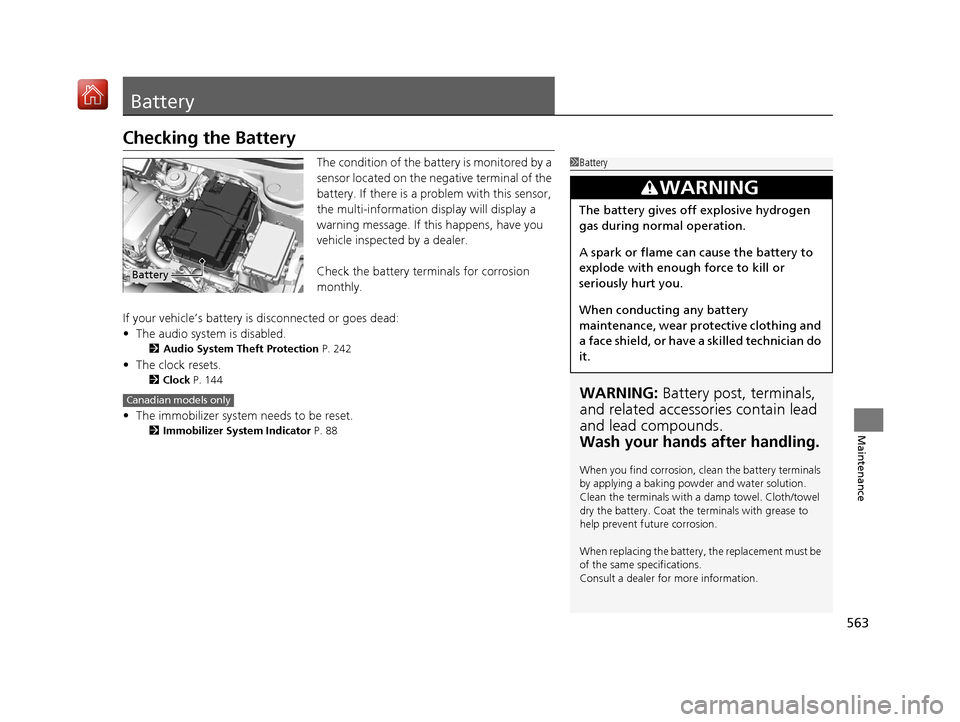
The condition of the battery is monitored by a
sensor located on the negative terminal of the
battery. If there is a problem with this sensor,
the multi-information display will display a
warning message. If this happens, have you
vehicle inspected by a dealer.
Check the battery terminals for corrosion
monthly.
If your vehicle’s battery is disconnected or goes dead:
• The audio system is disabled.
2 Audio System Theft Protection P. 242
•The clock resets.
2 Clock P. 144
•The immobilizer system needs to be reset.
2 Immobilizer System Indicator P. 88
1Battery
WARNING: Battery post, terminals,
and related accessories contain lead
and lead compounds.
Wash your hands after handling.
When you find corrosion, cl ean the battery terminals
by applying a baking powder and water solution.
Clean the terminals with a damp towel. Cloth/towel
dry the battery. Coat the terminals with grease to
help prevent future corrosion.
When replacing the battery, the replacement must be
of the same specifications.
Consult a dealer for more information.
3WARNING
The battery gives off explosive hydrogen
gas during normal operation.
A spark or flame can cause the battery to
explode with enough force to kill or
seriously hurt you.
When conducting any battery
maintenance, wear prot ective clothing and
a face shield, or have a skilled technician do
it.
Battery
Canadian models only
19 ACURA RDX-31TJB6000.book 563 ページ 2018年4月26日 木曜日 午後4時51分
Page 570 of 649
569Continued
Maintenance
Cleaning
Interior Care
Use a damp cloth with a mixture of mild detergent and warm water to remove dirt.
Use a clean cloth to remove detergent residue.
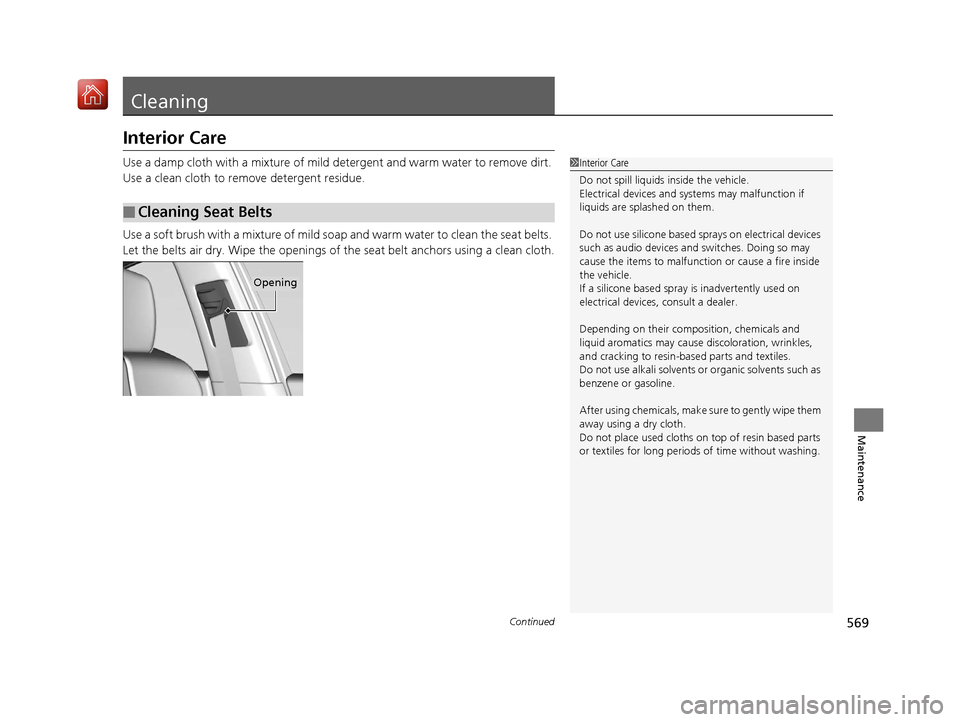
Use a soft brush with a mixture of mild soap and warm water to clean the seat belts.
Let the belts air dry. Wipe the openings of the seat belt anchors using a clean cloth.
■Cleaning Seat Belts
1Interior Care
Do not spill liquids inside the vehicle.
Electrical devices and systems may malfunction if
liquids are splashed on them.
Do not use silicone based sp rays on electrical devices
such as audio devices and switches. Doing so may
cause the items to malfunction or cause a fire inside
the vehicle.
If a silicone based spray is inadvertently used on
electrical devices, consult a dealer.
Depending on their compos ition, chemicals and
liquid aromatics may cause discoloration, wrinkles,
and cracking to resin-ba sed parts and textiles.
Do not use alkali solvents or organic solvents such as
benzene or gasoline.
After using chemical s, make sure to gently wipe them
away using a dry cloth.
Do not place used cloths on top of resin based parts
or textiles for long periods of time without washing.
Opening
19 ACURA RDX-31TJB6000.book 569 ページ 2018年4月26日 木曜日 午後4時51分
Page 581 of 649
uuIf a Tire Goes Flat uChanging a Flat Tire
580
Handling the Unexpected
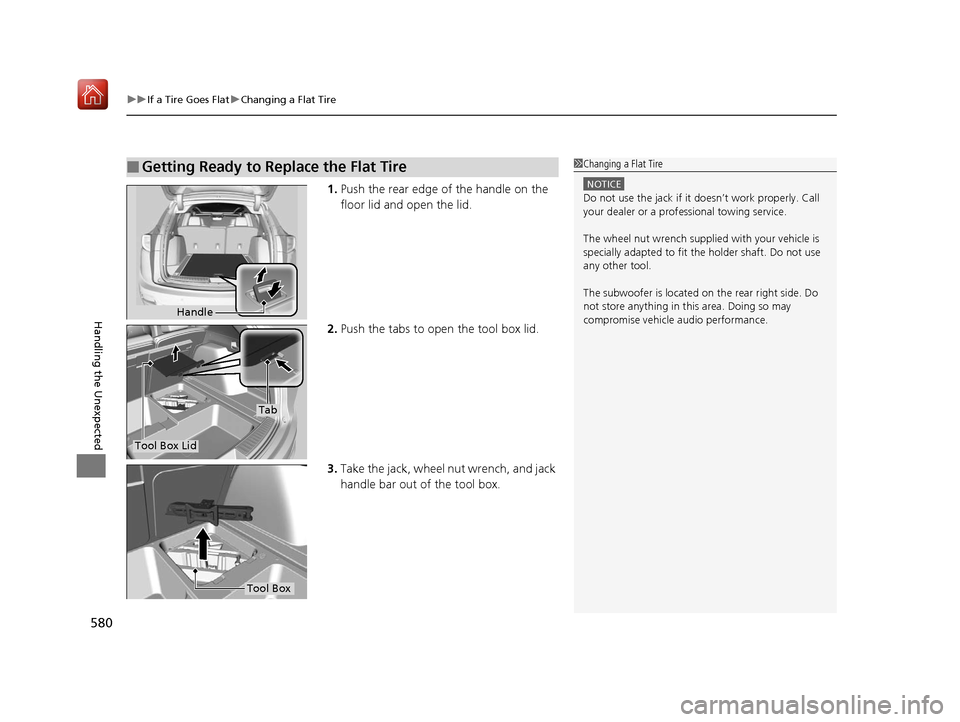
1. Push the rear edge of the handle on the
floor lid and open the lid.
2. Push the tabs to open the tool box lid.
3. Take the jack, wheel nut wrench, and jack
handle bar out of the tool box.
■Getting Ready to Replace the Flat Tire1Changing a Flat Tire
NOTICE
Do not use the jack if it doesn’t work properly. Call
your dealer or a prof essional towing service.
The wheel nut wrench supplied with your vehicle is
specially adapted to fit th e holder shaft. Do not use
any other tool.
The subwoofer is located on the rear right side. Do
not store anything in th is area. Doing so may
compromise vehicle audio performance.
Handle
Tool Box Lid
Tab
Tool Box
19 ACURA RDX-31TJB6000.book 580 ページ 2018年4月26日 木曜日 午後4時51分
Page 605 of 649
604
Handling the Unexpected
Jump Starting
Turn off the power to electric devices, such as audio and lights. Turn off the engine,
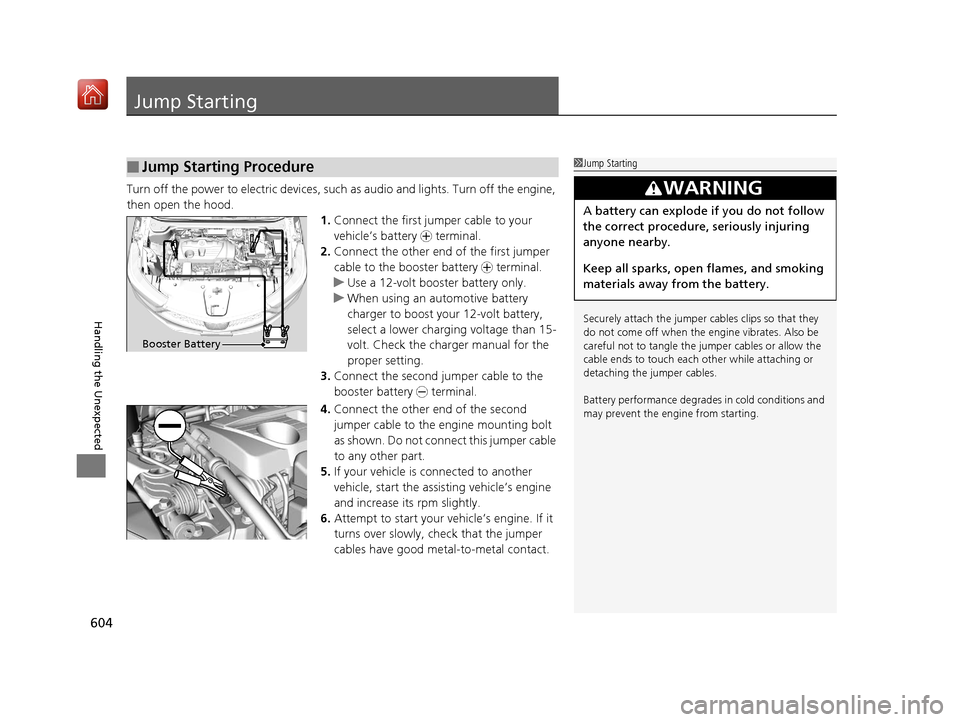
then open the hood. 1.Connect the first jump er cable to your
vehicle’s battery + terminal.
2. Connect the other end of the first jumper
cable to the booster battery + terminal.
u Use a 12-volt booster battery only.
u When using an automotive battery
charger to boost your 12-volt battery,
select a lower charging voltage than 15-
volt. Check the charger manual for the
proper setting.
3. Connect the second jumper cable to the
booster battery - terminal.
4. Connect the other end of the second
jumper cable to the engine mounting bolt
as shown. Do not conn ect this jumper cable
to any other part.
5. If your vehicle is connected to another
vehicle, start the assi sting vehicle’s engine
and increase its rpm slightly.
6. Attempt to start your vehicle’s engine. If it
turns over slowly, check that the jumper
cables have good metal-to-metal contact.
■Jump Starting Procedure1Jump Starting
Securely attach the jumper cables clips so that they
do not come off when the e ngine vibrates. Also be
careful not to tangle the ju mper cables or allow the
cable ends to touch each other while attaching or
detaching the jumper cables.
Battery performance degrades in cold conditions and
may prevent the engi ne from starting.
3WARNING
A battery can explode if you do not follow
the correct procedure, seriously injuring
anyone nearby.
Keep all sparks, open flames, and smoking
materials away from the battery.
Booster Battery
19 ACURA RDX-31TJB6000.book 604 ページ 2018年4月26日 木曜日 午後4時51分