auto lock Acura RDX 2020 Owner's Manual
[x] Cancel search | Manufacturer: ACURA, Model Year: 2020, Model line: RDX, Model: Acura RDX 2020Pages: 657, PDF Size: 33.2 MB
Page 13 of 657
12
Quick Reference Guide
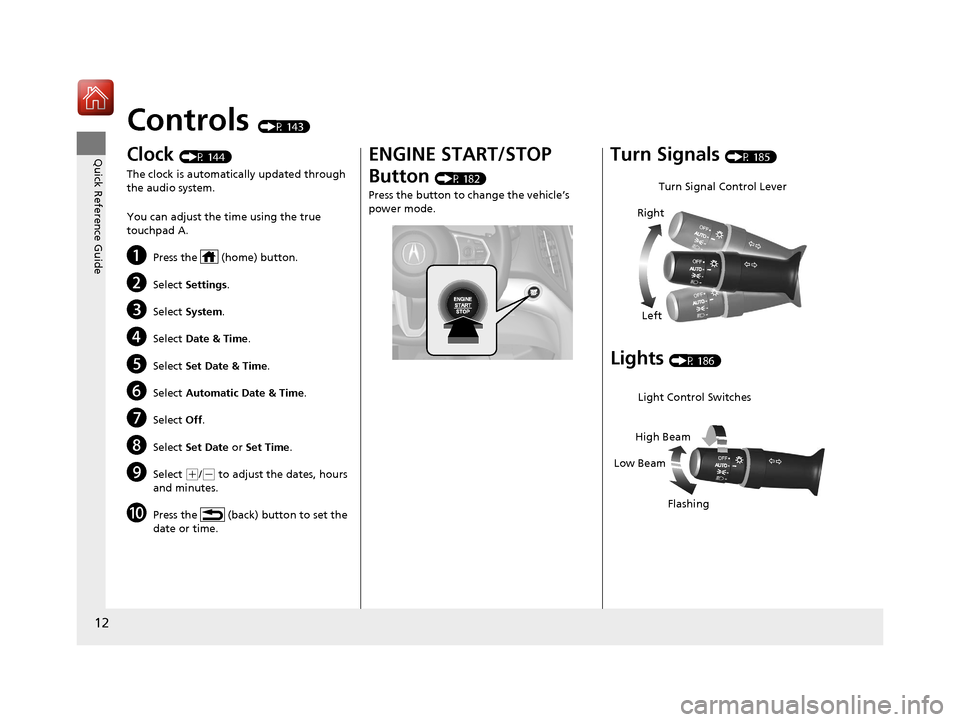
Controls (P 143)
Clock (P 144)
The clock is automatically updated through
the audio system.
You can adjust the time using the true
touchpad A.
aPress the (home) button.
bSelect Settings .
cSelect System .
dSelect Date & Time .
eSelect Set Date & Time .
fSelect Automatic Date & Time .
gSelect Off.
hSelect Set Date or Set Time .
iSelect (+/(- to adjust the dates, hours
and minutes.
jPress the (back) button to set the
date or time.
ENGINE START/STOP
Button
(P 182)
Press the button to change the vehicle’s
power mode.
Turn Signals (P 185)
Lights (P 186)
Turn Signal Control Lever
Right
Left
Light Control Switches
Low Beam High Beam
Flashing
20 ACURA RDX-31TJB6111.book 12 ページ 2020年2月11日 火曜日 午後2時6分
Page 14 of 657
13
Quick Reference Guide
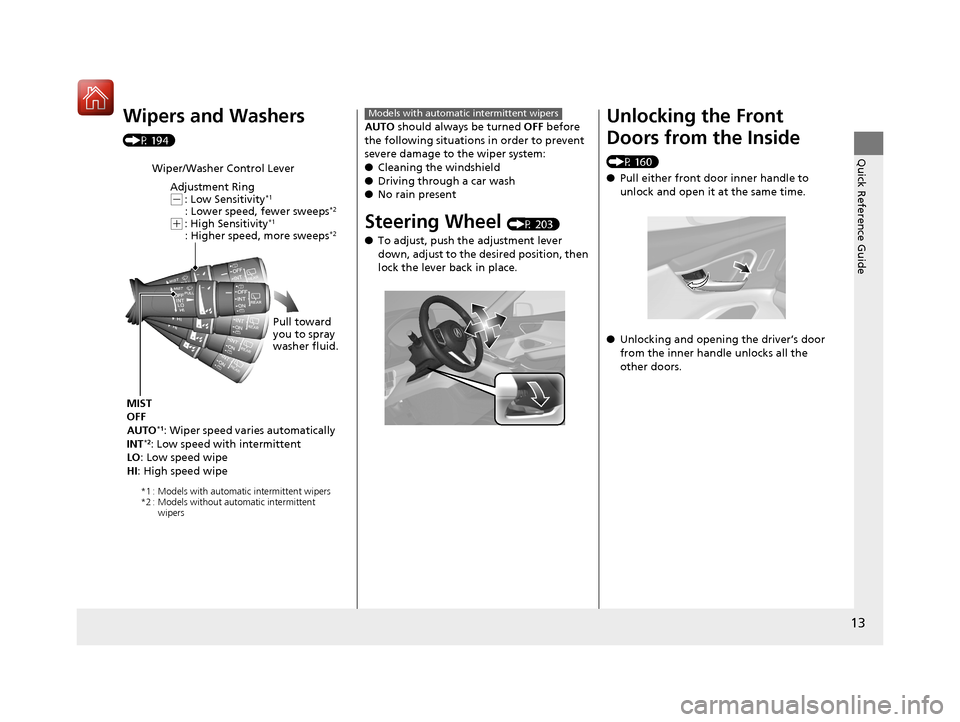
Wipers and Washers
(P 194)
Wiper/Washer Control LeverAdjustment Ring
(-: Low Sensitivity*1
: Lower speed, fewer sweeps*2
(+: High Sensitivity*1
: Higher speed, more sweeps*2
MIST
OFF
AUTO
*1: Wiper speed varies automatically
INT*2: Low speed with intermittent
LO : Low speed wipe
HI : High speed wipe Pull toward
you to spray
washer fluid.
*1 : Models with automatic intermittent wipers
*2 : Models without automatic intermittent
wipers
AUTO should always be turned OFF before
the following situations in order to prevent
severe damage to the wiper system:
● Cleaning the windshield
● Driving through a car wash
● No rain present
Steering Wheel (P 203)
● To adjust, push the adjustment lever
down, adjust to the desired position, then
lock the lever back in place.
Models with automatic intermittent wipersUnlocking the Front
Doors from the Inside
(P 160)
●Pull either front door inner handle to
unlock and open it at the same time.
● Unlocking and opening the driver’s door
from the inner handle unlocks all the
other doors.
20 ACURA RDX-31TJB6111.book 13 ページ 2020年2月11日 火曜日 午後2時6分
Page 20 of 657
19
Quick Reference Guide
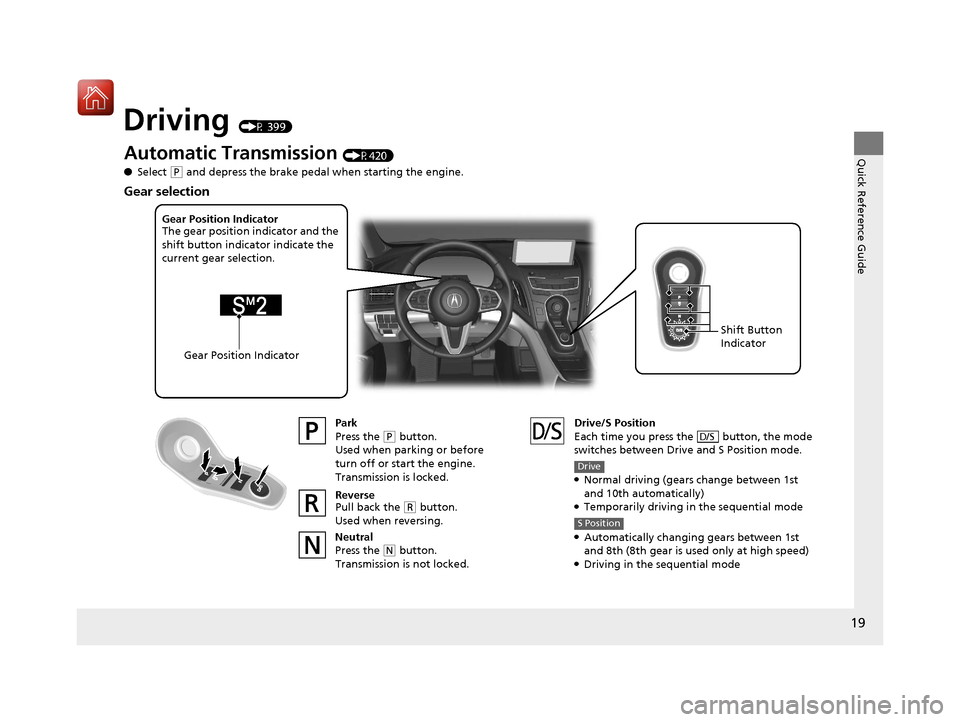
Driving (P 399)
Automatic Transmission (P420)
● Select
(P and depress the brake pedal when starting the engine.
Park
Press the
(P button.
Used when parking or before
turn off or start the engine.
Transmission is locked.
Reverse
Pull back the
( R button.
Used when reversing.
Neutral
Press the
( N button.
Transmission is not locked. Drive/S Position
Each time you press the button, the mode
switches between Drive and S Position mode.
●Normal driving (gears change between 1st
and 10th automatically)
●Temporarily driving in the sequential mode
●Automatically changing gears between 1st
and 8th (8th gear is used only at high speed)
●Driving in the sequential mode
D/S
Drive
S Position
Gear Position Indicator
The gear position indicator and the
shift button indicator indicate the
current gear selection.
Gear Position Indicator Shift Button
Indicator
Gear selection
20 ACURA RDX-31TJB6111.book 19 ページ 2020年2月11日 火曜日 午後2時6分
Page 22 of 657
21
Quick Reference Guide
VSA® On and Off (P 437)
● The Vehicle Stability Assist
TM (VSA® )
system helps stabilize the vehicle during
cornering, and helps maintain traction
while accelerating on loose or slippery
road surfaces.
● VSA ® comes on automatically every time
you start the engine.
● To partially disable or fully restore VSA®
function, press and ho ld the button until
you hear a beep.
CMBSTM On and Off
(P453)
● When a possible collision is likely
unavoidable, the CMBS
TM can help you to
reduce the vehicle speed and the severity
of the collision.
● The CMBS
TM is turned on every time you
start the engine.
● To turn the CMBS
TM on or off, press and
hold the button until you hear a beep.
Tire Pressure Monitoring
System (TPMS) with Tire
Fill Assist
(P 440)
● The TPMS monitors tire pressure.
● TPMS is turned on automatically every
time you start the engine.
● TPMS fill assist provides audible and visual
guidance during tire pressure adjustment.
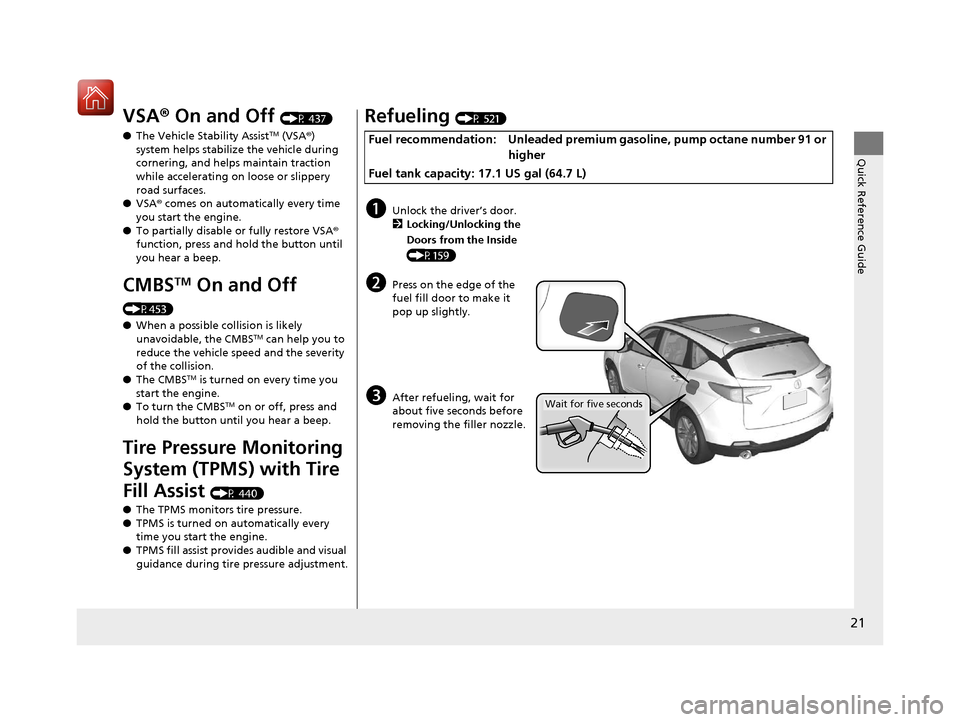
Refueling (P 521)
Fuel recommendation: Unleaded premium gasoline, pump octane number 91 or
higher
Fuel tank capacity: 17.1 US gal (64.7 L)
aUnlock the driver’s door. 2 Locking/Unlocking the
Doors from the Inside
(P159)
bPress on the edge of the
fuel fill door to make it
pop up slightly.
cAfter refueling, wait for
about five seconds before
removing the filler nozzle.Wait for five seconds
20 ACURA RDX-31TJB6111.book 21 ページ 2020年2月11日 火曜日 午後2時6分
Page 26 of 657
25
Quick Reference Guide
What to Do If
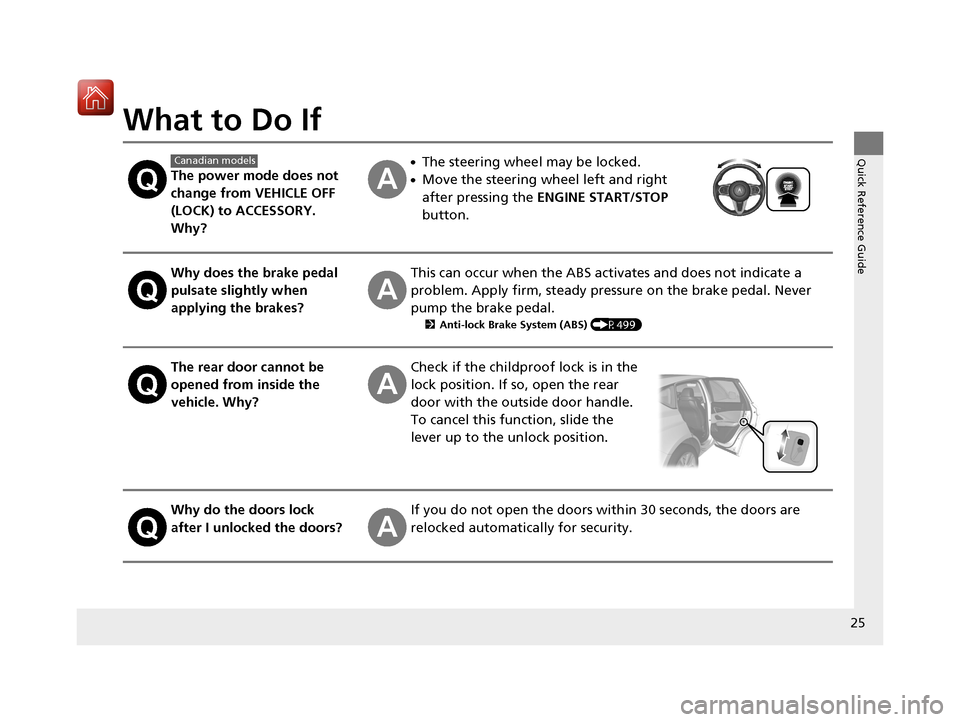
The power mode does not
change from VEHICLE OFF
(LOCK) to ACCESSORY.
Why?
●The steering wheel may be locked.
●Move the steering wheel left and right
after pressing the ENGINE START/STOP
button.
Why does the brake pedal
pulsate slightly when
applying the brakes?This can occur when the ABS activates and does not indicate a
problem. Apply firm, steady pressure on the brake pedal. Never
pump the brake pedal.
2 Anti-lock Brake System (ABS) (P499)
The rear door cannot be
opened from inside the
vehicle. Why?Check if the childproof lock is in the
lock position. If so, open the rear
door with the outside door handle.
To cancel this function, slide the
lever up to the unlock position.
Why do the doors lock
after I unlocked the doors?If you do not open the doors within 30 seconds, the doors are
relocked automatically for security.
Canadian models
20 ACURA RDX-31TJB6111.book 25 ページ 2020年2月11日 火曜日 午後2時6分
Page 27 of 657
26
Quick Reference Guide
Why does the beeper
sound when I open the
driver’s door?The beeper sounds when:
●The power mode is in ACCESSORY.
●The exterior lights are left on.
●The Auto Idle Stop is in operation.
Why does a beeper sound
when I walk away from the
vehicle after I close the
door?The beeper sounds if you move outside the walk away auto lock
operating range before the door completely closes.
2Locking the doors and tailgate (Walk away auto lock ®) (P153)
Why does the beeper
sound when I start driving?The beeper sounds when the driver and/or front passenger are
not wearing their seat belts.
Pulling the electric parking
brake switch does not
release the parking brake.
Why?Pull the electric parking brake switch with the brake pedal
depressed.
I’m seeing an amber
indicator of a tire with an
exclamation point. What is
that?The Tire Pressure Monitoring Sy stem (TPMS) needs attention.
Check tire pressure.
2 If the Low Tire Pressure/TPMS Indicator Comes On or Blinks (P619)
20 ACURA RDX-31TJB6111.book 26 ページ 2020年2月11日 火曜日 午後2時6分
Page 75 of 657
74
Instrument Panel
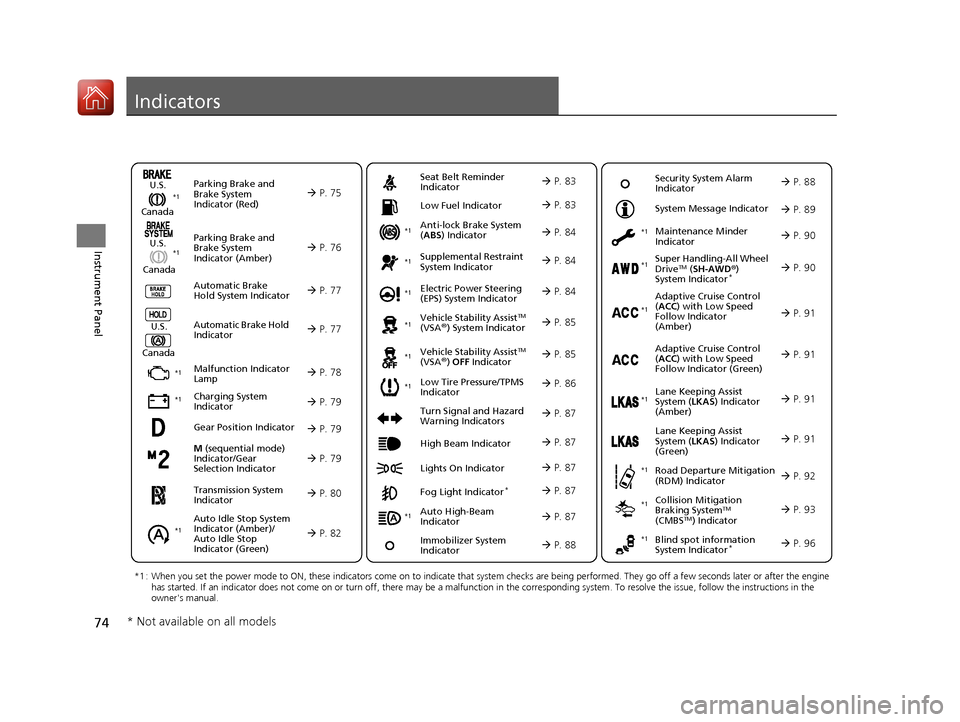
Indicators
M (sequential mode)
Indicator/Gear
Selection Indicator P. 79
Parking Brake and
Brake System
Indicator (Red)
Parking Brake and
Brake System
Indicator (Amber)
U.S.
Canada
U.S.
Canada Automatic Brake
Hold System Indicator
Automatic Brake Hold
IndicatorU.S.
Canada
*1 : When you set the power mode to ON, these indicators come on to indicate that system checks are being performed. They go off a few seconds later or after the engine
has started. If an indicator does not come on or turn off, ther e may be a malfunction in the corresponding system. To resolve the issue, follow the instructions in the
owner's manual.
P. 75*1
Malfunction Indicator
Lamp
Charging System
Indicator
Anti-lock Brake System
(ABS ) Indicator
Seat Belt Reminder
Indicator
Low Fuel Indicator
Vehicle Stability AssistTM
(VSA®) System Indicator
Vehicle Stability Assist
TM
(VSA®) OFF Indicator
Supplemental Restraint
System Indicator
Auto High-Beam
Indicator
Low Tire Pressure/TPMS
Indicator Electric Power Steering
(EPS) System Indicator
Turn Signal and Hazard
Warning Indicators
Lights On Indicator High Beam Indicator
Fog Light Indicator*
Maintenance Minder
Indicator
System Message Indicator
Super Handling-All Wheel
DriveTM (
SH-AWD ®)
System Indicator*
Adaptive Cruise Control
( ACC ) with Low Speed
Follow Indicator
(Amber)
Lane Keeping Assist
System ( LKAS) Indicator
(Amber)
Road Departure Mitigation
(RDM) Indicator
Blind spot information
System Indicator*
P. 76
P. 77
P. 77
P. 78
P. 79*1
*1
P. 86*1
*1
Gear Position Indicator P. 79
Transmission System
Indicator P. 80
Auto Idle Stop System
Indicator (Amber)/
Auto Idle Stop
Indicator (Green)
P. 82
P. 83
P. 83
P. 84
P. 84
P. 87
P. 85
*1
*1
*1
P. 85
*1 P. 84
P. 87
P. 91
*1
P. 87
P. 87
P. 90
P. 87
Immobilizer System
Indicator P. 88
Security System Alarm
Indicator P. 88
P. 89
P. 90
P. 91
P. 92
P. 96
*1
Adaptive Cruise Control
(ACC ) with Low Speed
Follow Indicator (Green) P. 91
*1
Lane Keeping Assist
System ( LKAS) Indicator
(Green) P. 91
*1
*1 *1 *1
*1
Collision Mitigation
Braking SystemTM
(CMBSTM) Indicator
*1 P. 93*1
* Not available on all models
20 ACURA RDX-31TJB6111.book 74 ページ 2020年2月11日 火曜日 午後2時6分
Page 107 of 657
106
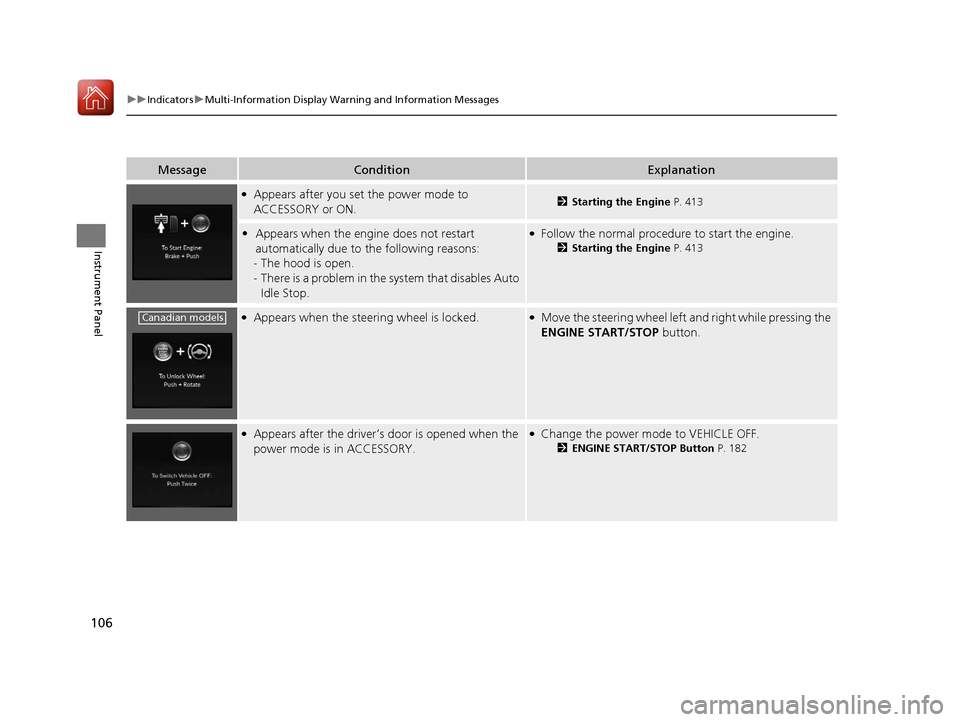
uuIndicators uMulti-Information Display Warn ing and Information Messages
Instrument Panel
MessageConditionExplanation
●Appears after you set the power mode to
ACCESSORY or ON.2Starting the Engine P. 413
•Appears when the engine does not restart
automatically due to the following reasons:
- The hood is open.
- There is a problem in the sy stem that disables Auto
Idle Stop.●Follow the normal procedure to start the engine.
2 Starting the Engine P. 413
●Appears when the steering wheel is locked.●Move the steering wheel left and right while pressing the
ENGINE START/STOP button.
●Appears after the driver’s door is opened when the
power mode is in ACCESSORY.●Change the power mode to VEHICLE OFF.
2ENGINE START/STOP Button P. 182
Canadian models
20 ACURA RDX-31TJB6111.book 106 ページ 2020年2月11日 火曜日 午後2時6分
Page 122 of 657
121
uuIndicators uMulti-Information Display Warning and Information Messages
Continued
Instrument Panel
MessageConditionExplanation
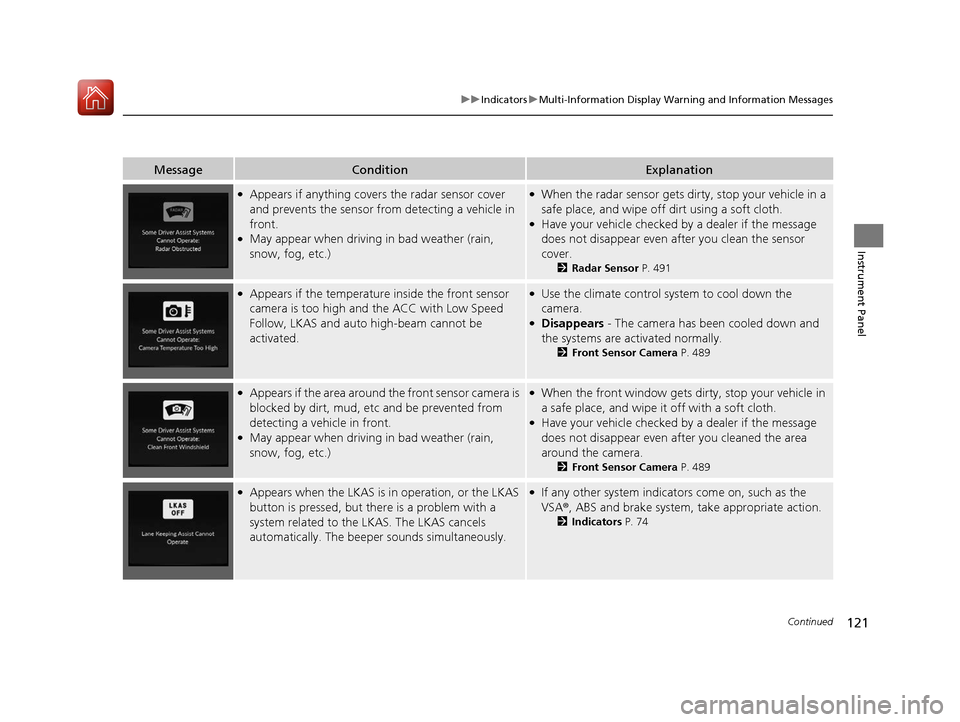
●Appears if anything covers the radar sensor cover
and prevents the sensor fro m detecting a vehicle in
front.
●May appear when driving in bad weather (rain,
snow, fog, etc.)
●When the radar sensor gets dirty, stop your vehicle in a
safe place, and wipe off dirt using a soft cloth.
●Have your vehicle checked by a dealer if the message
does not disappear even after you clean the sensor
cover.
2 Radar Sensor P. 491
●Appears if the temperature inside the front sensor
camera is too high and the ACC with Low Speed
Follow, LKAS and auto high-beam cannot be
activated.●Use the climate control sy stem to cool down the
camera.
●Disappears - The camera has b een cooled down and
the systems are activated normally.
2 Front Sensor Camera P. 489
●Appears if the area around the front sensor camera is
blocked by dirt, mud, etc and be prevented from
detecting a vehicle in front.
●May appear when driving in bad weather (rain,
snow, fog, etc.)
●When the front window gets dirty, stop your vehicle in
a safe place, and wipe it off with a soft cloth.
●Have your vehicle checked by a dealer if the message
does not disappear even a fter you cleaned the area
around the camera.
2 Front Sensor Camera P. 489
●Appears when the LKAS is in operation, or the LKAS
button is pressed, but there is a problem with a
system related to the LKAS. The LKAS cancels
automatically. The beeper sounds simultaneously.●If any other system indicato rs come on, such as the
VSA ®, ABS and brake system, take appropriate action.
2Indicators P. 74
20 ACURA RDX-31TJB6111.book 121 ページ 2020年2月11日 火曜日 午後2時6分
Page 144 of 657
143
Controls
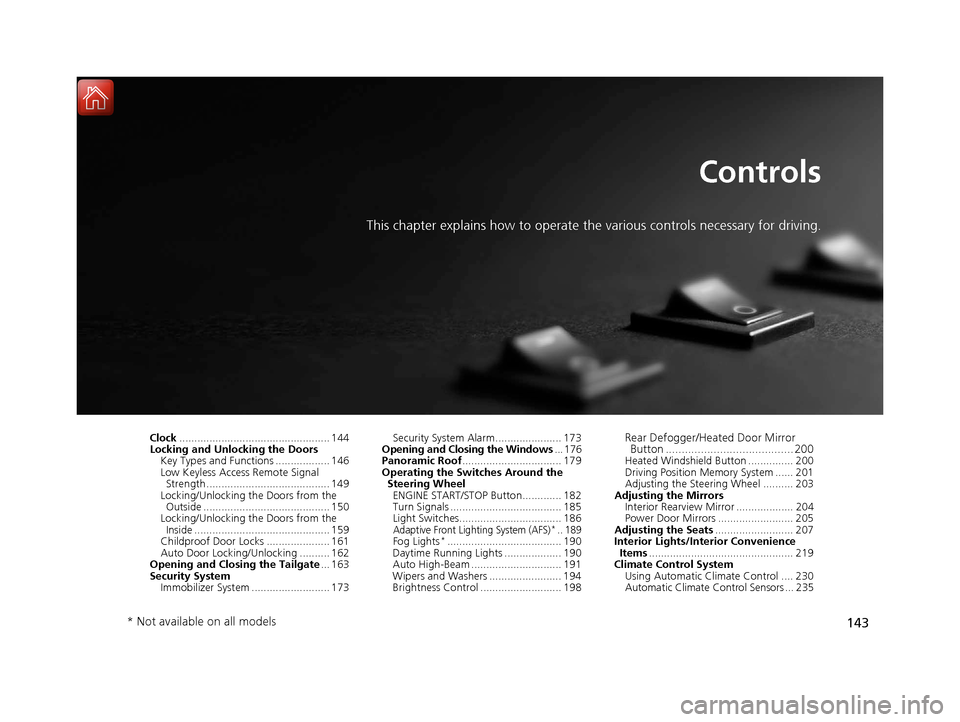
This chapter explains how to operate the various controls necessary for driving.
Clock.................................................. 144
Locking and Unlocking the Doors
Key Types and Functions .................. 146
Low Keyless Access Remote Signal Strength ......................................... 149
Locking/Unlocking the Doors from the Outside .......................................... 150
Locking/Unlocking the Doors from the
Inside ............................................. 159
Childproof Door Locks ..................... 161
Auto Door Locking/Unlocking .......... 162
Opening and Closing the Tailgate ... 163
Security System Immobilizer System .......................... 173 Security System Alarm...................... 173
Opening and Closing the Windows ... 176
Panoramic Roof ................................. 179
Operating the Switches Around the Steering Wheel
ENGINE START/STOP Button............. 182
Turn Signals ..................................... 185
Light Switches.................................. 186
Adaptive Front Lighting System (AFS)*.. 189Fog Lights*...................................... 190
Daytime Running Lights ................... 190
Auto High-Beam .............................. 191
Wipers and Washers ........................ 194
Brightness Control ........................... 198
Rear Defogger/Heated Door Mirror Button ........................................ 200
Heated Windshield Button ............... 200
Driving Position Memory System ...... 201
Adjusting the Steering Wheel .......... 203
Adjusting the Mirrors Interior Rearview Mirror ................... 204
Power Door Mirrors ......................... 205
Adjusting the Seats .......................... 207
Interior Lights/Interior Convenience Items ................................................ 219
Climate Control System Using Automatic Climate Control .... 230
Automatic Climate Control Sensors ... 235
* Not available on all models
20 ACURA RDX-31TJB6111.book 143 ページ 2020年2月11日 火曜日 午後2時6分