on mode Acura RDX 2020 Owner's Manual
[x] Cancel search | Manufacturer: ACURA, Model Year: 2020, Model line: RDX, Model: Acura RDX 2020Pages: 657, PDF Size: 33.2 MB
Page 450 of 657
449
uuAcuraWatchTMu
Driving
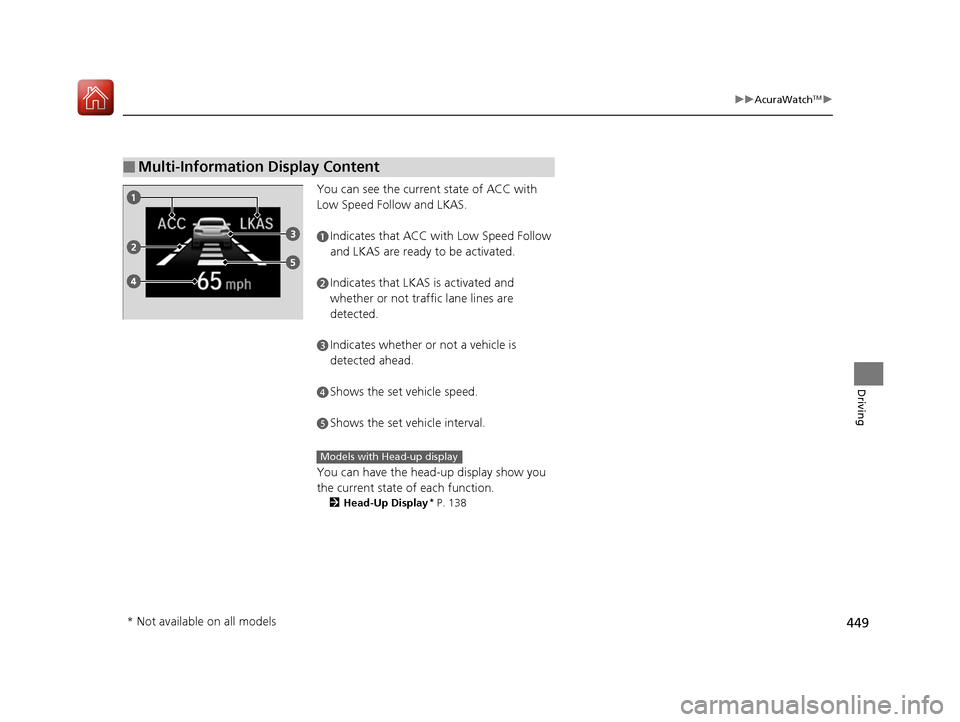
You can see the current state of ACC with
Low Speed Follow and LKAS.
You can have the head-up display show you
the current state of each function.
2Head-Up Display* P. 138
■Multi-Information Display Content
aIndicates that ACC with Low Speed Follow
and LKAS are ready to be activated.
bIndicates that LKAS is activated and
whether or not traffic lane lines are
detected.
cIndicates whether or not a vehicle is
detected ahead.
dShows the set vehicle speed.
eShows the set vehicle interval.
Models with Head-up display
* Not available on all models
20 ACURA RDX-31TJB6111.book 449 ページ 2020年2月11日 火曜日 午後2時6分
Page 452 of 657
Continued451
uuAcuraWatchTMuCollision Mitigation Braking SystemTM (CMBSTM)
Driving
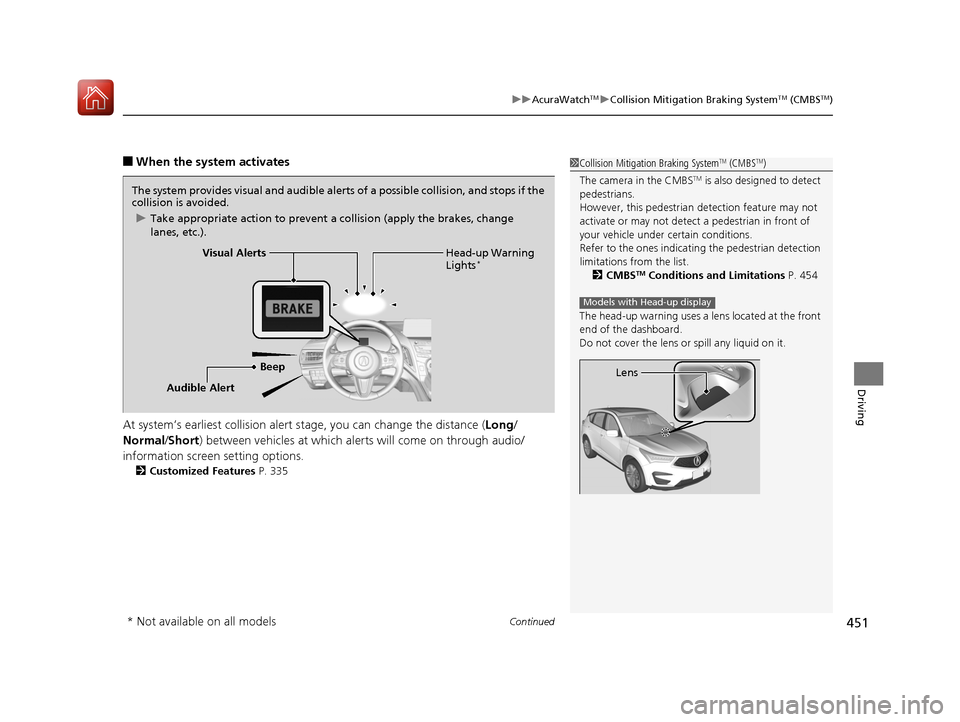
■When the system activates
At system’s earliest collision alert st age, you can change the distance (Long/
Normal /Short ) between vehicles at which alerts will come on through audio/
information screen setting options.
2 Customized Features P. 335
1Collision Mitigation Braking SystemTM (CMBSTM)
The camera in the CMBS
TM is also designed to detect
pedestrians.
However, this pedestrian detection feature may not
activate or may not detect a pedestrian in front of
your vehicle under certain conditions.
Refer to the ones indicating the pedestrian detection
limitations from the list. 2 CMBS
TM Conditions and Limitations P. 454
The head-up warning uses a lens located at the front
end of the dashboard.
Do not cover the lens or spill any liquid on it.
Models with Head-up display
Lens
The system provides visual and audible alerts of a possible collisi on, and stops if the
collision is avoided.
u Take appropriate action to prevent a collision (apply the brakes, change
lanes, etc.).
Beep Head-up Warning
Lights
*Visual Alerts
Audible Alert
* Not available on all models
20 ACURA RDX-31TJB6111.book 451 ページ 2020年2月11日 火曜日 午後2時6分
Page 456 of 657
455
uuAcuraWatchTMuCollision Mitigation Braking SystemTM (CMBSTM)
Continued
Driving
■Vehicle conditions
• Headlight lenses are dirty or the h eadlights are not properly adjusted.
• The outside of the windshield is blocked by dirt, mud, leaves, wet snow, etc.
• The inside of the windshield is fogged.
• An abnormal tire or wheel condition (wrong sized, varied size or construction,
improperly inflated, compact spare tire
*, etc.).
• When tire chains are installed.
• The vehicle is tilted due to a heavy load or suspension modifications.
• The camera temperature gets too high.
• Driving with the parking brake applied.
• When the radar sensor behind the emblem gets dirty.
• The vehicle is towing a trailer.
* Not available on all models
20 ACURA RDX-31TJB6111.book 455 ページ 2020年2月11日 火曜日 午後2時6分
Page 465 of 657

uuAcuraWatchTMuAdaptive Cruise Control (ACC) with Low Speed Follow
464
Driving
■There is a vehicle ahead
ACC with Low Speed Follow monitors if a ve hicle ahead of you enters the ACC with
Low Speed Follow range. If a vehicle is detected doing so, the ACC with Low Speed
Follow system maintains or decelerates your vehicle’s set speed in order to keep the
vehicle’s set followi ng-interval from the vehicle ahead.
2To Set or Change Following-interval P. 471
When a vehicle whose speed is slower than
your set speed is detected in front of you, your
vehicle starts to slow down.
■When in Operation1 When in Operation
If the vehicle ahead of you slows down abruptly, or if
another vehicle cuts in front of you, the beeper
sounds, a message appears on the multi-information
display, and the head-up warning lights
* flash.
Depress the brake pedal, and keep an appropriate
interval from the vehicle ahead.
Beep Head-up
Warning Lights
*
ACC with Low Speed Follow Range: 394 ft. (120 m)
A vehicle icon appears on the
multi-information display.
* Not available on all models
20 ACURA RDX-31TJB6111.book 464 ページ 2020年2月11日 火曜日 午後2時6分
Page 468 of 657
Continued467
uuAcuraWatchTMuAdaptive Cruise Control (ACC) with Low Speed Follow
Driving
The system may automatically shut off and the ACC with Low Speed Follow
indicator will come on under certain conditions. Some examples of these conditions
are listed below. Other conditions may reduce some of the ACC with Low Speed
Follow functions.
2 Front Sensor Camera P. 489
■Environmental conditions
Driving in bad weather (r ain, fog, snow, etc.).
■Roadway conditions
Driving on a snowy or wet roadway (obscure d lane marking, vehicle tracks, reflected
lights, road spra y, high contrast).
■Vehicle conditions
• The outside of the windshield is blocked by dirt, mud, leaves, wet snow, etc.
• An abnormal tire or wheel condition (Wrong sized, varied size or construction,
improperly inflated, compact spare tire
*, etc.).
• The camera temperature gets too high.
• The parking brake is applied.
• When the radar sensor cover is dirty.
• The vehicle is tilted due to a heavy load or suspension modifications.
• When tire chains are installed.
■ACC with Low Speed Follow Conditions and Limitations1ACC with Low Speed Follow Conditions and Limitations
Have your vehicle checked by a dealer if you find any
unusual behavior of the system (e.g., the warning
message appears too frequently).
* Not available on all models
20 ACURA RDX-31TJB6111.book 467 ページ 2020年2月11日 火曜日 午後2時6分
Page 476 of 657

Continued475
uuAcuraWatchTMuAdaptive Cruise Control (ACC) with Low Speed Follow
Driving
Press and hold the (interval) button for one
second. Cruise Mode Selected appears on
the multi-information display for two seconds,
and then the mode switches to Cruise.
To switch back to ACC with Low Speed
Follow, press and hold the button again for
one second.
■When to use
Desired speed in a range above roughly 25 mph (40 km/h) ~.
Take your foot off the pedal and press the RES/+/SET/– switch down when you
reach the desired speed.
The moment you release the RES/+/SET/– switch, the set speed is fixed, and cruise
control begins. The CRUISE CONTROL indicator comes on.
When you use cruise control, Straight Drivin g Assist (a feature of the Electric Power
Steering system) is activated.
By enabling the steering system to automa tically compensate for natural steering
pull, Straight Driv ing Assist makes it easier for you to keep your vehicle in a straight
line.
■To Switch ACC with Low Speed Follow to Cruise Control1 To Switch ACC with Low Speed Follow to Cruise Control
Always be aware which mode you are in. When you
are driving in Cruise mode, the system will not assist
you to maintain a followi ng interval from a vehicle
ahead of you.
You can switch the displayed set speed
measurements on the multi- information display or
audio/information screen between mph and km/h.
2 Speed/Distance Units P. 134
2 Customized Features P. 335
Resuming the prior set speed:
After cruise control has be en canceled, you can still
resume the prior set speed by pressing the RES/+/
SET/– switch up while driving at a speed of at least
25 mph (40 km/h) or more.
You cannot set or resume in the following situations:
•When vehicle speed is less than 25 mph (40 km/h)
•When the MAIN button is turned off.
At vehicle speeds of 22 m ph (35 km/h) or less, cruise
control is canceled automatically.
ACC with
Low Speed
Follow ON Cruise
Control ON
■To Set the Vehicle Speed
20 ACURA RDX-31TJB6111.book 475 ページ 2020年2月11日 火曜日 午後2時6分
Page 482 of 657
481
uuAcuraWatchTMuLane Keeping Assist System (LKAS)
Continued
Driving
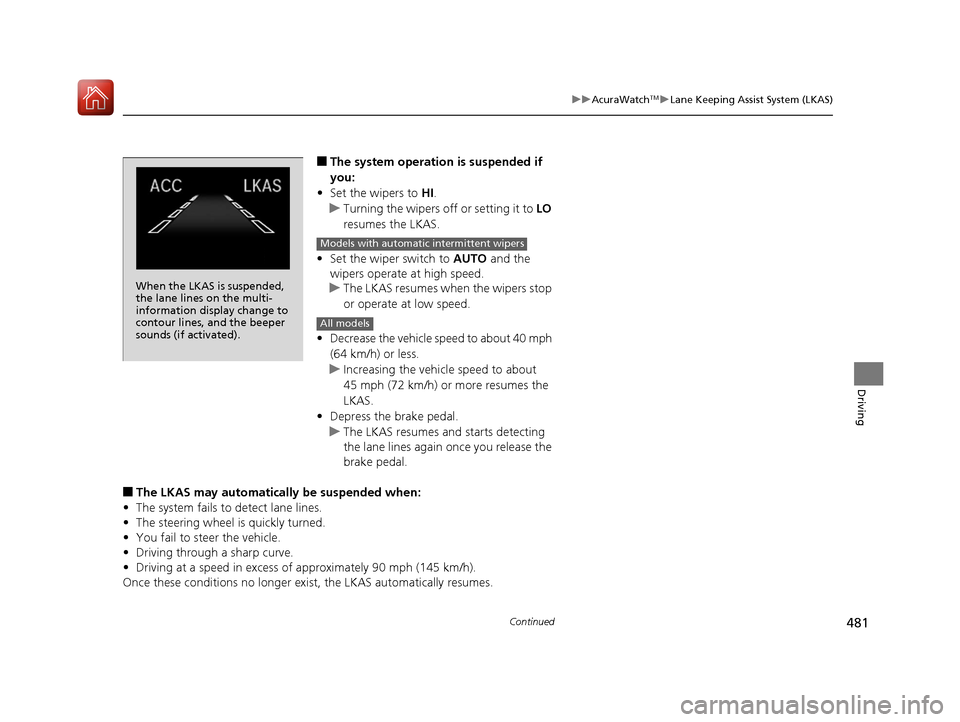
■The system operation is suspended if
you:
• Set the wipers to HI .
u Turning the wipers o ff or setting it to LO
resumes the LKAS.
• Set the wiper switch to AUTO and the
wipers operate at high speed.
u The LKAS resumes when the wipers stop
or operate at low speed.
• Decrease the vehicle speed to about 40 mph
(64 km/h) or less.
u Increasing the vehicle speed to about
45 mph (72 km/h) or more resumes the
LKAS.
• Depress the brake pedal.
u The LKAS resumes and starts detecting
the lane lines again once you release the
brake pedal.
■The LKAS may automatica lly be suspended when:
• The system fails to detect lane lines.
• The steering wheel is quickly turned.
• You fail to steer the vehicle.
• Driving through a sharp curve.
• Driving at a speed in excess of approximately 90 mph (145 km/h).
Once these conditions no longer exist, the LKAS automatically resumes.
When the LKAS is suspended,
the lane lines on the multi-
information display change to
contour lines, and the beeper
sounds (if activated).
Models with automatic intermittent wipers
All models
20 ACURA RDX-31TJB6111.book 481 ページ 2020年2月11日 火曜日 午後2時6分
Page 485 of 657
484
uuAcuraWatchTMuLane Keeping Assist System (LKAS)
Driving
• When objects on the road (curb, guard rail, pylons, etc.) are recognized as white
lines (or yellow lines).
• Driving on roads with double lines.
■Vehicle conditions
• Headlight lenses are dirty or the headlights are not properly adjusted.
• The outside of the windshield is streake d or blocked by dirt, mud, leaves, wet
snow, etc.
• The inside of the windshield is fogged.
• The camera temperature gets too high.
• An abnormal tire or wheel condition (wrong sized, varied size or construction,
improperly inflated, compact spare tire
*, etc.).
• The vehicle is tilted due to a heav y load or suspension modifications.
• The vehicle is towing a trailer.
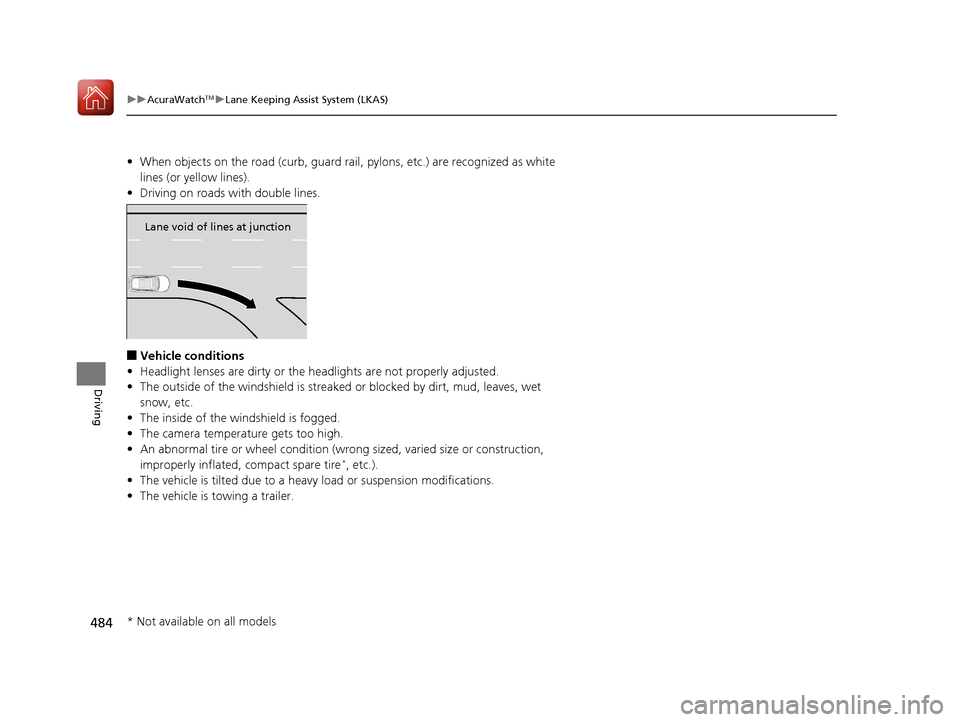
Lane void of lines at junction
* Not available on all models
20 ACURA RDX-31TJB6111.book 484 ページ 2020年2月11日 火曜日 午後2時6分
Page 489 of 657
488
uuAcuraWatchTMuRoad Departure Mitigation (RDM) System
Driving
■Roadway conditions
• Driving on a snowy or wet roadway (obs cured lane marking, vehicle tracks,
reflected lights, road spray, high contrast).
• Driving on a road with temporary lane markings.
• Faint, multiple, or varied lane markings are visible on the roadway due to road
repairs or old lane markings.
• The roadway has merging, split, or crossing lines (e.g., such as at an intersection
or crosswalk).
• The lane markings are extremely narrow, wide, or changing.
• The vehicle in front of you is driving near the lane lines.
• The road is hilly or the vehicle is approaching the crest of a hill.
• Driving on rough or unpaved roads, or over bumpy surfaces.
• When objects on the road (curb, guard rail, pylons, etc.) are recognized as white
lines (or yellow lines).
• Driving on roads with double lines.
■Vehicle conditions
• Headlight lenses are dirty or the headlights are not properly adjusted.
• The outside of the windshield is streake d or blocked by dirt, mud, leaves, wet
snow, etc.
• The inside of the windshield is fogged.
• The camera temperature gets too high.
• An abnormal tire or wheel condition (wrong sized, varied size or construction,
improperly inflated, compact spare tire
*, etc.).
• The vehicle is tilted due to a heav y load or suspension modifications.
• When tire chains are installed.
• The vehicle is towing a trailer.
* Not available on all models
20 ACURA RDX-31TJB6111.book 488 ページ 2020年2月11日 火曜日 午後2時6分
Page 491 of 657

uuAcuraWatchTMuFront Sensor Camera
490
Driving
1Front Sensor Camera
If the Some Driver Assist Systems Cannot
Operate: Camera Temperature Too High message
appears:
•Use the climate control system to cool down the
interior and, if necessary, also use defroster mode
with the airflow directed towards the camera.
•Start driving the vehicle to lower the windshield
temperature, which cool s down the area around
the camera.
If the Some Driver Assist Systems Cannot
Operate: Clean Front Windshield message
appears:
•Park your vehicle in a sa fe place, and clean the
windshield. If the message does not disappear after
you have cleaned the windshield and driven for a
while, have your vehicle checked by a dealer.
20 ACURA RDX-31TJB6111.book 490 ページ 2020年2月11日 火曜日 午後2時6分