ECO mode ACURA RDX 2023 Manual Online
[x] Cancel search | Manufacturer: ACURA, Model Year: 2023, Model line: RDX, Model: ACURA RDX 2023Pages: 713, PDF Size: 21.99 MB
Page 485 of 713

483Continued
Driving
AcuraWatchTM
AcuraWatchTM is a driver support system which employs the use of two distinctly
different kinds of sensors, a radar sensor located behind the emblem, and a front
sensor camera mounted to the interior side of the windshield, behind the rearview
mirror.
AcuraWatch
TM is a driver support sy stem which employs the us e of three distinctly
different kinds of sensors, a radar sensor located behind the emblem, a front sensor
camera mounted to the interior side of the windshield, behind the rearview mirror,
and the sonar sensors located in the front and rear bumpers.
AcuraWatch
TM has the following functions.
■The functions which do not requir e switch operations to activate
• Collision Mitigation Braking SystemTM (CMBSTM) 2 P. 486
• Low Speed Braking Control* 2 P. 497
• Road Departure Mitigation System 2 P. 530
• Traffic Sign Recognition System 2 P. 535
■The functions wh ich require switch operations to activate
• Adaptive Cruise Control ( ACC) with Low Speed Follow
2 P. 502
• Lane Keeping Assist System (LKAS) 2 P. 522
Models without Low Speed Braking Control
Models with Low Speed Braking Control
* Not available on all models
23 ACURA RDX-31TJB6400.book 483 ページ 2022年8月4日 木曜日 午後1時51分
Page 500 of 713

uuAcuraWatchTMuLow Speed Braking Control*
498
Driving
The Low Speed Braking Control provides a visual and audible alert when the vehicle
is moving between approximately 1 and 6 mph (2 and 10 km/h) and there is the
possibility of a collision with a detected wall or other obstacle, as well as providing
assistance with braking.
If the only rear sensors are turned off using the parking sensor system, the assistive
braking will not work when reversing.
2 Turning off All Rear Sensors P. 560
■How the System Works1Low Speed Braking Control*
For directions on the prop er handling of the sonar
sensors, please refer to the following page.
2 Sonar Sensors
* P. 544
The vehicle will release the brake and start moving a
few seconds after the system is activated. To keep the
vehicle stopped, keep the brake pedal depressed or
put the transmission into
( P.
In order to prevent the sy stem from activating when
not needed, always turn it off during vehicle
maintenance, when loading on ships, trucks, and so
on, or when using a chas sis dynamometer or free
rollers for inspection or when washing the car in
conveyor type car wash machine.
If you put any accessories (such as a towing hitch or
bicycle rack) on or around the rear sensors, the Low
Speed Braking Control Syst em may activate if it
detects these accessories as an obstacle. In this case,
turn off the rear sensor. 2 Turning off All Rear Sensors P. 560
Beep Beep
The vehicle
applies brake Driver
depresses
brake pedal Remove
brake after
maintaining
stationary
position
Stop
Audible Alert
* Not available on all models
23 ACURA RDX-31TJB6400.book 498 ページ 2022年8月4日 木曜日 午後1時51分
Page 520 of 713

uuAcuraWatchTMuAdaptive Cruise Control (ACC) with Low Speed Follow
518
Driving
Press and hold the interval button for one
second. Cruise Mode Selected appears on
the multi-information display for two seconds,
and then the mode switches to Cruise.
The comes on.
• Green: The system is on.
• White: The system is standby.
To switch back to ACC with Low Speed
Follow, press and hold the interval button
again for one second.
■When to use
Desired speed in a range above roughly 25 mph (40 km/h).
Take your foot off the pedal and press the RES/+ /SET/– switch down when you
reach the desired speed.
The moment you release the RES/+/SET/– switch, the set speed is fixed, and cruise
control begins. The indicator (green) comes on.
When you use cruise control, Straight Driving Assist (a feature of the Electric Power
Steering system) is activated.
By enabling the steering system to automa tically compensate for natural steering
pull, Straight Driving Assist makes it easier for you to keep your vehicle in a straight
line.
■To Switch ACC with Low Speed Follow to Cruise Control1 To Switch ACC with Low Speed Follow to Cruise Control
Always be aware which mode you are in. When you
are driving in Cruise mode, the system will not assist
you to maintain a following-interval from a vehicle
ahead of you.
You can switch the displayed set speed
measurements on the multi- information display or
audio/information screen between mph and km/h.
2 Speedometer P. 136
2 Customized Features P. 359
ACC with
Low Speed
Follow ONCruise
Control ON
Press and hold the
interval button
(white) (white)
Interval Button
■To Set the Vehicle Speed
23 ACURA RDX-31TJB6400.book 518 ページ 2022年8月4日 木曜日 午後1時51分
Page 531 of 713
529
uuAcuraWatchTMuLane Keeping Assist System (LKAS)
Driving
• When objects on the road (curb, guard rail, pylons, etc.) are recognized as white
(or yellow) lines.
• Driving on roads with double lines.
■Vehicle conditions
• Headlight lenses are dirty or the h eadlights are not properly adjusted.
• The outside of the windshield is streaked or blocked by dirt, mud, leaves, wet
snow, etc.
• The inside of the windshield is fogged.
• The camera temperature gets too high.
• An abnormal tire or wheel condition (inco rrect sizes, varied sizes or construction,
improperly inflated, compact spare tire
*, etc.).
• The vehicle is tilted due to a heavy load or suspension modifications.
• The vehicle is towing a trailer.
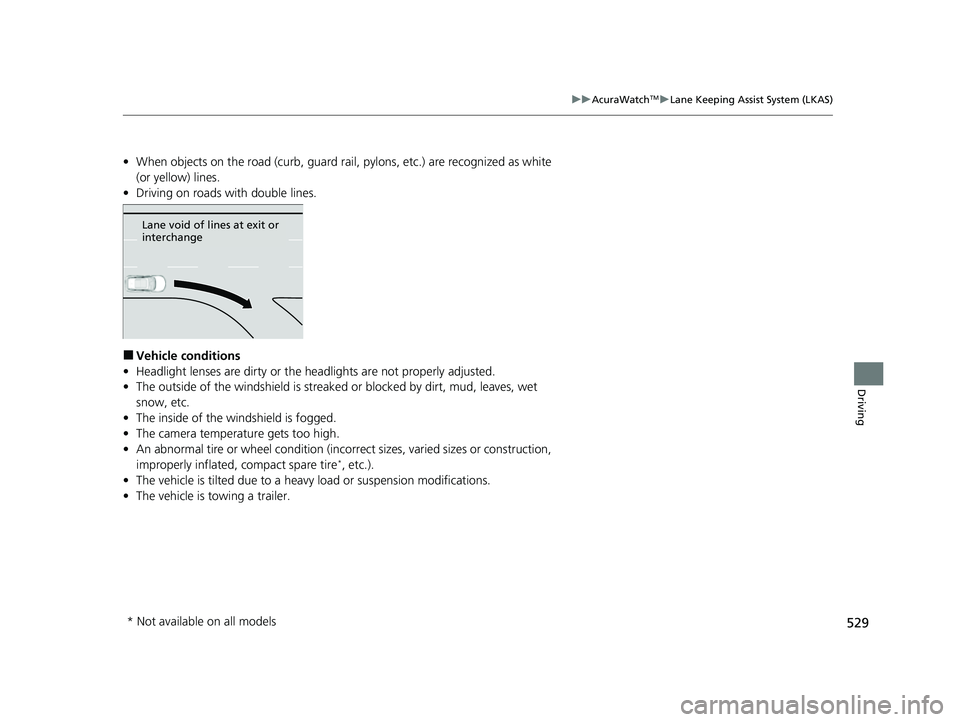
Lane void of lines at exit or
interchange
* Not available on all models
23 ACURA RDX-31TJB6400.book 529 ページ 2022年8月4日 木曜日 午後1時51分
Page 536 of 713
534
uuAcuraWatchTMuRoad Departure Mitigation System
Driving
■Roadway conditions
• Driving on a snowy or wet roadway (obs cured lane marking, vehicle tracks,
reflected lights, road spray, high contrast).
• Driving on a road with temporary lane markings.
• Faint, multiple, or varied lane markings are visible on the roadway due to road
repairs or old lane markings.
• The roadway has merging, split, or crossing lines (e.g., such as at an intersection
or crosswalk).
• The lane markings are extremely narrow, wide, or changing.
• The vehicle in front of you is driving near the lane lines.
• The road is hilly or the vehicle is approaching the crest of a hill.
• Driving on rough or unpaved roads, or over bumpy surfaces.
• When objects on the road (curb, guard rail, pylons, etc.) are recognized as white
(or yellow) lines.
• Driving on roads with double lines.
■Vehicle conditions
• Headlight lenses are dirty or the headlights are not properly adjusted.
• The outside of the windshield is streake d or blocked by dirt, mud, leaves, wet
snow, etc.
• The inside of the windshield is fogged.
• The camera temperature gets too high.
• An abnormal tire or wheel condition (incorre ct sizes, varied sizes or construction,
improperly inflated, compact spare tire
*, etc.).
• The vehicle is tilted due to a heav y load or suspension modifications.
• When tire chains are installed.
• The vehicle is towing a trailer.
* Not available on all models
23 ACURA RDX-31TJB6400.book 534 ページ 2022年8月4日 木曜日 午後1時51分
Page 537 of 713

535
uuAcuraWatchTMuTraffic Sign Recognition System
Continued
Driving
Traffic Sign Recognition System
Reminds you of road sign information of th e current speed limit your vehicle has just
passed through, showing it on the multi-information display and the head-up
display
*.
1 Traffic Sign Recognition System
Not all signs may be displa yed, but any signs posted
on roadsides should not be ignored. The system does
not work on the designated traffic signs of all the
countries you travel, nor in all situations.
Do not rely too much on the system. Always drive at
speeds appropriate fo r the road conditions.
Never apply a film or attach any objects to the
windshield that could obstruc t the camera’s field of
vision and cause the system to operate abnormally.
Scratches, nicks, and othe r damage to the windshield
within the camera’s field of vision can cause the
system to operate abnormally. If this occurs, we
recommend that you replace the windshield with a
genuine Acura replacement windshield. Making even
minor repairs within the ca mera’s field of vision or
installing an aftermarket replacement windshield may
also cause the system to operate abnormally. After
replacing the windshield, have a dealer recalibrate the
camera. Proper calibration of the camera is necessary
for the system to operate properly.
To help reduce the likelihood that high interior
temperatures will cause the camera’s sensing system to
shut off, when parking, find a shady area or face the front
of the vehicle away from the sun. If you use a reflective sun
shade, do not allow it to cover the camera housing.
Covering the camera can concentrate heat on it.
You can read about handling information for the
camera equipped with this system. 2 Front Sensor Camera P. 541
* Not available on all models
23 ACURA RDX-31TJB6400.book 535 ページ 2022年8月4日 木曜日 午後1時51分
Page 538 of 713

uuAcuraWatchTMuTraffic Sign Recognition System
536
Driving
Shows the current speed limit based on either information compiled through the
navigation system* or speed limit signs captured by the front sensor camera. The
system displays the ones that are recognized as designated for your vehicle. The sign
icon will be displayed until the vehicle reaches a predetermined time and distance.
If the system does not detect any traffic signs while you are driving, the sign icon will
not be displayed.
The sign icon also may switch to another one or disappear when:
• The other designated limit is detected.
• You make a turn with a turn signal at an intersection.
■How the System Works1Traffic Sign Recognition System
You can select whether the source of the speed limit
information is the front sensor camera or the
navigation system.
You can also turn off speed limit information. 2 Customized Features P. 359
You can turn on or off the speed limit information. 2 Customized Features P. 359
Models with navigation system
Models without navigation system
Multi-Information DisplayHead-up display*
* Not available on all models
23 ACURA RDX-31TJB6400.book 536 ページ 2022年8月4日 木曜日 午後1時51分
Page 539 of 713

Continued537
uuAcuraWatchTMuTraffic Sign Recognition System
Driving
The Traffic Sign Recognition system may inco rrectly recognize, be slow to identify,
or fail to recognize the traffic sign in the following cases.
■Vehicle conditions
• Headlight lenses are dirty or the h eadlights are not properly adjusted.
• The outside of the windshield is blocked by dirt, mud, leaves, wet snow, etc.
• The inside of the windshield is fogged.
• There are portions remaining to be wiped.
• An abnormal tire or wheel condition (inco rrect sizes, varied sizes or construction,
improperly inflated, compact spare tire
*, etc.).
• The vehicle is tilted due to a heavy load or suspension modifications.
■Environmental conditions
• Driving into low sunlight (e.g., at dawn or dusk).
• Strong light is reflec ted onto the roadway.
• Sudden changes between light and dark, such as an entrance or exit of a tunnel.
• When you drive in the shad ows of trees, buildings, etc.
• Driving at night, in dark areas such as long tunnels.
• Driving in bad weather (rain, fog, snow, etc.).
• A vehicle in front of you is kicking up spray or snow.
■Traffic Sign Recognition System Conditions and Limitations1Traffic Sign Recognition System Conditions and Limitations
When the Traffic Sign Recognition system
malfunctions, appears on the multi-information
display and the head-up display
*. If this message does
not disappear, have your ve hicle checked by a dealer.
Multi-Information Display
Head-up display*
* Not available on all models
23 ACURA RDX-31TJB6400.book 537 ページ 2022年8月4日 木曜日 午後1時51分
Page 542 of 713

540
uuAcuraWatchTMuTraffic Sign Recognition System
Driving
The speed limit sign icon is displayed on the right half of the screen.
■Signs Displayed on the Multi-Information Display and Head-
up Display*
Speed Limit Sign
Multi-Information Display
Speed Limit Sign
Head-up display
* Not available on all models
23 ACURA RDX-31TJB6400.book 540 ページ 2022年8月4日 木曜日 午後1時51分
Page 550 of 713

uuBraking uBrake System
548
Driving
■Activating and deactivating the au tomatic parking brake feature
With the power mode in ON, carry out the following steps to either activate or
deactivate the automatic parking brake feature.
1. Put the transmission into
(P.
2. Without depressing the brake pedal, press and release the parking brake switch.
u Check that the Parking Brake and Brake System indicator (red) has come on.
3. Press and hold the parking brake switch. When you hear a beeping sound, release
the switch and within 3 seconds press and hold the switch again.
4. When you hear a sound indicating that the procedure is completed, release the
switch.
u Two beeps indicates that the feature has been activated.
u One beep indicates that the feature has been deactivated.
u When you have completed activating the feature, the parking brake will
remain applied after you turn off the engine.
u To confirm that the parking brake is ap plied, check if the Parking Brake and
Brake System indicator (red) is on.
If you need to temporarily deactivate the feature while putting your vehicle through
a conveyor type car wash or when having your vehicle towed. You can follow the
procedure explained below.
1. Depress the brake pedal and bring the vehicle to a stop.
2. Set the power mode to VEHICLE OFF and then within 2 seconds pull up the
parking brake switch.
u Activation and deactivation settings fo r the feature will not be affected.
u Before temporarily deactivating the feat ure, make sure to first turn off both
ACC with Low Speed Follow and th e automatic brake hold system.
u To confirm that the parking brake is ap plied, check if the Parking Brake and
Brake System indicator (red) is on.
1 Parking Brake
In cold climates, the parking brake may freeze in
place if applied.
When parking the vehicle, chock the wheels and
make sure the automatic parking brake feature is
deactivated.
Also, when putting your vehicle through a conveyor-
type car wash or when ha ving your vehicle towed,
deactivate the automatic parking brake feature and
leave the parking brake released.
23 ACURA RDX-31TJB6400.book 548 ページ 2022年8月4日 木曜日 午後1時51分