ECO mode ACURA RDX 2023 Manual PDF
[x] Cancel search | Manufacturer: ACURA, Model Year: 2023, Model line: RDX, Model: ACURA RDX 2023Pages: 713, PDF Size: 21.99 MB
Page 398 of 713
uuBluetooth ® HandsFreeLink ®u HFL Menus
396
Features
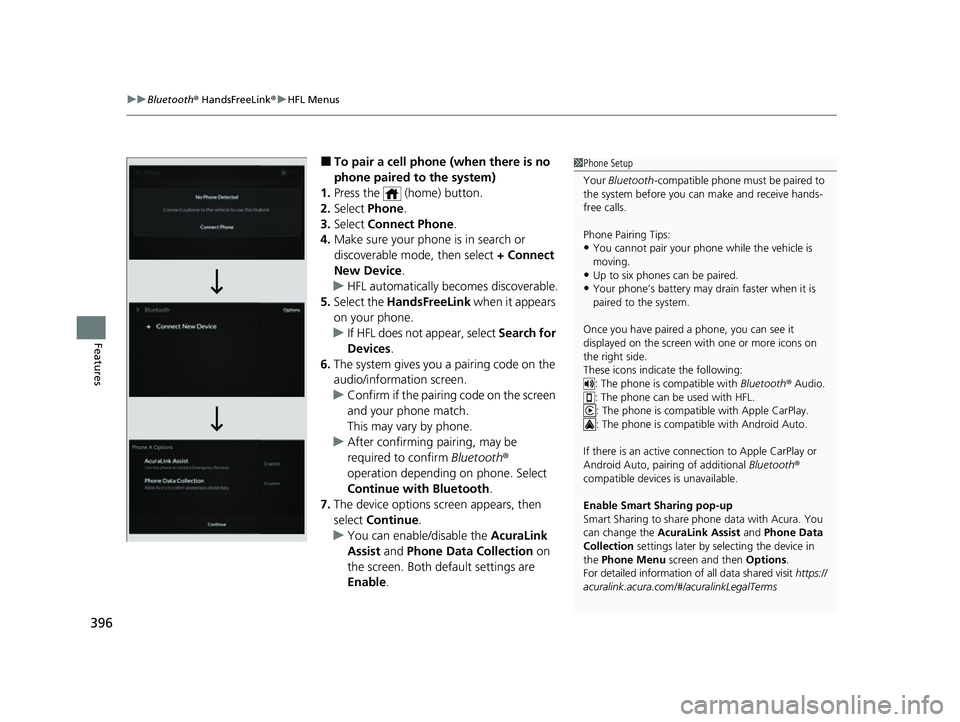
■To pair a cell phone (when there is no
phone paired to the system)
1. Press the (home) button.
2. Select Phone .
3. Select Connect Phone .
4. Make sure your phone is in search or
discoverable mode, then select + Connect
New Device .
u HFL automatically becomes discoverable.
5. Select the HandsFreeLink when it appears
on your phone.
u If HFL does not appear, select Search for
Devices.
6. The system gives you a pairing code on the
audio/information screen.
u Confirm if the pairing code on the screen
and your phone match.
This may vary by phone.
u After confirming pairing, may be
required to confirm Bluetooth®
operation depending on phone. Select
Continue with Bluetooth.
7. The device options sc reen appears, then
select Continue .
u You can enable/disable the AcuraLink
Assist and Phone Data Collection on
the screen. Both default settings are
Enable .1Phone Setup
Your Bluetooth -compatible phone must be paired to
the system before you ca n make and receive hands-
free calls.
Phone Pairing Tips:
•You cannot pair your phone while the vehicle is
moving.
•Up to six phones can be paired.
•Your phone’s battery may dr ain faster when it is
paired to the system.
Once you have paired a phone, you can see it
displayed on the screen with one or more icons on
the right side.
These icons indicate the following: : The phone is compatible with Bluetooth® Audio.
: The phone can be used with HFL.
: The phone is compatib le with Apple CarPlay.
: The phone is compatible with Android Auto.
If there is an active connection to Appl e CarPlay or
Android Auto, pairing of additional Bluetooth®
compatible devices is unavailable.
Enable Smart Sharing pop-up
Smart Sharing to share phone data with Acura. You
can change the AcuraLink Assist and Phone Data
Collection settings later by se lecting the device in
the Phone Menu screen and then Options.
For detailed information of all data shared visit https://
acuralink.acura.com/#/acuralinkLegalTerms
23 ACURA RDX-31TJB6400.book 396 ページ 2022年8月4日 木曜日 午後1時51分
Page 428 of 713
uuAcuraLink ®u
426
Features
Your subscribed telematics service provider can check your vehicle’s condition. For
maximum functionality, download AcuraLin k app in your smartphone and connect
it with the vehicle.
■Automatic Collision Notifications
A live agent will reach out and check on you and request that help be sent in the
event of a crash.
■Send Destination
Search for destinations on your phone and instantly beam turn-by-turn directions to
your navigation system
*. Requires In-vehicle Navigation System*.
■Stolen Vehicle Locator
In the event of a stolen vehicle, your vehi cle will help local authorities recover it.
■Remote Start & Stop
Arrive at your vehicle with the engine warmed up and the interior set to a
comfortable temperature.
■Remote Lock & Unlock
Lock and unlock your vehicle with your smartphone.
■Find My Car
Find your parked vehicle and flash/so und your horns remotely using your
smartphone.
■Connection Features1 Connection Features
The contact information of your provider, your user
ID and PIN will be given when you subscribe to
AcuraLink. If you forget any of the above, contact a
Acura dealer, or go to owners.acura.com (U.S.) or
www.acura.ca/owners/acuralink (Canada).
You can also activate the remote door lock/unlock
and vehicle finder features from the Internet or using
your smartphone app. As k a dealer, or visit
owners.acura.com (U.S.) or www.acura.ca/owners/
acuralink (Canada) for details.
1Find My Car
The lights will stop flas hing and horn will stop
sounding under the following:
•When conditions 30 seconds have elapsed.
•You unlock the doors using the remote transmitter.
•You unlock the doors using the keyless access
system.
•You unlock the doors us ing the built-in key.
•The power mode is set to ACCESSORY or ON.
* Not available on all models
23 ACURA RDX-31TJB6400.book 426 ページ 2022年8月4日 木曜日 午後1時51分
Page 431 of 713

429
Driving
This chapter discusses driving and refueling.
Before Driving................................... 430
Towing a Trailer ................................ 435
Off-Highway Driving Guidelines ..... 441
When Driving Starting the Engine .......................... 443
Precautions While Driving................. 449
Automatic Transmission ................... 450
Shifting ............................................ 451
Acura Integrated Dynamics System... 459
Auto Idle Stop .................................. 464
Vehicle Stability AssistTM (VSA®), aka Electronic
Stability Control (ESC), System ................. 471
Agile Handling Assist ....................... 473 Super Handling-All Wheel Drive
TM (SH-
AWD® )*......................................... 474
Tire Pressure Monitoring System (TPMS)
with Tire Fill Assist .......................... 475
Tire Pressure Monitoring System (TPMS) - Required Federal Explanation ......... 477
Blind Spot Information System ......... 479
AcuraWatch
TM................................... 483
Collision Mitigati on Braking SystemTM
(CMBSTM) ....................................... 486
Low Speed Braking Control*............ 497
Adaptive Cruise Control (ACC) with Low
Speed Follow ................................. 502 Lane Keeping Assist System (LKAS) .. 522
Road Departure Miti
gation System... 530
Traffic Sign Recognition System ....... 535
Front Sensor Camera ....................... 541
Radar Sensor ................................... 543
Sonar Sensors
*................................ 544
Braking .............................................. 545
Parking Your Vehicle ........................ 555
Multi-View Rear Camera
*................ 565
Surround View Camera System*..... 567
Refueling ........................................... 575
Fuel Economy and CO
2 Emissions .... 578
Turbo Engine Vehicle ....................... 579
* Not available on all models
23 ACURA RDX-31TJB6400.book 429 ページ 2022年8月4日 木曜日 午後1時51分
Page 443 of 713
441
Driving
Off-Highway Driving Guidelines
General Information
Your vehicle has been designed primarily for use on pavement, however, its higher
ground clearance allows you to occasionally travel on unpaved roads. It is not
designed for trail-blazing, or other challenging off-highway activities.
If you decide to drive on unpaved roads, you will find that it requires somewhat
different driving skills and that your vehicl e will handle somewhat differently than it
does on pavement. Pay attention to the precau tions and tips in this section, and get
acquainted with your vehicle before leaving the pavement.
Important Safety Precautions
To avoid loss of control or rollover, be sure to follow all precautions and
recommendations:
• Be sure to store cargo properly and do not exceed your cargo load limits.
2 Maximum Load Limit P. 433
•Whenever you drive, make su re you and your passengers always wear seat belts.
• Keep your speed low, and never go faster than the conditions allow.
• It’s up to you to continually assess the situation and drive within the limits.
1Off-Highway Driving Guidelines
Failure to operate your vehicle correctly might result
in a crash or a rollover.
2 Important Handling Information P. 34
2 Precautions While Driving P. 449
Spinning the tires can also damage the SH-AWD ®
system.
3WARNING
Improperly operating this vehicle on or off-
pavement can cause a crash or rollover in
which you and your passengers could be
seriously injured or killed.
• Follow all instructions and guidelines in
this owner’s manual.
• Keep your speed low, and don’t drive
faster than conditions permit.
Models with SH-AWD ®
23 ACURA RDX-31TJB6400.book 441 ページ 2022年8月4日 木曜日 午後1時51分
Page 448 of 713

uuWhen Driving uStarting the Engine
446
Driving
■To stop the engine
Press and hold the button
for one second.
Go within the range,
and try again.
Amber LED: Blinks when any
button is pressed. Red LED:
●Comes on for one second to let you
know that the engine has stopped.
●Blinks when the remote is out of
the keyless access system range.
The engine will not stop.
1
Remote Engine Start*
The engine may not start by the remote engine start
if:
•You have disabled a remo te engine start setting
using the audio/information screen. 2Customized Features P. 359
•The power mode is not in VEHICLE OFF.
•The transmission is in a position other than (P.
•The hood is open, or any door or the tailgate is
unlocked.
•The 12-volt battery temp is too low or the 12-volt
battery charge is too low.
•You have already used the remote twice to start
the engine.
•Another registered keyless remote is in the vehicle.
•There is any antenna failure.•The door is unlocked with the built-in key.
•The engine oil pressure is low.
•The engine coolant temper ature is extremely high.•The telematics unit malfunctions.
•The security system alarm is not set.
Before starting the engine, make sure to check the
door lock status using the remote. When you press
the button, wait for the green LED to blink. If
the red LED turns on, the doors and tailgate did not
lock, and the engine does not start.
* Not available on all models
23 ACURA RDX-31TJB6400.book 446 ページ 2022年8月4日 木曜日 午後1時51分
Page 449 of 713

Continued447
uuWhen Driving uStarting the Engine
Driving
1Remote Engine Start*
While the engine is running, the vehicle will
automatically preconditi on inside the vehicle.
When it is warm outside:
•The climate control system is activated in
recirculation mode.
•The seat ventilator* is activated.
When it is cold outside:
•The defroster is activated at a moderately warm
temperature.
•The rear defogger and door mirror heaters are
activated.
•The front seat heaters a nd heated steering wheel
are activated. 2Heated Steering Wheel
* P. 244
2 Front Seat Heaters/Ventilators* P. 245
* Not available on all models
23 ACURA RDX-31TJB6400.book 447 ページ 2022年8月4日 木曜日 午後1時51分
Page 451 of 713
449
uuWhen Driving uPrecautions While Driving
Continued
Driving
Precautions While Driving
Utility vehicles have a significantly higher rollover rate than other types of vehicles.
To prevent rollovers or loss of control:
• Take corners at slower speeds than yo u would with a passenger vehicle.
• Avoid sharp turns and abrupt maneuvers whenever possible.
• Do not modify your vehicle in any way th at you would raise the center of gravity.
• Do not carry heavy cargo on the roof.
Never carry more than 165 lbs (75 kg) of ca rgo on the roof rack (Acura accessory).
■Driving Guidelines for Your Utility Vehicle1Precautions While Driving
NOTICE
Do not select a shift button while pressing the
accelerator pedal. You could damage the
transmission.
NOTICE
If you repeatedly turn the steering wheel at an
extremely low speed, or hold the steering wheel in
the full left or right position for a while, the electric
power steering (EPS) system heats up. The system
goes into a protective mode, and limits its
performance. The steering wheel becomes harder
and harder to operate. Once the system cools down,
the EPS system is restored.
Repeated operation under these conditions can
eventually damage the system.
If the power mode is set to ACCESSORY while
driving, the engine will shut down and all steering
and brake power assist functi ons will stop, making it
difficult to control the vehicle.
Do not select
( N while driving as you will lose engine
braking (and accelera tion) performance.
During the first 600 miles (1,000 km) of operation,
avoid sudden acceleration or full throttle operation so
as not to damage the engine or powertrain.
23 ACURA RDX-31TJB6400.book 449 ページ 2022年8月4日 木曜日 午後1時51分
Page 457 of 713
![ACURA RDX 2023 Manual PDF Continued455
uuWhen Driving uShifting
Driving
■If you want to keep the transmission in (N position [car wash mode]
With the engine running:
1. Press and hold the brake pedal.
2. Select
(N, then rel](/img/32/58634/w960_58634-456.png "ACURA RDX 2023 Manual PDF Continued455
uuWhen Driving uShifting
Driving
■If you want to keep the transmission in (N position [car wash mode]
With the engine running:
1. Press and hold the brake pedal.
2. Select
(N, then rel")
Continued455
uuWhen Driving uShifting
Driving
■If you want to keep the transmission in (N position [car wash mode]
With the engine running:
1. Press and hold the brake pedal.
2. Select
(N, then release the button to display (N (Neutral) hold mode on the
multi-information display.
3. Press and hold
(N again for two seconds.
u This puts the vehicle in car wash mode which must be used when your vehicle
is pulled through a conveyor type automatic car wash where you or an
attendant do not remain in the vehicle.
If the ENGINE START/STOP button is pressed
after car wash mode has been activated, the
power mode will change to ACCESSORY and
a message will be displayed on the multi-
information display. u For 15 minutes the gear position remains
in
(N with the power mode in
ACCESSORY. After that, the position
automatically changes to
( P and the
power mode changes to OFF.
u Manually press the ENGINE START/
STOP button cancels ACCESSORY
mode. The
(P indicator comes on and
the power mode changes to OFF. You
must always press the ENGINE START/
STOP button when car wash mode is no
longer needed.
1 If you want to keep the transmission in (N position [car wash
mode]
To keep the vehicle in
(N position, you can also
follow this procedure:
While the engine is on, select
( N, and then within
five seconds, press the ENGINE START/STOP
button.
The transmission may not stay in
( N position while
the following indicators ar e on or when the message
below appears:
•Malfunction indicator lamp
•Transmission system indicator
•Charging system indicator•The 12 Volt Battery Charging System Problem.
Do Not Drive. message on the multi-information
display.
23 ACURA RDX-31TJB6400.book 455 ページ 2022年8月4日 木曜日 午後1時51分
Page 459 of 713

Continued457
uuWhen Driving uShifting
Driving
Use the paddle shifters to change betw een 1st and 10th gears without releasing
your hands from the steering wheel. The trans mission will switch to the sequential
mode.
■When the transmi ssion is in (D:
The vehicle will go into th e sequential mode momentarily, and the sequential mode
gear selection indicator will come on.
When the vehicle goes into the sequential mode by
(- paddle shifter and the lower
gear is available, the tran smission properly selects single or double gear change.
Once you start traveling at a constant speed , the sequential mode will automatically
switch off, and the sequential mode gear selection indicator will go off.
Hold the
(+ paddle shifter for two-seconds or push the button to return to
normal drive.
■When the transmi ssion is in (S:
The vehicle will go into th e sequential mode, and the M (sequential mode) indicator
and sequential mode gear selection indicator will come on.
If the vehicle speed increases and the engi ne speed reaches near the tachometer red
zone, the transmission automatically shifts up to the next gear.
You can cancel this mode by holding the
(+ paddle shifter for two seconds or push
the button. When the se quential mode is canceled, the sequential mode
indicator and sequential mode gear selection indicator go off.
■Sequential Mode1 Sequential Mode
The sequential mode may be canceled if the Dynamic
Mode is changed to another dynamic mode.
D/S
D/S
23 ACURA RDX-31TJB6400.book 457 ページ 2022年8月4日 木曜日 午後1時51分
Page 471 of 713

Continued469
uuWhen Driving uAuto Idle Stop
Driving
• The brake pedal is released (without the automatic brake hold system activated).
• The accelerator pedal is depressed (w ith the automatic brake hold system
activated).
2 Automatic Brake Hold P. 550
■The engine restarts even if the brake pedal is depressed*1 when:
• The Auto Idle Stop OFF button is pressed.
• The steering wheel is operated.
• The transmission is put into
(R or (S, or when it is set from (N to (D.
u If you put the tra nsmission into
(P after the Auto Idle Stop activates, the Auto
Idle Stop continues to operate. In this case, the engine restarts when you
depress the brake pedal.
• The pressure on the brake pedal is reduced and the vehicle starts moving while
stopped on an incline.
• The brake pedal is released slightly during a stop.
• The battery charge becomes low.
• The accelerator pedal is depressed.
• The driver’s seat belt is unlatched.
• is ON (indicator on).
• The climate control system is in use, and the difference between the set
temperature and actual interior temperature becomes significant.
• The climate control system is being used to dehumidify the interior.
• The Integrated Dynamics System mode is changed to SNOW or SPORT mode.
• The vehicle ahead of you starts again when your vehicle stops automatically with
ACC with Low Speed Follow.
■The Engine Automatically Restarts When:1 The Engine Automatically Restarts When:
If you are using an electroni c device during Auto Idle
Stop, the device may tempor arily be turned off when
the engine restarts.
1 The engine restarts even if the brake pedal is depressed*1 when:
*1: With the automatic brake hold system activated,
you can release the brake pedal while Auto Idle Stop
is in operation.
If the automatic brake hold system has been turned
off, or if there is a problem with the system, the
engine will restart automatically when you release
the brake pedal. 2 Automatic Brake Hold P. 550
23 ACURA RDX-31TJB6400.book 469 ページ 2022年8月4日 木曜日 午後1時51分