stop ACURA RDX 2023 Manual Online
[x] Cancel search | Manufacturer: ACURA, Model Year: 2023, Model line: RDX, Model: ACURA RDX 2023Pages: 713, PDF Size: 21.99 MB
Page 440 of 713
uuTowing a Trailer uTowing Preparation
438
Driving
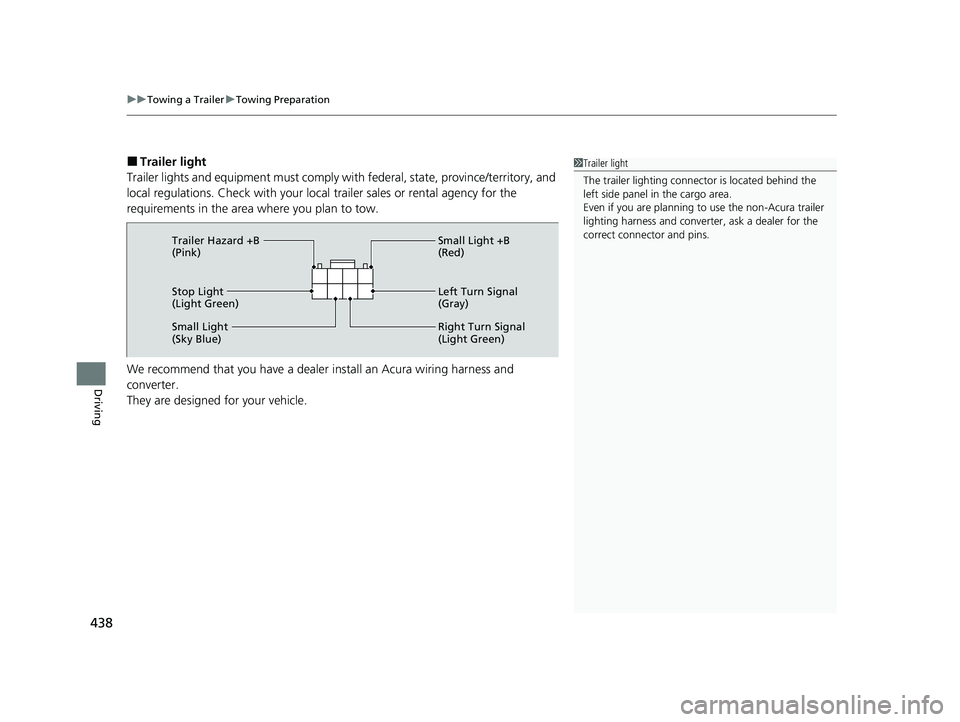
■Trailer light
Trailer lights and equipment must comply with federal, state, province/territory, and
local regulations. Check with your local trailer sales or rental agency for the
requirements in the area where you plan to tow.
We recommend that you have a dealer install an Acura wiring harness and
converter.
They are designed for your vehicle.1 Trailer light
The trailer lighting connect or is located behind the
left side panel in the cargo area.
Even if you are planning to use the non-Acura trailer
lighting harness and converte r, ask a dealer for the
correct connector and pins.
Stop Light
(Light Green) Small Light +B
(Red)
Left Turn Signal
(Gray)
Right Turn Signal
(Light Green)
Small Light
(Sky Blue) Trailer Hazard +B
(Pink)
23 ACURA RDX-31TJB6400.book 438 ページ 2022年8月4日 木曜日 午後1時51分
Page 441 of 713

439
uuTowing a Trailer uDriving Safely with a Trailer
Continued
Driving
Driving Safely with a Trailer
• Have the trailer properly servic ed and keep it in good condition.
• Make sure that all the weights and load in the vehicle and trailer are within limits.
2Towing Load Limits P. 435
•Securely attach the hitch, safety chains, and other necessary parts to the trailer.
• Securely store all the items in and on the tra iler so that they do not shift while
driving.
• Check if the lights and brakes on the trailer are working properly.
• Check the pressures of the trailer tires.
• Turn off the Auto Idle Stop syst em using the Auto Idle Stop OFF button. The
trailer weight can affect your vehicle’s brake effectiveness if Auto Idle Stop is
activated on a hill wh ile towing a trailer.
• Turn off the rear parking sensor system.
2 Turning off All Rear Sensors P. 560
•Turn off the Low Speed Braki ng Control system. It may activate if it detects the
towed object as an obstacle.
2 System On and Off P. 499
■Things You Need To Know Before Towing a Trailer1Driving Safely with a Trailer
Operating speed when towing a trailer must not
exceed 62 mph (100 km/h).
Parking
In addition to the normal precautions, place wheel
chocks at each of the trailer’s tires.
Remember to unhitch the tra iler before changing a
flat tire. Ask the trailer sales or rental agency where
and how to store the trailer’s spare tire.
Models with Parking Sensor System
Models with Low Speed Braking Control
23 ACURA RDX-31TJB6400.book 439 ページ 2022年8月4日 木曜日 午後1時51分
Page 444 of 713
442
uuOff-Highway Driving Guidelines uAvoiding Trouble
Driving
Avoiding Trouble
• Check Out Your Vehicle before you leave the pavement and make sure that all
scheduled maintenance has been comple ted. Pay special attention to the
condition of the tires, an d check the tire pressures.
• Remember the route you choose presents limits (too steep or bumpy), you have
limits (driving skill and comfort), and your ve hicle has limits (traction, stability, and
power). Failing to recognize these limits will likely put you and your passengers in
a hazardous situation.
• Accelerating and Braking should be done slowly and gradually. Trying to start
or stop too fast can cause a loss of traction and you could lose control.
• Avoiding Obstacles and Debris in the road reduces the likelihood of a rollover
or damage to your suspension or other components.
• Driving on Slopes increases your risk of a rollover, particularly if you attempt to
drive across a slope that is too steep. Going straight up or down a slope is usually
the safest. If you can’t clearly see all cond itions or obstacles on a slope, walk it
before you drive it. If there is any doubt whether you can safely pass, don’t try it.
Find another route. If you get stuck when climbing, do not try to turn around.
Back down slowly following the same route you took up the hill.
• Crossing a Stream - Avoid driving through deep water. If you encounter water
in your route (a small stream or large pu ddle, for example), evaluate it carefully
before going ahead. Make sure it is shallow, flowing slowly, and has firm ground
underneath. If you are not sure of the depth or the ground, turn around and find
another route. Driving through deep water can also damage your vehicle. The
water can get into the transmission and differential, diluting the lubricant and
causing an eventual failure. It can also wash the grease out of the wheel bearings.
• If You Get Stuck, carefully go in the direction that you think will get you
unstuck. Do not spin the tires as this will only make things worse and could
damage the transmission. If you are unable to free yourself, your vehicle will need
to be towed. Front tow hooks are provided for this purpose.
23 ACURA RDX-31TJB6400.book 442 ページ 2022年8月4日 木曜日 午後1時51分
Page 445 of 713

443Continued
Driving
When Driving
Starting the Engine
1.Make sure the parkin g brake is applied.
u The Parking Brake and Brake System
indicator (red) comes on for 30 seconds
when you press the electric parking
brake switch.
2. Depress the brake pedal.
3. Press the ENGINE START/STOP button
without depressing the accelerator pedal.1 Starting the Engine
Keep your foot firmly on the brake pedal when
starting the engine.
The engine is harder to st art in cold weather and in
thinner air found at altit udes above 8,000 feet (2,400
meters).
When starting the engine in cold weather, turn off all
electrical accessories such as the lights, climate
control system, and rear de fogger in order to reduce
battery drain.
If you live in a region where winter is extremely cold,
an engine block heater will improve starting and
warming of the engine. Consult a dealer for details.
If the exhaust system sounds abnormal or you can
smell exhaust gas inside the vehicle, have your vehicle
checked by a dealer. There may be a problem with
the engine or exhaust system.
Bring the keyless remote close to the ENGINE
START/STOP button if the batte ry in the keyless
remote is weak. 2 If the Keyless Remote Battery is Weak
P. 665
The engine may not start if the keyless remote is
subjected to strong radio waves.Electric Parking
Brake Switch
Brake Pedal
23 ACURA RDX-31TJB6400.book 443 ページ 2022年8月4日 木曜日 午後1時51分
Page 446 of 713
uuWhen Driving uStarting the Engine
444
Driving
1Starting the Engine
Do not hold the ENGINE START/STOP button to
start the engine.
If the engine does not start, wait at least 30 seconds
before starting the engine again.
The immobilizer system pr otects your vehicle from
theft. If an improperly c oded device is used, the
engine’s fuel system is disabled.
2 Immobilizer System P. 183
23 ACURA RDX-31TJB6400.book 444 ページ 2022年8月4日 木曜日 午後1時51分
Page 448 of 713

uuWhen Driving uStarting the Engine
446
Driving
■To stop the engine
Press and hold the button
for one second.
Go within the range,
and try again.
Amber LED: Blinks when any
button is pressed. Red LED:
●Comes on for one second to let you
know that the engine has stopped.
●Blinks when the remote is out of
the keyless access system range.
The engine will not stop.
1
Remote Engine Start*
The engine may not start by the remote engine start
if:
•You have disabled a remo te engine start setting
using the audio/information screen. 2Customized Features P. 359
•The power mode is not in VEHICLE OFF.
•The transmission is in a position other than (P.
•The hood is open, or any door or the tailgate is
unlocked.
•The 12-volt battery temp is too low or the 12-volt
battery charge is too low.
•You have already used the remote twice to start
the engine.
•Another registered keyless remote is in the vehicle.
•There is any antenna failure.•The door is unlocked with the built-in key.
•The engine oil pressure is low.
•The engine coolant temper ature is extremely high.•The telematics unit malfunctions.
•The security system alarm is not set.
Before starting the engine, make sure to check the
door lock status using the remote. When you press
the button, wait for the green LED to blink. If
the red LED turns on, the doors and tailgate did not
lock, and the engine does not start.
* Not available on all models
23 ACURA RDX-31TJB6400.book 446 ページ 2022年8月4日 木曜日 午後1時51分
Page 450 of 713

uuWhen Driving uStarting the Engine
448
Driving
1. Depress and hold the brake pedal, then press the ENGINE START/STOP button.
2. Keeping your right foot on the brake pedal, put the transmission into
(D. Select
(R when reversing.
3. With the parking brake applied, release the brake pedal and gently depress the
accelerator pedal.
u Make sure the Parking Brake and Brake System indicator (red) goes off.
2Parking Brake P. 545
■Hill start assist system
Hill start assist keeps the brake engaged br iefly to help prevent the vehicle from
rolling on inclines as you move your fo ot from the brake pedal to the accelerator.
Put the transmission into
(D or (S when facing uphill, or (R when facing downhill,
then release the brake pedal.
You can turn the engine off when the vehicle is completely stopped.
1. Depress the brake pedal and change the shift position to
(P.
u Do not release the brake pedal until you have confirmed that
(P is shown on
the gear position indicator.
2. Press the ENGINE START/STOP button.
■Starting to Drive
■Stopping the Engine
1Starting to Drive
You can also release the parking brake by pulling the
electric parking brake sw itch while depressing the
brake pedal. When facing downhill, you can start
your vehicle more smoothly by manually releasing it
with the electric parki ng brake switch than by
releasing it with th e accelerator pedal.
The engine stops when th e transmission is taken out
of
( P before the ENGINE START/STOP button is
pressed. Follow step 1 when starting to drive.
When the engine was started using the keyless remote*
When the engine was started using the keyless remote*
When the engine was started in any case
1 Hill start assist system
Hill start assist may not prevent the vehicle from
rolling downhill on a very st eep or slippery slope, and
will not operate on small inclines.
Hill start assist will operate even when VSA ® is
switched off.
Hill start assist is not a replacement for the parking
brake.
* Not available on all models
23 ACURA RDX-31TJB6400.book 448 ページ 2022年8月4日 木曜日 午後1時51分
Page 451 of 713
449
uuWhen Driving uPrecautions While Driving
Continued
Driving
Precautions While Driving
Utility vehicles have a significantly higher rollover rate than other types of vehicles.
To prevent rollovers or loss of control:
• Take corners at slower speeds than yo u would with a passenger vehicle.
• Avoid sharp turns and abrupt maneuvers whenever possible.
• Do not modify your vehicle in any way th at you would raise the center of gravity.
• Do not carry heavy cargo on the roof.
Never carry more than 165 lbs (75 kg) of ca rgo on the roof rack (Acura accessory).
■Driving Guidelines for Your Utility Vehicle1Precautions While Driving
NOTICE
Do not select a shift button while pressing the
accelerator pedal. You could damage the
transmission.
NOTICE
If you repeatedly turn the steering wheel at an
extremely low speed, or hold the steering wheel in
the full left or right position for a while, the electric
power steering (EPS) system heats up. The system
goes into a protective mode, and limits its
performance. The steering wheel becomes harder
and harder to operate. Once the system cools down,
the EPS system is restored.
Repeated operation under these conditions can
eventually damage the system.
If the power mode is set to ACCESSORY while
driving, the engine will shut down and all steering
and brake power assist functi ons will stop, making it
difficult to control the vehicle.
Do not select
( N while driving as you will lose engine
braking (and accelera tion) performance.
During the first 600 miles (1,000 km) of operation,
avoid sudden acceleration or full throttle operation so
as not to damage the engine or powertrain.
23 ACURA RDX-31TJB6400.book 449 ページ 2022年8月4日 木曜日 午後1時51分
Page 452 of 713

uuWhen Driving uAutomatic Transmission
450
Driving
Avoid driving in deep water and on flooded roads. This can damage the engine or
driveline, or cause electrical component failure.
If there is a strong impact with something under the vehicle, stop in a safe location.
Check the underside of the vehicle for damage or any fluid leaks.
Automatic Transmission
When the engine runs at higher idle speeds, the creeping force increases.
Keep the brake pedal firmly depressed when stopped.
Quickly depressing the accelerator pedal while driving uphill may cause the
transmission to drop to a lower gear, unexpectedly increasing vehicle speed. Depress
the accelerator pedal carefully, especi ally on slippery roads and curves.
■In Rain
■Other Precautions
■Creeping
■Kickdown
1Precautions While Driving
Avoid hard braking for the first 200 miles (300 km)
after purchasing your new vehicle or replacing the
brake pads or rotors, to allow for proper break-in.
1Driving Guidelines for Your Utility Vehicle
Failure to operate your vehicle correctly might result
in a crash or a rollover.
2 Important Handling Information P. 34
23 ACURA RDX-31TJB6400.book 450 ページ 2022年8月4日 木曜日 午後1時51分
Page 455 of 713

Continued453
uuWhen Driving uShifting
Driving
■Shift Operation1Shift Operation
NOTICE
When you change (D to (R and vice versa, depress
the brake pedal to come to a complete stop, then
select the intended gear position while maintaining
brake pressure.
When changing the gear position to
( P, always keep
your foot on the brake pedal until you have
confirmed that
( P is shown on the gear position
indicator.
Use the gear position indicator and the shift button
indicator to check the gear position before selecting
a shift button.
If the indicator of the currently selected gear position,
or all the gear position indicators are blinking
simultaneously, there is a problem with the
transmission.
Avoid sudden acceleration and have the transmission
checked by a dealer as soon as possible.
The fuel supply may be cut of f if you drive at engine
speeds in or over the ta chometer red zone (engine
speed limit). If this happe ns, you may experience a
slight jolt.
When the engine speed is increased while the
transmission is in
( N, (P or (R, the fuel supply may
be cut off even without the engine speed entering
the tachometer red zone.
Gear Position Indicator
Tachometer red zone
Press the ( P button.
Pull back the (R button.
Press the
( N button.
Shift Button
Indicator M
(sequential mode)
Indicator
Sequential Mode Gear
Selection Indicator
Press the button.
Each time you press the button,
the mode switches between
Drive and S Position mode.D/S
23 ACURA RDX-31TJB6400.book 453 ページ 2022年8月4日 木曜日 午後1時51分