service Acura RLX 2015 Owner's Guide
[x] Cancel search | Manufacturer: ACURA, Model Year: 2015, Model line: RLX, Model: Acura RLX 2015Pages: 521, PDF Size: 22.24 MB
Page 406 of 521
405
uuRefueling uHow to Refuel
Driving
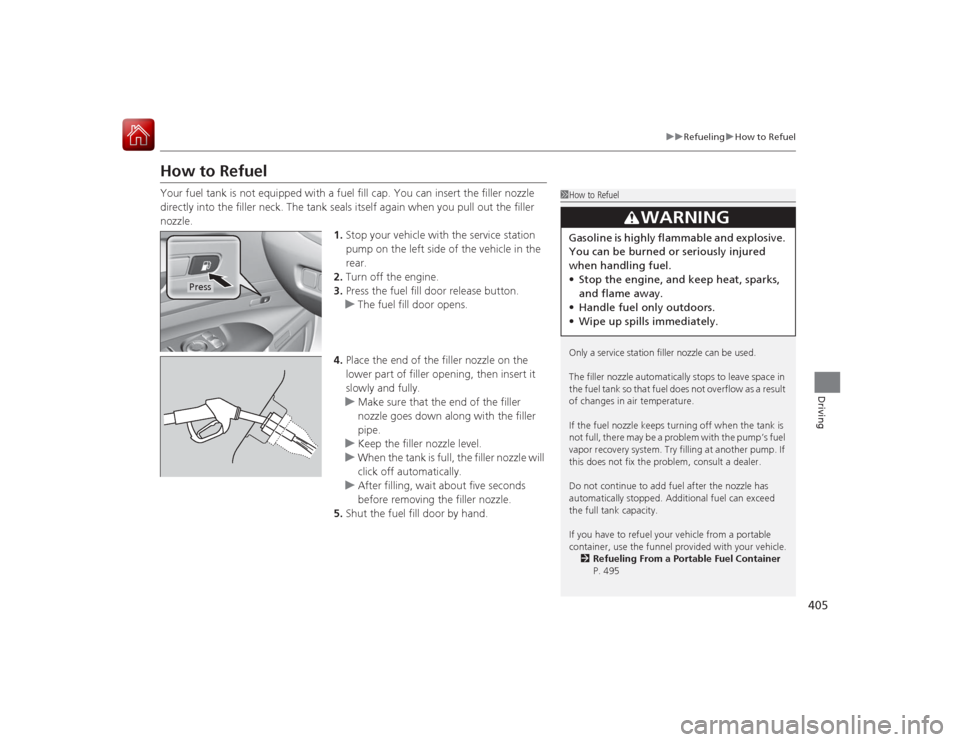
How to RefuelYour fuel tank is not equipped with a fuel fill cap. You can insert the filler nozzle
directly into the filler neck. The tank seals itself again when you pull out the filler
nozzle.
1.Stop your vehicle with the service station
pump on the left side of the vehicle in the
rear.
2. Turn off the engine.
3. Press the fuel fill door release button.
u The fuel fill door opens.
4. Place the end of the filler nozzle on the
lower part of filler opening, then insert it
slowly and fully.
u Make sure that the end of the filler
nozzle goes down along with the filler
pipe.
u Keep the filler nozzle level.
u When the tank is full, the filler nozzle will
click off automatically.
u After filling, wait about five seconds
before removing the filler nozzle.
5. Shut the fuel fill door by hand.
1How to Refuel
Only a service station filler nozzle can be used.
The filler nozzle automatically stops to leave space in
the fuel tank so that fuel does not overflow as a result
of changes in air temperature.
If the fuel nozzle keeps turning off when the tank is
not full, there may be a problem with the pump’s fuel
vapor recovery system. Try filling at another pump. If
this does not fix the problem, consult a dealer.
Do not continue to add fuel af ter the nozzle has
automatically stopped. Additional fuel can exceed
the full tank capacity.
If you have to refuel your vehicle from a portable
container, use the funnel provided with your vehicle. 2 Refueling From a Portable Fuel Container
P. 495
3
WARNING
Gasoline is highly flammable and explosive.
You can be burned or seriously injured
when handling fuel.
• Stop the engine, and keep heat, sparks,
and flame away.
• Handle fuel only outdoors.
• Wipe up spills immediately.
Press
Page 410 of 521
409
Maintenance
This chapter discusses basic maintenance.
Before Performing MaintenanceInspection and Maintenance ............ 410Safety When Performing Maintenance..... 411Parts and Fluids Used in Maintenance Service ........................................... 412
Maintenance Minder
TM..................... 413
Maintenance Under the Hood
Maintenance Items Under the Hood ..... 418Opening the Hood ........................... 419
Engine Compartment Cover ............. 420
Recommended Engine Oil ................ 421
Oil Check ......................................... 422
Adding Engine Oil ............................ 423
Changing the Engine Oil and Oil Filter ..... 424Engine Coolant ................................ 426
Transmission Fluid ............................ 428
Brake Fluid ....................................... 429
Refilling Window Washer Fluid......... 429
Replacing Light Bulbs ....................... 430Checking and Maintaining Wiper
Blades .......................................... 436Checking and Maintaining Tires
Checking Tires ................................. 439Tire and Loading Information Label ...... 440Tire Labeling .................................... 440DOT Tire Quality Grading (U.S. Vehicles)....... 442
Wear Indicators ............................... 444
Tire Service Life ................................ 444
Tire and Wheel Replacement ........... 445
Tire Rotation .................................... 446
Winter Tires ..................................... 447
Battery ............................................... 448
Remote Transmitter Care Replacing the Button Battery ........... 449Climate Control System Maintenance
.... 450
Cleaning
Interior Care .................................... 451
Exterior Care.................................... 453
Page 411 of 521
410Maintenance
Before Performing MaintenanceInspection and MaintenanceFor your safety, perform all listed inspections and maintenance to keep your vehicle
in good condition. If you become aware of any abnormality (noise, smell, insufficient
brake fluid, oil residue on the ground, etc.), have your vehicle inspected by a dealer.
(Note, however, that service at a dealer is not mandatory to keep your \
warranties in
effect.) Refer to the separate maintenance booklet for detailed maintenance and
inspection information.■Daily inspections
Perform inspections before long distance trips, when washing the vehicle, or when
refueling.■Periodic inspections
• Check the brake fluid level monthly.2 Brake Fluid P. 429
•Check the tire pressure monthly. Examine the tread for wear and foreign objects.
2 Checking and Maintaining Tires P. 439
•Check the operation of the exterior lights monthly.
2 Replacing Light Bulbs P. 430
•Check the condition of the wiper blades at least every six months.
2Checking and Maintaining Wiper Blades P. 436
■
Types of Inspection and Maintenance
1Inspection and Maintenance
Maintenance, replacement, or repair of
emissions control devices and systems may be
done by any automotive repair establishment or
individuals using parts that are “certified” to
EPA standards.
According to state and federal regulations, failure to
perform maintenance on the maintenance main
items marked with # will not void your emissions
warranties. However, all maintenance services should
be performed in accordance with the intervals
indicated by the multi-information display.
2 Maintenance Service Items P. 416
If you want to perform complex maintenance tasks
that require mor e skills and tools, you can purchase a
subscription to the Service Express website at
www.techinfo.honda.com .
2 Authorized Manuals P. 507
If you want to perform maintenance yourself, make
sure that you have the necessary tools and skills first.
After performing maintenance, update the records in
the separate maintenance booklet.U.S. models
Page 413 of 521
412
uuBefore Performing Maintenance uParts and Fluids Used in Maintenance Service
Maintenance
Parts and Fluids Used in Maintenance ServiceThe use of Acura genuine parts and fluids is recommended when maintaining and
servicing your vehicle. Acura genuine parts are manufactured according to the same
high quality standards used in Acura vehicles.
Page 414 of 521

413Maintenance
Maintenance Minder
TM
If the engine oil life is less than 15%, you will see the Maintenance Minder messages
appear the multi-information display every time you set the power mode to ON. The
messages notify you when to change the engine oil, or when to bring your vehicle
to a dealer for indicated maintenance services.
Page 415 of 521

414
uuMaintenance Minder
TMuTo Use Maintenance Minder
TM
Maintenance
To Use Maintenance Minder
TM
Maintenance items, which should be serviced at the same time that you replace the
engine oil, appear on the multi-information display.
You can view them on the engine oil life screen at any time.
1. Set the power mode to ON.
2. Roll the right selector wheel until the en gine oil life appears on the multi-
information display.■
Displaying the Engine Oil Life and Maintenance Items
1 Displaying the Engine Oil Life and Maintenance Items
Based on the engine operating conditions, the
remaining engine oil life is calculated and displayed
as a percentage.
There is a list of maintenance main and sub items you
can view on the multi-information display.
2 Maintenance Service Items P. 416
Displayed Engine Oil
Life (%)
Calculated Engine Oil Life (%)
100 100 to 91
90
90 to 81
80 80 to 71
70
70 to 61
60 60 to 51
50
50 to 41
40 40 to 31
30
30 to 21
20 20 to 16
15
15 to 11
10 10 to 6
5
5 to 1
0 0
Remaining Engine Oil Life
Maintenance Service ItemsModels with
navigation
system
Models without
navigation
system
Right Selector Wheel
Page 416 of 521

415
uuMaintenance Minder
TMuTo Use Maintenance Minder
TM
Continued
Maintenance
*1:On the left: Models with navigation system
On the right: Models without navigation system
The system message indicator ( ) comes on along with the Maintenance Minder message.■
Maintenance Minder Messages on the Multi-Information
DisplayMaintenance Message
*1
Oil Life Display
*1
Explanation
Information
Maintenance Due Soon /
SERVICE DUE SOON
15 %
The remaining engine oil life is 15 to 6
percent. Once you switch the display
by rolling the right selector wheel, this
message will go off.
The engine oil is approaching the end
of its service life, and the maintenance
items should be inspected and
serviced soon.
Maintenance Due Now /
SERVICE DUE NOW
5 %
The remaining engine oil life is 5 to 1
percent. Roll the right selector wheel
to switch to another display.
The engine oil has almost reached the
end of its service life, and the
maintenance items should be
inspected and serviced as soon as
possible.
Maintenance Past Due /
SERVICE PAST DUE
Negative Distance
The remaining engine oil life has
passed its service life, and a negative
distance appears after driving over 10
miles (U.S. models) or 10 km
(Canadian models). Roll the right
selector wheel to switch to another
display.
The engine oil life has passed.
The maintenance items must be
inspected and serviced immediately.
Page 417 of 521
416
uuMaintenance Minder
TMuTo Use Maintenance Minder
TM
Maintenance
■
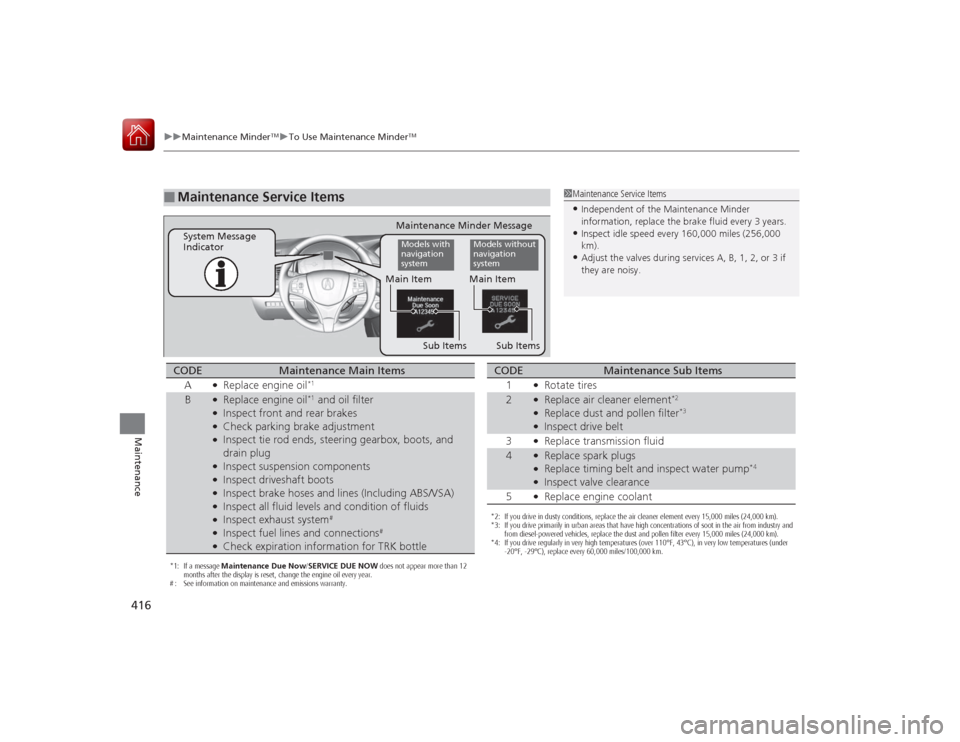
Maintenance Service Items
1Maintenance Service Items•Independent of the Maintenance Minder
information, replace the brake fluid every 3 years.•Inspect idle speed every 160,000 miles (256,000
km).•Adjust the valves during services A, B, 1, 2, or 3 if
they are noisy.
Maintenance Minder Message
System Message
Indicator
Sub Items
Main ItemModels with
navigation
system
Models without
navigation
system
Sub Items Main Item
*1: If a message
Maintenance Due Now/SERVICE DUE NOW does not appear more than 12
months after the display is reset, change the engine oil every year.
# : See information on maintenance and emissions warranty.CODE
Maintenance Main Items
A
●Replace engine oil
*1
B
●Replace engine oil
*1 and oil filter
●Inspect front and rear brakes●Check parking brake adjustment●Inspect tie rod ends, steering gearbox, boots, and
drain plug●Inspect suspension components●Inspect driveshaft boots●Inspect brake hoses and lines (Including ABS/VSA)●Inspect all fluid levels and condition of fluids●Inspect exhaust system
#
●Inspect fuel lines and connections
#
●Check expiration information for TRK bottle
*2: If you drive in dusty conditions, replace the air cleaner element every 15,000 miles (24,000 km).
*3: If you drive primarily in urban areas that have high concentrations of soot in the air from industry and from diesel-powered vehicles, replace the dust and pollen filter every 15,000 miles (24,000 km).
*4: If you drive regularly in very high temperatures (over 110°F, 43°C), in very low temperatures (under -20°F, -29°C), replace every 60,000 miles/100,000 km.CODE
Maintenance Sub Items
1
●Rotate tires
2
●Replace air cleaner element
*2
●Replace dust and pollen filter
*3
●Inspect drive belt
3●Replace transmission fluid
4
●Replace spark plugs●Replace timing belt and inspect water pump
*4
●Inspect valve clearance
5●Replace engine coolant
Page 418 of 521
417
uuMaintenance Minder
TMuTo Use Maintenance Minder
TM
Maintenance
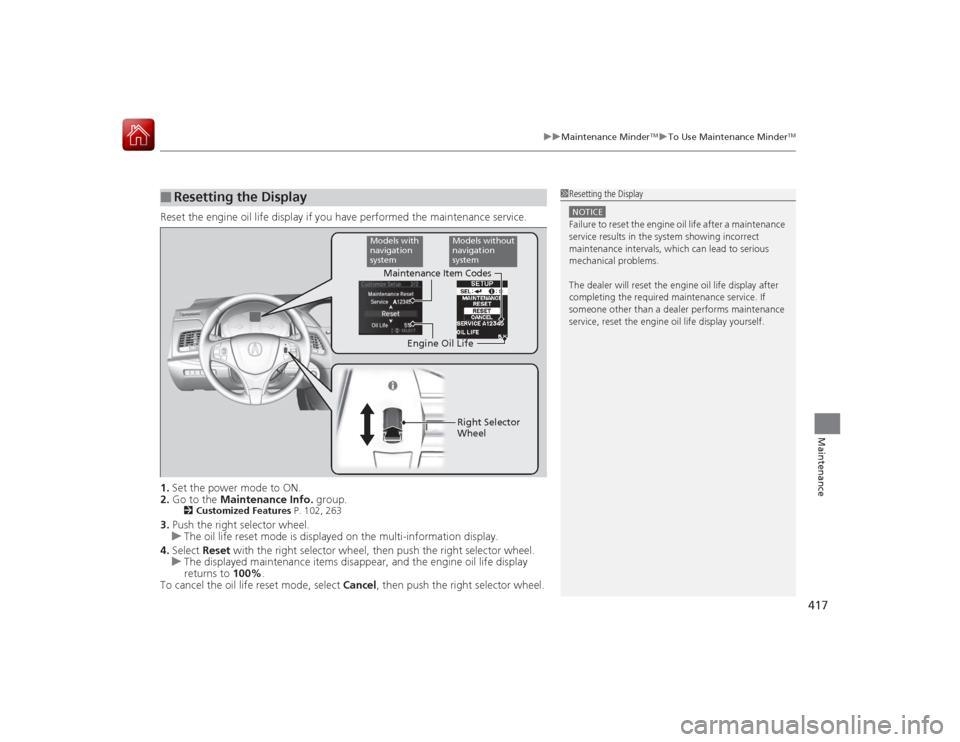
Reset the engine oil life display if you have performed the maintenance service.
1. Set the power mode to ON.
2. Go to the Maintenance Info. group.
2Customized Features P. 102, 263
3.Push the right selector wheel.
u The oil life reset mode is displayed on the multi-information display.
4. Select Reset with the right selector wheel, then push the right selector wheel.
u The displayed maintenance items disappear, and the engine oil life display
returns to 100%.
To cancel the oil life reset mode, select Cancel, then push the right selector wheel.■
Resetting the Display
1Resetting the DisplayNOTICEFailure to reset the engine oil life after a maintenance
service results in the system showing incorrect
maintenance intervals, which can lead to serious
mechanical problems.
The dealer will reset th e engine oil life display after
completing the required maintenance service. If
someone other than a dealer performs maintenance
service, reset the engine oil life display yourself.
Engine Oil Life
Maintenance Item Codes
Models with
navigation
system
Models without
navigation
systemRight Selector
Wheel
Page 443 of 521
442
uuChecking and Maintaining Tires uDOT Tire Quality Grading (U.S. Vehicles)
Maintenance
DOT Tire Quality Grading (U.S. Vehicles)The tires on your vehicle meet all U.S. Federal Safety
Requirements. All tires are also graded for treadwear, traction,
and temperature performance according to Department of
Transportation (DOT) standards. The following explains these
gradings.
Quality grades can be found where applicable on the tire sidewall
between tread shoulder and maximum section width.
The treadwear grade is a comparative rating based on the wear
rate of the tire when tested under controlled conditions on a
specified government test course. For example, a tire graded 150
would wear one and one-half (1 1/2) times as well on the
government course as a tire graded 100. The relative performance
of tires depends upon the actual conditions of their use, however,
and may depart significantly from the norm due to variations in
driving habits, service practices and differences in road
characteristics and climate.■
Uniform Tire Quality Grading
■
Treadwear
1 Uniform Tire Quality GradingFor example:
Treadwear 200
Traction AA
Temperature A
All passenger car tires must conform
to Federal Safety Requirements in
addition to these grades.