radio ACURA TL 1995 Service Workshop Manual
[x] Cancel search | Manufacturer: ACURA, Model Year: 1995, Model line: TL, Model: ACURA TL 1995Pages: 1771, PDF Size: 62.49 MB
Page 1558 of 1771
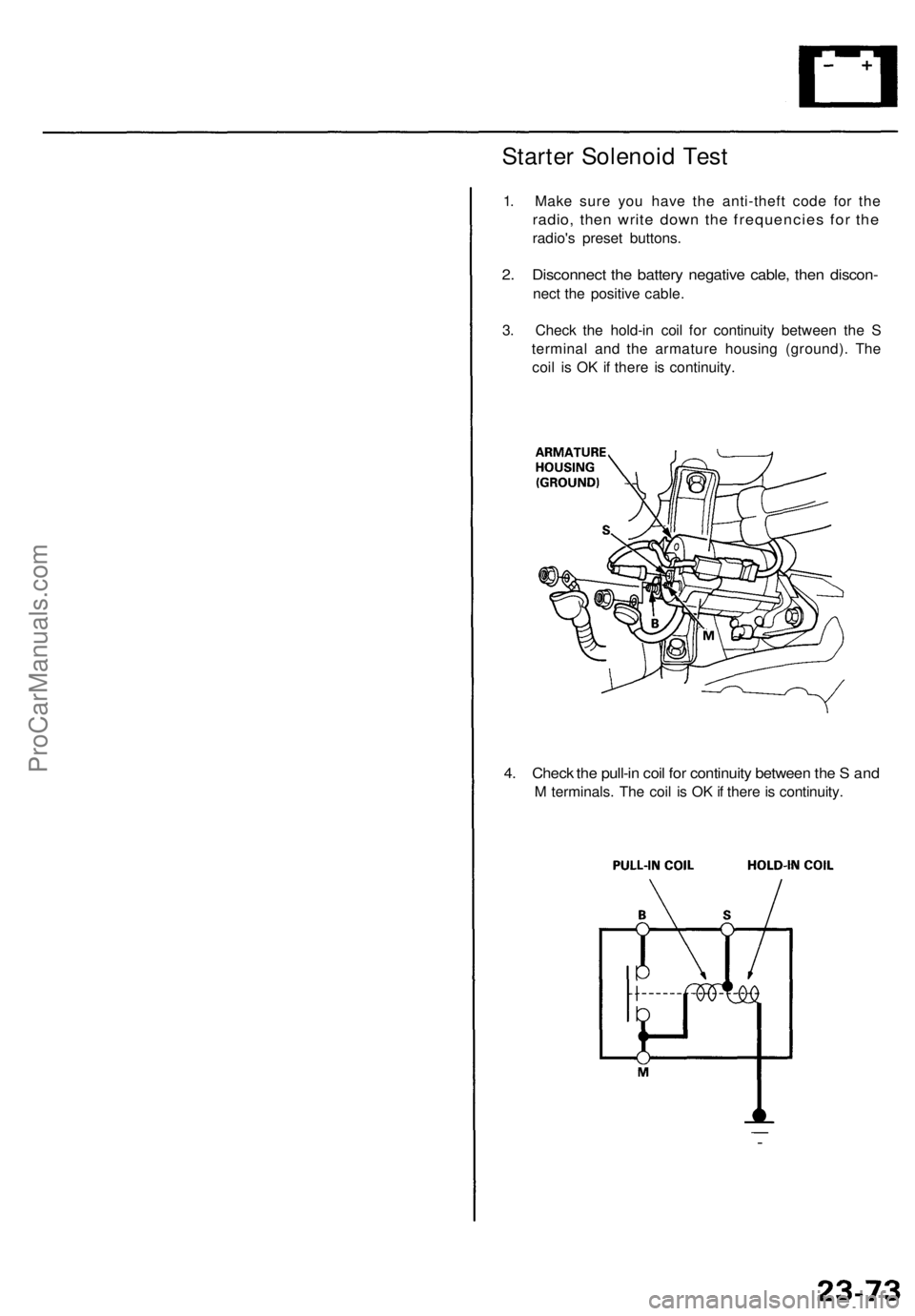
Starter Solenoid Test
1. Make sure you have the anti-theft code for the
radio, then write down the frequencies for the
radio's preset buttons.
2. Disconnect the battery negative cable, then discon-
nect the positive cable.
3. Check the hold-in coil for continuity between the S
terminal and the armature housing (ground). The
coil is OK if there is continuity.
4. Check the pull-in coil for continuity between the S and
M terminals. The coil is OK if there is continuity.ProCarManuals.com
Page 1559 of 1771
Starting Syste m
Starter Replacemen t
1. Mak e sur e yo u hav e th e anti-thef t cod e fo r th e radio ,
the n writ e dow n th e frequencie s fo r th e radio' s prese t
buttons .
2 . Disconnec t th e batter y negativ e cable , the n disconnec t
th e positiv e cable .
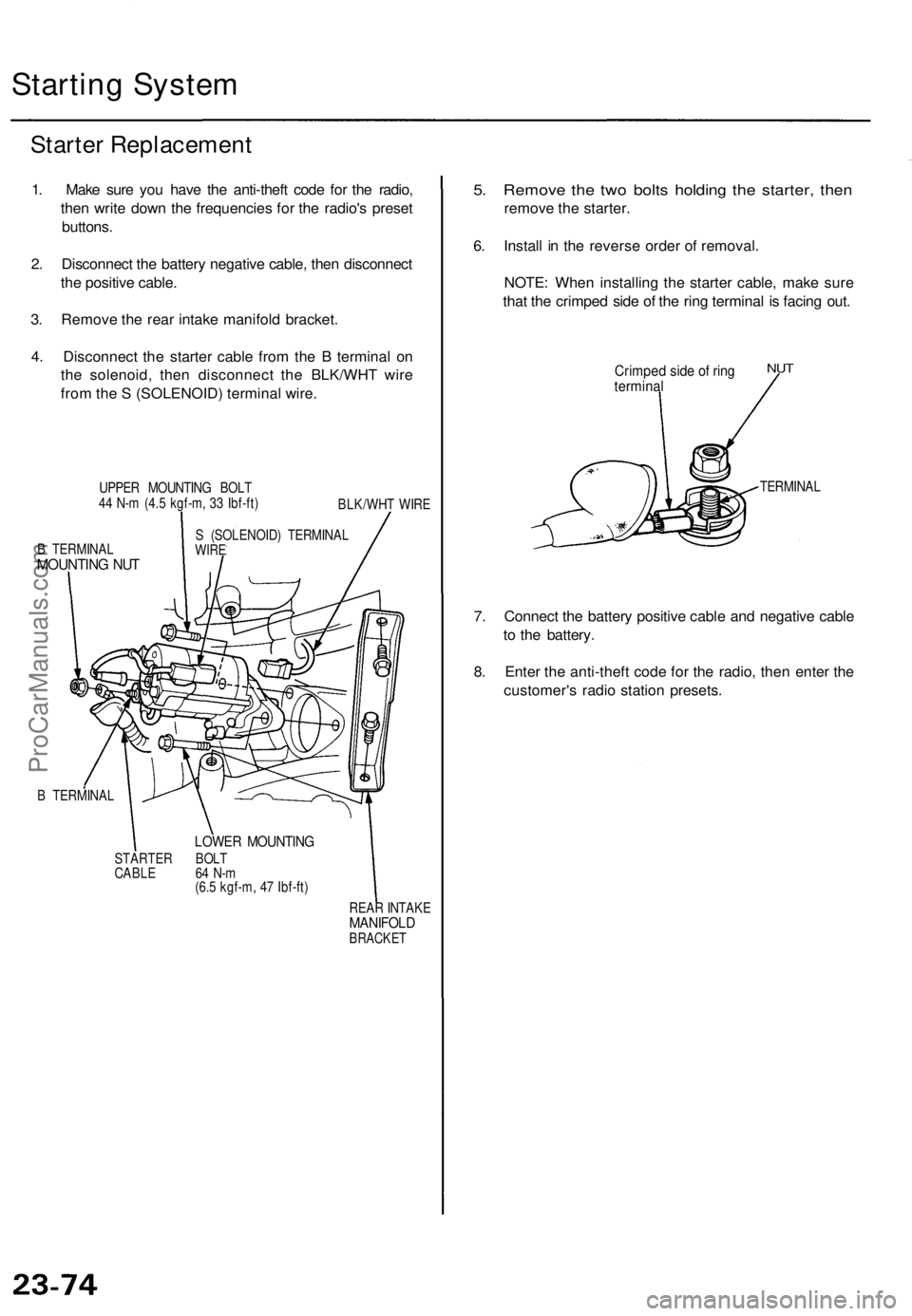
3 . Remov e th e rea r intak e manifol d bracket .
4 . Disconnec t th e starte r cabl e fro m th e B termina l o n
th e solenoid , the n disconnec t th e BLK/WH T wir e
fro m th e S (SOLENOID ) termina l wire .
UPPE R MOUNTIN G BOL T
4 4 N- m (4. 5 kgf-m , 3 3 Ibf-ft )
BLK/WHT WIR E
B TERMINA L
MOUNTING NU T
S (SOLENOID ) TERMINA LWIRE
B TERMINA L
LOWER MOUNTIN G
STARTER BOL T
CABL E 6 4 N- m
(6. 5 kgf-m , 4 7 Ibf-ft )
REAR INTAK E
MANIFOL DBRACKET
5. Remov e th e tw o bolt s holdin g th e starter , the n
remov e th e starter .
6 . Instal l i n th e revers e orde r o f removal .
NOTE : Whe n installin g th e starte r cable , mak e sur e
tha t th e crimpe d sid e o f th e rin g termina l i s facin g out .
Crimpe d sid e o f rin gtermina l
NUT
TERMINA L
7. Connec t th e batter y positiv e cabl e an d negativ e cabl e
t o th e battery .
8 . Ente r th e anti-thef t cod e fo r th e radio , the n ente r th e
customer' s radi o statio n presets .
ProCarManuals.com
Page 1583 of 1771
Charging Syste m
Alternato r Replacemen t
1. Mak e sur e yo u hav e th e anti-thef t cod e fo r th e radio ,
the n writ e dow n th e frequencie s fo r th e radio' s pre -
set buttons .
2. Disconnec t th e batter y negativ e cable , the n discon -
nec t th e positiv e cable .
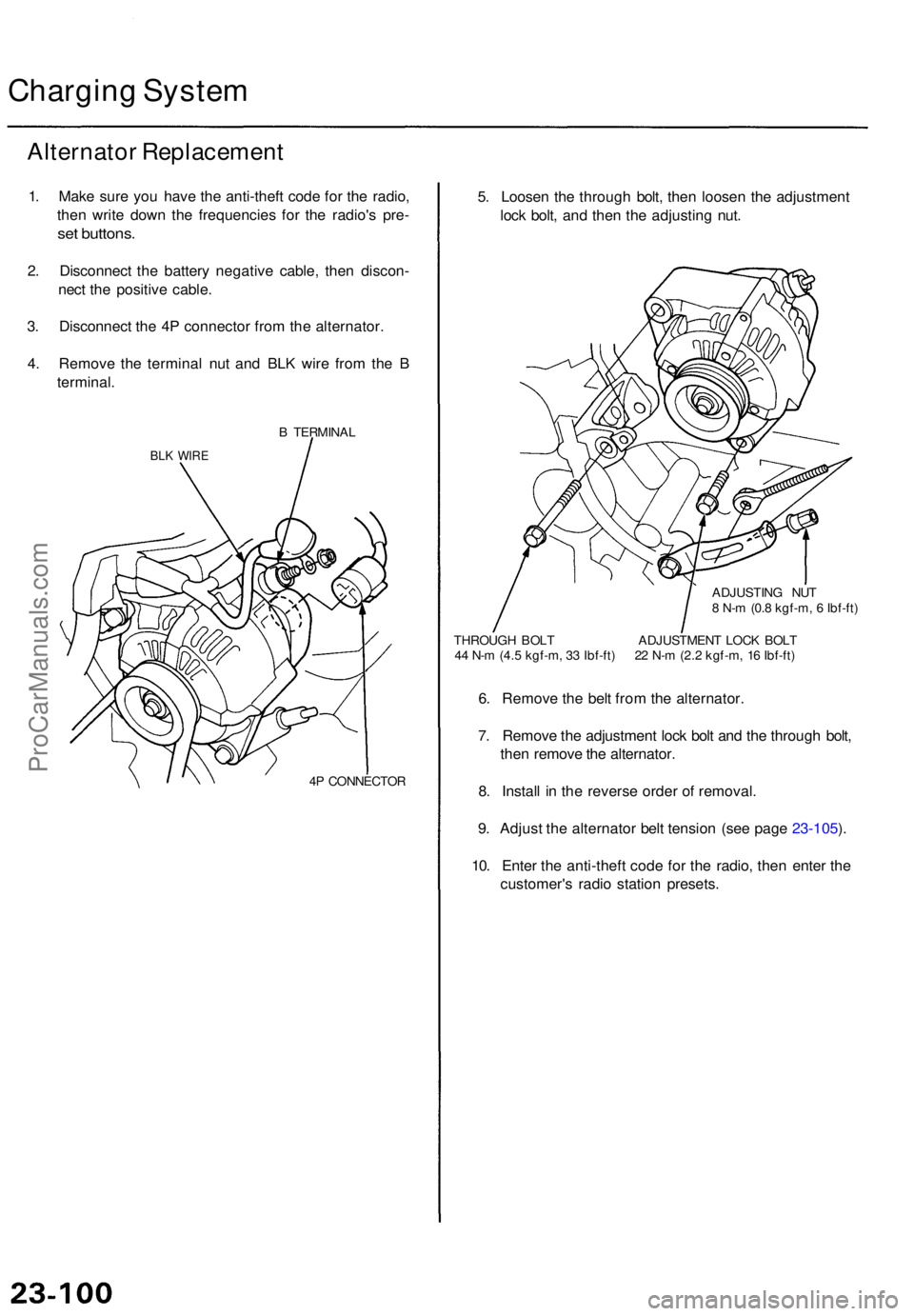
3 . Disconnec t th e 4 P connecto r fro m th e alternator .
4 . Remov e th e termina l nu t an d BL K wir e fro m th e B
terminal .
B TERMINA L
BLK WIR E
4P CONNECTO R
5. Loose n th e throug h bolt , the n loose n th e adjustmen t
loc k bolt , an d the n th e adjustin g nut .
ADJUSTIN G NU T
8 N- m (0. 8 kgf-m , 6 Ibf-ft )
THROUG H BOL T ADJUSTMEN T LOC K BOL T
4 4 N- m (4. 5 kgf-m , 3 3 Ibf-ft ) 2 2 N- m (2. 2 kgf-m , 1 6 Ibf-ft )
6. Remov e th e bel t fro m th e alternator .
7 . Remov e th e adjustmen t loc k bol t an d th e throug h bolt ,
the n remov e th e alternator .
8 . Instal l i n th e revers e orde r o f removal .
9 . Adjus t th e alternato r bel t tensio n (se e pag e 23-105 ).
10 . Ente r th e anti-thef t cod e fo r th e radio , the n ente r th e
customer' s radi o statio n presets .
ProCarManuals.com
Page 1657 of 1771
Stereo Soun d Syste m
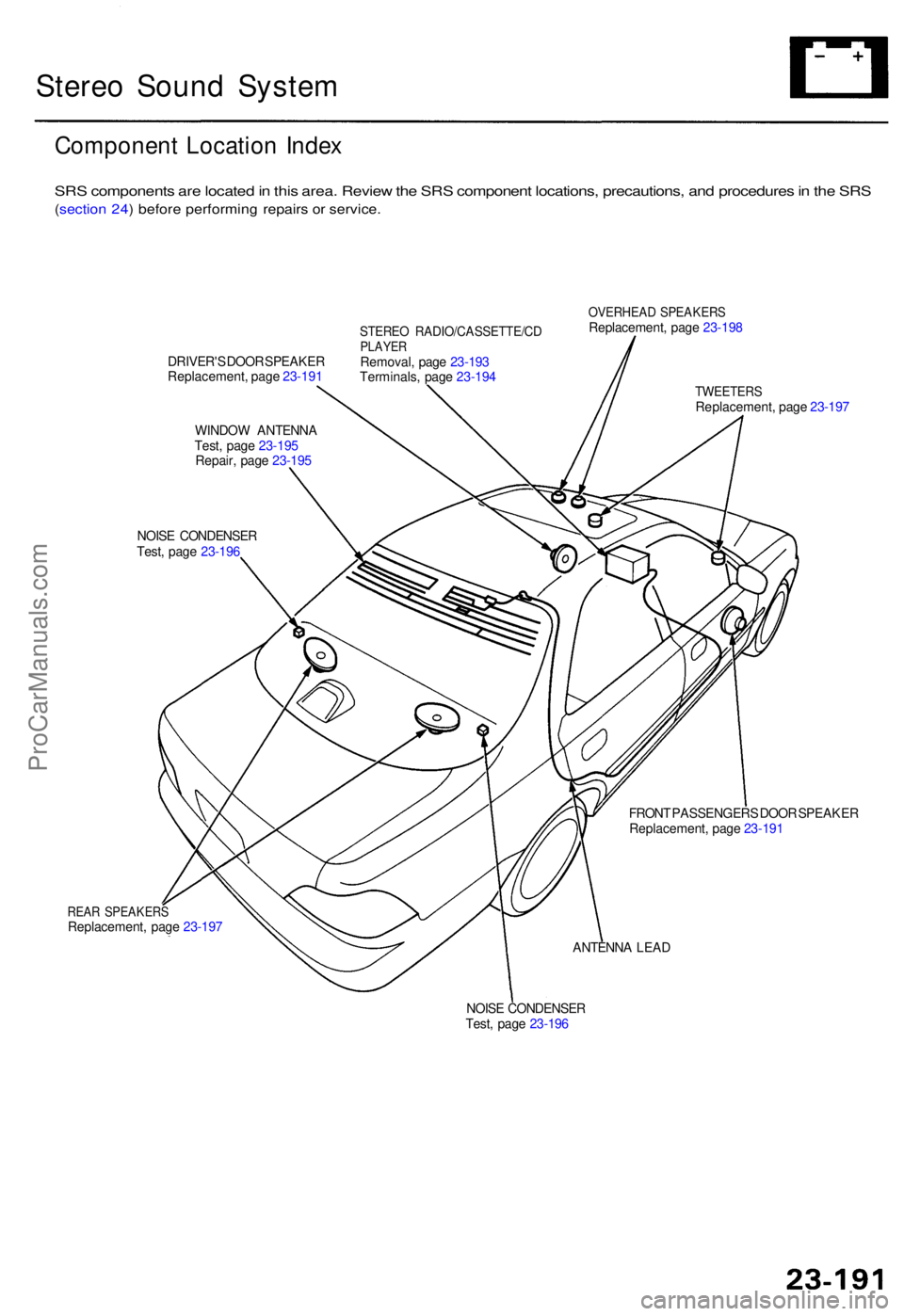
Componen t Locatio n Inde x
SRS component s ar e locate d in thi s area . Revie w th e SR S componen t locations , precautions , an d procedure s in th e SR S
(sectio n 24 ) befor e performin g repair s o r service .
DRIVER' S DOO R SPEAKE R
Replacement , pag e 23-19 1
WINDO W ANTENN A
Test , pag e 23-19 5
Repair , pag e 23-19 5
NOIS E CONDENSE R
Test , pag e 23-19 6
STERE O RADIO/CASSETTE/C DPLAYERRemoval , pag e 23-19 3
Terminals , pag e 23-19 4
OVERHEA D SPEAKER SReplacement , pag e 23-19 8
REAR SPEAKER SReplacement , pag e 23-19 7
TWEETER SReplacement , pag e 23-19 7
FRON T PASSENGER S DOO R SPEAKE R
Replacement , pag e 23-19 1
ANTENN A LEA D
NOIS E CONDENSE R
Test , pag e 23-19 6
ProCarManuals.com
Page 1658 of 1771
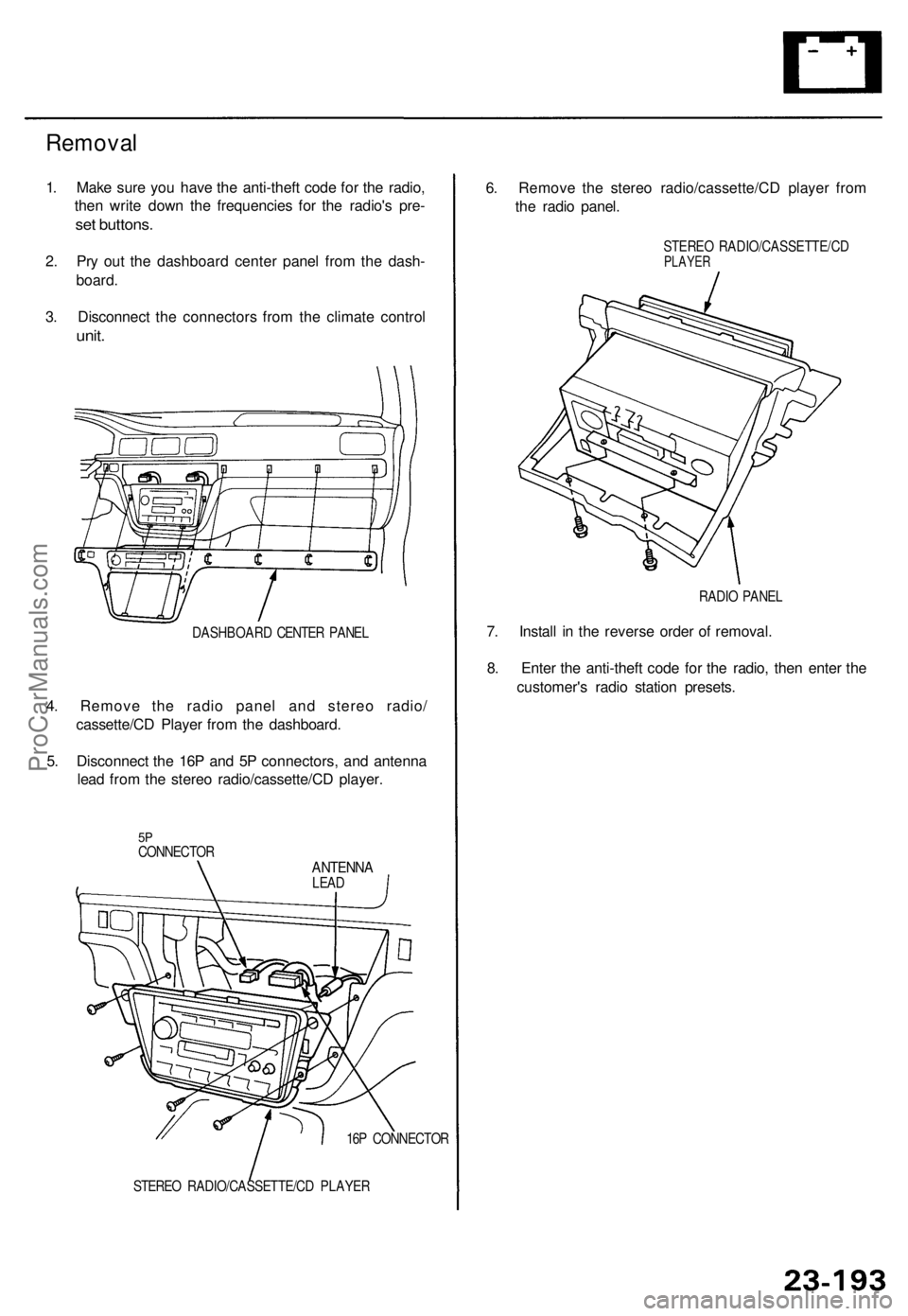
Removal
1. Mak e sur e yo u hav e th e anti-thef t cod e fo r th e radio ,
the n writ e dow n th e frequencie s fo r th e radio' s pre -
set buttons .
2. Pr y ou t th e dashboar d cente r pane l fro m th e dash -
board .
3 . Disconnec t th e connector s fro m th e climat e contro l
unit.
DASHBOAR D CENTE R PANE L
4. Remov e th e radi o pane l an d stere o radio /
cassette/C D Playe r fro m th e dashboard .
5 . Disconnec t th e 16 P an d 5 P connectors , an d antenn a
lea d fro m th e stere o radio/cassette/C D player .
5PCONNECTO RANTENNALEAD
16 P CONNECTO R
STERE O RADIO/CASSETTE/C D PLAYE R
6. Remov e th e stere o radio/cassette/C D playe r fro m
th e radi o panel .
STERE O RADIO/CASSETTE/C DPLAYER
RADIO PANE L
7. Instal l i n th e revers e orde r o f removal .
8 . Ente r th e anti-thef t cod e fo r th e radio , the n ente r th e
customer' s radi o statio n presets .
ProCarManuals.com
Page 1659 of 1771
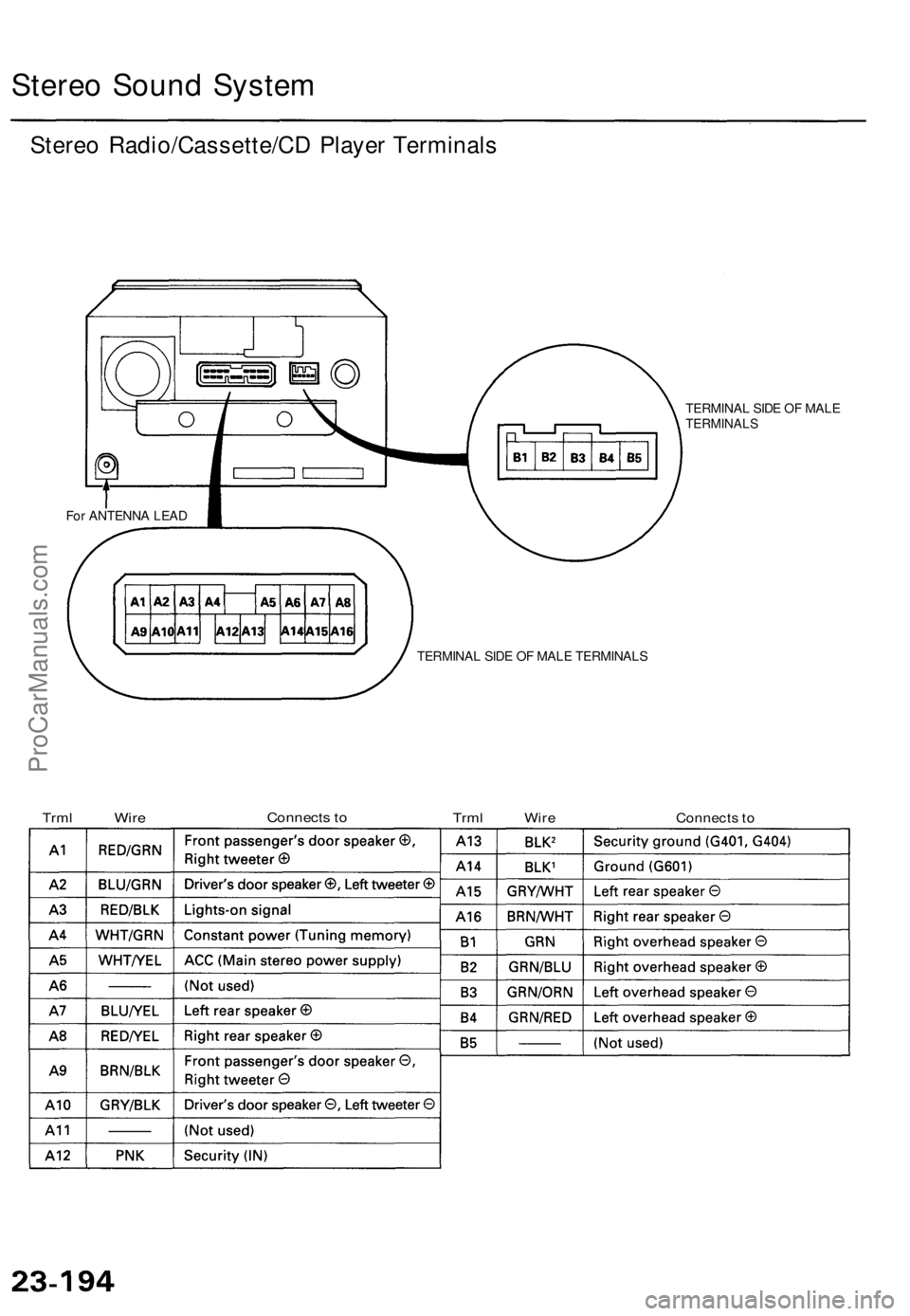
Stereo Soun d Syste m
Stereo Radio/Cassette/C D Playe r Terminal s
TERMINA L SID E O F MAL ETERMINAL S
For ANTENN A LEA D
TERMINAL SID E O F MAL E TERMINAL S
TrmlWireConnect s to
TrmlWireConnect s to
ProCarManuals.com
Page 1665 of 1771
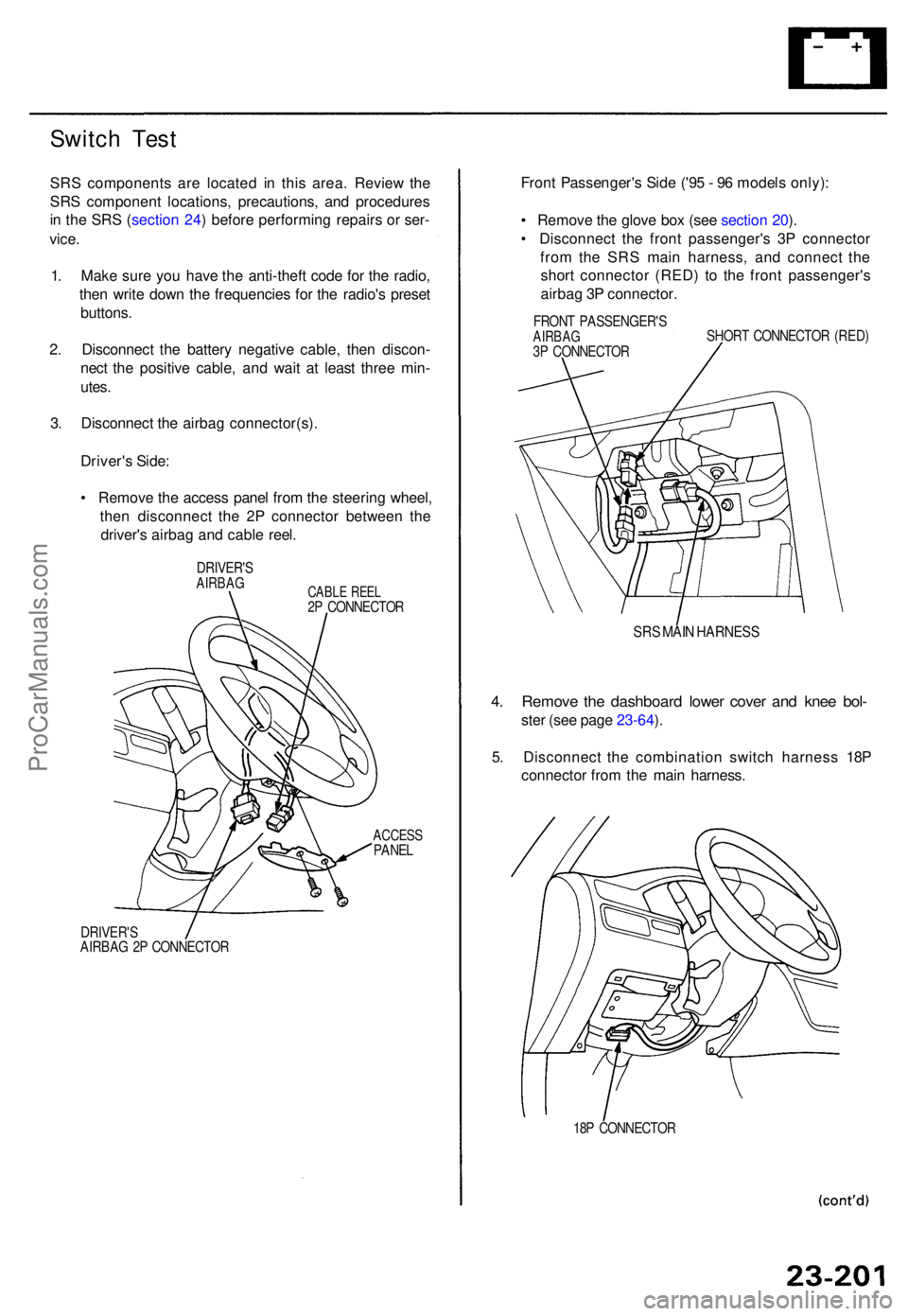
Switch Tes t
SRS component s ar e locate d i n thi s area . Revie w th e
SR S componen t locations , precautions , an d procedure s
i n th e SR S (sectio n 24 ) befor e performin g repair s o r ser -
vice .
1 . Mak e sur e yo u hav e th e anti-thef t cod e fo r th e radio ,
the n writ e dow n th e frequencie s fo r th e radio' s prese t
buttons .
2 . Disconnec t th e batter y negativ e cable , the n discon -
nec t th e positiv e cable , an d wai t a t leas t thre e min -
utes .
3 . Disconnec t th e airba g connector(s) .
Driver' s Side :
• Remov e th e acces s pane l fro m th e steerin g wheel ,
the n disconnec t th e 2 P connecto r betwee n th e
driver' s airba g an d cabl e reel .
DRIVER' SAIRBAGCABLE REE L2P CONNECTO R
ACCESSPANEL
DRIVER' S
AIRBA G 2 P CONNECTO R
Front Passenger' s Sid e ('9 5 - 9 6 model s only) :
• Remov e th e glov e bo x (se e sectio n 20 ).
• Disconnec t th e fron t passenger' s 3 P connecto r
fro m th e SR S mai n harness , an d connec t th e
shor t connecto r (RED ) t o th e fron t passenger' s
airba g 3 P connector .
FRONT PASSENGER' SAIRBAG3P CONNECTO R SHOR
T CONNECTO R (RED )
SRS MAI N HARNES S
4. Remov e th e dashboar d lowe r cove r an d kne e bol -
ster (se e pag e 23-64 ).
5 . Disconnec t th e combinatio n switc h harnes s 18 P
connecto r fro m th e mai n harness .
18P CONNECTO R
ProCarManuals.com
Page 1666 of 1771
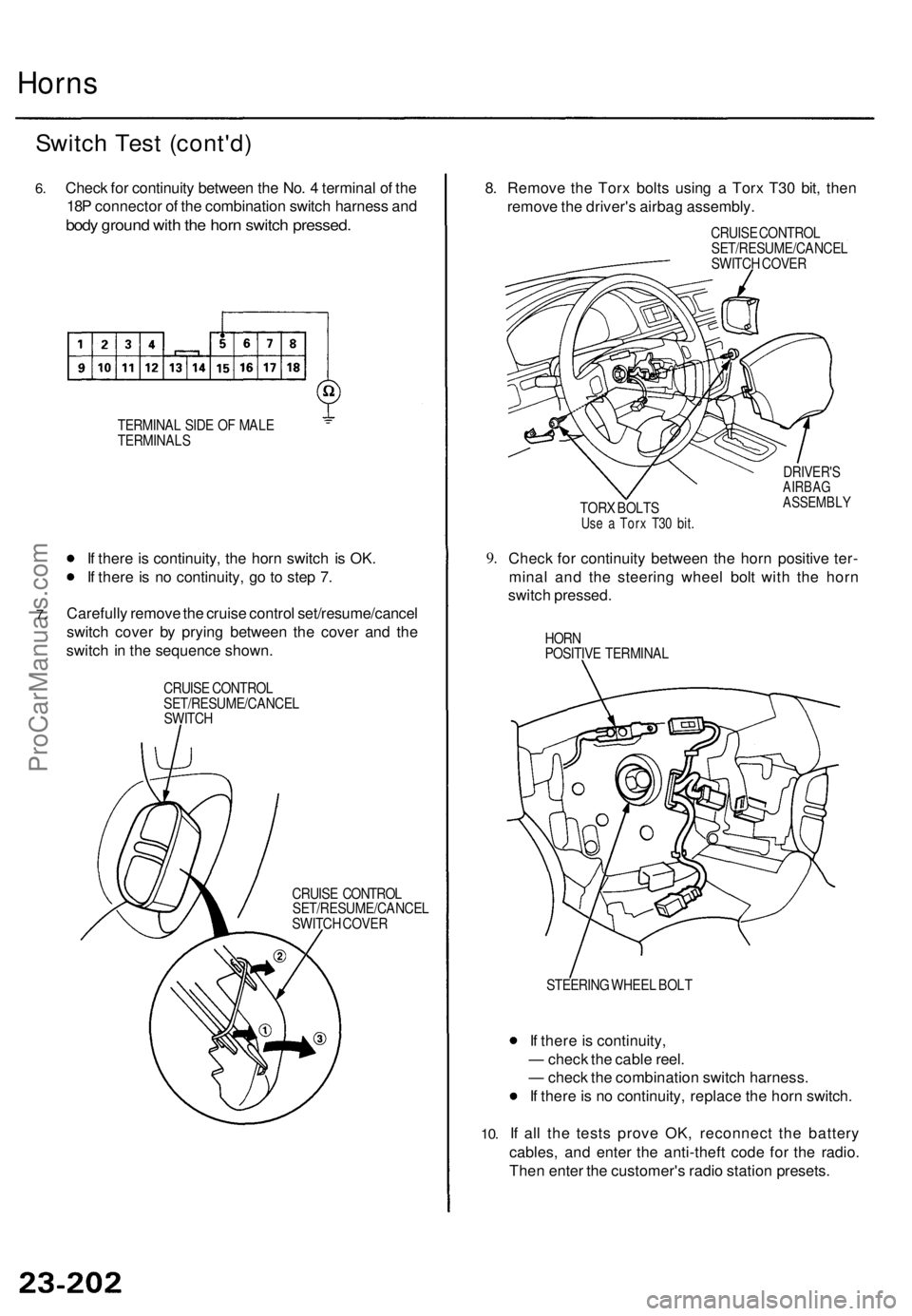
Horns
Switc h Tes t (cont'd )
6.Chec k fo r continuit y betwee n th e No . 4 termina l o f th e
18 P connecto r o f th e combinatio n switc h harnes s an d
bod y groun d wit h th e hor n switc h pressed .
TERMINA L SID E O F MAL E
TERMINAL S
7.
If ther e is continuity , th e hor n switc h i s OK .
I f ther e is n o continuity , g o to ste p 7 .
Carefull y remov e th e cruis e contro l set/resume/cance l
switc h cove r b y pryin g betwee n th e cove r an d th e
switc h in th e sequenc e shown .
CRUISE CONTRO L
SET/RESUME/CANCE L
SWITC H
CRUISE CONTRO L
SET/RESUME/CANCE L
SWITC H COVE R
8. Remov e th e Tor x bolt s usin g a Tor x T3 0 bit , the n
remov e th e driver' s airba g assembly .
CRUISE CONTRO L
SET/RESUME/CANCE L
SWITC H COVE R
TOR X BOLT S
Use a Tor x T3 0 bit .
DRIVER' SAIRBAGASSEMBL Y
9.Chec k fo r continuit y betwee n th e hor n positiv e ter -
mina l an d th e steerin g whee l bol t wit h th e hor n
switc h pressed .
HORN
POSITIV E TERMINA L
10.
STEERIN G WHEE L BOL T
If ther e is continuity ,
— chec k th e cabl e reel .
— chec k th e combinatio n switc h harness .
I f ther e is n o continuity , replac e th e hor n switch .
I f al l th e test s prov e OK , reconnec t th e batter y
cables , an d ente r th e anti-thef t cod e fo r th e radio .
The n ente r th e customer' s radi o statio n presets .
ProCarManuals.com
Page 1722 of 1771
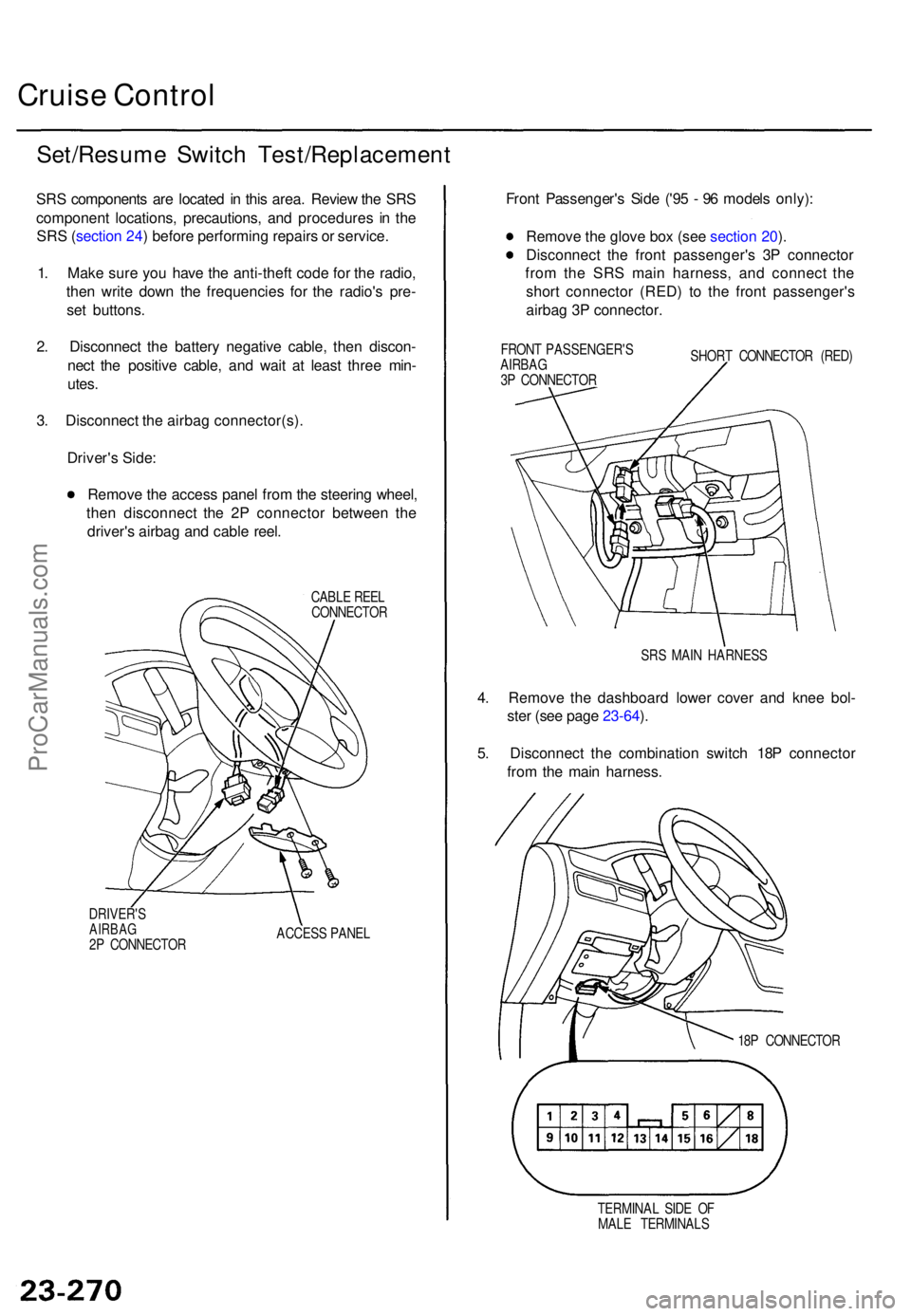
Cruise Contro l
Set/Resum e Switc h Test/Replacemen t
SRS component s ar e locate d in thi s area . Revie w th e SR S
componen t locations , precautions , an d procedure s i n th e
SR S (sectio n 24 ) befor e performin g repair s o r service .
1 . Mak e sur e yo u hav e th e anti-thef t cod e fo r th e radio ,
the n writ e dow n th e frequencie s fo r th e radio' s pre -
se t buttons .
2 . Disconnec t th e batter y negativ e cable , the n discon -
nec t th e positiv e cable , an d wai t a t leas t thre e min -
utes .
3 . Disconnec t th e airba g connector(s) .
Driver' s Side :
Remov e th e acces s pane l fro m th e steerin g wheel ,
the n disconnec t th e 2 P connecto r betwee n th e
driver' s airba g an d cabl e reel .
CABL E REE L
CONNECTO R
DRIVER' S
AIRBAG2P CONNECTO R ACCES
S PANE L
Front Passenger' s Sid e ('9 5 - 9 6 model s only) :
Remov e th e glov e bo x (se e sectio n 20 ).
Disconnec t th e fron t passenger' s 3 P connecto r
fro m th e SR S mai n harness , an d connec t th e
shor t connecto r (RED ) t o th e fron t passenger' s
airba g 3 P connector .
FRONT PASSENGER' S
AIRBA G
3 P CONNECTO R SHOR
T CONNECTO R (RED )
SR S MAI N HARNES S
4. Remov e th e dashboar d lowe r cove r an d kne e bol -
ste r (se e pag e 23-64 ).
5 . Disconnec t th e combinatio n switc h 18 P connecto r
fro m th e mai n harness .
18P CONNECTO R
TERMINA L SID E O F
MAL E TERMINAL S
ProCarManuals.com
Page 1723 of 1771
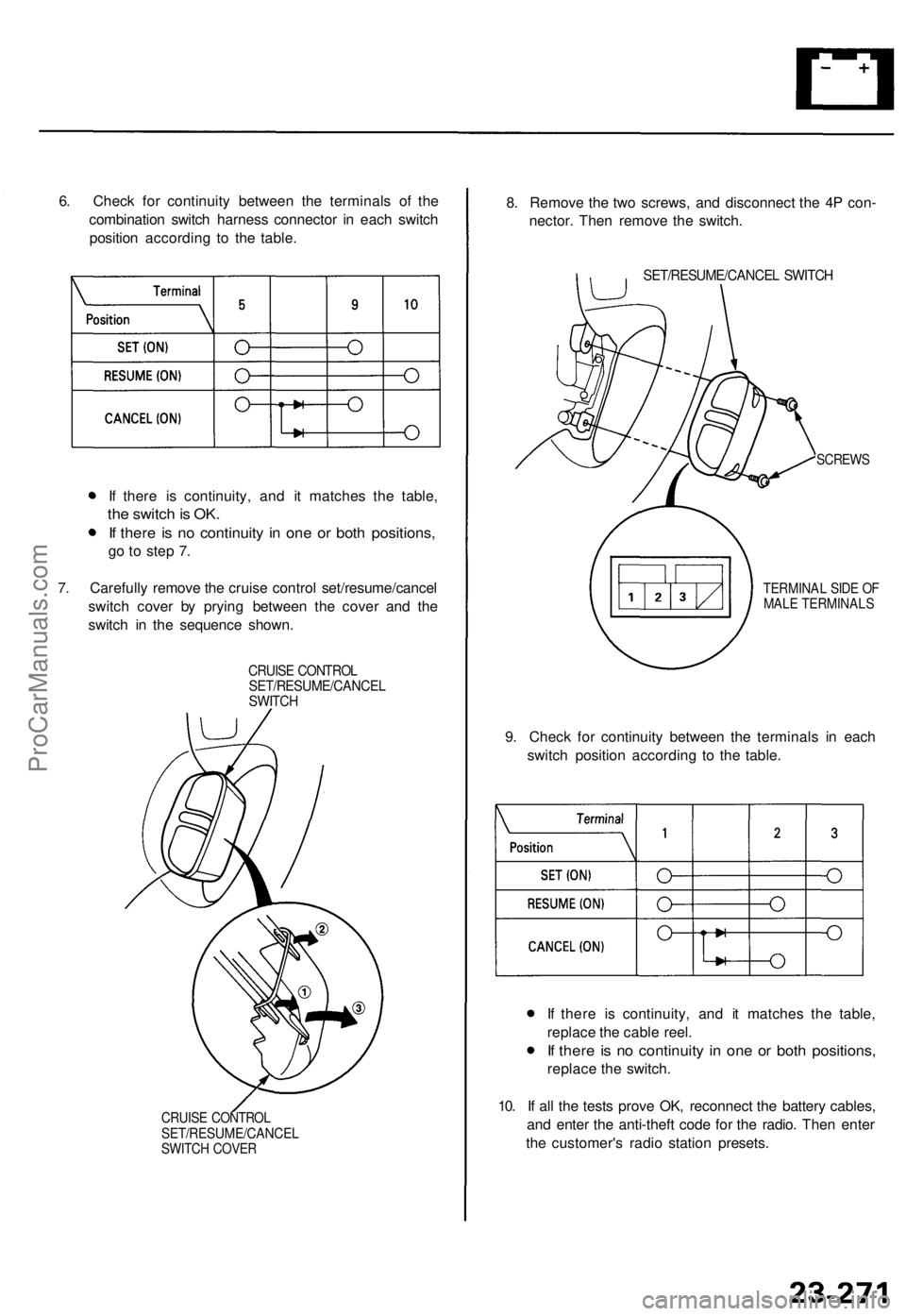
6. Check for continuity between the terminals of the
combination switch harness connector in each switch
position according to the table.
If there is continuity, and it matches the table,
the switch is OK.
If there is no continuity in one or both positions,
go to step 7.
7. Carefully remove the cruise control set/resume/cancel
switch cover by prying between the cover and the
switch in the sequence shown.
CRUISE CONTROL
SET/RESUME/CANCEL
SWITCH
CRUISE CONTROL
SET/RESUME/CANCEL
SWITCH COVER
8. Remove the two screws, and disconnect the 4P con-
nector. Then remove the switch.
SET/RESUME/CANCEL SWITCH
SCREWS
TERMINAL SIDE OF
MALE TERMINALS
9. Check for continuity between the terminals in each
switch position according to the table.
If there is continuity, and it matches the table,
replace the cable reel.
If there is no continuity in one or both positions,
replace the switch.
10. If all the tests prove OK, reconnect the battery cables,
and enter the anti-theft code for the radio. Then enter
the customer's radio station presets.ProCarManuals.com