trans Acura TLX 2015 User Guide
[x] Cancel search | Manufacturer: ACURA, Model Year: 2015, Model line: TLX, Model: Acura TLX 2015Pages: 545, PDF Size: 19.64 MB
Page 77 of 545
76
uuIndicators u
Instrument Panel
*1:On the left: Models with full color display
On the right: Models without full color display
*2:Models with full color display
*3:Models without full color displayIndicator
Name
On/Blinking
Explanation
Message
*1
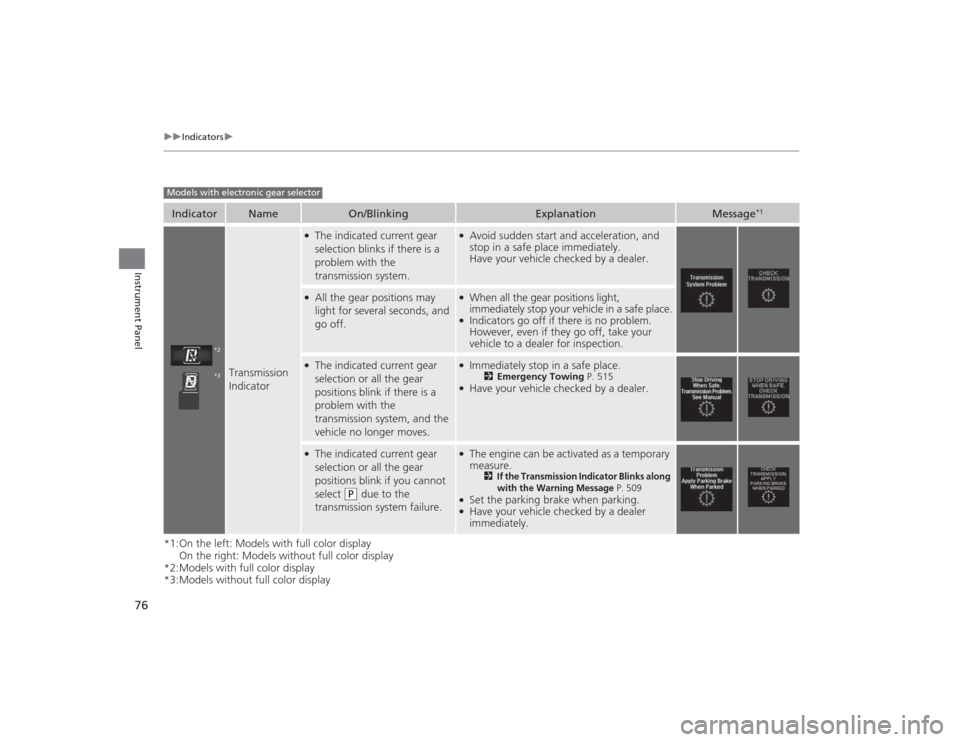
Transmission
Indicator
●The indicated current gear
selection blinks if there is a
problem with the
transmission system.
●Avoid sudden start and acceleration, and
stop in a safe place immediately.
Have your vehicle checked by a dealer.
●All the gear positions may
light for several seconds, and
go off.
●When all the gear positions light,
immediately stop your vehicle in a safe place.●Indicators go off if there is no problem.
However, even if they go off, take your
vehicle to a dealer for inspection.
●The indicated current gear
selection or all the gear
positions blink if there is a
problem with the
transmission system, and the
vehicle no longer moves.
●Immediately stop in a safe place.
2 Emergency Towing P. 515
●Have your vehicle checked by a dealer.
●The indicated current gear
selection or all the gear
positions blink if you cannot
select
(P
due to the
transmission system failure.
●The engine can be activated as a temporary
measure.
2
If the Transmission Indicator Blinks along
with the Warning Message
P. 509
●Set the parking brake when parking.●Have your vehicle checked by a dealer
immediately.
Models with electronic gear selector
*2*3
Page 78 of 545

77
uuIndicators u
Continued
Instrument Panel
*1:On the left: Models with full color display
On the right: Models without full color display
*2:Models with full color display
*3:Models without full color displayIndicator
Name
On/Blinking
Explanation
Message
*1
Transmission
Indicator
●Blinks if the transmission
system has a problem.
●Blinks while driving - Avoid sudden starts
and acceleration and have the vehicle
checked by a dealer immediately.
Models with shift lever
*2*3
Page 96 of 545
95
uuIndicators uMulti-Information Display Warning and Information Messages
Continued
Instrument Panel
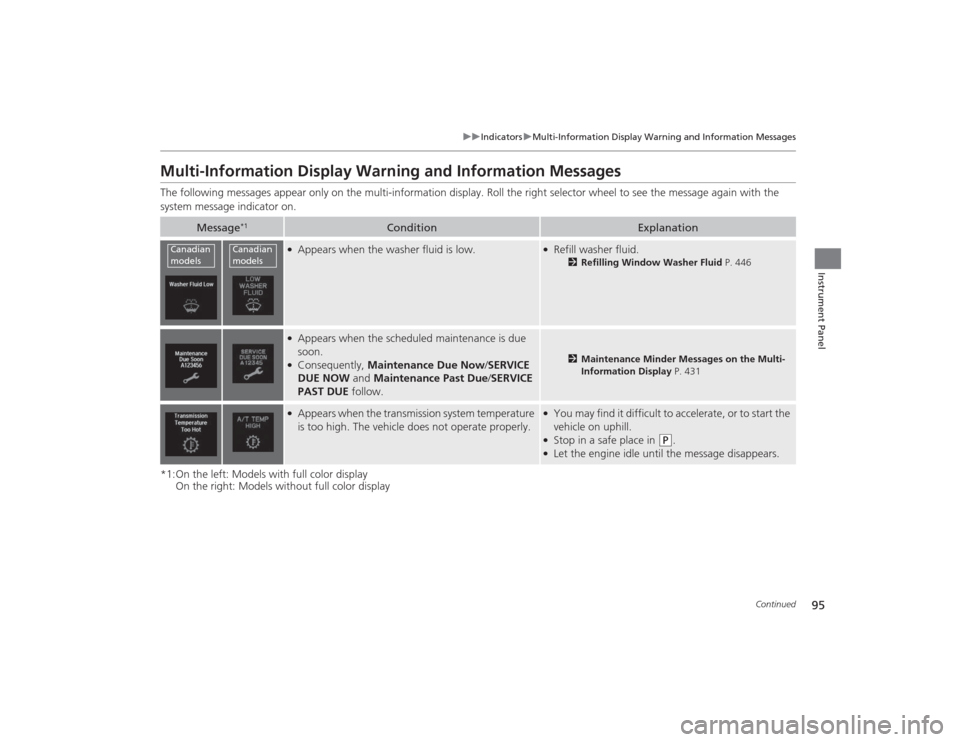
Multi-Information Display Warning and Information MessagesThe following messages appear only on the multi-information display. Roll the right selector wheel to see the message again wit h the
system message indicator on.
*1:On the left: Models with full color display On the right: Models without full color display
Message
*1
Condition
Explanation
●Appears when the washer fluid is low.
●Refill washer fluid.
2Refilling Window Washer Fluid P. 446
●Appears when the scheduled maintenance is due
soon.●Consequently, Maintenance Due Now /SERVICE
DUE NOW and Maintenance Past Due /SERVICE
PAST DUE follow.
2Maintenance Minder Messages on the Multi-
Information Display P. 431
●Appears when the transmission system temperature
is too high. The vehicle does not operate properly.
●You may find it difficult to accelerate, or to start the
vehicle on uphill.●Stop in a safe place in
(P
.
●Let the engine idle until the message disappears.
Canadian
models
Canadian
models
Page 97 of 545
96
uuIndicators uMulti-Information Display Warn ing and Information Messages
Instrument Panel
*1:On the left: Models with full color display
On the right: Models without full color display
Message
*1
Condition
Explanation
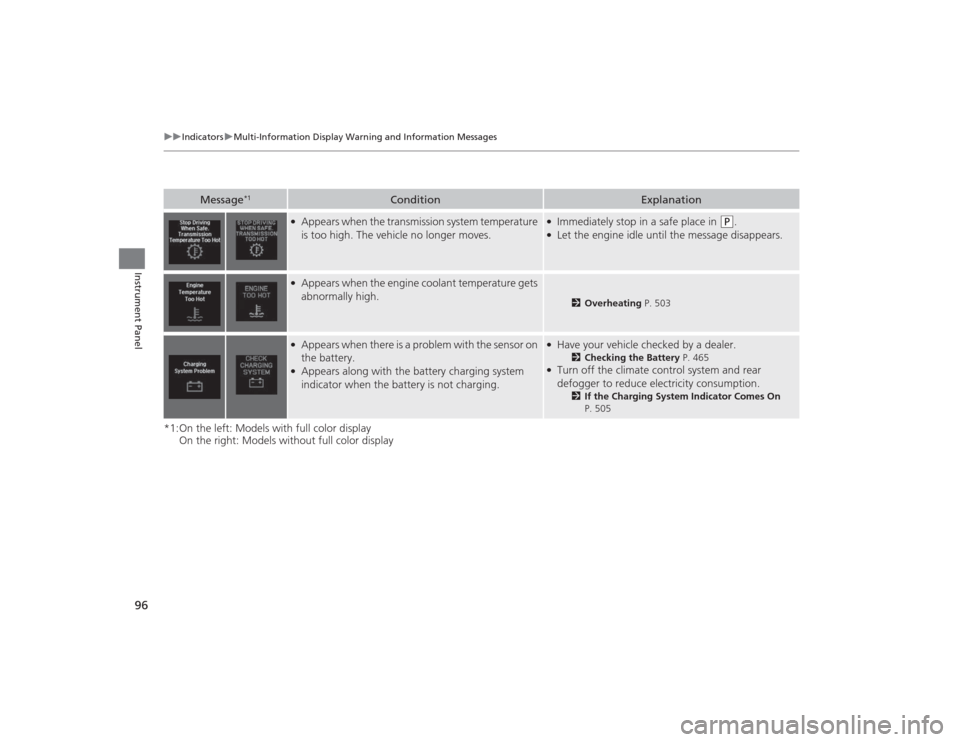
●Appears when the transmission system temperature
is too high. The vehicle no longer moves.
●Immediately stop in a safe place in
(P
.
●Let the engine idle until the message disappears.
●Appears when the engine coolant temperature gets
abnormally high.
2Overheating P. 503
●Appears when there is a problem with the sensor on
the battery.●Appears along with the battery charging system
indicator when the battery is not charging.
●Have your vehicle checked by a dealer.
2Checking the Battery P. 465
●Turn off the climate control system and rear
defogger to reduce electricity consumption.
2If the Charging System Indicator Comes On
P. 505
Page 101 of 545
100
uuIndicators uMulti-Information Display Warn ing and Information Messages
Instrument Panel
*1:On the left: Models with full color display
On the right: Models without full color display
Message
*1
Condition
Explanation
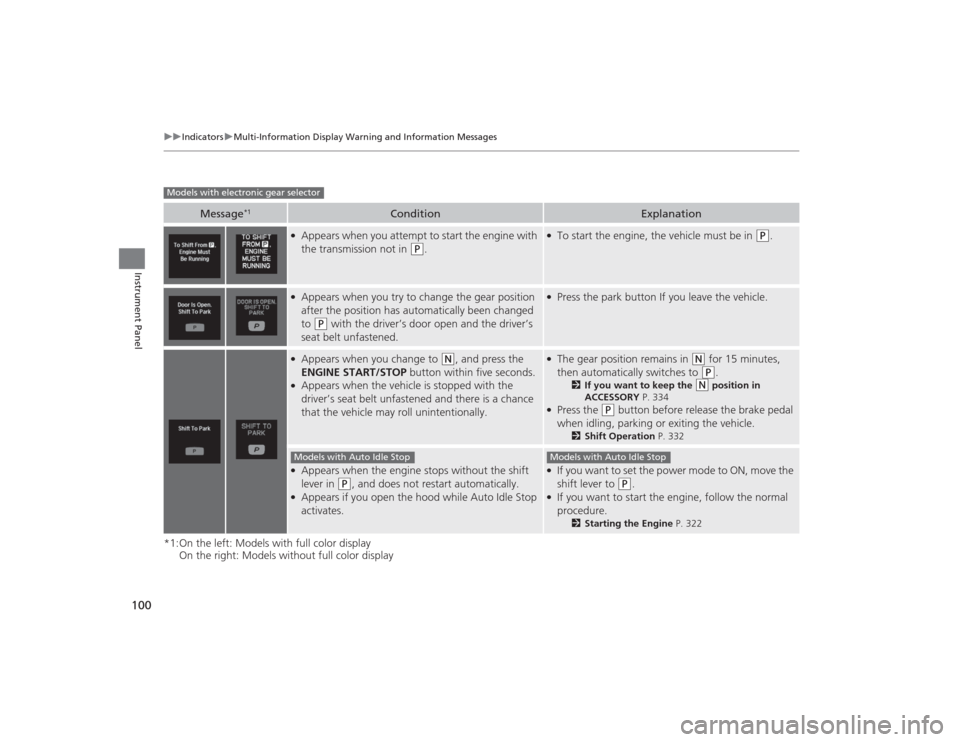
●Appears when you attempt to start the engine with
the transmission not in
(P
.
●To start the engine, the vehicle must be in
(P
.
●Appears when you try to change the gear position
after the position has automatically been changed
to
(P
with the driver’s door open and the driver’s
seat belt unfastened.
●Press the park button If you leave the vehicle.
●Appears when you change to
(N
, and press the
ENGINE START/STOP button within five seconds.
●Appears when the vehicle is stopped with the
driver’s seat belt unfastened and there is a chance
that the vehicle may roll unintentionally.
●The gear position remains in
(N
for 15 minutes,
then automatically switches to (P
.
2 If you want to keep the
(N
position in
ACCESSORY P. 334
●Press the
(P
button before release the brake pedal
when idling, parking or exiting the vehicle.
2 Shift Operation P. 332
●Appears when the engine stops without the shift
lever in
(P
, and does not restart automatically.
●Appears if you open the hood while Auto Idle Stop
activates.
●If you want to set the power mode to ON, move the
shift lever to
(P
.
●If you want to start the engine, follow the normal
procedure.
2Starting the Engine P. 322
Models with electronic gear selector
Models with Auto Idle Stop
Models with Auto Idle Stop
Page 110 of 545
109
uuIndicators uMulti-Information Display Warning and Information Messages
Continued
Instrument Panel
Message
Condition
Explanation
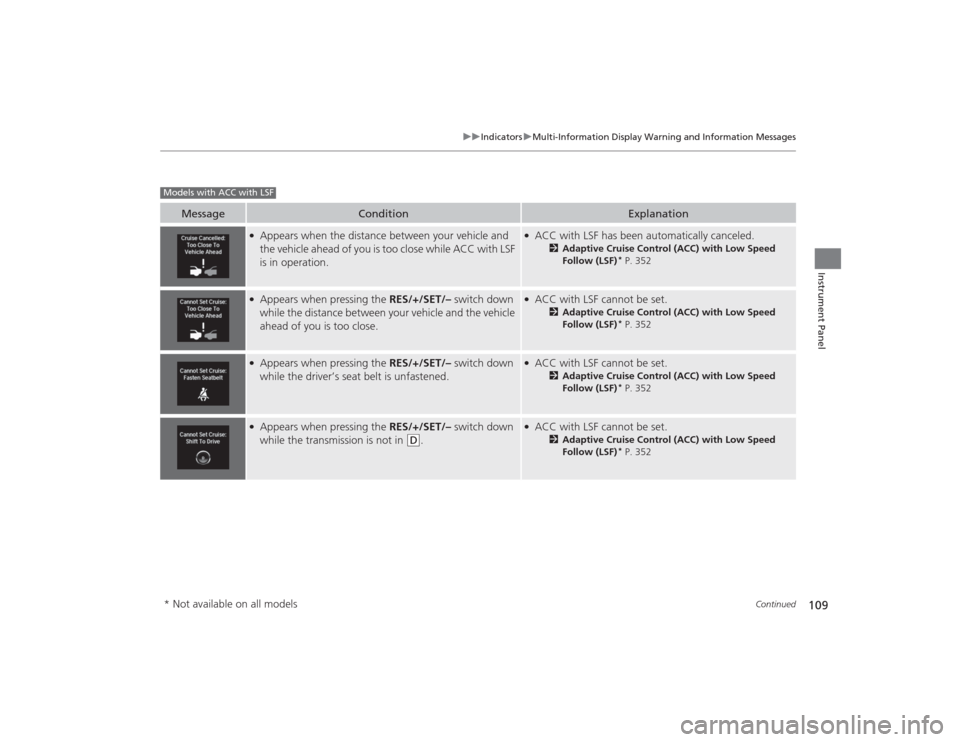
●Appears when the distance between your vehicle and
the vehicle ahead of you is too close while ACC with LSF
is in operation.
●ACC with LSF has been automatically canceled.
2 Adaptive Cruise Control (ACC) with Low Speed
Follow (LSF)
* P. 352
●Appears when pressing the RES/+/SET/– switch down
while the distance between your vehicle and the vehicle
ahead of you is too close.
●ACC with LSF cannot be set.
2 Adaptive Cruise Control (ACC) with Low Speed
Follow (LSF)
* P. 352
●Appears when pressing the RES/+/SET/– switch down
while the driver’s seat belt is unfastened.
●ACC with LSF cannot be set.
2 Adaptive Cruise Control (ACC) with Low Speed
Follow (LSF)
* P. 352
●Appears when pressing the RES/+/SET/– switch down
while the transmission is not in
(D
.
●ACC with LSF cannot be set.
2 Adaptive Cruise Control (ACC) with Low Speed
Follow (LSF)
* P. 352
Models with ACC with LSF* Not available on all models
Page 126 of 545
125
uuGauges and Multi-Information Display uMulti-Information DisplayContinued
Instrument Panel
Shows the remaining oil life and Maintenance Minder
TM.
2 Maintenance Minder
TM P. 429
Shows each tire’s pressure.2Tire Pressure Monitoring System (TPMS) P. 392Shows the current mode for Integrated dynamics system.2Integrated Dynamics System (IDS) P. 346
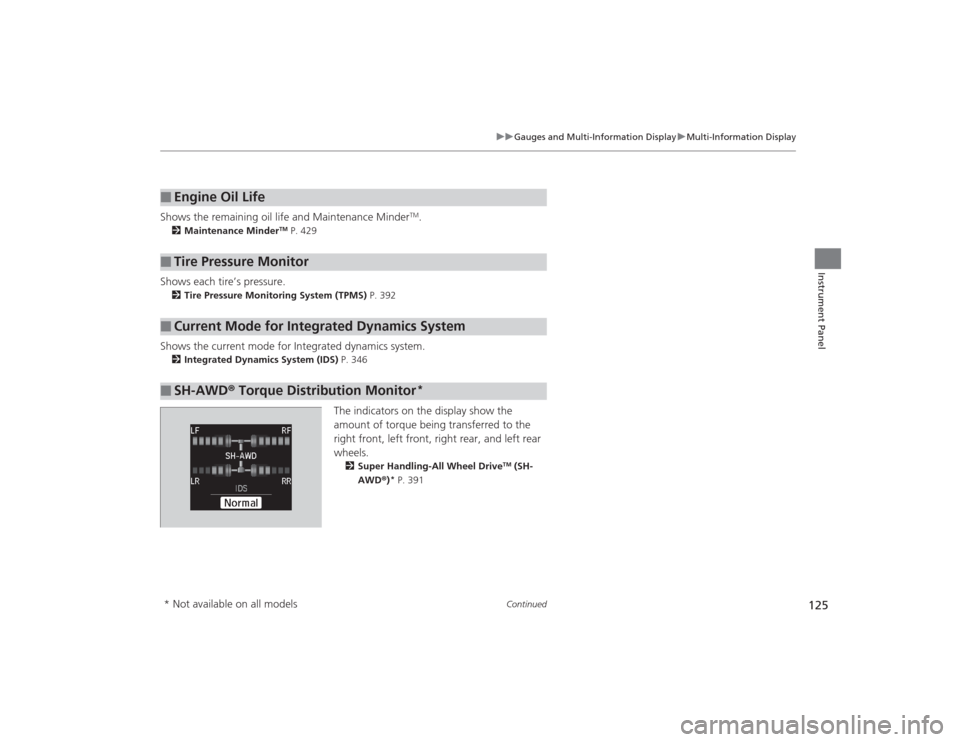
The indicators on the display show the
amount of torque being transferred to the
right front, left front, right rear, and left rear
wheels.2Super Handling-All Wheel Drive
TM (SH-
AWD ®)
* P. 391
■
Engine Oil Life
■
Tire Pressure Monitor
■
Current Mode for Integrated Dynamics System
■
SH-AWD ® Torque Distribution Monitor
*
* Not available on all models
Page 127 of 545

uuGauges and Multi- Information Display uMulti-Information Display
126Instrument Panel
Use the multi-information display to customize certain features.■How to customize
Select the Vehicle Settings screen by rolling the right selector wheel while the
power mode is in ON, and the vehicle is at a complete stop.
Push the right selector wheel.■
Customized Features
1 Customized Features
To customize other features, roll the right selector
wheel.
2 List of customizable options P. 129
2 Example of customization settings P. 134
Customization is possible when you see the driver’s
ID ( Driver 1 or Driver 2) on the screen.
The driver’s ID indicates which remote transmitter
you have used to unlock the driver’s door. The
customized settings are recalled every time you
unlock the driver’s door with that remote.
Change to
( P before you attempt to change any
customized setting.
Customizing is also available from the audio/
information screen.
You cannot have Vehicle Settings displayed on the
multi-information display while the audio/
information screen shows the same menu. 2 Customized Features P. 259
Right Selector Wheel
Roll : Changes the
customize menus and
items.
Push : Enters the selected
item.
Multi-information Display: Goes to Vehicle Settings.
Models without
full color display
Models with full
color display
Page 142 of 545
141
uuLocking and Unlocking the Doors uLow Keyless Access Remote Signal Strength
Controls
Contains a number that you will need if you
purchase a replacement key.
Low Keyless Access Remote Signal StrengthThe vehicle transmits radio waves to locate the keyless access remote when locking/
unlocking the doors, opening the trunk, or to start the engine.
In the following cases, locking/unlocking the doors, opening the trunk, or starting
the engine may be inhibited or operation may be unstable:
• Strong radio waves are being transmitted by nearby equipment.
• You are carrying the keyless access remote together with telecommunications
equipment, laptop computers, cell phones, or wireless devices.
• A metallic object is touching or covering the keyless access remote.■
Key Number Tag
1Key Number Tag
Keep the key number tag separate from the key in a
safe place outside of your vehicle.
If you wish to purchase an additional key, contact a
dealer.
If you lose your key and you cannot start the engine,
contact a dealer.1Low Keyless Access Remote Signal Strength
Communication between the keyless access remote
and the vehicle consumes the keyless access remote’s
battery.
The keyless access remote battery lasts about two
years. This changes by how often you use the remote.
The battery is consumed whenever the keyless access
remote is receiving strong radio waves. Avoid placing
it near electrica l appliances such as televisions and
personal computers.
Page 143 of 545
142
uuLocking and Unlocking the Doors uLocking/Unlocking the Doors from the Outside
Controls
Locking/Unlocking the Doors from the Outside
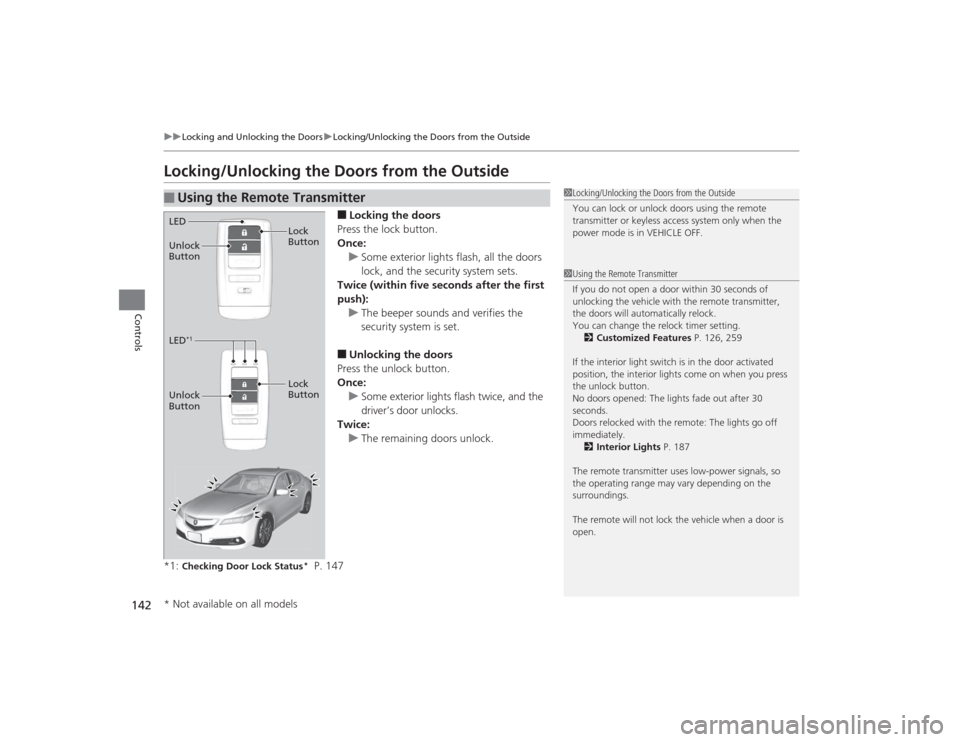
■Locking the doors
Press the lock button.
Once: u Some exterior lights flash, all the doors
lock, and the security system sets.
Twice (within five seconds after the first
push):
u The beeper sounds and verifies the
security system is set.■Unlocking the doors
Press the unlock button.
Once:
u Some exterior lights flash twice, and the
driver’s door unlocks.
Twice:
u The remaining doors unlock.
*1:
Checking Door Lock Status
* P. 147
■
Using the Remote Transmitter
1 Locking/Unlocking the Doors from the Outside
You can lock or unlock doors using the remote
transmitter or keyless access system only when the
power mode is in VEHICLE OFF.1Using the Remote Transmitter
If you do not open a door within 30 seconds of
unlocking the vehicle with the remote transmitter,
the doors will automatically relock.
You can change the relock timer setting.
2 Customized Features P. 126, 259
If the interior light switch is in the door activated
position, the interior lights come on when you press
the unlock button.
No doors opened: The lights fade out after 30
seconds.
Doors relocked with the remote: The lights go off
immediately. 2 Interior Lights P. 187
The remote transmitter uses low-power signals, so
the operating range may vary depending on the
surroundings.
The remote will not lock the vehicle when a door is
open.
LED
Unlock
Button Lock
ButtonLED
*1
Unlock
Button
Lock
Button* Not available on all models