trans Acura TLX 2015 Service Manual
[x] Cancel search | Manufacturer: ACURA, Model Year: 2015, Model line: TLX, Model: Acura TLX 2015Pages: 545, PDF Size: 19.64 MB
Page 307 of 545
uuBluetooth ® HandsFreeLink ®u HFL Menus
306Features
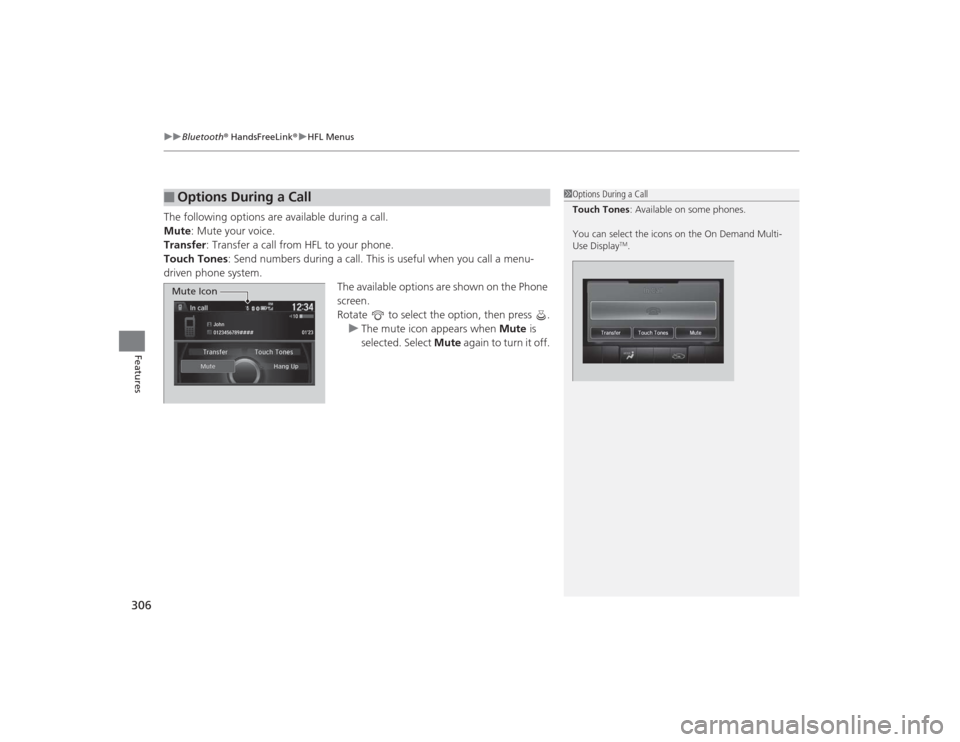
The following options are available during a call.
Mute: Mute your voice.
Transfer : Transfer a call from HFL to your phone.
Touch Tones: Send numbers during a call. This is useful when you call a menu-
driven phone system. The available options are shown on the Phone
screen.
Rotate to select the option, then press .u The mute icon appears when Mute is
selected. Select Mute again to turn it off.■
Options During a Call
1Options During a Call
Touch Tones : Available on some phones.
You can select the icons on the On Demand Multi-
Use Display
TM.
Mute Icon
Page 316 of 545
315
Driving
This chapter discusses driving, refueling, and information on items such as accessories.
Before Driving................................... 316
Towing a Trailer ................................ 321
When Driving
Starting the Engine .......................... 322
Precautions While Driving................. 329
Automatic Transmission
*................. 330
Dual Clutch Transmission*............... 330
Shifting ............................................ 331
Shifting ............................................ 338
Auto Idle Stop
*................................ 342
Integrated Dynamics System (IDS)..... 346
Models with electronic gear selectorModels with shift lever
Cruise Control
*............................... 348
Front Sensor Camera
*..................... 351
Adaptive Cruise Control (ACC) with Low Speed Follow (LSF)
*....................... 352
Forward Collision Warning (FCW) with Pedestrian Detection*.................... 365
Lane Departure Warning (LDW)
*..... 371
Road Departure Mitigation (RDM) System
*... 375
Lane Keeping Assist System (LKAS)
*.. 380
Vehicle Stability Assist (VSA
®), aka Electronic
Stability Control (ESC), System ............... 386
Agile Handling Assist System............ 388
Precision All Wheel Steer System
*.... 388
Blind Spot Information (BSI) System
*.... 389
Super Handling-All Wheel Drive
TM (SH-
AWD® )
*......................................... 391
Tire Pressure Monitoring System (TPMS) ... 392Tire Pressure Monitoring System (TPMS) -
Required Federal Explanation ......... 394
Braking .............................................. 396
Parking Your Vehicle ........................ 411
Multi-View Rear Camera .................. 419
Refueling ........................................... 420
Fuel Economy .................................... 422
Accessories and Modifications ........ 423
* Not available on all models
Page 321 of 545
320
uuBefore Driving uMaximum Load Limit
Driving
(5) Determine the combined weight of luggage and cargo being
loaded on the vehicle. That weight may not safely exceed the
available cargo and luggage load capacity calculated in step 4.
(6) If your vehicle will be towing a trailer, load from your trailer will
be transferred to your vehicle. Co nsult this manual to
determine how this reduces the available cargo and luggage
load capacity of your vehicle.
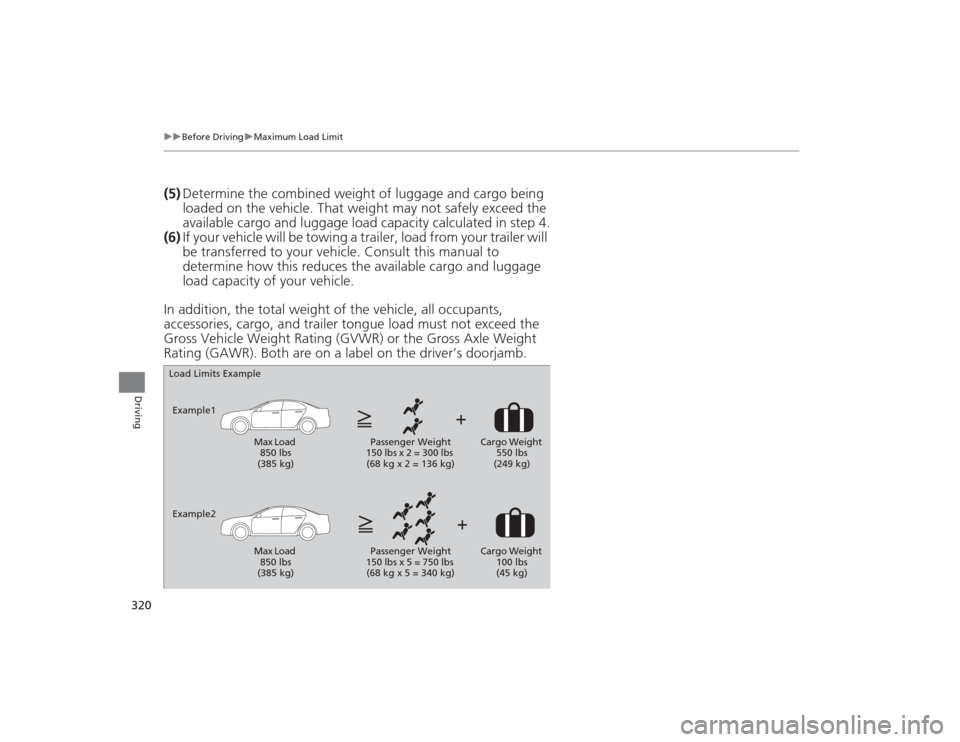
In addition, the total weight of the vehicle, all occupants,
accessories, cargo, and trailer tongue load must not exceed the
Gross Vehicle Weight Rating (GVWR) or the Gross Axle Weight
Rating (GAWR). Both are on a label on the driver’s doorjamb.Load Limits Example
Example1 Max Load 850 lbs
(385 kg) Passenger Weight
150 lbs x 2 = 300 lbs (68 kg x 2 = 136 kg) Cargo Weight
550 lbs
(249 kg)
Example2 Max Load 850 lbs
(385 kg) Passenger Weight
150 lbs x 5 = 750 lbs (68 kg x 5 = 340 kg) Cargo Weight
100 lbs
(45 kg)
Page 323 of 545
322Driving
When DrivingStarting the Engine
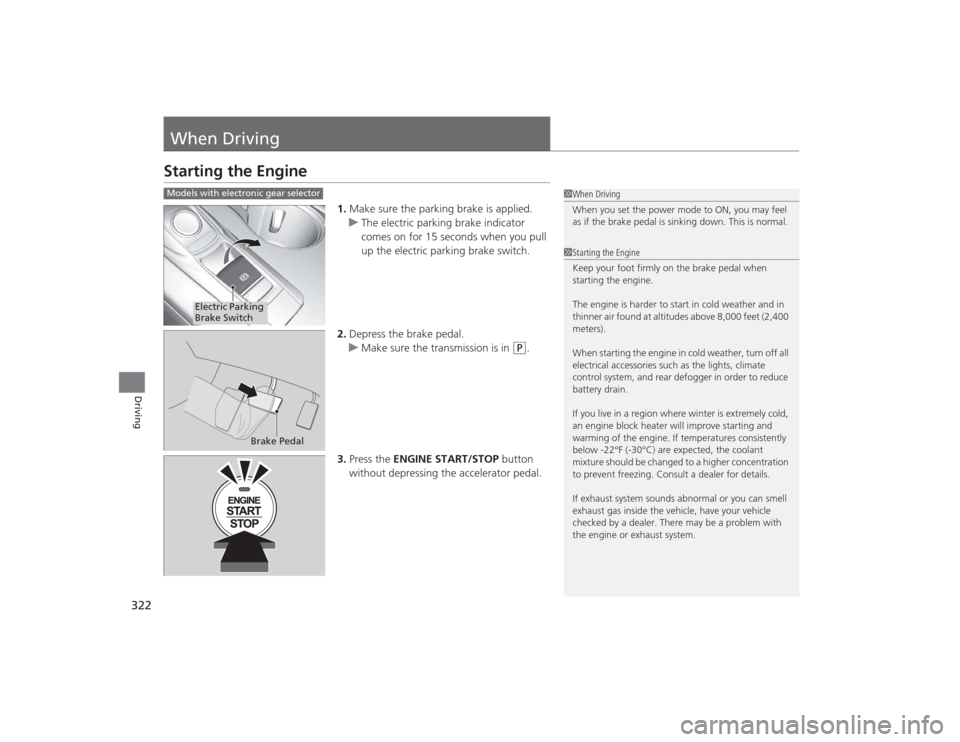
1.Make sure the parking brake is applied.
u The electric parking brake indicator
comes on for 15 seconds when you pull
up the electric parking brake switch.
2. Depress the brake pedal.
u Make sure the transmission is in
(P
.
3. Press the ENGINE START/STOP button
without depressing the accelerator pedal.
1 When Driving
When you set the power mode to ON, you may feel
as if the brake pedal is sinking down. This is normal.1Starting the Engine
Keep your foot firmly on the brake pedal when
starting the engine.
The engine is harder to start in cold weather and in
thinner air found at altitudes above 8,000 feet (2,400
meters).
When starting the engine in cold weather, turn off all
electrical accessories such as the lights, climate
control system, and rear defogger in order to reduce
battery drain.
If you live in a region where winter is extremely cold,
an engine block heater will improve starting and
warming of the engine. If temperatures consistently
below -22°F (-30°C) are expected, the coolant
mixture should be changed to a higher concentration
to prevent freezing. Consult a dealer for details.
If exhaust system sounds abnormal or you can smell
exhaust gas inside the vehicle, have your vehicle
checked by a dealer. There may be a problem with
the engine or exhaust system.
Models with electronic gear selector
Electric Parking
Brake Switch
Brake Pedal
Page 326 of 545

Continued
325
uuWhen Driving uStarting the Engine
Driving
You can remotely start the engine using the two-way keyless access remote from
extended distances.■To start the engine
The engine runs for up to 10 minutes without you starting the vehicle.
To extend the run time for another 10 minutes during the first run, press the
button, then press and hold the button. u The amber LED blinks, then the green LED comes back on if a 10-minute
extension request was transmitted successfully.
After pressing the (lock) button, wait for the green LED to blink. This indicates that
the all the doors and the trunk are locked. ■
Remote Engine Start with Vehicle Feedback
*
1 Remote Engine Start with Vehicle Feedback
*
WARNING:
Carbon monoxide gas is toxic and can
rapidly accumulate in closed or even partly enclosed
areas. Breathing it can cause unconsciousness and
even kill you. Never use the remote engine starter
with the vehicle parked in a garage or other areas
with limited ventilation.
If there are buildings and obstacles between your
vehicle and the remote, the range will be reduced.
This distance may vary by external electrical
interference.
The engine may not start by the remote engine start
if:
•You have disabled a remote engine start setting
using the multi-information display.•The power mode is not in VEHICLE OFF (LOCK).•The gear is in a position other than
( P.
•The hood is open, or any door or the trunk is
unlocked.•You have already used the remote twice to start
the engine.•Another registered keyless access remote is in the
vehicle.•There is any antenna failure.•Door is unlocked with the built-in key.
With the doors locked, Press the button,
then press and hold the button.
Amber LED: Blinks when any button is pressed.
Continues to blink
during a vehicle
self check until the
engine starts. Go within the range,
and try again.
Green LED: Comes on while
the engine is running. Red LED: Blinks when the
remote is out of the keyless
access system range.
* Not available on all models
Page 330 of 545
329
uuWhen Driving uPrecautions While Driving
Continued
Driving
Precautions While DrivingAvoid driving in deep water and on flooded roads. This can damage the engine,
driveline, or cause electrical component failure.■
In Rain
1Precautions While DrivingNOTICEDo not change the gear position while pressing the
accelerator pedal. You could damage the
transmission.NOTICEThe following can damage the under spoiler:•Parking the vehicle by a parking block•Parallel parking along the road shoulder•Driving toward the bottom of a hill•Driving up or down to a different surface level
(such as a road shoulder)•Driving on a rutted or bumpy road•Driving on a road with potholes.NOTICEIf you repeatedly turn the steering wheel at an
extremely low speed, or hold the steering wheel on
the full left or right position for a while, the electric
power steering (EPS) system heats up. The system
goes into a protective mode, and limits its
performance. The steering wheel becomes harder
and harder to operate. Once the system cools down,
the EPS system is restored.
Repeated operation under these conditions can
eventually damage the system.
If the power mode is set to ACCESSORY or VEHICLE
OFF (LOCK) while driving, the engine will shut down
and all steering and brake power assist functions will
stop, making it difficult to control the vehicle.
Page 331 of 545
uuWhen Driving uAutomatic Transmission
*
330Driving
If there is a strong impact with something under the vehicle, stop in a safe location.
Check the underside of the vehicle for damage or any fluid leaks.Automatic Transmission
*
The engine runs at a higher idle speed and creeping increases.
Keep the brake pedal firmly depressed when stopped.
Quickly depressing the accelerator pedal while driving uphill may cause the
transmission to drop to a lower gear, unexpectedly increasing vehicle speed. Depress
the accelerator pedal carefully, especially on slippery roads and curves.Dual Clutch Transmission
*
As with a conventional automatic transmission, this vehicle will creep.
Keep the brake pedal firmly depressed when stopped.
Quickly depressing the accelerator pedal while driving uphill may cause the
transmission to drop to a lower gear, unexpectedly increasing vehicle speed. Depress
the accelerator pedal carefully, especially on slippery roads and curves.■
Other Precautions
■
Creeping
■
Kickdown
■
Creeping
■
Kickdown
1Precautions While Driving
Do not change the gear position to
(N, as you will
lose engine braking (and acceleration) performance.
During the first 600 miles (1,000 km) of operation,
avoid sudden acceleration or full throttle operation so
as to not damage the engine or powertrain.
Avoid hard braking for the first 200 miles (300 km).
You should also follow this when the brake pads are
replaced.
* Not available on all models
Page 332 of 545
331
uuWhen Driving uShifting
Continued
Driving
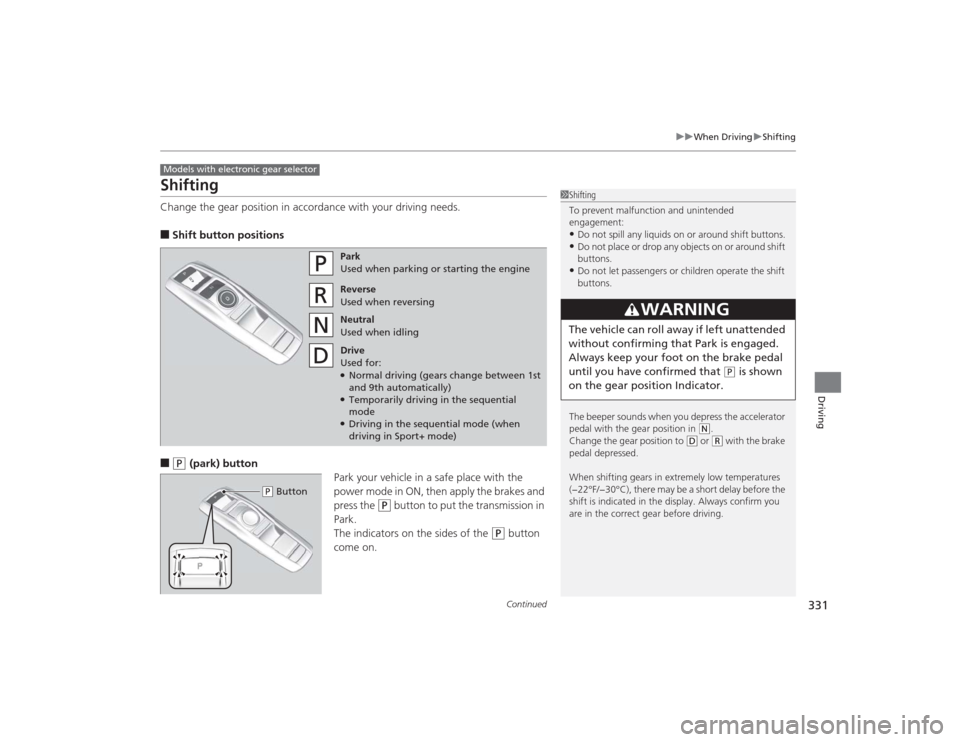
ShiftingChange the gear position in accordance with your driving needs.■Shift button positions■
(P
(park) button
Park your vehicle in a safe place with the
power mode in ON, then apply the brakes and
press the
(P
button to put the transmission in
Park.
The indicators on the sides of the
(P
button
come on.
Models with electronic gear selector
1 Shifting
To prevent malfunction and unintended
engagement:•Do not spill any liquids on or around shift buttons.•Do not place or drop any objects on or around shift
buttons.•Do not let passengers or children operate the shift
buttons.
The beeper sounds when you depress the accelerator
pedal with the gear position in
( N.
Change the gear position to
( D or
(R with the brake
pedal depressed.
When shifting gears in extremely low temperatures
(−22°F/−30°C), there may be a short delay before the
shift is indicated in the display. Always confirm you
are in the correct gear before driving.
3
WARNING
The vehicle can roll away if left unattended
without confirming that Park is engaged.
Always keep your foot on the brake pedal
until you have confirmed that
( P is shown
on the gear position Indicator.
Park
Used when parking or starting the engine
Reverse
Used when reversing
Neutral
Used when idling
Drive
Used for:●Normal driving (gears change between 1st
and 9th automatically)●Temporarily driving in the sequential
mode●Driving in the sequential mode (when
driving in Sport+ mode)
( P Button
Page 333 of 545
uuWhen Driving uShifting
332Driving
■
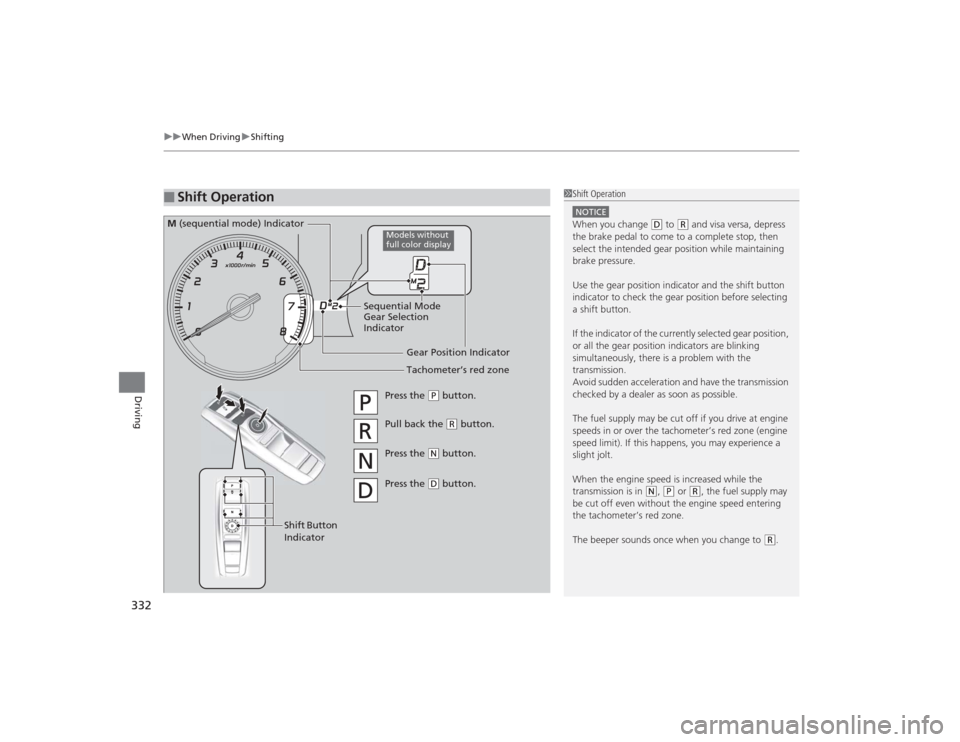
Shift Operation
1Shift OperationNOTICEWhen you change
(D to
(R and visa versa, depress
the brake pedal to come to a complete stop, then
select the intended gear position while maintaining
brake pressure.
Use the gear position indicator and the shift button
indicator to check the gear position before selecting
a shift button.
If the indicator of the currently selected gear position,
or all the gear position indicators are blinking
simultaneously, there is a problem with the
transmission.
Avoid sudden acceleration and have the transmission
checked by a dealer as soon as possible.
The fuel supply may be cut off if you drive at engine
speeds in or over the tachometer’s red zone (engine
speed limit). If this happens, you may experience a
slight jolt.
When the engine speed is increased while the
transmission is in
( N, (P or
(R, the fuel supply may
be cut off even without the engine speed entering
the tachometer’s red zone.
The beeper sounds once when you change to
( R.
Gear Position Indicator
Tachometer’s red zone
Press the
(P button.
Pull back the
(R button.
Press the
( N button.
Press the ( D button.
Shift Button
Indicator
M (sequential mode) Indicator
Sequential Mode
Gear Selection
Indicator
Models without
full color display
Page 334 of 545
Continued
333
uuWhen Driving uShifting
Driving
In freezing or sub-freezing conditions, the electronic gear selector response may be
slow.
Always depress the brake pedal before changing the gear position to
(P
, and
confirm that
(P
is shown on the gear position indicator before releasing the brake.
■When opening the driver’s door
If you open the driver’s door under the following conditions, the gear position
automatically changes to
(P
.
• The vehicle is stationary with the engine running, or moving at 1 mph (2 km/h) or
slower.
• The transmission is in other than
(P
.
• You have unfastened the driver side seat belt.
u If you manually change the gear position from
(P
with the brake pedal
depressed, the gear position will automatically return to
(P
once you release
the brake pedal.
■When turning off the power mode
If you turn the engine off while the vehicle is stationary, and the transmission is in
other than
(P
, the gear position automatically changes to
(P
.
1 When opening the driver’s door
You should always select
(P before opening the
driver’s door.
Make sure to park the vehicle in a safe place. 2 When Stopped P. 411
If you want to drive the vehicle after the gear position
has automatically changed to ( P under the described
conditions, close the door, fasten the seat belt,
depress the brake pedal, then change the gear
position.
If you leave the vehicle, turn off the engine and lock
the doors.