trans Acura TLX 2015 Owner's Guide
[x] Cancel search | Manufacturer: ACURA, Model Year: 2015, Model line: TLX, Model: Acura TLX 2015Pages: 545, PDF Size: 19.64 MB
Page 181 of 545
180Controls
Adjusting the SeatsAdjusting the Seat Positions
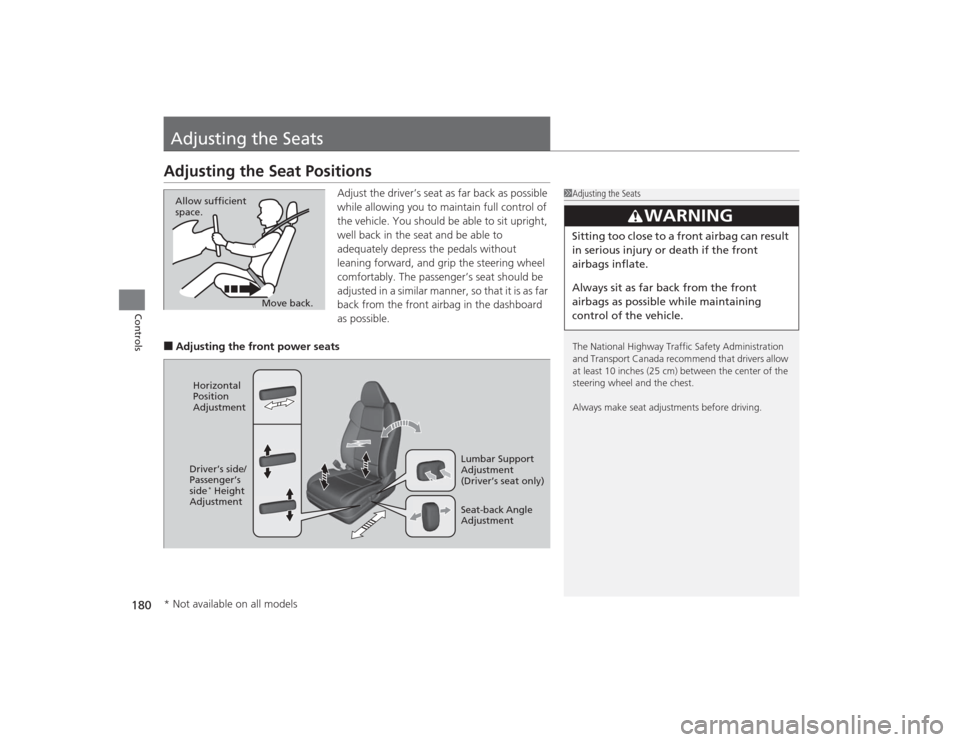
Adjust the driver’s seat as far back as possible
while allowing you to maintain full control of
the vehicle. You should be able to sit upright,
well back in the seat and be able to
adequately depress the pedals without
leaning forward, and grip the steering wheel
comfortably. The passenger’s seat should be
adjusted in a similar manner, so that it is as far
back from the front airbag in the dashboard
as possible.
■Adjusting the front power seats
1Adjusting the Seats
The National Highway Traffic Safety Administration
and Transport Canada recommend that drivers allow
at least 10 inches (25 cm) between the center of the
steering wheel and the chest.
Always make seat adjustments before driving.
3
WARNING
Sitting too close to a front airbag can result
in serious injury or death if the front
airbags inflate.
Always sit as far back from the front
airbags as possible while maintaining
control of the vehicle.
Move back.
Allow sufficient
space.
Horizontal
Position
Adjustment
Seat-back Angle
Adjustment Lumbar Support
Adjustment
(Driver’s seat only)
Driver’s side/
Passenger’s
side
* Height
Adjustment
* Not available on all models
Page 210 of 545
209
Features
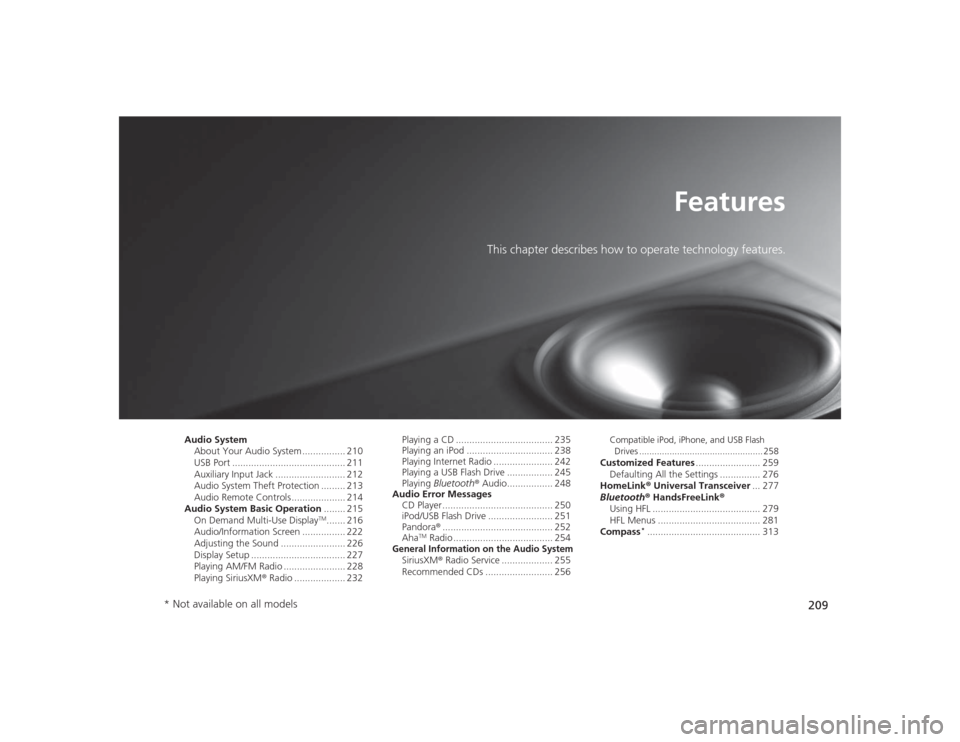
This chapter describes how to operate technology features.
Audio SystemAbout Your Audio System ................ 210
USB Port .......................................... 211
Auxiliary Input Jack .......................... 212
Audio System Theft Protection ......... 213
Audio Remote Controls .................... 214
Audio System Basic Operation ........ 215
On Demand Multi-Use Display
TM....... 216
Audio/Information Screen ................ 222
Adjusting the Sound ........................ 226
Display Setup ................................... 227
Playing AM/FM Radio ....................... 228
Playing SiriusXM ® Radio ................... 232 Playing a CD .................................... 235
Playing an iPod ................................ 238
Playing Internet Radio ...................... 242
Playing a USB Flash Drive ................. 245
Playing
Bluetooth ® Audio................. 248
Audio Error Messages CD Player ......................................... 250
iPod/USB Flash Drive ........................ 251
Pandora ®......................................... 252
Aha
TM Radio ..................................... 254
General Information on the Audio SystemSiriusXM ® Radio Service ................... 255
Recommended CDs ......................... 256
Compatible iPod, iPhone, and USB Flash
Drives ................................................. 258Customized Features ........................ 259
Defaulting All the Settings ............... 276
HomeLink ® Universal Transceiver ... 277
Bluetooth ® HandsFreeLink ®
Using HFL ........................................ 279
HFL Menus ...................................... 281
Compass
*.......................................... 313
* Not available on all models
Page 264 of 545
263
uuCustomized Features u
Continued
Features
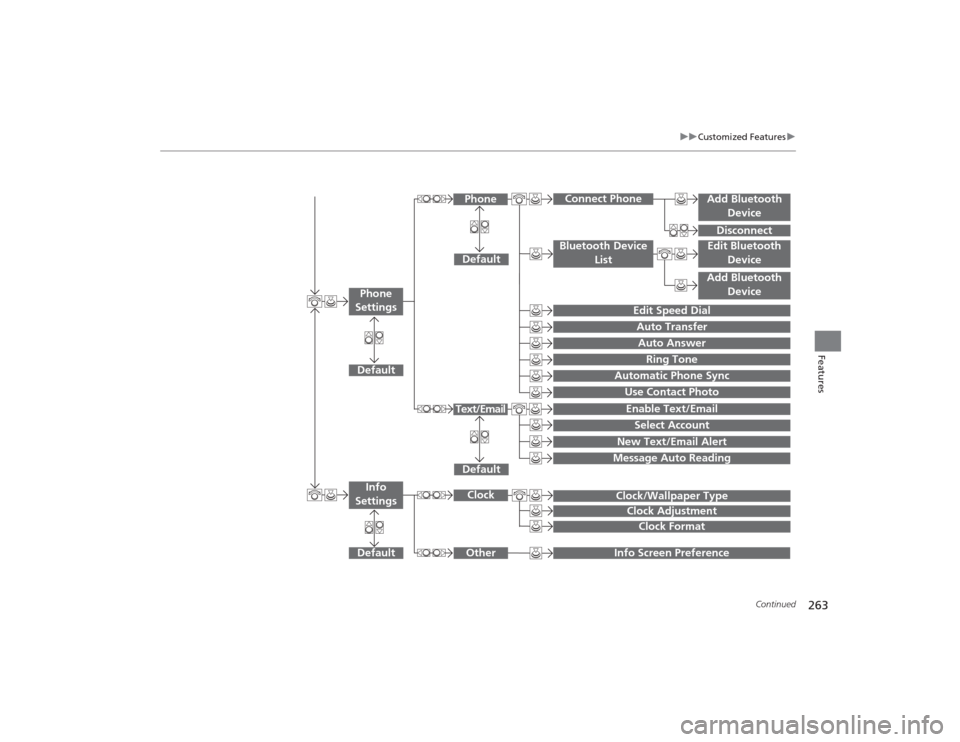
Add Bluetooth
DeviceDisconnect
Default
Phone
Connect Phone
Edit Bluetooth DeviceAdd Bluetooth Device
Bluetooth Device
List
Edit Speed DialAuto TransferAuto AnswerRing Tone
Automatic Phone SyncUse Contact Photo
Default
Default
Enable Text/EmailSelect Account
New Text/Email Alert
Text/Email
Phone
Settings
Message Auto ReadingInfo Screen Preference
Clock/Wallpaper TypeClock Adjustment
Clock
Default
Other
Info
Settings
Clock Format
Page 274 of 545
273
uuCustomized Features u
Continued
Features
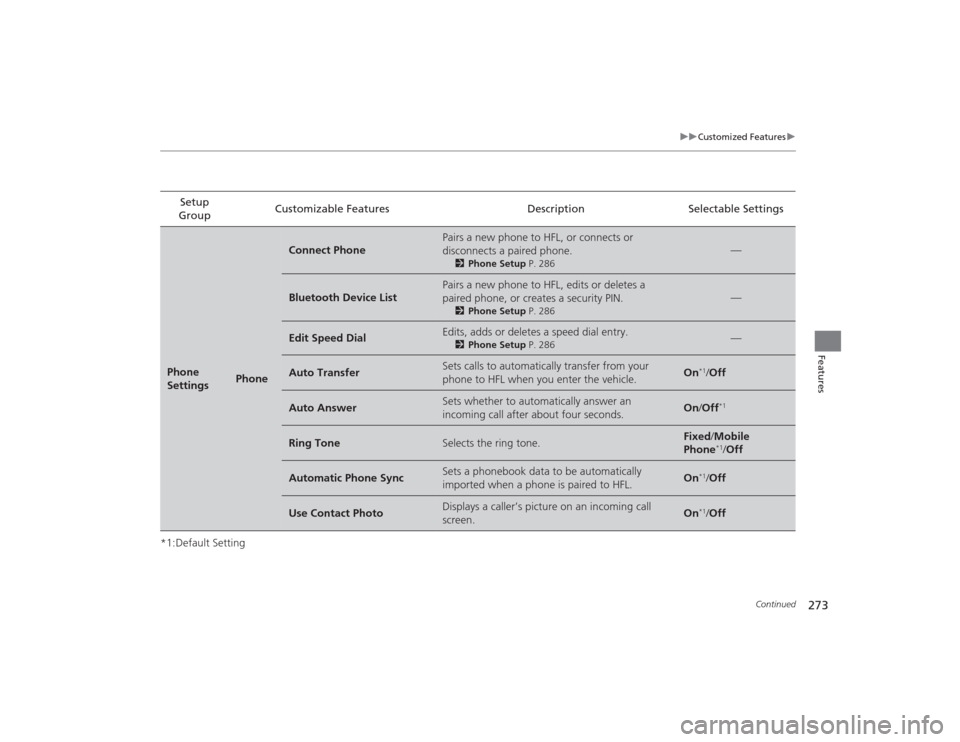
*1:Default SettingSetup
Group Customizable Features Description Selectable SettingsPhone
Settings
Phone
Connect Phone
Pairs a new phone to HFL, or connects or
disconnects a paired phone.
2
Phone Setup P. 286
—
Bluetooth Device List
Pairs a new phone to HFL, edits or deletes a
paired phone, or creates a security PIN.
2Phone Setup P. 286
—
Edit Speed Dial
Edits, adds or deletes a speed dial entry.
2Phone Setup P. 286
—
Auto Transfer
Sets calls to automatically transfer from your
phone to HFL when you enter the vehicle.
On
*1/Off
Auto Answer
Sets whether to automatically answer an
incoming call after about four seconds.
On /Off
*1
Ring Tone
Selects the ring tone.
Fixed /Mobile
Phone
*1/ Off
Automatic Phone Sync
Sets a phonebook data to be automatically
imported when a phone is paired to HFL.
On
*1/Off
Use Contact Photo
Displays a caller’s picture on an incoming call
screen.
On
*1/Off
Page 277 of 545

276
uuCustomized Features uDefaulting All the Settings
Features
Defaulting All the SettingsYou can reset all the menu and customized settings as the factory defaults.
1.Press the SETTINGS button.
2. Rotate to select System Settings, then
press .
3. Rotate to select Factory Data Reset ,
then press .
u The pop-up menu appears on the screen.
4. Rotate to select Yes, then press .
u The confirmation message will appear.
5. Rotate to select Yes, then press
again to reset the settings.
u The confirmation message will appear.
Press to select OK.
1Defaulting All the Settings
When you transfer the vehicle to a third party, reset
all settings to default and delete all personal data.
The following settings will be reset:•Audio preset settings•Phonebook entries•Other display and each item settings.
Page 278 of 545

277
Continued
Features
HomeLink® Universal TransceiverThe HomeLink ® Universal Transceiver can be programmed to operate up to three
remote controlled devices around your home, such as garage doors, lighting, or
home security systems.
Refer to the safety information that came with your garage door opener to test that
the safety features are functioning properly. If you do not have the safety
information, contact the manufacturer.
Before programming HomeLink, make sure that people and objects are out of the
way of the garage or gate to prevent potential injury or damage.
When programming a garage door opener, park just outside the garage door’s
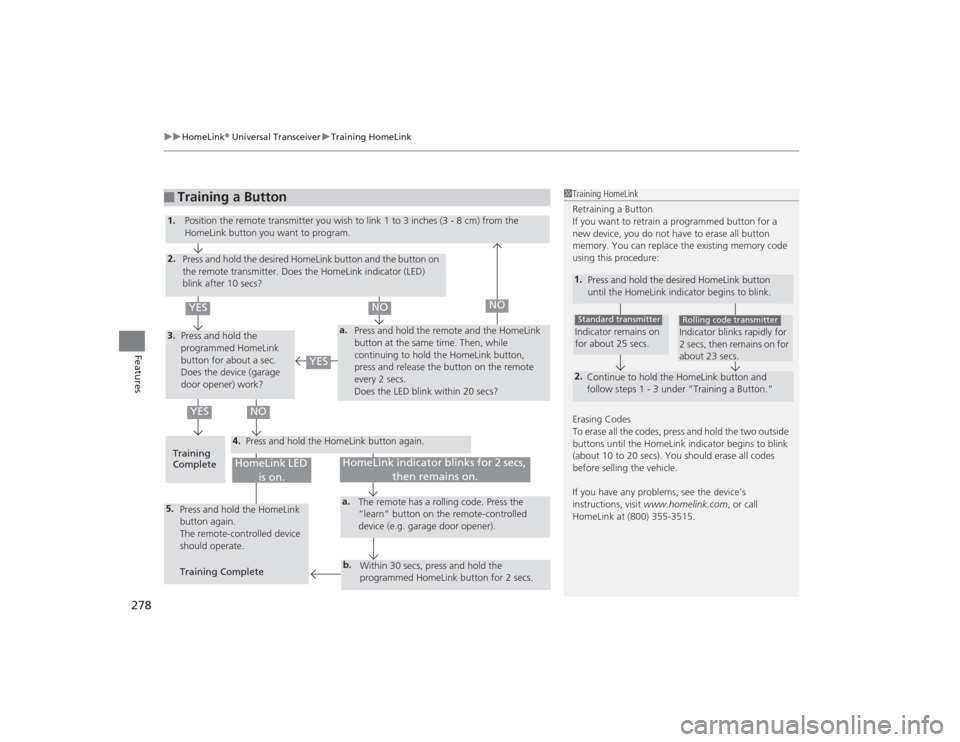
path.Training HomeLink
If you have not trained any of the buttons in
HomeLink before, you should erase any
previously learned codes. To do this:
• Press and hold the two outside buttons for
about 10 seconds, until the red indicator
blinks. Release the buttons, and proceed to
step 1.
• If you are training the second or third
button, go directly to step 1.
■
Important Safety Precautions
1HomeLink ® Universal Transceiver
HomeLink® is a registered trademark of Johnson
Controls., Inc.
Before programming HomeLink to operate a garage
door opener, confirm that the opener has an external
entrapment protection system, such as an “electronic
eye,” or other safety and reverse stop features. If it
does not, HomeLink may not be able to operate it.
Red Indicator
Page 279 of 545
uuHomeLink ® Universal Transceiver uTraining HomeLink
278Features
■
Training a Button
1Training HomeLink
Retraining a Button
If you want to retrain a programmed button for a
new device, you do not have to erase all button
memory. You can replace the existing memory code
using this procedure:1.
Press and hold the desired HomeLink button
until the HomeLink indicator begins to blink.2.
Continue to hold the HomeLink button and
follow steps 1 - 3 under “Training a Button.”Indicator remains on
for about 25 secs.Standard transmitter
Indicator blinks rapidly for
2 secs, then remains on for
about 23 secs.Rolling code transmitter
Erasing Codes
To erase all the codes, press and hold the two outside
buttons until the HomeLink indicator begins to blink
(about 10 to 20 secs). You should erase all codes
before selling the vehicle.
If you have any problems, see the device’s
instructions, visit www.homelink.com , or call
HomeLink at (800) 355-3515.
4.
a.
3.2.5.
a.b.
1. Position the remote transmit ter you wish to link 1 to 3 inches (3 - 8 cm) from the
HomeLink button you want to program.
Press and hold the desired HomeLink button and the button on
the remote transmitter. Does the HomeLink indicator (LED)
blink after 10 secs?
Press and hold the
programmed HomeLink
button for about a sec.
Does the device (garage
door opener) work? Press and hold the remote and the HomeLink
button at the same time. Then, while
continuing to hold the HomeLink button,
press and release the button on the remote
every 2 secs.
Does the LED blink within 20 secs?
Training
Complete Press and hold the HomeLink button again.
Press and hold the HomeLink
button again.
The remote-controlled device
should operate.
Training Complete The remote has a rolling code. Press the
“learn” button on the remote-controlled
device (e.g. garage door opener).
Within 30 secs, press and hold the
programmed HomeLink button for 2 secs.
HomeLink indicator blinks for 2 secs, then remains on.
HomeLink LED is on.
YES
NO
YES
YES
NO
NO
Page 283 of 545

282
uuBluetooth ® HandsFreeLink ®u HFL Menus
Features
Manual Input
Edit Speed
Dial
New Entry
Import from Call History
Import from Phonebook
Delete All
Delete all the previously stored speed dial numbers.
Select a phone number from the call
history to store as a speed dial number.
Select a phone number from the
phonebook to store as a speed dial number. Enter a phone number to store as a speed
dial number.
Edit
Delete
(Existing
entry list)
Edit a previously stored speed dial number.●Change a number.●Create or delete a voice tag.Delete a previously stored speed dial
number.
Set calls to automatically transfer from your phone to HFL when you enter the
vehicle.
Auto TransferAuto AnswerRing Tone
Set whether to automatically answer an incoming call after about four
seconds.
Select the ring tone.
Use Contact Photo
Set phonebook data to be automatically imported when a phone is paired to
HFL.
Display a caller’s picture on an incoming call screen.
Automatic Phone Sync
Cancel/Reset all customized items in the Phone Settings group as default.
Default
Page 295 of 545
294
uuBluetooth ® HandsFreeLink ®u HFL Menus
Features
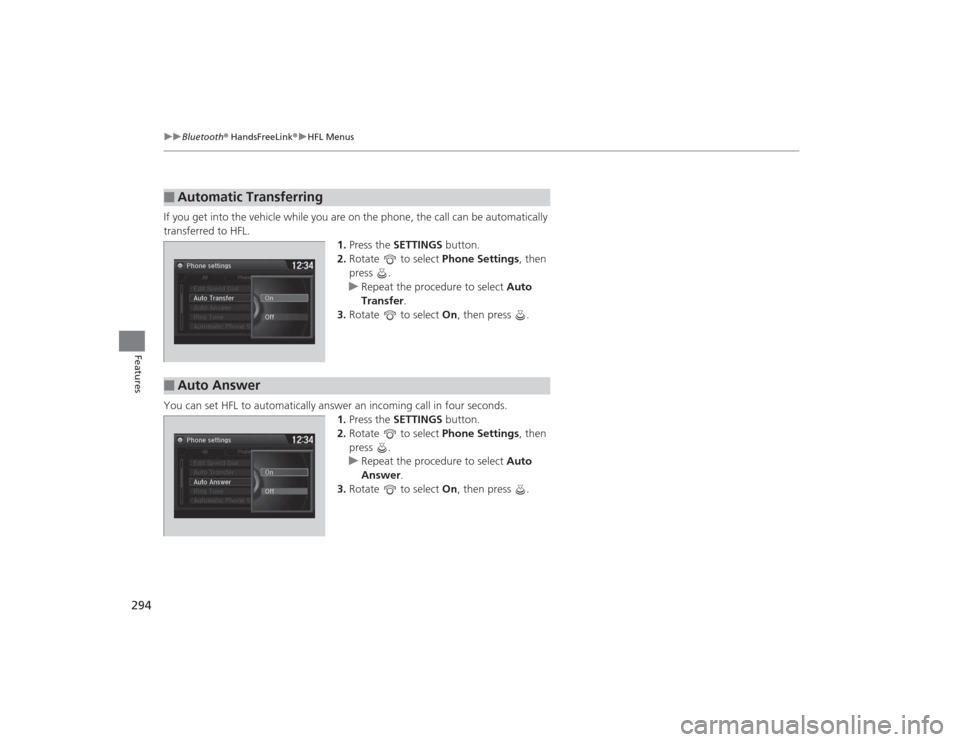
If you get into the vehicle while you are on the phone, the call can be automatically
transferred to HFL.
1.Press the SETTINGS button.
2. Rotate to select Phone Settings, then
press .
u Repeat the procedure to select Auto
Transfer .
3. Rotate to select On, then press .
You can set HFL to automatically answer an incoming call in four seconds. 1.Press the SETTINGS button.
2. Rotate to select Phone Settings, then
press .
u Repeat the procedure to select Auto
Answer.
3. Rotate to select On, then press .■
Automatic Transferring
■
Auto Answer
Page 296 of 545

Continued
295
uuBluetooth ® HandsFreeLink ®u HFL Menus
Features
You can change the ring tone setting.
1.Press the SETTINGS button.
2. Rotate to select Phone Settings, then
press .
u Repeat the procedure to select Ring
Tone .
3. Rotate to select Fixed, Mobile Phone
or Off , then press .
You can display a caller’s picture on an incoming call screen. 1.Press the SETTINGS button.
2. Rotate to select Phone Settings, then
press .
u Repeat the procedure to select Use
Contact Photo .
3. Rotate to select On or Off , then press
.■
Ring Tone
1 Ring Tone
Fixed: The fixed ring tone sounds from the speaker.
Mobile Phone : The ring tone stored in the
connected cell phone sounds from the speaker.
Off : No ring tones sound from the speaker.
■
Use Contact PhotoPhone settings
All PhoneAuto Transfer
Auto Answer
Ring Tone
Automatic Phone Sy
Use Contact Photo On
Off
Default