trans Acura TLX 2015 Workshop Manual
[x] Cancel search | Manufacturer: ACURA, Model Year: 2015, Model line: TLX, Model: Acura TLX 2015Pages: 545, PDF Size: 19.64 MB
Page 335 of 545
![Acura TLX 2015 Workshop Manual 334
uuWhen Driving uShifting
Driving
■If you want to keep the transmission in
(N
position [car wash mode]
With the engine running:
1. Press and hold the brake pedal.
2. Select
(N
.
3. With in fi](/img/32/11130/w960_11130-334.png "Acura TLX 2015 Workshop Manual 334
uuWhen Driving uShifting
Driving
■If you want to keep the transmission in
(N
position [car wash mode]
With the engine running:
1. Press and hold the brake pedal.
2. Select
(N
.
3. With in fi")
334
uuWhen Driving uShifting
Driving
■If you want to keep the transmission in
(N
position [car wash mode]
With the engine running:
1. Press and hold the brake pedal.
2. Select
(N
.
3. With in five seconds, press the ENGINE START/STOP button.
The power mode changes to ACCESSORY. u This puts the vehicle in car wash mode which must be used when your vehicle
is pulled through a conveyor type automatic car wash where you or an
attendant do not remain in the vehicle.
u The gear position remains in
(N
with the power mode in ACCESSORY for 15
minutes, then, it automatically changes to
(P
and the power mode changes to
OFF.
Manually changing to
(P
cancels ACCESSORY mode. The
(P
indicator comes on
and the power mode changes to OFF.
Page 336 of 545
335
uuWhen Driving uShifting
Continued
Driving
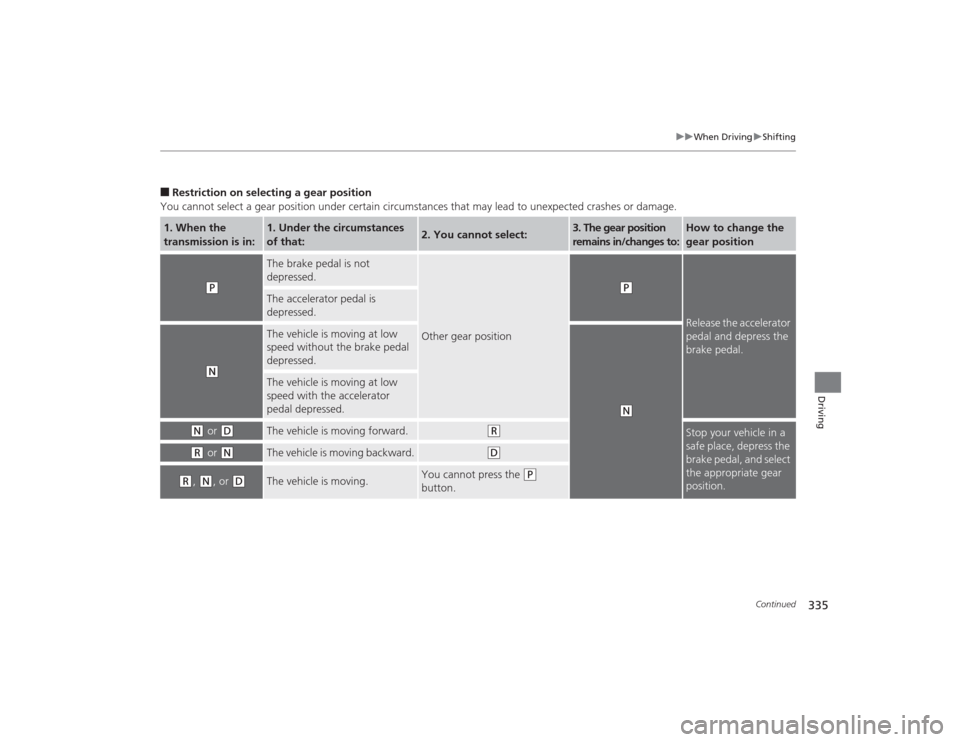
■Restriction on selecting a gear position
You cannot select a gear position under certain circumstances that may lead to unexpected crashes or damage.1. When the
transmission is in:
1. Under the circumstances
of that:
2. You cannot select:
3. The gear position
remains in/changes to:
How to change the
gear position
(P
The brake pedal is not
depressed.
Other gear position
(P
Release the accelerator
pedal and depress the
brake pedal.
The accelerator pedal is
depressed.
(N
The vehicle is moving at low
speed without the brake pedal
depressed.
(N
The vehicle is moving at low
speed with the accelerator
pedal depressed.
(N
or
(D
The vehicle is moving forward.
(R
Stop your vehicle in a
safe place, depress the
brake pedal, and select
the appropriate gear
position.
(R
or
(N
The vehicle is moving backward.
(D
(R
, (N
, or
(D
The vehicle is moving.
You cannot press the
(P
button.
Page 337 of 545
336
uuWhen Driving uShifting
Driving
Use the paddle shifters to change between 1st and 9th gears without removing your
hands from the steering wheel. The transmission will switch to the sequential mode.■When the transmission is in
(D
:
The vehicle will go into the sequential mode momentarily, and the sequential mode
gear selection indicator will come on.
Once you start traveling at a constant speed, the sequential mode will automatically
switch off, and the sequential mode gear selection indicator will go off.
Hold the
(+
paddle shifter for two seconds or push
(D
button to return to normal
drive.
■When the transmission is in
(D
with Sport+ mode:
The vehicle will go into the sequential mode, and the M (sequential mode) indicator
and sequential mode gear selection indicator will come on.
If the vehicle speed increases and the engine speed reaches near the tachometer’s
red zone, the transmission automatically shifts up to the next gear.
You can cancel this mode by pressing IDS button to select other than Sport+ mode
or push
(D
button to return to normal drive Sport+ mode. When the sequential
mode is canceled, the sequential mode indicator and sequential mode gear selection
indicator go off.
■
Sequential Mode
Page 340 of 545
Continued
339
uuWhen Driving uShifting
Driving
■
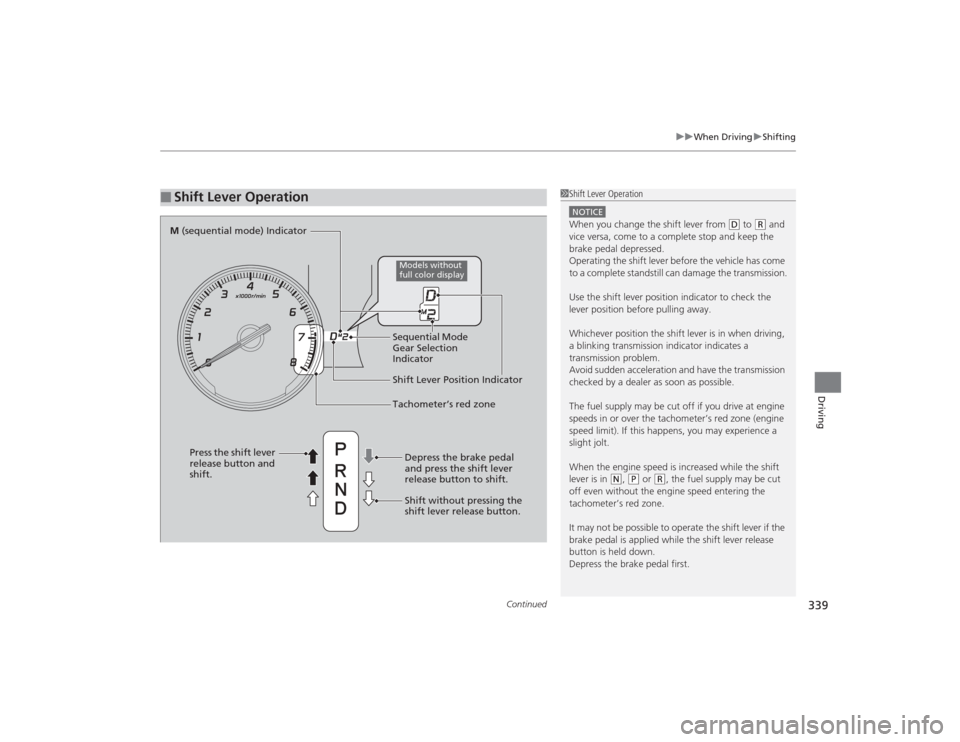
Shift Lever Operation
1Shift Lever OperationNOTICEWhen you change the shift lever from
(D to
( R and
vice versa, come to a complete stop and keep the
brake pedal depressed.
Operating the shift lever before the vehicle has come
to a complete standstill can damage the transmission.
Use the shift lever position indicator to check the
lever position before pulling away.
Whichever position the shift lever is in when driving,
a blinking transmission indicator indicates a
transmission problem.
Avoid sudden acceleration and have the transmission
checked by a dealer as soon as possible.
The fuel supply may be cut off if you drive at engine
speeds in or over the tachometer’s red zone (engine
speed limit). If this happens, you may experience a
slight jolt.
When the engine speed is increased while the shift
lever is in
( N, (P or
(R, the fuel supply may be cut
off even without the engine speed entering the
tachometer’s red zone.
It may not be possible to operate the shift lever if the
brake pedal is applied while the shift lever release
button is held down.
Depress the brake pedal first.
Shift Lever Position Indicator
Depress the brake pedal
and press the shift lever
release button to shift.
Shift without pressing the
shift lever release button.
Press the shift lever
release button and
shift.Tachometer’s red zone
M
(sequential mode) Indicator
Sequential Mode
Gear Selection
Indicator
Models without
full color display
Page 341 of 545
340
uuWhen Driving uShifting
Driving
Use the paddle shifters to change between 1st and 8th gears without removing your
hands from the steering wheel. The transmission will switch to the sequential shift
mode.■When the shift lever is in
(D
:
The vehicle will go into the sequential shift mode momentarily, and the gear position
indicator will come on.
Once you start traveling at a constant speed, the sequential shift mode will
automatically switch off, and the gear position indicator will go off.
Hold the
(+
paddle shifter for two seconds to return to normal drive.
■When the shift lever is in
(D
with Sport+ mode:
The vehicle goes into sequential sift mode and the M (sequential shift) indicator
comes on. At speeds of 2 mph (4 km/h) or less, the vehicle automatically shifts down
into 1st gear.
If you are in 1st through 6th gears and do not operate the paddle shifters as engine
speed increases approaches the tachometer red zone, the transmission
automatically shifts up to the next gear.
You can cancel Sport+ mode by either:
• Pressing the IDS button.
• Or holding the
(+
paddle shifter for two seconds.
When the mode is canceled the sequential mode and sequential mode gear
indicators go off.
■
Sequential Shift Mode
Page 344 of 545
Continued
343
uuWhen Driving uAuto Idle Stop
*
Driving
The vehicle stops with the gear position in
(D
and the brake pedal depressed.
■Auto idle stop does not activate when:
• The driver’s seat belt is not fastened.
• The engine coolant temperature is low or high.
• The transmission fluid temperature is low or high.
• The vehicle comes to a stop again before the vehicle speed reaches 5 km/h after
the engine starts.
• Stopped on a steep incline.
• A gear position other than
(D
or in Sport+.
• The engine is started with the hood open.
u Turn off the engine. Close the hood before you restart the engine to activate
Auto Idle Stop.
• The battery charge is low.
• The internal temperature of the battery is 14°F (−10°C). or less.
• The climate control system is in use, and the outside temperature is below −4°F
(−20°C) or over 104°F (40°C).
• The climate control system temperature is set to the Hi or Lo.
• is ON (indicator on).
■
Auto Idle Stop Activates When:
1Auto Idle Stop Activates When:
When ACC with LSF is in operation, the vehicle stops
without depressing the brake pedal and Auto Idle
Stop may activate.
Do not open the hood while the Auto Idle Stop
function is activated. If the hood is opened, the
engine will not restart automatically.
In this case, restart the engine with the ENGINE
START/STOP button.
2 Starting the Engine P. 322
Pressing the ENGINE START/STOP button changes
the power mode to ACCESSORY even while Auto Idle
Stop is in operation. Once in ACCESSORY, the engine
no longer restarts automatically. Follow the standard
procedure to start the engine. 2 Starting the Engine P. 322Models with ACC with LSF
Page 390 of 545
389
uuWhen Driving uBlind Spot Information (BSI) System
*
Continued
Driving
Blind Spot Information (BSI) System
*
Is designed to detect vehicles in specified alert zones adjacent to your vehicle,
particularly in harder to see areas common ly known as “blind spots.”
When the system detects vehicles approaching from behind in adjacent lanes, the
appropriate indicator comes on for a few seconds, providing assistance when you
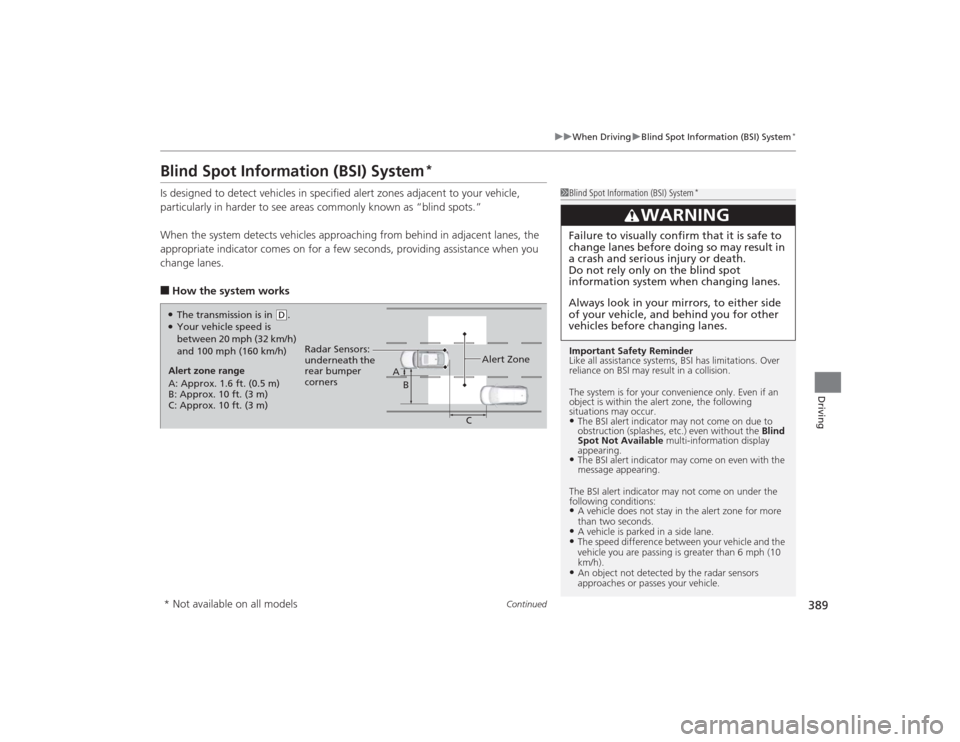
change lanes.■How the system works
1 Blind Spot Information (BSI) System
*
Important Safety Reminder
Like all assistance systems, BSI has limitations. Over
reliance on BSI may result in a collision.
The system is for your convenience only. Even if an
object is within the alert zone, the following
situations may occur.•The BSI alert indi cator may not come on due to
obstruction (splashes, etc.) even without the Blind
Spot Not Available multi-information display
appearing.•The BSI alert indicator may come on even with the
message appearing.
The BSI alert indicator may not come on under the
following conditions:•A vehicle does not stay in the alert zone for more
than two seconds.•A vehicle is parked in a side lane.•The speed difference between your vehicle and the
vehicle you are passing is greater than 6 mph (10
km/h).•An object not detected by the radar sensors
approaches or passes your vehicle.
3
WARNING
Failure to visually confirm that it is safe to
change lanes before doing so may result in
a crash and serious injury or death.
Do not rely only on the blind spot
information system when changing lanes.
Always look in your mirrors, to either side
of your vehicle, and behind you for other
vehicles before changing lanes.
●The transmission is in
( D.
●Your vehicle speed is
between 20 mph (32 km/h)
and 100 mph (160 km/h)
Alert zone range
A: Approx. 1.6 ft. (0.5 m)
B: Approx. 10 ft. (3 m)
C: Approx. 10 ft. (3 m) Radar Sensors:
underneath the
rear bumper
corners
Alert Zone
A
B
C
* Not available on all models
Page 392 of 545
391
uuWhen Driving uSuper Handling-All Wheel Drive
TM (SH-AWD ®)
*
Driving
Super Handling-All Wheel Drive
TM
(SH-AWD ®)
*
The system controls and transfers varying amounts of engine torque to each wheel
in accordance with the driving conditions.
SH-AWD helps to enhance driving stability, and lets you handle situations like
slippery surfaces, such as on wet, icy, or snowy roads, better than when driving with
two wheel drive. However, the system does not help to enhance braking. Be
precautious about the following:
• It is still your responsibility to drive safely when you steer, accelerate, and apply
brakes.
• Leave a sufficient margin when braking on slippery surfaces.
1Super Handling-All Wheel Drive
TM (SH-AWD ®)
*
The SH-AWD ® system may not function properly if
tire type and size are mixed.
Make sure to use the same size and type of tire, and
the air pressures as specified. 2 Tire and Wheel Replacement P. 462
* Not available on all models
Page 399 of 545
uuBraking uBrake System
398Driving
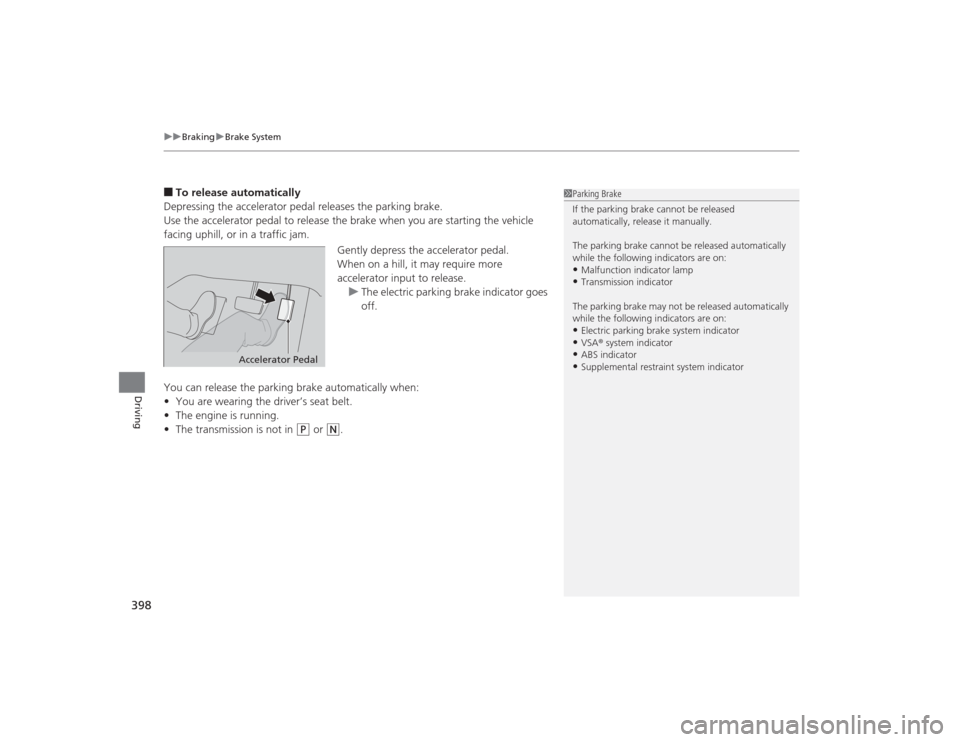
■To release automatically
Depressing the accelerator pedal releases the parking brake.
Use the accelerator pedal to release the brake when you are starting the vehicle
facing uphill, or in a traffic jam.
Gently depress the accelerator pedal.
When on a hill, it may require more
accelerator input to release.u The electric parking brake indicator goes
off.
You can release the parking brake automatically when:
• You are wearing the driver’s seat belt.
• The engine is running.
• The transmission is not in
(P
or
(N
.
1Parking Brake
If the parking brake cannot be released
automatically, release it manually.
The parking brake cannot be released automatically
while the following indicators are on:•Malfunction indicator lamp•Transmission indicator
The parking brake may not be released automatically
while the following indicators are on:•Electric parking brake system indicator•VSA ® system indicator•ABS indicator•Supplemental restraint system indicator
Accelerator Pedal
Page 401 of 545

uuBraking uBrake System
400Driving
Keeps the brake applied after releasing the brake pedal until the accelerator pedal is
pressed. You can use this system while the vehicle is temporarily stopped, such as
when you stop at a traffic light.■
Automatic Brake Hold
1Automatic Brake Hold
3
WARNING
Activating the automatic brake hold system
on steep hills or slippery roads may still
allow the vehicle to move if you remove
your foot from the brake pedal.
If a vehicle unexpec tedly moves, it may
cause a crash resulting in serious injury or
death.
Never activate the automatic brake hold
system or rely on it to keep a vehicle from
moving when stopped on a steep hill or
slippery roads.
3
WARNING
Using the automatic brake hold system to
park the vehicle may result in the vehicle
unexpectedly moving.
If a vehicle moves unexpectedly, it may
cause a crash, resulting in serious injury or
death.
Never leave the vehicle when braking is
temporarily kept by automatic brake hold
and always park the vehic le by putting the
transmission in
( P and applying the parking
brake.
■Turning on the system
Fasten your seat belt
properly, then start the
engine. Press the
automatic brake hold
button.●The automatic brake
hold system indicator
comes on. The system
is turned on.
■Activating the system
Depress the brake pedal
to come to a complete
stop. The transmission
must be in
( D or
(N.
●The automatic brake
hold indicator comes
on. Braking is kept for
up to 10 minutes.●Release the brake
pedal after the
automatic brake hold
indicator comes on.
■Canceling the system
Depress the accelerator
pedal while the
transmission is in
( D or
(R. The system is
canceled and the vehicle
starts to move.
●The automatic brake
hold indicator goes
off. The system
continues to be on.Accelerator Pedal
Brake Pedal
Automatic Brake
Hold Button
Goes
Off
On On On
On
On
U.S.
Canada