light Acura TLX 2017 User Guide
[x] Cancel search | Manufacturer: ACURA, Model Year: 2017, Model line: TLX, Model: Acura TLX 2017Pages: 75, PDF Size: 10.99 MB
Page 24 of 75
40 || 41
V EHICLE C ONTROLS
V
EHICLE C ONTROLS
Customized Features
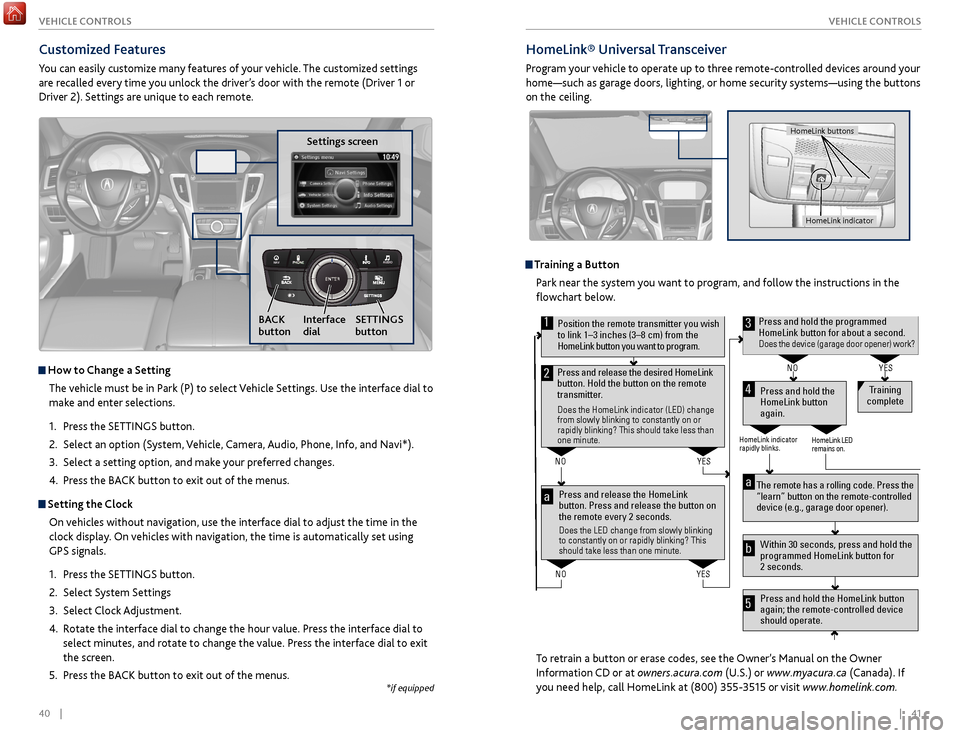
You can easily customize many features of your vehicle. The customized settings
are recalled every time you unlock the driver’s door with the remote (Driver 1 or
Driver 2). Settings are unique to each remote.
How to
Change a Setting
The vehicle must be in Park (P) to select Vehicle Settings. Use the interface dial to
make and enter selections.
1.
Pr
ess the SETTINGS button.
2.
Select an
option (System, Vehicle, Camera, Audio, Phone, Info, and Navi*).
3.
Select a setting
option, and make your preferred changes.
4.
Pr
ess the BACK button to exit out of the menus.
Setting the Clock
On vehicles without navigation, use the interface dial to adjust the time in the
clock display. On vehicles with navigation, the time is automatically set using
GPS signals.
1.
Pr
ess the SETTINGS button.
2.
Select S
ystem Settings
3.
Select
Clock Adjustment.
4.
R
otate the interface dial to change the hour value. Press the interface dial to
select minutes, and rotate to change the value. Press the interface dial to exit
the screen.
5.
Pr
ess the BACK button to exit out of the menus.
Settings screen
NAVAUDIOAUDIONAV
SETTINGS
button
BACK
button Interface
dial
HomeLink®
Universal Transceiver
Program your vehicle to operate up to three remote-controlled devices around your
home—such as garage doors, lighting, or home security systems—using the buttons
on the ceiling.
Training a Button
Park near the system you want to program, and follow the instructions in the
flowchart below.
To retrain a button or erase codes, see the Owner’s Manual on the Owner
Information CD or at owners.acura.com (U.S.) or www.myacura.ca (Canada). If
you need help, call HomeLink at (800) 355-3515 or visit www.homelink.com.
Press and release the HomeLink
button. Press and release the button on
the remote every 2 seconds.
Does the LED change from slowly blinking
to constantly on or rapidly blinking? This
should take less than one minute.
Press and hold the
HomeLink button
again. Training
complete
YES
NO
HomeLink indicator
rapidly blinks. HomeLink LED
remains on.
YES
NO
YES
NO
Position the remote transmitter you wish to link 1–3 inches (3–8 cm) from the
HomeLink button you want to program.1
Press and release the desired HomeLink
button. Hold the button on the remote
transmitter.
Does the HomeLink indicator (LED) change
from slowly blinking to constantly on or
rapidly blinking? This should take less than
one minute.
2
aThe remote has a rolling code. Press the
“learn” button on the remote-controlled
device (e.g., garage door opener) .
Press and hold the HomeLink button
again; the remote-controlled device
should operate. Within 30 seconds, press and hold the
programmed HomeLink button for
2 seconds.a
Press and hold the programmed HomeLink button for about a second.Does the device (garage door opener) work?
3
b
4
5
HomeLink indicator
HomeLink buttons
*if equipped
Page 26 of 75
44 || 45
A UDIO
AND
C ONNECTIVITY
A
UDIO AND C ONNECTIVITY
State or local laws may prohibit the operation of
handheld electronic devices while operating a vehicle.
AUDIO AND CONNECTIVITY
Learn how to operate the vehicle’s audio system.
Basic Audio Operation
Connect audio devices and operate buttons and displays for the audio system.
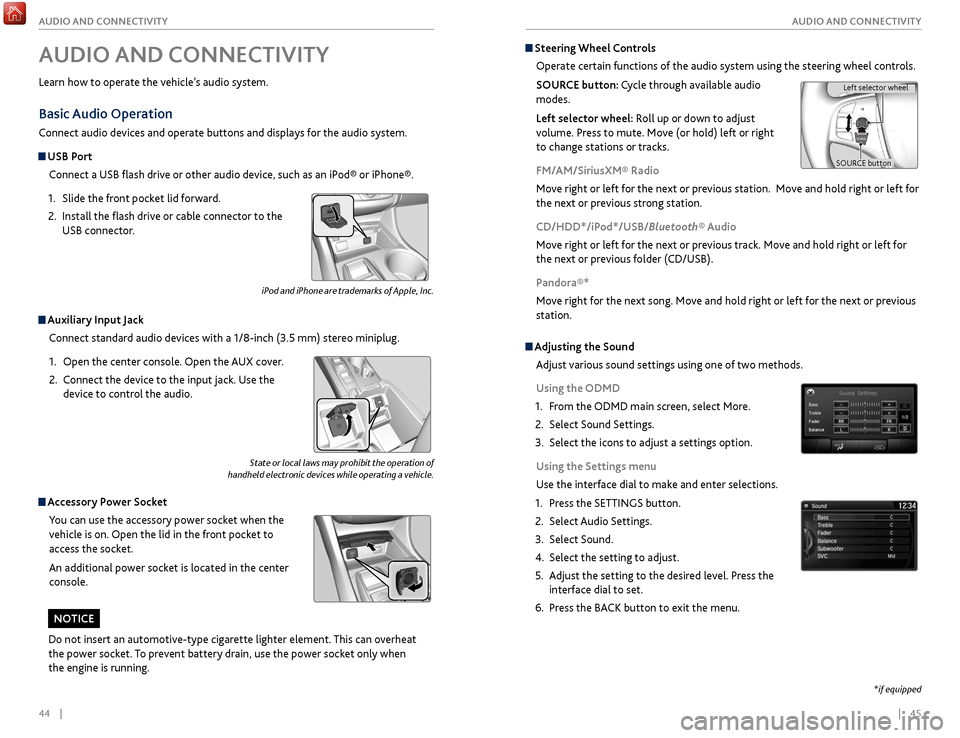
USB Port
Connect a USB flash drive or other audio device, such as an iPod® or iPhone®.
1.
Slide
the front pocket lid forward.
2.
Install the
flash drive or cable connector to the
USB connector.
Auxiliary Input Jack
Connect standard audio devices with a 1/8-inch (3.5 mm) stereo miniplug.
1.
Open
the center console. Open the AUX cover.
2.
C
onnect the device to the input jack. Use the
device to control the audio.
Accessory Power Socket
You can use the accessory power socket when the
vehicle is on. Open the lid in the front pocket to
access the socket.
An additional power socket is located in the center
console.
Steering Wheel Controls
Operate certain functions of the audio system using the steering wheel controls.
SOURCE button: Cycle through available audio
modes.
Left selector wheel: Roll up or down to adjust
volume. Press to mute. Move (or hold) left or right
to change stations or tracks.
FM/AM/SiriusXM® Radio
Move right or left for the next or previous station. Move and hold right or left for
the next or previous strong station.
CD/HDD*/iPod*/USB/Bluetooth® Audio
Move right or left for the next or previous track. Move and hold right or left for
the next or previous folder (CD/USB).
Pandora®*
Move right for the next song. Move and hold right or left for the next or previous
station.
Left selector wheel
SOURCE button
*if equipped
iPod and iPhone are trademarks of Apple, Inc.
Do not insert an automotive-type cigarette lighter element. This can overheat
the power socket. To prevent battery drain, use the power socket only when
the engine is running.
NOTICE
Adjusting the Sound
Adjust various sound settings using one of two methods.
Using the ODMD
1.
F
rom the ODMD main screen, select More.
2.
Select Sound Settings.
3.
Select
the icons to adjust a settings option.
Using the Settings menu
Use the interface dial to make and enter selections.
1.
Pr
ess the SETTINGS button.
2.
Select Audio
Settings.
3.
Select Sound.
4.
Select the
setting to adjust.
5.
A
djust the setting to the desired level. Press the
interface dial to set.
6.
Pr
ess the BACK button to exit the menu.
Page 40 of 75
72 || 73
DRIVING
DRIVING
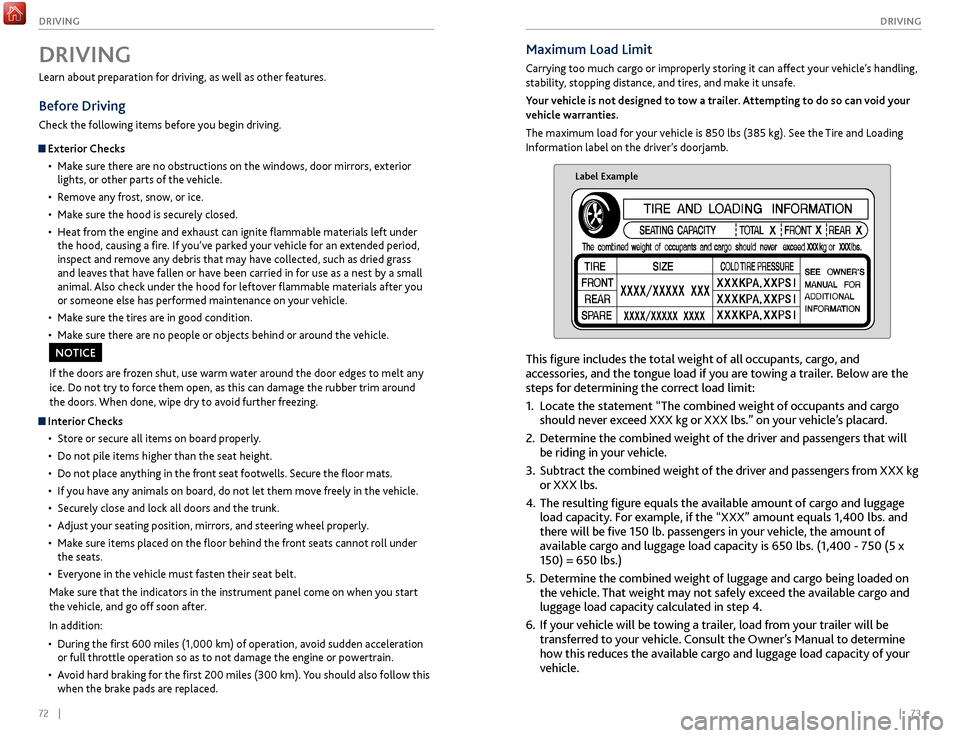
Maximum Load Limit
Carrying too much cargo or improperly storing it can affect your vehicle’s handling,
stability, stopping distance, and tires, and make it unsafe.
Your vehicle is not designed to tow a trailer. Attempting to do so can void your
vehicle warranties.
The maximum load for your vehicle is 850 lbs (385 kg). See the Tire and Loading
Information label on the driver’s doorjamb.
Label Example
This figure includes the total weight of all occupants, cargo, and
accessories, and the tongue load if you are towing a trailer. Below are the
steps for determining the correct load limit:
1.
Locate
the statement “The combined weight of occupants and cargo
should never exceed XXX kg or XXX lbs.” on your vehicle’s placard.
2.
Determine the
combined weight of the driver and passengers that will
be riding in your vehicle.
3.
Subtract the
combined weight of the driver and passengers from XXX kg
or XXX lbs.
4.
The r
esulting figure equals the available amount of cargo and luggage
load capacity. For example, if the “XXX” amount equals 1,400 lbs. and
there will be five 150 lb. passengers in your vehicle, the amount of
available cargo and luggage load capacity is 650 lbs. (1,400 - 750 (5 x
150) = 650 lbs.)
5.
Determine
the combined weight of luggage and cargo being loaded on
the vehicle. That weight may not safely exceed the available cargo and
luggage load capacity calculated in step 4.
6.
If y
our vehicle will be towing a trailer, load from your trailer will be
transferred to your vehicle. Consult the Owner’s Manual to determine
how this reduces the available cargo and luggage load capacity of your
vehicle.
Learn about preparation for driving, as well as other features.
Before Driving
Check the following items before you begin driving.
Exterior Checks
•
Mak
e sure there are no obstructions on the windows, door mirrors, exterior
lights, or other parts of the vehicle.
•
R
emove any frost, snow, or ice.
•
Mak
e sure the hood is securely closed.
•
Heat
from the engine and exhaust can ignite flammable materials left under
the hood, causing a fire. If you’ve parked your vehicle for an extended period,
inspect and remove any debris that may have collected, such as dried grass
and leaves that have fallen or have been carried in for use as a nest by a small
animal. Also check under the hood for leftover flammable materials after you
or someone else has performed maintenance on your vehicle.
•
Mak
e sure the tires are in good condition.
•
Mak
e sure there are no people or objects behind or around the vehicle.
DRIVING
If the doors are frozen shut, use warm water around the door edges to melt any
ice. Do not try to force them open, as this can damage the rubber trim around
the doors. When done, wipe dry to avoid further freezing.
NOTICE
Interior Checks•
Stor
e or secure all items on board properly.
•
Do not pile items higher
than the seat height.
•
Do not place an
ything in the front seat footwells. Secure the floor mats.
•
If
you have any animals on board, do not let them move freely in the vehicle.
•
Secur
ely close and lock all doors and the trunk.
•
A
djust your seating position, mirrors, and steering wheel properly.
•
Mak
e sure items placed on the floor behind the front seats cannot roll under
the seats.
•
Ev
eryone in the vehicle must fasten their seat belt.
Make sure that the indicators in the instrument panel come on when you start
the vehicle, and go off soon after.
In addition:
•
During
the first 600 miles (1,000 km) of operation, avoid sudden acceleration
or full throttle operation so as to not damage the engine or powertrain.
•
A
void hard braking for the first 200 miles (300 km). You should also follow this
when the brake pads are replaced.
Page 41 of 75
74 || 75
DRIVING
DRIVING
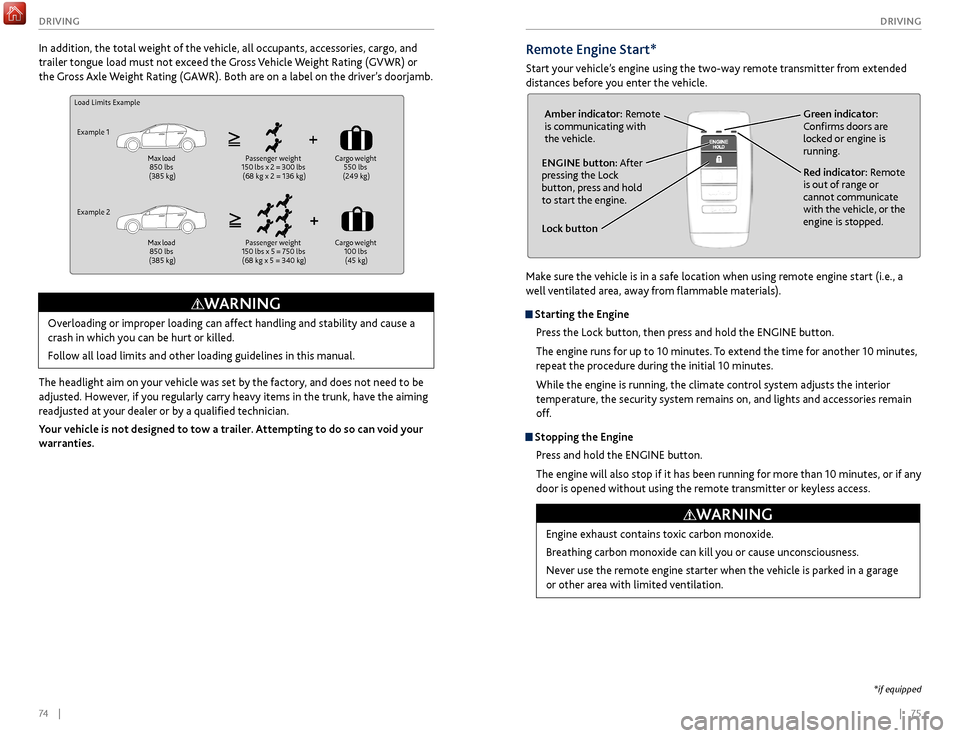
Remote Engine Start*
Start your vehicle’s engine using the two-way remote transmitter from extended
distances before you enter the vehicle.
Lock button
ENGINE button: After
pressing the Lock
button, press and hold
to start the engine.Red indicator: Remote
is out of range or
cannot communicate
with the vehicle, or the
engine is stopped.
Amber indicator: Remote
is communicating with
the vehicle.
Green indicator:
Confirms doors are
locked or engine is
running.
Engine exhaust contains toxic carbon monoxide.
Breathing carbon monoxide can kill you or cause unconsciousness.
Never use the remote engine starter when the vehicle is parked in a garage
or other area with limited ventilation.
WARNING
*if equipped
Make sure the vehicle is in a safe location when using remote engine start (i.e., a
well ventilated area, away from flammable materials).
Starting the Engine
Press the Lock button, then press and hold the ENGINE button.
The engine runs for up to 10 minutes. To extend the time for another 10 minutes,
repeat the procedure during the initial 10 minutes.
While the engine is running, the climate control system adjusts the interior
temperature, the security system remains on, and lights and accessories remain
off.
Stopping the EnginePress and hold the ENGINE button.
The engine will also stop if it has been running for more than 10 minutes, or if any
door is opened without using the remote transmitter or keyless access.
Load Limits Example
Example 1 Max load
850 lbs
(385 kg) Passenger weight
150 lbs x 2 = 300 lbs (68 kg x 2 = 136 kg) Cargo
weight
550 lbs
(249 kg)
Example 2 Max load
850 lbs
(385 kg) Passenger weight
150 lbs x 5 = 750 lbs (68 kg x 5 = 340 kg) Cargo
weight
100 lbs (45 kg)
Overloading or improper loading can affect handling and stability and cause a
crash in which you can be hurt or killed.
Follow all load limits and other loading guidelines in this manual.
WARNING
In addition, the total weight of the vehicle, all occupants, accessories, cargo, and
trailer tongue load must not exceed the Gross Vehicle Weight Rating (GVWR) or
the Gross Axle Weight Rating (GAWR). Both are on a label on the driver’s doorjamb.
The headlight aim on your vehicle was set by the factory, and does not need to be
adjusted. However, if you regularly carry heavy items in the trunk, have the aiming
readjusted at your dealer or by a qualified technician.
Your vehicle is not designed to tow a trailer. Attempting to do so can void your
warranties.
Page 42 of 75
76 || 77
DRIVING
DRIVING
When you change the shift lever from D to R and vice versa, come to a complete
stop and keep the brake pedal depressed. Operating the shift lever before the
vehicle has come to a complete standstill can damage the transmission.
Do not operate the shift lever while pressing the accelerator pedal. You could
damage the transmission.
NOTICE
Shifting
Change your vehicle’s gears to begin driving.
Shift Lever*
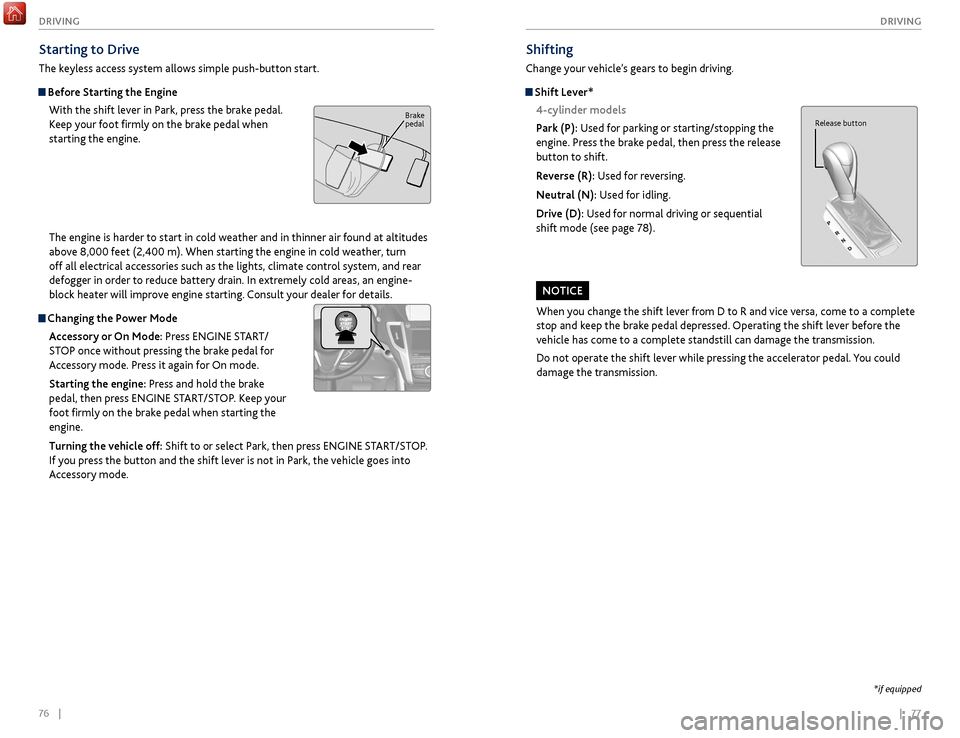
4-cylinder models
Park (P): Used for parking or starting/stopping the
engine. Press the brake pedal, then press the release
button to shift.
Reverse (R): Used for reversing.
Neutral (N): Used for idling.
Drive (D): Used for normal driving or sequential
shift mode (see page 78).
Release button
*if equipped
Starting to Drive
The keyless access system allows simple push-button start.
Before Starting the Engine With the shift lever in Park, press the brake pedal.
Keep your foot firmly on the brake pedal when
starting the engine.
The engine is harder to start in cold weather and in thinner air found at altitudes
above 8,000 feet (2,400 m). When starting the engine in cold weather, turn
off all electrical accessories such as the lights, climate control system, and rear
defogger in order to reduce battery drain. In extremely cold areas, an engine-
block heater will improve engine starting. Consult your dealer for details.
Changing the Power Mode
Accessory or On Mode: Press ENGINE START/
STOP once without pressing the brake pedal for
Accessory mode. Press it again for On mode.
Starting the engine: Press and hold the brake
pedal, then press ENGINE START/STOP. Keep your
foot firmly on the brake pedal when starting the
engine.
Turning the vehicle off: Shift to or select Park, then press ENGINE START/STOP.
If you press the button and the shift lever is not in Park, the vehicle goes into
Accessory mode.
Brake
pedal
Page 44 of 75

80 || 81
DRIVING
DRIVING
Braking
Slow down or stop your vehicle, and keep it from moving when parked.
Foot Brake
Press the brake pedal to slow down or stop your
vehicle from moving.
Brake Assist SystemDuring hard or emergency braking, the system
increases braking force. The brake pedal may move
slightly or make a noise; this is normal. Continue to
hold the brake pedal firmly down.
Anti-Lock Brake System (ABS) During hard or emergency braking, the system rapidly pumps the brakes to
prevent wheel lockup and help you maintain steering control. The brake pedal
may pulsate slightly during ABS operation; this is normal. Do not pump the brake
pedal, and continue to hold it firmly down.
The ABS may not function correctly if you use an incorrect tire type and size.
NOTICE
Brake pedal
Electric Parking BrakeKeep your vehicle from moving while parked using a simple switch.
To apply: Pull up the switch. The PARK indicator
appears in the instrument panel.
To release: Press the brake pedal and make sure
your seat belt is fastened. Press the switch down to
release.
You can also lightly press the accelerator pedal if
your seat belt is fastened and the vehicle is on and in
Drive (D) or Reverse (R).
Pull
up to
apply
Press
down to
release.
Car wash mode
Follow the procedure below to use a conveyor-style car wash where you or
an attendant do not remain in the vehicle. Make sure the wiper lever is in the
OFF position (see page 33). You should inform the car wash attendant of this
procedure.
1.
When
the engine is running, apply the brake pedal and select Neutral (N).
2.
Within 5 seconds, pr
ess the ENGINE START/STOP button. The vehicle goes
into Accessory mode.
This mode lasts for 15 minutes before the gear changes to Park and the vehicle
turns off.
Sequential Mode* 6-cylinder models
Use the paddle shifters to change gears without removing your hands from the
steering wheel.
When the gear is in D: The vehicle goes into sequential mode momentarily,
and the gear indicator comes on. When you start driving at a constant speed,
sequential mode automatically switches off, and the gear indicator goes off.
When the gear is in D (with SPORT+ mode): The vehicle goes into sequential
mode, and the M (sequential mode) indicator and gear indicator come on.
To cancel this mode, press the IDS button (see page 84) to select a different
mode. When sequential mode is canceled, the M indicator and gear indicator go
off.
(-) Paddle shifter:
Pull to shift down
to a lower gear. (+) Paddle shifter:
Pull to shift up to a
higher gear. Recommended shift points
Shift up
Acceleration
1st
to 2nd
15 mph (2
4 km/h)
2nd
to 3rd
25 mph (40 km/h)
3r
d to 4th
40 mph (64 km/h)
4th
to 5th
45 mph (7
2 km/h)
5th
to 6th
50 mph (80 km/h)
6th
to 7th
55 mph (89 km/h)
7th
to 8th
60 mph (9
7 km/h)
8
th to 9th
65 mph (105 km/h)
*if equipped
Page 48 of 75

88 || 89
DRIVING
DRIVING
Lane Departure Warning (LDW)*
A camera mounted between the windshield and the rearview mirror determines if
your vehicle begins to move away from the center of a detected lane while driving
between 45–90 mph (72–145 km/h).
If you cross a detected lane line
without using the turn signal, a
message appears in the MID and a
beep sounds continuously.
Turning LDW On or Off
Press the LDW button to turn the system on or off.
A green indicator light appears on the button when
the system is on.
Important Safety Reminder
Like all assistance systems, LDW has limitations. Over-reliance on LDW may result
in a collision. It is always your responsibility to keep the vehicle within your lane.
LDW only alerts you when lane drift is detected without a turn signal in use. LDW
may not detect all lane markings or lane departures; accuracy will vary based on
weather, speed, and lane marker condition. It is always your responsibility to safely
operate the vehicle and avoid collisions.
Lane departure
message
Audible
beep
LDW
button Indicator
*if equipped
Forward Collision Warning (FCW) with Pedestrian Detection*
Warns you if the system determines there is likelihood of a frontal collision when
a vehicle is detected in front of you when your vehicle speed is 10 mph (15 km/h)
or higher, or a pedestrian is detected in front of you when your vehicle speed is
between 10–62 mph (15–100 km/h).
If you do not brake in time or
take preventive action, a visual
warning flashes, BRAKE flashes
in the MID, and a beep sounds
continuously.
Changing Settings
Determine the warning timing, or turn the system off. Use the interface dial to
make selections.
1.
Pr
ess the SETTINGS button.
2.
Select
Vehicle Settings. The vehicle must be in
Park (P).
3.
Select F
orward Collision Warning Distance.
4.
Select Long
, Normal (default), Short, or Off.
5.
Pr
ess BACK to exit the menu.
Important Safety Reminder
FCW cannot detect all pedestrians and vehicles ahead; accuracy of the system will
vary based on weather, speed, extreme interior heat, and other factors. FCW does
not include a braking function. It is always your responsibility to safely operate the
vehicle and avoid collisions.
BRAKE message
Audible
beep Visual warning
*if equipped
Page 49 of 75

90 || 91
DRIVING
DRIVING
Collision Mitigation Braking System™ (CMBS™)*
Can alert you when a potential frontal collision with a vehicle or pedestrian is
determined and reduce your vehicle speed when a collision is deemed unavoidable
to help minimize collision severity.
The system provides visual,
audible and tactile alerts if you
do not take appropriate action
to avoid a collision.
Alert Stages
The system has three alert stages for a possible collision. Depending on the
circumstances or CMBS settings, CMBS may not go through all of the stages
before initiating the last stage.
Stage 1:
Visual warnings
and audible warnings, steering wheel vibration
Stage 2:
Visual
warnings, audible warning, light seat belt retraction*,
and light brak
e application
Stage 3:
Visual
warnings, audible warning, strong seat belt retraction*,
and str
ong brake application
Turning CMBS On or OffPress and hold the CMBS OFF button. A message
appears in the MID, and the CMBS indicator
appears when the system is off.
Changing SettingsSee page 88 for how to change CMBS settings. Options include Long, Normal
(default), and Short. Use the CMBS OFF button to turn the system off.
Important Safety Reminder
CMBS is designed to help avoid collisions by automatically stopping the vehicle
when possible, and to reduce the severity of an unavoidable collision. It is still
your responsibility to operate the brake pedal and steering wheel appropriately
according to the driving conditions.
BRAKE message
Audible
beep Visual warning
*if equipped
Lane Keeping Assist System (LKAS)*
A camera mounted between the windshield and the rearview mirror determines if
your vehicle begins to move away from the center of a detected lane while driving
between 45–90 mph (72–145 km/h).
If you cross a detected lane line
without using your turn signal, a
message appears on the MID and
a beep sounds.
Light steering torque and
vibrations are applied to keep
your vehicle in the middle of the
lane.
Turning LKAS On or Off
1.
Pr
ess MAIN. LKAS appears in the MID.
2.
Pr
ess the LKAS button. Lane outlines appear
in the MID. Dotted lane lines turn solid when
the system operates.
3.
Pr
ess MAIN or the LKAS button to turn the
system off.
Important Safety Reminder
The LKAS is for your convenience only. It is not a substitute for your vehicle control.
The system does not work if you take your hands off the steering wheel or fail to
steer the vehicle.
Do not place an object on the top of the instrument panel. It may reflect onto the
windshield and prevent the system from detecting lane lines properly.
Lane departure
message
Audible
beep Steering assistance
*if equipped
Vibration
Page 51 of 75

94 || 95
DRIVING
DRIVING
Multi-View Rear Camera
When you shift into Reverse (R), a real-time image of the area behind your vehicle
is shown in the display, along with helpful parking guidelines.
The rear camera view is restricted. You cannot see the corner ends of the bumper or what is underneath
the bumper. Its unique lens also makes objects appear closer or farther than they actually are.
Visually confirm that it is safe to drive before backing up. Certain conditions (such as weather, lighting,
and high temperatures) may also restrict the rear view. Do not rely on the rearview display, which does
not give you all information about conditions at the rear of your vehicle.
Wide view Normal view Top down view
Changing Guidelines
1.
Pr
ess the SETTINGS button.
2.
Select Camera
Settings.
3.
Select
Rear Camera.
4.
Select one of the options.
Fixed Guideline: Guidelines appear when you
shift into Reverse. Select On or Off.
Dynamic Guideline: Guidelines move as you turn
the steering wheel. Select On or Off.
5.
Pr
ess the BACK button to exit the menu.
Press the
interface dial
to toggle
between
views.
Parking Sensor System*
When the system senses an object when you are parking or backing up, an indicator
appears on the upper display and a series of beeps will sound. As you get closer to
the object, the beep rate increases.
Turning the System On or OffPress the parking sensor button. A green indicator
light appears on the button when the system is on.
*if equipped
Display indicators
Parking sensor button
Do not continuously spin the front tires of your vehicle. Continuously spinning
the front tires can cause damage to the transmission and SH-AWD unit.
If the SH-AWD light blinks while driving, it indicates the differential temperature
is too high. If this happens, pull to the side of the road when it is safe, shift to
park, and idle the engine until the indicator goes out.
NOTICE
Super Handling-All Wheel Drive (SH-AWD)*
Controls and transfers varying amounts of engine torque to each wheel depending
on driving conditions.
SH-AWD helps enhance stability in driving situations involving slippery surfaces,
such as on wet, icy, or snowy roads. The system does not help enhance braking. It is
still your responsibility to drive safely when you steer, accelerate, and apply brakes.
Leave sufficient distance in front of you when braking on slippery surfaces.
Page 54 of 75

100 || 101
HANDLING THE UNEXPECTED
HANDLING THE UNEXPECTED
WARNING: Battery posts, terminals, and related accessories contain lead and lead
compounds. Wash your hands after handling.
After the Engine Starts
Once your vehicle’s engine has started, remove the jumper cables in the following
order:
1.
Disconnect
the jumper cable from your vehicle’s ground.
2.
Disconnect
the other end of the jumper cable from the booster battery (-)
terminal.
3.
Disconnect
the jumper cable from your vehicle’s battery (+) terminal.
4.
Disconnect
the other end of the jumper cable from the booster battery (+)
terminal.
Have your vehicle inspected by a nearby service station or a dealer. A battery can explode if you do not follow the correct procedure, seriously
injuring anyone nearby.
Keep all sparks, open flames, and smoking materials away from the battery.
WARNING
Jump Starting
Turn off the power to electric devices, such as audio and lights. Turn off the engine,
then open the hood (see page 118).
1.
6-cylinder models:
Remove the engine
cover. Start on the passenger side, and lift the
outermost edge of the cover, removing it from
the pins. Move towards the driver side while
applying uniform upward pressure. Open the
battery terminal cover.
2.
All models:
Connect the first jumper cable to
your vehicle’s battery (+) terminal.
3.
C
onnect the other end of the first jumper
cable to the booster battery (+) terminal. Use
a 12-volt booster battery only (i.e., an assisting
vehicle or a rechargeable 12-volt battery pack).
4.
C
onnect the second jumper cable to the
booster battery (-) terminal.
5.
C
onnect the other end of the second jumper
cable to the mounting bolt or engine hanger
as shown. Do not connect this jumper cable to
any other part.
6.
If
your vehicle is connected to another vehicle,
start the assisting vehicle’s engine and increase
its rpm slightly.
7.
A
ttempt to start your vehicle’s engine. If it
turns over slowly, make sure the jumper cables
have good metal-to-metal contact.
6-cylinder models
Pin
Engine cover
6-cylinder models
Battery
terminal cover
4-cylinder models
Booster battery
6-cylinder models
Booster battery
4-cylinder models
6-cylinder models