driver Acura TLX 2017 Manual PDF
[x] Cancel search | Manufacturer: ACURA, Model Year: 2017, Model line: TLX, Model: Acura TLX 2017Pages: 553, PDF Size: 33.77 MB
Page 343 of 553
342
uuWhen Driving uAuto Idle Stop*
Driving
Auto Idle Stop*
To help maximize fuel econ omy, the engine automatica lly stops when the vehicle
comes to a stop, depending on environmental and vehicle operating conditions. The
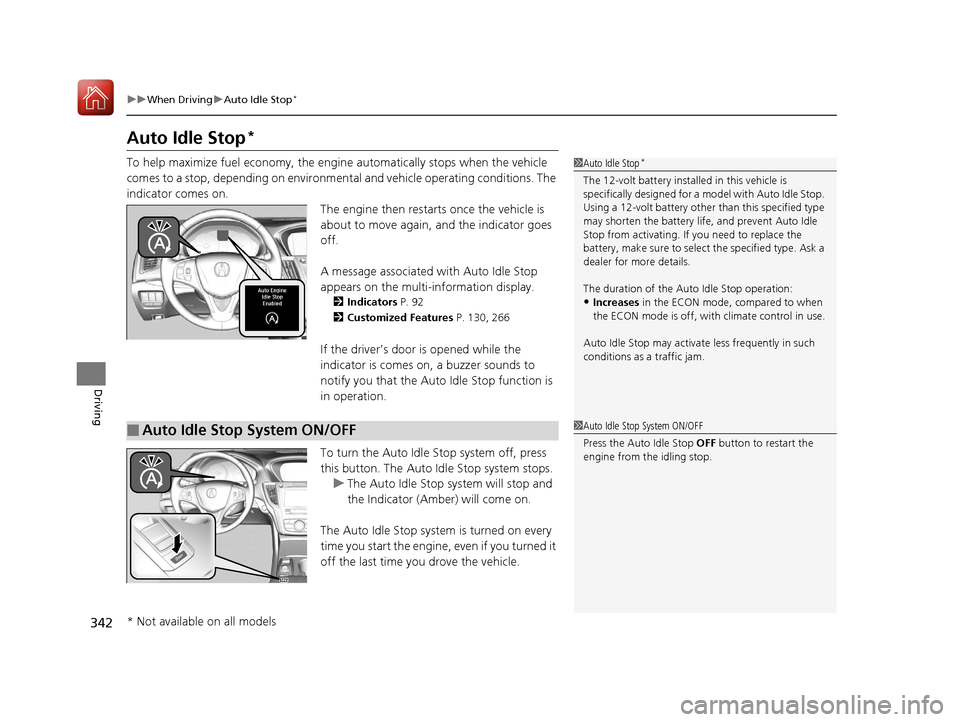
indicator comes on. The engine then restarts once the vehicle is
about to move again, and the indicator goes
off.
A message associated with Auto Idle Stop
appears on the multi-information display.
2 Indicators P. 92
2 Customized Features P. 130, 266
If the driver’s door is opened while the
indicator is comes on, a buzzer sounds to
notify you that the Auto Idle Stop function is
in operation.
To turn the Auto Idle Stop system off, press
this button. The Auto Idle Stop system stops.
u The Auto Idle Stop system will stop and
the Indicator (Amber) will come on.
The Auto Idle Stop syst em is turned on every
time you start the engine, even if you turned it
off the last time you drove the vehicle.
1 Auto Idle Stop*
The 12-volt battery insta lled in this vehicle is
specifically designed for a m odel with Auto Idle Stop.
Using a 12-volt battery other than this specified type
may shorten the battery life , and prevent Auto Idle
Stop from activati ng. If you need to replace the
battery, make sure to select the specified type. Ask a
dealer for more details.
The duration of the Au to Idle Stop operation:
•Increases in the ECON mode, compared to when
the ECON mode is off, with climate control in use.
Auto Idle Stop may activate less frequently in such
conditions as a traffic jam.
■Auto Idle Stop System ON/OFF1 Auto Idle Stop System ON/OFF
Press the Auto Idle Stop OFF button to restart the
engine from the idling stop.
* Not available on all models
17 ACURA TLX-31TZ36200.book 342 ページ 2016年6月10日 金曜日 午後6時39分
Page 344 of 553
Continued343
uuWhen Driving uAuto Idle Stop*
Driving
The vehicle stops with the gear position in (D and the brake pedal depressed.
■Auto idle stop does not activate when:
• The driver’s seat belt is not fastened.
• The engine coolant temperature is low or high.
• The transmission fluid temperature is low or high.
• The vehicle comes to a stop again befo re the vehicle speed reaches 3 mph (5
km/h) after the engine starts.
• Stopped on a steep incline.
• A gear position other than
(D or in Sport+.
• The engine is started with the hood open.
u Turn off the engine. Close the hood before you restart the engine to activate
Auto Idle Stop.
• The battery charge is low.
• The internal temperature of the battery is 14°F (−10°C) or less.
• The climate control system is in use, and the outside temperature is below −4°F
(−20°C) or over 104°F (40°C).
• The climate control system temperature is set to the Hi or Lo.
• is ON (indicator on).
■Auto Idle Stop Activates When:1Auto Idle Stop Activates When:
When ACC with LSF is in operation, the vehicle stops
without depressing the br ake pedal and Auto Idle
Stop may activate.
Do not open the hood while the Auto Idle Stop
function is activated. If the hood is opened, the
engine will not re start automatically.
In this case, restart the engine with the ENGINE
START/STOP button.
2 Starting the Engine P. 322
Pressing the ENGINE START/STOP button changes
the power mode to ACCESSORY even while Auto Idle
Stop is in operation. Once in ACCESSORY, the engine
no longer restarts automatica lly. Follow the standard
procedure to start the engine. 2 Starting the Engine P. 322
Models with ACC with LSF
17 ACURA TLX-31TZ36200.book 343 ページ 2016年6月10日 金曜日 午後6時39分
Page 346 of 553
345
uuWhen Driving uAuto Idle Stop*
Driving
The brake pedal is released and the automatic brake hold system is off.
■The engine restarts even if the brak e pedal is depressed or the automatic
brake hold system is activated when:
• The Auto Idle Stop OFF button is pressed.
• When a steering wheel is operated.
• The gear position is in a position other than
(D or in Sport+.
• The pressure on the brake pedal is reduced and the vehicle starts moving while
stopped on an incline.
• The pressure on the brake pedal is repeat edly applied and released slightly during
a stop.
• The battery charge becomes low.
• The accelerator pedal is depressed.
• The driver’s seat belt is unlatched.
• is ON (indicator on).
• The climate control system is in use, and the difference between the set
temperature and actual interior temperature becomes significant.
• The climate control system is being used to dehumidify the interior.
Briefly keeps the brakes applied after releas ing the brake pedal to restart the engine.
This can keep your vehicle from unexpe ctedly moving while on an incline.
■The Engine Automatically Restarts When:
■Starting Assist Brake Function
1The Engine Automatically Restarts When:
•If you are using an elec tronic device during Auto
Idle Stop, the device may temporarily be turned off
when the engine restarts.
17 ACURA TLX-31TZ36200.book 345 ページ 2016年6月10日 金曜日 午後6時39分
Page 353 of 553
uuWhen Driving uFront Sensor Camera*
352
Driving
1Front Sensor Camera*
If the Some Driver Assist Systems Cannot
Operate: Camera Temperature Too High message
appears:
•Use the climate control system to cool down the
interior and, if necessary, also use defroster mode
with the air flow directed towards the camera.
•Start driving the vehicle to lower the windshield
temperature, which cool s down the area around
the camera.
If the Some Driver Assist Systems Cannot
Operate: Clean Front Windshield message
appears:
•Park your vehicle in a sa fe place, and clean the
windshield. If the message does not disappear after
you have cleaned the winds hield and driven for a
while, have your vehicle checked by a dealer.
* Not available on all models
17 ACURA TLX-31TZ36200.book 352 ページ 2016年6月10日 金曜日 午後6時39分
Page 365 of 553
uuWhen Driving uAdaptive Cruise Control (ACC) with Low Speed Follow (LSF)*
364
Driving
■Automatic cancellation
The beeper sounds and a message appears on the multi-information display when
ACC with LSF is automatically canceled. An y of these conditions may cause the ACC
with LSF to automatically cancel:
• Bad weather (rain, fog, snow, etc.)
• When the radar sensor in the front grille gets dirty.
• The vehicle ahead of you cannot be detected.
• An abnormal tire condition is detected, or the tires are skidding.
• Driving on a mountainous road, or driving off road for extended periods.
• Abrupt steering wheel movement.
• When the ABS, VSA ® or CMBS
TM is activated.
• When the ABS or VSA ® system indicator comes on.
• When the vehicle is stopped on a very steep slope.
• When you manually apply the parking brake.
• When the detected vehicle within the ACC with LSF range is too close to your
vehicle.
• The camera behind the rearview mirror, or the area around the camera, including
the windshield, gets dirty.
The ACC with LSF automatic cancellation can be also triggered by the following
causes. In these cases, the parking brake will be automatically applied.
• The driver’s seat belt is unfastened when the vehicl e is stationary.
• The vehicle stops for mo re than 10 minutes.
• The engine is turned off.
1Automatic cancellation
Even though ACC with LSF has been automatically
canceled, you can still resu me the prior set speed.
Wait until the condition that caused ACC with LSF to
cancel improves, then press the RES/+/SET/– switch
up.
17 ACURA TLX-31TZ36200.book 364 ページ 2016年6月10日 金曜日 午後6時39分
Page 378 of 553
377
uuWhen Driving uRoad Departure Mitigation (RDM) System*
Continued
Driving
Road Departure Mitigation (RDM) System*
Alerts and helps to assist you when the system determines a possibility of your
vehicle unintentionally crossing over detected lane markings.
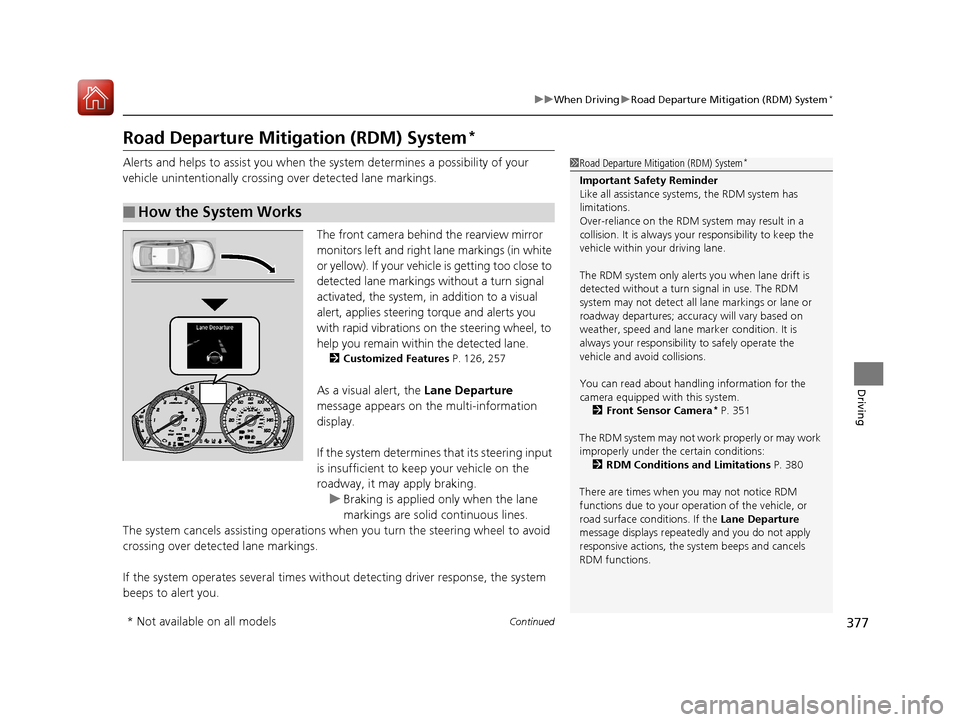
The front camera behind the rearview mirror
monitors left and right lane markings (in white
or yellow). If your vehicl e is getting too close to
detected lane markings without a turn signal
activated, the system, in addition to a visual
alert, applies steering torque and alerts you
with rapid vibrations on the steering wheel, to
help you remain within the detected lane.
2 Customized Features P. 126, 257
As a visual alert, the Lane Departure
message appears on the multi-information
display.
If the system determines that its steering input
is insufficient to keep your vehicle on the
roadway, it may apply braking. u Braking is applied only when the lane
markings are solid continuous lines.
The system cancels assisting operations wh en you turn the steering wheel to avoid
crossing over detected lane markings.
If the system operates several times with out detecting driver response, the system
beeps to alert you.
■How the System Works
1 Road Departure Mitigation (RDM) System*
Important Safety Reminder
Like all assistance systems, the RDM system has
limitations.
Over-reliance on the RDM system may result in a
collision. It is always your responsibility to keep the
vehicle within your driving lane.
The RDM system only alerts you when lane drift is
detected without a turn signal in use. The RDM
system may not detect all la ne markings or lane or
roadway departures; accu racy will vary based on
weather, speed and lane marker condition. It is
always your responsibilit y to safely operate the
vehicle and avoid collisions.
You can read about handling information for the
camera equipped with this system.
2 Front Sensor Camera
* P. 351
The RDM system may not wo rk properly or may work
improperly under the certain conditions: 2 RDM Conditions and Limitations P. 380
There are times when you may not notice RDM
functions due to your opera tion of the vehicle, or
road surface conditions. If the Lane Departure
message displays repeated ly and you do not apply
responsive actions, the sy stem beeps and cancels
RDM functions.
* Not available on all models
17 ACURA TLX-31TZ36200.book 377 ページ 2016年6月10日 金曜日 午後6時39分
Page 379 of 553
uuWhen Driving uRoad Departure Mitigation (RDM) System*
378
Driving
The system becomes ready to start sear ching for lane markings when all the
following conditions are met:
• The vehicle is traveling between about 45 and 90 mph (72 and 145 km/h).
• The vehicle is on a straight or slightly curved road.
• The turn signals are off.
• The brake pedal is not depressed.
• The wipers are not in continuous operation.
• The vehicle is not accelerating or braking, and the steering wheel is not being
turned.
• The system makes a determination that the driver is not actively accelerating,
braking or steering.
■How the System Activates1How the System Activates
The RDM system may automa tically shut off and the
indicator comes and stays on.
2 Indicators P. 87
RDM system function can be impacted when the
vehicle is:
•Not driven within a traffic lane.
•Driven on the inside edge of a curve, or outside of
a lane.
•Driven in a narrow lane.
17 ACURA TLX-31TZ36200.book 378 ページ 2016年6月10日 金曜日 午後6時39分
Page 392 of 553
391
uuWhen Driving uVehicle Stability Assist (VSA ®), aka Electronic Stability Control (ESC), System
Driving
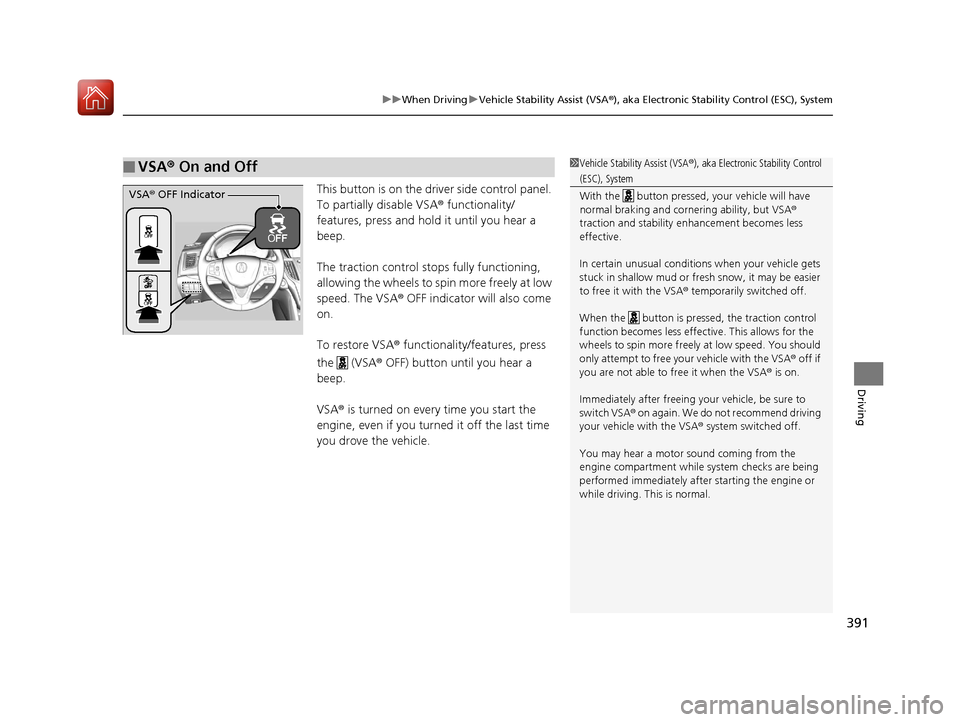
This button is on the driver side control panel.
To partially disable VSA ® functionality/
features, press and hold it until you hear a
beep.
The traction control stop s fully functioning,
allowing the wheels to spin more freely at low
speed. The VSA ® OFF indicator will also come
on.
To restore VSA ® functionality/features, press
the (VSA ® OFF) button until you hear a
beep.
VSA ® is turned on every time you start the
engine, even if you turned it off the last time
you drove the vehicle.
■VSA ® On and Off1 Vehicle Stability Assist (VSA ®), aka Electronic Stability Control
(ESC), System
With the button pressed, your vehicle will have
normal braking and corn ering ability, but VSA®
traction and stability enhancement becomes less
effective.
In certain unusual conditions when your vehicle gets
stuck in shallow mud or fr esh snow, it may be easier
to free it with the VSA ® temporarily switched off.
When the button is pressed, the traction control
function becomes less effective. This allows for the
wheels to spin more freely at low speed. You should
only attempt to free your vehicle with the VSA ® off if
you are not able to free it when the VSA ® is on.
Immediately after freeing your vehicle, be sure to
switch VSA ® on again. We do not recommend driving
your vehicle with the VSA ® system switched off.
You may hear a motor sound coming from the
engine compartment while system checks are being
performed immediately after starting the engine or
while driving. This is normal.
VSA ® OFF Indicator
17 ACURA TLX-31TZ36200.book 391 ページ 2016年6月10日 金曜日 午後6時39分
Page 400 of 553
399
uuWhen Driving uTire Pressure Monitoring System (TPMS) - Required Federal Explanation
Driving
Please note that the TPMS is not a substitute for proper tire
maintenance, and it is the driver ’s responsibility to maintain
correct tire pressure, even if un der-inflation has not reached the
level to trigger illumination of th e TPMS low tire pressure telltale.
Your vehicle has also been equi pped with a TPMS malfunction
indicator to indicate when the system is not operating properly.
The TPMS malfunction indicator is combined with the low tire
pressure telltale. When the syst em detects a malfunction, the
telltale will flash fo r approximately one minute and then remain
continuously illumina ted. This sequence will continue upon
subsequent vehicle start-ups as long as the malfunction exists.
When the malfunction indicator is illuminated, the system may
not be able to detect or signal low tire pressure as intended.
TPMS malfunctions may occur for a variety of reasons, including
the installation of replacement or alternate tires or wheels on the
vehicle that prevent the TPMS from functioning properly.
Always check the TPMS malfunction telltale after replacing one or
more tires or wheels on your vehicle to ensure that the
replacement or alternate tires and wheels allow the TPMS to
continue to function properly.
17 ACURA TLX-31TZ36200.book 399 ページ 2016年6月10日 金曜日 午後6時39分
Page 401 of 553
400
Driving
Braking
Brake System
Use the parking brake to keep the vehicle stationary when parked. You can
manually apply and release, or automatically release it.
■Manual operations
Use the electric parking brake switch to apply or release the brake. Manually
releasing the parking brake using the switch helps your vehicle start slowly and
smoothly when facing down hill on steep hills.
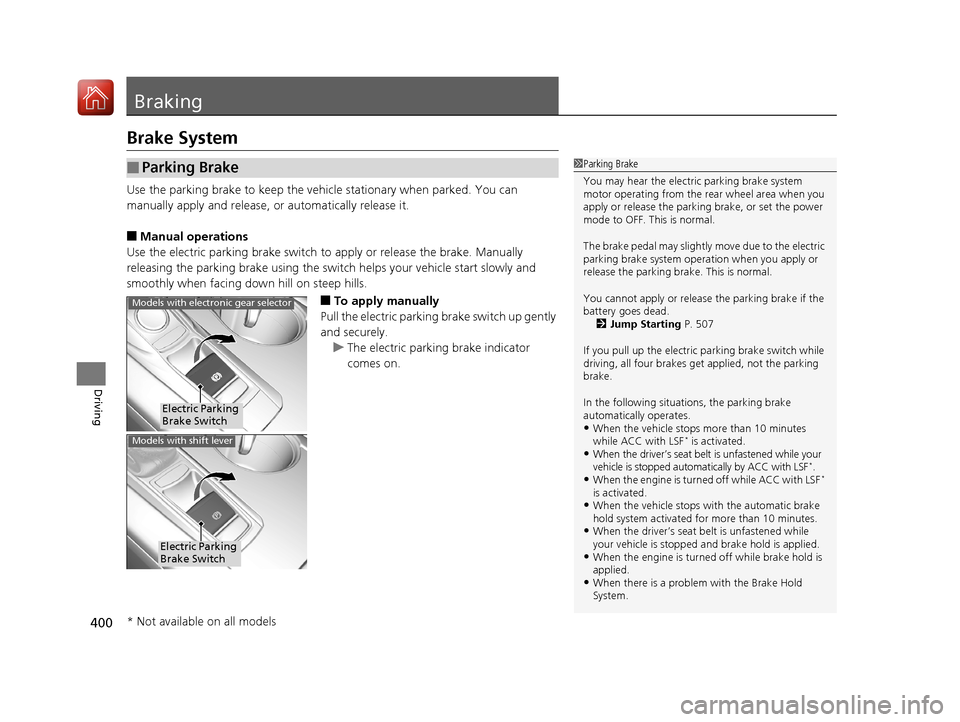
■To apply manually
Pull the electric parkin g brake switch up gently
and securely.
u The electric parking brake indicator
comes on.
■Parking Brake1Parking Brake
You may hear the electric parking brake system
motor operating from the re ar wheel area when you
apply or release the parki ng brake, or set the power
mode to OFF. This is normal.
The brake pedal may slightly move due to the electric
parking brake system opera tion when you apply or
release the parking br ake. This is normal.
You cannot apply or release the parking brake if the
battery goes dead.
2 Jump Starting P. 507
If you pull up the electric parking brake switch while
driving, all four brakes get applied, not the parking
brake.
In the following situations, the parking brake
automatically operates.
•When the vehicle stops more than 10 minutes
while ACC with LSF* is activated.•When the driver’s seat belt is unfastened while your
vehicle is stopped automatically by ACC with LSF*.•When the engine is turned off while ACC with LSF*
is activated.
•When the vehicle stops with the automatic brake
hold system activated for more than 10 minutes.
•When the driver’s seat belt is unfastened while
your vehicle is stopped and brake hold is applied.
•When the engine is turned off while brake hold is
applied.
•When there is a problem with the Brake Hold
System.
Electric Parking
Brake Switch
Models with electronic gear selector
Electric Parking
Brake Switch
Models with shift lever
* Not available on all models
17 ACURA TLX-31TZ36200.book 400 ページ 2016年6月10日 金曜日 午後6時39分