driver Acura TLX 2017 Workshop Manual
[x] Cancel search | Manufacturer: ACURA, Model Year: 2017, Model line: TLX, Model: Acura TLX 2017Pages: 553, PDF Size: 33.77 MB
Page 166 of 553
165
uuOperating the Switches Around the Steering Wheel uLight Switches
Continued
Controls
Light Switches
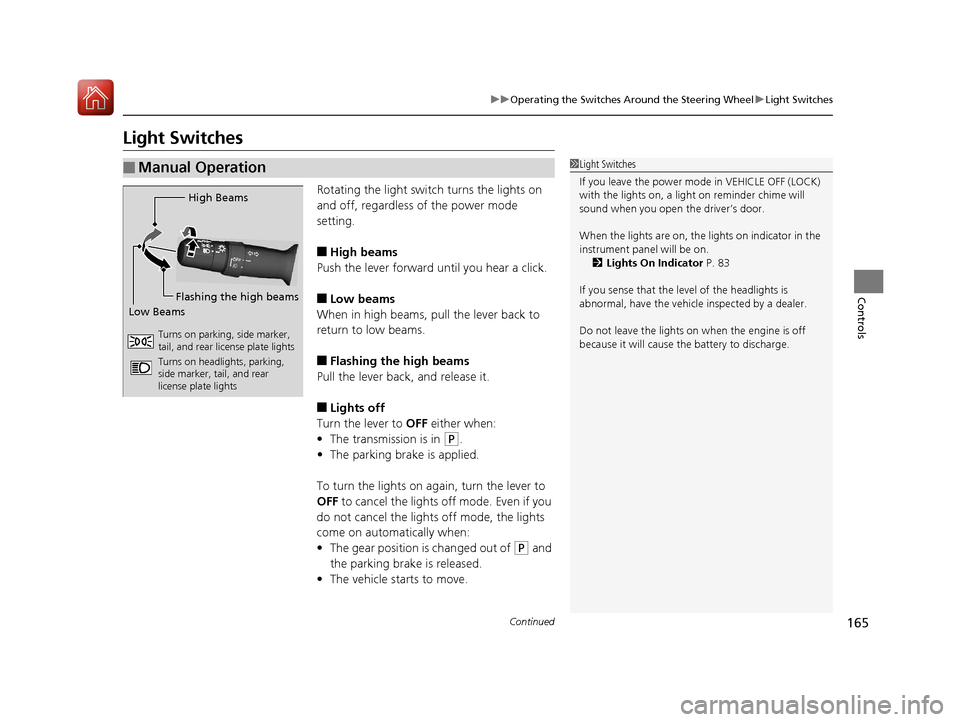
Rotating the light switch turns the lights on
and off, regardless of the power mode
setting.
■High beams
Push the lever forward until you hear a click.
■Low beams
When in high beams, pull the lever back to
return to low beams.
■Flashing the high beams
Pull the lever back, and release it.
■Lights off
Turn the lever to OFF either when:
• The transmission is in
(P.
• The parking brake is applied.
To turn the light s on again, turn the lever to
OFF to cancel the lights off mode. Even if you
do not cancel the lights off mode, the lights
come on automatically when:
• The gear position is changed out of
(P and
the parking brake is released.
• The vehicle starts to move.
■Manual Operation1Light Switches
If you leave the power mode in VEHICLE OFF (LOCK)
with the lights on, a light on reminder chime will
sound when you open the driver’s door.
When the lights are on, the lights on indicator in the
instrument pane l will be on.
2 Lights On Indicator P. 83
If you sense that the le vel of the headlights is
abnormal, have the vehicl e inspected by a dealer.
Do not leave the lights on when the engine is off
because it will cause the battery to discharge.
High Beams
Flashing the high beams
Low Beams
Turns on parking, side marker,
tail, and rear license plate lights
Turns on headlights, parking,
side marker, tail, and rear
license plate lights
17 ACURA TLX-31TZ36200.book 165 ページ 2016年6月10日 金曜日 午後6時39分
Page 168 of 553
167
uuOperating the Switches Around the Steering Wheel uLight Switches
Controls
The headlights automatically come on when the wipers are used several times within
a certain interval with the headlight switch in AUTO.
The headlights automatically go off a few minutes later if the wipers are stopped.
The headlights, all other exterior lights, a nd the instrument panel lights turn off 15
seconds after you set the po wer mode to VEHICLE OFF (LOCK), take the remote with
you, and close the driver's door.
If you set the power mode to VEHICLE OFF (LOCK) with the headlight switch on, but
do not open the door, the lights turn off after 10 minutes (three minutes, if the
switch is in the AUTO position).
The lights turn on again when you unlock or open the driver’s door. If you unlock
the door, but do not open it within 15 seconds, the lights go off. If you open the
driver’s door, you will hear a lights on reminder chime.
■Headlight Integration with Wipers
■Automatic Lighting Off Feature
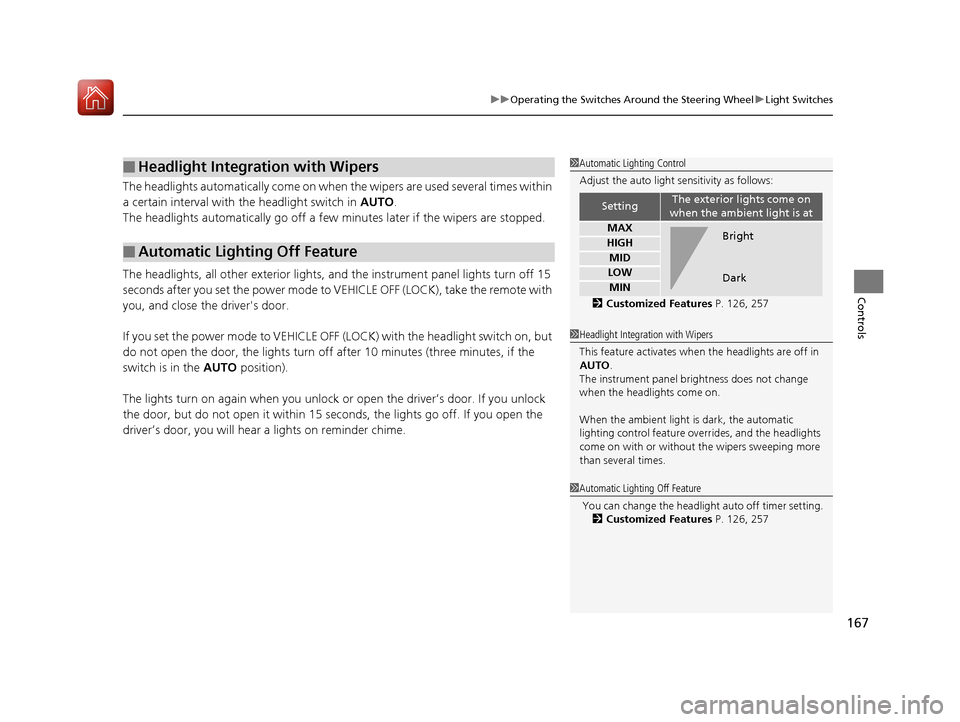
1 Automatic Lighting Control
Adjust the auto light sensitivity as follows:
2 Customized Features P. 126, 257
SettingThe exterior lights come on
when the ambient light is at
MAX
HIGH
MID
LOW
MIN
Bright
Dark
1 Headlight Integration with Wipers
This feature activates when the headlights are off in
AUTO .
The instrument panel br ightness does not change
when the headlights come on.
When the ambient light is dark, the automatic
lighting control feature over rides, and the headlights
come on with or without the wipers sweeping more
than several times.
1 Automatic Lighting Off Feature
You can change the headli ght auto off timer setting.
2 Customized Features P. 126, 257
17 ACURA TLX-31TZ36200.book 167 ページ 2016年6月10日 金曜日 午後6時39分
Page 175 of 553
174
uuOperating the Switches Around the Steering Wheel uDriving Position Memory System
Controls
Driving Position Memory System
You can store two driver’s seat (except for power lumbar) and door mirror positions
with the driving position memory system.
When you unlock and open th e driver’s door with a remote transmitter, or keyless
access system, the seat and door mirrors adjust automatically to one of the two
preset positions.
When you enter the vehicle, the multi-in formation display briefly shows you which
remote transmitter you used to unlock the vehicle.
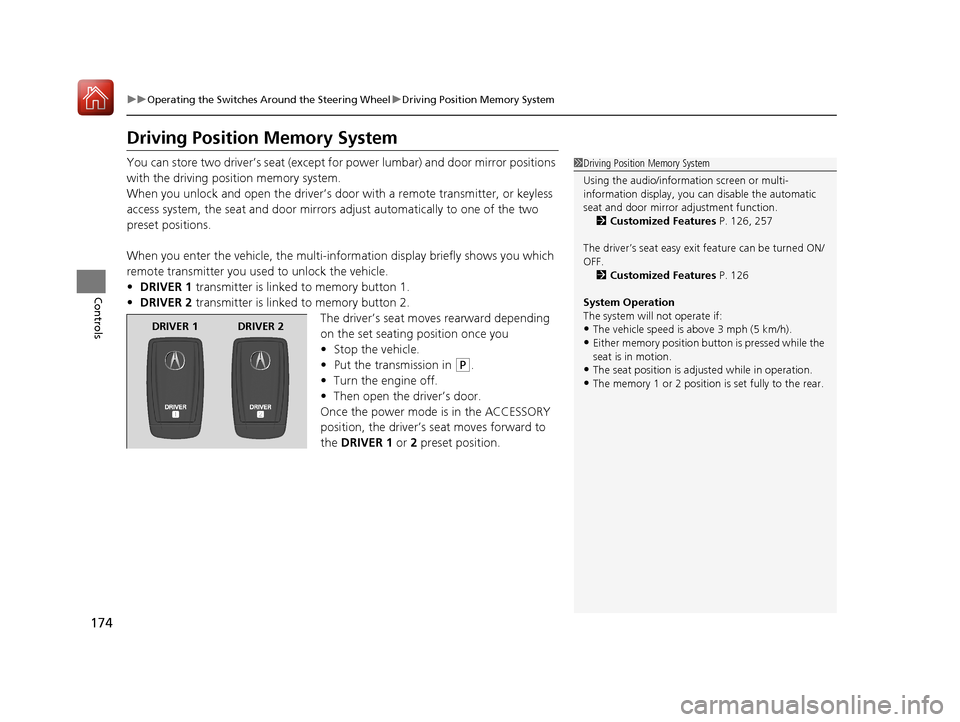
• DRIVER 1 transmitter is linked to memory button 1.
• DRIVER 2 transmitter is linked to memory button 2.
The driver’s seat moves rearward depending
on the set seating position once you
•Stop the vehicle.
• Put the transmission in
(P.
• Turn the engine off.
• Then open the driver’s door.
Once the power mode is in the ACCESSORY
position, the driver’s seat moves forward to
the DRIVER 1 or 2 preset position.
1 Driving Position Memory System
Using the audio/information screen or multi-
information display, you can disable the automatic
seat and door mirror adjustment function. 2 Customized Features P. 126, 257
The driver’s seat easy exit feature can be turned ON/
OFF. 2 Customized Features P. 126
System Operation
The system will not operate if:
•The vehicle speed is above 3 mph (5 km/h).
•Either memory position button is pressed while the
seat is in motion.
•The seat position is adju sted while in operation.
•The memory 1 or 2 position is set fully to the rear.
DRIVER 1 DRIVER 2
17 ACURA TLX-31TZ36200.book 174 ページ 2016年6月10日 金曜日 午後6時39分
Page 176 of 553
175
uuOperating the Switches Around the Steering Wheel uDriving Position Memory System
Controls
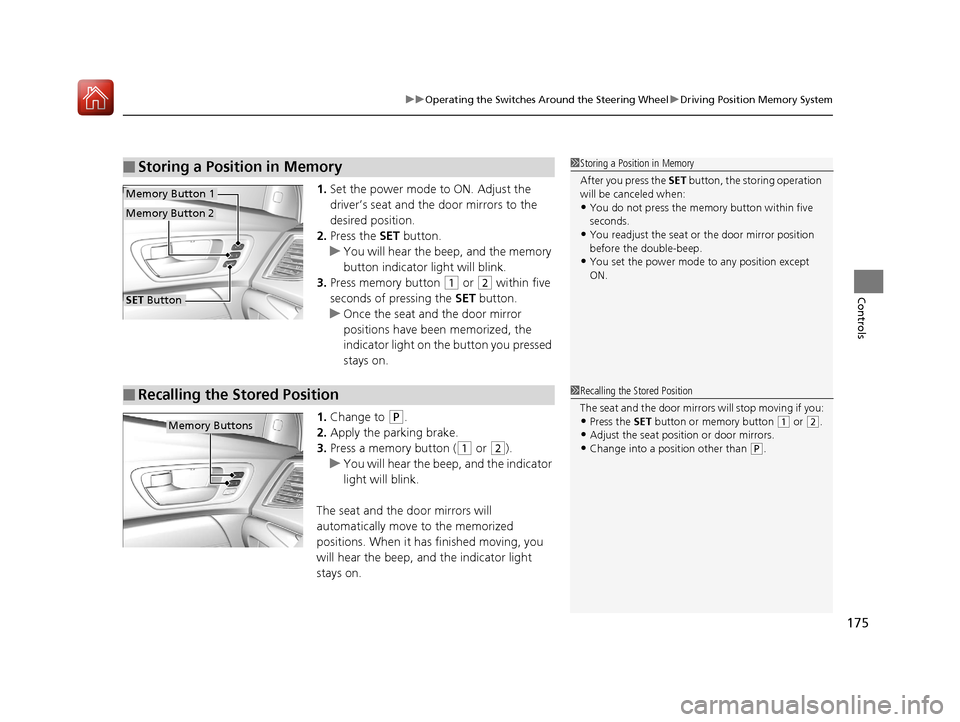
1. Set the power mode to ON. Adjust the
driver’s seat and the door mirrors to the
desired position.
2. Press the SET button.
u You will hear the beep, and the memory
button indicator light will blink.
3. Press memory button
(1 or (2 within five
seconds of pressing the SET button.
u Once the seat and the door mirror
positions have been memorized, the
indicator light on the button you pressed
stays on.
1. Change to
(P.
2. Apply the parking brake.
3. Press a memory button (
(1 or (2).
u You will hear the beep, and the indicator
light will blink.
The seat and the door mirrors will
automatically move to the memorized
positions. When it has finished moving, you
will hear the beep, and the indicator light
stays on.
■Storing a Position in Memory1 Storing a Position in Memory
After you press the SET button, the storing operation
will be canceled when:
•You do not press the memory button within five
seconds.
•You readjust the seat or the door mirror position
before the double-beep.
•You set the power mode to any position except
ON.
SET Button
Memory Button 1
Memory Button 2
■Recalling the Stored Position1 Recalling the Stored Position
The seat and the door mirrors will stop moving if you:
•Press the SET button or memory button (1 or (2.
•Adjust the seat position or door mirrors.
•Change into a position other than (P.
Memory Buttons
17 ACURA TLX-31TZ36200.book 175 ページ 2016年6月10日 金曜日 午後6時39分
Page 180 of 553
179Continued
Controls
Adjusting the Seats
Front Seats
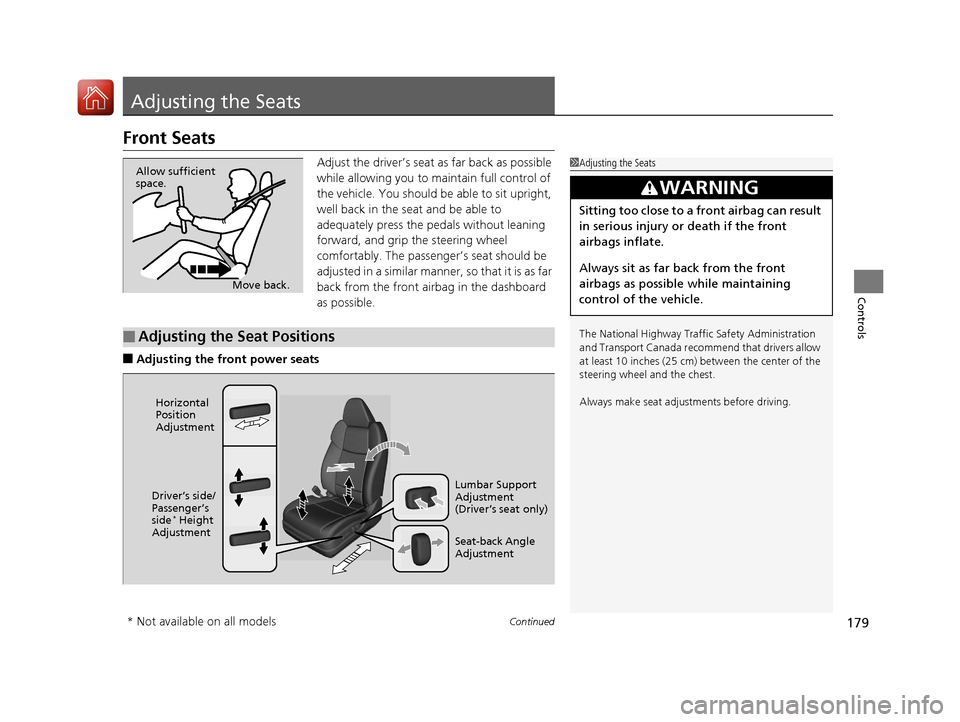
Adjust the driver’s seat as far back as possible
while allowing you to ma intain full control of
the vehicle. You should be able to sit upright,
well back in the seat and be able to
adequately press the pedals without leaning
forward, and grip the steering wheel
comfortably. The passenger’s seat should be
adjusted in a similar manner, so that it is as far
back from the front airbag in the dashboard
as possible.
■Adjusting the fro nt power seats
1Adjusting the Seats
The National Highway Traffic Safety Administration
and Transport Cana da recommend that drivers allow
at least 10 inches (25 cm) between the center of the
steering wheel and the chest.
Always make seat adjustments before driving.
3WARNING
Sitting too close to a front airbag can result
in serious injury or death if the front
airbags inflate.
Always sit as far back from the front
airbags as possible while maintaining
control of the vehicle.
Move back.
Allow sufficient
space.
■Adjusting the Seat Positions
Horizontal
Position
Adjustment
Seat-back Angle
Adjustment Lumbar Support
Adjustment
(Driver’s seat only)
Driver’s side/
Passenger’s
side
* Height
Adjustment
* Not available on all models
17 ACURA TLX-31TZ36200.book 179 ページ 2016年6月10日 金曜日 午後6時39分
Page 181 of 553
uuAdjusting the Seats uFront Seats
180
Controls
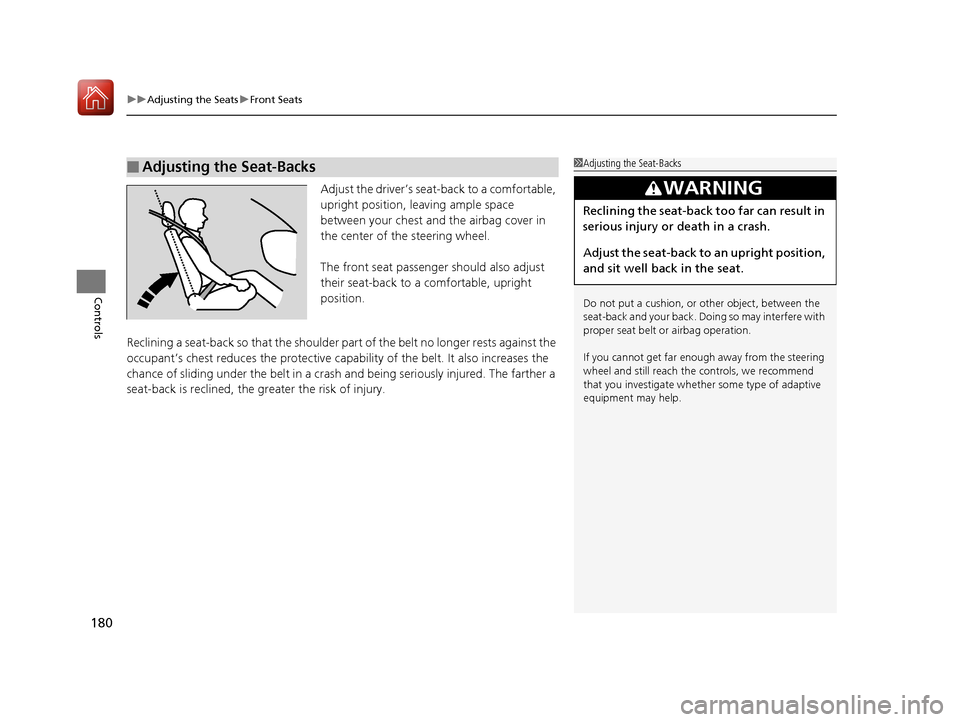
Adjust the driver’s sea t-back to a comfortable,
upright position, leaving ample space
between your chest and the airbag cover in
the center of the steering wheel.
The front seat passenger should also adjust
their seat-back to a comfortable, upright
position.
Reclining a seat-back so that the shoulder pa rt of the belt no longer rests against the
occupant’s chest reduces the protective capa bility of the belt. It also increases the
chance of sliding under the belt in a crash and being seriously injured. The farther a
seat-back is reclined, the greater the risk of injury.
■Adjusting the Seat-Backs1 Adjusting the Seat-Backs
Do not put a cushion, or other object, between the
seat-back and your back. Do ing so may interfere with
proper seat belt or airbag operation.
If you cannot get far e nough away from the steering
wheel and still reach th e controls, we recommend
that you investigate whether some type of adaptive
equipment may help.
3WARNING
Reclining the seat-back too far can result in
serious injury or death in a crash.
Adjust the seat-back to an upright position,
and sit well back in the seat.
17 ACURA TLX-31TZ36200.book 180 ページ 2016年6月10日 金曜日 午後6時39分
Page 187 of 553
186
Controls
Interior Lights/Interior Convenience Items
Interior Lights
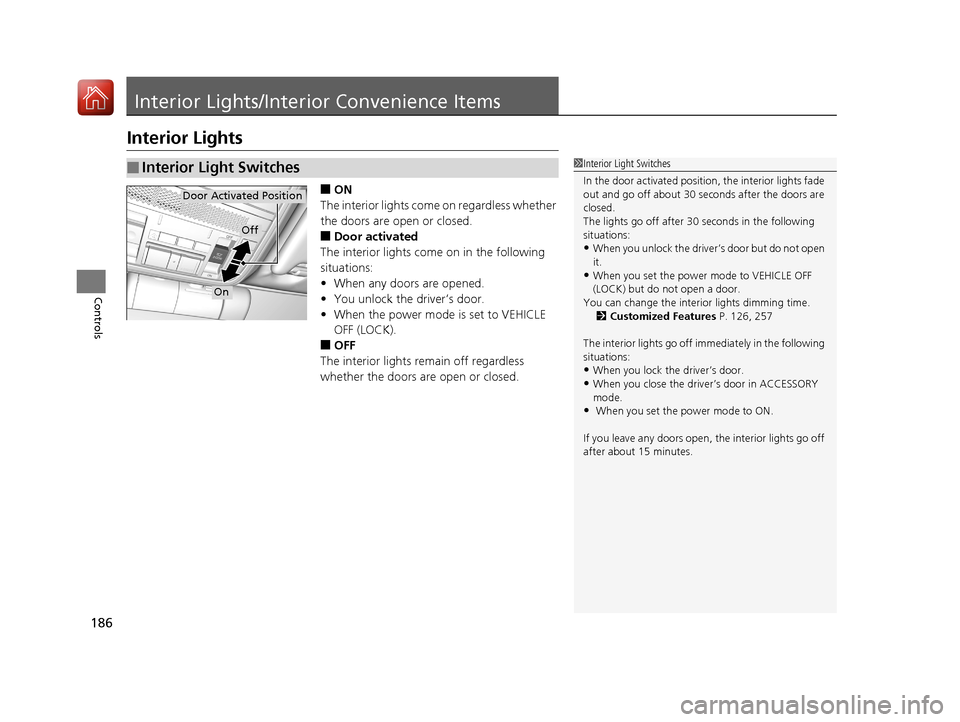
■ON
The interior lights come on regardless whether
the doors are open or closed.
■Door activated
The interior lights come on in the following
situations:
• When any doors are opened.
• You unlock the driver’s door.
• When the power mode is set to VEHICLE
OFF (LOCK).
■OFF
The interior lights remain off regardless
whether the doors are open or closed.
■Interior Light Switches1 Interior Light Switches
In the door activated position, the interior lights fade
out and go off about 30 se conds after the doors are
closed.
The lights go off after 30 seconds in the following
situations:
•When you unlock the driver’s door but do not open
it.
•When you set the power mode to VEHICLE OFF
(LOCK) but do not open a door.
You can change the interi or lights dimming time.
2 Customized Features P. 126, 257
The interior lights go off i mmediately in the following
situations:
•When you lock the driver’s door.
•When you close the driver’s door in ACCESSORY
mode.
• When you set the power mode to ON.
If you leave any doors open, the interior lights go off
after about 15 minutes.
Door Activated Position
Off
On
17 ACURA TLX-31TZ36200.book 186 ページ 2016年6月10日 金曜日 午後6時39分
Page 199 of 553
198
Controls
Climate Control System
Using Automatic Climate Control
The automatic climate control system maintains the interior temperature you select.
The system also selects the proper mix of heated or cooled air that raises or lowers
the interior temperature to your pr eference as quickly as possible.
Use the system when the engine is running.
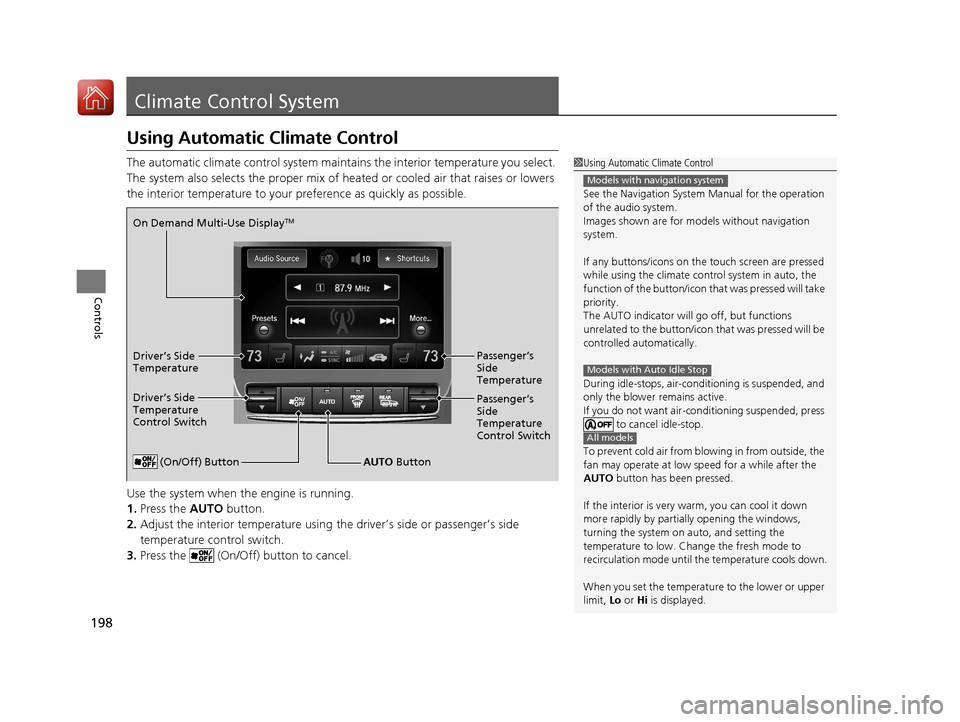
1. Press the AUTO button.
2. Adjust the interior temperature using the driver’s side or passenger’s side
temperature control switch.
3. Press the (On/Off) button to cancel.1Using Automatic Climate Control
See the Navigation System Manual for the operation
of the audio system.
Images shown are for m odels without navigation
system.
If any buttons/icons on the touch screen are pressed
while using the climate control system in auto, the
function of the button/icon th at was pressed will take
priority.
The AUTO indicator will go off, but functions
unrelated to the button/icon that was pressed will be
controlled automatically.
During idle-stops, air-conditioning is suspended, and
only the blower remains active.
If you do not want air-cond itioning suspended, press
to cancel idle-stop.
To prevent cold air from bl owing in from outside, the
fan may operate at low speed for a while after the
AUTO button has been pressed.
If the interior is very warm, you can cool it down
more rapidly by partial ly opening the windows,
turning the system on auto, and setting the
temperature to low. Change the fresh mode to
recirculation mode until the temperature cools down.
When you set the temperat ure to the lower or upper
limit, Lo or Hi is displayed.
Models with navigation system
Models with Auto Idle Stop
All models
(On/Off) ButtonAUTO Button
On Demand Multi-Use Display
TM
Driver’s Side
Temperature
Control Switch
Passenger’s
Side
Temperature
Control Switch Passenger’s
Side
Temperature
Driver’s Side
Temperature
17 ACURA TLX-31TZ36200.book 198 ページ 2016年6月10日 金曜日 午後6時39分
Page 200 of 553
Continued199
uuClimate Control System uUsing Automatic Climate Control
Controls
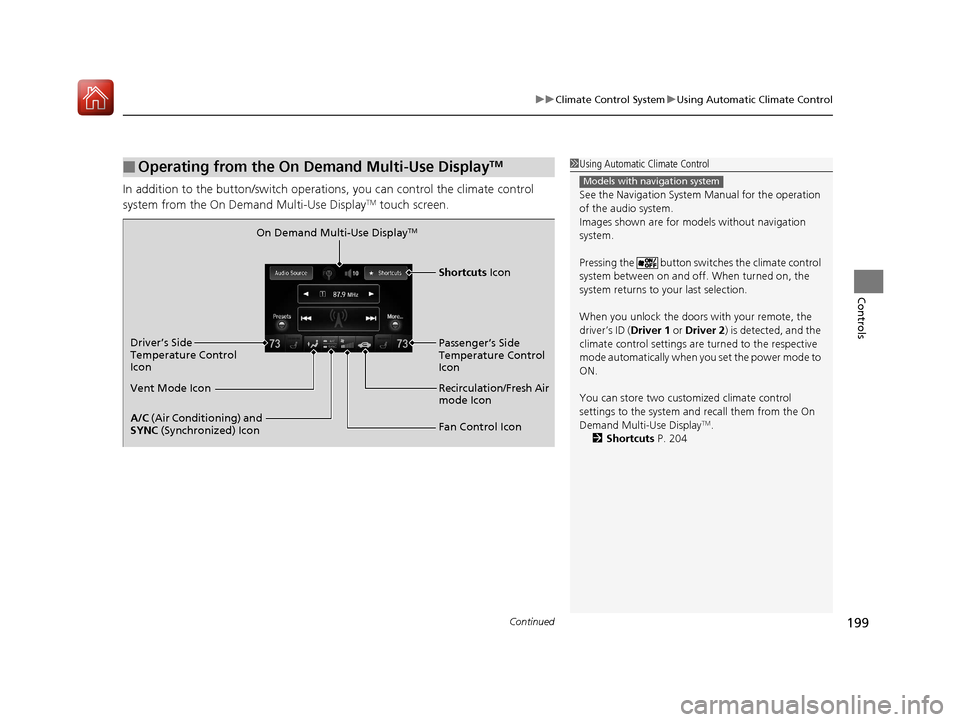
In addition to the button/switch operati ons, you can control the climate control
system from the On Demand Multi-Use DisplayTM touch screen.
■Operating from the On Demand Multi-Use DisplayTM1 Using Automatic Climate Control
See the Navigation System Manual for the operation
of the audio system.
Images shown are for m odels without navigation
system.
Pressing the button switch es the climate control
system between on and off. When turned on, the
system returns to your last selection.
When you unlock the doors with your remote, the
driver’s ID ( Driver 1 or Driver 2) is detected, and the
climate control settings are turned to the respective
mode automatically when you set the power mode to
ON.
You can store two customized climate control
settings to the system and recall them from the On
Demand Multi-Use Display
TM.
2 Shortcuts P. 204
Models with navigation system
On Demand Multi-Use DisplayTM
A/C (Air Conditioning) and
SYNC (Synchronized) Icon
Vent Mode Icon Driver’s Side
Temperature Control
Icon
Recirculation/Fresh Air
mode Icon
Fan Control Icon Passenger’s Side
Temperature Control
Icon
Shortcuts Icon
17 ACURA TLX-31TZ36200.book 199 ページ 2016年6月10日 金曜日 午後6時39分
Page 201 of 553
uuClimate Control System uUsing Automatic Climate Control
200
Controls
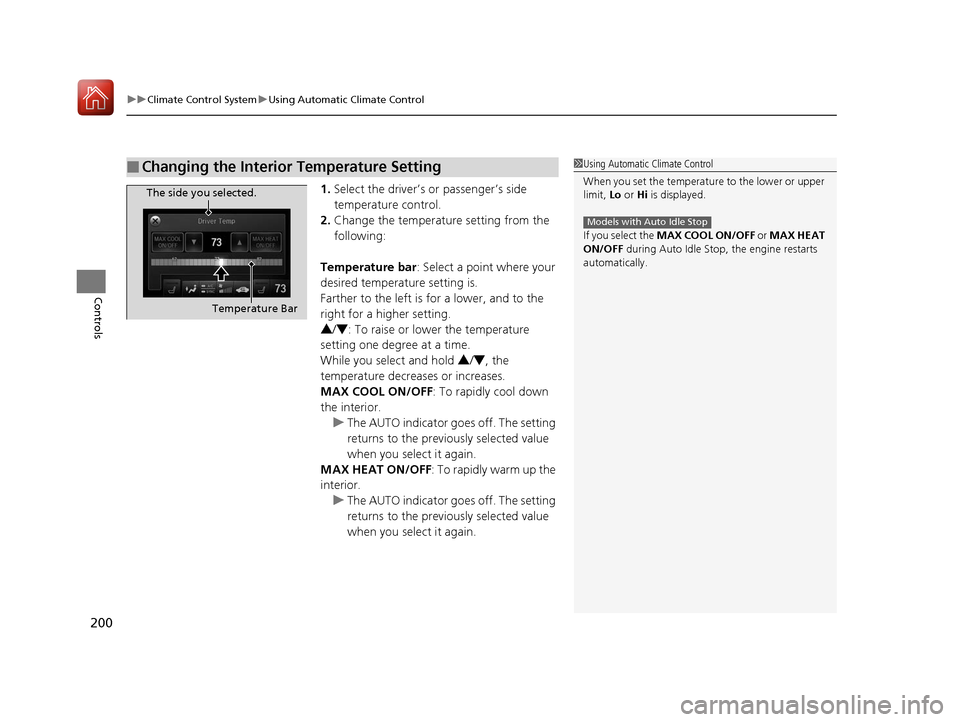
1. Select the driver’s or passenger’s side
temperature control.
2. Change the temperature setting from the
following:
Temperature bar : Select a point where your
desired temperature setting is.
Farther to the left is for a lower, and to the
right for a higher setting.
3 /4 : To raise or lower the temperature
setting one degree at a time.
While you select and hold 3/4 , the
temperature decreases or increases.
MAX COOL ON/OFF : To rapidly cool down
the interior. u The AUTO indicator goes off. The setting
returns to the previo usly selected value
when you select it again.
MAX HEAT ON/OFF : To rapidly warm up the
interior.
u The AUTO indicator goes off. The setting
returns to the previo usly selected value
when you select it again.
■Changing the Interior Temperature Setting1 Using Automatic Climate Control
When you set the temperat ure to the lower or upper
limit, Lo or Hi is displayed.
If you select the MAX COOL ON/OFF or MAX HEAT
ON/OFF during Auto Idle Stop , the engine restarts
automatically.
Models with Auto Idle Stop
The side you selected.
Temperature Bar
17 ACURA TLX-31TZ36200.book 200 ページ 2016年6月10日 金曜日 午後6時39分