ECO mode ACURA TLX 2022 Owner's Manual
[x] Cancel search | Manufacturer: ACURA, Model Year: 2022, Model line: TLX, Model: ACURA TLX 2022Pages: 656, PDF Size: 26.43 MB
Page 127 of 656

Continued125
uuLocking and Unlocking the Doors uLocking/Unlocking the Doors from the Outside
Controls
■Unlocking the doors and trunk
Grab the driver’s door handle:u The driver’s door and fuel fill door
unlocks.
u Some exterior lights flash twice and the
beeper sounds twice.
Grab the front passenger’s or rear
* door
handle: u All doors and fuel fill door unlock.
u Some exterior lights flash twice and the
beeper sounds twice.
Press the trunk release button: u The trunk unlocks and opens.
u Some exterior lights flash twice and the
beeper sounds.
2 Using the Trunk Release Button P. 137
Trunk Release Button
1Using the Keyless Access System
The light flash, beep and door unlock mode settings
can be customized using the audio/information
screen.
2 Customized Features P. 302
When you go into the keyless access system working
range with all the doors locked, the puddle lights
come on for 30 seconds.
The lights do not come on if you have previously
stayed within the range for more than two minutes,
or the doors have been locked for a few days.
The feature activates agai n after you open and close
any door, then lock the doors.
Models with puddle lights
* Not available on all models
22 ACURA TLX-31TGV6100.book 125 \b
Page 129 of 656

Continued127
uuLocking and Unlocking the Doors uLocking/Unlocking the Doors from the Outside
Controls
To temporarily deactivate the function:
1. Set the power mode to OFF.
2. Open the driv er’s door.
3. Using the master door lock switch, operate
the lock as follows:
Lock Unlock Lock Unlock.
u The beeper sounds an d the function is
deactivated.
To restore the function:
• Set the power mode to ON.
• Lock the vehicl e without using the auto lock
function.
• With the keyless remote on you, move out
of the auto lock function operation range.
• Open any door.1Locking the doors and trunk (Walk away auto lock ®)
The auto lock function does not operate when any of
the following conditions are met.
•The keyless remote is inside the vehicle.
•A door or the hood is not closed.•The power mode is set to any mode other than
OFF.
•The keyless remote is not located within a radius of
about 5 feet (1.5 m) from the vehicle when you get
out of the vehicle and close the doors.
Auto lock function operation stop beeper
After the auto lock function has been activated, the
auto lock operation stop beeper sounds for
approximately two seconds in the following cases.
•The keyless remote is put inside the vehicle through
a window.
•You are located too close to the vehicle.
•The keyless remote is put inside the trunk.
If the warning beeper sounds, check that you are
carrying the keyless remote. Then, open/close a door
and confirm the auto lock activation beeper sounds
once.
22 ACURA TLX-31TGV6100.book 127 \b
Page 130 of 656

uuLocking and Unlocking the Doors uLocking/Unlocking the Doors from the Outside
128
Controls
■Locking the doors
Press the lock button.
Once: u Some exterior lights flash, all the doors,
fuel fill door and trunk lock, and the
security system sets.
Twice (within five seco nds after the first
push): u Some exterior lights flash and the beeper
sounds and verifies the security system is
set.
■Unlocking the doors
Press the unlock button.
Once: u Some exterior lights flash twice, and the
driver’s door and fuel fill door unlocks.
Twice: u Some exterior lights flash twice, and the
remaining doors and trunk unlock.
*1:
Checking Door Lock Status* P. 131
■Using the Remote Transmitter1 Using the Remote Transmitter
If you do not open a door within 30 seconds of
unlocking the vehicle with the remote transmitter,
the doors, fuel fill door a nd trunk will automatically
relock.
You can change the relock timer setting.
2 Customized Features P. 302
You can lock or unlock doors, fuel fill door and trunk
using the remote transmitter only when the power
mode is in VEHICLE OFF.
The remote transmitter us es low-power signals, so
the operating range may vary depending on the
surroundings.
The remote will not lock th e vehicle when a door is
open.
If the distance at which the remote transmitter works
varies, the batter y is probably low.
If the LED does not come on when you press a
button, the battery is dead. 2 Replacing the Remote Battery P. 568
You can customize the door unlock mode setting. 2 Customized Features P. 302
LED
Unlock
Button Lock
Button
LED*1
Unlock
Button
Lock
Button
* Not available on all models
22 ACURA TLX-31TGV6100.book 128 \b
Page 131 of 656
Continued129
uuLocking and Unlocking the Doors uLocking/Unlocking the Doors from the Outside
Controls
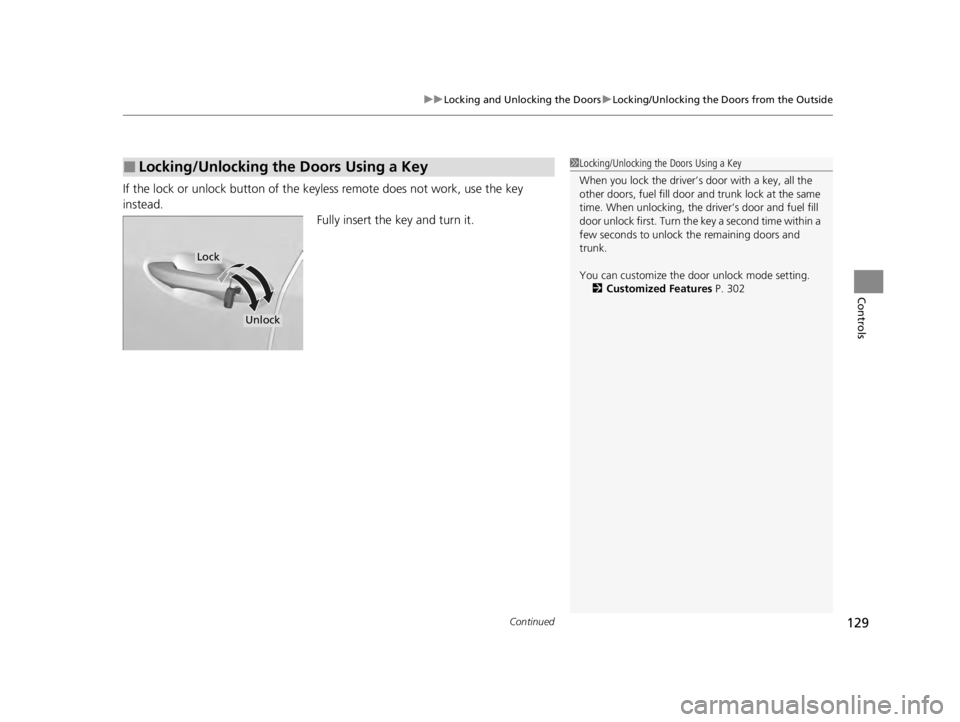
If the lock or unlock button of the key less remote does not work, use the key
instead. Fully insert the key and turn it.
■Locking/Unlocking the Doors Using a Key1Locking/Unlocking the Doors Using a Key
When you lock the driver’s door with a key, all the
other doors, fuel fill door and trunk lock at the same
time. When unlocking, the dr iver’s door and fuel fill
door unlock first. Turn the key a second time within a
few seconds to unlock the remaining doors and
trunk.
You can customize the door unlock mode setting.
2 Customized Features P. 302
Lock
Unlock
22 ACURA TLX-31TGV6100.book 129 \b
Page 133 of 656

131
uuLocking and Unlocking the Doors uLocking/Unlocking the Doors from the Outside
Controls
You can remotely check if your vehicle’s doors
are all locked or any are unlocked using the
keyless remote from extended distances.
Press the lock button, the Amber (LEFT) LED blinks once. After three seconds, one of
the following feedback will come:
• Green (center) comes on: Acknowle dges that the doors are locked.
• Red (right) comes on: Acknowledges that doors are not locked, or any door is not
completely closed.
• Red (right) blinks three times: The remote does not receive the door lock status
from the vehicle.
■Checking Door Lock Status*1 Checking Door Lock Status*
Operate the remote in an open space. If there are
buildings or other obstacl es between your vehicle
and the remote, the remote may not work even
within the operable range. However, the range
required for unlocking the tr unk and all the doors as
well as activating the pani c function is the same as
that required for operating the standard keyless
remote.
When checking the door lock status, you can also
start or stop the engine.
2 Remote Engine Start
* P. 376
Red
Green
Amber
Lock Button
* Not available on all models
22 ACURA TLX-31TGV6100.book 131 \b
Page 139 of 656

137
uuOpening and Closing the Trunk uUsing the Trunk Release Button
Controls
Using the Trunk Release Button
Press the release button on the right side
trunk lid light after the doors are unlocked.
2 If You Cannot Open the Trunk P. 629
Even if the trunk is locked, you can open the
trunk if you carry the keyless remote.
u Some exterior lights flash twice and the
beeper sounds.
Using the Remote Transmitter
Press and hold the trunk release button for
approximately one second to unlock and open
the trunk.
1Using the Trunk Release Button
•If you forget the remote inside the trunk, the
beeper will sound and th e trunk will not close.
•A person who is not carryi ng the keyless remote
can unlock the trunk if a pe rson who is carrying it is
within range or if all doors are unlocked.
•If the beeper sounds after you close the trunk,
move the keyless remote away from the trunk and
close again.
•The keyless remote may not operate if it is too close
to the trunk.
When the vehicle is used in cold weather, the trunk
release button could freeze up and using it may not
be possible.
In this case, the trunk may be opened using the
interior trunk opener or tr unk release button on the
remote transmitter.
Trunk Release Button
1 Using the Remote Transmitter
If the driver’s door is locked, the trunk will
automatically lock when yo u close it. Otherwise, you
will have to lock it manually.
•You can lock or unlock th e trunk using the remote
transmitter only when the power mode is in
VEHICLE OFF.
Trunk
Release
Button
Trunk
Release
Button
22 ACURA TLX-31TGV6100.book 137 \b
Page 141 of 656
139Continued
Controls
Security System
Immobilizer System
This system prevents a key that has not been preregistered from starting the engine.
Pay attention to the follo wing when pressing the ENGINE START/STOP button:
• Do not allow objects that emit strong radio waves near the ENGINE START/
STOP button.
• Make sure the key is not covered by or touching a metal object.
• Do not bring a key from another vehicle’s immobilizer system near the ENGINE
START/STOP button.
• Do not put the key near magnetic items. Electronic devices, such as televisions
and audio systems emit strong magnetic fields. Note that even a key chain can
become magnetic.
Security System Alarm
The security system alarm activates when the trunk, hood or doors are forcibly
opened. The alarm does not activate if the trunk or doors are opened with the key,
remote transmitter or keyless access system.
However, the alarm activates if a door is opened with the key and then the hood is
opened before the power mode is set to ON.
■When the security system alarm activates
The horn sounds intermittently and some exterior lights flash.
1Immobilizer System
NOTICE
Leaving the key in the vehicl e can result in theft or
accidental movement of the vehicleM
Always take the key with you whenever you leave the
vehicle unattendedM
Do not alter the system or add other devices to itM
Doing so may damage the system and make your
vehicle inoperableM
Apply and hold the brake pedal before turning the
vehicle on the first time after the battery has been
disconnectedM
Canadian models
1 Security System Alarm
Do not alter the system or add other devices to it.
Doing so may damage the system and make your
vehicle inoperable.
The security system alarm continues for a maximum
of two minutes until the security system alarm
deactivates.
22 ACURA TLX-31TGV6100.book 139 \b
Page 142 of 656

uuSecurity System uSecurity System Alarm
140
Controls
■To deactivate the security system alarm
Unlock the vehicle using the key, remote transmitter or keyless access system, or set
the power mode to ON. The system, along with the horn and flashing lights, is
deactivated.
■Setting the security system alarm
The security system alarm automatically sets when the following conditions have
been met:
• The power mode is set to VEHICLE OFF.
• The hood is closed.
• All doors and the trunk are locked from outside with the key, remote transmitter
or keyless access system.
■When the security system alarm sets
The security system alarm indicator in the instrument panel blinks and the blinking
interval changes after about 15 seconds.
■To cancel the security system alarm
The security system alarm is canceled when the vehicle is unlocked using the remote
transmitter or keyless access system, or wh en the power mode is set to ON. The
security system alarm indicator goes off at the same time.
1 Security System Alarm
Do not set the security system alarm when someone
is in the vehicle or a window is open. The system can
accidentally activate when:
•Unlocking the door with the lock tab.•Opening the trunk with the trunk opener or the
emergency trunk opener.
•Opening the hood with the hood release.
If the battery goes dead after you have set the
security system alarm, the security alarm may go off
once the battery is re charged or replaced.
If this occurs, deactivate the security system alarm by
unlocking a door using the key, remote transmitter or
keyless access system.
22 ACURA TLX-31TGV6100.book 140 \b
Page 143 of 656

141
uuSecurity System uSecurity System Alarm
Controls
■The panic button on the remote
transmitter
If you press the panic button for
approximately one second, the following will
occur for about 30 seconds:
• The horn sounds.
• Some exterior lights flash.
■Canceling panic mode
• Press any button on the remote transmitter.
• Set the power mode to ON.
■Panic Mode
Panic
Button
Panic
Button
22 ACURA TLX-31TGV6100.book 141 \b
Page 153 of 656

Continued151
uuOperating the Switches Around the Steering Wheel uLight Switches
Controls
Automatic lighting control can be used when
the power mode is in ON.
When the light switch is in AUTO, the
headlights and other exterior lights will switch
on and off automatically depending on the
ambient brightness.
The headlights come on when you unlock a
door in dark areas with the headlight switch in
AUTO .
u Once you lock the door, the headlights
will go off.
■Automatic Operation (automatic lighting control)1Automatic Operation (aut omatic lighting control)
We recommend that you tu rn on the lights manually
when driving at night, in a de nse fog, or in dark areas
such as long tunnels or parking facilities.
The light sensor is in the location shown below.
Do not cover this light sensor with anything;
otherwise, the automatic lighting system may not
work properly.
Light Sensor
Models with automatic
intermittent wipers
Models without automatic
intermittent wipers
Light Sensor
22 ACURA TLX-31TGV6100.book 151 \b