ECO mode ACURA TLX 2022 Workshop Manual
[x] Cancel search | Manufacturer: ACURA, Model Year: 2022, Model line: TLX, Model: ACURA TLX 2022Pages: 656, PDF Size: 26.43 MB
Page 260 of 656
258
uuAudio System Basic Operation uPlaying a USB Flash Drive
Features
Playing a USB Flash Drive
Your audio system reads and plays audio file s on a USB flash drive in either format
of MP3, WMA, AAC*1, etc.
2 Playable audio file P. 281
Connect your USB flash drive to the USB port (2.5A), then select the USB mode.
2USB Ports P. 205
*1:Only AAC format files recorded with iTunes are playable on this unit.
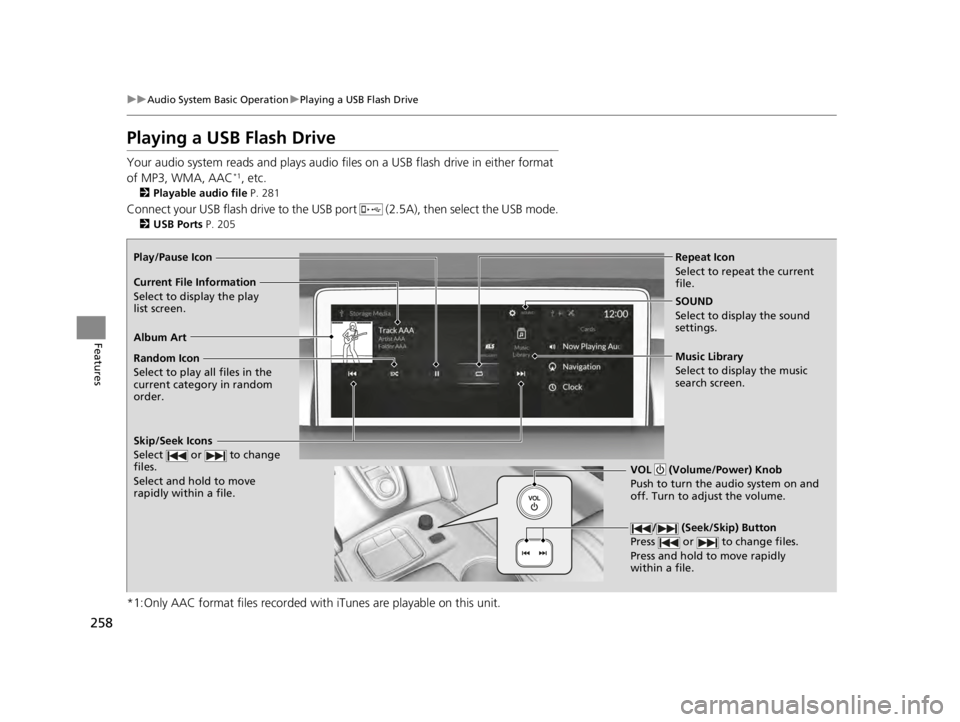
Repeat Icon
Select to repeat the current
file.
SOUND
Select to display the sound
settings.
Music Library
Select to display the music
search screen.
Skip/Seek Icons
Select or to change
files.
Select and hold to move
rapidly within a file.
Random Icon
Select to play all files in the
current category in random
order.
VOL (Volume/Power) Knob
Push to turn the audio system on and
off. Turn to adjust the volume.
/ (Seek/Skip) Button
Press or to change files.
Press and hold to move rapidly
within a file.
Play/Pause Icon
Album Art Current File Information
Select to display the p l
ay
list screen.
22 ACURA TLX-31TGV6100.book 258 \b
Page 264 of 656
uuAudio System Basic Operation uPlaying Bluetooth ® Audio
262
Features
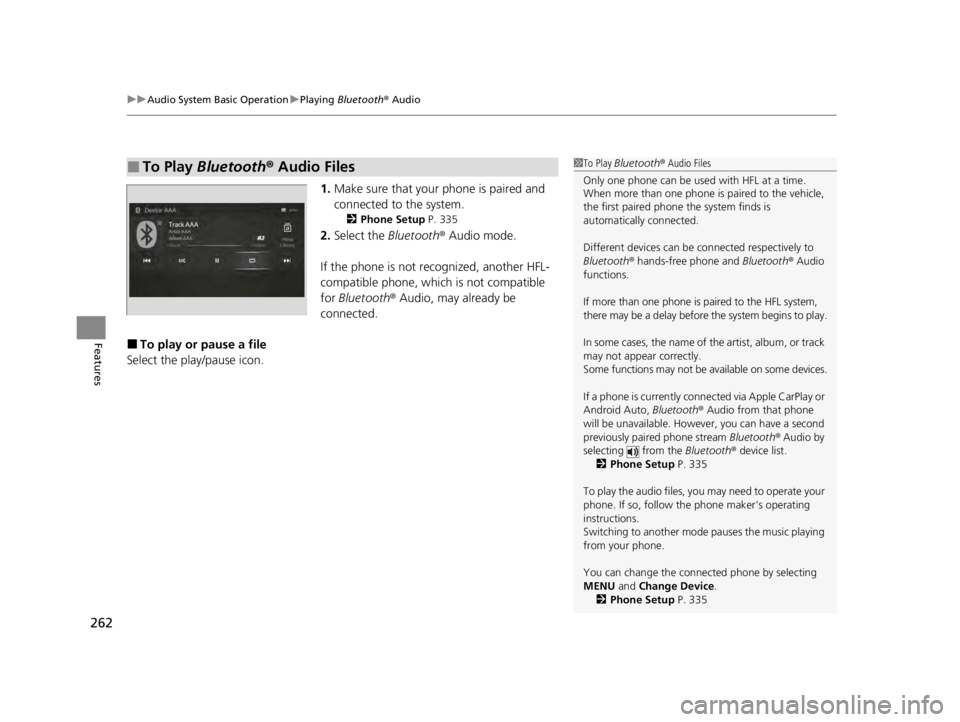
1. Make sure that your phone is paired and
connected to the system.
2 Phone Setup P. 335
2.Select the Bluetooth® Audio mode.
If the phone is not recognized, another HFL-
compatible phone, which is not compatible
for Bluetooth ® Audio, may already be
connected.
■To play or pause a file
Select the play/pause icon.
■To Play Bluetooth ® Audio Files1 To Play Bluetooth ® Audio Files
Only one phone can be used with HFL at a time.
When more than one phone is paired to the vehicle,
the first paired phone the system finds is
automatically connected.
Different devices can be co nnected respectively to
Bluetooth ® hands-free phone and Bluetooth® Audio
functions.
If more than one phone is paired to the HFL system,
there may be a delay before the system begins to play.
In some cases, the name of the artist, album, or track
may not appear correctly.
Some functions may not be available on some devices.
If a phone is currently conne cted via Apple CarPlay or
Android Auto, Bluetooth® Audio from that phone
will be unavailable. Howe ver, you can have a second
previously paired phone stream Bluetooth® Audio by
selecting from the Bluetooth® device list.
2 Phone Setup P. 335
To play the audio files, y ou may need to operate your
phone. If so, follow the phone maker’s operating
instructions.
Switching to another mode pauses the music playing
from your phone.
You can change the connected phone by selecting
MENU and Change Device.
2 Phone Setup P. 335
22 ACURA TLX-31TGV6100.book 262 \b
Page 319 of 656

317
uuCustomized Features u
Continued
Features*1:Default SettingSetup Group
Customizable Features DescriptionSelectable Settings
Vehicle Meter Setup Speed Limit InformationSelect whether the speed limit
information source is camera located
behind the rearview mirror or the
navigation system. You can also turn
off speed limit information. Traffic Sign
Recognition
*1/
Navigation /Off
Speed Limit Information Selects whether the speed limit
information should be displayed on
head-up display
*/meter.
On
*1/
Off
Models with navigation system
Models without navigation system
* Not available on all models
22 ACURA TLX-31TGV6100.book 317 \b
Page 332 of 656
uuBluetooth ® HandsFreeLink ®u Using HFL
330
Features
Left Selector Wheel:
• Incoming call: Move the selector wheel to the ri ght to answer the call. Move it
to the left to decline the call.
• During a call: Move the selector wheel to the ri ght to display the call options
menu. Move it to the left to end the call.
• (back) button: Press the button to go back to the previous screen or to
cancel a command.
• (talk) button: Press the button to start voice recognition.
To go to the phone screen of the multi-in formation display or the head-up display
*:
1. Press the APPS button on the steering wheel.
2. Using the selector wheel, scroll to Phone on the multi-information display or the
head-up display
*, and then press the left selector wheel.
u You can select Favorites or Recents by moving the selector wheel to the left
or the right.
1 Bluetooth ® HandsFreeLink ®
Bluetooth ® Wireless Technology
The Bluetooth ® word mark and logos are registered
trademarks owned by Bluetooth SIG, Inc., and any
use of such marks by Honda Motor Co., Ltd., is under
license. Other trademarks and trade names are those
of their respective owners.
HFL Limitations
An incoming call on HFL will interrupt the audio
system when it is playing. It will resume when the call
is ended.
* Not available on all models
22 ACURA TLX-31TGV6100.book 330 \b
Page 367 of 656

Continued365
uuAcuraLink ®u
Features
Your subscribed telematics service provid er can check your vehicle’s condition. For
maximum functionality, download AcuraLink app in your smartphone and connect
it with the vehicle.
■Automatic Collision Notifications
A live agent will reach out and check on you and request that help be sent in the
event of a crash.
■Send Destination
Search for destinations on your phone and instantly beam turn-by-turn directions to
your navigation system
*. Requires In-vehicle Navigation System*.
■Stolen Vehicle Locator
In the event of a stolen vehicle, your vehi cle will help local authorities recover it.
■Remote Start & Stop
Arrive at your vehicle with the engine warmed up and the interior set to a
comfortable temperature.
■Remote Lock & Unlock
Lock and unlock your vehicle with your smartphone.
■Find My Car
Find your parked vehicle and flash/sound your horns remotely using your
smartphone.
■Connection Features1 Connection Features
The contact information of your provider, your user
ID and PIN will be given when you subscribe to
AcuraLink. If you forget any of the above, contact a
Acura dealer, or go to owners.acura.com (U.S.) or
www.acura.ca/owners/acuralink (Canada).
You can also activate the remote door lock/unlock
and vehicle finder features from the Internet or using
your smartphone app. As k a dealer, or visit
owners.acura.com (U.S.) or www.acura.ca/owners/
acuralink (Canada) for details.
1Find My Car
The lights will stop flas hing and horn will stop
sounding under the following:
•When conditions 30 seconds have elapsed.
•You unlock the doors using the remote transmitter.
•You unlock the doors using the keyless access
system.
•You unlock the doors us ing the built-in key.
•The power mode is set to ACCESSORY or ON.
* Not available on all models
22 ACURA TLX-31TGV6100.book 365 \b
Page 369 of 656
367
Driving
This chapter discusses driving and refueling.
Before Driving................................... 368
Towing a Trailer ................................ 373
When Driving
Starting the Engine .......................... 374
Precautions While Driving................. 380
Automatic Transmission ................... 381
Shifting ............................................ 382
Integrated Dynamics System............. 391
Auto Idle Stop .................................. 398
Vehicle Stability AssistTM (VSA® ), aka
Electronic Stability Control (ESC),
System ........................................ 405
Agile Handling Assist ....................... 407 Super Handling-All Wheel Drive
TM (SH-
AWD® )*......................................... 408
Tire Pressure Monitoring System (TPMS)
with Tire Fill Assist .......................... 409
Tire Pressure Monitoring System (TPMS) - Required Federal Explanation ........... 411
Blind spot information System
*........ 413
AcuraWatchTM................................... 416
Collision Mitigati on Braking SystemTM
(CMBSTM) ....................................... 420
Adaptive Cruise Control (ACC) with Low Speed Follow ................................. 431
Lane Keeping Assist System (LKAS) .. 450 Traffic Jam Assist ............................. 459
Road Departure Mi
tigation (RDM)
System ........................................ 471
Traffic Sign Recognition System ....... 476
Front Sensor Camera ....................... 482
Radar Sensor ................................... 484
Braking .............................................. 485
Parking Your Vehicle ........................ 494
Multi-View Rear Camera
*................ 505
Surround View Camera System*..... 507
Refueling ........................................... 515
Fuel Economy and CO
2 Emissions .... 518
Turbo Engine Vehicle ....................... 519
* Not available on all models
22 ACURA TLX-31TGV6100.book 367 \b
Page 379 of 656
Continued377
uuWhen Driving uStarting the Engine
Driving
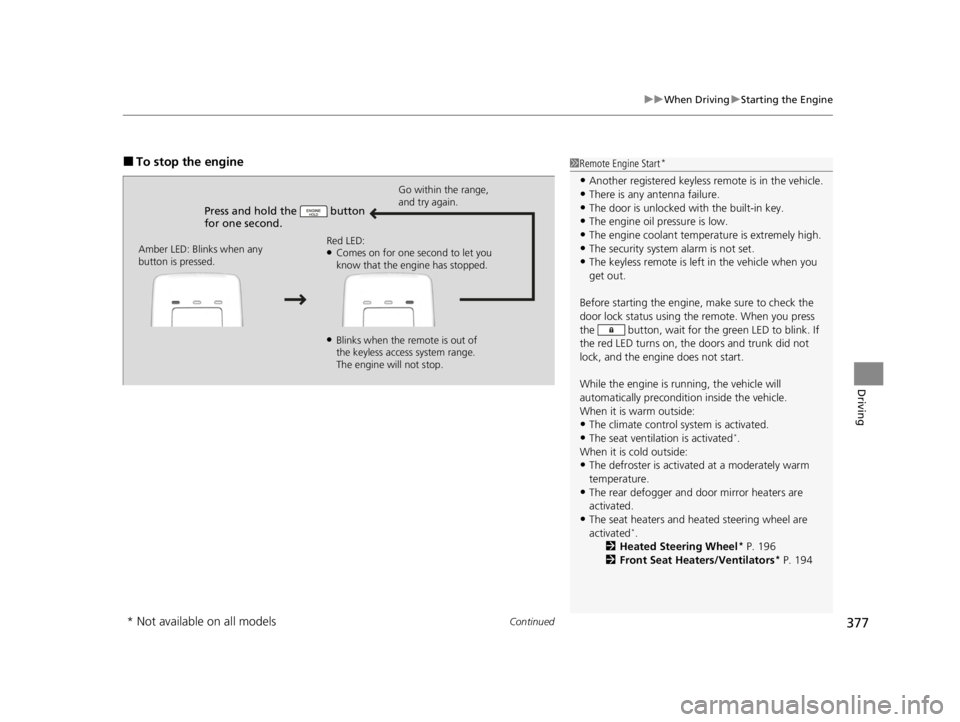
■To stop the engine
Press and hold the button
for one second.
Go within the range,
and try again.
Amber LED: Blinks when any
button is pressed. Red LED:
●Comes on for one second to let you
know that the engine has stopped.
●Blinks when the remote is out of
the keyless access system range.
The engine will not stop.
1
Remote Engine Start*
•Another registered keyless remote is in the vehicle.
•There is any antenna failure.
•The door is unlocked with the built-in key.•The engine oil pressure is low.
•The engine coolant temper ature is extremely high.
•The security system alarm is not set.•The keyless remote is left in the vehicle when you
get out.
Before starting the engine, make sure to check the
door lock status using the remote. When you press
the button, wait for the green LED to blink. If
the red LED turns on, the doors and trunk did not
lock, and the engine does not start.
While the engine is running, the vehicle will
automatically preconditi on inside the vehicle.
When it is warm outside:
•The climate control system is activated.
•The seat ventilation is activated*.
When it is cold outside:
•The defroster is activated at a moderately warm
temperature.
•The rear defogger and door mirror heaters are
activated.
•The seat heaters and heated steering wheel are
activated*.
2 Heated Steering Wheel* P. 196
2 Front Seat Heaters/Ventilators* P. 194
* Not available on all models
22 ACURA TLX-31TGV6100.book 377 \b
Page 382 of 656

380
uuWhen Driving uPrecautions While Driving
Driving
Precautions While Driving
Avoid driving in deep water and on flooded roads. This can damage the engine or
driveline, or cause electrical component failure.
■In Rain1Precautions While Driving
NOTICE
Do not select a shift button while pressing the
accelerator pedal. You could damage the
transmission.
NOTICE
If you repeatedly turn the steering wheel at an
extremely low speed, or hold the steering wheel in
the full left or right position for a while, the electric
power steering (EPS) system heats up. The system
goes into a protective mode, and limits its
performance. The steering wheel becomes harder
and harder to operate. Once the system cools down,
the EPS system is restored.
Repeated operation under these conditions can
eventually damage the system.
If the power mode is set to ACCESSORY while
driving, the engine will shut down and all steering
and brake power assist functi ons will stop, making it
difficult to control the vehicle.
Do not select
( N while driving as you will lose engine
braking (and accelera tion) performance.
During the first 600 miles (1,000 km) of operation,
avoid sudden acceleration or full throttle operation so
as not to damage the engine or powertrain.
22 ACURA TLX-31TGV6100.book 380 \b
Page 389 of 656
![ACURA TLX 2022 Workshop Manual Continued387
uuWhen Driving uShifting
Driving
■If you want to keep the transmission in (N position [car wash mode]
With the engine running:
1. Press and hold the brake pedal.
2. Select
(N, then rel](/img/32/58635/w960_58635-388.png "ACURA TLX 2022 Workshop Manual Continued387
uuWhen Driving uShifting
Driving
■If you want to keep the transmission in (N position [car wash mode]
With the engine running:
1. Press and hold the brake pedal.
2. Select
(N, then rel")
Continued387
uuWhen Driving uShifting
Driving
■If you want to keep the transmission in (N position [car wash mode]
With the engine running:
1. Press and hold the brake pedal.
2. Select
(N, then release the button to display (N (Neutral) hold mode on the
multi-information display.
3. Press and hold
(N again for two seconds.
u This puts the vehicle in car wash mode which must be used when your vehicle
is pulled through a conveyor type automatic car wash where you or an
attendant do not remain in the vehicle.
If the ENGINE START/STOP button is pressed
after car wash mode has been activated, the
power mode will change to ACCESSORY and
a message will be displayed on the multi-
information display. u The gear position remains in
(N with the
power mode in ACCESSORY for 15
minutes, then, it automatically changes
to
(P and the power mode changes to
OFF.
u Manually press the ENGINE START/
STOP button cancels ACCESSORY
mode. The
(P indicator comes on and
the power mode changes to OFF. You
must always press the ENGINE START/
STOP button when car wash mode is no
longer needed.
1 If you want to keep the transmission in (N position [car wash
mode]
The transmission may not stay in
(N position while
the following indicators ar e on or when the message
below appears:
•Malfunction indicator lamp
•Transmission system indicator
•Charging system indicator•The 12 Volt Battery Charging System Problem.
Do Not Drive. message on the multi-information
display.
22 ACURA TLX-31TGV6100.book 387 \b
Page 391 of 656

Continued389
uuWhen Driving uShifting
Driving
Use the paddle shifters to change betw een 1st and 10th gears without releasing
your hands from the steering wheel. The trans mission will switch to the sequential
mode.
■When the transmi ssion is in (D:
The vehicle will go into th e sequential mode momentarily, and the sequential mode
gear selection indicator will come on.
When the vehicle goes into the sequential mode by
(- paddle shifter and the lower
gear is available, the tran smission properly selects single or double gear change.
Once you start traveling at a constant speed , the sequential mode will automatically
switch off, and the sequential mode gear selection indicator will go off.
Hold the
(+ paddle shifter for two seconds or push the button to return to
normal drive.
■When the transmi ssion is in (S:
The vehicle will go into th e sequential mode, and the M (sequential mode) indicator
and sequential mode gear selection indicator will come on.
If the vehicle speed increases and the engi ne speed reaches near the tachometer’s
red zone, the transmission automatically shifts up to the next gear.
You can cancel this mode by holding the
(+ paddle shifter for two seconds or push
the button.
When the sequential mode is cancel ed, the sequential mode indicator and
sequential mode gear selection indicator turn off.
■Sequential Mode1 Sequential Mode
The sequential mode may be canceled if the Dynamic
Mode is changed to another dynamic mode.
D/S
D/S
22 ACURA TLX-31TGV6100.book 389 \b