ECO mode ACURA ZDX 2010 User Guide
[x] Cancel search | Manufacturer: ACURA, Model Year: 2010, Model line: ZDX, Model: ACURA ZDX 2010Pages: 645, PDF Size: 17.13 MB
Page 75 of 645
Super Handling-All
Wheel Drive (SH-AWD)
Indicator
This indicator normally comes on for
a few seconds when you turn the
ignition switch to the ON (II)
position. If this indicator comes on at
any other time, there is a problem in
the SH-AWD system. You will also
see a ‘‘CHECK SH-AWD SYSTEM ’’
message on the multi-information
display (see page 91). Take your
vehicle to a dealer to have it checked.
For more information, see page 487.
Models equipped with the keyless
access system have an engine start/
stop button instead of an ignition
switch. ON mode is the equivalent of
ON (II). For more information, see
pages 194 and 196. If the indicator blinks while driving,
it indicates the differential
temperature is too high.
You will also see a
‘‘SH-AWD DIFF
TEMP. HIGH ’’message on the multi-
information display (see page 91).
Pull to the side of the road when it is
safe, shift to Park, and let the engine
idle until the indicator goes out.
Continuing to drive with the SH-AWD
indicator blinking may cause serious
damage to the system.
Immobilizer System
Indicator
This indicator comes on briefly when
you turn the ignition switch to the
ON (II) position. It will then go off if
you have inserted a properly coded
ignition key, on models with keyless
access system, if an appropriate
keyless access remote is used. If it is
not a properly coded key or a keyless
access remote, the indicator will
blink, and the engine's fuel system
will be disabled (see page 149).
Models equipped with the keyless
access system have an engine start/
stop button instead of an ignition
switch. ON mode is the equivalent of
ON (II). For more information, see
pages 194 and 196.
Instrument Panel Indicators7009/10/28 17:15:37 10 ACURA ZDX KA KC New North America Own 50 31SZN600 enu
ProCarManuals.com
Page 76 of 645

Lights On Indicator
This indicator reminds you that the
exterior lights are on. It comes on
when the light switch is in either the
or
position. This indicator will
also come on when the light switch is
in AUTO and the lights turn on
automatically. If you turn the ignition
switch to the ACCESSORY (I) or the
LOCK (0) position without turning
off the light switch, this indicator will
remain on. A reminder chime will
also sound when you open the
driver's door.
Models equipped with the keyless
access system have an engine start/
stop button instead of an ignition
switch. VEHICLE OFF (LOCK)
mode is the equivalent of LOCK (0)
and ACCESSORY mode is the
equivalent of ACCESSORY (I). For
more information, see pages 194 and
196.
Fog Light Indicator
This indicator comes on when you
turn on the fog lights. For more
information, see page 141.High Beam Indicator
This indicator comes on with the
high beam headlights. For more
information, see page 139.
Cruise Main Indicator
On models without adaptive cruise control (ACC)This indicator comes on when you
turn on the cruise control system by
pressing the CRUISE button on the
steering wheel (see page 379).
Cruise Control Indicator
On models without adaptive cruisecontrol (ACC)This indicator comes on when you
set the cruise control. See page 379
for information on operating the
cruise control.
CONTINUED
Instrument Panel Indicators
71
Instruments and Controls
09/10/28 17:15:37 10 ACURA ZDX KA KC New North America Own 50 31SZN600 enu
ProCarManuals.com
Page 77 of 645
Active Damper System
Indicator
On models with active dampersystemThis indicator normally comes on for
a few seconds when you select the
ON mode by operating the engine
start/stop button (see page 194). If
this indicator comes on at any other
time, there is a problem in the
system. In this case, your vehicle still
has the normal damper function, but
it will not have the active damper
function. You will also see a ‘‘CHECK
ADS SYSTEM ’’message on the
multi-information display. Have the
vehicle checked by your dealer as
soon as possible. For more
information, see page 521. Low Fuel Indicator
This indicator is in the fuel gauge. It
comes on as a reminder that you
must refuel soon. You will also see a
‘‘
LOW FUEL ’’message on the multi-
information display (see page 91).
When the indicator comes on, there
are about 2.9 U.S. gal (10.8 L) of fuel
remaining in the tank.
When the needle reaches E, there is
a very small amount of fuel in the
tank. Security System Indicator
This indicator comes on when the
security system is set. See page 378
for more information on the security
system.
LOW FUEL
INDICATOR
U.S. model is shown.
SECURITY SYSTEM INDICATOR
Instrument Panel Indicators7209/10/28 17:15:37 10 ACURA ZDX KA KC New North America Own 50 31SZN600 enu
ProCarManuals.com
Page 78 of 645

Adaptive Cruise Control
(ACC) Indicator (Amber)
On models with adaptive cruise control(ACC)This indicator normally comes on for
a few seconds when you select the
ON mode by operating the engine
start/stop button (see page 194).
When you push the MAIN button on
the steering wheel, this indicator
comes on green. You will also see
‘‘ ACC’’ on the multi-information
display.
If the indicator comes on orange,
there is a problem with the ACC
system. You will also see a ‘‘CHECK
ACC SYSTEM ’’message on the
multi-information display (see page
92). Take your vehicle to your dealer
to have it checked. For more
information, see page 382.
Keyless Access System
Indicator
On models with keyless access systemThis indicator normally comes on for
a few seconds when you select the
ON mode by operating the engine
start/stop button (see page 194). If it
comes on at any other time, it
indicates that there is a problem with
the system.
This indicator has two functions:
1. If this indicator comes on along with a ‘‘CHECK KEYLESS
ACCESS SYSTEM ’’message on
the multi-information display,
there is a problem with the keyless
access system. Have the vehicle
checked by your dealer as soon as
possible. For more information,
see page 204. 2. If this indicator comes on along
with a ‘‘CHECK KEYLESS
STARTING SYSTEM ’’message on
the multi-information display,
there is a problem with the keyless
starting system. In this case, your
vehicle may not restart. If you can
continue to drive safely, take the
vehicle to your dealer and have it
checked as soon as possible. For
more information, see page 204.
CONTINUED
Instrument Panel Indicators
73
Instruments and Controls
09/10/28 17:15:37 10 ACURA ZDX KA KC New North America Own 50 31SZN600 enu
ProCarManuals.com
Page 79 of 645

Electronically Controlled
Power Steering System
(ECPS) Indicator
On models with electronicallycontrolled power steering system(ECPS)This indicator normally comes on
when you select the ON mode by
operating the engine start/stop
button (see page 194) and goes off
after the engine starts. If it comes on
at any other time, there is a problem
with the power steering system. You
will also see a ‘‘CHECK POWER
STEERING SYSTEM ’’message on
the multi-information display (see
page 91). If this happens, stop the vehicle in a
safe place, and turn off the engine.
Reset the system by restarting the
engine, and watch this indicator. If it
does not go off or comes back on
again while driving, take the vehicle
to your dealer to have it checked.
With the indicator on, the ECPS is
turned off, which could make the
steering feel different.
Collision Mitigation
Braking System
™
(CMBS ™) Indicator
On models with collision mitigation
braking system ™(CMBS ™)This indicator normally comes on for
a few seconds when you select the
ON mode by operating the engine
start/stop button (see page 194). It
also comes on as a reminder that you
have turned off the collision
mitigation braking system ™
(CMBS ™).
The CMBS indicator also comes on if
dirt or other debris blocks the radar
sensor in the front grille. You will
also see a ‘‘CHECK CMBS RADAR
SENSOR ’’message on the multi-
information display. When you clean
the radar sensor, the indicator
should go off the next time you select
the ON mode by operating the
engine start/stop button.
Instrument Panel Indicators7409/10/28 17:15:37 10 ACURA ZDX KA KC New North America Own 50 31SZN600 enu
ProCarManuals.com
Page 80 of 645

If the indicator comes on at any other
time, there is a problem with the
CMBS. You will also see a‘‘CHECK
CMBS SYSTEM ’’message on the
multi-information display. If this
happens, take your vehicle to a
dealer, and have it checked. For
more information, see page 498.
When this indicator is on, the CMBS
is not working.
Blind Spot Information
System (BSI) Indicator
On models with blind spot information system (BSI)This indicator normally comes on for
a few seconds when you select the
ON mode by operating the engine
start/stop button (see page 194).
The BSI indicator also comes on if
the rear bumper becomes dirty while
driving. You will see a ‘‘BLIND SPOT
NOT AVAILABLE ’’message on the
multi-information display.
When you clean the rear bumper, the
indicator should go off after you
begin driving again.
When you turn the system on, the
indicator will turn off. If the indicator comes on at any other
time, there is a problem with BSI.
You will also see a
‘‘CHECK BLIND
SPOT SYSTEM ’’message on the
multi-information display. If this
happens, take your vehicle to a
dealer, and have it checked (for more
information, see page 518).
When this indicator is on, BSI is not
working.
Instrument Panel Indicators
75
Instruments and Controls
09/10/28 17:15:37 10 ACURA ZDX KA KC New North America Own 50 31SZN600 enu
ProCarManuals.com
Page 84 of 645
If you do not fasten your seat belt,
you will also see a‘‘FASTEN SEAT
BELT ’’message on the multi-
information display when you turn
the ignition switch to the ON (II)
position.
These messages go off in several
seconds after the key is inserted into
the ignition switch.
On models with keyless access systemThese messages go off in several
seconds.
Models equipped with the keyless
access system have an engine start/
stop button instead of an ignition
switch. ON mode is the equivalent of
ON (II). See page 196 for ignition
switch and power mode comparison.
With the ignition switch in the ON
(II) position, the multi-information
display changes as shown on page 81
each time you press the INFO
(▲ /▼ ) button or the SEL/RESET
button.
When you turn the ignition switch to
the ON (II) position, your last
selection is displayed.SEL/RESET BUTTON
On models with
adaptive cruise control (ACC) INFO BUTTON (
▲/▼ )
CONTINUED
Multi-Information Display
79
Instruments and Controls
09/10/28 17:15:37 10 ACURA ZDX KA KC New North America Own 50 31SZN600 enu
ProCarManuals.com
Page 85 of 645
In the multi-information display, the
system message is also displayed
(see page 81) and you can customize
your vehicle control settings (see
page 94).
The multi-information display
consists of an upper segment and a
lower segment.In the normal display mode, the
upper segment displays trip
computer information, such as fuel
economy or average speed. The
lower segment displays the
odometer/trip meter (A/B), outside
temperature, and engine oil life and
maintenance item code(s).
On models with keyless access
systemYou will see some keyless access
system messages until you select the
ON mode by operating the engine
start/stop button. These messages
can be customized (see page 113).
UPPER SEGMENT
LOWER SEGMENT
U.S. model is shown.
Multi-Information Display8009/10/28 17:15:37 10 ACURA ZDX KA KC New North America Own 50 31SZN600 enu
ProCarManuals.com
Page 87 of 645
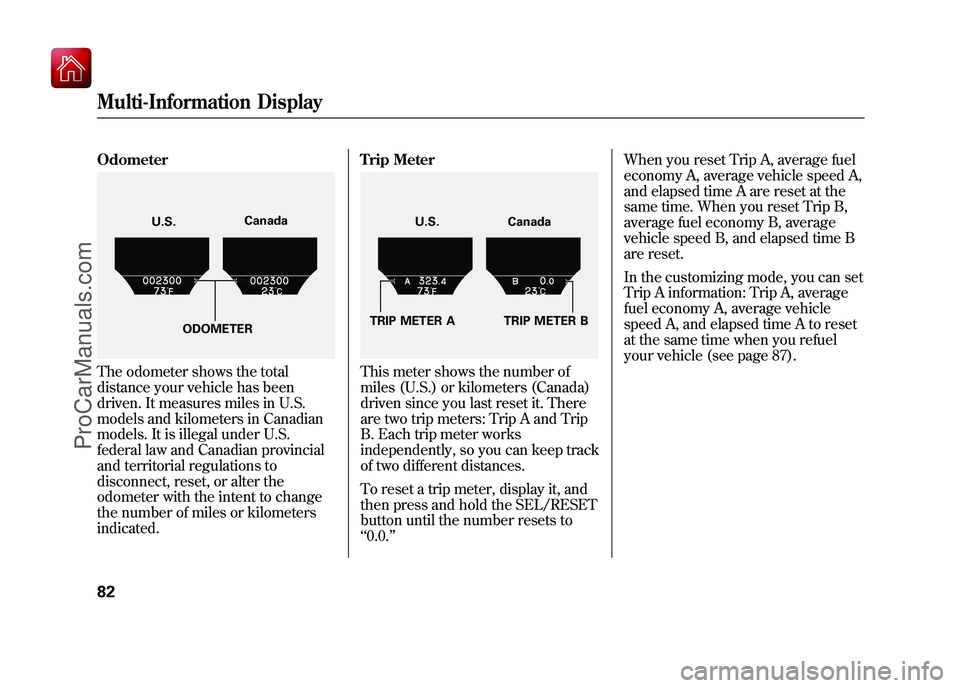
OdometerThe odometer shows the total
distance your vehicle has been
driven. It measures miles in U.S.
models and kilometers in Canadian
models. It is illegal under U.S.
federal law and Canadian provincial
and territorial regulations to
disconnect, reset, or alter the
odometer with the intent to change
the number of miles or kilometers
indicated.Trip Meter
This meter shows the number of
miles (U.S.) or kilometers (Canada)
driven since you last reset it. There
are two trip meters: Trip A and Trip
B. Each trip meter works
independently, so you can keep track
of two different distances.
To reset a trip meter, display it, and
then press and hold the SEL/RESET
button until the number resets to
‘‘
0.0. ’’ When you reset Trip A, average fuel
economy A, average vehicle speed A,
and elapsed time A are reset at the
same time. When you reset Trip B,
average fuel economy B, average
vehicle speed B, and elapsed time B
are reset.
In the customizing mode, you can set
Trip A information: Trip A, average
fuel economy A, average vehicle
speed A, and elapsed time A to reset
at the same time when you refuel
your vehicle (see page 87).
U.S.
Canada
ODOMETER
U.S. Canada
TRIP METER A TRIP METER B
Multi-Information Display8209/10/28 17:15:37 10 ACURA ZDX KA KC New North America Own 50 31SZN600 enu
ProCarManuals.com
Page 92 of 645
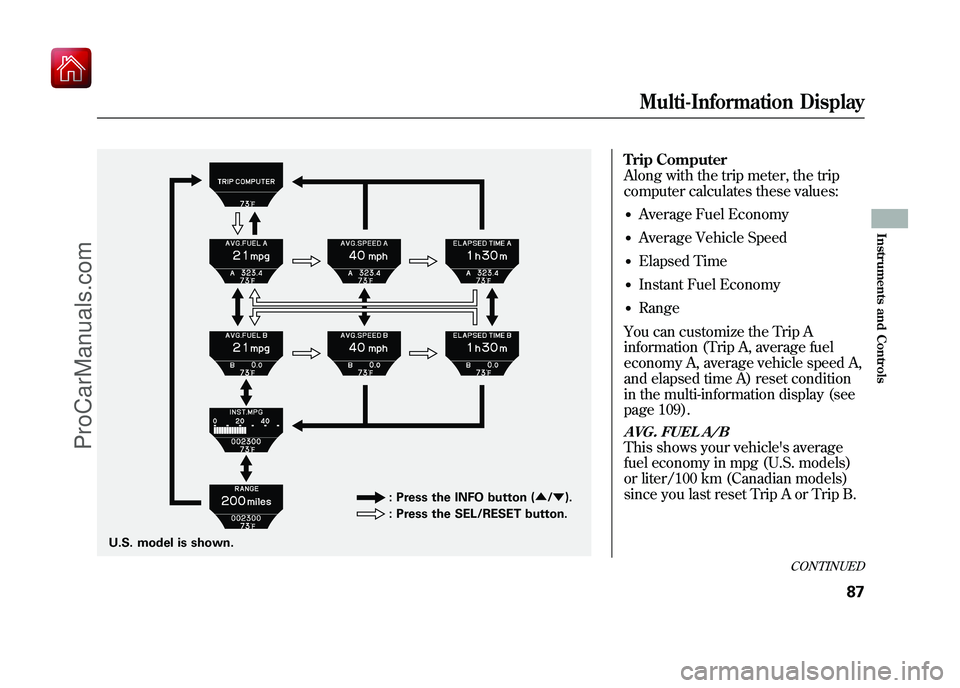
Trip Computer
Along with the trip meter, the trip
computer calculates these values:●Average Fuel Economy●Average Vehicle Speed●Elapsed Time●Instant Fuel Economy●Range
You can customize the Trip A
information (Trip A, average fuel
economy A, average vehicle speed A,
and elapsed time A) reset condition
in the multi-information display (see
page 109).AVG. FUEL A/BThis shows your vehicle's average
fuel economy in mpg (U.S. models)
or liter/100 km (Canadian models)
since you last reset Trip A or Trip B.
U.S. model is shown. : Press the INFO button (
▲/▼ ).
: Press the SEL/RESET button.
CONTINUED
Multi-Information Display
87
Instruments and Controls
09/10/28 17:15:37 10 ACURA ZDX KA KC New North America Own 50 31SZN600 enu
ProCarManuals.com