lock ACURA ZDX 2010 User Guide
[x] Cancel search | Manufacturer: ACURA, Model Year: 2010, Model line: ZDX, Model: ACURA ZDX 2010Pages: 645, PDF Size: 17.13 MB
Page 56 of 645
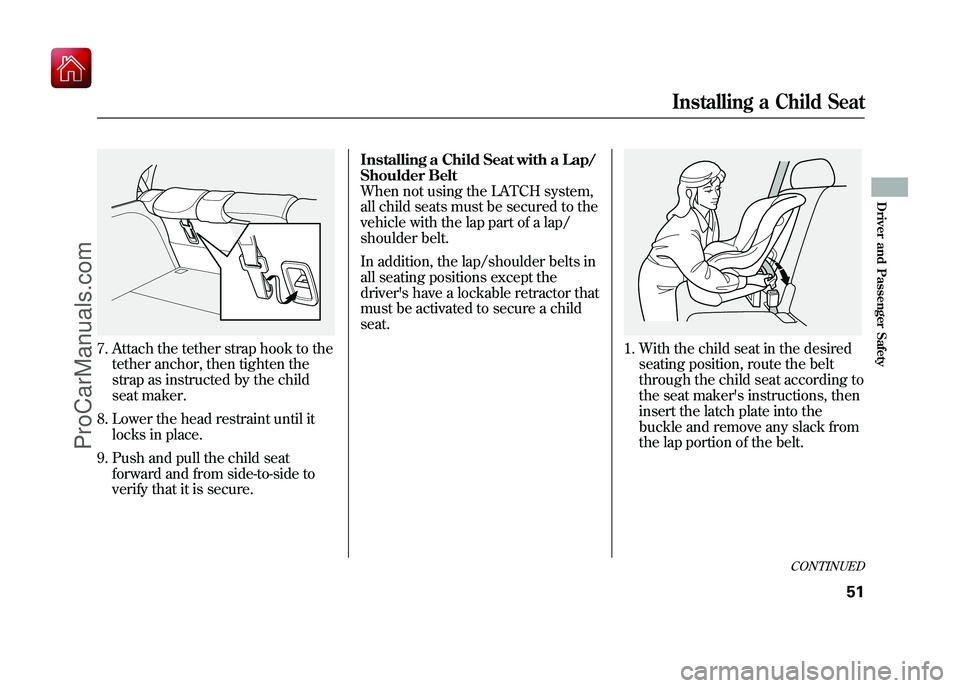
7. Attach the tether strap hook to thetether anchor, then tighten the
strap as instructed by the child
seat maker.
8. Lower the head restraint until it locks in place.
9. Push and pull the child seat forward and from side-to-side to
verify that it is secure. Installing a Child Seat with a Lap/
Shoulder Belt
When not using the LATCH system,
all child seats must be secured to the
vehicle with the lap part of a lap/
shoulder belt.
In addition, the lap/shoulder belts in
all seating positions except the
driver's have a lockable retractor that
must be activated to secure a child
seat.
1. With the child seat in the desired
seating position, route the belt
through the child seat according to
the seat maker's instructions, then
insert the latch plate into the
buckle and remove any slack from
the lap portion of the belt.
CONTINUED
Installing a Child Seat
51
Driver and Passenger Safety
09/10/28 17:15:37 10 ACURA ZDX KA KC New North America Own 50 31SZN600 enu
ProCarManuals.com
Page 57 of 645
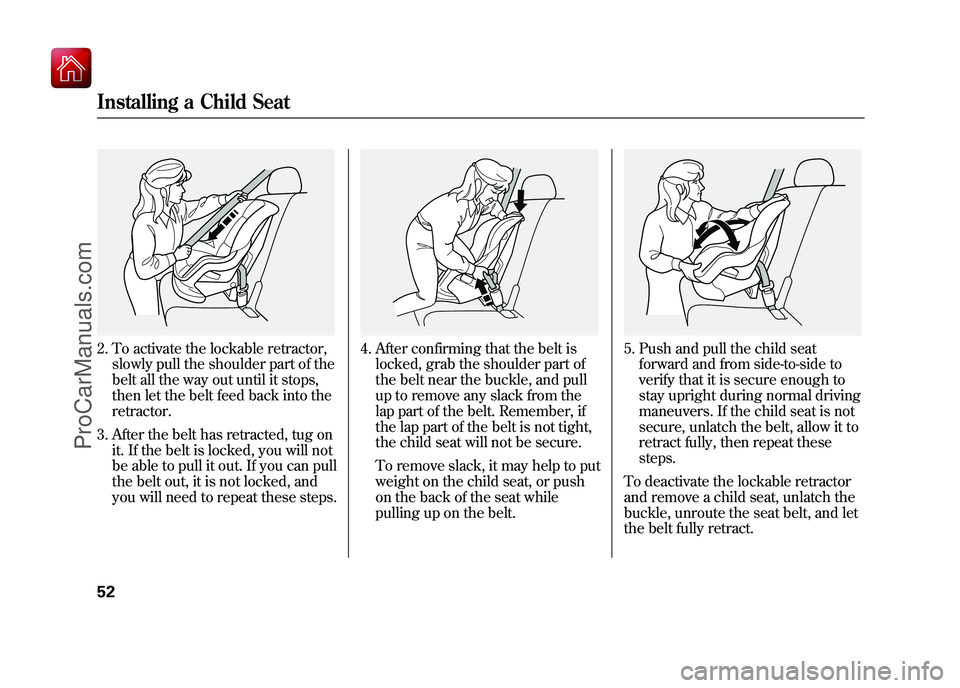
2. To activate the lockable retractor,slowly pull the shoulder part of the
belt all the way out until it stops,
then let the belt feed back into the
retractor.
3. After the belt has retracted, tug on it. If the belt is locked, you will not
be able to pull it out. If you can pull
the belt out, it is not locked, and
you will need to repeat these steps.
4. After confirming that the belt islocked, grab the shoulder part of
the belt near the buckle, and pull
up to remove any slack from the
lap part of the belt. Remember, if
the lap part of the belt is not tight,
the child seat will not be secure.
To remove slack, it may help to put
weight on the child seat, or push
on the back of the seat while
pulling up on the belt.
5. Push and pull the child seatforward and from side-to-side to
verify that it is secure enough to
stay upright during normal driving
maneuvers. If the child seat is not
secure, unlatch the belt, allow it to
retract fully, then repeat these
steps.
To deactivate the lockable retractor
and remove a child seat, unlatch the
buckle, unroute the seat belt, and let
the belt fully retract.
Installing a Child Seat5209/10/28 17:15:37 10 ACURA ZDX KA KC New North America Own 50 31SZN600 enu
ProCarManuals.com
Page 58 of 645
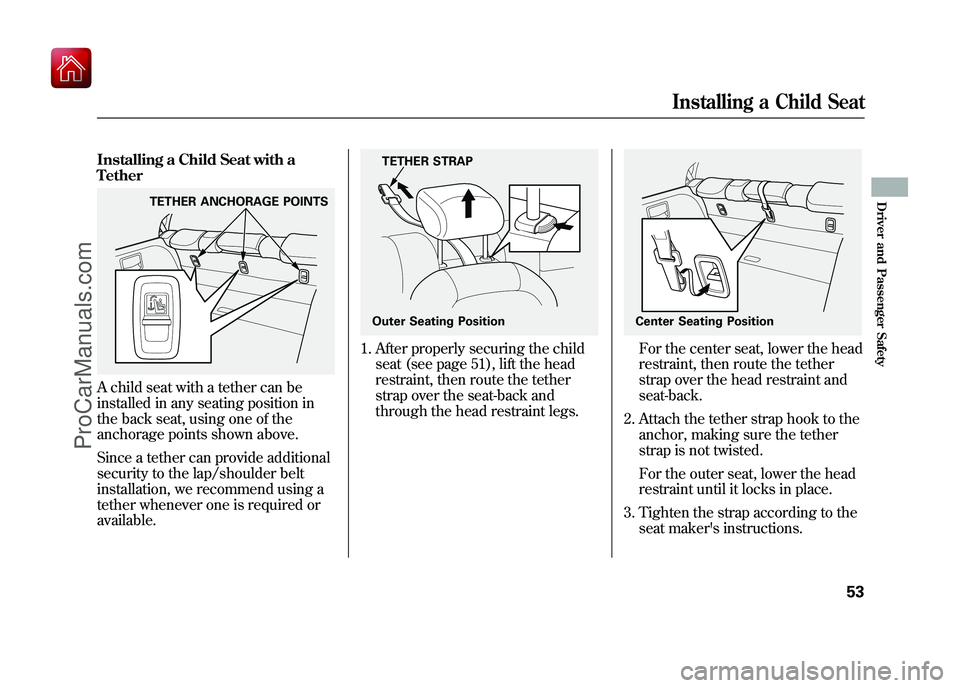
Installing a Child Seat with a
TetherA child seat with a tether can be
installed in any seating position in
the back seat, using one of the
anchorage points shown above.
Since a tether can provide additional
security to the lap/shoulder belt
installation, we recommend using a
tether whenever one is required or
available.
1. After properly securing the childseat (see page 51), lift the head
restraint, then route the tether
strap over the seat-back and
through the head restraint legs.
For the center seat, lower the head
restraint, then route the tether
strap over the head restraint and
seat-back.
2. Attach the tether strap hook to the anchor, making sure the tether
strap is not twisted.
For the outer seat, lower the head
restraint until it locks in place.
3. Tighten the strap according to the seat maker's instructions.
TETHER ANCHORAGE POINTS
TETHER STRAP
Outer Seating Position
Center Seating Position
Installing a Child Seat
53
Driver and Passenger Safety
09/10/28 17:15:37 10 ACURA ZDX KA KC New North America Own 50 31SZN600 enu
ProCarManuals.com
Page 66 of 645
This section gives information about
the controls and displays that
contribute to the daily operation of
your vehicle. All the essential
controls are within easy reach.Control Locations
..........................
62
Instrument Panel
..........................
63
Instrument Panel Indicators
..........
64
Gauges
..........................................
76
Multi-Information Display
.............
78
Controls Near the Steering
Wheel
.....................................
136
Windshield Wipers and Washers
..................................
137
Turn Signal and Headlights
........
139
Hazard Warning Button
..............
143
Rear Window Defogger
...............
143
Instrument Panel Brightness
......
144
Steering Wheel Adjustments
.......
145
Keys and Locks
...........................
147
Immobilizer System
....................
149
Ignition Switch
............................
150
Door Locks
.................................
151
Childproof Door Locks
............
153
Tailgate
.......................................
153
Power Tailgate
........................
153
Remote Transmitter
....................
157
Seats
...........................................
161
Front Seat Heaters
......................
167 Front Seat Heaters and Seat
Ventilation
...............................
168
Rear Seat Heaters (Canadian models)
...................................
170
Power Windows
..........................
171
Panoramic Glass Roof
.................
174
Parking Brake
.............................
176
Mirrors
.......................................
177
Driving Position Memory
System
....................................
180
Keyless Access System
...............
183
Interior Lights
.............................
208
Interior Convenience Items
.........
212
Beverage Holders
...................
213
Console Compartment
............
213
Under Floor Storage
...............
214
Storage Compartments
...........
214
Glove Box
...............................
215
Sunglasses Holder
..................
215
Coat Hook
...............................
216
Sun Visor
................................
216
Vanity Mirror
..........................
217
Accessory Power Sockets
.......
217
Instruments and Controls
61
Instruments and Controls
09/10/28 17:15:37 10 ACURA ZDX KA KC New North America Own 50 31SZN600 enu
ProCarManuals.com
Page 67 of 645
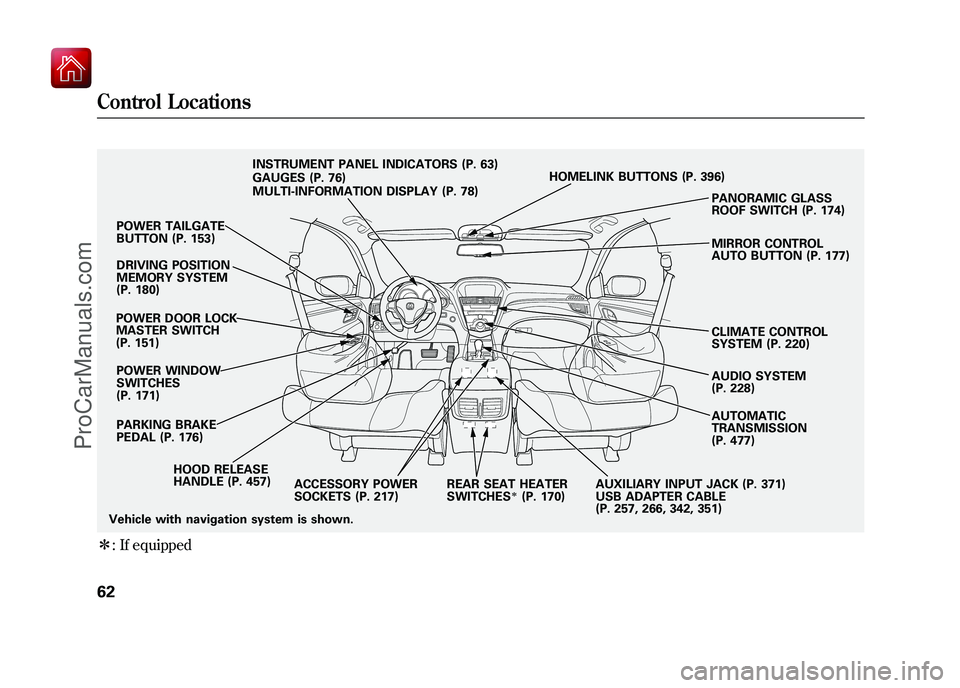
ꭧ: If equipped
POWER TAILGATE
BUTTON (P. 153)
DRIVING POSITION
MEMORY SYSTEM
(P. 180)
POWER DOOR LOCK
MASTER SWITCH
(P. 151) POWER WINDOW
SWITCHES
(P. 171)
HOOD RELEASE
HANDLE (P. 457)
PARKING BRAKE
PEDAL (P. 176) INSTRUMENT PANEL INDICATORS (P. 63)
GAUGES (P. 76)
MULTI-INFORMATION DISPLAY (P. 78)
HOMELINK BUTTONS (P. 396)
PANORAMIC GLASS
ROOF SWITCH (P. 174)
MIRROR CONTROL
AUTO BUTTON (P. 177)
CLIMATE CONTROL
SYSTEM (P. 220)
AUDIO SYSTEM
(P. 228)
AUTOMATIC
TRANSMISSION
(P. 477)
ACCESSORY POWER
SOCKETS (P. 217) REAR SEAT HEATER
SWITCHES
ꭧ(P. 170)AUXILIARY INPUT JACK (P. 371)
USB ADAPTER CABLE
(P. 257, 266, 342, 351)
Vehicle with navigation system is shown.
Control Locations6209/10/28 17:15:37 10 ACURA ZDX KA KC New North America Own 50 31SZN600 enu
ProCarManuals.com
Page 68 of 645
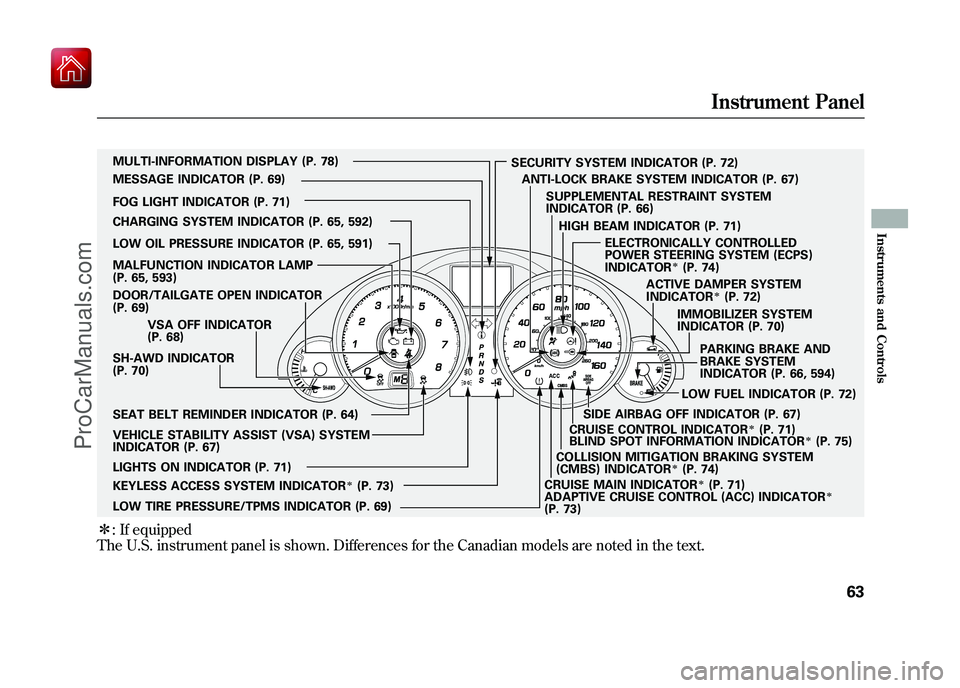
ꭧ: If equipped
The U.S. instrument panel is shown. Differences for the Canadian models are noted in the text.
SH-AWD INDICATOR
(P. 70) IMMOBILIZER SYSTEM
INDICATOR (P. 70)
CHARGING SYSTEM INDICATOR (P. 65, 592)
LOW OIL PRESSURE INDICATOR (P. 65, 591)
DOOR/TAILGATE OPEN INDICATOR
(P. 69)
CRUISE MAIN INDICATOR
ꭧ(P. 71)
SECURITY SYSTEM INDICATOR (P. 72)
PARKING BRAKE AND
BRAKE SYSTEM
INDICATOR (P. 66, 594)
VEHICLE STABILITY ASSIST (VSA) SYSTEM
INDICATOR (P. 67) VSA OFF INDICATOR
(P. 68)
CRUISE CONTROL INDICATOR
ꭧ(P. 71)
LOW FUEL INDICATOR (P. 72)
LOW TIRE PRESSURE/TPMS INDICATOR (P. 69) SUPPLEMENTAL RESTRAINT SYSTEM
INDICATOR (P. 66)
LIGHTS ON INDICATOR (P. 71) SEAT BELT REMINDER INDICATOR (P. 64) MULTI-INFORMATION DISPLAY (P. 78)
MESSAGE INDICATOR (P. 69)
FOG LIGHT INDICATOR (P. 71) ACTIVE DAMPER SYSTEM
INDICATOR
ꭧ(P. 72)
ANTI-LOCK BRAKE SYSTEM INDICATOR (P. 67)
MALFUNCTION INDICATOR LAMP
(P. 65, 593)
KEYLESS ACCESS SYSTEM INDICATOR
ꭧ(P. 73) HIGH BEAM INDICATOR (P. 71)
ELECTRONICALLY CONTROLLED
POWER STEERING SYSTEM (ECPS)
INDICATOR
ꭧ(P. 74)
ADAPTIVE CRUISE CONTROL (ACC) INDICATOR
ꭧ
(P. 73) BLIND SPOT INFORMATION INDICATOR
ꭧ(P. 75)
COLLISION MITIGATION BRAKING SYSTEM
(CMBS) INDICATOR
ꭧ(P. 74)
SIDE AIRBAG OFF INDICATOR (P. 67)
Instrument Panel
63
Instruments and Controls
09/10/28 17:15:37 10 ACURA ZDX KA KC New North America Own 50 31SZN600 enu
ProCarManuals.com
Page 72 of 645
U.S. Canada
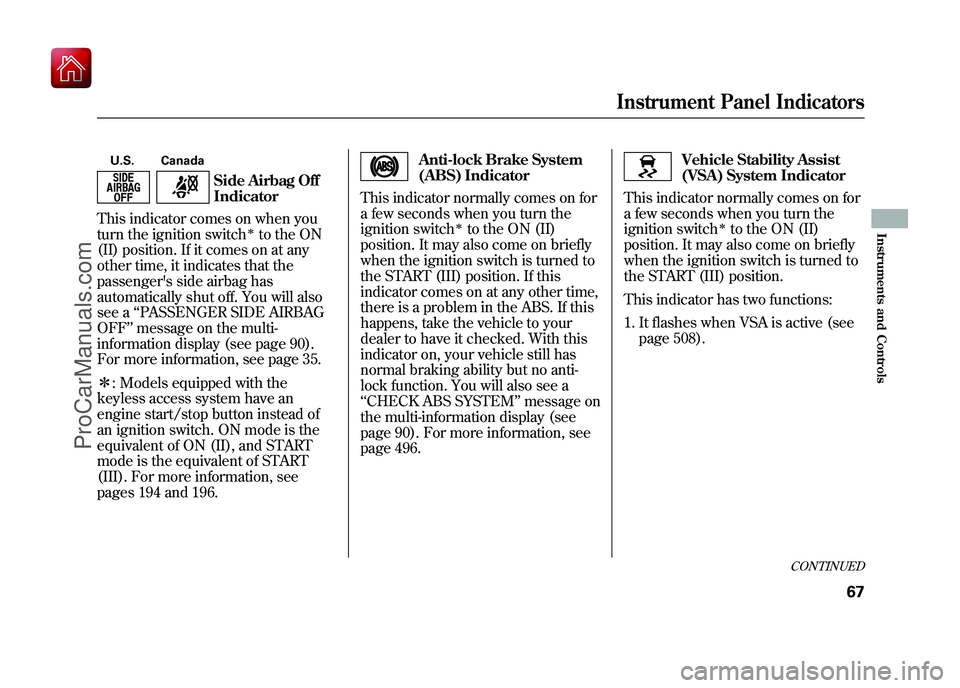
Side Airbag Off
Indicator
This indicator comes on when you
turn the ignition switch
ꭧto the ON
(II) position. If it comes on at any
other time, it indicates that the
passenger's side airbag has
automatically shut off. You will also
see a ‘‘PASSENGER SIDE AIRBAG
OFF ’’message on the multi-
information display (see page 90).
For more information, see page 35.
ꭧ : Models equipped with the
keyless access system have an
engine start/stop button instead of
an ignition switch. ON mode is the
equivalent of ON (II), and START
mode is the equivalent of START
(III). For more information, see
pages 194 and 196.
Anti-lock Brake System
(ABS) Indicator
This indicator normally comes on for
a few seconds when you turn the
ignition switch
ꭧto the ON (II)
position. It may also come on briefly
when the ignition switch is turned to
the START (III) position. If this
indicator comes on at any other time,
there is a problem in the ABS. If this
happens, take the vehicle to your
dealer to have it checked. With this
indicator on, your vehicle still has
normal braking ability but no anti-
lock function. You will also see a
‘‘ CHECK ABS SYSTEM ’’message on
the multi-information display (see
page 90). For more information, see
page 496.
Vehicle Stability Assist
(VSA) System Indicator
This indicator normally comes on for
a few seconds when you turn the
ignition switch
ꭧto the ON (II)
position. It may also come on briefly
when the ignition switch is turned to
the START (III) position.
This indicator has two functions:
1. It flashes when VSA is active (see page 508).
CONTINUED
Instrument Panel Indicators
67
Instruments and Controls
09/10/28 17:15:37 10 ACURA ZDX KA KC New North America Own 50 31SZN600 enu
ProCarManuals.com
Page 76 of 645

Lights On Indicator
This indicator reminds you that the
exterior lights are on. It comes on
when the light switch is in either the
or
position. This indicator will
also come on when the light switch is
in AUTO and the lights turn on
automatically. If you turn the ignition
switch to the ACCESSORY (I) or the
LOCK (0) position without turning
off the light switch, this indicator will
remain on. A reminder chime will
also sound when you open the
driver's door.
Models equipped with the keyless
access system have an engine start/
stop button instead of an ignition
switch. VEHICLE OFF (LOCK)
mode is the equivalent of LOCK (0)
and ACCESSORY mode is the
equivalent of ACCESSORY (I). For
more information, see pages 194 and
196.
Fog Light Indicator
This indicator comes on when you
turn on the fog lights. For more
information, see page 141.High Beam Indicator
This indicator comes on with the
high beam headlights. For more
information, see page 139.
Cruise Main Indicator
On models without adaptive cruise control (ACC)This indicator comes on when you
turn on the cruise control system by
pressing the CRUISE button on the
steering wheel (see page 379).
Cruise Control Indicator
On models without adaptive cruisecontrol (ACC)This indicator comes on when you
set the cruise control. See page 379
for information on operating the
cruise control.
CONTINUED
Instrument Panel Indicators
71
Instruments and Controls
09/10/28 17:15:37 10 ACURA ZDX KA KC New North America Own 50 31SZN600 enu
ProCarManuals.com
Page 79 of 645

Electronically Controlled
Power Steering System
(ECPS) Indicator
On models with electronicallycontrolled power steering system(ECPS)This indicator normally comes on
when you select the ON mode by
operating the engine start/stop
button (see page 194) and goes off
after the engine starts. If it comes on
at any other time, there is a problem
with the power steering system. You
will also see a ‘‘CHECK POWER
STEERING SYSTEM ’’message on
the multi-information display (see
page 91). If this happens, stop the vehicle in a
safe place, and turn off the engine.
Reset the system by restarting the
engine, and watch this indicator. If it
does not go off or comes back on
again while driving, take the vehicle
to your dealer to have it checked.
With the indicator on, the ECPS is
turned off, which could make the
steering feel different.
Collision Mitigation
Braking System
™
(CMBS ™) Indicator
On models with collision mitigation
braking system ™(CMBS ™)This indicator normally comes on for
a few seconds when you select the
ON mode by operating the engine
start/stop button (see page 194). It
also comes on as a reminder that you
have turned off the collision
mitigation braking system ™
(CMBS ™).
The CMBS indicator also comes on if
dirt or other debris blocks the radar
sensor in the front grille. You will
also see a ‘‘CHECK CMBS RADAR
SENSOR ’’message on the multi-
information display. When you clean
the radar sensor, the indicator
should go off the next time you select
the ON mode by operating the
engine start/stop button.
Instrument Panel Indicators7409/10/28 17:15:37 10 ACURA ZDX KA KC New North America Own 50 31SZN600 enu
ProCarManuals.com
Page 91 of 645
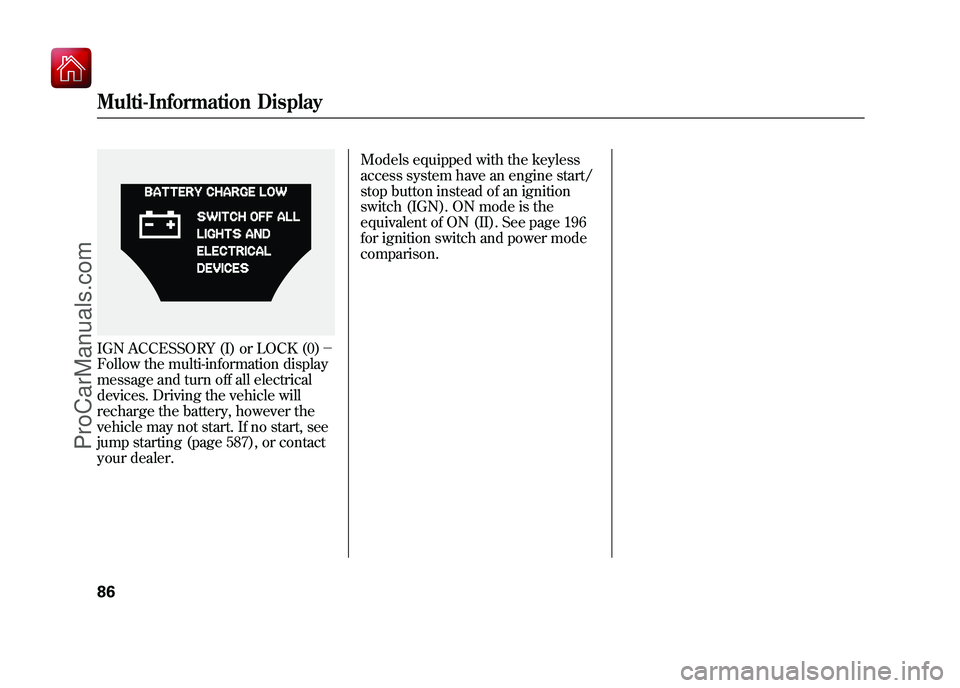
IGN ACCESSORY (I) or LOCK (0)-
Follow the multi-information display
message and turn off all electrical
devices. Driving the vehicle will
recharge the battery, however the
vehicle may not start. If no start, see
jump starting (page 587), or contact
your dealer. Models equipped with the keyless
access system have an engine start/
stop button instead of an ignition
switch (IGN). ON mode is the
equivalent of ON (II). See page 196
for ignition switch and power mode
comparison.Multi-Information Display8609/10/28 17:15:37 10 ACURA ZDX KA KC New North America Own 50 31SZN600 enu
ProCarManuals.com