lock ACURA ZDX 2010 Workshop Manual
[x] Cancel search | Manufacturer: ACURA, Model Year: 2010, Model line: ZDX, Model: ACURA ZDX 2010Pages: 645, PDF Size: 17.13 MB
Page 163 of 645
TAILGATE-All doors must be
unlocked to operate the power
tailgate. Press and hold the
TAILGATE button to open or close
the power tailgate. When the tailgate
begins to move, you will hear a beep,
and some front and rear lights will
flash.
If you push the same button again
while the tailgate is opening or
closing, three beeps sound, the
tailgate stops moving, reverses
direction and stops in the fully
opened or fully closed position.
PANIC -Press and hold this
button for about 1 second to attract
attention; the horn will sound, and
the exterior lights will flash for about
30 seconds. To cancel panic mode,
press any other button on the remote
transmitter, or turn the ignition
switch to the ON (II) position. Panic
mode does not work when the key is
in the ignition switch.
Remote Transmitter Care●Avoid dropping or throwing the
transmitter.●Protect the transmitter from
extreme temperature.●Do not immerse the transmitter in
any liquid.●If you lose a transmitter, the
replacement needs to be
reprogramed by your dealer. Replacing the Transmitter Battery
If it takes several pushes on the
button to lock or unlock the doors
and the tailgate, replace the battery
as soon as possible.
Battery type: CR1616
Remote Transmitter15809/10/28 17:15:37 10 ACURA ZDX KA KC New North America Own 50 31SZN600 enu
ProCarManuals.com
Page 165 of 645
As required by the FCC:This device complies with Part 15 of theFCC rules. Operation is subject to the
following two conditions: (1) This devicemay not cause harmful interference, and(2) this device must accept any
interference received, includinginterference that may cause undesiredoperation.
Changes or modifications not expresslyapproved by the party responsible for
compliance could void the user'sauthority to operate the equipment.
This device complies with IndustryCanada Standard RSS-210.
Operation is subject to the following twoconditions: (1) this device may not causeinterference, and (2) this device must
accept any interference that may causeundesired operation of the device.
Recalling a Memorized Driving
PositionWhen you unlock the driver's door
with your remote transmitter, each
remote transmitter activates the
keyless memory settings related to
that remote transmitter. The driving position memory
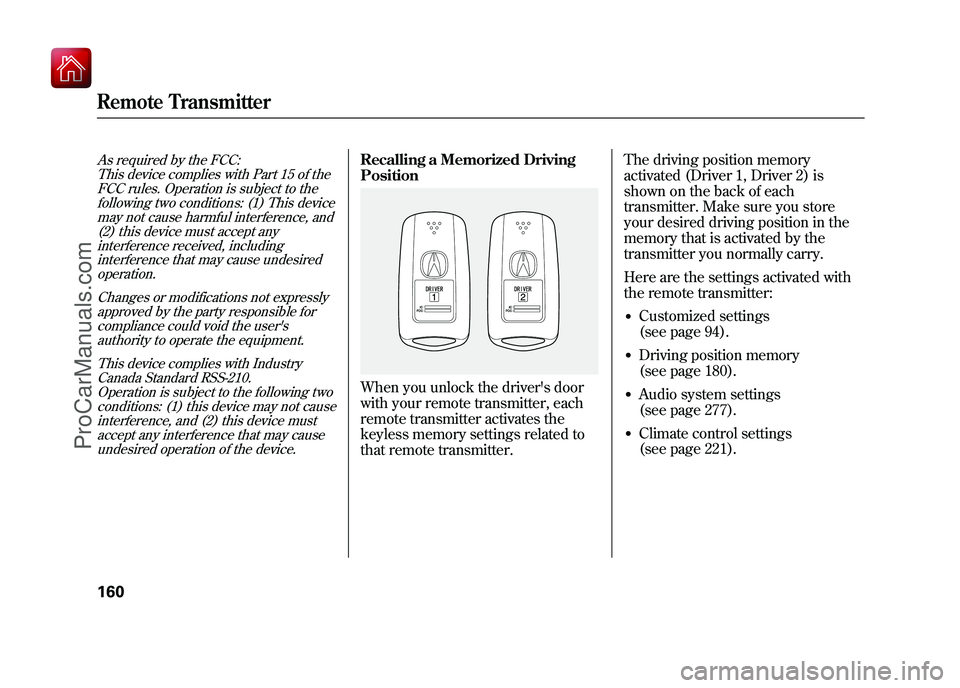
activated (Driver 1, Driver 2) is
shown on the back of each
transmitter. Make sure you store
your desired driving position in the
memory that is activated by the
transmitter you normally carry.
Here are the settings activated with
the remote transmitter:
●Customized settings
(see page 94).●Driving position memory
(see page 180).●Audio system settings
(see page 277).●Climate control settings
(see page 221).
Remote Transmitter16009/10/28 17:15:37 10 ACURA ZDX KA KC New North America Own 50 31SZN600 enu
ProCarManuals.com
Page 166 of 645

When you unlock and open the
driver's door with the remote
transmitter, the driver's seat (except
the power lumbar feature) and
outside mirrors start to move to the
positions stored in memory. The
indicator in the related memory
button to the remote transmitter
comes on.
The steering wheel will move to the
stored position when you insert the
key into the ignition switch.
You will also see the‘‘DRIVER 1’’ or
‘‘ DRIVER 2’’ message on the multi-
information display, depending on
which linked remote transmitter is
used. Front Seat Power Adjustments
See pages 14
-15 for important safety
information and warnings about how to properly position the seats and seat-backs.The controls for the power adjustable
front seats are on the outside edge of
each seat bottom. You can adjust the
seats with the ignition switch in any
position. Make all seat adjustments
before you start driving.
The passenger seat has the same
adjustments as the driver's seat but
without any lumbar adjustment.
Models equipped with the keyless
access system have an engine start/
stop button instead of an ignition
switch. VEHICLE OFF (LOCK)
mode is the equivalent of LOCK (0);
ACCESSORY mode is the equivalent
of ACCESSORY (I); and ON mode is
the equivalent of ON (II). See page
196 for ignition switch and power
mode comparison.
Moves the seat forward
and backward.
Moves the front of the
seat up or down.
Raises or lowers the seat.
CONTINUED
Remote Transmitter, Seats
161
Instruments and Controls
09/10/28 17:15:37 10 ACURA ZDX KA KC New North America Own 50 31SZN600 enu
ProCarManuals.com
Page 168 of 645
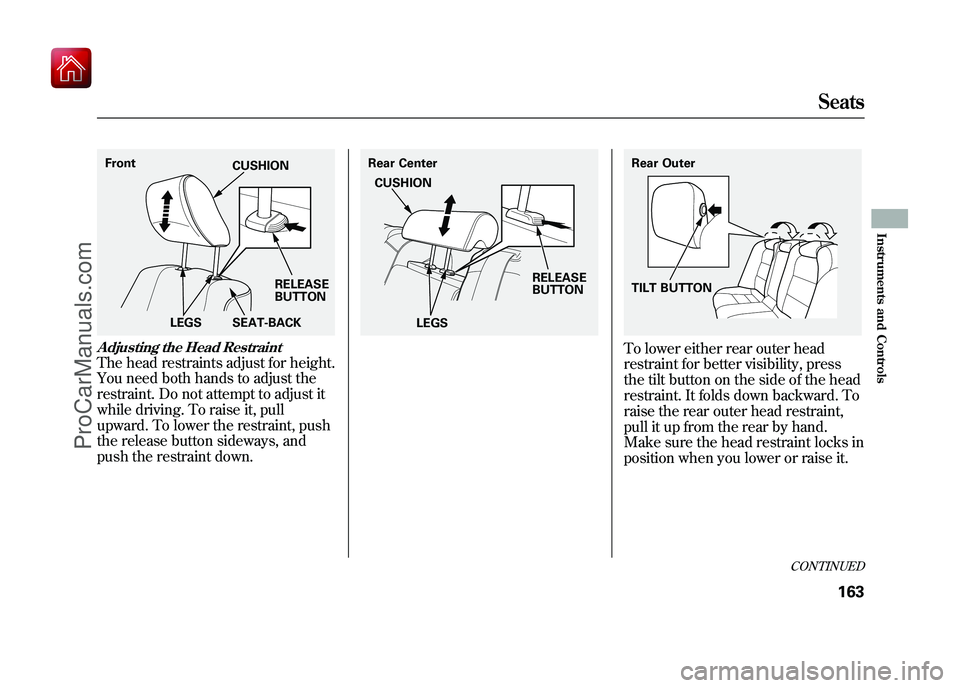
Adjusting the Head RestraintThe head restraints adjust for height.
You need both hands to adjust the
restraint. Do not attempt to adjust it
while driving. To raise it, pull
upward. To lower the restraint, push
the release button sideways, and
push the restraint down.
To lower either rear outer head
restraint for better visibility, press
the tilt button on the side of the head
restraint. It folds down backward. To
raise the rear outer head restraint,
pull it up from the rear by hand.
Make sure the head restraint locks in
position when you lower or raise it.
FrontSEAT-BACK
LEGS RELEASE
BUTTON
CUSHION
Rear Center
LEGS RELEASE
BUTTON
CUSHION
Rear Outer
TILT BUTTON
CONTINUED
Seats
163
Instruments and Controls
09/10/28 17:15:37 10 ACURA ZDX KA KC New North America Own 50 31SZN600 enu
ProCarManuals.com
Page 169 of 645
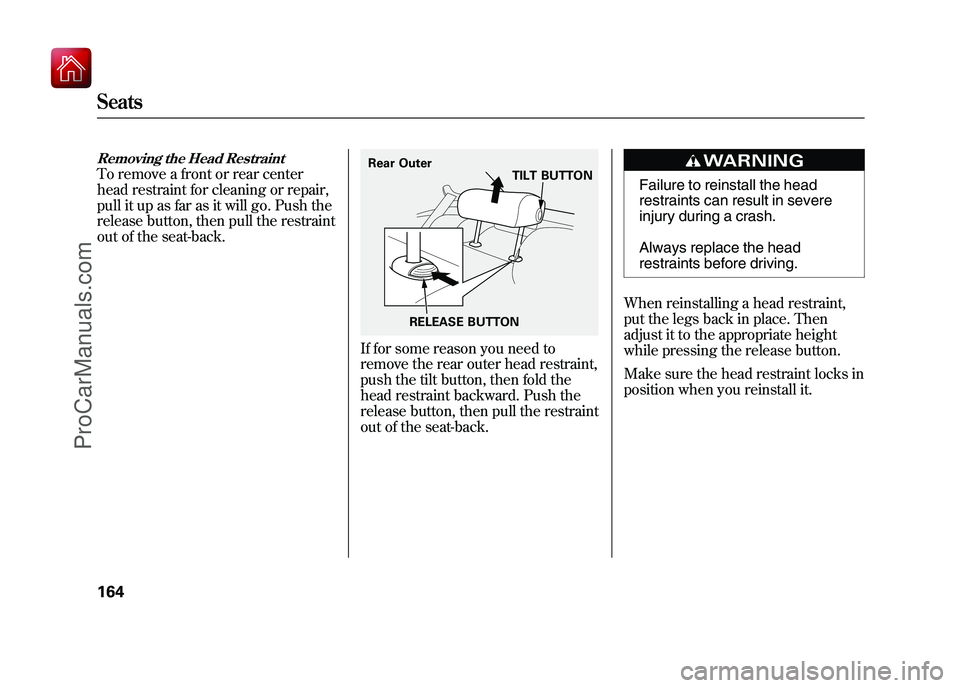
Removing the Head RestraintTo remove a front or rear center
head restraint for cleaning or repair,
pull it up as far as it will go. Push the
release button, then pull the restraint
out of the seat-back.
If for some reason you need to
remove the rear outer head restraint,
push the tilt button, then fold the
head restraint backward. Push the
release button, then pull the restraint
out of the seat-back.
Failure to reinstall the head
restraints can result in severe
injury during a crash.
Always replace the head
restraints before driving.
When reinstalling a head restraint,
put the legs back in place. Then
adjust it to the appropriate height
while pressing the release button.
Make sure the head restraint locks in
position when you reinstall it.
Rear Outer TILT BUTTON
RELEASE BUTTON
Seats16409/10/28 17:15:37 10 ACURA ZDX KA KC New North America Own 50 31SZN600 enu
ProCarManuals.com
Page 171 of 645
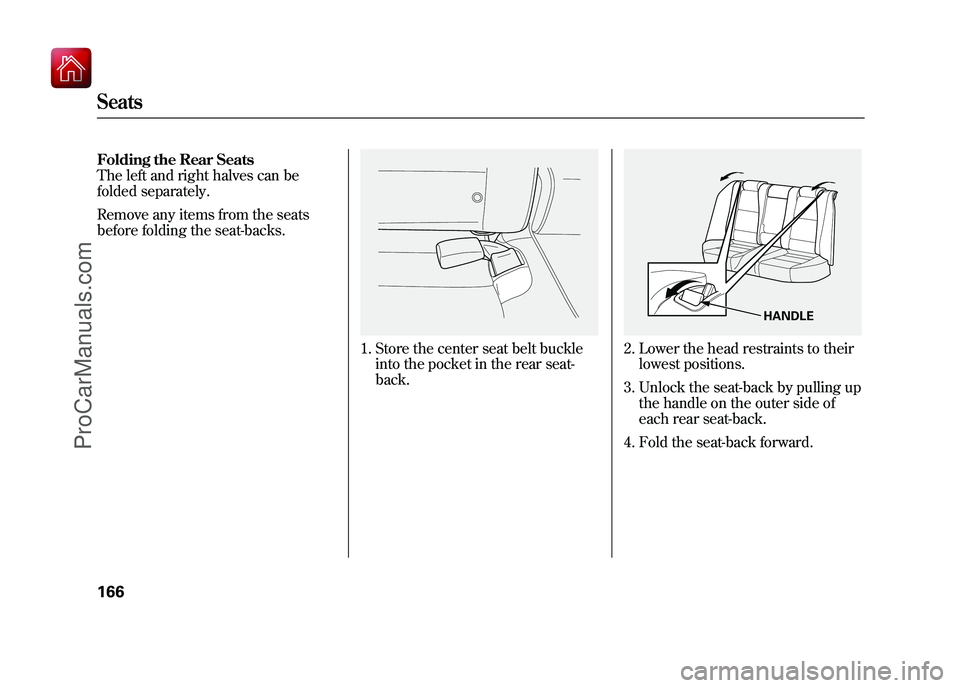
Folding the Rear Seats
The left and right halves can be
folded separately.
Remove any items from the seats
before folding the seat-backs.
1. Store the center seat belt buckleinto the pocket in the rear seat-
back.
2. Lower the head restraints to theirlowest positions.
3. Unlock the seat-back by pulling up the handle on the outer side of
each rear seat-back.
4. Fold the seat-back forward.
HANDLE
Seats16609/10/28 17:15:37 10 ACURA ZDX KA KC New North America Own 50 31SZN600 enu
ProCarManuals.com
Page 172 of 645

Reverse this procedure to return the
seat-back to the upright position. Pull
on the seat-back to make sure it is
latched. If the seat-back is not
latched fully, the seat belt will not
work properly and you will see the
red indicator behind the handle as
shown.
Do not put any heavy items on the
seat-back when it is folded down.
Make sure that the folded seat-back
does not press against the front
passenger's seat, as this could cause
the weight sensors to work
improperly.
Make sure the seat-back and seat
cushion are locked securely and all
rear shoulder belts are positioned in
front of the rear seat-backs.
Make sure all items in the cargo area
are secured. Loose items can fly
forward and cause injury if you have
to brake hard (SeeCarrying Cargo
on page 465). Front Seat Heaters
On models without adaptive cruise
control (ACC)Both front seats are equipped with
seat heaters. Because of the sensors
for the side airbag cutoff system,
there is no heater in the passenger's
seat-back. The ignition switch must
be in the ON (II) position to use the
heaters. Models equipped with the keyless
access system have an engine start/
stop button instead of an ignition
switch. ON mode is the equivalent of
ON (II). For more information, see
pages 194 and 196.
Push the right side of the switch, HI,
to rapidly heat up the seat. After the
seat reaches a comfortable
temperature, select LO by pushing
the left side of the switch. This will
keep the seat warm.
Passenger's
Seat
HEATERS Driver's
Seat
Front seat
HI
LOW
CONTINUED
Seats, Front Seat Heaters
167
Instruments and Controls
09/10/28 17:15:37 10 ACURA ZDX KA KC New North America Own 50 31SZN600 enu
ProCarManuals.com
Page 177 of 645

To close either front window fully,
pull back the window switch firmly to
the second detent, then release it.
The window automatically goes all
the way up. To stop the window from
going all the way up, push down on
the window switch briefly.
When you push the main switch in,
the switch is off, and the passengers'
windows cannot be raised or
lowered. To cancel this feature, push
on the switch again to get it to pop
out. Use the main switch when you
have children in the vehicle so they
do not injure themselves by
operating the windows
unintentionally.
The windows and the main switch
will operate for up to 10 minutes after
you turn off the ignition switch (set
VEHICLE OFF mode on models with
keyless access system). Opening
either front door cancels this
function.AUTO REVERSE
-If either front
window senses any obstacle while it
is closing automatically, it will
reverse direction and then stop. To
close the window, remove the
obstacle, then use the window switch
again.
Auto reverse stops sensing when the
window is almost closed. You should
always check that all passengers and
objects are away from the window
before closing it. Opening the Windows, Panoramic
Glass Roof, and Sunshades with
the Remote Transmitter/Keyless
Access Remote
You can open all of the windows,
panoramic glass roof, and sunshades
from outside with the remote
transmitter/keyless access remote.
1. Press the UNLOCK button once to
unlock the driver's door.
2. Press the UNLOCK button a second time, and hold it. All the
doors unlock, and all four
windows, panoramic glass roof,
and sunshades start to open. To
stop the windows and panoramic
glass roof, release the button.
The sunshades will not stop
opening and will continue moving
to the full open position.Power Windows17209/10/28 17:15:37 10 ACURA ZDX KA KC New North America Own 50 31SZN600 enu
ProCarManuals.com
Page 178 of 645

3. To open the windows andpanoramic glass roof further, press
the button again (within 20
seconds of step 1) and hold it. If
the windows and panoramic glass
roof stop before the desired
position, repeat steps 1 and 2.
You cannot close the windows,
panoramic glass roof, and sunshades
with the remote transmitter/keyless
access remote. Opening/Closing the Windows,
Panoramic Glass Roof, and
Sunshades with the Key or the
Built-in Key
You can open and close the windows,
panoramic glass roof, and sunshades
with the key in the driver's door lock.To open:
1. Insert the key in the driver's door
lock.
2. Turn the key clockwise, then release it.
3. Turn the key clockwise again, and hold it. All four windows,
panoramic glass roof, and
sunshades start to open. To stop
the windows and panoramic glass
roof release the key. The
sunshades will not stop opening
and will continue moving to the full
open position.
4. To open the windows and panoramic glass roof further, turn
and hold the key again (within 20
seconds of step 2).
Close Open
On models without keyless
access system
CONTINUED
Power Windows
173
Instruments and Controls
09/10/28 17:15:37 10 ACURA ZDX KA KC New North America Own 50 31SZN600 enu
ProCarManuals.com
Page 179 of 645
To close:1. Insert the key in the driver's door lock.
2. Turn the key counterclockwise, then release it.
3. Turn the key counterclockwise again, and hold it. All four windows
and panoramic glass roof start to
close. The sunshades will start to
close about 1 second after the
panoramic glass roof has fully
closed. To stop the windows,
panoramic glass roof, and
sunshades, release the key. 4. To close the windows, panoramic
glass roof, and sunshades further,
turn and hold the key again
(within 20 seconds of step 2).
Auto reverse does not work when
closing the windows, panoramic
glass roof, and sunshades with the
key.
NOTE: If the windows, panoramic
glass roof, and sunshades stop
before the desired position, repeat
steps 2 and 3. Panoramic Glass Roof
You must turn the ignition switch to
the ON (II) position to operate the
panoramic glass roof and the
sunshades.
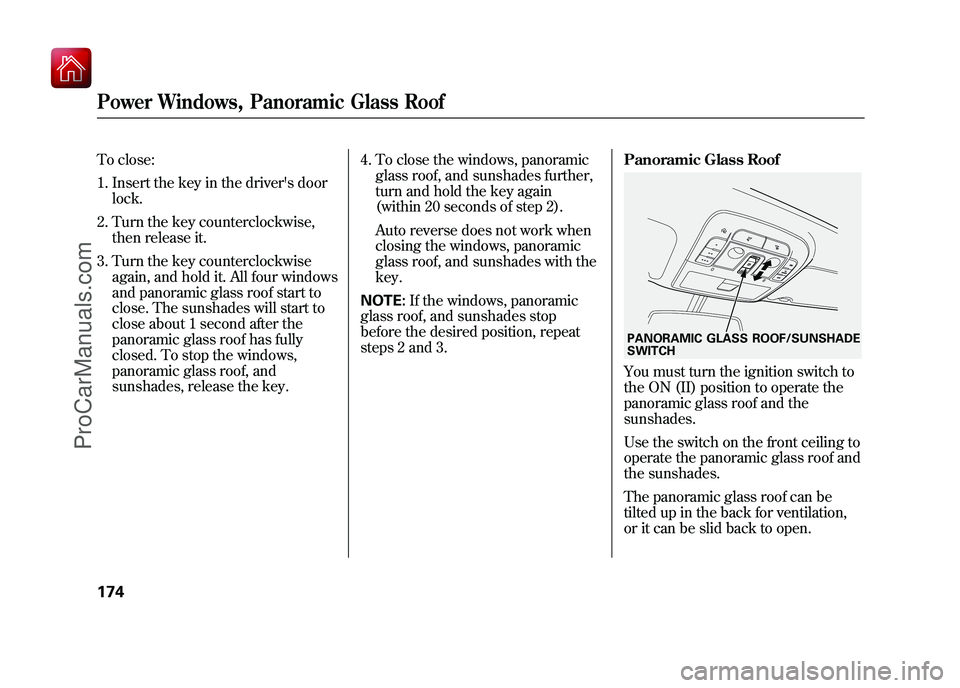
Use the switch on the front ceiling to
operate the panoramic glass roof and
the sunshades.
The panoramic glass roof can be
tilted up in the back for ventilation,
or it can be slid back to open.PANORAMIC GLASS ROOF/SUNSHADE
SWITCH
Power Windows, Panoramic Glass Roof17409/10/28 17:15:37 10 ACURA ZDX KA KC New North America Own 50 31SZN600 enu
ProCarManuals.com