steering Acura ZDX 2012 Service Manual
[x] Cancel search | Manufacturer: ACURA, Model Year: 2012, Model line: ZDX, Model: Acura ZDX 2012Pages: 370, PDF Size: 10.06 MB
Page 237 of 370
235
uuWhen Driving uACC (Adaptive Cruise Control)*
Continued
Driving
ACC (Adaptive Cruise Control)*
Maintains a constant vehicle speed and a safe distance between your vehicle and the
vehicle ahead of you without having to keep your foot on the brake pedal or
accelerator.1 ACC (Adaptive Cruise Control)*
Important Safety Reminder
As with any system, th ere are limits to ACC.
Inappropriate use of ACC can result in a serious
accident. Use the brake pedal whenever necessary,
and always keep a safe distance between your vehicle
and other vehicles.
The radar sensor for ACC is shared with the CMBS
TM
(collision mitigation braking systemTM).
2 CMBSTM (Collision Mitigation Braking
SystemTM)* P. 257
3WARNING
Improper use of ACC can lead to a crash.
Use ACC only when traveling on open
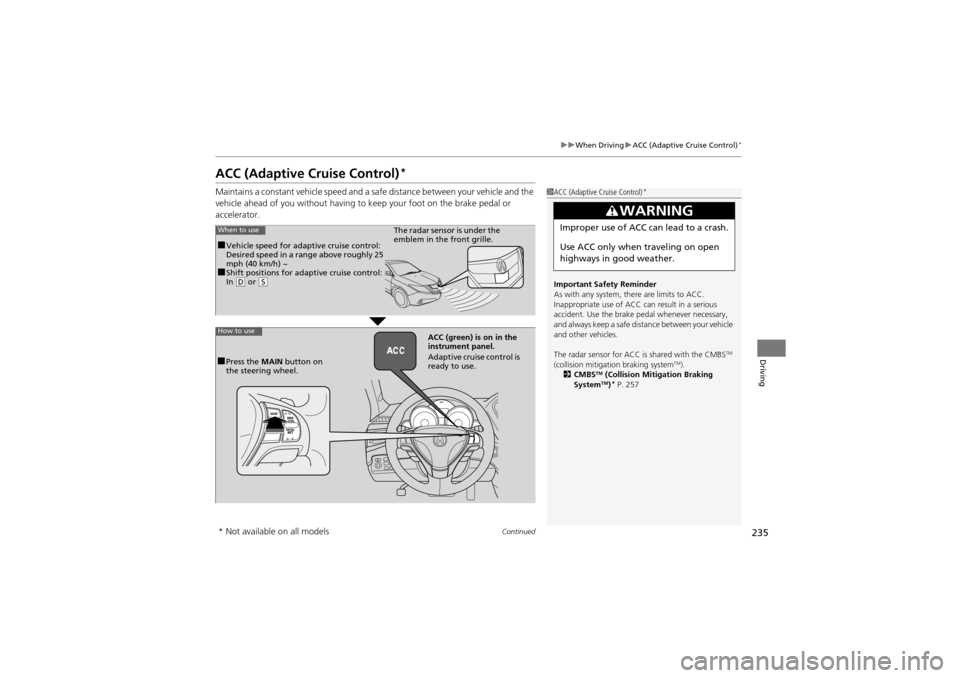
highways in good weather.When to use
■Vehicle speed for adaptive cruise control:
Desired speed in a range above roughly 25
mph (40 km/h) ~
■Shift positions for adaptive cruise control:
In ( D or (S
The radar sensor is under the
emblem in the front grille.
How to use
■Press the MAIN button on
the steering wheel. ACC (green) is
on in the
instrument panel.
Adaptive cruise control is
ready to use.
* Not available on all models
Page 240 of 370
uuWhen Driving uACC (Adaptive Cruise Control)*
238
Driving
■There is no vehicle ahead
Your vehicle cruises at the set speed.
■A vehicle ahead is within ACC range and going slower than the set speed
Your vehicle slows down, and maintains the same speed as the speed of the vehicle
ahead.
■A vehicle ahead is within ACC range and going at a steady speed
Your vehicle follows the vehicle ahead of it, keeping a constant distance, without
going beyond the set speed.
■A vehicle ahead goes out of range
ACC accelerates your vehicle to the set speed, and then maintains it.
■When you depress the accelerator pedal
You can temporarily increase the vehicle speed . In this case, there is no audible or
visual alerts even if a vehicle is in ACC range.
ACC stays on unless you cancel it. Once you release the accelerator pedal, the
system resumes the set speed.
1 When in Operation
Limitations
Use the brake pedal to mainta in a safe distance with
other vehicles in the follo wing cases. ACC may not
work properly when:
•Vehicles ahead of you are going slower than 13
mph (20 km/h) or vehicles are parked.
•Motorcycles or other small vehicles are ahead of
you.
ACC may momentarily apply brakes or sounds a beep
against a vehicles beside you or even a building
beside you if:
•You drive at a sudden curve or on a narrow road.•You abruptly move the steering wheel.•You are in an unusual position within your lane.
Page 241 of 370
Continued239
uuWhen Driving uACC (Adaptive Cruise Control)*
Driving
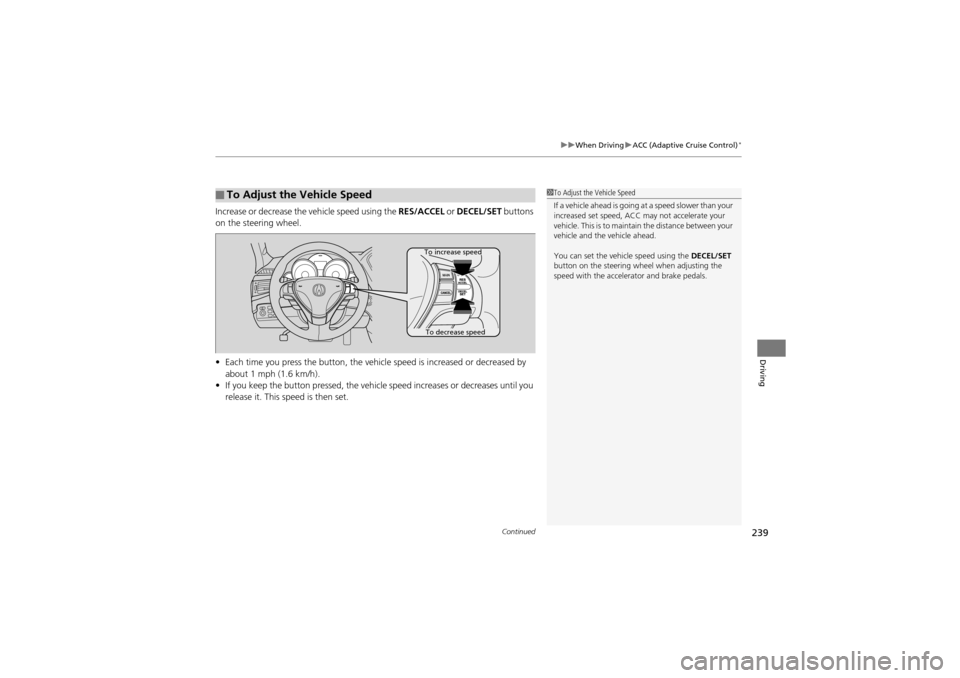
Increase or decrease the vehicle speed using the RES/ACCEL or DECEL/SET buttons
on the steering wheel.
• Each time you press the button, the vehicl e speed is increased or decreased by
about 1 mph (1.6 km/h).
• If you keep the button pressed, the vehicl e speed increases or decreases until you
release it. This speed is then set.
■To Adjust the Vehicle Speed1 To Adjust the Vehicle Speed
If a vehicle ahead is going at a speed slower than your
increased set speed, ACC may not accelerate your
vehicle. This is to maintain the distance between your
vehicle and the vehicle ahead.
You can set the vehicle speed using the DECEL/SET
button on the steering wh eel when adjusting the
speed with the accelera tor and brake pedals.
To increase speed
To decrease speed
Page 243 of 370
Continued241
uuWhen Driving uACC (Adaptive Cruise Control)*
Driving
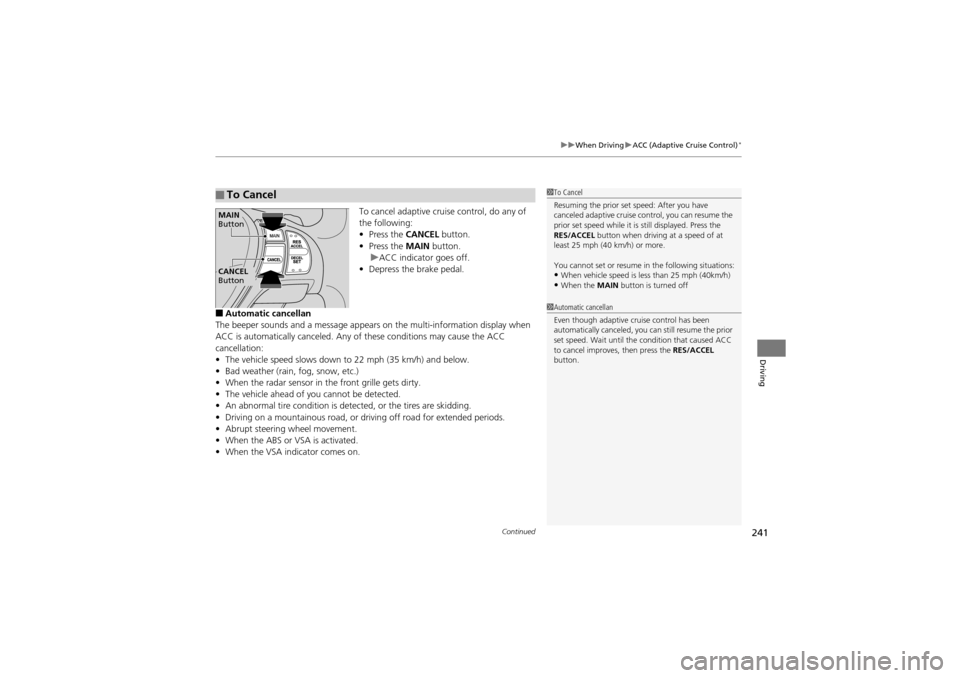
To cancel adaptive cruise control, do any of
the following:
• Press the CANCEL button.
• Press the MAIN button.
u ACC indicator goes off.
• Depress the brake pedal.
■Automatic cancellan
The beeper sounds and a message appears on the multi-information display when
ACC is automatically canceled. Any of these conditions may cause the ACC
cancellation:
• The vehicle speed slows down to 22 mph (35 km/h) and below.
• Bad weather (rain, fog, snow, etc.)
• When the radar sensor in the front grille gets dirty.
• The vehicle ahead of you cannot be detected.
• An abnormal tire condition is detected, or the tires are skidding.
• Driving on a mountainous road, or dr iving off road for extended periods.
• Abrupt steering wheel movement.
• When the ABS or VSA is activated.
• When the VSA indicator comes on.
■To Cancel1To Cancel
Resuming the prior set speed: After you have
canceled adaptive cruise co ntrol, you can resume the
prior set speed while it is still displayed. Press the
RES/ACCEL button when driving at a speed of at
least 25 mph (40 km/h) or more.
You cannot set or resume in the following situations:
•When vehicle speed is less than 25 mph (40km/h)•When the MAIN button is turned off
CANCEL
Button MAIN
Button
1 Automatic cancellan
Even though adaptive cruise control has been
automatically canceled, you can still resume the prior
set speed. Wait until the condition that caused ACC
to cancel improves, then press the RES/ACCEL
button.
Page 254 of 370
252
uuWhen Driving uIDS (Integrated Dynamics System)*
Driving
IDS (Integrated Dynamics System)*
Constantly controls your vehicle’s damper s and power steering assist according to
current road conditions, vehicle speed, and steering operation.
You can choose between two modes, sport mode and comfort mode, according to
your driving taste.
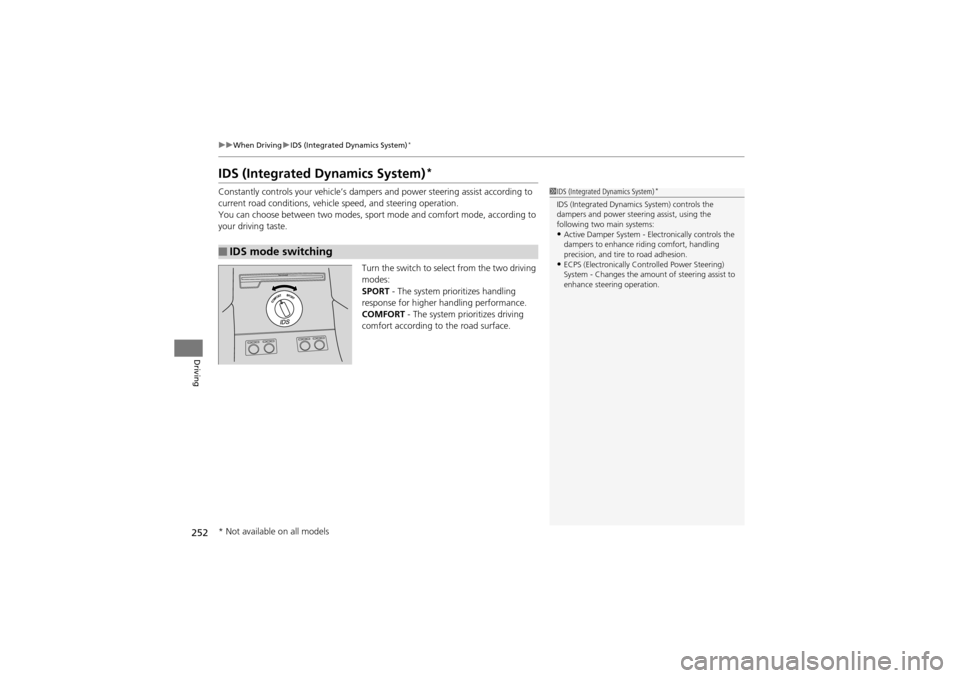
Turn the switch to select from the two driving
modes:
SPORT - The system prioritizes handling
response for higher handling performance.
COMFORT - The system prioritizes driving
comfort according to the road surface.
■IDS mode switching
1 IDS (Integrated Dynamics System)*
IDS (Integrated Dynamics System) controls the
dampers and power steering assist, using the
following two main systems:
•Active Damper System - Electronically controls the
dampers to enhance riding comfort, handling
precision, and tire to road adhesion.
•ECPS (Electronically C ontrolled Power Steering)
System - Changes the amount of steering assist to
enhance steering operation.
* Not available on all models
Page 256 of 370
uuBraking uBrake System
254
Driving
Your vehicle is equipped with disc brakes at all four wheels. A power assist helps
reduce the effort needed on the brake pedal. The brake assist system increases the
stopping force when you depress the brake pe dal hard in an emergency situation.
The anti-lock brake system (ABS) helps you re tain steering control when braking very
hard.
2 Brake Assist System P. 256
2 ABS (Anti-lock Brake System) P. 255
■Foot Brake1Foot Brake
Check the brakes after driv ing through deep water,
or if there is a buildup of road surface water. If
necessary, dry the brakes by lightly depressing the
pedal several times.
If you hear a continuous metallic friction sound when
applying the brakes, the brake pads need to be
replaced. Have the vehicl e checked by a dealer.
Constantly using the brak e pedal while going down a
long hill builds up heat, which reduces the brake
effectiveness. Apply engine braking by taking your
foot off the accelerator pedal and downshifting to a
lower gear.
Do not rest your foot on the brake pedal while
driving, as it will lightly apply the brakes and cause
them to lose effectiveness over time and reduce pad
life. It will also confuse drivers behind you.
Page 257 of 370
255
uuBraking uABS (Anti-lock Brake System)
Driving
ABS (Anti-lock Brake System)
Helps prevent the wheels from locking up, an d helps you retain steering control by
pumping the brakes rapidly, much faster than you.
The electronic brake distribution (EBD) sy stem, which is part of the ABS, also
balances the front-to-rear braking distri bution according to vehicle loading.
You should never pump th e brake pedal. Let the ABS work for you by always
keeping firm, steady pressure on the brake pedal. This is sometimes referred to as
“stomp and steer.”
■ABS operation
The brake pedal may pulsate slightly when the ABS is working. Keep holding the
pedal firmly down. On dry pavement, you will need to press on the brake pedal very
hard before the ABS activates. However, you may feel the ABS activate immediately
if you are trying to stop on snow or ice.
When the vehicle speed goes under 6 mph (10 km/h), the ABS stops.
■ABS1 ABS (Anti-lock Brake System)
NOTICEThe ABS may not function correctly if you use an
incorrect tire type and size.
When the ABS indicator comes on while driving,
there may be a problem with the system.
While normal braking is no t affected, there is a
possibility of the ABS not operating. Have the vehicle
checked by a dealer immediately.
The ABS does not reduce the ti me or distance it takes
to stop the vehicle. It only helps with steering control
during hard braking.
In the following cases, your vehicle may need more
stopping distance than a vehicle without the ABS:
•When driving on rough road surfaces, including
when driving on uneven surfaces, such as gravel or
snow.
•When tire chains are installed.
You may hear a motor sound coming from the
engine compartmen t while system checks are being
performed immediately after starting the engine or
while driving. This is normal.
Page 259 of 370
257
uuBraking uCMBSTM (Collision Mitigation Braking SystemTM)*
Continued
Driving
CMBSTM (Collision Mitigation Braking SystemTM)*
Can assist you when there is a possibility of your vehicle colliding with the vehicle in
front of yours. The CMBSTM is designed to alert you, then reduce your vehicle speed
when a possible collision is likely unavoidable to help minimize collision severity.
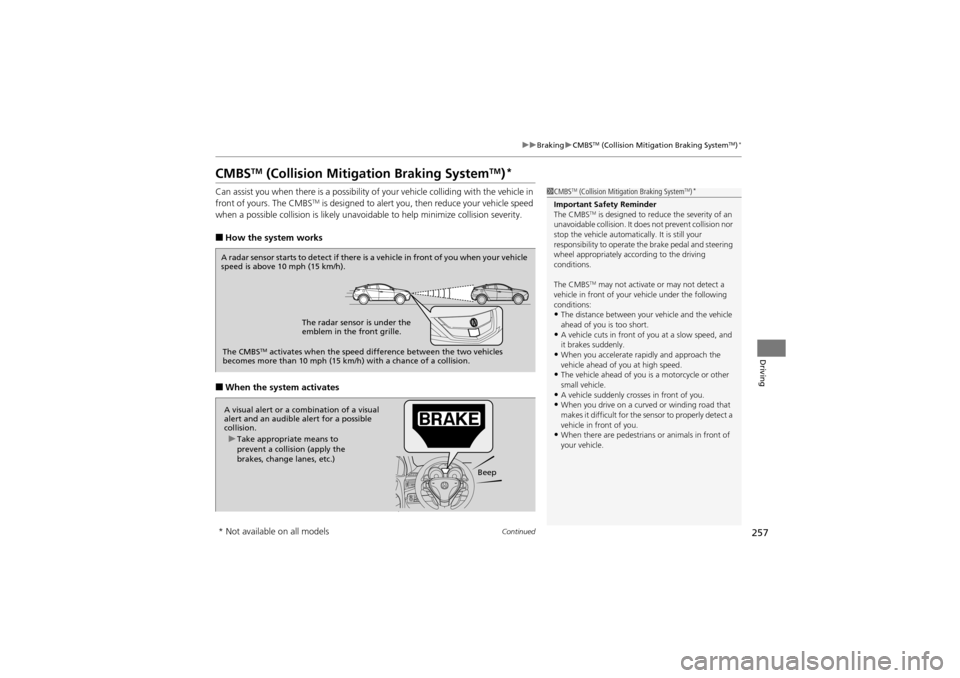
■How the system works
■When the system activates
1 CMBSTM (Collision Mitigation Braking SystemTM)*
Important Safety Reminder
The CMBSTM is designed to reduce the severity of an
unavoidable collision. It do es not prevent collision nor
stop the vehicle automatically. It is still your
responsibility to operate th e brake pedal and steering
wheel appropriately according to the driving
conditions.
The CMBS
TM may not activate or may not detect a
vehicle in front of your vehicle under the following
conditions:
•The distance between your vehicle and the vehicle
ahead of you is too short.
•A vehicle cuts in front of you at a slow speed, and
it brakes suddenly.
•When you accelerate ra pidly and approach the
vehicle ahead of you at high speed.
•The vehicle ahead of you is a motorcycle or other
small vehicle.
•A vehicle suddenly crosses in front of you.•When you drive on a curved or winding road that
makes it difficult for the se nsor to properly detect a
vehicle in front of you.
•When there are pedestrians or animals in front of
your vehicle.
A radar sensor starts to detect if there is a vehicle in front of you when your vehicle
speed is above 10 mph (15 km/h).
The radar sensor is under the
emblem in the front grille.
The CMBS
TM activates when the speed difference betw een the two vehicles
becomes more than 10 mph (15 km/h ) with a chance of a collision.
A visual alert or a combination of a visual
alert and an audible alert for a possible
collision.
Beep
u
Take appropriate means to
prevent a collision (apply the
brakes, change lanes, etc.)
* Not available on all models
Page 271 of 370
269
Maintenance
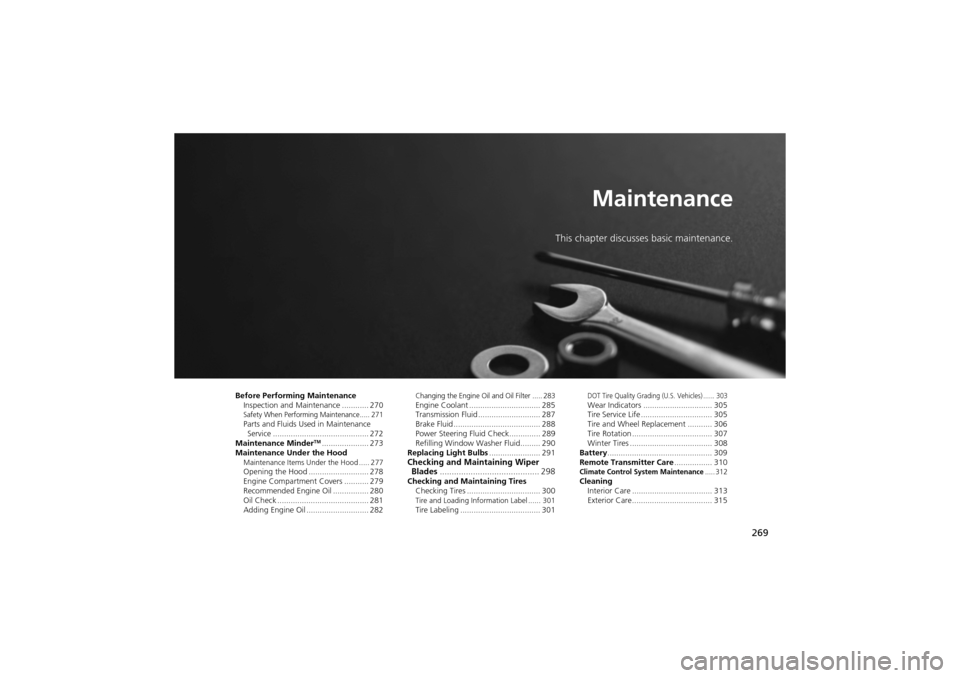
This chapter discusses basic maintenance.
Before Performing MaintenanceInspection and Mainte nance ............ 270
Safety When Performing Maintenance..... 271Parts and Fluids Used in Maintenance
Service ........................................... 272
Maintenance Minder
TM..................... 273
Maintenance Under the Hood
Maintenance Items Under the Hood ..... 277Opening the Hood ........................... 278
Engine Compartment Covers ........... 279
Recommended Engine Oi l ................ 280
Oil Check ......................................... 281
Adding Engine Oil ............................ 282
Changing the Engine Oil and Oil Filter ..... 283Engine Coolant ................................ 285
Transmission Fluid ............................ 287
Brake Fluid ....................................... 288
Power Steering Fluid Check.............. 289
Refilling Window Washer Fluid......... 290
Replacing Light Bulbs ....................... 291
Checking and Maintaining Wiper
Blades .......................................... 298
Checking and Maintaining Tires
Checking Tires ................................. 300
Tire and Loading Information Label ...... 301Tire Labeling .................................... 301
DOT Tire Quality Grading (U.S. Vehicles) ...... 303Wear Indicators ............................... 305
Tire Service Life ................................ 305
Tire and Wheel Replacement ........... 306
Tire Rotation .................................... 307
Winter Tires ..................................... 308
Battery ............................................... 309
Remote Transmitter Care ................. 310
Climate Control System Maintenance..... 312Cleaning
Interior Care .................................... 313
Exterior Care.................................... 315
Page 277 of 370
275
uuMaintenance MinderTMuTo Use Maintenance MinderTM
Continued
Maintenance
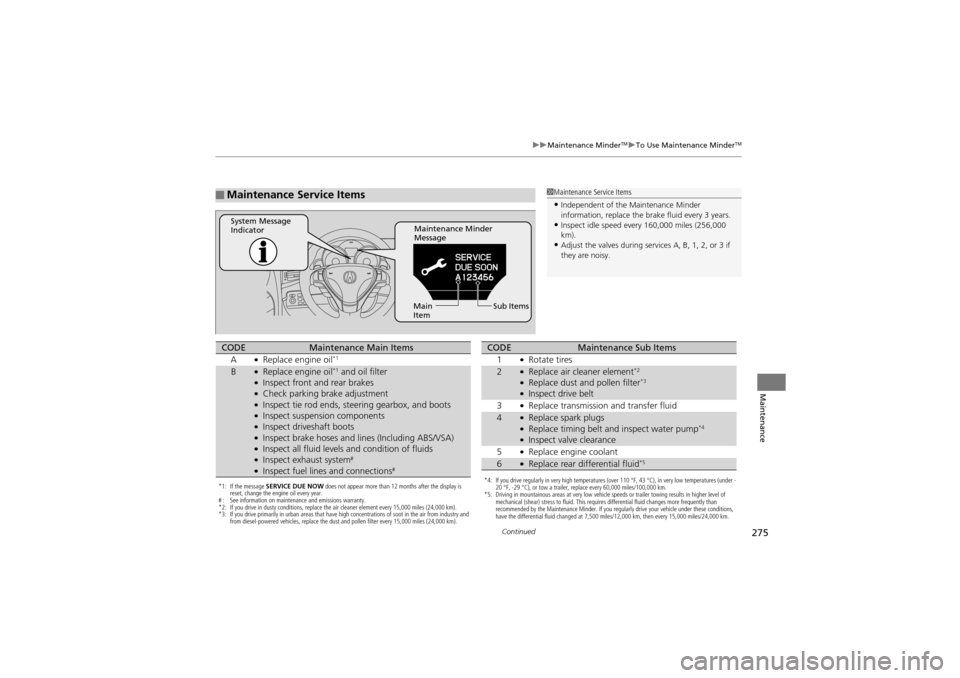
■Maintenance Service Items1Maintenance Service Items
•Independent of the Maintenance Minder
information, replace the brake fluid every 3 years.
•Inspect idle speed every 160,000 miles (256,000
km).
•Adjust the valves during services A, B, 1, 2, or 3 if
they are noisy.
Maintenance Minder
Message
System Message
Indicator
Sub Items
Main
Item
*1: If the message SERVICE DUE NOW does not appear more than 12 months after the display is
reset, change the engine oil every year.
# : See information on maintenance and emissions warranty.
*2: If you drive in dusty conditions, replace the air cleaner element every 15,000 miles (24,000 km).
*3: If you drive primarily in urban areas that have high concentrations of soot in the air from industry and
from diesel-powered vehicles, replace the dust and pollen filter every 15,000 miles (24,000 km).
CODEMaintenance Main Items
A●Replace engine oil*1
B●Replace engine oil*1 and oil filter●Inspect front and rear brakes●Check parking brake adjustment●Inspect tie rod ends, steering gearbox, and boots●Inspect suspension components●Inspect driveshaft boots●Inspect brake hoses and li nes (Including ABS/VSA)●Inspect all fluid levels and condition of fluids●Inspect exhaust system#
●Inspect fuel lines and connections#*4: If you drive regularly in very high temperatures (over 110 °F, 43 °C), in very low temperatures (under -
20 °F, -29 °C), or tow a trailer, replace every 60,000 miles/100,000 km.
*5: Driving in mountainous areas at very low vehicle speeds or trailer towing results in higher level of
mechanical (shear) stress to fluid. This requires differential fluid changes more frequently than
recommended by the Maintenance Minder. If you regularly drive your vehicle under these conditions,
have the differential fluid changed at 7,500 miles/12,000 km, then every 15,000 miles/24,000 km.
CODEMaintenance Sub Items
1●Rotate tires
2●Replace air cleaner element*2
●Replace dust and pollen filter*3
●Inspect drive belt
3●Replace transmission and transfer fluid
4●Replace spark plugs●Replace timing belt an d inspect water pump*4
●Inspect valve clearance
5●Replace engine coolant
6●Replace rear differential fluid*5