seat Acura ZDX 2013 Workshop Manual
[x] Cancel search | Manufacturer: ACURA, Model Year: 2013, Model line: ZDX, Model: Acura ZDX 2013Pages: 324, PDF Size: 8.58 MB
Page 106 of 324
105
Controls
This chapter explains how to operate the various controls necessary for driving.
Locking and Unlocking the Doors
Key Types and Functions .................. 106
Locking/Unlocking the Doors from the
Outside .......................................... 108Low Keyless Access Remote Signal
Strength ........................................ 112Locking/Unlocking the Doors from the
Inside ............................................. 113
Childproof Door Locks ..................... 114
Auto Door Locking/Unlocking .......... 115
Opening and Closing the Tailgate... 116
Security System................................ 122Opening and Closing the Windows..... 125
Opening and Closing the Panoramic
Glass Roof........................................ 128
Operating the Switches Around the
Steering Wheel
ENGINE START/STOP Button............. 129
Turn Signals ..................................... 132
Light Switches.................................. 132
Fog Lights ........................................ 134
Daytime Running Lights ................... 134
Wipers and Washers ........................ 135
Brightness Control ........................... 137Rear Defogger/Heated Door Mirror
Button........................................ 138Driving Position Memory System ...... 139Adjusting the Steering Wheel .......... 141
Adjusting the Mirrors....................... 142
Adjusting the Seats.......................... 144
Interior Lights/Interior Convenience
Items
Interior Lights .................................. 152
Interior Convenience Items .............. 154
Climate Control System
Using Automatic Climate Control .... 163
Synchronized Mode ......................... 165
Automatic Climate Control Sensors ...... 166
Page 107 of 324
106Controls
Locking and Unlocking the DoorsKey Types and FunctionsThis vehicle comes with the following key:
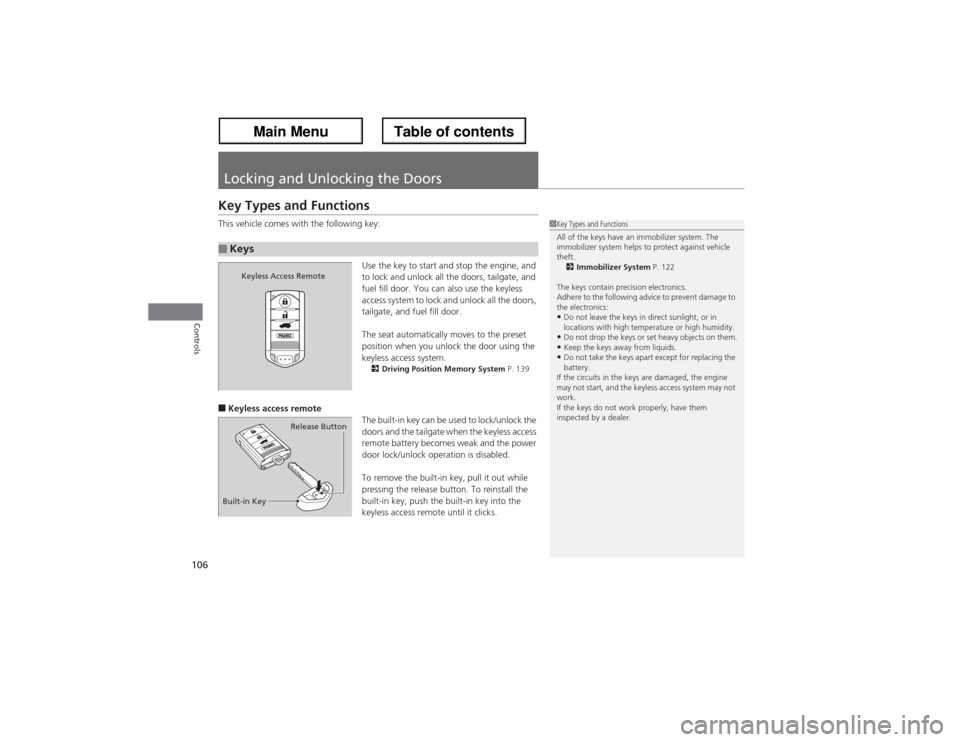
Use the key to start and stop the engine, and
to lock and unlock all the doors, tailgate, and
fuel fill door. You can also use the keyless
access system to lock and unlock all the doors,
tailgate, and fuel fill door.
The seat automatically moves to the preset
position when you unlock the door using the
keyless access system.
2Driving Position Memory System P. 139
■Keyless access remote
The built-in key can be used to lock/unlock the
doors and the tailgate when the keyless access
remote battery becomes weak and the power
door lock/unlock operation is disabled.
To remove the built-in key, pull it out while
pressing the release button. To reinstall the
built-in key, push the built-in key into the
keyless access remote until it clicks.■Keys
1Key Types and Functions
All of the keys have an immobilizer system. The
immobilizer system helps to protect against vehicle
theft.
2Immobilizer System P. 122
The keys contain precision electronics.
Adhere to the following advice to prevent damage to
the electronics:•Do not leave the keys in direct sunlight, or in
locations with high temperature or high humidity.•Do not drop the keys or set heavy objects on them.•Keep the keys away from liquids.•Do not take the keys apart except for replacing the
battery.
If the circuits in the keys are damaged, the engine
may not start, and the keyless access system may not
work.
If the keys do not work properly, have them
inspected by a dealer.
Keyless Access Remote
Built-in KeyRelease Button
Page 126 of 324
125
Continued
Controls
Opening and Closing the WindowsOpening/Closing the Power WindowsThe power windows can be opened and closed when the power mode is in ON,
using the switches on the doors. The driver side switches can be used to open and
close all of the windows.
The power window lock button on the driver side must be switched off (not pushed
in, indicator off) to open and close the windows from anywhere other than the
driver’s seat.
When the power window lock button is pushed in, the indicator comes on and you
can only operate the driver’s window. Turn the power window lock button on when
children are in the vehicle.
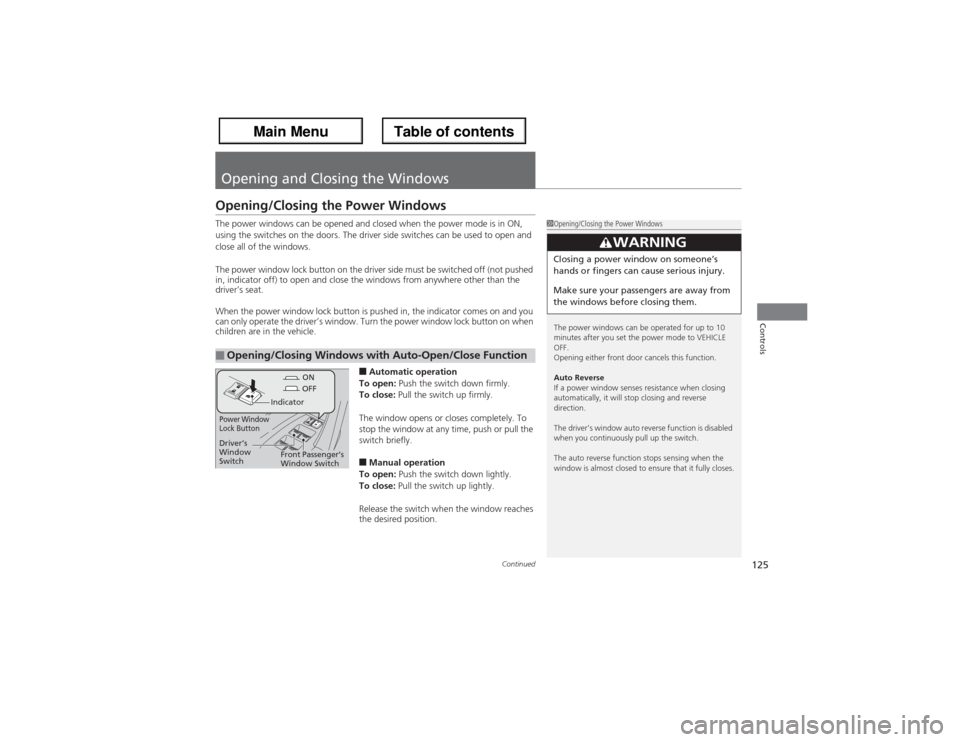
■Automatic operation
To open: Push the switch down firmly.
To close: Pull the switch up firmly.
The window opens or closes completely. To
stop the window at any time, push or pull the
switch briefly.■Manual operation
To open: Push the switch down lightly.
To close: Pull the switch up lightly.
Release the switch when the window reaches
the desired position.
■Opening/Closing Windows with Auto-Open/Close Function
1Opening/Closing the Power Windows
The power windows can be operated for up to 10
minutes after you set the power mode to VEHICLE
OFF.
Opening either front door cancels this function.
Auto Reverse
If a power window senses resistance when closing
automatically, it will stop closing and reverse
direction.
The driver’s window auto reverse function is disabled
when you continuously pull up the switch.
The auto reverse function stops sensing when the
window is almost closed to ensure that it fully closes.
3
WARNING
Closing a power window on someone’s
hands or fingers can cause serious injury.
Make sure your passengers are away from
the windows before closing them.
ON
OFF
Power Window
Lock Button
Indicator
Driver’s
Window
SwitchFront Passenger’s
Window Switch
Page 140 of 324
139
uuOperating the Switches Around the Steering WheeluDriving Position Memory System
Continued
Controls
Driving Position Memory SystemYou can store two driver’s seat (except for power lumbar), steering wheel and
outside mirror positions with the driving position memory system.
When you unlock and open the driver’s door with the keyless access system, the seat
and outside mirrors adjust automatically to one of the two preset positions.
The multi-information display shows you which you used to unlock the vehicle when
you enter.
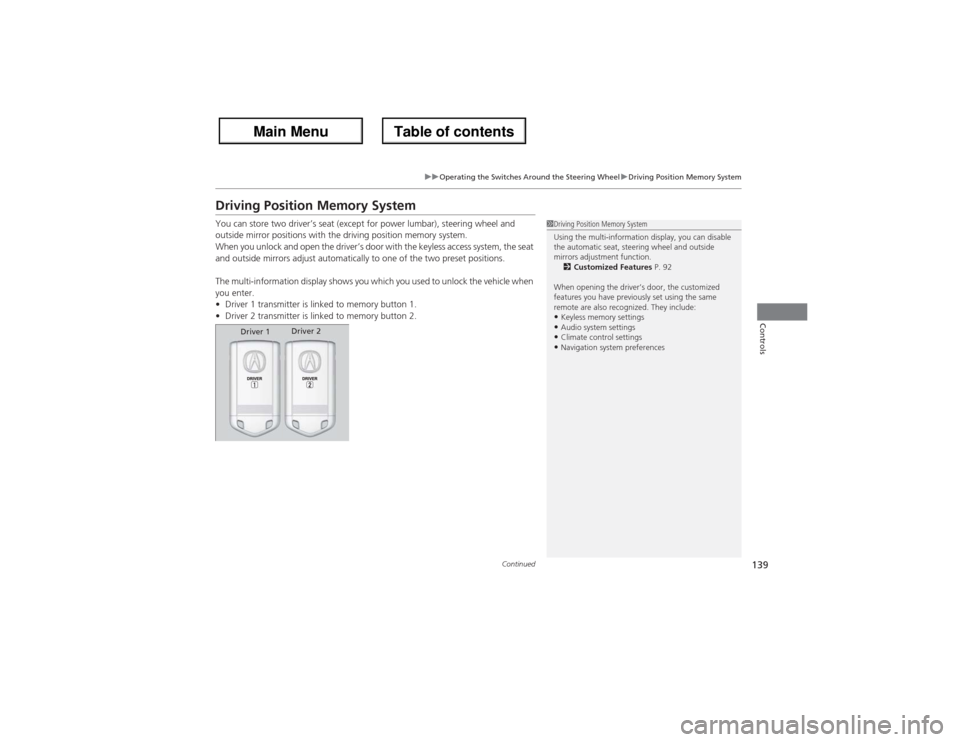
•Driver 1 transmitter is linked to memory button 1.
•Driver 2 transmitter is linked to memory button 2.
1Driving Position Memory System
Using the multi-information display, you can disable
the automatic seat, steering wheel and outside
mirrors adjustment function.
2Customized Features P. 92
When opening the driver’s door, the customized
features you have previously set using the same
remote are also recognized. They include:•Keyless memory settings•Audio system settings•Climate control settings•Navigation system preferences
Driver 1Driver 2
Page 141 of 324
uuOperating the Switches Around the Steering WheeluDriving Position Memory System
140Controls
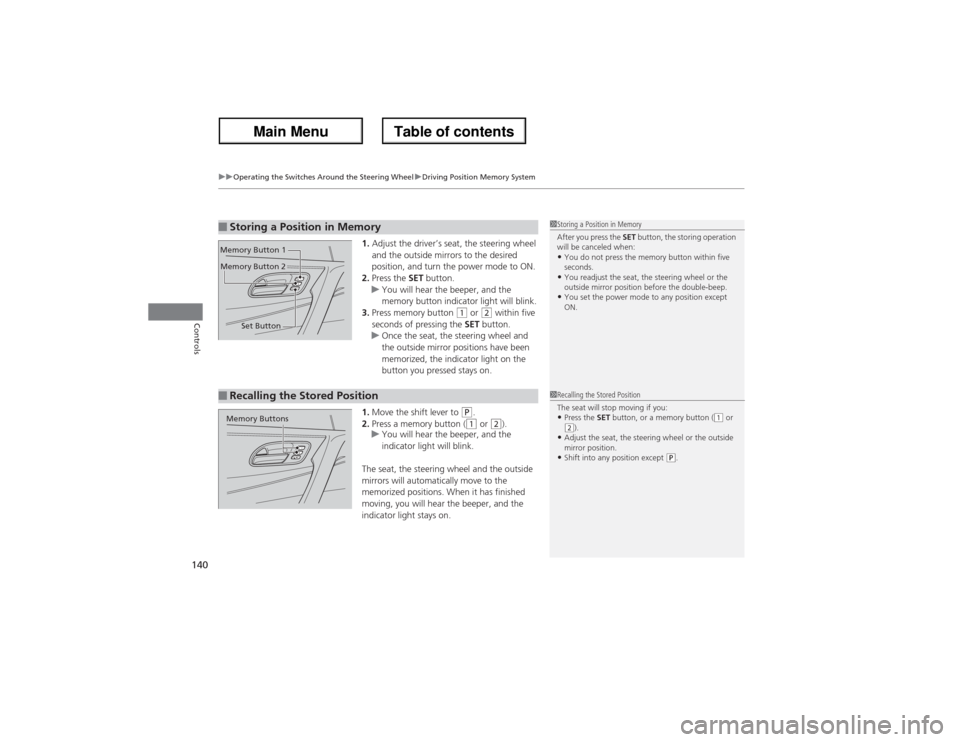
1.Adjust the driver’s seat, the steering wheel
and the outside mirrors to the desired
position, and turn the power mode to ON.
2.Press the SET button.
uYou will hear the beeper, and the
memory button indicator light will blink.
3.Press memory button
(1 or
(2 within five
seconds of pressing the SET button.
uOnce the seat, the steering wheel and
the outside mirror positions have been
memorized, the indicator light on the
button you pressed stays on.
1.Move the shift lever to
(P.
2.Press a memory button ((1 or
(2).
uYou will hear the beeper, and the
indicator light will blink.
The seat, the steering wheel and the outside
mirrors will automatically move to the
memorized positions. When it has finished
moving, you will hear the beeper, and the
indicator light stays on.
■Storing a Position in Memory
1Storing a Position in Memory
After you press the SET button, the storing operation
will be canceled when:•You do not press the memory button within five
seconds.•You readjust the seat, the steering wheel or the
outside mirror position before the double-beep.•You set the power mode to any position except
ON.
Set Button Memory Button 1
Memory Button 2■Recalling the Stored Position
1Recalling the Stored Position
The seat will stop moving if you:•Press the SET button, or a memory button (
(1 or
(2).
•Adjust the seat, the steering wheel or the outside
mirror position.•Shift into any position except
(P.
Memory Buttons
Page 143 of 324
142Controls
Adjusting the MirrorsInterior Rearview MirrorAdjust the angle of the rearview mirror when you are sitting in the correct driving
position.
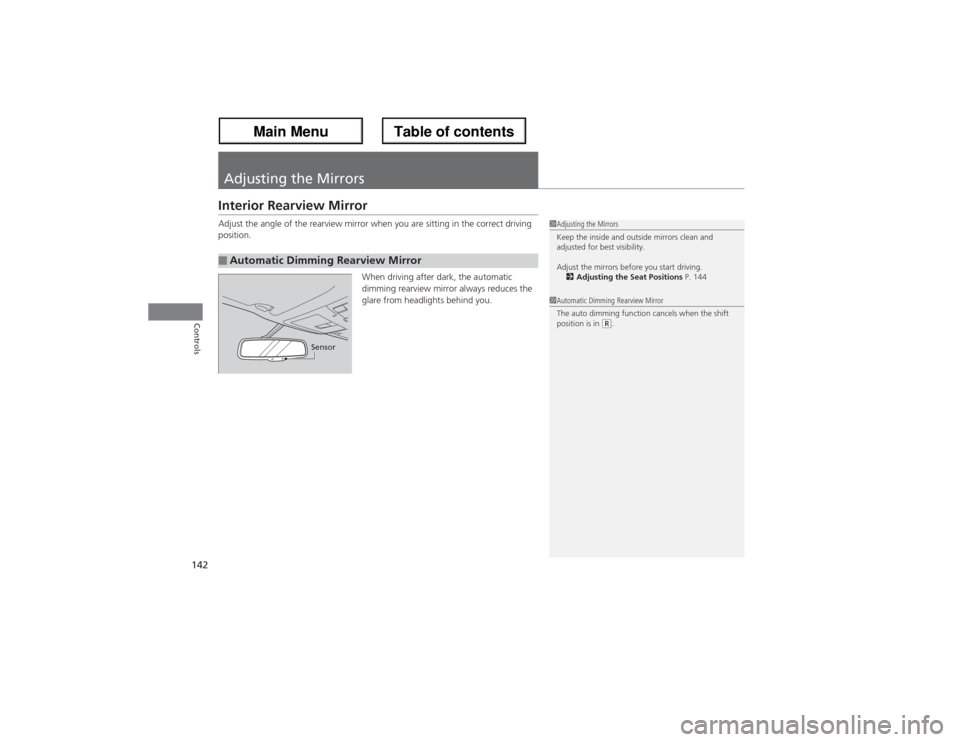
When driving after dark, the automatic
dimming rearview mirror always reduces the
glare from headlights behind you.■Automatic Dimming Rearview Mirror
1Adjusting the Mirrors
Keep the inside and outside mirrors clean and
adjusted for best visibility.
Adjust the mirrors before you start driving.
2Adjusting the Seat Positions P. 1441Automatic Dimming Rearview Mirror
The auto dimming function cancels when the shift
position is in
(R.
Sensor
Page 145 of 324
144Controls
Adjusting the SeatsAdjusting the Seat Positions
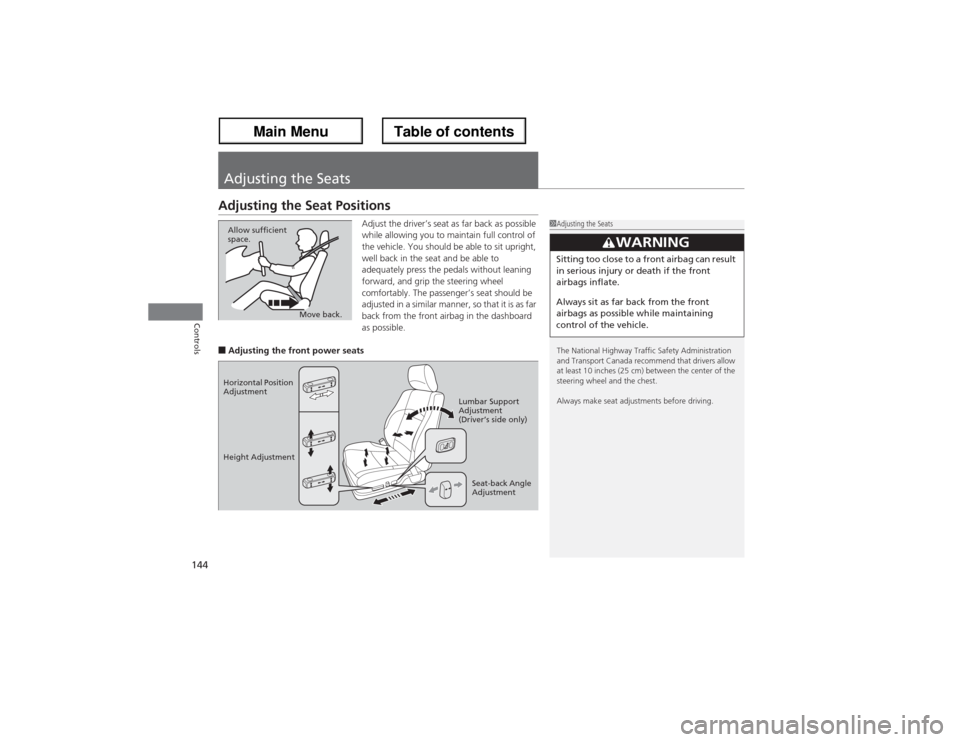
Adjust the driver’s seat as far back as possible
while allowing you to maintain full control of
the vehicle. You should be able to sit upright,
well back in the seat and be able to
adequately press the pedals without leaning
forward, and grip the steering wheel
comfortably. The passenger’s seat should be
adjusted in a similar manner, so that it is as far
back from the front airbag in the dashboard
as possible.
■Adjusting the front power seats
1Adjusting the Seats
The National Highway Traffic Safety Administration
and Transport Canada recommend that drivers allow
at least 10 inches (25 cm) between the center of the
steering wheel and the chest.
Always make seat adjustments before driving.
3
WARNING
Sitting too close to a front airbag can result
in serious injury or death if the front
airbags inflate.
Always sit as far back from the front
airbags as possible while maintaining
control of the vehicle.
Move back. Allow sufficient
space.
Horizontal Position
Adjustment
Height Adjustment
Seat-back Angle
Adjustment Lumbar Support
Adjustment
(Driver’s side only)
Page 146 of 324
Continued
145
uuAdjusting the SeatsuAdjusting the Seat Positions
Controls
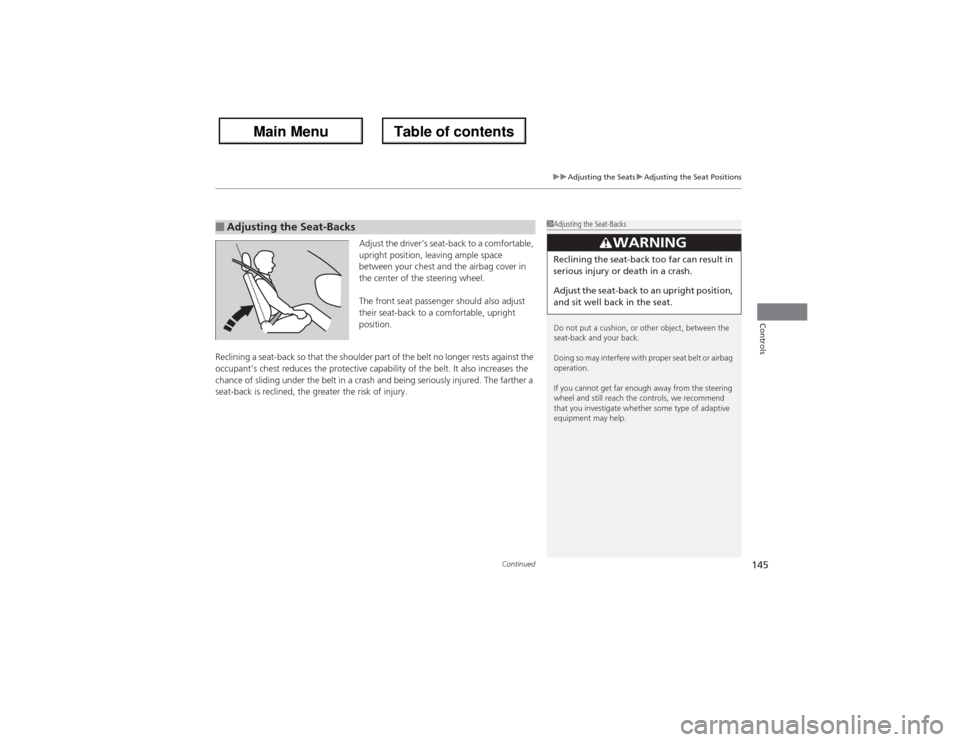
Adjust the driver’s seat-back to a comfortable,
upright position, leaving ample space
between your chest and the airbag cover in
the center of the steering wheel.
The front seat passenger should also adjust
their seat-back to a comfortable, upright
position.
Reclining a seat-back so that the shoulder part of the belt no longer rests against the
occupant’s chest reduces the protective capability of the belt. It also increases the
chance of sliding under the belt in a crash and being seriously injured. The farther a
seat-back is reclined, the greater the risk of injury.
■Adjusting the Seat-Backs
1Adjusting the Seat-Backs
Do not put a cushion, or other object, between the
seat-back and your back.
Doing so may interfere with proper seat belt or airbag
operation.
If you cannot get far enough away from the steering
wheel and still reach the controls, we recommend
that you investigate whether some type of adaptive
equipment may help.
3
WARNING
Reclining the seat-back too far can result in
serious injury or death in a crash.
Adjust the seat-back to an upright position,
and sit well back in the seat.
Page 147 of 324
uuAdjusting the SeatsuAdjusting the Seat Positions
146Controls
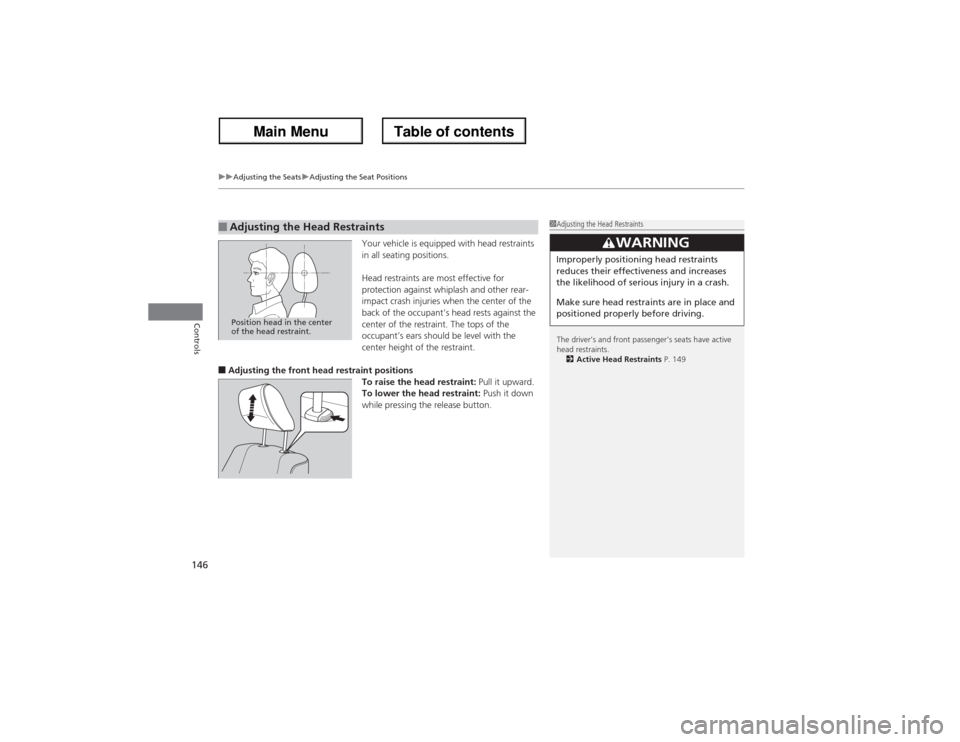
Your vehicle is equipped with head restraints
in all seating positions.
Head restraints are most effective for
protection against whiplash and other rear-
impact crash injuries when the center of the
back of the occupant’s head rests against the
center of the restraint. The tops of the
occupant’s ears should be level with the
center height of the restraint.
■Adjusting the front head restraint positions
To raise the head restraint: Pull it upward.
To lower the head restraint: Push it down
while pressing the release button.■Adjusting the Head Restraints
1Adjusting the Head Restraints
The driver’s and front passenger’s seats have active
head restraints.
2Active Head Restraints P. 149
3
WARNING
Improperly positioning head restraints
reduces their effectiveness and increases
the likelihood of serious injury in a crash.
Make sure head restraints are in place and
positioned properly before driving.
Position head in the center
of the head restraint.
Page 148 of 324
147
uuAdjusting the SeatsuAdjusting the Seat Positions
Continued
Controls
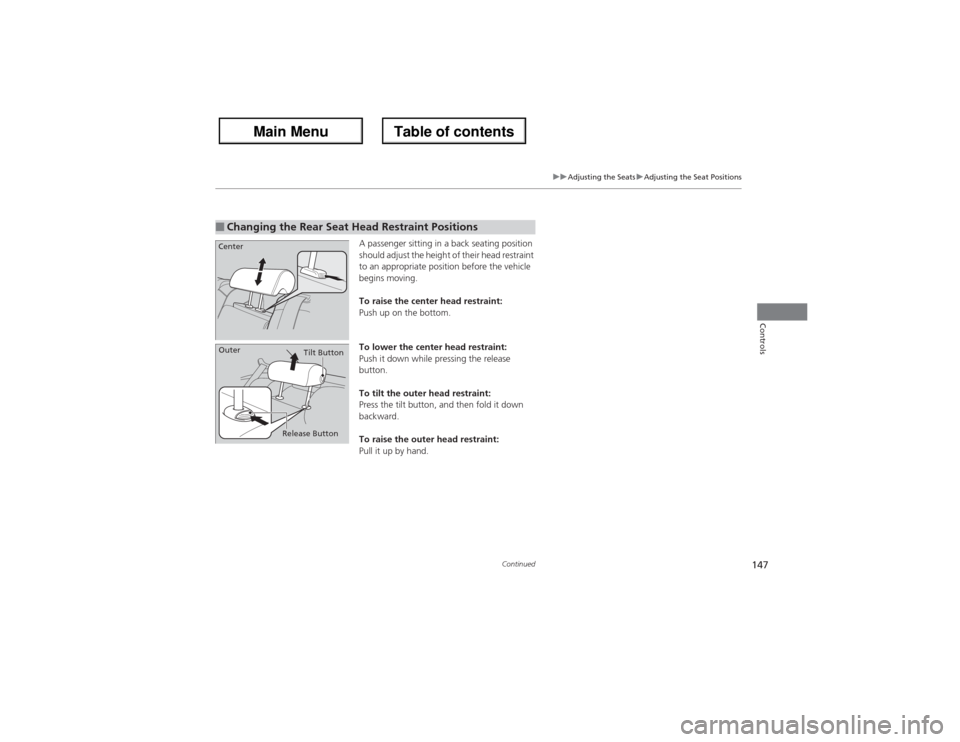
A passenger sitting in a back seating position
should adjust the height of their head restraint
to an appropriate position before the vehicle
begins moving.
To raise the center head restraint:
Push up on the bottom.
To lower the center head restraint:
Push it down while pressing the release
button.
To tilt the outer head restraint:
Press the tilt button, and then fold it down
backward.
To raise the outer head restraint:
Pull it up by hand.
■Changing the Rear Seat Head Restraint PositionsCenter
Release ButtonTilt Button
Outer