service Alfa Romeo Giulia 2017 User Guide
[x] Cancel search | Manufacturer: ALFA ROMEO, Model Year: 2017, Model line: Giulia, Model: Alfa Romeo Giulia 2017Pages: 268, PDF Size: 18.64 MB
Page 116 of 268
Switchable Automatic Locking
Retractors (ALR)
The seat belts in the passenger seating
positions are equipped with a
Switchable Automatic Locking
Retractor (ALR) which is used to secure
a child restraint system. For additional
information, refer to “Installing Child
Restraints Using The Vehicle Seat Belt”
under the “Child Restraints” section of
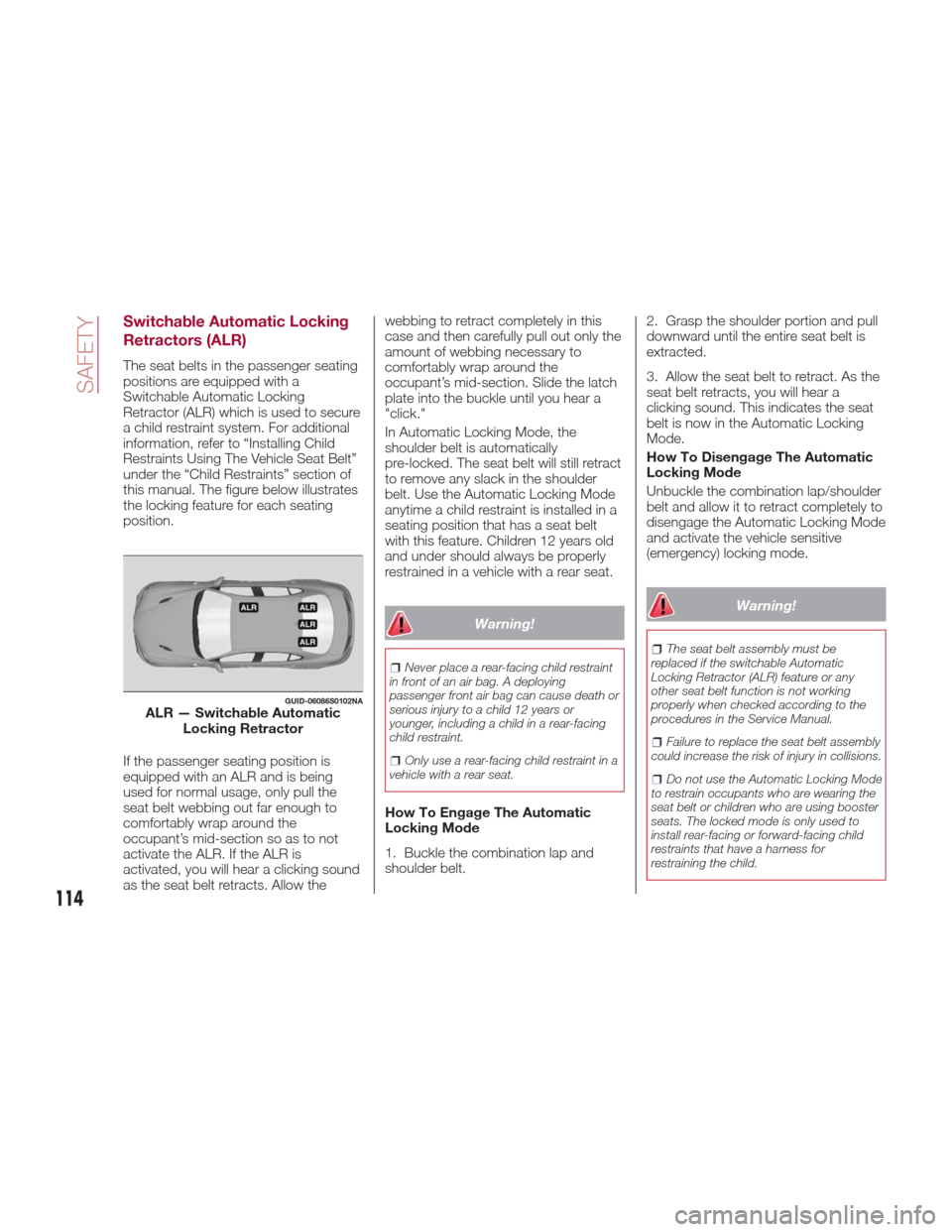
this manual. The figure below illustrates
the locking feature for each seating
position.
If the passenger seating position is
equipped with an ALR and is being
used for normal usage, only pull the
seat belt webbing out far enough to
comfortably wrap around the
occupant’s mid-section so as to not
activate the ALR. If the ALR is
activated, you will hear a clicking sound
as the seat belt retracts. Allow thewebbing to retract completely in this
case and then carefully pull out only the
amount of webbing necessary to
comfortably wrap around the
occupant’s mid-section. Slide the latch
plate into the buckle until you hear a
"click."
In Automatic Locking Mode, the
shoulder belt is automatically
pre-locked. The seat belt will still retract
to remove any slack in the shoulder
belt. Use the Automatic Locking Mode
anytime a child restraint is installed in a
seating position that has a seat belt
with this feature. Children 12 years old
and under should always be properly
restrained in a vehicle with a rear seat.
Warning!
Never place a rear-facing child restraint
in front of an air bag. A deploying
passenger front air bag can cause death or
serious injury to a child 12 years or
younger, including a child in a rear-facing
child restraint.
Only use a rear-facing child restraint in a
vehicle with a rear seat.
How To Engage The Automatic
Locking Mode
1. Buckle the combination lap and
shoulder belt. 2. Grasp the shoulder portion and pull
downward until the entire seat belt is
extracted.
3. Allow the seat belt to retract. As the
seat belt retracts, you will hear a
clicking sound. This indicates the seat
belt is now in the Automatic Locking
Mode.
How To Disengage The Automatic
Locking Mode
Unbuckle the combination lap/shoulder
belt and allow it to retract completely to
disengage the Automatic Locking Mode
and activate the vehicle sensitive
(emergency) locking mode.
Warning!
The seat belt assembly must be
replaced if the switchable Automatic
Locking Retractor (ALR) feature or any
other seat belt function is not working
properly when checked according to the
procedures in the Service Manual.
Failure to replace the seat belt assembly
could increase the risk of injury in collisions.
Do not use the Automatic Locking Mode
to restrain occupants who are wearing the
seat belt or children who are using booster
seats. The locked mode is only used to
install rear-facing or forward-facing child
restraints that have a harness for
restraining the child.
GUID-06086S0102NAALR — Switchable Automatic Locking Retractor
114
SAFETY
Page 117 of 268

Supplemental Restraint
Systems (SRS)
Some of the safety features described
in this section may be standard
equipment on some models, or may be
optional equipment on others. If you are
not sure, ask your authorized dealer.
The air bag system must be ready to
protect you in a collision. The Occupant
Restraint Controller (ORC) monitors the
internal circuits and interconnecting
wiring associated with the electrical Air
Bag System Components. Your vehicle
may be equipped with the following Air
Bag System Components:
Air Bag System Components
Occupant Restraint Controller (ORC)
Air Bag Warning Light
Steering Wheel and Column
Instrument Panel
Knee Impact Bolsters
Driver and Front Passenger Air Bags
Supplemental Side Air Bags
Supplemental Knee Air Bags
Front and Side Impact Sensors
Seat Belt Pretensioners
Seat Track Position Sensors
Seat Belt Buckle Switch
Air Bag Warning Light
The ORC monitors the readiness of
the electronic parts of the air bag
system whenever the ignition switch is
in the AVV/START or ON/RUN position.
If the ignition switch is in the STOP
position or in the ON/RUN position, the
air bag system is not on and the air
bags will not inflate.
The ORC contains a backup power
supply system that may deploy the air
bag system even if the battery loses
power or it becomes disconnected
prior to deployment.
The ORC turns on the Air Bag Warning
Light in the instrument panel for
approximately four to eight seconds for a
self-check when the ignition switch is first
in the ON/RUN position. After the
self-check, the Air Bag Warning Light will
turn off. If the ORC detects a malfunction
in any part of the system, it turns on the
Air Bag Warning Light, either
momentarily or continuously. A single
chime will sound to alert you if the light
comes on again after initial startup.
The ORC also includes diagnostics that
will illuminate the instrument panel Air
Bag Warning Light if a malfunction is
detected that could affect the air bag
system. The diagnostics also record the
nature of the malfunction. While the air
bag system is designed to be
maintenance free, if any of the following
occurs, have an authorized dealer
service the air bag system immediately.
The Air Bag Warning Light does not
come on during the four to eight
seconds when the ignition is first in the
ON/RUN position.
The Air Bag Warning Light remains
on after the four to eight-second
interval.
The Air Bag Warning Light comes on
intermittently or remains on while
driving.
Note:
If the speedometer, tachometer, or any
engine related gauges are not working,
the Occupant Restraint Controller
(ORC) may also be disabled. In this
condition the air bags may not be ready
to inflate for your protection. Have an
authorized dealer service the air bag
system immediately.
Warning!
Ignoring the Air Bag Warning Light in your
instrument panel could mean you won’t
have the air bag system to protect you in a
collision. If the light does not come on as a
bulb check when the ignition is first turned
on, stays on after you start the vehicle, or if
it comes on as you drive, have an
authorized dealer service the air bag
system immediately.
115
Page 118 of 268

Redundant Air Bag Warning
Light
If a fault with the Air Bag Warning
Light is detected, which could affect the
Supplemental Restraint System (SRS),
the Redundant Air Bag Warning Light
will illuminate on the instrument panel.
The Redundant Air Bag Warning Light
will stay on until the fault is cleared. In
addition, a single chime will sound to
alert you that the Redundant Air Bag
Warning Light has come on and a fault
has been detected. If the Redundant Air
Bag Warning Light comes on
intermittently or remains on while driving
have an authorized dealer service the
vehicle immediately. For additional
information regarding the Redundant Air
Bag Warning Light, refer to “Warning
Lights And Messages” in the “Getting to
Know Your Instrument Panel” section of
this manual.
Front Air Bags
This vehicle has front air bags and
lap/shoulder belts for both the driver
and front passenger. The front air bags
are a supplement to the seat belt
restraint systems. The driver front air
bag is mounted in the center of the
steering wheel. The passenger front air
bag is mounted in the instrument panel,
above the glove compartment. The
words “SRS AIRBAG” or “AIRBAG” are
embossed on the air bag covers.
Warning!
Being too close to the steering wheel or
instrument panel during front air bag
deployment could cause serious injury,
including death. Air bags need room to
inflate. Sit back, comfortably extending
your arms to reach the steering wheel or
instrument panel.
Never place a rear-facing child restraint
in front of an air bag. A deploying
passenger front air bag can cause death or
serious injury to a child 12 years or
younger, including a child in a rear-facing
child restraint.
Only use a rear-facing child restraint in a
vehicle with a rear seat.
Driver And Passenger Front Air
Bag Features
The Advanced Front Air Bag system
has multistage driver and front
passenger air bags. This system
provides output appropriate to the
severity and type of collision as
determined by the Occupant Restraint
Controller (ORC), which may receive
information from the front impact
sensors (if equipped) or other system
components.
The first stage inflator is triggered
immediately during an impact that
requires air bag deployment. A low
energy output is used in less severe
06106S0001EMDriver Air Bag
06106S0002EMPassenger Air Bag
116
SAFETY
Page 123 of 268
If you do have a collision which deploys
the air bags, any or all of the following
may occur:
The air bag material may sometimes
cause abrasions and/or skin reddening
to the occupants as the air bags deploy
and unfold. The abrasions are similar to
friction rope burns or those you might
get sliding along a carpet or gymnasium
floor. They are not caused by contact
with chemicals. They are not permanent
and normally heal quickly. However, if
you haven’t healed significantly within a
few days, or if you have any blistering,
see your doctor immediately.
As the air bags deflate, you may see
some smoke-like particles. The
particles are a normal by-product of the
process that generates the non-toxic
gas used for air bag inflation. These
airborne particles may irritate the skin,
eyes, nose, or throat. If you have skin or
eye irritation, rinse the area with cool
water. For nose or throat irritation, move
to fresh air. If the irritation continues,
see your doctor. If these particles settle
on your clothing, follow the garment
manufacturer’s instructions for cleaning.
Do not drive your vehicle after the air
bags have deployed. If you are involved
in another collision, the air bags will not
be in place to protect you.
Warning!
Deployed air bags and seat belt
pretensioners cannot protect you in
another collision. Have the air bags, seat
belt pretensioners, and the seat belt
retractor assemblies replaced by an
authorized dealer immediately. Also, have
the Occupant Restraint Controller System
serviced as well.
Note:
Air bag covers may not be obvious
in the interior trim, but they will open
during air bag deployment.
After any collision, the vehicle
should be taken to an authorized
dealer immediately.
Enhanced Accident Response
System
In the event of an impact, if the
communication network remains intact,
and the power remains intact,
depending on the nature of the event,
the ORC will determine whether to have
the Enhanced Accident Response
System perform the following functions:
Cut off fuel to the engine.
Flash hazard lights as long as the
battery has power or until the hazard
light button is pressed. The hazard lights can be deactivated by pressing
the hazard light button.
Turn on the interior lights, which
remain on as long as the battery has
power or for 15 minutes from the
intervention of the Enhanced Accident
Response System.
Unlock the power door locks.
Turn off the Fuel Pump Heater
(if equipped).
Turn off the HVAC Blower Motor.
Close the HVAC Circulation Door.
Enhanced Accident Response
System Reset Procedure
After the event occurs, when the
system is active, a message regarding
fuel cutoff is displayed. Turn the ignition
switch from ignition AVV/START or
ON/RUN to ignition STOP/OFF.
Carefully check the vehicle for fuel leaks
in the engine compartment and on the
ground near the engine compartment
and fuel tank before resetting the
system and starting the engine.
Depending on the nature of the event
the left and right turn signal lights,
located in the instrument panel, may
both be blinking and will continue to
blink. In order to move your vehicle to
the side of the road, you must follow
the system reset procedure.
121
Page 124 of 268
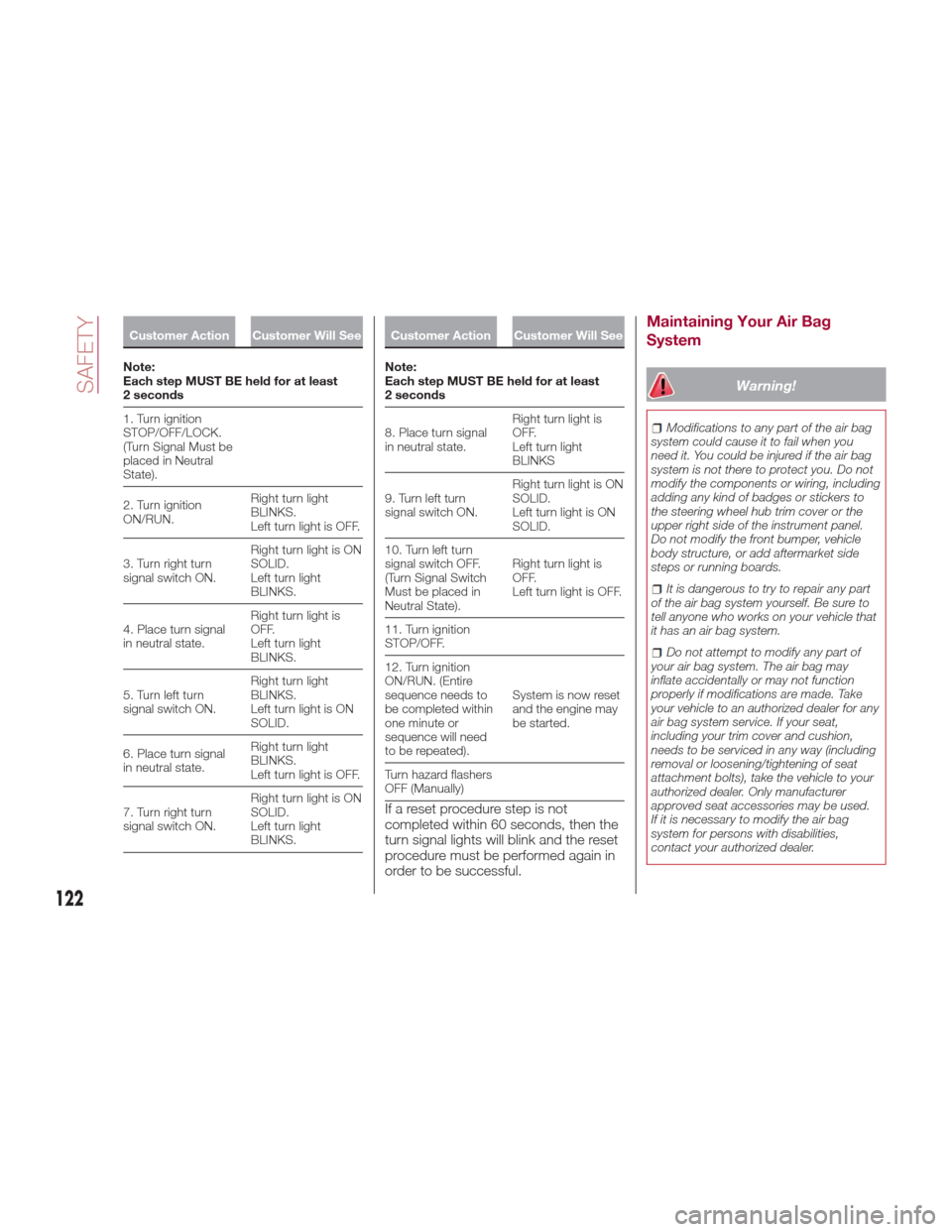
Customer Action Customer Will See
Note:
Each
step MUST BE held for at least
2 seconds
1. Turn ignition
STOP/OFF/LOCK.
(Turn Signal Must be
placed in Neutral
State).
2. Turn ignition
ON/RUN. Right turn light
BLINKS.
Left turn light is OFF.
3. Turn right turn
signal switch ON. Right turn light is ON
SOLID.
Left turn light
BLINKS.
4. Place turn signal
in neutral state. Right turn light is
OFF.
Left turn light
BLINKS.
5. Turn left turn
signal switch ON. Right turn light
BLINKS.
Left turn light is ON
SOLID.
6. Place turn signal
in neutral state. Right turn light
BLINKS.
Left turn light is OFF.
7. Turn right turn
signal switch ON. Right turn light is ON
SOLID.
Left turn light
BLINKS.
Customer Action Customer Will See
Note:
Each
step MUST BE held for at least
2 seconds
8. Place turn signal
in neutral state. Right turn light is
OFF.
Left turn light
BLINKS
9. Turn left turn
signal switch ON. Right turn light is ON
SOLID.
Left turn light is ON
SOLID.
10. Turn left turn
signal switch OFF.
(Turn Signal Switch
Must be placed in
Neutral State). Right turn light is
OFF.
Left turn light is OFF.
11. Turn ignition
STOP/OFF.
12. Turn ignition
ON/RUN. (Entire
sequence needs to
be completed within
one minute or
sequence will need
to be repeated). System is now reset
and the engine may
be started.
Turn hazard flashers
OFF (Manually)
If a reset procedure step is not
completed within 60 seconds, then the
turn signal lights will blink and the reset
procedure must be performed again in
order to be successful.
Maintaining Your Air Bag
System
Warning!
Modifications to any part of the air bag
system could cause it to fail when you
need it. You could be injured if the air bag
system is not there to protect you. Do not
modify the components or wiring, including
adding any kind of badges or stickers to
the steering wheel hub trim cover or the
upper right side of the instrument panel.
Do not modify the front bumper, vehicle
body structure, or add aftermarket side
steps or running boards.
It is dangerous to try to repair any part
of the air bag system yourself. Be sure to
tell anyone who works on your vehicle that
it has an air bag system.
Do not attempt to modify any part of
your air bag system. The air bag may
inflate accidentally or may not function
properly if modifications are made. Take
your vehicle to an authorized dealer for any
air bag system service. If your seat,
including your trim cover and cushion,
needs to be serviced in any way (including
removal or loosening/tightening of seat
attachment bolts), take the vehicle to your
authorized dealer. Only manufacturer
approved seat accessories may be used.
If it is necessary to modify the air bag
system for persons with disabilities,
contact your authorized dealer.
122
SAFETY
Page 146 of 268
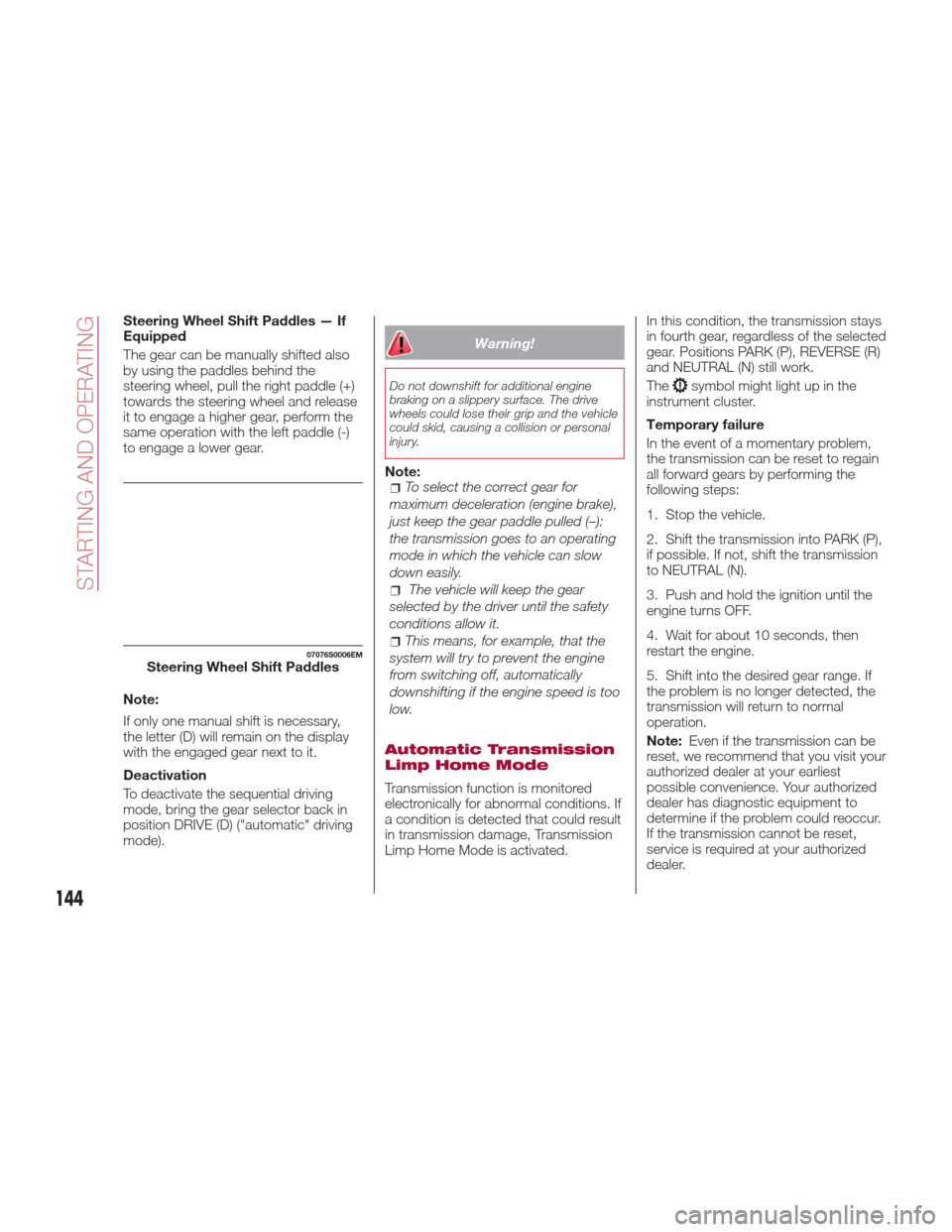
Steering Wheel Shift Paddles — If
Equipped
The gear can be manually shifted also
by using the paddles behind the
steering wheel, pull the right paddle (+)
towards the steering wheel and release
it to engage a higher gear, perform the
same operation with the left paddle (-)
to engage a lower gear.
Note:
If only one manual shift is necessary,
the letter (D) will remain on the display
with the engaged gear next to it.
Deactivation
To deactivate the sequential driving
mode, bring the gear selector back in
position DRIVE (D) ("automatic" driving
mode).
Warning!
Do not downshift for additional engine
braking on a slippery surface. The drive
wheels could lose their grip and the vehicle
could skid, causing a collision or personal
injury.
Note:To select the correct gear for
maximum deceleration (engine brake),
just keep the gear paddle pulled (–):
the transmission goes to an operating
mode in which the vehicle can slow
down easily.
The vehicle will keep the gear
selected by the driver until the safety
conditions allow it.
This means, for example, that the
system will try to prevent the engine
from switching off, automatically
downshifting if the engine speed is too
low.
Automatic Transmission
Limp Home Mode
Transmission function is monitored
electronically for abnormal conditions. If
a condition is detected that could result
in transmission damage, Transmission
Limp Home Mode is activated. In this condition, the transmission stays
in fourth gear, regardless of the selected
gear. Positions PARK (P), REVERSE (R)
and NEUTRAL (N) still work.
The
symbol might light up in the
instrument cluster.
Temporary failure
In the event of a momentary problem,
the transmission can be reset to regain
all forward gears by performing the
following steps:
1. Stop the vehicle.
2. Shift the transmission into PARK (P),
if possible. If not, shift the transmission
to NEUTRAL (N).
3. Push and hold the ignition until the
engine turns OFF.
4. Wait for about 10 seconds, then
restart the engine.
5. Shift into the desired gear range. If
the problem is no longer detected, the
transmission will return to normal
operation.
Note: Even if the transmission can be
reset, we recommend that you visit your
authorized dealer at your earliest
possible convenience. Your authorized
dealer has diagnostic equipment to
determine if the problem could reoccur.
If the transmission cannot be reset,
service is required at your authorized
dealer.
07076S0006EMSteering Wheel Shift Paddles
144
STARTING AND OPERATING
Page 164 of 268
In this case, sufficient distance from the
vehicle which is changing lanes may not
be guaranteed. It is advisable to pay the
utmost attention at all times and be
always ready to apply the brakes if
needed.
Small Vehicles
Some narrow vehicles (e.g. bicycles
and motorcycles) travelling near the
outer edges of the lane or which enter
the lane from curb side are not
detected until they are fully in the lane.Sufficient distance from the vehicles
ahead may not be guaranteed in these
cases.
Stationary Objects And Vehicles
The system cannot detect the presence
of stationary vehicles or objects. For
example, the system will not operate if
the vehicle ahead leaves the lane and a
vehicle ahead of that one is stationary in
that lane. Pay the utmost attention at all
times and be always ready to apply the
brakes if needed.
Objects And Vehicles Moving In
Opposite Or Crosswise Direction
The system cannot detect the presence
of objects or vehicles traveling in
opposite or crosswise directions and
consequently will not be operated.General Information
This vehicle has systems that operate
on radio frequency that comply with
Part 15 of the Federal Communications
Commission (FCC) rules and with
Industry Canada Standards RSS-
GEN/210/220/310.
Operation is subject to the following
two conditions:
1. The device may not cause harmful
interference.
2. The device must accept any
interference received, including
interference that may cause undesired
operation of the device.
Changes or modifications to any of
these systems by other than an
authorized service facility could void
authorization to use this equipment.
GUID-07146S0012EMLane ChangeGUID-07146S0013EMSmall VehiclesGUID-07146S0014EMObjects And Vehicles Moving In
Opposite Or Crosswise Direction
162
STARTING AND OPERATING
Page 189 of 268
Warning!
When replacing a blown fuse, always
use an appropriate replacement fuse with
the same amp rating as the original fuse.
Never replace a fuse with another fuse of
higher amp rating. Never replace a blown
fuse with metal wires or any other material.
Failure to use proper fuses may result in
serious personal injury, fire and/or property
damage.
Before replacing a fuse, make sure that
the ignition is off and that all the other
services are switched off and/or
disengaged.
If the replaced fuse blows again, contact
an authorized dealer.
If a general protection fuse for safety
systems (air bag system, braking system),
power unit systems (engine system,
transmission system) or steering system
blows, contact an authorized dealer.
Fuse Location
The fuses, which can be replaced by
the user, are grouped in two boxes
below the passenger side foot board
and inside the trunk.
Control Unit Under
Passenger Side
Footboard
To access the fuses, proceed as
follows:
1. Lift the upper end of the footboard
on the passenger side, pulling to
release the two buttons.
Release Buttons On Footboard
1 — Footboard
2. Unscrewing the two hooks, remove
the panel pulling downward. Release Hooks On Footboard
2 — Panel
The fuses are freely accessible on the
control unit.
After replacing the fuse, make sure that
panel and footboard are correctly
locked.
Luggage Compartment
Fuse Box
To access the fuses, proceed as
follows:
1. Lift the luggage compartment cover.
2. Remove the control unit cover.
08036S0010EM
08036S0011EM
187
Page 195 of 268
Inflation Procedure
Warning!
Do not attempt to seal a tire on the side
of the vehicle closest to traffic. Pull far
enough off the road to avoid the danger of
being hit when using the Tire Service Kit.
Do not use Tire Service Kit or drive the
vehicle under the following circumstances:
If the puncture in the tire tread is
approximately 1/4 inch (6 mm) or larger.
If the tire has any sidewall damage.
If the tire has any damage from driving
with extremely low tire pressure.
If the tire has any damage from driving
on a flat tire.
If the wheel has any damage.
If you are unsure of the condition of the
tire or the wheel.
Keep Tire Service Kit away from open
flames or heat sources.
A loose Tire Service Kit thrown forward
in a collision or hard stop could endanger
the occupants of the vehicle. Always stow
the Tire Service Kit in the place provided.
Failure to follow these warnings can result
in injuries that are serious or fatal to you,
your passengers, and others around you.
Take care not to allow the contents of
Tire Service Kit to come in contact with
hair, eyes, or clothing. Tire Service Kit
sealant is harmful if inhaled, swallowed, or
absorbed through the skin. It causes skin,
eye, and respiratory irritation. Flush
immediately with plenty of water if there is
any contact with eyes or skin. Change
clothing as soon as possible, if there is any
contact with clothing.
Tire Service Kit Sealant solution contains
latex. In case of an allergic reaction or rash,
consult a physician immediately. Keep Tire
Service Kit out of reach of children. If
swallowed, rinse mouth immediately with
plenty of water and drink plenty of water.
Do not induce vomiting! Consult a
physician immediately.
To use your Tire Repair Kit, proceed as
follows:
1. Engage the electric parking brake.
2. Insert the sealant cartridge
containing the sealing liquid in the
proper compressor holder, pushing
down hard. Unscrew the tire valve cap,
take out the filler tube and tighten the
ring nut on the tire valve. 3. Make sure the power switch of the
compressor is in the off position (O).
4. Insert the plug into the power outlet
in the center console, then start the
engine.
08066S0004EMAttaching Filler Tube To Deflated
Tire
1— Sealant Cartridge
2— Filler Tube
193
Page 201 of 268
ENGINE
OVERHEATING
Engine overheating may occur in
situations of extreme environmental
temperatures, frequent engine
stops/starts, or driving in heavy traffic. If
the engine becomes overheated, the
Engine Temperature Warning Light in
the instrument cluster will illuminate
along with a dedicated message. Refer
to "Warning Lights And Messages" in
the "Getting To Know Your Instrument
Panel" for more information.
In any of the following situations, you
can reduce the potential for overheating
by taking the appropriate action.
On the highways — slow down.
In city traffic — while stopped, place
the transmission in NEUTRAL, but do
not increase engine idle speed.
Note:
There are steps that you can take to
slow down an impending overheat
condition:
If your air conditioner (A/C) is on,
turn it off. The A/C system adds heat
to the engine cooling system and
turning the A/C off can help remove
this heat.
You can also turn the temperature
control to maximum heat, the mode
control to floor and the blower control
to high. This allows the heater core to
act as a supplement to the radiator
and aids in removing heat from the
engine cooling system.
Warning!
You or others can be badly burned by hot
engine coolant (antifreeze) or steam from
your radiator. If you see or hear steam
coming from under the hood, do not open
the hood until the radiator has had time to
cool. Never try to open a cooling system
pressure cap when the radiator or coolant
bottle is hot.
Caution!
Driving with a hot cooling system could
damage your vehicle. If temperature gauge
reads “H”, pull over and stop the vehicle.
Idle the vehicle with the air conditioner
turned off until the pointer drops back into
the normal range. If the pointer remains on
the “H”, turn the engine off immediately,
and call for service.
If Steam Is Coming From The
Engine Compartment
Do not go near the front of the vehicle.
Stop the engine. Wait until the steam
dissipates. Then, open the hood and
start the engine.
If Neither Coolant Nor Steam Is
Escaping
Open the hood and idle the engine until
it cools.
Note:
If the cooling fan does not operate
while the engine is running, the engine
temperature will increase. Stop the
engine and contact your authorized
dealer.
If the engine continues to overheat
or frequently overheats, have the
cooling system inspected. The engine
could be seriously damaged unless
repairs are made. Contact your
authorized dealer.
199