display Alfa Romeo Giulia 2017 Owner's Guide
[x] Cancel search | Manufacturer: ALFA ROMEO, Model Year: 2017, Model line: Giulia, Model: Alfa Romeo Giulia 2017Pages: 268, PDF Size: 18.64 MB
Page 108 of 268
The system may activate, assessing the
trajectory of the vehicle, for the presence of
reflecting metal objects different from other
vehicles, such as safety barriers, road
signs, barriers before parking lots, tollgates,
level crossings, gates, railways, objects
near road constructions sites or higher than
the vehicle (e.g. a fly-over). In the same
way, the system may intervene inside
multi-story parking lots or tunnels, or due
to a glare on the road surface. These
possible activations are a consequence of
the real driving scenario coverage by the
system and must not be regarded as
faults.
The system has been designed for road
use only. If the vehicle is driven on a track,
the system must be deactivated to avoid
unnecessary warnings. Automatic
deactivation is signaled by the dedicated
warning light/symbol switching on in the
instrument panel (refer to the instructions in
the "Warning Lights And Messages On The
Instrument Panel" in "Getting To Know Your
Instrument Panel" for further information).
Tire Pressure
Monitoring System
(TPMS)
The vehicle is equipped with a Tire
Pressure Monitoring System (TPMS)
that sends the inflation pressure
information of each tire to the control
unit, and will signal the driver in the
event of insufficient tire pressure.
Tire pressure will vary with temperature
by approximately 1 psi (7 kPa) for every
12°F (6.5°C). This means that when the outside temperature decreases, the tire
pressure will also decrease. Tire
pressure should always be set based
on cold inflation tire pressure. This is
defined as the tire pressure after the
vehicle has not been driven for at least
three hours, or driven less than 1 mile
(1.6 km) after a three hour period. The
cold tire inflation pressure must not
exceed the maximum inflation pressure
molded into the tire sidewall. Refer to
“Tires” in “Servicing And Maintenance”
for information on how to properly
inflate the vehicle’s tires. The tire
pressure will also increase as the
vehicle is driven. This is normal, and
there should be no adjustment for this
increased pressure.
The TPMS will signal the driver if
pressure falls below the warning limit for
any reason, including the effects of low
temperature and normal loss of
pressure from the tire.
The TPMS will stop indicating
insufficient tire pressure when pressure
is equal to or greater than the
prescribed cold inflation level.
Therefore, if insufficient tire pressure is
indicated by the () warning light
displaying in the instrument cluster,
increase the inflation pressure up to the
prescribed cold inflation value.
The system will automatically update,
and the “Tire Pressure Monitoring
Telltale Light” will turn off once the
system receives the updated tire
pressures. The vehicle may need to be driven for up to 20 minutes above
15 mph (24 km/h) in order for the TPMS
to receive this information.
Operating Example
For example, your vehicle may have a
recommended cold (parked for more
than three hours) placard pressure of
33 psi (227 kPa). If the ambient
temperature is 68°F (20°C), and the
measuredtirepressureis28psi
(193 kPa), a temperature drop to 20°F
(-7°C) will decrease the tire pressure to
approximately 24 psi (165 kPa). This tire
pressure is low enough to turn ON the
“Tire Pressure Monitoring Telltale Light.”
Driving the vehicle may cause the tire
pressure to rise to approximately 28 psi
(193 kPa), but the “Tire Pressure
Monitoring Telltale Light” will still be on.
In this situation, the “Tire Pressure
Monitoring Telltale Light” will turn off
only after the tires are inflated to the
vehicle’s recommended cold placard
pressure value.
106
SAFETY
Page 109 of 268
Caution!
The TPMS has been optimized for the
original equipment tires and wheels. TPMS
pressures and warning have been
established for the tire size equipped on
your vehicle. Undesirable system operation
or sensor damage may result when using
replacement equipment that is not of the
same size, type, and/or style. Aftermarket
wheels can cause sensor damage.
Using aftermarket tire sealants may
cause the Tire Pressure Monitoring System
(TPMS) sensor to become inoperable. After
using an aftermarket tire sealant it is
recommended that you take your vehicle to
an authorized dealership to have your
sensor function checked.
After inspecting or adjusting the tire
pressure always reinstall the valve stem
cap. This will prevent moisture and dirt
from entering the valve stem, which could
damage the TPMS sensor.
INSUFFICIENT TIRE PRESSURE
INDICATION
If an insufficient pressure value is
detected on one or more tires, the
warning light in the instrument
cluster will display alongside the
dedicated messages, the system will
highlight the tire or tires with insufficient
pressure graphically, and an acoustic
signal will be emitted. In this case, stop the car, check the
inflation pressure of each tire, and
inflate the necessary tire or tires to the
correct cold inflation pressure value,
shown on the display or in the
dedicated TPMS menu.
TPMS TEMPORARILY DISABLED
TPMS Check Message
When a system fault is detected, the
“Tire Pressure Monitoring Telltale Light”
will flash on and off for 75 seconds, and
then remain on solid. The system fault
will also sound a chime. If the ignition is
cycled, this sequence will repeat,
provided that the system fault still
exists. The “Tire Pressure Monitoring
Telltale Light” will turn off when the fault
condition no longer exists. A system
fault can occur due to any of the
following:
Jamming due to electronic devices
or driving next to facilities emitting the
same radio frequencies as the TPMS
sensors.
Installing some form of aftermarket
window tinting that affects radio wave
signals.
Lots of snow or ice around the
wheels or wheel housings.
Using tire chains on the vehicle.
Using wheels/tires not equipped with
TPMS sensors. After the punctured tire has been
repaired with the original tire sealant
contained in the TireKit, the previous
condition must be restored so that the
warning light is off during normal
driving.
TPMS Deactivation
The TPMS can be deactivated by
replacing all four wheel and tire
assemblies (road tires) with wheel and
tire assemblies that do not have TPMS
Sensors, such as when installing winter
wheel and tire assemblies on your
vehicle.
To deactivate the TPMS, first replace all
four wheel and tire assemblies (road
tires) with tires not equipped with Tire
Pressure Monitoring (TPM) Sensors.
Then, drive the vehicle for 10 minutes
above 15 mph (24 km/h). The TPMS
will chime, the "TPM Telltale Light" will
flash on and off for 75 seconds and
then remain on. The instrument cluster
will display the “SERVICE TPM
SYSTEM” message and then display
dashes (--) in place of the pressure
values.
Beginning with the next ignition switch
cycle, the TPMS will no longer chime or
display the “SERVICE TPM SYSTEM”
message in the instrument cluster.
Instead, dashes (--) will remain in place
of the pressure values.
To reactivate the TPMS, replace all four
wheel and tire assemblies (road tires)
with tires equipped with TPM sensors.
107
Page 110 of 268
Then, drive the vehicle for up to
10 minutes above 15 mph (24 km/h).
The TPMS will chime, the "TPM Telltale
Light" will flash on and off for
75 seconds and then turn off. The
instrument cluster will display the
“SERVICE TPM SYSTEM” message
and then display pressure values in
place of the dashes. On the next
ignition switch cycle the "SERVICE TPM
SYSTEM" message will no longer be
displayed, as long as no system fault
exists.
Note:
The TPMS is not intended to
replace normal tire care and
maintenance, or to provide warning of
a tire failure or condition.
The TPMS should not be used as a
tire pressure gauge while adjusting
your tire pressure.
Driving on a significantly
underinflated tire will cause the tire to
overheat, and can lead to tire failure.
Underinflation also reduces fuel
efficiency and tire tread life, and may
affect the vehicle’s handling and
stopping ability.
The TPMS is not a substitute for
proper tire maintenance, and it is the
driver’s responsibility to maintain
correct tire pressure using an accurate
tire pressure gauge, even if
underinflation has not reached the level to trigger illumination of the “Tire
Pressure Monitoring Telltale Light”.
Seasonal temperature changes will
affect tire pressure, and the TPMS will
monitor the actual tire pressure in the
tire.
General Information
The following regulatory statement
applies to all radio frequency (RF)
devices equipped in this vehicle:
This device complies with Part 15 of the
FCC rules and RSS-210 of Industry
Canada. Operation is subject to the
following two conditions:
(1) This device may not cause harmful
interference.
(2) This device must accept any
interference received, including
interference that may cause undesired
operation.
Note:
Changes or modifications not expressly
approved by the party responsible for
compliance could void the user’s
authority to operate the equipment.
OCCUPANT
RESTRAINT
SYSTEMS
Some of the most important safety
features in your vehicle are the restraint
systems:
Occupant Restraint
Systems Features
Seat Belt Systems
Supplemental Restraint Systems
(SRS) Air Bags
Child Restraints
Some of the safety features described
in this section may be standard
equipment on some models, or may be
optional equipment on others. If you are
not sure, ask your authorized dealer.
Important Safety
Precautions
Please pay close attention to the
information in this section. It tells you
how to use your restraint system
properly, to keep you and your
passengers as safe as possible.
Here are some simple steps you can
take to minimize the risk of harm from a
deploying air bag:
1. Children 12 years old and under
should always ride buckled up in a
vehicle with a rear seat.
108
SAFETY
Page 123 of 268
If you do have a collision which deploys
the air bags, any or all of the following
may occur:
The air bag material may sometimes
cause abrasions and/or skin reddening
to the occupants as the air bags deploy
and unfold. The abrasions are similar to
friction rope burns or those you might
get sliding along a carpet or gymnasium
floor. They are not caused by contact
with chemicals. They are not permanent
and normally heal quickly. However, if
you haven’t healed significantly within a
few days, or if you have any blistering,
see your doctor immediately.
As the air bags deflate, you may see
some smoke-like particles. The
particles are a normal by-product of the
process that generates the non-toxic
gas used for air bag inflation. These
airborne particles may irritate the skin,
eyes, nose, or throat. If you have skin or
eye irritation, rinse the area with cool
water. For nose or throat irritation, move
to fresh air. If the irritation continues,
see your doctor. If these particles settle
on your clothing, follow the garment
manufacturer’s instructions for cleaning.
Do not drive your vehicle after the air
bags have deployed. If you are involved
in another collision, the air bags will not
be in place to protect you.
Warning!
Deployed air bags and seat belt
pretensioners cannot protect you in
another collision. Have the air bags, seat
belt pretensioners, and the seat belt
retractor assemblies replaced by an
authorized dealer immediately. Also, have
the Occupant Restraint Controller System
serviced as well.
Note:
Air bag covers may not be obvious
in the interior trim, but they will open
during air bag deployment.
After any collision, the vehicle
should be taken to an authorized
dealer immediately.
Enhanced Accident Response
System
In the event of an impact, if the
communication network remains intact,
and the power remains intact,
depending on the nature of the event,
the ORC will determine whether to have
the Enhanced Accident Response
System perform the following functions:
Cut off fuel to the engine.
Flash hazard lights as long as the
battery has power or until the hazard
light button is pressed. The hazard lights can be deactivated by pressing
the hazard light button.
Turn on the interior lights, which
remain on as long as the battery has
power or for 15 minutes from the
intervention of the Enhanced Accident
Response System.
Unlock the power door locks.
Turn off the Fuel Pump Heater
(if equipped).
Turn off the HVAC Blower Motor.
Close the HVAC Circulation Door.
Enhanced Accident Response
System Reset Procedure
After the event occurs, when the
system is active, a message regarding
fuel cutoff is displayed. Turn the ignition
switch from ignition AVV/START or
ON/RUN to ignition STOP/OFF.
Carefully check the vehicle for fuel leaks
in the engine compartment and on the
ground near the engine compartment
and fuel tank before resetting the
system and starting the engine.
Depending on the nature of the event
the left and right turn signal lights,
located in the instrument panel, may
both be blinking and will continue to
blink. In order to move your vehicle to
the side of the road, you must follow
the system reset procedure.
121
Page 137 of 268
STARTING THE
ENGINE
Starting The Engine
Before starting the engine, be sure to
adjust the seat, the interior rear view
mirrors, and the door mirrors, and
fasten the seat belt correctly.
Never press the accelerator pedal
before starting the engine.
If necessary, messages indicating the
starting procedure can be shown in the
display.
Warning!
When leaving the vehicle, always remove
the key fob from the vehicle and lock your
vehicle.
Never leave children alone in a vehicle,
or with access to an unlocked vehicle.
Allowing children to be in a vehicle
unattended is dangerous for a number of
reasons. A child or others could be
seriously or fatally injured. Children should
be warned not to touch the parking brake,
brake pedal or the transmission gear
selector.
Do not leave the key fob in or near the
vehicle, or in a location accessible to
children. A child could operate power
windows, other controls, or move the
vehicle.
Do not leave children or animals inside
parked vehicles in hot weather. Interior heat
build-up may cause serious injury or death.
Starting Procedure
Proceed as follows:
1. Apply the electric park brake and set
the gear selector to PARK (P) or
NEUTRAL (N).
2. Fully depress the brake pedal
without touching the accelerator.
3. Briefly push the ignition button.
4. If the engine doesn't start within a
few seconds, you need to repeat the
procedure.
If the problem persists, contact an
authorized dealer.
Warning!
Never pour fuel or other flammable liquid
into the throttle body air inlet opening in an
attempt to start the vehicle. This could
result in flash fire causing serious personal
injury.
Do not attempt to push or tow your
vehicle to get it started. Vehicles equipped
with an automatic transmission cannot be
started this way. Unburned fuel could enter
the catalytic converter and once the engine
has started, ignite and damage the
converter and vehicle.
If the vehicle has a discharged battery,
booster cables may be used to obtain a
start from a booster battery or the battery
in another vehicle. This type of start can be
dangerous if done improperly. Refer to
“Emergency Starting” in “In Case Of
Emergency” for further information.
Caution!
To prevent damage to the starter, do not
continuously crank the engine for more
than 25 seconds at a time. Wait
60 seconds before trying again.
Remote Starting System
— If Equipped
This system uses the key fob to start
the engine conveniently from outside
the vehicle while still maintaining
security. The system has a range of at
least 300 feet (91 meters).
The remote starting system also
activates the climate control (if
equipped), the heated seats (if
equipped), and the heated steering
wheel (if equipped), depending on
temperatures outside and inside of the
car.
Note:
The vehicle must be equipped with
an automatic transmission in order to
include remote start.
Obstructions between the vehicle
and key fob may reduce this range.
135
Page 138 of 268
How to use Remote Start
All of the following conditions must be
met before the engine will remote start:
Gear selector in PARK (P).
Doors closed.
Hood closed.
Trunk closed.
Hazard switch off.
Brake switch inactive (brake pedal
not pressed).
Battery at an acceptable charge
level.
PANIC button not pushed.
System not disabled from previous
remote start event.
Vehicle alarm system indicator
flashing.
Ignition in the OFF mode (if equipped
with keyless ignition system).
Fuel level meets minimum
requirement.
Remote Start Comfort Systems — If
Equipped
When Remote Start is activated, the
heated steering wheel and driver
heated seat features will automatically
turn on in cold weather.
These features will stay on through the
duration of remote start also until the
ignition is cycled to the ON/RUN mode. Remote Start Windshield Wiper
De–Icer Activation — If Equipped
When remote start is active and the
outside ambient temperature is less
than 39°F (4°C), the Windshield Wiper
De-Icer will be enabled. Exiting remote
start will resume previous operation,
except if the Windshield Wiper De-Icer
is active.
The Windshield Wiper De-Icer timer and
operation will continue.
Extended Park Starting
If the vehicle has not been started or
driven for at least 35 days, it is advisable
to follow the indications below.
To start the engine, proceed as follows:
1. Briefly push the ignition button
2. If the engine does not start, wait five
seconds and let the starter cool down
and then repeat the starting procedure
3. If the engine does not start after
eight attempts, let the starter cool down
for at least 10 seconds, and then repeat
the starting procedure
If the problem persists, contact your
authorized dealer.
Note:
After prolonged vehicle inactivity,
very difficult starting, that can be
noticed through rapid fatigue of the
starter, might also be due to a partially
flat battery. In this case, see the
"Emergency Starting" section in the "In
Case Of Emergency" chapter.
If Engine Fails To Start
Starting the Engine with Key Fob
Battery Run Down or Drained
If the ignition does not respond when
the button is pushed, the key fob
battery might be run down or drained.
Therefore, the system does not detect
the presence of the key fob in the
vehicle, and will display a dedicated
message.
In this case, follow the instructions
outlined in "Starting With A Discharged
Key Fob Battery" in the "Getting To
Know Your Vehicle" chapter, and start
the engine normally.
Warning!
Never pour fuel or other flammable liquid
into the throttle body air inlet opening in an
attempt to start the vehicle. This could
result in flash fire causing serious personal
injury.
Do not attempt to push or tow your
vehicle to get it started. Vehicles equipped
with an automatic transmission cannot be
started this way. Unburned fuel could enter
the catalytic converter and once the engine
has started, ignite and damage the
converter and vehicle.
136
STARTING AND OPERATING
Page 143 of 268
Caution!
Damage to the transmission may occur if
the following precautions are not observed:
Shift into or out of PARK or REVERSE
only after the vehicle has come to a
complete stop.
Do not shift between PARK, REVERSE,
NEUTRAL, or DRIVE when the engine is
above idle speed.
Before shifting into any gear, make sure
your foot is firmly pressing the brake pedal.
Display
The following information is shown on
the dedicated area of the display:
In Automatic Mode : the active
mode (P, R, N, D) and with "D" the
current gear number.
In Manual Drive Mode
(Sequential) : the mode (M), the current
gear and the double or single gear shift
request, both up and down (single or
double arrow).
Gear Selector
The gear functioning is controlled by the
gear selector, which can assume the
following positions:
P = PARK
R = REVERSE
N = NEUTRAL
D= DRIVE, (automatic forward
speed)
AutoStick : + shifting to higher gear
in manual (sequential) driving mode; –
shifting to lower gear in sequential
driving mode.
The positions diagram is illustrated on
the top of the gear selector. The letter corresponding to the mode
selected on the gear selector lights up
and appears on the instrument cluster
display.
To select a mode, move the gear
selector forward or backwards,
together with pressing the brake pedal
and button to engage REVERSE (R).
07076S0001EMGear Display07076S0002EMGear Selector Center Console
1 — Gear Selector
2 — PARK (P) Button
141
Page 144 of 268
The gear selector is characterized by a
joystick-type operation, with automatic
return in the central position. It can be
pressed twice forwards and twice
backwards, based on the starting
condition.
The PARK (P) mode can be
enabled/disabled by pushing the PARK
(P) button.
To transition the vehicle into REVERSE
(R) mode from DRIVE (D) mode, or into
DRIVE (D) mode from REVERSE (R)
mode, it is necessary to move the gear
selector by pushing the gear selector
button.
When using the "sequential"
transmission, activate it by moving the
gear selector from DRIVE (D) to the left
and then forward towards the - symbol
or backwards towards the + symbol
and the gear is changed.To shift out of PARK (P), or to pass from
position NEUTRAL (N) to position
DRIVE (D) or REVERSE (R), the vehicle
must be moving at a low speed or
stopped, and the brake pedal must also
be pressed.
Note:
DO NOT accelerate while shifting
from position PARK (P) or NEUTRAL
(N) to another position.
After selecting a gear, wait a few
seconds before accelerating. This
precaution is particularly important with
engine cold.
Transmission Operating
Modes
PARK (P)
The transmission is locked in this mode.
The engine can be started in this mode.
Note: Never try to engage PARK (P)
mode when the vehicle is moving.
Before leaving the vehicle, make sure
this mode is engaged (letter P shown
on the display and gear selector) and
that the park brake is engaged.
When parking on a flat surface, first
engage the PARK (P) mode and then
engage the electric park brake.
When parking uphill, before activating
the PARK (P) mode, engage the electric
park brake. Otherwise, it could be
difficult to engage the (P) mode. To check that the PARK (P) mode is
actually engaged, make sure (P) is
illuminated on the display and on the
gear selector.
Warning!
Never use the PARK position as a
substitute for the park brake. Always apply
the park brake fully when parked to guard
against vehicle movement and possible
injury or damage.
Your vehicle could move and injure you
and others if it is not in PARK. Check by
trying to move the gear selector out of
PARK with the brake pedal released. Make
sure the transmission is in PARK before
leaving the vehicle.
It is dangerous to shift out of PARK or
NEUTRAL if the engine speed is higher
than idle speed. If your foot is not firmly
pressing the brake pedal, the vehicle could
accelerate quickly forward or in reverse.
You could lose control of the vehicle and hit
someone or something. Only shift into gear
when the engine is idling normally and your
foot is firmly pressing the brake pedal.
Unintended movement of a vehicle
could injure those in or near the vehicle. As
with all vehicles, you should never exit a
vehicle while the engine is running. Before
exiting a vehicle, always apply the park
brake, shift the transmission into PARK,
and turn the ignition STOP/OFF. When the
ignition is in the STOP/OFF mode, the
transmission is locked in PARK, securing
the vehicle against unwanted movement.
07076S0005EMGear Selector
3 — Gear Selector Button
142
STARTING AND OPERATING
Page 145 of 268
When leaving the vehicle, always make
sure the ignition is in the STOP/OFF mode,
remove the key fob from the vehicle, and
lock the vehicle.
Never leave children alone in a vehicle,
or with access to an unlocked vehicle.
Allowing children to be in a vehicle
unattended is dangerous for a number of
reasons. A child or others could be
seriously or fatally injured. Children should
be warned not to touch the park brake,
brake pedal or the transmission gear
selector.
Do not leave the key fob in or near the
vehicle (or in a location accessible to
children), and do not leave the ignition in
the ON mode. A child could operate power
windows, other controls, or move the
vehicle.
Caution!
Before moving the transmission gear
selector out of PARK, you must press the
ignition button to cycle from STOP/OFF
mode to the ON mode, and also press the
brake pedal. Otherwise, damage to the
gear selector could result.
DO NOT race the engine when shifting
from PARK or NEUTRAL into another gear
range, as this can damage the drivetrain.
REVERSE (R)
Select this mode only with the vehicle at
a standstill.
NEUTRAL (N)
Use this range when the vehicle is
standing for prolonged periods with the
engine running. The engine may be
started in this range. Apply the electric
park brake and shift the transmission
into PARK (P) if you must leave the
vehicle.
Warning!
Do not coast in NEUTRAL and never turn
off the ignition to coast down a hill. These
are unsafe practices that limit your
response to changing traffic or road
conditions. You might lose control of the
vehicle and have a collision.
DRIVE (D)
Use this mode in normal driving
conditions.
Shifting from DRIVE (D) to PARK (P) or
REVERSE (R) modes must take place
only after releasing the accelerator
pedal, with vehicle at a standstill and
brake pedal pressed.
This mode ensures automatic
engagement of the most suitable gears
for driving needs and maximum fuel
economy in terms of consumption. In this position, the transmission shifts
the gears automatically, selecting the
most suitable for forward driving among
those available as you go. In this way
the vehicle's optimal driving
characteristics are provided for all
conditions.
AutoStick
In the case of frequent shifting (e.g. for
sport driving, when the vehicle is driven
with a heavy load, on slopes, when
towing heavy trailers), it is
recommended to use the Autostick
(sequential shifting) mode to select and
keep a lower fixed ratio.
In these conditions, the use of a lower
gear improves vehicle performance,
preventing overheating.
It is possible to shift from DRIVE (D)
mode to sequential mode regardless of
vehicle speed.
Activation
Starting from DRIVE (D) mode, to
activate the sequential drive mode,
move the selector to the left (– and +
indication of the trim). The gear
engaged will be shown on the display.
Shifting is made by moving the gear
selector forwards, towards symbol – or
backwards, towards symbol +.
143
Page 146 of 268
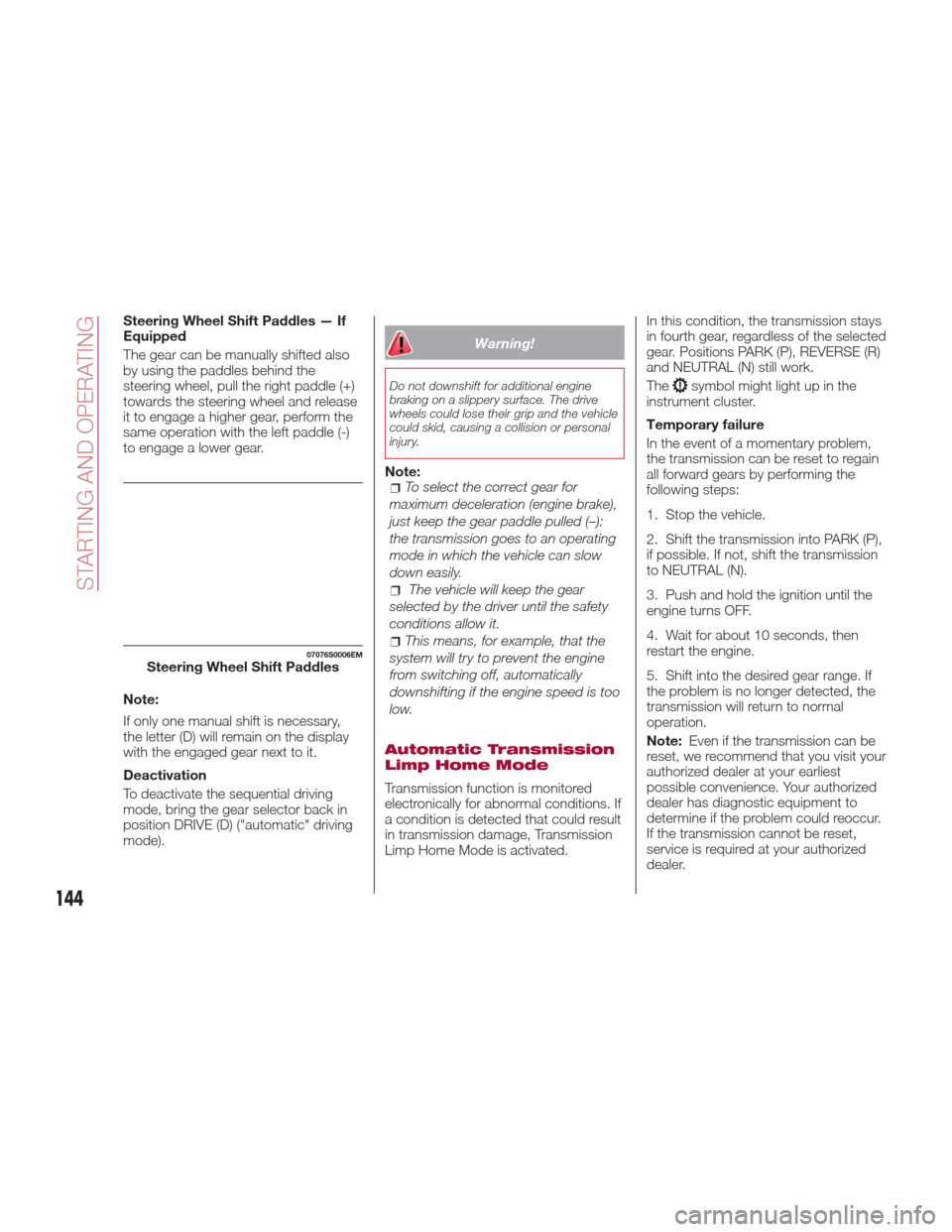
Steering Wheel Shift Paddles — If
Equipped
The gear can be manually shifted also
by using the paddles behind the
steering wheel, pull the right paddle (+)
towards the steering wheel and release
it to engage a higher gear, perform the
same operation with the left paddle (-)
to engage a lower gear.
Note:
If only one manual shift is necessary,
the letter (D) will remain on the display
with the engaged gear next to it.
Deactivation
To deactivate the sequential driving
mode, bring the gear selector back in
position DRIVE (D) ("automatic" driving
mode).
Warning!
Do not downshift for additional engine
braking on a slippery surface. The drive
wheels could lose their grip and the vehicle
could skid, causing a collision or personal
injury.
Note:To select the correct gear for
maximum deceleration (engine brake),
just keep the gear paddle pulled (–):
the transmission goes to an operating
mode in which the vehicle can slow
down easily.
The vehicle will keep the gear
selected by the driver until the safety
conditions allow it.
This means, for example, that the
system will try to prevent the engine
from switching off, automatically
downshifting if the engine speed is too
low.
Automatic Transmission
Limp Home Mode
Transmission function is monitored
electronically for abnormal conditions. If
a condition is detected that could result
in transmission damage, Transmission
Limp Home Mode is activated. In this condition, the transmission stays
in fourth gear, regardless of the selected
gear. Positions PARK (P), REVERSE (R)
and NEUTRAL (N) still work.
The
symbol might light up in the
instrument cluster.
Temporary failure
In the event of a momentary problem,
the transmission can be reset to regain
all forward gears by performing the
following steps:
1. Stop the vehicle.
2. Shift the transmission into PARK (P),
if possible. If not, shift the transmission
to NEUTRAL (N).
3. Push and hold the ignition until the
engine turns OFF.
4. Wait for about 10 seconds, then
restart the engine.
5. Shift into the desired gear range. If
the problem is no longer detected, the
transmission will return to normal
operation.
Note: Even if the transmission can be
reset, we recommend that you visit your
authorized dealer at your earliest
possible convenience. Your authorized
dealer has diagnostic equipment to
determine if the problem could reoccur.
If the transmission cannot be reset,
service is required at your authorized
dealer.
07076S0006EMSteering Wheel Shift Paddles
144
STARTING AND OPERATING