instrument panel ALFA ROMEO GIULIA 2021 User Guide
[x] Cancel search | Manufacturer: ALFA ROMEO, Model Year: 2021, Model line: GIULIA, Model: ALFA ROMEO GIULIA 2021Pages: 284, PDF Size: 8.87 MB
Page 51 of 284
49
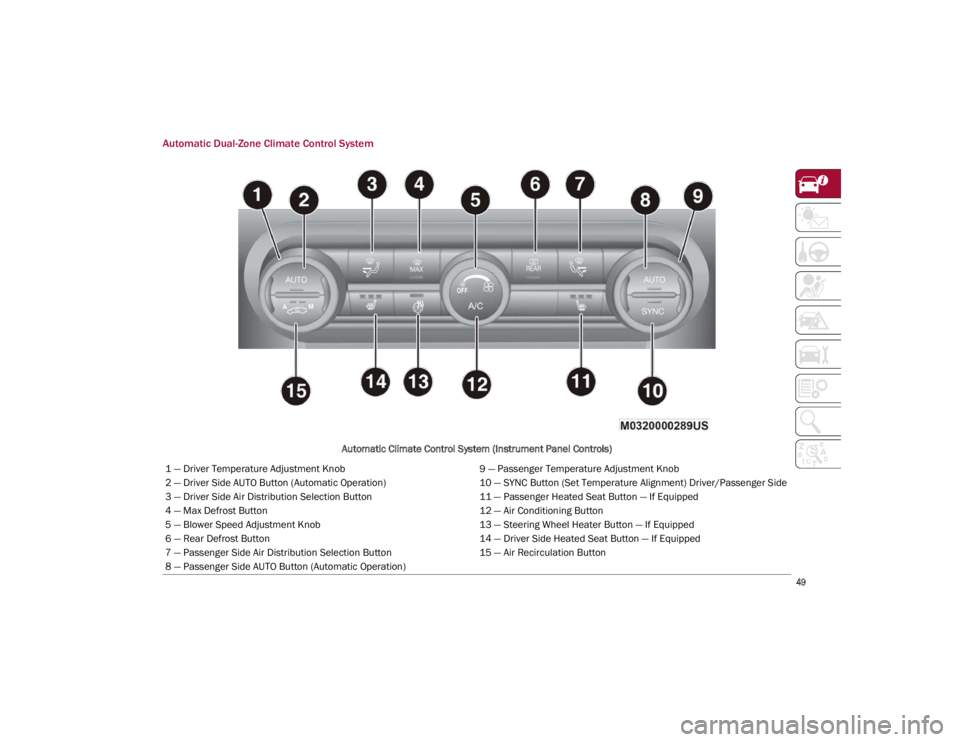
Automatic Dual-Zone Climate Control System
Automatic Climate Control System (Instrument Panel Controls)
1 — Driver Temperature Adjustment Knob 9 — Passenger Temperature Adjustment Knob
2 — Driver Side AUTO Button (Automatic Operation) 10 — SYNC Button (Set Temperature Alignment) Driver/Passenger Side
3 — Driver Side Air Distribution Selection Button 11 — Passenger Heated Seat Button — If Equipped
4 — Max Defrost Button 12 — Air Conditioning Button
5 — Blower Speed Adjustment Knob 13 — Steering Wheel Heater Button — If Equipped
6 — Rear Defrost Button 14 — Driver Side Heated Seat Button — If Equipped
7 — Passenger Side Air Distribution Selection Button 15 — Air Recirculation Button
8 — Passenger Side AUTO Button (Automatic Operation)
21_GA_OM_EN_USC_t.book Page 49
Page 56 of 284
GETTING TO KNOW YOUR VEHICLE
54
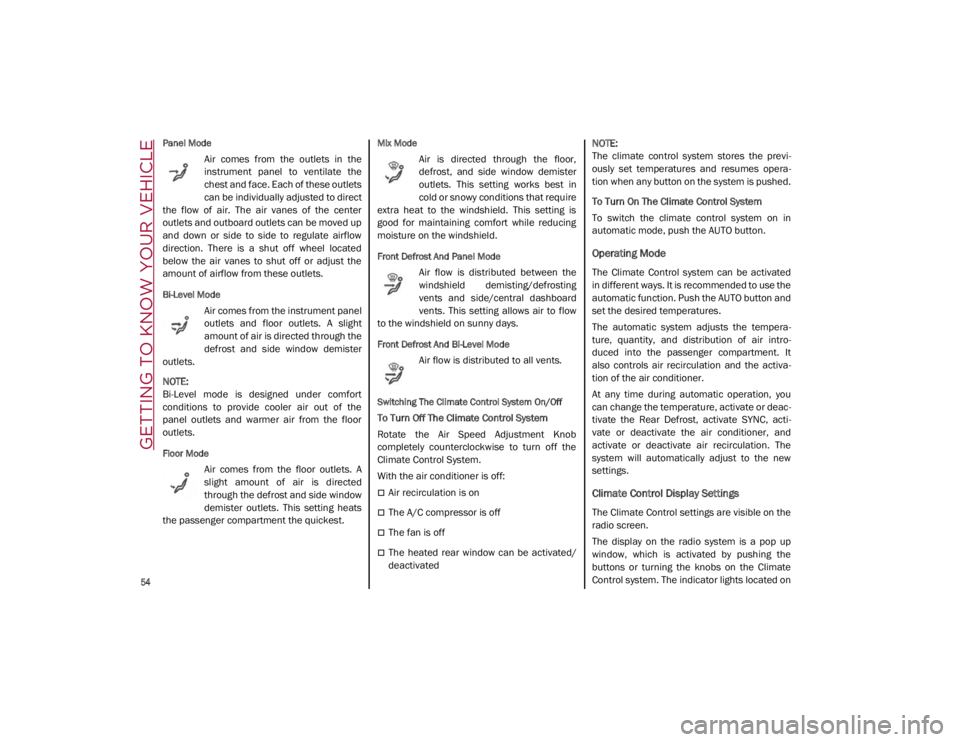
Panel Mode
Air comes from the outlets in the
instrument panel to ventilate the
chest and face. Each of these outlets
can be individually adjusted to direct
the flow of air. The air vanes of the center
outlets and outboard outlets can be moved up
and down or side to side to regulate airflow
direction. There is a shut off wheel located
below the air vanes to shut off or adjust the
amount of airflow from these outlets.
Bi-Level Mode
Air comes from the instrument panel
outlets and floor outlets. A slight
amount of air is directed through the
defrost and side window demister
outlets.
NOTE:
Bi-Level mode is designed under comfort
conditions to provide cooler air out of the
panel outlets and warmer air from the floor
outlets.
Floor Mode
Air comes from the floor outlets. A
slight amount of air is directed
through the defrost and side window
demister outlets. This setting heats
the passenger compartment the quickest.
Mix Mode
Air is directed through the floor,
defrost, and side window demister
outlets. This setting works best in
cold or snowy conditions that require
extra heat to the windshield. This setting is
good for maintaining comfort while reducing
moisture on the windshield.
Front Defrost And Panel Mode
Air flow is distributed between the
windshield demisting/defrosting
vents and side/central dashboard
vents. This setting allows air to flow
to the windshield on sunny days.
Front Defrost And Bi-Level Mode
Air flow is distributed to all vents.
Switching The Climate Control System On/Off
To Turn Off The Climate Control System
Rotate the Air Speed Adjustment Knob
completely counterclockwise to turn off the
Climate Control System.
With the air conditioner is off:
Air recirculation is on
The A/C compressor is off
The fan is off
The heated rear window can be activated/
deactivated
NOTE:
The climate control system stores the previ
-
ously set temperatures and resumes opera -
tion when any button on the system is pushed.
To Turn On The Climate Control System
To switch the climate control system on in
automatic mode, push the AUTO button.
Operating Mode
The Climate Control system can be activated
in different ways. It is recommended to use the
automatic function. Push the AUTO button and
set the desired temperatures.
The automatic system adjusts the tempera -
ture, quantity, and distribution of air intro -
duced into the passenger compartment. It
also controls air recirculation and the activa -
tion of the air conditioner.
At any time during automatic operation, you
can change the temperature, activate or deac -
tivate the Rear Defrost, activate SYNC, acti -
vate or deactivate the air conditioner, and
activate or deactivate air recirculation. The
system will automatically adjust to the new
settings.
Climate Control Display Settings
The Climate Control settings are visible on the
radio screen.
The display on the radio system is a pop up
window, which is activated by pushing the
buttons or turning the knobs on the Climate
Control system. The indicator lights located on
21_GA_OM_EN_USC_t.book Page 54
Page 57 of 284
55
the number of buttons and knobs indicate that
the selected feature is on/off. If no operation
is performed for a predetermined time, the
pop-up will close on the display.
Humidity Sensor
The Humidity Sensor helps prevent the
windows from fogging up. The AUTO function
(indicator illuminated) must be on for the
Humidity Sensor to function.
When outside temperature is low, the system
may turn the compressor on and turn air recir-
culation off for safer driving.
Stop/Start
The Stop/Start system shuts off the engine
when the vehicle speed is 0 mph (0 km/h), as
a fuel conservation measure.
In order to maintain comfort in the cabin, the
Stop/Start feature will not activate if any of the
following conditions exist:
The climate control system is in AUTO mode
(indicator illuminated), and the vehicle has
yet to reach the set temperature
The climate control system is in LO maximum
cooling
The climate control system is in HI maximum
heating
The climate control system is in the MAX-DEF
status
When the Stop/Start system is active, the
engine will restart if the inside temperature
changes significantly, or if the LO setting, or
MAX-DEF setting, is activated.
With Stop/Start system on (engine is off), air
flow is reduced to keep the compartment
comfort conditions for longer.
Until the temperature drastically changes within
the cabin, the climate control system will
continue to maintain the temperature while the
engine is off. By deactivating the Stop/Start
system with the button (located by the head
-
light switch), the climate control system operates
normally according to the settings.
NOTE:
In harsh climate conditions, limit the use of
the Stop/Start system to prevent the
compressor from continuously switching on
and off. This will prevent rapid misting of the
windows and the accumulation of humidity
in the passenger compartment.
When the Stop/Start system is on, the
climate control system will always take air in
from outside, reducing the probability of the
windows fogging up.
System Maintenance
In winter months, the Climate Control system
must be turned on at least once a month for
approximately ten minutes.
Have the system inspected at an authorized
dealer before the summer.
INTERIOR STORAGE AND
EQUIPMENT
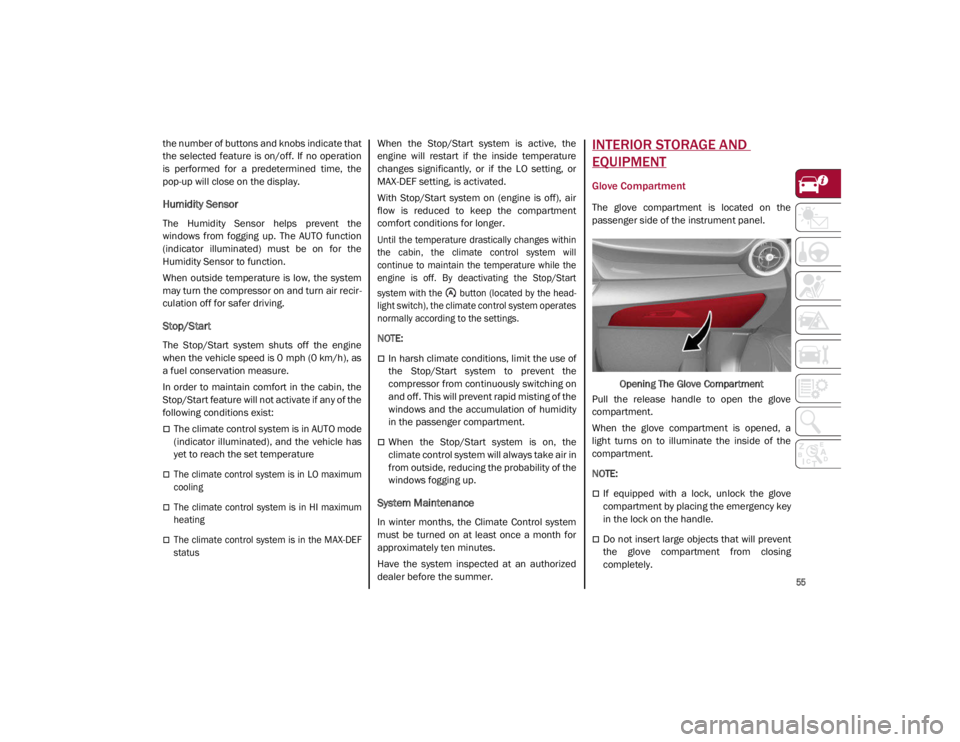
Glove Compartment
The glove compartment is located on the
passenger side of the instrument panel.
Opening The Glove Compartment
Pull the release handle to open the glove
compartment.
When the glove compartment is opened, a
light turns on to illuminate the inside of the
compartment.
NOTE:
If equipped with a lock, unlock the glove
compartment by placing the emergency key
in the lock on the handle.
Do not insert large objects that will prevent
the glove compartment from closing
completely.
21_GA_OM_EN_USC_t.book Page 55
Page 64 of 284
GETTING TO KNOW YOUR VEHICLE
62
HOOD
Opening
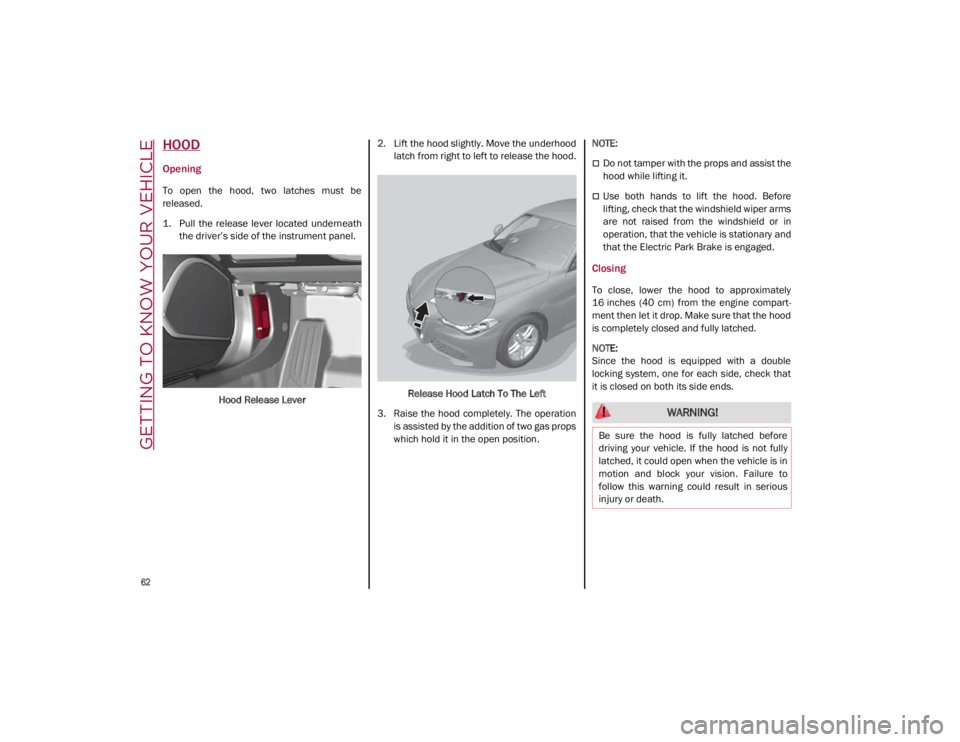
To open the hood, two latches must be
released.
1. Pull the release lever located underneaththe driver’s side of the instrument panel.
Hood Release Lever 2. Lift the hood slightly. Move the underhood
latch from right to left to release the hood.
Release Hood Latch To The Left
3. Raise the hood completely. The operation is assisted by the addition of two gas props
which hold it in the open position.
NOTE:
Do not tamper with the props and assist the
hood while lifting it.
Use both hands to lift the hood. Before
lifting, check that the windshield wiper arms
are not raised from the windshield or in
operation, that the vehicle is stationary and
that the Electric Park Brake is engaged.
Closing
To close, lower the hood to approximately
16 inches (40 cm) from the engine compart
-
ment then let it drop. Make sure that the hood
is completely closed and fully latched.
NOTE:
Since the hood is equipped with a double
locking system, one for each side, check that
it is closed on both its side ends.
WARNING!
Be sure the hood is fully latched before
driving your vehicle. If the hood is not fully
latched, it could open when the vehicle is in
motion and block your vision. Failure to
follow this warning could result in serious
injury or death.
21_GA_OM_EN_USC_t.book Page 62
Page 67 of 284

65
ENVIRONMENTAL PROTECTION
SYSTEMS
The following systems are used for reducing
engine emissions:
Catalytic Converter
Oxygen Sensors
Evaporation Control System
ACTIVE AERODYNAMIC SPOILER
(QUADRIFOGLIO VEHICLES)
Carbon Fiber Active Aero Front Spoiler
This is an automatic device working at the
vehicle speed to regulate air flow in the lower
part of the vehicle. It allows higher reactivity at
average speeds and higher vehicle stability at
high speeds.
NOTE:
The Active Aero Spoiler is active in the
Dynamic or RACE mode of the Alfa DNA Pro
Selector; it is not active in any mode when
external temperatures are near or below zero.Front Fascia
If there is a fault, a generic failure icon will light
up on the instrument panel display, along with
a message that will identify the type of
malfunction. See an authorized dealer if a
fault occurs.
21_GA_OM_EN_USC_t.book Page 65
Page 68 of 284
66
GETTING TO KNOW YOUR INSTRUMENT PANEL
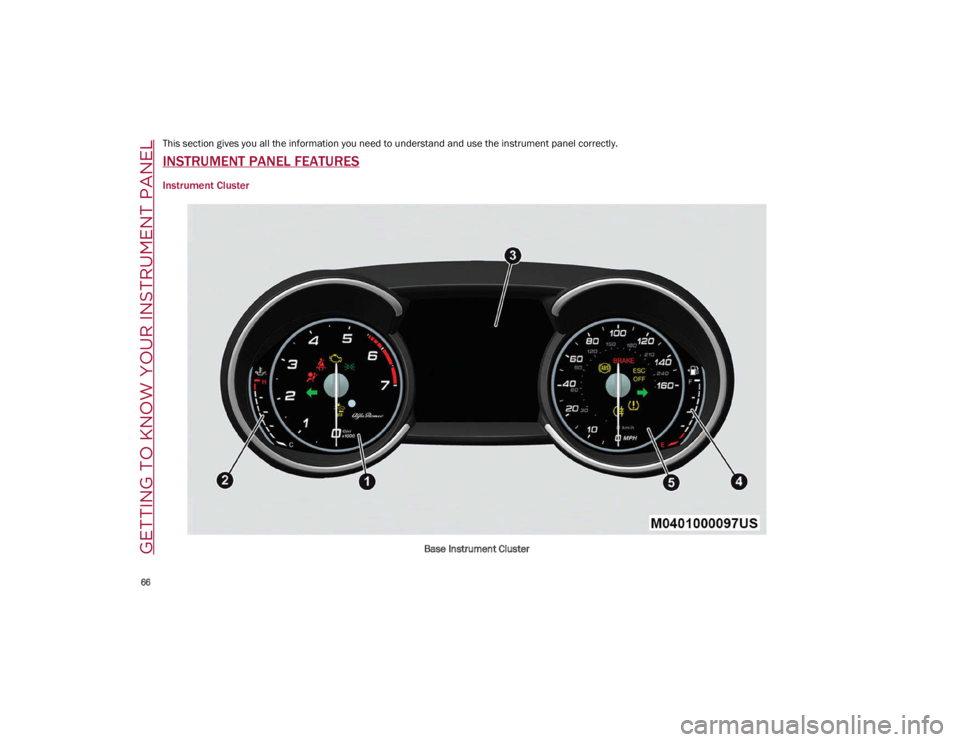
This section gives you all the information you need to understand and use the instrument panel correctly.
INSTRUMENT PANEL FEATURES
Instrument Cluster
Base Instrument Cluster
21_GA_OM_EN_USC_t.book Page 66
Page 69 of 284

67
Quadrifoglio Instrument Cluster
1. Tachometer
2. Digital Engine Oil Temperature Gauge With Overheating Warning Light
3. Driver Interactive Display
4. Digital Fuel Level Gauge (The triangle on the left side of the symbol indicates that
the Fuel Door Location is on the left side of
the vehicle)
5. Speedometer (Speed Indicator)
Tachometer
The Tachometer indicates the engine Revolu -
tions Per Minute (Giri).
Adjusting Instrument Panel Lighting (Bright -
ness Sensor)
Inside the Tachometer there is a light sensor
capable of detecting light and adjusting the
brightness of the instrument panel and the
Information and Entertainment System display.
Engine Oil Temperature Gauge
The digital indicator monitors the temperature
of the engine oil and starts supplying indica -
tions when the oil temperature reaches
approximately 122°F (50°C).
Under normal usage, the temperature should
remain around the middle of the digital scale
according to the working conditions.
21_GA_OM_EN_USC_t.book Page 67
Page 70 of 284
GETTING TO KNOW YOUR INSTRUMENT PANEL
68
The Engine Oil Temperature warning light
will turn on to signal the excessive increase of
the engine oil temperature.
In the event of excessive engine oil tempera-
ture, stop the engine immediately and contact
an authorized dealer.
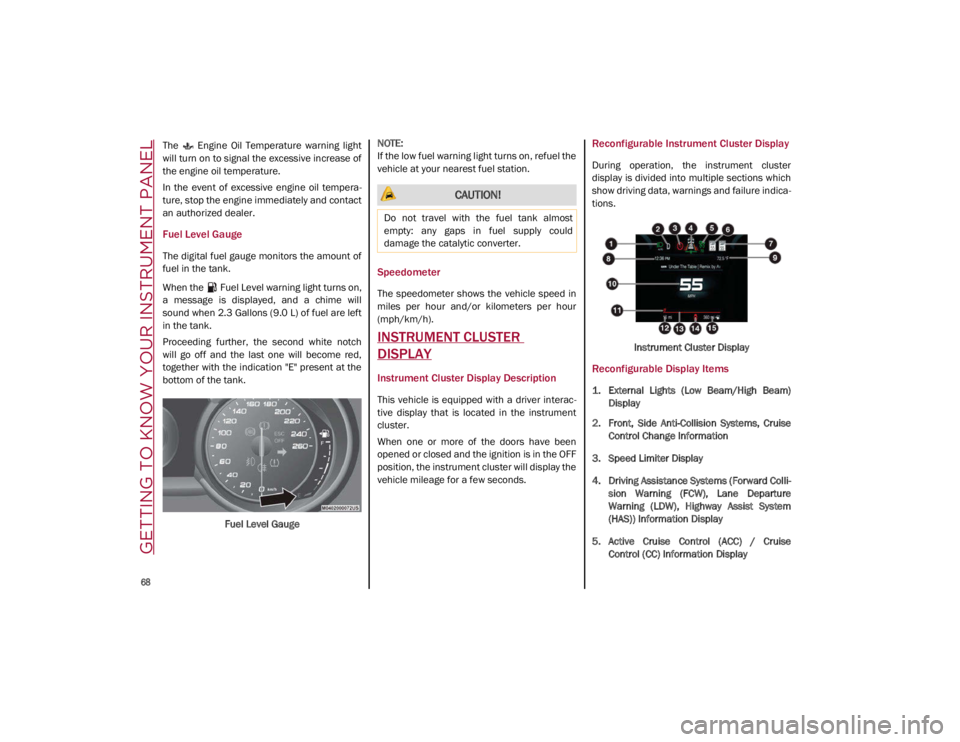
Fuel Level Gauge
The digital fuel gauge monitors the amount of
fuel in the tank.
When the Fuel Level warning light turns on,
a message is displayed, and a chime will
sound when 2.3 Gallons (9.0 L) of fuel are left
in the tank.
Proceeding further, the second white notch
will go off and the last one will become red,
together with the indication "E" present at the
bottom of the tank.
Fuel Level Gauge
NOTE:
If the low fuel warning light turns on, refuel the
vehicle at your nearest fuel station.
Speedometer
The speedometer shows the vehicle speed in
miles per hour and/or kilometers per hour
(mph/km/h).
INSTRUMENT CLUSTER
DISPLAY
Instrument Cluster Display Description
This vehicle is equipped with a driver interac
-
tive display that is located in the instrument
cluster.
When one or more of the doors have been
opened or closed and the ignition is in the OFF
position, the instrument cluster will display the
vehicle mileage for a few seconds.
Reconfigurable Instrument Cluster Display
During operation, the instrument cluster
display is divided into multiple sections which
show driving data, warnings and failure indica -
tions.
Instrument Cluster Display
Reconfigurable Display Items
1. External Lights (Low Beam/High Beam)Display
2. Front, Side Anti-Collision Systems, Cruise Control Change Information
3. Speed Limiter Display
4. Driving Assistance Systems (Forward Colli -
sion Warning (FCW), Lane Departure
Warning (LDW), Highway Assist System
(HAS)) Information Display
5. Active Cruise Control (ACC) / Cruise Control (CC) Information Display
CAUTION!
Do not travel with the fuel tank almost
empty: any gaps in fuel supply could
damage the catalytic converter.
21_GA_OM_EN_USC_t.book Page 68
Page 72 of 284
GETTING TO KNOW YOUR INSTRUMENT PANEL
70
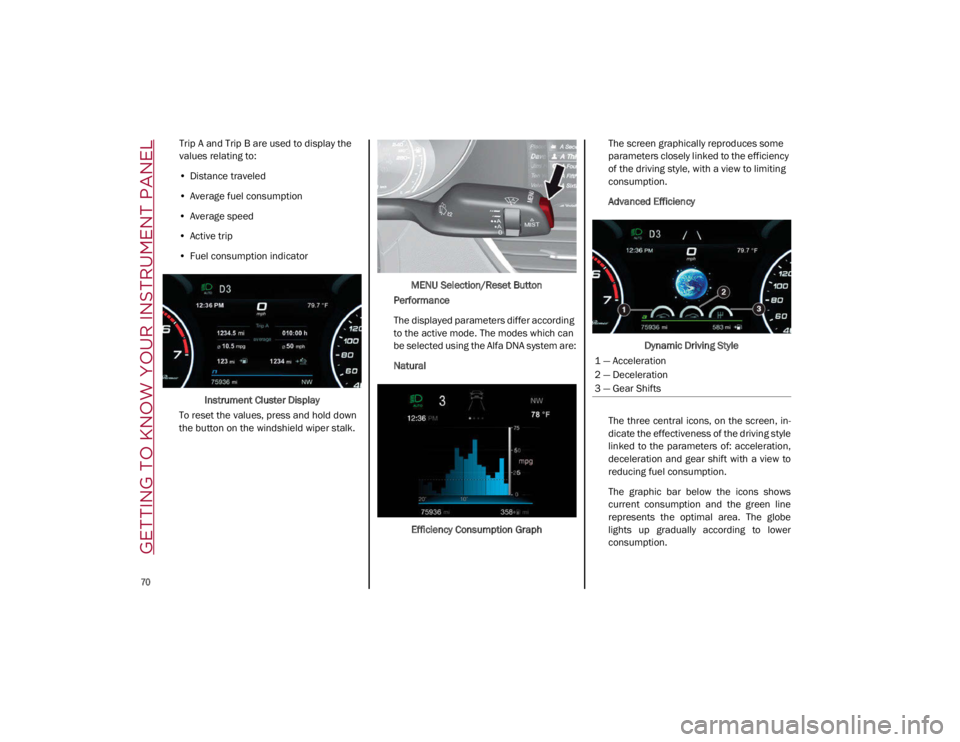
Trip A and Trip B are used to display the
values relating to:
• Distance traveled
• Average fuel consumption
• Average speed
• Active trip
• Fuel consumption indicator
Instrument Cluster Display
To reset the values, press and hold down
the button on the windshield wiper stalk. MENU Selection/Reset Button
Performance
The displayed parameters differ according
to the active mode. The modes which can
be selected using the Alfa DNA system are:
Natural
Efficiency Consumption Graph The screen graphically reproduces some
parameters closely linked to the efficiency
of the driving style, with a view to limiting
consumption.
Advanced Efficiency
Dynamic Driving Style
The three central icons, on the screen, in -
dicate the effectiveness of the driving style
linked to the parameters of: acceleration,
deceleration and gear shift with a view to
reducing fuel consumption.
The graphic bar below the icons shows
current consumption and the green line
represents the optimal area. The globe
lights up gradually according to lower
consumption.
1 — Acceleration
2 — Deceleration
3 — Gear Shifts
21_GA_OM_EN_USC_t.book Page 70
Page 74 of 284
GETTING TO KNOW YOUR INSTRUMENT PANEL
72
11. Driving Mode Display (Alfa DNA System)
12. Distance Traveled (miles/km) display
13. Fuel Consumption
14. Warning Indications Display (e.g. danger ofice, open doors, ABS operation, etc.)
15. Range
Customer Programmable Settings
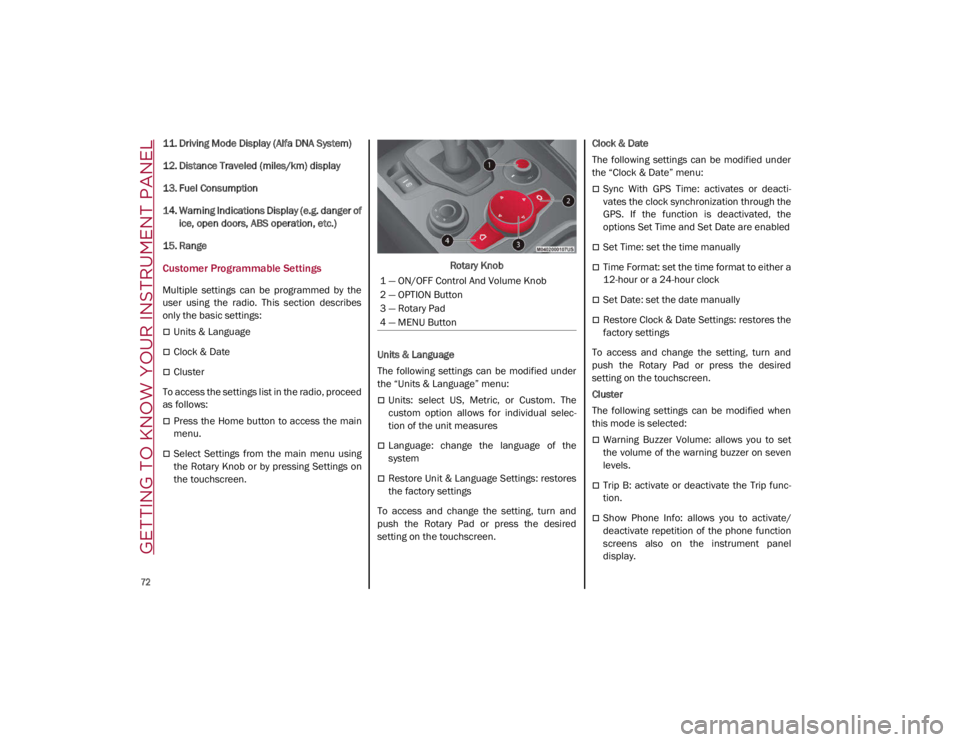
Multiple settings can be programmed by the
user using the radio. This section describes
only the basic settings:
Units & Language
Clock & Date
Cluster
To access the settings list in the radio, proceed
as follows:
Press the Home button to access the main
menu.
Select Settings from the main menu using
the Rotary Knob or by pressing Settings on
the touchscreen. Rotary Knob
Units & Language
The following settings can be modified under
the “Units & Language” menu:
Units: select US, Metric, or Custom. The
custom option allows for individual selec -
tion of the unit measures
Language: change the language of the
system
Restore Unit & Language Settings: restores
the factory settings
To access and change the setting, turn and
push the Rotary Pad or press the desired
setting on the touchscreen. Clock & Date
The following settings can be modified under
the “Clock & Date” menu:
Sync With GPS Time: activates or deacti
-
vates the clock synchronization through the
GPS. If the function is deactivated, the
options Set Time and Set Date are enabled
Set Time: set the time manually
Time Format: set the time format to either a
12-hour or a 24-hour clock
Set Date: set the date manually
Restore Clock & Date Settings: restores the
factory settings
To access and change the setting, turn and
push the Rotary Pad or press the desired
setting on the touchscreen.
Cluster
The following settings can be modified when
this mode is selected:
Warning Buzzer Volume: allows you to set
the volume of the warning buzzer on seven
levels.
Trip B: activate or deactivate the Trip func -
tion.
Show Phone Info: allows you to activate/
deactivate repetition of the phone function
screens also on the instrument panel
display.
1 — ON/OFF Control And Volume Knob
2 — OPTION Button
3 — Rotary Pad
4 — MENU Button
21_GA_OM_EN_USC_t.book Page 72