display ALFA ROMEO GIULIA 2023 Workshop Manual
[x] Cancel search | Manufacturer: ALFA ROMEO, Model Year: 2023, Model line: GIULIA, Model: ALFA ROMEO GIULIA 2023Pages: 248, PDF Size: 9.62 MB
Page 121 of 248
119
TURNING LANE DEPARTURE WARNING
O
N OR OFF
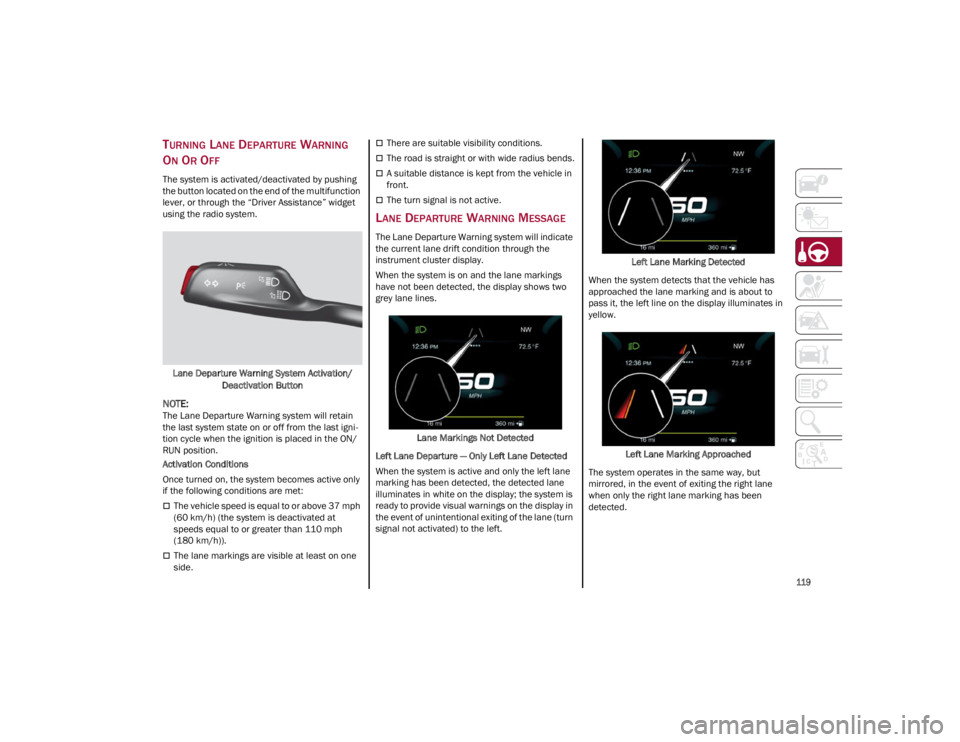
The system is activated/deactivated by pushing
the button located on the end of the multifunction
lever, or through the “Driver Assistance” widget
using the radio system.
Lane Departure Warning System Activation/ Deactivation Button
NOTE:
The Lane Departure Warning system will retain
the last system state on or off from the last igni -
tion cycle when the ignition is placed in the ON/
RUN position.
Activation Conditions
Once turned on, the system becomes active only
if the following conditions are met:
The vehicle speed is equal to or above 37 mph
(60 km/h) (the system is deactivated at
speeds equal to or greater than 110 mph
(180 km/h)).
The lane markings are visible at least on one
side.
There are suitable visibility conditions.
The road is straight or with wide radius bends.
A suitable distance is kept from the vehicle in
front.
The turn signal is not active.
LANE DEPARTURE WARNING MESSAGE
The Lane Departure Warning system will indicate
the current lane drift condition through the
instrument cluster display.
When the system is on and the lane markings
have not been detected, the display shows two
grey lane lines.
Lane Markings Not Detected
Left Lane Departure — Only Left Lane Detected
When the system is active and only the left lane
marking has been detected, the detected lane
illuminates in white on the display; the system is
ready to provide visual warnings on the display in
the event of unintentional exiting of the lane (turn
signal not activated) to the left. Left Lane Marking Detected
When the system detects that the vehicle has
approached the lane marking and is about to
pass it, the left line on the display illuminates in
yellow.
Left Lane Marking Approached
The system operates in the same way, but
mirrored, in the event of exiting the right lane
when only the right lane marking has been
detected.
23_GA_OM_EN_USC_t.book Page 119
Page 122 of 248
STARTING AND OPERATING
120
Left Lane Departure — Both Lanes Detected
When the system is active, both lane lines on the
display illuminate in white to indicate that both of
the lane markings have been detected.
When lane markings are detected, the system is
ready to provide indications in case the driver
unintentionally leaves the lane (turn signal not
activated).
As the Lane Departure Warning system detects
the lane markings while the vehicle is in motion,
it will adjust the display accordingly (from white to
yellow and vice versa, and increase their
thickness).
If a lane line is crossed, the driver is alerted by an
audible signal as well as the visual indication in
the instrument cluster. The signal is emitted
through the speakers on the side of the lane
marking which is being crossed (e.g. if the vehicle
is exceeding the left line of the lane, the audible
signal will come from the speakers on the left of
the vehicle).
Limited Operation Warning
If a message appears on the display, a condition
limiting the Lane Departure Warning system
operation may have occurred. This could be an
obstruction of the camera view, or a fault in the
system.
If an obstruction is detected, clean the area of the
windshield by the interior rearview mirror.
Although the vehicle can still be driven in normal
conditions, the system may not function properly.
When the conditions limiting the system are
corrected, it will go back to normal operation.
Should a fault persist, contact an authorized
dealer.System Failure Warning
If the system turns off and the warning light
appears on the display, it means that there is a
system fault.
In this case, it is still possible to drive the vehicle,
but you are advised to contact an authorized
dealer as soon as possible.
CHANGING LANE DEPARTURE WARNING
S
TATUS
The system's sensitivity can be set through the
radio system. Sensitivity “High” or “Low” can be
selected.
To access the function, from the main menu
select the following in order:
1. Driver Assistance
2. Lane Departure Warning
3. Sensitivity
LANE KEEPING ASSIST
(LKA) SYSTEM —
IF EQUIPPED
The Lane Keeping Assist (LKA) system uses a
camera located on the windshield to detect the
lane markings and calculate the position of the
vehicle within such markings, in order to make
sure that the vehicle remains inside the lane. This
is an active system that will apply torque to the
steering wheel if it senses that the vehicle is
drifting out of the lane. When one or both lane markings are detected
and the vehicle passes over one without a turn
signal being applied, the system will apply torque
to the steering wheel and a visual signal will be
displayed in the instrument cluster display. An
audible signal may also sound.
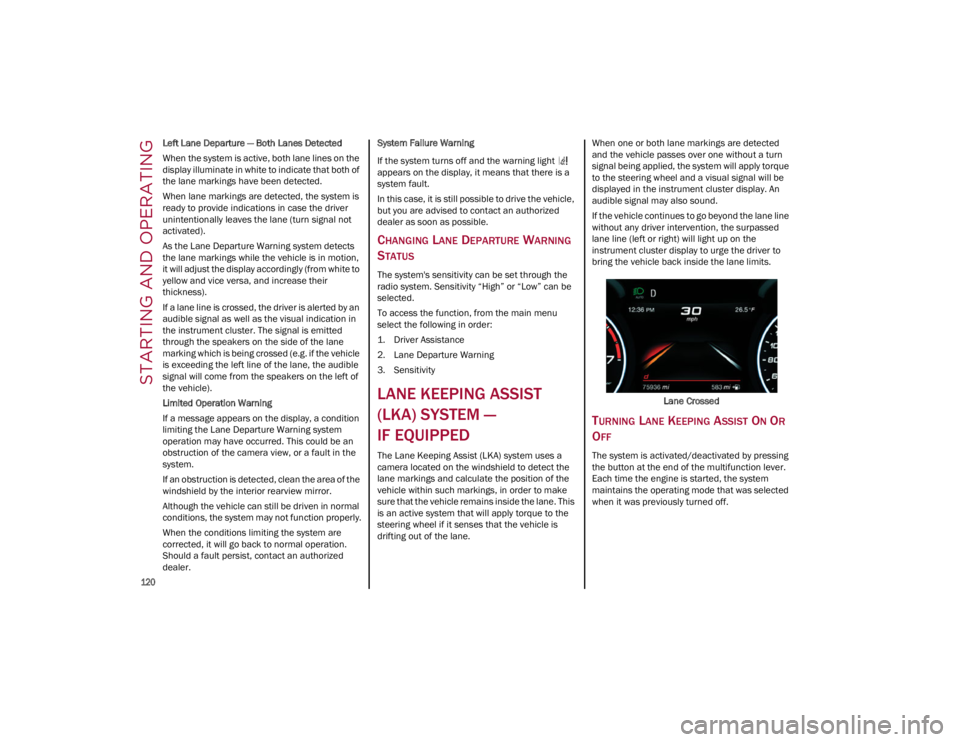
If the vehicle continues to go beyond the lane line
without any driver intervention, the surpassed
lane line (left or right) will light up on the
instrument cluster display to urge the driver to
bring the vehicle back inside the lane limits.
Lane Crossed
TURNING LANE KEEPING ASSIST ON OR
O
FF
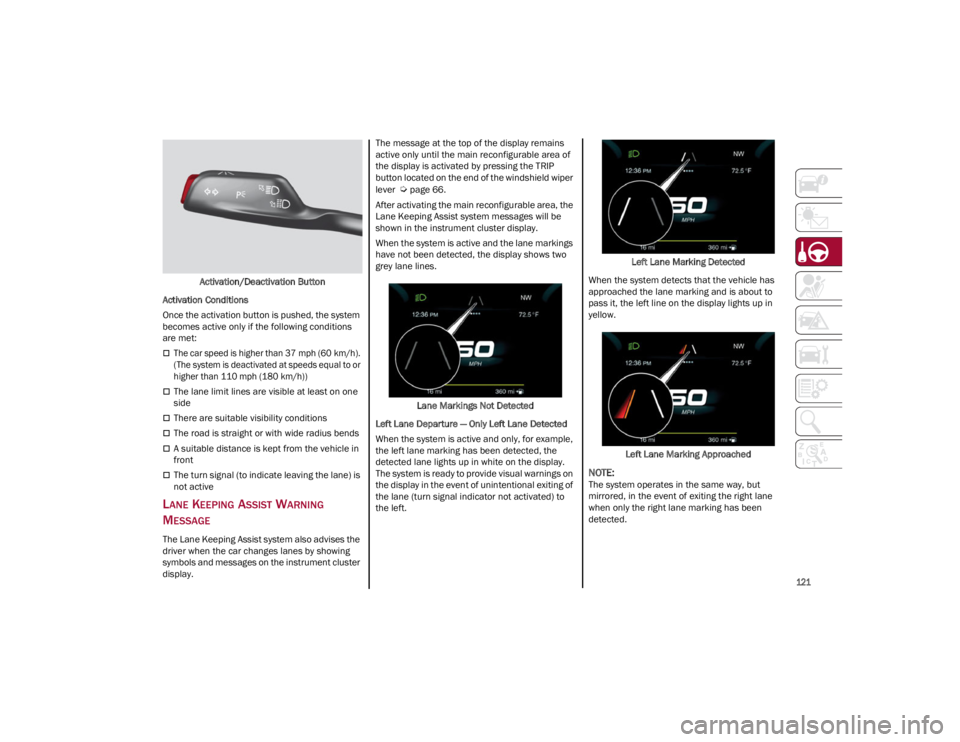
The system is activated/deactivated by pressing
the button at the end of the multifunction lever.
Each time the engine is started, the system
maintains the operating mode that was selected
when it was previously turned off.
23_GA_OM_EN_USC_t.book Page 120
Page 123 of 248
121
Activation/Deactivation Button
Activation Conditions
Once the activation button is pushed, the system
becomes active only if the following conditions
are met:
The car speed is higher than 37 mph (60 km/h). (The system is deactivated at speeds equal to or
higher than 110 mph (180 km/h))
The lane limit lines are visible at least on one
side
There are suitable visibility conditions
The road is straight or with wide radius bends
A suitable distance is kept from the vehicle in
front
The turn signal (to indicate leaving the lane) is
not active
LANE KEEPING ASSIST WARNING
M
ESSAGE
The Lane Keeping Assist system also advises the
driver when the car changes lanes by showing
symbols and messages on the instrument cluster
display. The message at the top of the display remains
active only until the main reconfigurable area of
the display is activated by pressing the TRIP
button located on the end of the windshield wiper
lever
Ú
page 66.
After activating the main reconfigurable area, the
Lane Keeping Assist system messages will be
shown in the instrument cluster display.
When the system is active and the lane markings
have not been detected, the display shows two
grey lane lines.
Lane Markings Not Detected
Left Lane Departure — Only Left Lane Detected
When the system is active and only, for example,
the left lane marking has been detected, the
detected lane lights up in white on the display.
The system is ready to provide visual warnings on
the display in the event of unintentional exiting of
the lane (turn signal indicator not activated) to
the left. Left Lane Marking Detected
When the system detects that the vehicle has
approached the lane marking and is about to
pass it, the left line on the display lights up in
yellow.
Left Lane Marking Approached
NOTE:
The system operates in the same way, but
mirrored, in the event of exiting the right lane
when only the right lane marking has been
detected.
23_GA_OM_EN_USC_t.book Page 121
Page 124 of 248
STARTING AND OPERATING
122
Left Lane Departure — Both Lanes Detected
When the system is active, both lane lines on the
display illuminate in white to indicate the
successful detection of both limits.
When lane markings are detected, the system is
ready to provide indications in case the driver
unintentionally leaves the lane (turn signal not
activated).
As the Lane Keeping Assist system detects the
lane markings while the vehicle is in motion, it will
adjust the display accordingly (from white to
yellow and yellow to white, and increase their
thickness).
If a lane line is crossed, the driver is alerted by an
audible signal as well as the visual indication in
the instrument cluster. The signal is emitted
through the speakers on the side of the lane
marking which is being crossed (e.g. if the vehicle
is exceeding the left line of the lane, the audible
signal will come from the speakers on the left of
the vehicle).
Hands Presence On The Steering Wheel
Detection
The system is able to detect the presence of the
driver’s hands on the steering wheel.
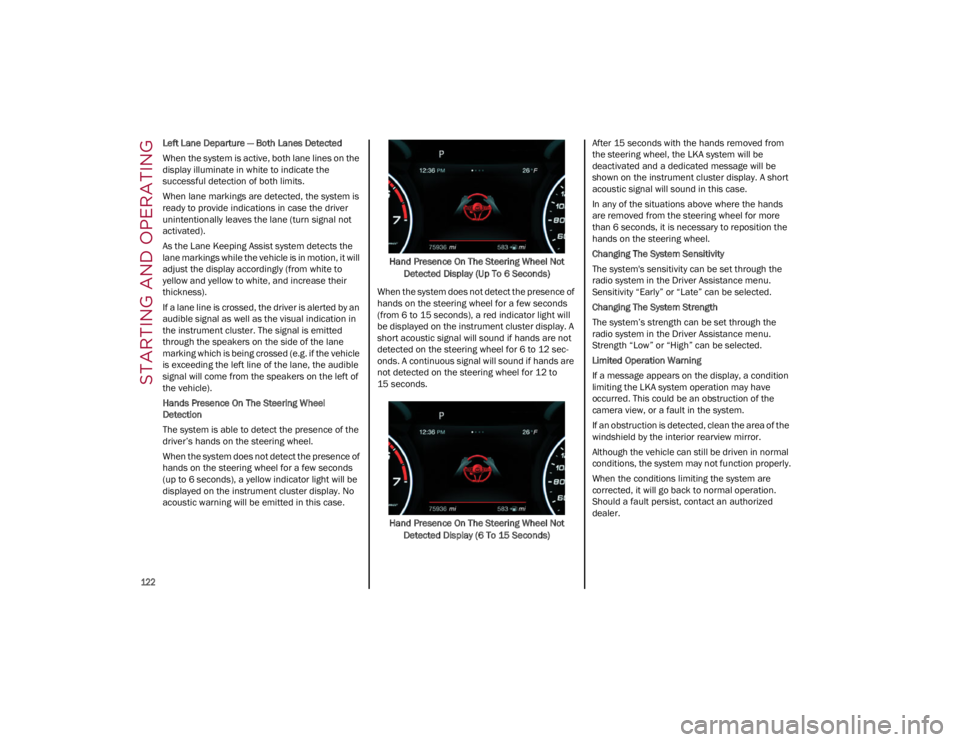
When the system does not detect the presence of
hands on the steering wheel for a few seconds
(up to 6 seconds), a yellow indicator light will be
displayed on the instrument cluster display. No
acoustic warning will be emitted in this case.Hand Presence On The Steering Wheel Not
Detected Display (Up To 6 Seconds)
When the system does not detect the presence of
hands on the steering wheel for a few seconds
(from 6 to 15 seconds), a red indicator light will
be displayed on the instrument cluster display. A
short acoustic signal will sound if hands are not
detected on the steering wheel for 6 to 12 sec-
onds. A continuous signal will sound if hands are
not detected on the steering wheel for 12 to
15 seconds.
Hand Presence On The Steering Wheel Not Detected Display (6 To 15 Seconds) After 15 seconds with the hands removed from
the steering wheel, the LKA system will be
deactivated and a dedicated message will be
shown on the instrument cluster display. A short
acoustic signal will sound in this case.
In any of the situations above where the hands
are removed from the steering wheel for more
than 6 seconds, it is necessary to reposition the
hands on the steering wheel.
Changing The System Sensitivity
The system's sensitivity can be set through the
radio system in the Driver Assistance menu.
Sensitivity “Early” or “Late” can be selected.
Changing The System Strength
The system’s strength can be set through the
radio system in the Driver Assistance menu.
Strength “Low” or “High” can be selected.
Limited Operation Warning
If a message appears on the display, a condition
limiting the LKA system operation may have
occurred. This could be an obstruction of the
camera view, or a fault in the system.
If an obstruction is detected, clean the area of the
windshield by the interior rearview mirror.
Although the vehicle can still be driven in normal
conditions, the system may not function properly.
When the conditions limiting the system are
corrected, it will go back to normal operation.
Should a fault persist, contact an authorized
dealer.
23_GA_OM_EN_USC_t.book Page 122
Page 125 of 248
123
(Continued)
System Failure Signaling
If the system turns off and appears on the
display, it means that there is a system fault.
In this case, it is still possible to drive the vehicle,
but you are advised to contact an authorized
dealer as soon as possible.
REAR BACK UP CAMERA /
DYNAMIC GRIDLINES
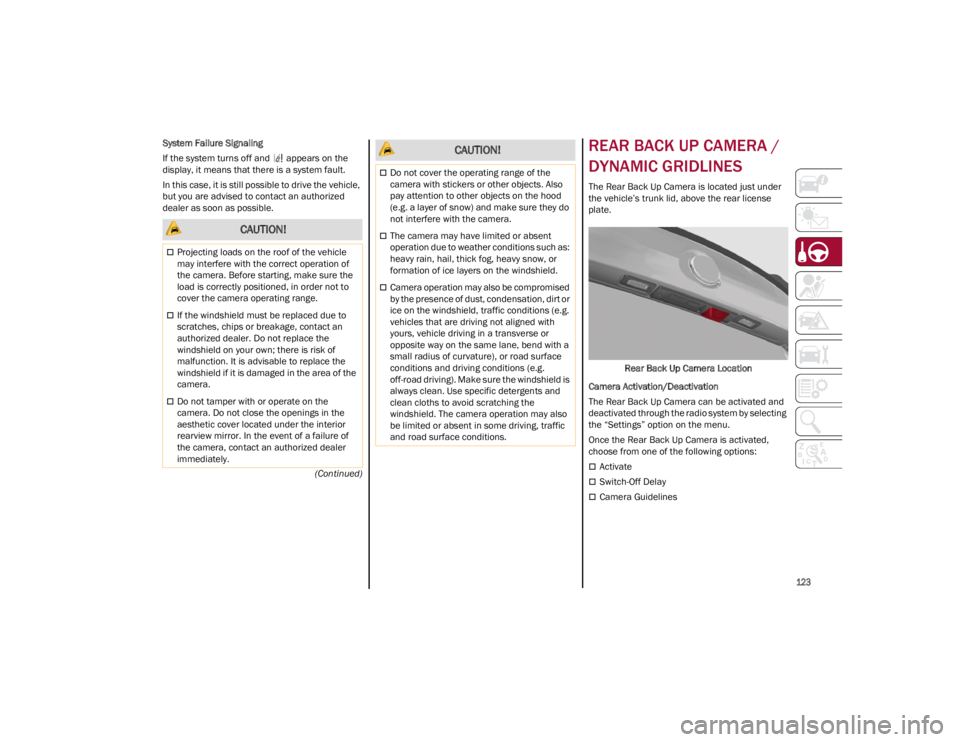
The Rear Back Up Camera is located just under
the vehicle’s trunk lid, above the rear license
plate.
Rear Back Up Camera Location
Camera Activation/Deactivation
The Rear Back Up Camera can be activated and
deactivated through the radio system by selecting
the “Settings” option on the menu.
Once the Rear Back Up Camera is activated,
choose from one of the following options:
Activate
Switch-Off Delay
Camera Guidelines
CAUTION!
Projecting loads on the roof of the vehicle
may interfere with the correct operation of
the camera. Before starting, make sure the
load is correctly positioned, in order not to
cover the camera operating range.
If the windshield must be replaced due to
scratches, chips or breakage, contact an
authorized dealer. Do not replace the
windshield on your own; there is risk of
malfunction. It is advisable to replace the
windshield if it is damaged in the area of the
camera.
Do not tamper with or operate on the
camera. Do not close the openings in the
aesthetic cover located under the interior
rearview mirror. In the event of a failure of
the camera, contact an authorized dealer
immediately.
Do not cover the operating range of the
camera with stickers or other objects. Also
pay attention to other objects on the hood
(e.g. a layer of snow) and make sure they do
not interfere with the camera.
The camera may have limited or absent
operation due to weather conditions such as:
heavy rain, hail, thick fog, heavy snow, or
formation of ice layers on the windshield.
Camera operation may also be compromised
by the presence of dust, condensation, dirt or
ice on the windshield, traffic conditions (e.g.
vehicles that are driving not aligned with
yours, vehicle driving in a transverse or
opposite way on the same lane, bend with a
small radius of curvature), or road surface
conditions and driving conditions (e.g.
off-road driving). Make sure the windshield is
always clean. Use specific detergents and
clean cloths to avoid scratching the
windshield. The camera operation may also
be limited or absent in some driving, traffic
and road surface conditions.
CAUTION!
23_GA_OM_EN_USC_t.book Page 123
Page 126 of 248
STARTING AND OPERATING
124
(Continued)
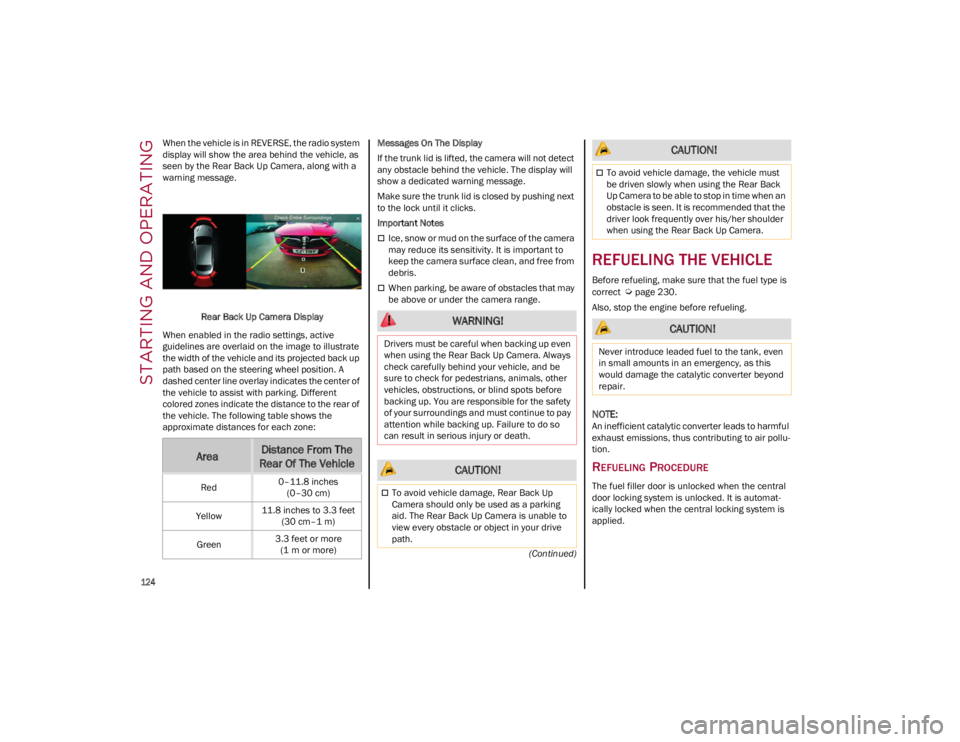
When the vehicle is in REVERSE, the radio system
display will show the area behind the vehicle, as
seen by the Rear Back Up Camera, along with a
warning message.
Rear Back Up Camera Display
When enabled in the radio settings, active
guidelines are overlaid on the image to illustrate
the width of the vehicle and its projected back up
path based on the steering wheel position. A
dashed center line overlay indicates the center of
the vehicle to assist with parking. Different
colored zones indicate the distance to the rear of
the vehicle. The following table shows the
approximate distances for each zone: Messages On The Display
If the trunk lid is lifted, the camera will not detect
any obstacle behind the vehicle. The display will
show a dedicated warning message.
Make sure the trunk lid is closed by pushing next
to the lock until it clicks.
Important Notes
Ice, snow or mud on the surface of the camera
may reduce its sensitivity. It is important to
keep the camera surface clean, and free from
debris.
When parking, be aware of obstacles that may
be above or under the camera range.
REFUELING THE VEHICLE
Before refueling, make sure that the fuel type is
correct
Ú
page 230.
Also, stop the engine before refueling.
NOTE:
An inefficient catalytic converter leads to harmful
exhaust emissions, thus contributing to air pollu -
tion.
REFUELING PROCEDURE
The fuel filler door is unlocked when the central
door locking system is unlocked. It is automat -
ically locked when the central locking system is
applied.
AreaDistance From The
Rear Of The Vehicle
Red 0–11.8 inches
(0–30 cm)
Yellow 11.8 inches to 3.3 feet
(30 cm–1 m)
Green 3.3 feet or more
(1 m or more)
WARNING!
Drivers must be careful when backing up even
when using the Rear Back Up Camera. Always
check carefully behind your vehicle, and be
sure to check for pedestrians, animals, other
vehicles, obstructions, or blind spots before
backing up. You are responsible for the safety
of your surroundings and must continue to pay
attention while backing up. Failure to do so
can result in serious injury or death.
CAUTION!
To avoid vehicle damage, Rear Back Up
Camera should only be used as a parking
aid. The Rear Back Up Camera is unable to
view every obstacle or object in your drive
path.
To avoid vehicle damage, the vehicle must
be driven slowly when using the Rear Back
Up Camera to be able to stop in time when an
obstacle is seen. It is recommended that the
driver look frequently over his/her shoulder
when using the Rear Back Up Camera.
CAUTION!
Never introduce leaded fuel to the tank, even
in small amounts in an emergency, as this
would damage the catalytic converter beyond
repair.
CAUTION!
23_GA_OM_EN_USC_t.book Page 124
Page 137 of 248
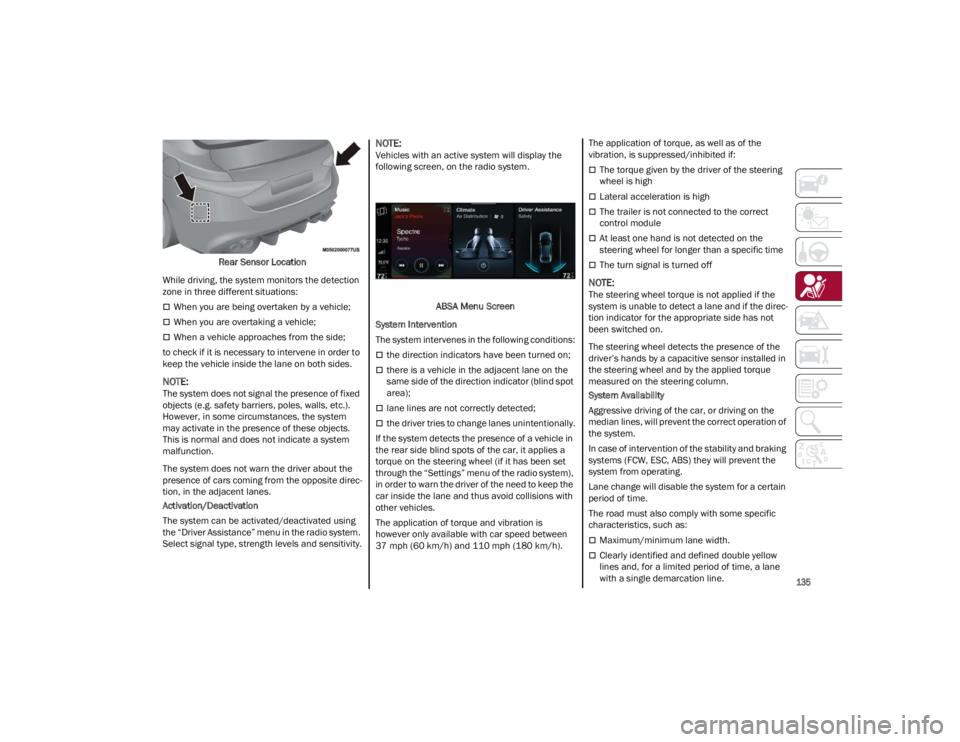
135
Rear Sensor Location
While driving, the system monitors the detection
zone in three different situations:
When you are being overtaken by a vehicle;
When you are overtaking a vehicle;
When a vehicle approaches from the side;
to check if it is necessary to intervene in order to
keep the vehicle inside the lane on both sides.
NOTE:
The system does not signal the presence of fixed
objects (e.g. safety barriers, poles, walls, etc.).
However, in some circumstances, the system
may activate in the presence of these objects.
This is normal and does not indicate a system
malfunction.
The system does not warn the driver about the
presence of cars coming from the opposite direc -
tion, in the adjacent lanes.
Activation/Deactivation
The system can be activated/deactivated using
the “Driver Assistance” menu in the radio system.
Select signal type, strength levels and sensitivity.
NOTE:
Vehicles with an active system will display the
following screen, on the radio system.
ABSA Menu Screen
System Intervention
The system intervenes in the following conditions:
the direction indicators have been turned on;
there is a vehicle in the adjacent lane on the
same side of the direction indicator (blind spot
area);
lane lines are not correctly detected;
the driver tries to change lanes unintentionally.
If the system detects the presence of a vehicle in
the rear side blind spots of the car, it applies a
torque on the steering wheel (if it has been set
through the “Settings” menu of the radio system),
in order to warn the driver of the need to keep the
car inside the lane and thus avoid collisions with
other vehicles.
The application of torque and vibration is
however only available with car speed between
37 mph (60 km/h) and 110 mph (180 km/h). The application of torque, as well as of the
vibration, is suppressed/inhibited if:
The torque given by the driver of the steering
wheel is high
Lateral acceleration is high
The trailer is not connected to the correct
control module
At least one hand is not detected on the
steering wheel for longer than a specific time
The turn signal is turned off
NOTE:
The steering wheel torque is not applied if the
system is unable to detect a lane and if the direc
-
tion indicator for the appropriate side has not
been switched on.
The steering wheel detects the presence of the
driver’s hands by a capacitive sensor installed in
the steering wheel and by the applied torque
measured on the steering column.
System Availability
Aggressive driving of the car, or driving on the
median lines, will prevent the correct operation of
the system.
In case of intervention of the stability and braking
systems (FCW, ESC, ABS) they will prevent the
system from operating.
Lane change will disable the system for a certain
period of time.
The road must also comply with some specific
characteristics, such as:
Maximum/minimum lane width.
Clearly identified and defined double yellow
lines and, for a limited period of time, a lane
with a single demarcation line.
23_GA_OM_EN_USC_t.book Page 135
Page 138 of 248
SAFETY
136
NOTE:
In some cases, for a limited period of time, the
system may be activated by a lane with a single
median line.
In cases of good road surface conditions, the
system could correctly recognize other types of
valid lane markings (e.g. road edges, sidewalks,
etc.).
Hand Presence On The Steering Wheel Detection
The system is able to detect the presence of the
driver’s hands on the steering wheel.
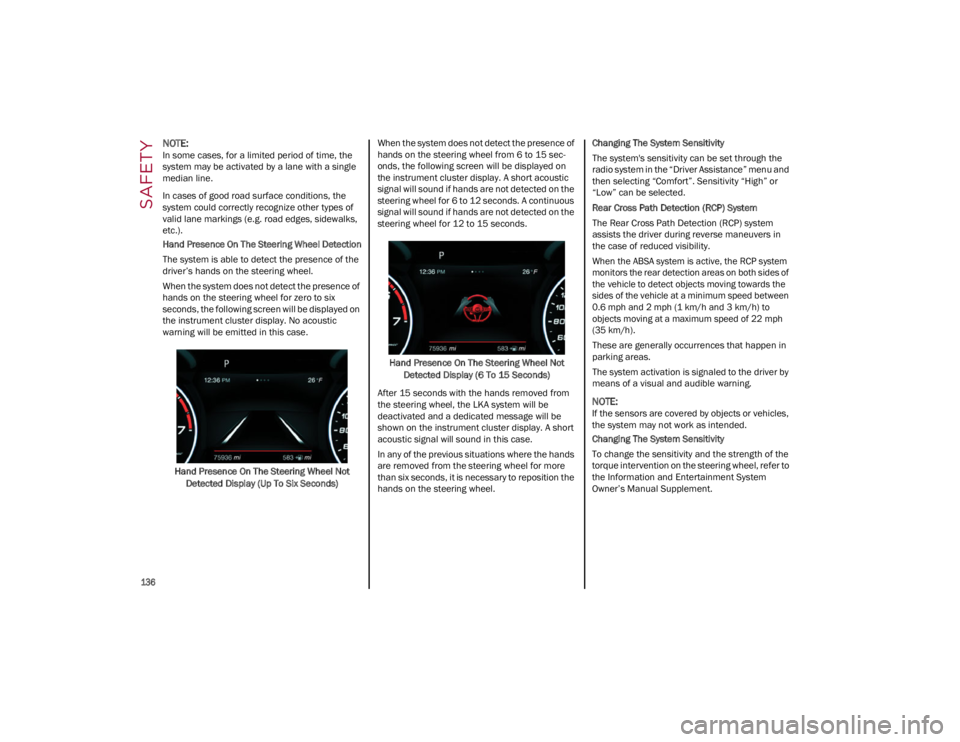
When the system does not detect the presence of
hands on the steering wheel for zero to six
seconds, the following screen will be displayed on
the instrument cluster display. No acoustic
warning will be emitted in this case.Hand Presence On The Steering Wheel Not Detected Display (Up To Six Seconds) When the system does not detect the presence of
hands on the steering wheel from 6 to 15 sec-
onds, the following screen will be displayed on
the instrument cluster display. A short acoustic
signal will sound if hands are not detected on the
steering wheel for 6 to 12 seconds. A continuous
signal will sound if hands are not detected on the
steering wheel for 12 to 15 seconds.
Hand Presence On The Steering Wheel Not Detected Display (6 To 15 Seconds)
After 15 seconds with the hands removed from
the steering wheel, the LKA system will be
deactivated and a dedicated message will be
shown on the instrument cluster display. A short
acoustic signal will sound in this case.
In any of the previous situations where the hands
are removed from the steering wheel for more
than six seconds, it is necessary to reposition the
hands on the steering wheel. Changing The System Sensitivity
The system's sensitivity can be set through the
radio system in the “Driver Assistance” menu and
then selecting “Comfort”. Sensitivity “High” or
“Low” can be selected.
Rear Cross Path Detection (RCP) System
The Rear Cross Path Detection (RCP) system
assists the driver during reverse maneuvers in
the case of reduced visibility.
When the ABSA system is active, the RCP system
monitors the rear detection areas on both sides of
the vehicle to detect objects moving towards the
sides of the vehicle at a minimum speed between
0.6 mph and 2 mph (1 km/h and 3 km/h) to
objects moving at a maximum speed of 22 mph
(35 km/h).
These are generally occurrences that happen in
parking areas.
The system activation is signaled to the driver by
means of a visual and audible warning.
NOTE:
If the sensors are covered by objects or vehicles,
the system may not work as intended.
Changing The System Sensitivity
To change the sensitivity and the strength of the
torque intervention on the steering wheel, refer to
the Information and Entertainment System
Owner’s Manual Supplement.
23_GA_OM_EN_USC_t.book Page 136
Page 139 of 248
137
DRIVER ATTENTION ASSIST (DAA)
S
YSTEM — IF EQUIPPED
The Driver Attention Assist (DAA) system detects
when the driver is feeling fatigued and warns the
driver to pull over and take a break.
To Activate/Deactivate
The DAA system can be activated and deactivated
through the radio system by selecting the
following in order:
1. “Driver Assistance”
2. “Driver Attention Assist”
System Intervention
Using information from the front camera, the
system implements two operating logics:
The first operating logic takes the driving style
into account, observing the road and detecting
to what extent the driver can continue driving
with few lane crossing events.
The second operating logic measures the time
spent behind the wheel with the vehicle speed
above 40 mph (60 km/h) and below 110 mph (180 km/h). If the “Standard” option is
selected, in these conditions, the “Dozy Driver”
message may appear after three hours of
driving. If the “Early” option is selected and
these conditions occur, the “Dozy Driver”
message will be displayed after two hours of
driving.
NOTE:
If the conditions described previously are not
detected continuously during the entire driving
period, the “Dozy Driver” message may be
displayed later than two or three hours. If the
driving style indicates that the driver is unable to
follow the road trajectory and respect the hori-
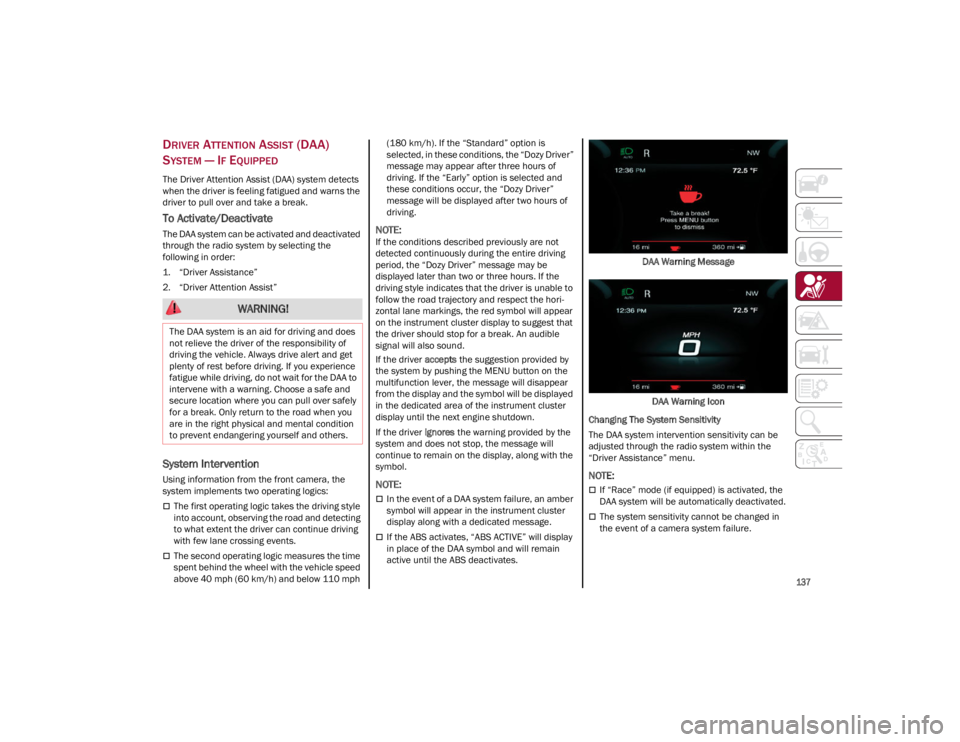
zontal lane markings, the red symbol will appear
on the instrument cluster display to suggest that
the driver should stop for a break. An audible
signal will also sound.
If the driver
accepts the suggestion provided by
the system by pushing the MENU button on the
multifunction lever, the message will disappear
from the display and the symbol will be displayed
in the dedicated area of the instrument cluster
display until the next engine shutdown.
If the driver ignores the warning provided by the
system and does not stop, the message will
continue to remain on the display, along with the
symbol.
NOTE:
In the event of a DAA system failure, an amber
symbol will appear in the instrument cluster
display along with a dedicated message.
If the ABS activates, “ABS ACTIVE” will display
in place of the DAA symbol and will remain
active until the ABS deactivates. DAA Warning Message
DAA Warning Icon
Changing The System Sensitivity
The DAA system intervention sensitivity can be
adjusted through the radio system within the
“Driver Assistance” menu.
NOTE:
If “Race” mode (if equipped) is activated, the
DAA system will be automatically deactivated.
The system sensitivity cannot be changed in
the event of a camera system failure.
WARNING!
The DAA system is an aid for driving and does
not relieve the driver of the responsibility of
driving the vehicle. Always drive alert and get
plenty of rest before driving. If you experience
fatigue while driving, do not wait for the DAA to
intervene with a warning. Choose a safe and
secure location where you can pull over safely
for a break. Only return to the road when you
are in the right physical and mental condition
to prevent endangering yourself and others.
23_GA_OM_EN_USC_t.book Page 137
Page 140 of 248
SAFETY
138
FORWARD COLLISION WARNING PLUS
(FCW+) S
YSTEM — IF EQUIPPED
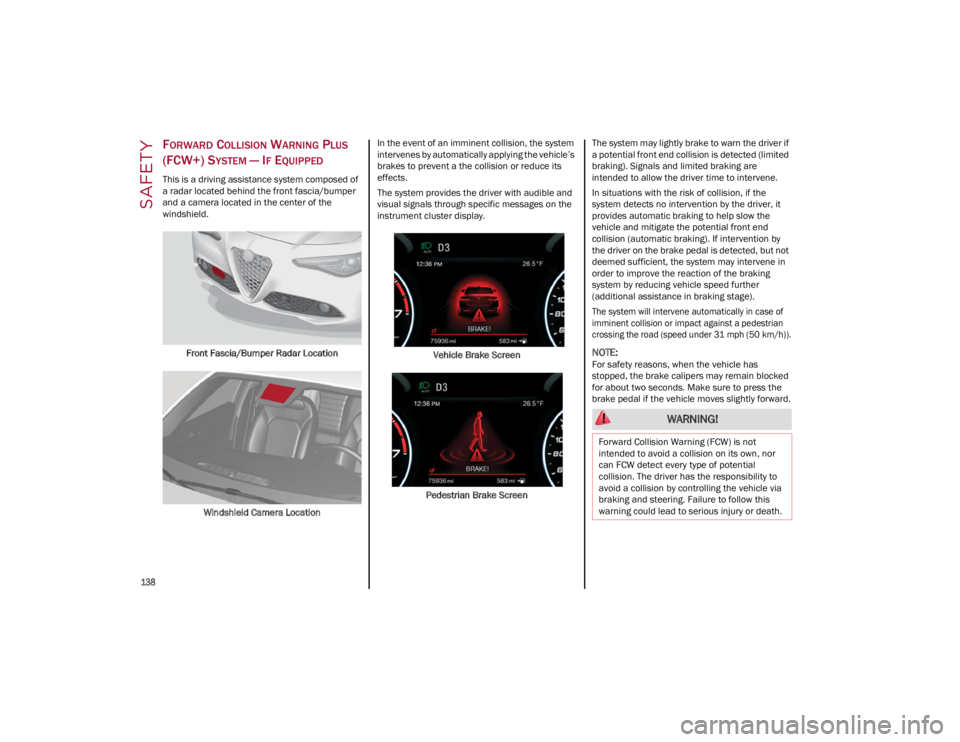
This is a driving assistance system composed of
a radar located behind the front fascia/bumper
and a camera located in the center of the
windshield.
Front Fascia/Bumper Radar Location
Windshield Camera Location In the event of an imminent collision, the system
intervenes by automatically applying the vehicle’s
brakes to prevent a the collision or reduce its
effects.
The system provides the driver with audible and
visual signals through specific messages on the
instrument cluster display.
Vehicle Brake Screen
Pedestrian Brake Screen The system may lightly brake to warn the driver if
a potential front end collision is detected (limited
braking). Signals and limited braking are
intended to allow the driver time to intervene.
In situations with the risk of collision, if the
system detects no intervention by the driver, it
provides automatic braking to help slow the
vehicle and mitigate the potential front end
collision (automatic braking). If intervention by
the driver on the brake pedal is detected, but not
deemed sufficient, the system may intervene in
order to improve the reaction of the braking
system by reducing vehicle speed further
(additional assistance in braking stage).
The system will intervene automatically in case of
imminent collision or impact against a pedestrian
crossing the road (speed under 31 mph (50 km/h)).
NOTE:
For safety reasons, when the vehicle has
stopped, the brake calipers may remain blocked
for about two seconds. Make sure to press the
brake pedal if the vehicle moves slightly forward.
WARNING!
Forward Collision Warning (FCW) is not
intended to avoid a collision on its own, nor
can FCW detect every type of potential
collision. The driver has the responsibility to
avoid a collision by controlling the vehicle via
braking and steering. Failure to follow this
warning could lead to serious injury or death.
23_GA_OM_EN_USC_t.book Page 138