display ALFA ROMEO GIULIA 2023 Repair Manual
[x] Cancel search | Manufacturer: ALFA ROMEO, Model Year: 2023, Model line: GIULIA, Model: ALFA ROMEO GIULIA 2023Pages: 248, PDF Size: 9.62 MB
Page 141 of 248

139
Engagement/Disengagement
The system may be disengaged (and engaged
again) in the “Driver Assistance” menu of the
Information and Entertainment System.
The system can be deactivated even with the
ignition device in the ON position.
NOTE:
The system status can be changed with car at a
standstill only.
Select from among three operating modes:
Warning And Braking: the system (if active), in
addition to the visual and audible warnings,
provides limited braking, automatic braking,
and additional assistance in braking stage
where the driver does not brake sufficiently in
the event of a potential front-end collision.
Only Warning : the system (if active), does not
provide limited braking, but guarantees
automatic braking or additional assistance in
braking stage where the driver does not brake
at all or not sufficiently enough in the event of
a potential front-end collision.
Disabled : the system does not provide visual
and audible warnings, limited braking,
automatic braking, or additional assistance in
braking stage. The system will therefore
provide no indication of a possible collision.
Activation/Deactivation
The Forward Collision Warning system is
activated whenever the engine is started
regardless of what is shown on the radio system.
Following a deactivation, the system will not warn
the driver about the possible collision with the
preceding vehicle, regardless of the setting
selected with the radio system.
NOTE:
Each time the engine is started, the system is
activated regardless of what setting was selected
when the engine was turned off.
The system is active:
Each time the engine is started
In the radio system
When the ignition is in the ON position
When the vehicle speed is between 2 mph
(4 km/h) and 124 mph (200 km/h)
When the front seat belts are fastened
NOTE:
If the seat belts of the front seats are not correctly
fastened, the system will not intervene on the
braking system (only audible and visual signals
will be provided).
Changing The System Sensitivity
The sensitivity of the system can be changed
through the radio system menu, choosing from
one of the following three options: "Near",
"Medium" or "Far". Refer to the description in the
Information and Entertainment System Owner’s
Manual Supplement for how to change the
settings.
The default setting is "Medium". With this setting,
the system warns the driver of a possible collision
with the vehicle in front when that vehicle is at a
standard distance, between that of the other two
settings.
With the system sensitivity set to "Far", the
system will warn the driver of a possible collision
with the vehicle in front when that vehicle is at a
greater distance, thus providing the possibility of
acting on the brakes more lightly and gradually. This setting provides the driver with the maximum
possible reaction time to prevent a potential
collision.
NOTE:
The “Far” setting may result in a greater number
of FCW possible collision warnings experienced.
With the option set to "Near", the system will alert
the driver of a possible collision with the vehicle
in front when that vehicle is close. This setting
offers the driver a lower reaction time compared
to the "Medium" and "Far" settings, in the event of
a potential collision, but permits more dynamic
driving of the vehicle.
NOTE:
The “Near” setting may result in a lesser number
of FCW possible collision warnings experienced.
The system sensitivity setting is kept in the
memory when the engine is turned off.
System Limited Operation Warning
If a dedicated message is displayed, a condition
limiting the system operation may have occurred.
The possible reasons of this limitation are if
something is blocking the camera view, or a fault
is present.
If an obstruction is signaled, clean the area of the
windshield.
Although the vehicle can still be driven in normal
conditions, the system may be not completely
available.
When the conditions limiting the system
functions end, this will go back to normal and
complete operation. Should the fault persist,
contact an authorized dealer.
23_GA_OM_EN_USC_t.book Page 139
Page 142 of 248

SAFETY
140
System Failure Signaling
If the system turns off and a dedicated message
is shown on the display, it means that there is a
fault with the system.
In this case, it is still possible to drive the vehicle,
but you are advised to contact an authorized
dealer as soon as possible.
Radar Indication Not Available
If conditions are such that the radar cannot
detect obstacles correctly, the system is
deactivated and a dedicated message appears
on the display. This generally occurs in the event
of poor visibility, such as when it is snowing or
raining heavily.
The function of this system can also be
temporarily reduced due to obstructions such as
mud, dirt or ice on the fascia/bumper. In such
cases, a dedicated message will be shown on the
display and the system will be deactivated. This
message can sometimes appear in conditions of
high reflectivity (e.g. tunnels with reflective tiles
or ice or snow). When the conditions limiting the
system functions end, it will go back to normal
and complete operation.
In certain cases, this dedicated message could
be displayed when the radar is not detecting any
vehicles or objects within its view range.
If atmospheric conditions are not the reason
behind this message, check if the sensor is dirty.
It could be necessary to clean or remove any
obstructions in the area.
If the message appears frequently, even in the
absence of atmospheric conditions such as snow, rain, mud or other obstructions, contact an
authorized dealer for a sensor alignment check.
In the absence of visible obstructions, manually
removing the decorative cover trim and cleaning
the radar surface could be required. Have this
operation performed at an authorized dealer.
NOTE:
It is recommended that you do not install devices,
accessories, or aerodynamic attachments in
front of the sensor or darken it in any way, as this
can compromise the correct functioning of the
system.
Frontal Collision Alarm With Active Braking —
If Equipped
If this function is selected, the brakes are
operated to reduce the speed of the vehicle in the
event of potential collision.
This function applies an additional braking
pressure if the braking pressure applied by the
driver does not suffice to prevent potential
collision.
The function is active with speed above 2 mph
(4 km/h).
NOTE:
When using an automatic car wash it is recom
-
mended to deactivate the system through the
settings of the radio system. The system may
detect the presence of a car, a wall or another
obstacle and activate. Driving In Special Conditions
In certain driving conditions, system intervention
might be unexpected or delayed. The driver must
therefore be very careful, keeping control of the
vehicle.
Driving close to a bend.
The vehicle ahead is leaving a roundabout.
Vehicles with small dimensions and/or not
aligned in the driving lane.
Lane change by other vehicles.
Vehicles traveling at right angles to the vehicle.
NOTE:
In particularly complex traffic conditions, the
driver can deactivate the system manually
through the radio system.
If the driver presses the brake pedal fully or
makes an excessive steering maneuver during
system operation, the automatic braking
function may deactivate (e.g. to allow a
possible maneuver to avoid the obstacle).
The FCW system is automatically deactivated
when operating in race mode and a warning
message will be displayed on the instrument
cluster
Ú
page 239.
23_GA_OM_EN_USC_t.book Page 140
Page 144 of 248
SAFETY
142
TIRE PRESSURE MONITORING SYSTEM
(TPMS)
The vehicle is equipped with a TPMS that sends
the inflation pressure information of each tire to
the control unit, and will signal the driver in the
event of insufficient tire pressure. The TPMS uses wireless technology with wheel
rim mounted electronic sensors to monitor tire
pressure levels. Sensors, mounted to each wheel
as part of the valve stem, transmit tire pressure
readings to the receiver module.
Tire pressure will vary with temperature by
approximately 1 psi (7 kPa) for every 12°F
(6.5°C). This means that when the outside
temperature decreases, the tire pressure will
also decrease. Tire pressure should always be set
based on cold inflation tire pressure. This is
defined as the tire pressure after the vehicle has
not been driven for at least three hours, or driven
less than 1 mile (1.6 km) after a three hour
period. The cold tire inflation pressure must not
exceed the maximum inflation pressure molded
into the tire sidewall. The tire pressure will also
increase as the vehicle is driven. This is normal,
and there should be no adjustment for this
increased pressure. See
Ú
page 206 for
information on how to properly inflate the
vehicle’s tires.
The TPMS will signal the driver if pressure falls
below the warning limit for any reason, including
the effects of low temperature and normal loss of
pressure from the tire.
The TPMS will stop indicating insufficient tire
pressure when pressure is equal to or greater
than the prescribed cold inflation level.
Therefore, if insufficient tire pressure is indicated
by the ( ) warning light displaying in the
instrument cluster, increase the inflation
pressure up to the prescribed cold inflation value. The system will automatically update, and the
Tire Pressure Monitoring System Warning Light
will turn off once the system receives the updated
tire pressures. The vehicle may need to be driven
for up to 20 minutes above 15 mph (24 km/h) in
order for the TPMS to receive this information.
NOTE:
The TPMS cannot indicate sudden tire pressure
drops (e.g. if a tire bursts). In this case, proceed
with caution and avoid abrupt steering.
Operating Example
For example, your vehicle may have a
recommended cold (parked for more than three
hours) placard pressure of 33 psi (227 kPa). If
the ambient temperature is 68°F (20°C), and the
measured tire pressure is 28 psi (193 kPa), a
temperature drop to 20°F (-7°C) will decrease
the tire pressure to approximately 24 psi
(165 kPa). This tire pressure is low enough to turn
on the Tire Pressure Monitoring System Warning
Light. Driving the vehicle may cause the tire
pressure to rise to approximately 28 psi
(193 kPa), but the Tire Pressure Monitoring
System Warning Light will still be on. In this
situation, the Tire Pressure Monitoring System
Warning Light will turn off only after the tires are
inflated to the vehicle’s recommended cold
placard pressure value.
WARNING!
The system has not been designed to
prevent impacts and cannot detect possible
conditions leading to an accident in
advance. Failure to take into account this
warning may lead to serious or fatal injuries.
The system may activate, assessing the
trajectory of the vehicle, for the presence of
reflecting metal objects different from other
vehicles, such as safety barriers, road signs,
barriers before parking lots, tollgates, level
crossings, gates, railways, objects near road
constructions sites or higher than the vehicle
(e.g. a fly-over). In the same way, the system
may intervene inside multi-story parking lots
or tunnels, or due to a glare on the road
surface. These possible activations are a
consequence of the real driving scenario
coverage by the system and must not be
regarded as faults.
The system has been designed for road use
only. If the vehicle is driven on a track, the
system must be deactivated to avoid
unnecessary warnings. Automatic deacti
-
vation is signaled by the dedicated warning
light/symbol switching on in the instrument
panel
Ú
page 70.
23_GA_OM_EN_USC_t.book Page 142
Page 145 of 248
143
Insufficient Tire Pressure Indication
If an insufficient pressure value is detected on
one or more tires, the Tire Pressure Monitoring
System Warning Light in the instrument cluster
will display alongside the dedicated messages,
the system will highlight the tire or tires with
insufficient pressure graphically, and an acoustic
signal will be emitted.In this case, stop the vehicle, check the inflation
pressure of each tire, and inflate the necessary
tire or tires to the correct cold inflation pressure
value, shown on the display or in the dedicated
TPMS menu.
TPMS Temporarily Disabled:
TPMS Check Message
When a system fault is detected, the Tire
Pressure Monitoring System Warning Light will
flash on and off for 75 seconds, and then remain
on solid. The system fault will also sound a chime.
If the ignition is cycled, this sequence will repeat,
provided that the system fault still exists. The Tire
Pressure Monitoring System Warning Light will
turn off when the fault condition no longer exists.
A system fault can occur due to any of the
following:
Jamming due to electronic devices or driving
next to facilities emitting the same radio
frequencies as the TPMS sensors.
Installing some form of aftermarket window
tinting that affects radio wave signals.
Packed snow or ice around the wheels or
wheel housings.
Using tire chains on the vehicle.
Using wheels/tires not equipped with TPMS
sensors.
After the punctured tire has been repaired with
the original tire sealant contained in the tire kit,
the previous condition must be restored so that
the Tire Pressure Monitoring System Warning
Light is off during normal driving.
TPMS Deactivation
The TPMS can be deactivated by replacing all four
wheel and tire assemblies (road tires) with wheel and tire assemblies that do not have TPMS
sensors, such as when installing winter wheel
and tire assemblies on your vehicle.
To deactivate the TPMS, first replace all four
wheel and tire assemblies (road tires) with tires
not equipped with Tire Pressure Monitoring
System sensors. Then, drive the vehicle for
20 minutes above 15 mph (24 km/h). The TPMS
will chime, the Tire Pressure Monitoring System
Warning Light will flash on and off for 75 seconds
and then remain on. The instrument cluster will
display the “SERVICE TPM SYSTEM” message
and then display dashes (--) in place of the
pressure values.
Beginning with the next ignition switch cycle, the
TPMS will no longer chime or display the
“SERVICE TPM SYSTEM” message in the
instrument cluster. Instead, dashes (--) will
remain in place of the pressure values.
To reactivate the TPMS, replace all four wheel
and tire assemblies (road tires) with tires
equipped with TPMS sensors. Then, drive the
vehicle for up to 20 minutes above 15 mph
(24 km/h). The TPMS will chime, the Tire
Pressure Monitoring System Warning Light will
flash on and off for 75 seconds and then turn off.
The instrument cluster will display the “SERVICE
TPM SYSTEM” message and then display
pressure values in place of the dashes. On the
next ignition switch cycle the "SERVICE TPM
SYSTEM" message will no longer be displayed, as
long as no system fault exists.
NOTE:
The TPMS is not intended to replace normal
tire care and maintenance, or to provide
warning of a tire failure or condition.
CAUTION!
The TPMS has been optimized for the original
equipment tires and wheels. TPMS pressures
and warning have been established for the
tire size equipped on your vehicle.
Undesirable system operation or sensor
damage may result when using replacement
equipment that is not of the same size, type,
and/or style. The TPMS sensor is not
designed for use on aftermarket wheels and
may contribute to a poor overall system
performance or sensor damage. Customers
are encouraged to use Original Equipment
Manufacturer (OEM) wheels to ensure proper
TPMS feature operation.
Using aftermarket tire sealants may cause the
Tire Pressure Monitoring System (TPMS)
sensor to become inoperable. After using an
aftermarket tire sealant it is recommended
that you take your vehicle to an authorized
dealer to have your sensor function checked.
After inspecting or adjusting the tire pressure
always reinstall the valve stem cap. This will
prevent moisture and dirt from entering the
valve stem, which could damage the TPMS
sensor.
23_GA_OM_EN_USC_t.book Page 143
Page 158 of 248
SAFETY
156
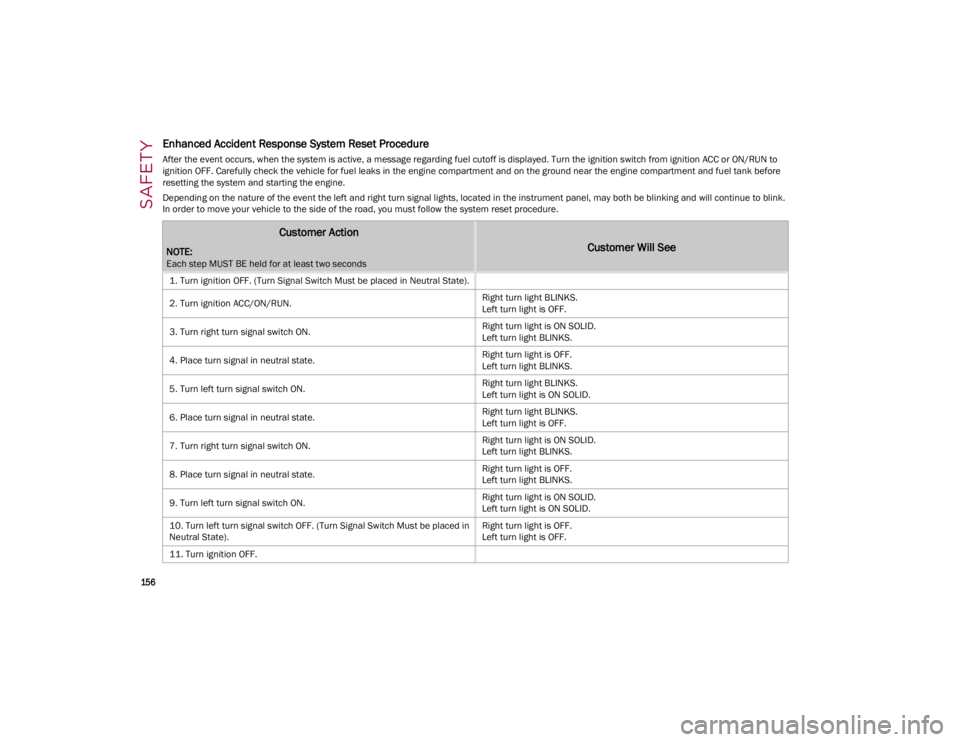
Enhanced Accident Response System Reset Procedure
After the event occurs, when the system is active, a message regarding fuel cutoff is displayed. Turn the ignition switch from ignition ACC or ON/RUN to
ignition OFF. Carefully check the vehicle for fuel leaks in the engine compartment and on the ground near the engine compartment and fuel tank before
resetting the system and starting the engine.
Depending on the nature of the event the left and right turn signal lights, located in the instrument panel, may both be blinking and will continue to blink.
In order to move your vehicle to the side of the road, you must follow the system reset procedure.
Customer Action
NOTE:
Each step MUST BE held for at least two seconds
Customer Will See
1. Turn ignition OFF. (Turn Signal Switch Must be placed in Neutral State).
2. Turn ignition ACC/ON/RUN.Right turn light BLINKS.
Left turn light is OFF.
3. Turn right turn signal switch ON. Right turn light is ON SOLID.
Left turn light BLINKS.
4. Place turn signal in neutral state. Right turn light is OFF.
Left turn light BLINKS.
5. Turn left turn signal switch ON. Right turn light BLINKS.
Left turn light is ON SOLID.
6. Place turn signal in neutral state. Right turn light BLINKS.
Left turn light is OFF.
7. Turn right turn signal switch ON. Right turn light is ON SOLID.
Left turn light BLINKS.
8. Place turn signal in neutral state. Right turn light is OFF.
Left turn light BLINKS.
9. Turn left turn signal switch ON. Right turn light is ON SOLID.
Left turn light is ON SOLID.
10. Turn left turn signal switch OFF. (Turn Signal Switch Must be placed in
Neutral State). Right turn light is OFF.
Left turn light is OFF.
11. Turn ignition OFF.
23_GA_OM_EN_USC_t.book Page 156
Page 172 of 248
IN CASE OF EMERGENCY
170
NOTE:
If the SOS EmergencySOS Emergency Call button
is accidentally pushed, there is a 10 second delay
before the call is placed. The system will issue a
verbal alert that a call is about to be made. To
cancel the call connection, push the SOS Emer-
gency Call button again.
Once a connection between the vehicle and an
emergency service operator is made, the SOS
Emergency Call system will transmit the following
important vehicle information to the operator:
Indication that the occupant placed an SOS
Emergency Call.
The Vehicle Identification Number (VIN).
The last known GPS coordinates of the vehicle.
You will then be able to speak with the emergency
service operator to determine if additional help is
needed.
The SOS Emergency Call has priority over other
audio sources, which will be muted. If you have a
phone connected via Bluetooth®, it is discon -
nected and reconnected at the end of the SOS
Emergency Call. Voice prompts will guide you
during the SOS Emergency Call. If a connection is
made between an emergency service operator
and your vehicle, emergency service operators
may record conversations and sounds within your
vehicle once a connection is made, and by using
the service you consent to having this information
shared.
NOTE:
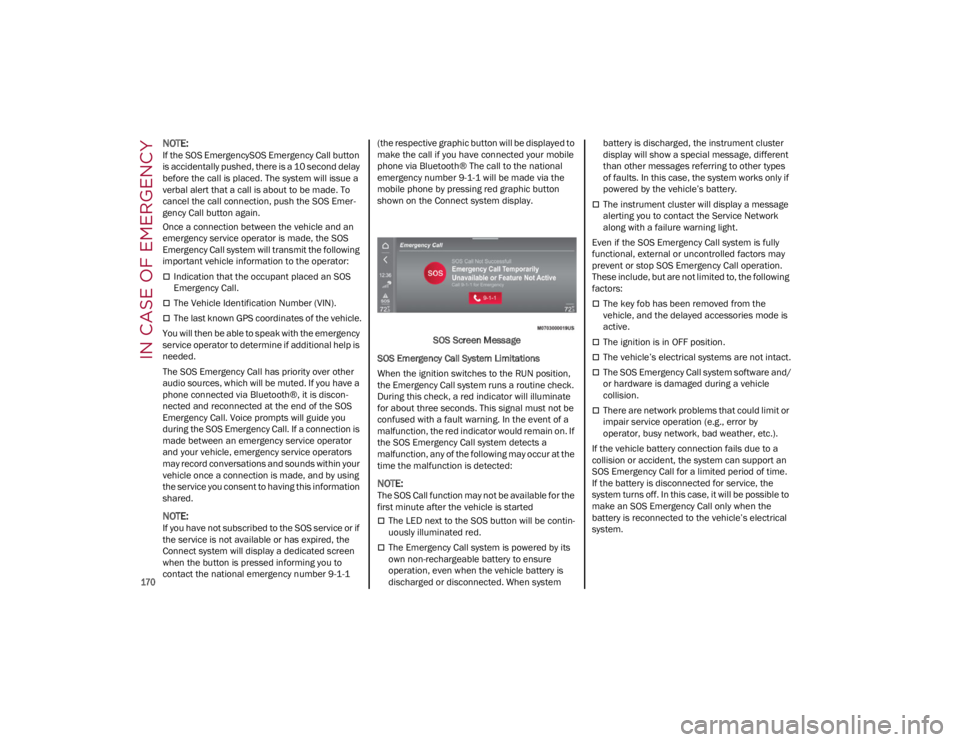
If you have not subscribed to the SOS service or if
the service is not available or has expired, the
Connect system will display a dedicated screen
when the button is pressed informing you to
contact the national emergency number 9-1-1 (the respective graphic button will be displayed to
make the call if you have connected your mobile
phone via Bluetooth® The call to the national
emergency number 9-1-1 will be made via the
mobile phone by pressing red graphic button
shown on the Connect system display.
SOS Screen Message
SOS Emergency Call System Limitations
When the ignition switches to the RUN position,
the Emergency Call system runs a routine check.
During this check, a red indicator will illuminate
for about three seconds. This signal must not be
confused with a fault warning. In the event of a
malfunction, the red indicator would remain on. If
the SOS Emergency Call system detects a
malfunction, any of the following may occur at the
time the malfunction is detected:
NOTE:
The SOS Call function may not be available for the
first minute after the vehicle is started
The LED next to the SOS button will be contin -
uously illuminated red.
The Emergency Call system is powered by its
own non-rechargeable battery to ensure
operation, even when the vehicle battery is
discharged or disconnected. When system battery is discharged, the instrument cluster
display will show a special message, different
than other messages referring to other types
of faults. In this case, the system works only if
powered by the vehicle’s battery.
The instrument cluster will display a message
alerting you to contact the Service Network
along with a failure warning light.
Even if the SOS Emergency Call system is fully
functional, external or uncontrolled factors may
prevent or stop SOS Emergency Call operation.
These include, but are not limited to, the following
factors:
The key fob has been removed from the
vehicle, and the delayed accessories mode is
active.
The ignition is in OFF position.
The vehicle’s electrical systems are not intact.
The SOS Emergency Call system software and/
or hardware is damaged during a vehicle
collision.
There are network problems that could limit or
impair service operation (e.g., error by
operator, busy network, bad weather, etc.).
If the vehicle battery connection fails due to a
collision or accident, the system can support an
SOS Emergency Call for a limited period of time.
If the battery is disconnected for service, the
system turns off. In this case, it will be possible to
make an SOS Emergency Call only when the
battery is reconnected to the vehicle’s electrical
system.
23_GA_OM_EN_USC_t.book Page 170
Page 190 of 248
SERVICING AND MAINTENANCE
188
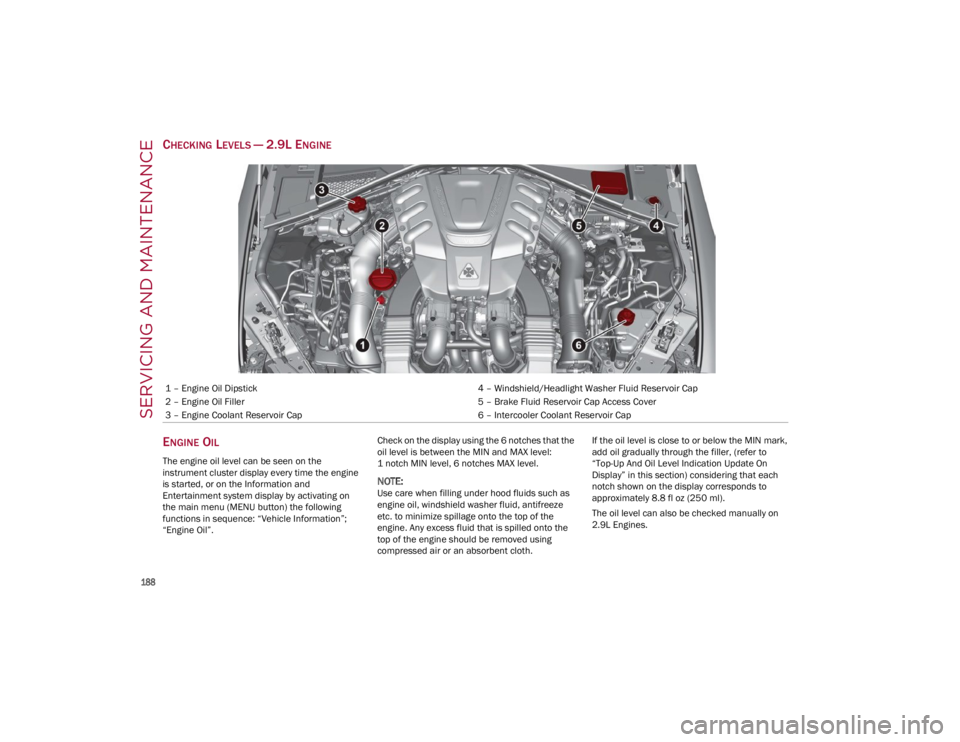
CHECKING LEVELS — 2.9L ENGINE
E
NGINE OIL
The engine oil level can be seen on the
instrument cluster display every time the engine
is started, or on the Information and
Entertainment system display by activating on
the main menu (MENU button) the following
functions in sequence: “Vehicle Information”;
“Engine Oil”. Check on the display using the 6 notches that the
oil level is between the MIN and MAX level:
1 notch MIN level, 6 notches MAX level.
NOTE:
Use care when filling under hood fluids such as
engine oil, windshield washer fluid, antifreeze
etc. to minimize spillage onto the top of the
engine. Any excess fluid that is spilled onto the
top of the engine should be removed using
compressed air or an absorbent cloth.If the oil level is close to or below the MIN mark,
add oil gradually through the filler, (refer to
“Top-Up And Oil Level Indication Update On
Display” in this section) considering that each
notch shown on the display corresponds to
approximately 8.8 fl oz (250 ml).
The oil level can also be checked manually on
2.9L Engines.
1 – Engine Oil Dipstick
4 – Windshield/Headlight Washer Fluid Reservoir Cap
2 – Engine Oil Filler 5 – Brake Fluid Reservoir Cap Access Cover
3 – Engine Coolant Reservoir Cap 6 – Intercooler Coolant Reservoir Cap
23_GA_OM_EN_USC_t.book Page 188
Page 191 of 248
189
NOTE:
Always reinstall the oil cap and tighten to proper
torque whenever it is removed to add oil to
engine. Never run the engine with cap removed
as this could cause oil to leak from engine.
Manual Oil Level Checking Procedure —
2.9L Engine
Check that the oil level is between the MIN and
MAX marks on dipstick, clean it with a lint-free
cloth and reinsert it. Extract the dipstick again
and check that the level is between the MIN and
MAX marks.
Top-Up And Oil Level Indication Update On
Display — 2.9L Engine
If an engine oil top-off is needed, in order to
ensure the correct indication of the oil level on
the display, proceed with the following process:
Leave the car on flat ground with the engine
running for approximately five minutes
(temperature higher than 198°F (90°C) and
shut the engine off.
Wait for five minutes, turn the ignition to the
ON mode without starting the engine and wait
for a few seconds.
NOTE:
If the level indication is not updated after the
previously described procedure, repeat the
engine adjustment, shut the engine off and wait
another five minutes before starting it again. If
the indication is not updated after the second
start, contact an authorized dealer.
Top-Up And Oil Level Indication Update On
Display — 2.0L Engine
If an engine oil top-off is needed, in order to
ensure the correct indication of the oil level on
the display, proceed with the following process:
Leave the car on flat ground with the engine
running for approximately five minutes
(temperature higher than 176°F (80°C) and
shut the engine off.
Start the engine again and idle it for about two
minutes.
NOTE:
If you have added the specified amount of oil and
the indicator is not reading “Full”, please contact
an authorized dealer.
ENGINE COOLANT
If the level is too low, remove the cap of reservoir
and add the fluid described on
Ú
page 233.
WASHER FLUID FOR WINDSHIELD/
H
EADLIGHTS
The windshield and headlights washer fluid
reservoir has a telescopic filler.
If the level is too low, remove reservoir cap and lift
the filler. Then, add the fluid described on
Ú
page 233.
NOTE:
Use care when filling under hood fluids such as
engine oil, windshield washer fluid, antifreeze
etc. to minimize spillage onto the top of the
engine. Any excess fluid that is spilled onto the
top of the engine should be removed using
compressed air or an absorbent cloth.
CAUTION!
Make sure not to add too much oil when
topping off the engine. Engine oil in excess
may damage the engine. Have the vehicle
checked. Never exceed the MAX level when
topping off engine oil. It is advisable to check
the oil level in intermediate steps using the oil
dipstick (2.9L Engine Only).
CAUTION!
The oil level is not refreshed immediately on
the display after topping off. Consequently,
wait for the oil level to be refreshed on the
display and see the following procedures.
WARNING!
If the engine oil is being topped up, wait for the
engine to cool down before loosening the filler
cap, particularly for vehicles with aluminum
cap (if equipped). WARNING: risk of burns!
CAUTION!
The oil level must never exceed the MAX mark.
If the MAX mark is exceeded (last notch on the
right turns red) after the fill-up, go to an
authorized dealer as soon as possible to have
the oil in excess removed.
Do not add oil with specifications different
from those of the oil already in the engine.
Used engine oil and oil filters contain
substances which are harmful to the
environment. To change the oil and filters, we
advise you to contact an authorized dealer.
23_GA_OM_EN_USC_t.book Page 189
Page 192 of 248
SERVICING AND MAINTENANCE
190
NOTE:
The headlight washing system will not work if the
liquid level is low (as indicated by the symbol on
the instrument cluster display). On vehicles
equipped with headlight washers, there is a refer-
ence notch on the dipstick: ONLY the windshield/
rear window washer operates with the level below
this reference.
BRAKE FLUID
Check that the fluid is at the maximum level. If
the fluid level in the tank is low, contact an
authorized dealer to have the system checked.
AUTOMATIC TRANSMISSION ACTIVATION
S
YSTEM OIL
The transmission control oil level should only be
checked at an authorized dealer.
USEFUL ADVICE FOR EXTENDING THE
L
IFE OF YOUR BATTERY
To avoid draining your battery and make it last
longer, observe the following instructions:
When you park the car, ensure that the doors
and trunk are closed properly to prevent any
lights from remaining on inside the
passenger's compartment.
Do not keep accessories (e.g. radio, hazard
warning lights, etc.) switched on for a long time
when the engine is not running.
Before performing any operation on the
electrical system, disconnect the negative
battery cable. If you wish to install electrical accessories after
purchasing the car that require permanent
electrical supply (e.g. alarm, etc.), or accessories
which influence the electrical supply
requirements, contact an authorized dealer,
whose qualified staff will evaluate the overall
electrical consumption.
NOTE:
After the battery is disconnected, the steering
must be initialized. The warning light on the
instrument panel switches on to indicate this. To
carry out this procedure, simply turn the steering
wheel all the way from one end to the other, and
then turn it back to the central position.
BATTERY
The battery does not require the electrolyte to be
topped up with distilled water. A periodic check
carried out at an authorized dealer, however, is
necessary to check efficiency.
Follow the battery manufacturer's instructions for
maintenance.
Replacing The Battery
If necessary, replace the battery with another
original battery with the same specifications.
Follow the battery manufacturer’s instructions for
maintenance.
NOTE:
It will not be possible to open the trunk with a key
or by pushing the button in the passenger
compartment when the battery is disconnected.
So, always position the manual trunk opening
strap on the trunk lock before disconnecting the
battery
Ú
page 220.
CAUTION!
If the charge level remains under 50% for a
long time, the battery may be damaged by
sulphation, reducing its capacity and
efficiency during a vehicle start. The battery is
also more prone to the risk of freezing (at
temperatures as high as 14°F (-10°C).
WARNING!
Battery acid is a corrosive solution and can
burn or even blind you. Do not allow battery
acid to contact your eyes, skin, or clothing.
Do not lean over a battery when attaching
clamps
Ú
page 177. If acid splashes in eyes
or on skin, flush the area immediately with
large amounts of water.
Battery gas is flammable and explosive.
Keep flame or sparks away from the battery.
Do not use a booster battery or any other
booster source with an output greater than
12 Volts. Do not allow cable clamps to touch
each other.
Battery posts, terminals, and related
accessories contain lead and lead
compounds. Wash hands after handling.
23_GA_OM_EN_USC_t.book Page 190
Page 243 of 248

241
Drive Train Control (DTC) System ..............130
Driving Modes .............................................. 92
Dynamic Steering Torque (DST) System ... 130
E
Electric Park Brake....................................... 84
Electronic Speed Control (Cruise Control) .. 97
Electronic Stability Control (ESC)
System ........................................................130
Electronic Throttle Control Warning Light... 75
Emergency In Case Of ......................................169, 171
SOS Emergency Call .............................. 169
Emergency, In Case Of Jump Starting .........................................175
Overheating ............................................ 178
Tow Hooks ..............................................180
Towing.....................................................179
Emission Control System Maintenance...... 80
Engine ......................................................... 224 Block Heater............................................. 83
Engine Coolant Level .............................189
Exhaust Gas Caution .............................168
Fuel Requirements ................................ 230Jump Starting .........................................177
Overheating ............................................ 178
Engine Compartment .................................187
Engine Compartment (Washing) ...............222
Engine Oil Level Check ............................................ 188
Enhanced Accident Response
Feature...............................................155, 181
Ethanol........................................................230 Exhaust Gas Cautions ............................... 168
Exhaust System ......................................... 168
Exterior Lights .............................42, 168, 203
F
Flashers
Turn Signals .....................................74, 168
Fluid Leaks ................................................. 168
Fog Lights, Rear ............................................44
Forward Collision Warning ........................ 138
Fuel Additives ................................................ 230
Clean Air................................................. 230
Ethanol ................................................... 230
Light ..........................................................76
Materials Added .................................... 230
Methanol................................................ 230
Fuses ................................................. 197, 198
G
Garage Door Opener (HomeLink) ................39
Gasoline, Clean Air .................................... 230
Gasoline, Reformulated ............................ 230
Gauges Engine Oil Temperature ...........................65
Fuel ...........................................................66
Speedometer ............................................66
Tachometer............................................... 65
Glove Compartment Storage .......................55
GVWR ......................................................... 126
H
Hazard Warning Flashers .......................... 169
Head Restraints ............................................36 Head Rests ................................................... 36
Headlights .................................................... 42
Automatic ................................................. 43
Delay......................................................... 44
High Beam ............................................... 43
Switch ....................................................... 42
Headlights (Cleaning) ................................ 222
Heated Mirrors ............................................. 39
Heated Seats ............................................... 35
Heated Steering Wheel ............................... 30
Heater, Engine Block ................................... 83
Highway Assist System .............................. 106
Hill Start Assist (HSA) System ................... 131
HomeLink (Garage Door Opener) ............... 39
Hood Closing ...................................................... 60Opening .................................................... 60
Hood Release ............................................... 60
I
Ignition .......................................................... 22 Switch ....................................................... 22
Immobilizer (Sentry Key) ............................. 21
In Case Of Emergency ............................... 169
Installing Electrical/Electronic Devices ......... 4
Instrument Cluster ....................................... 64 Descriptions ............................................. 74
Display ...................................................... 66
Instrument Panel Features ................................................... 64
Intelligent Speed Control System ............. 114
Interior And Instrument Lights .................... 46
Interior Lights ...................................... 45, 204
Interiors (Cleaning) .................................... 222
Internal Equipment ...................................... 55
23_GA_OM_EN_USC_t.book Page 241