buttons Alfa Romeo Giulietta 2013 Owner handbook (in English)
[x] Cancel search | Manufacturer: ALFA ROMEO, Model Year: 2013, Model line: Giulietta, Model: Alfa Romeo Giulietta 2013Pages: 292, PDF Size: 13.06 MB
Page 7 of 292
GETTING TO KNOW YOUR CAR
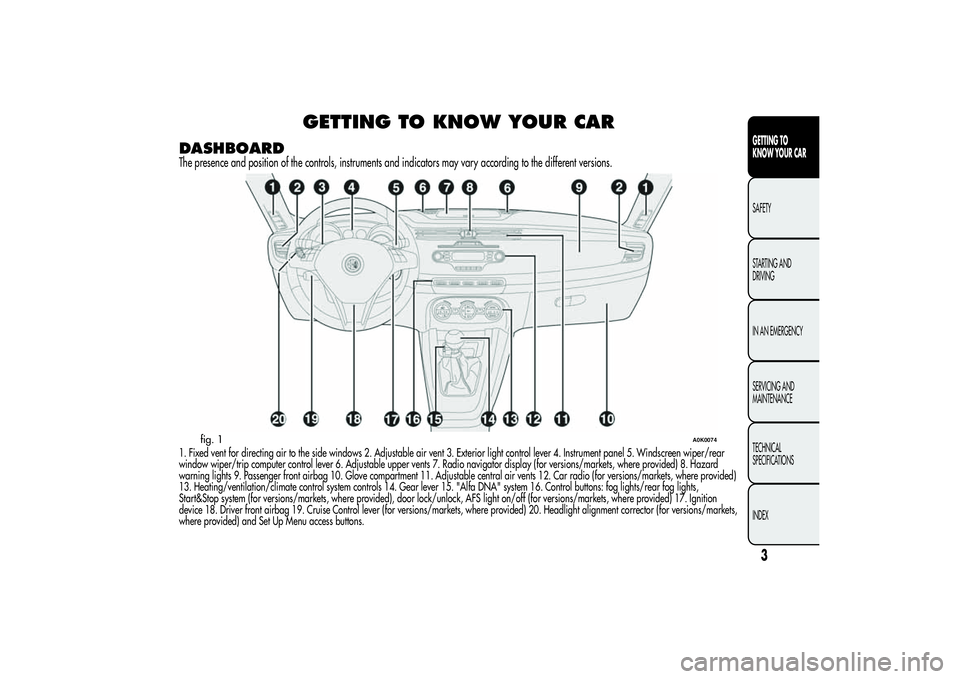
DASHBOARDThe presence and position of the controls, instruments and indicators may vary according to the different versions.1. Fixed vent for directing air to the side windows 2. Adjustable air vent 3. Exterior light control lever 4. Instrument panel 5. Windscreen wiper/rear
window wiper/trip computer control lever 6. Adjustable upper vents 7. Radio navigator display (for versions/markets, where provided) 8. Hazard
warning lights 9. Passenger front airbag 10. Glove compartment 11. Adjustable central air vents 12. Car radio (for versions/markets, where provided)
13. Heating/ventilation/climate control system controls 14. Gear lever 15. "Alfa DNA" system 16. Control buttons: fog lights/rear fog lights,
Start&Stop system (for versions/markets, where provided), door lock/unlock, AFS light on/off (for versions/markets, where provided) 17. Ignition
device 18. Driver front airbag 19. Cruise Control lever (for versions/markets, where provided) 20. Headlight alignment corrector (for versions/markets,
where provided) and Set Up Menu access buttons.
fig. 1
A0K0074
3GETTING TO
KNOW YOUR CARSAFETY
STARTING AND
DRIVING
IN AN EMERGENCY
SERVICING AND
MAINTENANCE
TECHNICAL
SPECIFICATIONS
INDEX
Page 25 of 292
CONTROL BUTTONS
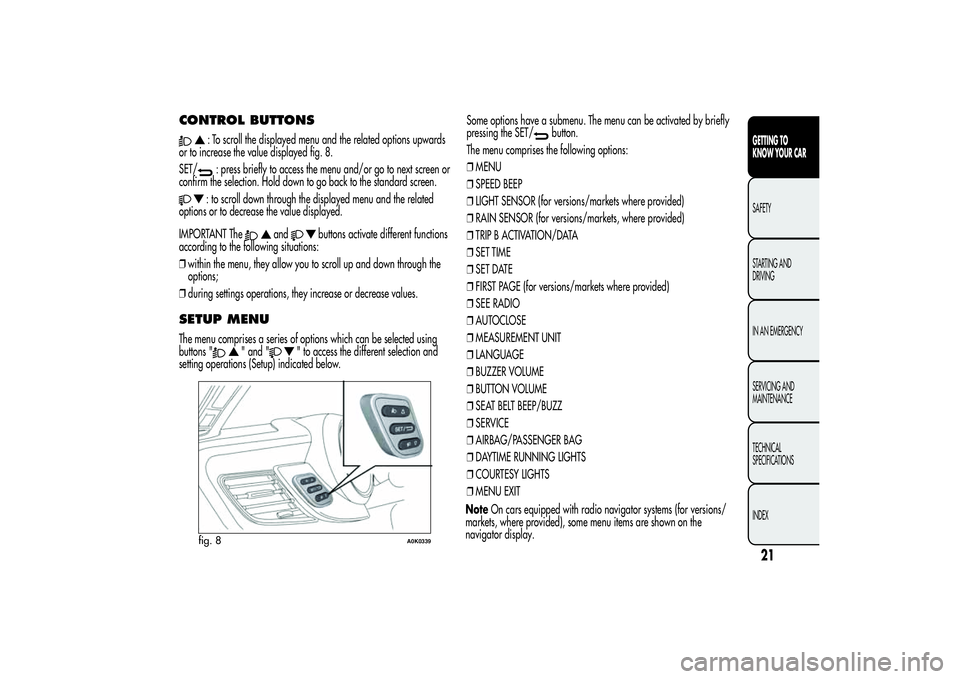
: To scroll the displayed menu and the related options upwards
or to increase the value displayed fig. 8.
SET/: press briefly to access the menu and/or go to next screen or
confirm the selection. Hold down to go back to the standard screen.: to scroll down through the displayed menu and the related
options or to decrease the value displayed.
IMPORTANT The
and
buttons activate different functions
according to the following situations:
❒within the menu, they allow you to scroll up and down through the
options;
❒during settings operations, they increase or decrease values.
SETUP MENUThe menu comprises a series of options which can be selected using
buttons "
" and "
" to access the different selection and
setting operations (Setup) indicated below.Some options have a submenu. The menu can be activated by briefly
pressing the SET/
button.
The menu comprises the following options:
❒MENU
❒SPEED BEEP
❒LIGHT SENSOR (for versions/markets where provided)
❒RAIN SENSOR (for versions/markets, where provided)
❒TRIP B ACTIVATION/DATA
❒SET TIME
❒SET DATE
❒FIRST PAGE (for versions/markets where provided)
❒SEE RADIO
❒AUTOCLOSE
❒MEASUREMENT UNIT
❒LANGUAGE
❒BUZZER VOLUME
❒BUTTON VOLUME
❒SEAT BELT BEEP/BUZZ
❒SERVICE
❒AIRBAG/PASSENGER BAG
❒DAYTIME RUNNING LIGHTS
❒COURTESY LIGHTS
❒MENU EXIT
fig. 8
A0K0339
21GETTING TO
KNOW YOUR CARSAFETY
STARTING AND
DRIVING
IN AN EMERGENCY
SERVICING AND
MAINTENANCE
TECHNICAL
SPECIFICATIONS
INDEX
NoteOn cars equipped with radio navigator systems (for versions/
markets, where provided), some menu items are shown on the
navigator display.
Page 26 of 292
Selecting an option from the main
menu without a submenu:❒press the SET/
button briefly to select the main menu setting you
wish to change;
❒press buttons ""or"
" (by single presses) to select the
new setting;
❒press the SET/
button briefly to save the new setting and go
back to the previous main menu option.
Selecting an option from the main
menu with a submenu:❒briefly press the SET/
button to display the first submenu option;
❒press buttons "
"or"
" (with single presses) to scroll
through all the submenu options;
❒briefly press the SET/
button to select the displayed submenu
option and to open the relevant settings menu;
❒press buttons "
"or"
" (by single presses) to select the
new setting for this submenu option;
❒press the SET/
button briefly to save the new setting and go
back to the previous submenu option.
MENU ITEMSMenuThis item allows you to access the Setup Menu.
Press the "
"or"
" button to select the various Menu
items. Hold down the SET/button to return to the standard screen.
Speed Beep (Speed limit)This function may be used to set the car speed limit (km/h or mph);
when this limit is exceeded the driver is alerted.
To set the desired speed limit, proceed as follows:
❒briefly press the SET/
button: the display will show the wording
("Speed Beep");
❒press button "
"or"
" to select speed limit activation
("On") or deactivation ("Off");
❒if the function is On, press ""or"
" to select the
required speed limit and then press the SET/button to confirm.
IMPORTANT Setting is possible between 30 and 200 km/h, or 20 and
125 mph, according to the previously set unit. See the "Unit of
Measurement" paragraph described below. The setting will increase/
decrease by five units each time button
/
is pressed.
Hold down the
/
button to automatically increase/
decrease the setting rapidly. Complete the setting by single pressing
the button when you approach the required value.
Briefly press the SET/
button to go back to the menu screen or hold
the button down to go back to the standard screen without saving.
22GETTING TO
KNOW YOUR CAR
SAFETY
STARTING AND
DRIVING
IN AN EMERGENCY
SERVICING AND
MAINTENANCE
TECHNICAL
SPECIFICATIONS
INDEX
Page 31 of 292
Belt reminder (Reactivation of SBR
buzzer)(for versions/markets, where provided)
This function can only be displayed after Alfa Romeo Authorized
Services have deactivated the SBR system (see "SBR system" in the
"Safety" chapter).Service (Scheduled servicing)With this function it is possible to view information on servicing
deadlines depending on kilometres travelled or daily intervals.
With the Service function it is also possible to view the interval (in
kilometres or miles) before the next engine oil change is due.
To consult this information, proceed as follows:
❒briefly press the SET/
button: the display shows when servicing
is due in km or mi according to the previous setting (see paragraph
"Units of measurement");
❒briefly press the SET/button to go back to the menu screen or
hold the button down to go back to the standard screen.IMPORTANT According to the "Scheduled Servicing Plan", the car
must be serviced every 30,000 km (1.4 petrol versions) or 35,000 km
(1750 Turbo petrol and diesel versions). This message is displayed
automatically when the key is turned to MAR, starting at 2,000 km (or
equivalent value in miles) from when the next service is due and
reappearing every 200 km (or equivalent value in miles). Below 200
km the signals become more frequent. The display will be in km or
mi depending on the measurement unit settings. When the next
scheduled service is approaching and the key is turned to MAR, the
word Service will appear on the display, followed by the number
of kilometres or miles left. Contact Alfa Romeo Authorized Services
where the "Scheduled Servicing Plan" operations will be performed
and the message will be reset.
Passenger airbag/side bag (front
passenger side airbag and side bag
for pelvis, chest and shoulder
protection - Side bag -
activation/deactivation)This function is used to activate/deactivate the passenger side air bag.
Proceed as follows:
❒press the SET/
button and, after the message (Bag pass: Off) (to
deactivate) or (Bag pass: On) (to activate) is displayed by pressing
buttons "
" and "
", press the SET/
button again;
❒a confirmation request message will appear on the display;
❒by pressing the "
"or"
" buttons select "Yes" (to
confirm activation/deactivation) or "No" (to cancel);
❒press the SET/
button briefly, a message confirming the
selection will be displayed and you will return to the menu screen or,
pressing the button for longer, you will return to the standard screen
without memorising.
27GETTING TO
KNOW YOUR CARSAFETY
STARTING AND
DRIVING
IN AN EMERGENCY
SERVICING AND
MAINTENANCE
TECHNICAL
SPECIFICATIONS
INDEX
Page 46 of 292
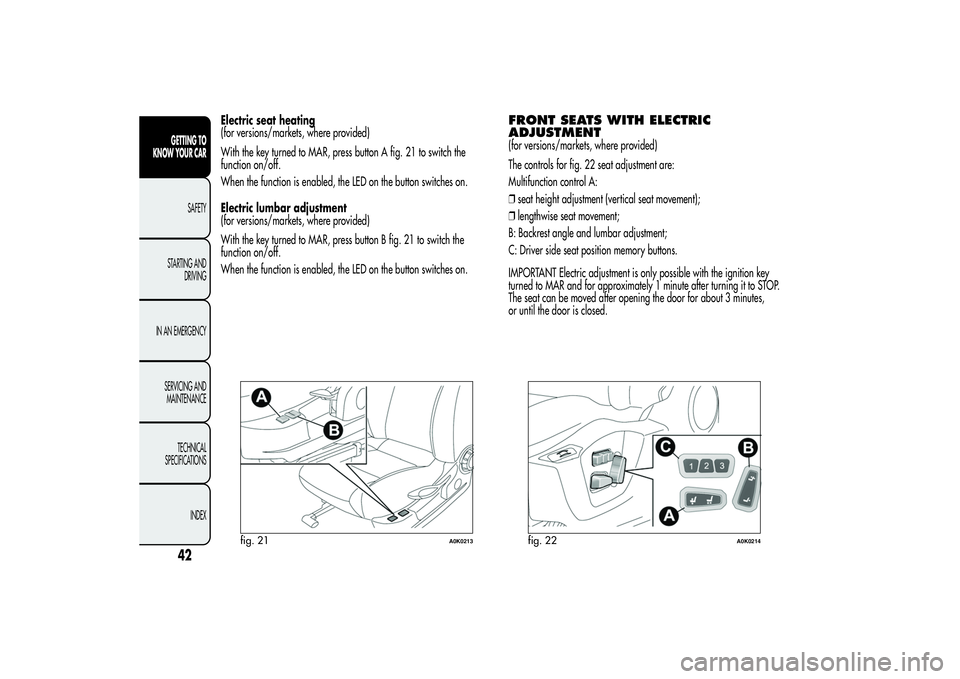
Electric seat heating
(for versions/markets, where provided)
With the key turned to MAR, press button A fig. 21 to switch the
function on/off.
When the function is enabled, the LED on the button switches on.
Electric lumbar adjustment
(for versions/markets, where provided)
With the key turned to MAR, press button B fig. 21 to switch the
function on/off.
When the function is enabled, the LED on the button switches on.
FRONT SEATS WITH ELECTRIC
ADJUSTMENT(for versions/markets, where provided)
The controls for fig. 22 seat adjustment are:
Multifunction control A:
❒seat height adjustment (vertical seat movement);
❒lengthwise seat movement;
B: Backrest angle and lumbar adjustment;
C: Driver side seat position memory buttons.
IMPORTANT Electric adjustment is only possible with the ignition key
turned to MAR and for approximately 1 minute after turning it to STOP.
The seat can be moved after opening the door for about 3 minutes,
or until the door is closed.
fig. 21
A0K0213
fig. 22
A0K0214
42GETTING TO
KNOW YOUR CAR
SAFETY
STARTING AND
DRIVING
IN AN EMERGENCY
SERVICING AND
MAINTENANCE
TECHNICAL
SPECIFICATIONS
INDEX
Page 47 of 292
Memorising driver’s seat positionsThe buttons C allow three different driver’s seat positions to be
memorised and recalled.
Memorisation and recall are possible with the ignition key in MAR
position and for 3 minutes after opening the driver's side door or until
the door is closed, even when the ignition key is in STOP position.
The memorisation of the position is confirmed by an acoustic signal.
To memorise a seat position, adjust it with the various controls, then
press the button where you want to memorise the position for several
seconds.
When a new seat position is memorised, the previously memorised
position on the same button is automatically overwritten.
Recalling a memorised position is also possible for about 3 minutes
after the doors are opened and about 1 minute after the ignition key is
turned to the STOP position.
To recall a memorised position, press the relevant button briefly.
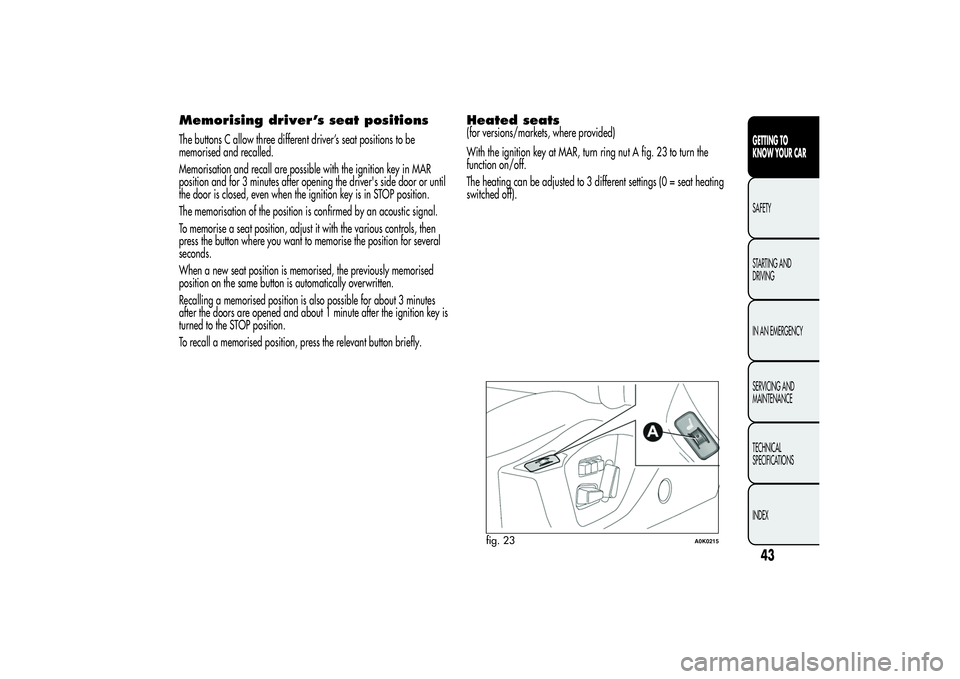
Heated seats(for versions/markets, where provided)
With the ignition key at MAR, turn ring nut A fig. 23 to turn the
function on/off.
The heating can be adjusted to 3 different settings (0 = seat heating
switched off).
fig. 23
A0K0215
43GETTING TO
KNOW YOUR CARSAFETY
STARTING AND
DRIVING
IN AN EMERGENCY
SERVICING AND
MAINTENANCE
TECHNICAL
SPECIFICATIONS
INDEX
Page 48 of 292
HEAD RESTRAINTSFRONTHead restraints are adjustable in height and they lock automatically
into the desired position:
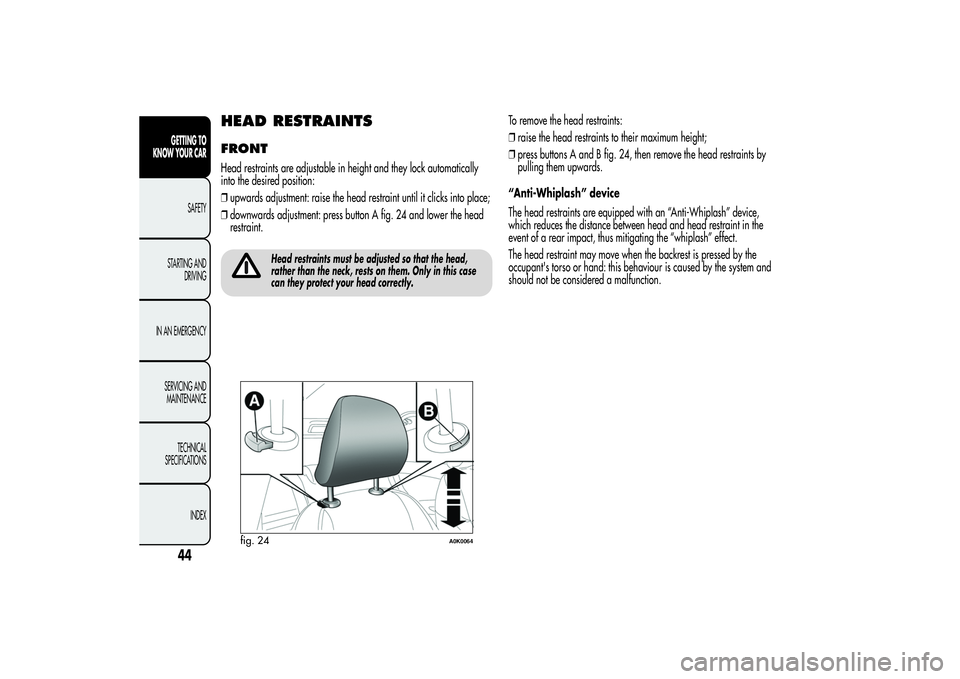
❒upwards adjustment: raise the head restraint until it clicks into place;
❒downwards adjustment: press button A fig. 24 and lower the head
restraint.
Head restraints must be adjusted so that the head,
rather than the neck, rests on them. Only in this case
can they protect your head correctly.
To remove the head restraints:
❒raise the head restraints to their maximum height;
❒press buttons A and B fig. 24, then remove the head restraints by
pulling them upwards.
“Anti-Whiplash” device
The head restraints are equipped with an “Anti-Whiplash” device,
which reduces the distance between head and head restraint in the
event of a rear impact, thus mitigating the “whiplash” effect.
The head restraint may move when the backrest is pressed by the
occupant's torso or hand: this behaviour is caused by the system and
should not be considered a malfunction.
fig. 24
A0K0064
44GETTING TO
KNOW YOUR CAR
SAFETY
STARTING AND
DRIVING
IN AN EMERGENCY
SERVICING AND
MAINTENANCE
TECHNICAL
SPECIFICATIONS
INDEX
Page 49 of 292
REARTwo height-adjustable head restraints are provided for the back seats
(to adjust the height see the previous paragraph).
On some versions a head restraint is also provided for the central seat.
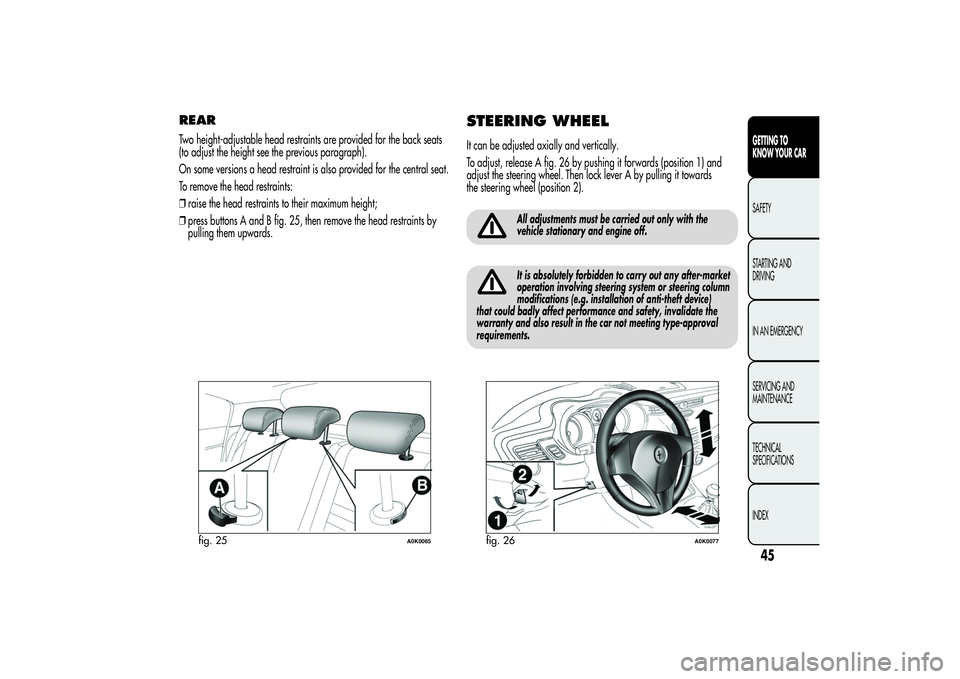
To remove the head restraints:
❒raise the head restraints to their maximum height;
❒press buttons A and B fig. 25, then remove the head restraints by
pulling them upwards.
STEERING WHEELIt can be adjusted axially and vertically.
To adjust, release A fig. 26 by pushing it forwards (position 1) and
adjust the steering wheel. Then lock lever A by pulling it towards
the steering wheel (position 2).
All adjustments must be carried out only with the
vehicle stationary and engine off.It is absolutely forbidden to carry out any after-market
operation involving steering system or steering column
modifications (e.g. installation of anti-theft device)
that could badly affect performance and safety, invalidate the
warranty and also result in the car not meeting type-approval
requirements.
fig. 25
A0K0065
fig. 26
A0K0077
45GETTING TO
KNOW YOUR CARSAFETY
STARTING AND
DRIVING
IN AN EMERGENCY
SERVICING AND
MAINTENANCE
TECHNICAL
SPECIFICATIONS
INDEX
Page 59 of 292
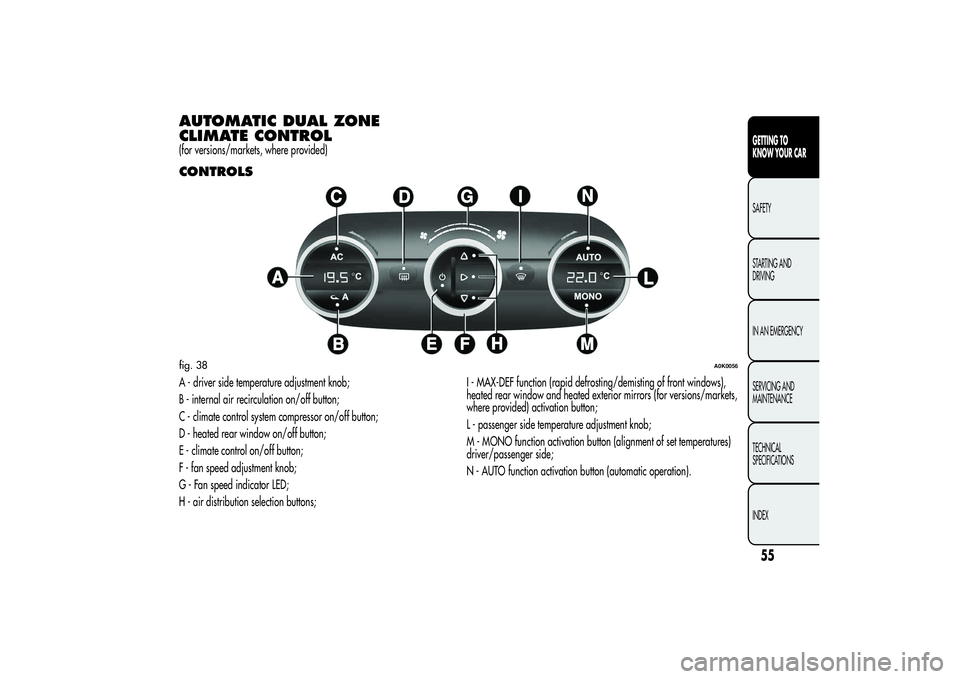
AUTOMATIC DUAL ZONE
CLIMATE CONTROL(for versions/markets, where provided)CONTROLSA - driver side temperature adjustment knob;
B - internal air recirculation on/off button;
C - climate control system compressor on/off button;
D - heated rear window on/off button;
E - climate control on/off button;
F - fan speed adjustment knob;
G - Fan speed indicator LED;
H - air distribution selection buttons;I - MAX-DEF function (rapid defrosting/demisting of front windows),
heated rear window and heated exterior mirrors (for versions/markets,
where provided) activation button;
L - passenger side temperature adjustment knob;
M - MONO function activation button (alignment of set temperatures)
driver/passenger side;
N - AUTO function activation button (automatic operation).fig. 38
A0K0056
55GETTING TO
KNOW YOUR CARSAFETY
STARTING AND
DRIVING
IN AN EMERGENCY
SERVICING AND
MAINTENANCE
TECHNICAL
SPECIFICATIONS
INDEX
Page 61 of 292
During automatic operation, you can change the set temperatures, air
distribution and fan speed at any time by using the relevant buttons
or knobs: the system will automatically change the settings to adjust to
the new requirements.
During fully automatic operation (AUTO), the word AUTO will
disappear if the air distribution and/or flow rate and/or engagement
of the compressor and/or recirculation settings are changed.
During fully automatic operation (FULL AUTO), the word FULL will
disappear if the air distribution and/or flow rate and/or activation of
the compressor and/or recirculation settings are changed.
In this way the climate control system will continue to automatically
manage all functions except for those that have been manually
adjusted. The fan speed is the same in all the zones of the passenger
compartment.ADJUSTING THE AIR TEMPERATURETurn the A or L knob right or left to adjust the air temperature: A knob
for the front left-hand area, L knob for the front right-hand area of
the passenger compartment. The set temperatures are shown on
the displays.
Press the MONO button to align the air temperature between the two
areas:
Turn the L knob to return to the separate management of air
temperatures in the two zones.
Turn the knobs fully right or left to engage HI (maximum heating) or LO
(maximum cooling) respectively. To deactivate these functions, turn
the temperature knob to the desired temperature.
SETTING THE AIR DISTRIBUTIONBy pressing the buttons (
/
/
), it is possible to set one of the
7 possible air distributions manually:
Air flow to the windscreen and front side window diffusers to
demist/defrost them.Air flow at central and side dashboard vents to ventilate the chest
and the face during the hot season.Air flow to the front and rear footwell diffusers. This air
distribution setting heats the passenger compartment most
quickly, giving a prompt sensation of warmth.
Air flow distributed between footwell vents (hotter air) and
central and side dashboard vents (cooler air). This
distribution setting is useful in spring and autumn on sunny
days.Air flow distributed between footwell diffusers and
windscreen and front side window defrosting/demisting
diffusers. This distribution setting allows the passenger
compartment to warm up efficiently and prevents the
windows from misting up.Air flow distribution between windscreen demisting/
defrosting diffusers and side and central dashboard vents.
This allows air to be sent to the windscreen in conditions
of strong sunlight.
Air flow distribution to all vents on the car.
In AUTO mode, the climate control system automatically manages air
distribution (the LEDs on buttons H are off). When set manually, the air
distribution is shown by the LEDs on the selected buttons.
57GETTING TO
KNOW YOUR CARSAFETY
STARTING AND
DRIVING
IN AN EMERGENCY
SERVICING AND
MAINTENANCE
TECHNICAL
SPECIFICATIONS
INDEX