light Alfa Romeo Giulietta 2017 User Guide
[x] Cancel search | Manufacturer: ALFA ROMEO, Model Year: 2017, Model line: Giulietta, Model: Alfa Romeo Giulietta 2017Pages: 212, PDF Size: 4.56 MB
Page 32 of 212
BOOT
The luggage compartment unlocking is
electrically operated and is deactivated
when the car is in motion.
OPENING
When unlocked, the luggage
compartment can be opened from
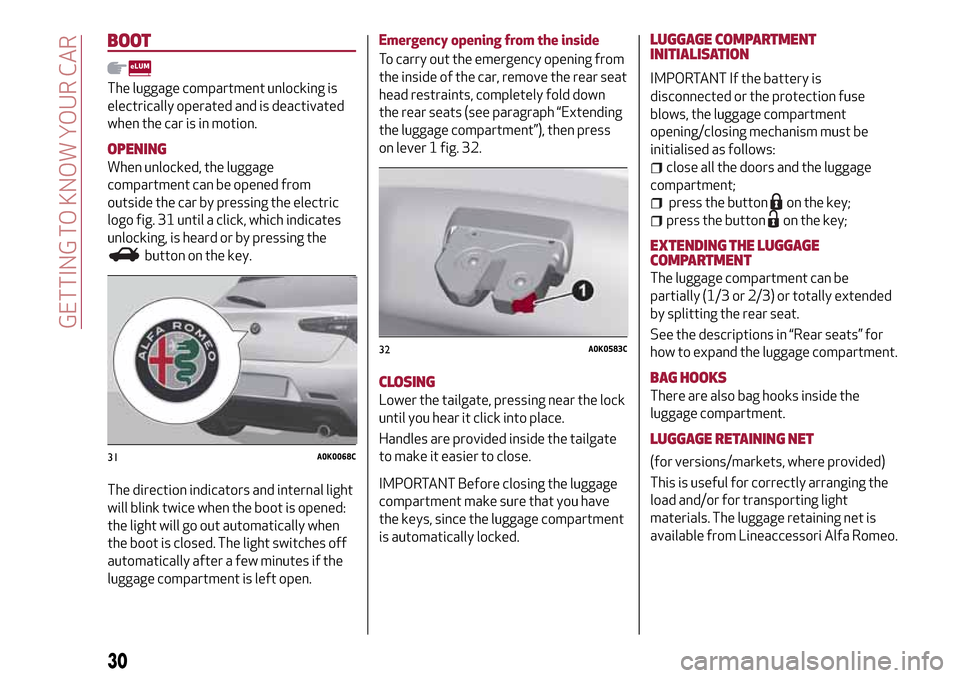
outside the car by pressing the electric
logo fig. 31 until a click, which indicates
unlocking, is heard or by pressing the
button on the key.
The direction indicators and internal light
will blink twice when the boot is opened:
the light will go out automatically when
the boot is closed. The light switches off
automatically after a few minutes if the
luggage compartment is left open.Emergency opening from the inside
To carry out the emergency opening from
the inside of the car, remove the rear seat
head restraints, completely fold down
the rear seats (see paragraph “Extending
the luggage compartment”), then press
on lever 1 fig. 32.
CLOSING
Lower the tailgate, pressing near the lock
until you hear it click into place.
Handles are provided inside the tailgate
to make it easier to close.
IMPORTANT Before closing the luggage
compartment make sure that you have
the keys, since the luggage compartment
is automatically locked.LUGGAGE COMPARTMENT
INITIALISATION
IMPORTANT If the battery is
disconnected or the protection fuse
blows, the luggage compartment
opening/closing mechanism must be
initialised as follows:
close all the doors and the luggage
compartment;
press the buttonon the key;
press the buttonon the key;
EXTENDING THE LUGGAGE
COMPARTMENT
The luggage compartment can be
partially (1/3 or 2/3) or totally extended
by splitting the rear seat.
See the descriptions in “Rear seats” for
how to expand the luggage compartment.
BAG HOOKS
There are also bag hooks inside the
luggage compartment.
LUGGAGE RETAINING NET
(for versions/markets, where provided)
This is useful for correctly arranging the
load and/or for transporting light
materials. The luggage retaining net is
available from Lineaccessori Alfa Romeo.31A0K0068C
32A0K0583C
30
GETTING TO KNOW YOUR CAR
Page 33 of 212
WARNING
17)A heavy load that has not been secured
may cause serious injuries to passengers in
the event of an accident.
18)If you are travelling in an area with
limited opportunities for vehicle refuelling
and you wish to bring petrol with you in a
petrol can, you must do so in compliance with
current regulations and using an approved
can, appropriately secured to the load
securing attachments. In the event of a
collision the fire risk is increased all the
same.
HEADLIGHTS
LIGHT BEAM DIRECTION
The correct orientation of the headlights
is important for the driver's comfort and
safety as well as for all other road users.
This is also covered by a specific rule of
the highway code.
The headlights must be correctly
directed to ensure the best visibility
conditions for all drivers. Contact a Alfa
Romeo Dealership to have the headlights
checked and adjusted, if necessary.
FOG LIGHTS ALIGNMENT(for versions/markets, where provided)
Contact a Alfa Romeo Dealership to have
the headlights checked and adjusted, if
necessary.
ADJUSTING THE HEADLIGHTS ABROAD
The dipped beam headlights are aligned
to comply with the regulations of the
country of purchase. When driving in
countries with a different traffic
direction, to avoid blinding the drivers
travelling in the opposite direction, it is
necessary to cover the areas of the beam
according to the provisions of the
Highway Code of the country you are
driving in.
Alfa DNASYSTEM (Car dynamic
control system)
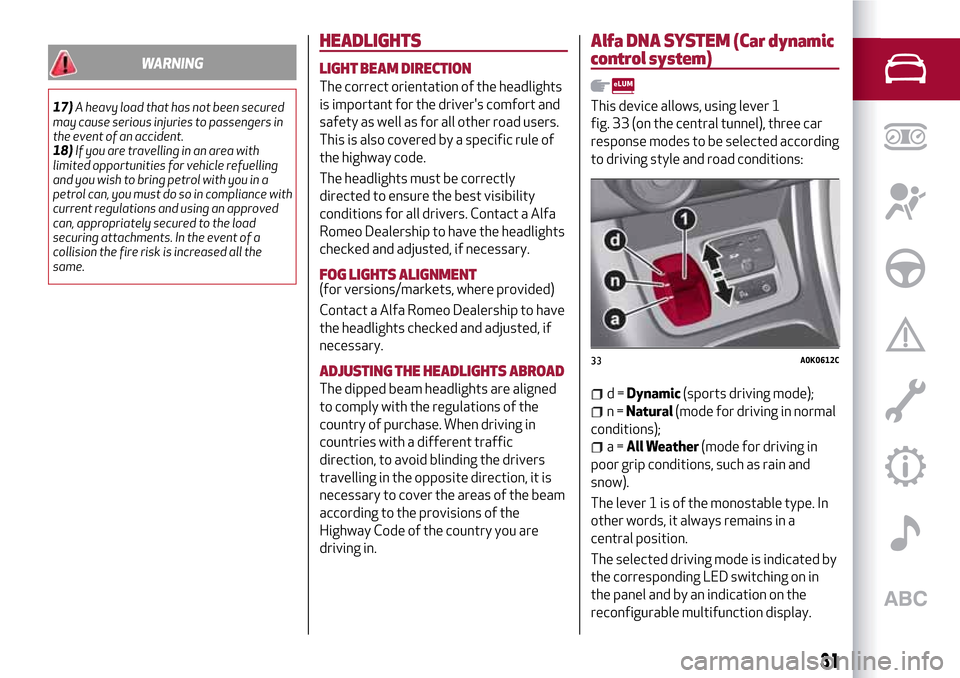
This device allows, using lever 1
fig. 33 (on the central tunnel), three car
response modes to be selected according
to driving style and road conditions:
d=Dynamic(sports driving mode);
n=Natural(mode for driving in normal
conditions);
a=All Weather(mode for driving in
poor grip conditions, such as rain and
snow).
The lever 1 is of the monostable type. In
other words, it always remains in a
central position.
The selected driving mode is indicated by
the corresponding LED switching on in
the panel and by an indication on the
reconfigurable multifunction display.
33A0K0612C
31
Page 34 of 212
When “Natural” mode is selected, no
messages or symbols are shown on the
display.
The device acts on the dynamic car
control systems (engine, steering, ESC,
ASR, ELECTRONIC Q2 systems, etc.).
TURNING “Dynamic” MODE ON/OFF
9)
IMPORTANT For versions/markets,
where provided, switching to "Dynamic"
mode is automatically disabled in the
first kilometres in order to guarantee
correct settling of the mechanical
components. If an attempt to activate
the system is made before this limit, the
display will show a dedicated message to
remind the driver that this request
cannot be fulfilled.
Activation
Move lever 1 fig. 33 downwards (to the
letter “d”) and hold in this position for
0.5 seconds until the corresponding LED
lights up or the word “Dynamic” appears
on the display.
When lever 1 fig. 33 is moved to the “d”
position, the activation of “Dynamic”
mode is confirmed by a temporary
variation in the brightness (flashing) of
the instrument panel.Turning off
Mover the lever 1 fig. 33 to the "Natural"
position;
TURNING“All Weather” MODE ON/OFF
Activation
Move lever 1 fig. 33 downwards (to the
letter “a”) and hold in this position for
0.5 seconds until the corresponding LED
lights up or the word “All Weather”
appears on the display.
Deactivation
Mover the lever 1 fig. 33 to the "Natural"
position;
IMPORTANT
9)"FAST" VERSION: Considering the high
levels of vehicle performance, it is
recommended to not use the "Dynamic"
mode when driving the first kilometres with
the vehicle in order to provide the
mechanical components with the necessary
running-in period.
VERSION WITH LPGSYSTEM
19) 21)10) 11) 12) 13) 14) 16)
INTRODUCTION
The LPG version features two fuel supply
systems: one for petrol and one for LPG.
PASSIVE SAFETY/ACTIVE SAFETY
Although the LPG system has numerous
safety features, it is advisable to proceed
as follows every time the vehicle is not in
use for a long period or moved in an
emergency as a result of a breakdown or
accident:
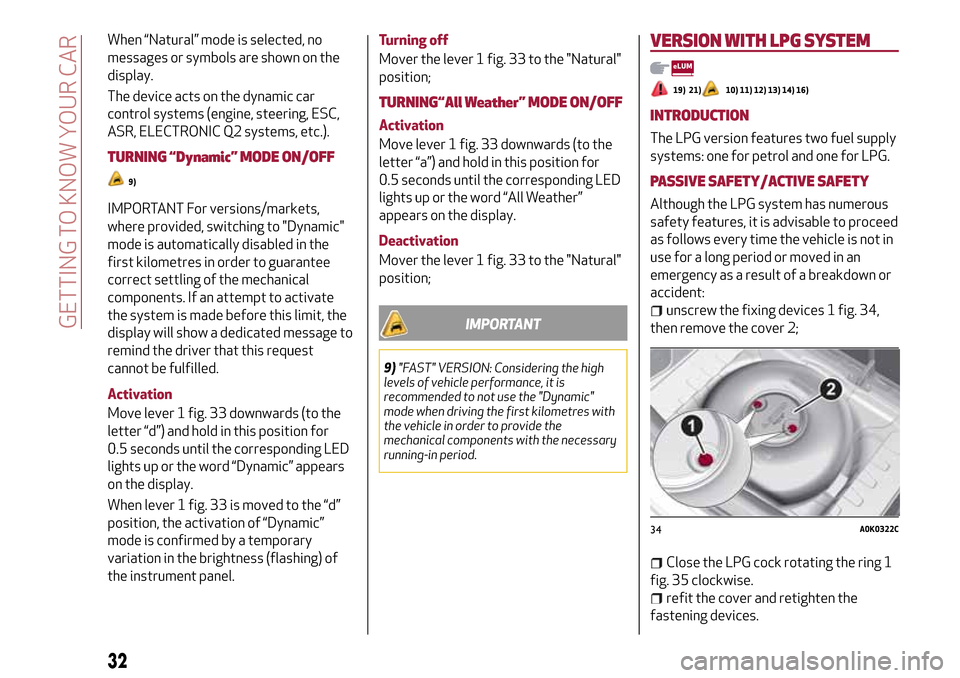
unscrew the fixing devices 1 fig. 34,
then remove the cover 2;
Close the LPG cock rotating the ring 1
fig. 35 clockwise.
refit the cover and retighten the
fastening devices.
34A0K0322C
32
GETTING TO KNOW YOUR CAR
Page 36 of 212
IMPORTANT
10)The car is equipped with a specifically
designed gaseous LPG injection system: it is
therefore absolutely forbidden to alter the
configuration of the system or its
components. The use of other components or
materials could cause malfunctions and lead
to a reduction in safety; therefore, in the
case of problems, contact an Alfa Romeo
Dealership. When towing or lifting the
vehicle, follow the instructions in the main
handbook under the paragraph on "Towing
the vehicle" to prevent damage to the gas
system parts.
11)The system operates at temperatures
ranging between -20°C and 100°C.
12)When using a painting oven, the LPG
tank should be removed from the car and
later carefully refitted at an Alfa Romeo
Dealership. Although the LPG system has
numerous safety features, it is advisable to
proceed as follows every time the vehicle is
not in use for a long period or moved in an
emergency as a result of a breakdown or
accident: unscrew the devices fastening the
cover of the LPG tank, then remove it. Close
the LPG cock rotating the ring nut clockwise
(see "Passive safety / active safety"). Refit
the cover and retighten the fastening
devices.13)Only use LPG for motor vehicles.
14)It is strictly forbidden to use any additive
in the LPG. Periodically (at least once every
six months) it is advisable to let the LPG in
the tank run out and, at the first refuelling, to
check that it does not exceed the maximum
capacity of 38 litres (reserve included) (with
a tolerance of 2 litres excess). If the level is
above 38 litres (reserve included) contact an
Alfa Romeo Dealership immediately.
15)When switching is requested, metallic
noise from the valves which pressurise the
circuit can be heard. For the switching logic
described above, a delay between the valve
ticking and the switching off of the
instrument panel indication is completely
normal.
16)In particular usage conditions, such as
starting and operation at low ambient
temperature or LPG supply with low propane
content, the system may switch temporarily
to petrol operation, without a visual
indication of switching on the instrument
panel. In the event of low LPG levels in the
tank or request for high performance (e.g.
overtaking, car fully laden, steep hills) the
system may automatically switch to petrol
operation to guarantee the engine power
requested; the green warning light on the
instrument panel switches on to indicate this.
When the above conditions are no longer
present, the system automatically restores
LPG operation; the green warning light
switches off. To achieve the automatic
switching described above, make sure that
there is always enough fuel in the petrol tank.
34
GETTING TO KNOW YOUR CAR
Page 37 of 212
This section of the booklet gives you all the information you need
to understand, interpret and use the instrument panel correctly.
KNOWING THE INSTRUMENT PANEL
CONTROL PANEL AND ON-BOARD INSTRUMENTS .........36
DISPLAY....................................38
MENU ITEMS.................................40
TRIP COMPUTER..............................41
WARNING LIGHTS AND MESSAGES . ..................42
Page 38 of 212
CONTROL PANEL AND ON-BOARD INSTRUMENTS
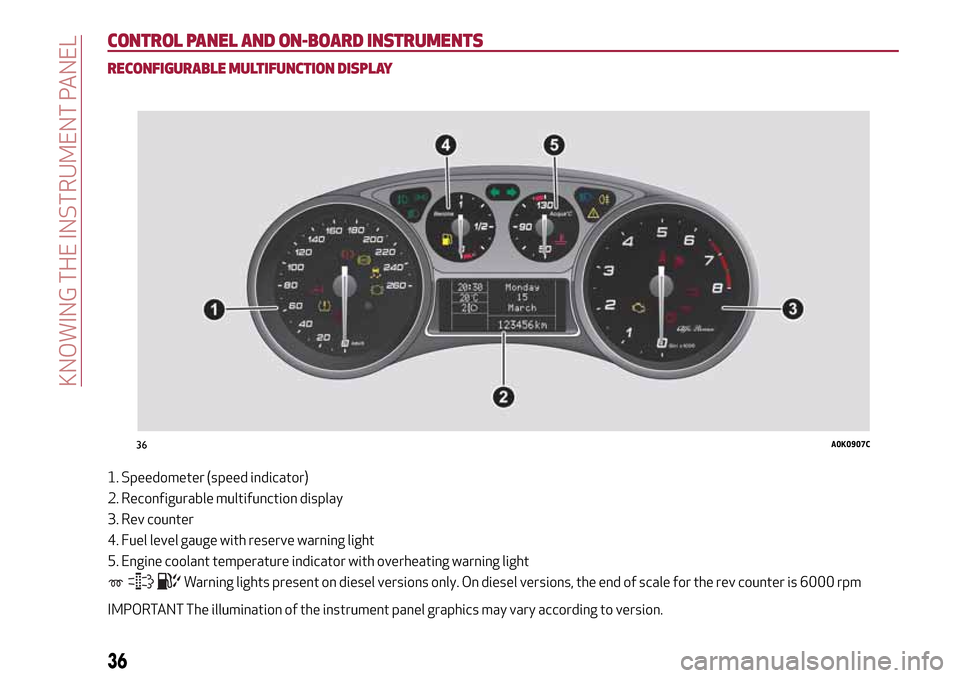
RECONFIGURABLE MULTIFUNCTION DISPLAY
1. Speedometer (speed indicator)
2. Reconfigurable multifunction display
3. Rev counter
4. Fuel level gauge with reserve warning light
5. Engine coolant temperature indicator with overheating warning light
Warning lights present on diesel versions only. On diesel versions, the end of scale for the rev counter is 6000 rpm
IMPORTANT The illumination of the instrument panel graphics may vary according to version.
36A0K0907C
36
KNOWING THE INSTRUMENT PANEL
Page 39 of 212
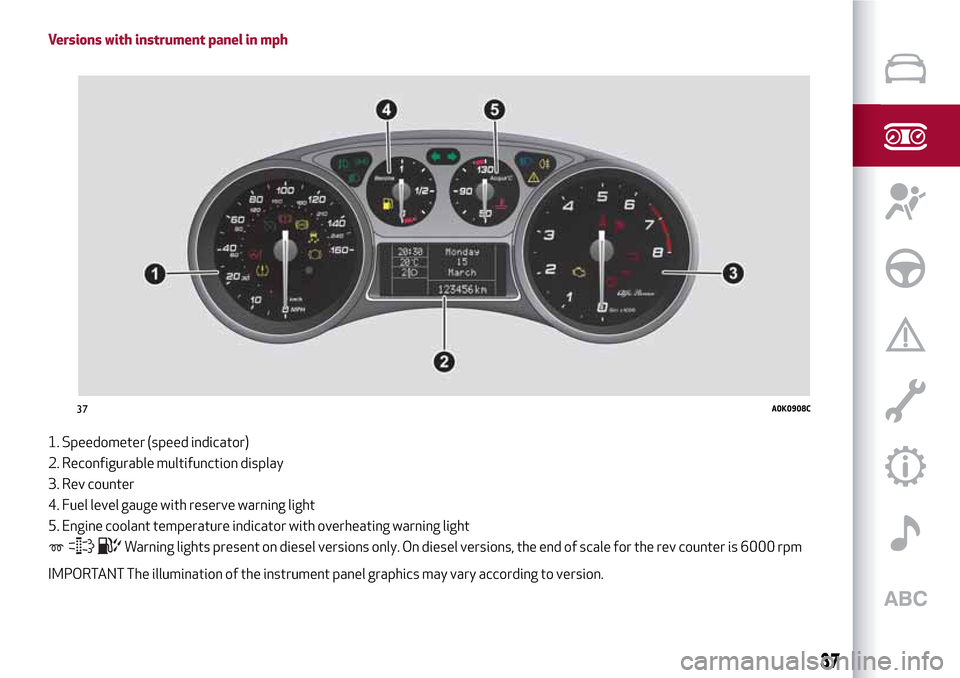
Versions with instrument panel in mph
1. Speedometer (speed indicator)
2. Reconfigurable multifunction display
3. Rev counter
4. Fuel level gauge with reserve warning light
5. Engine coolant temperature indicator with overheating warning light
Warning lights present on diesel versions only. On diesel versions, the end of scale for the rev counter is 6000 rpm
IMPORTANT The illumination of the instrument panel graphics may vary according to version.
37A0K0908C
37
Page 40 of 212
DISPLAY
The car is equipped with a reconfigurable
multifunction display that, according to
the previously applied settings, will show
useful driving information.
With the ignition key removed, the
display lights up and shows the time and
total odometer reading (in km or miles)
for a few seconds when a door is
opened/closed.
RECONFIGURABLE MULTIFUNCTION
DISPLAY
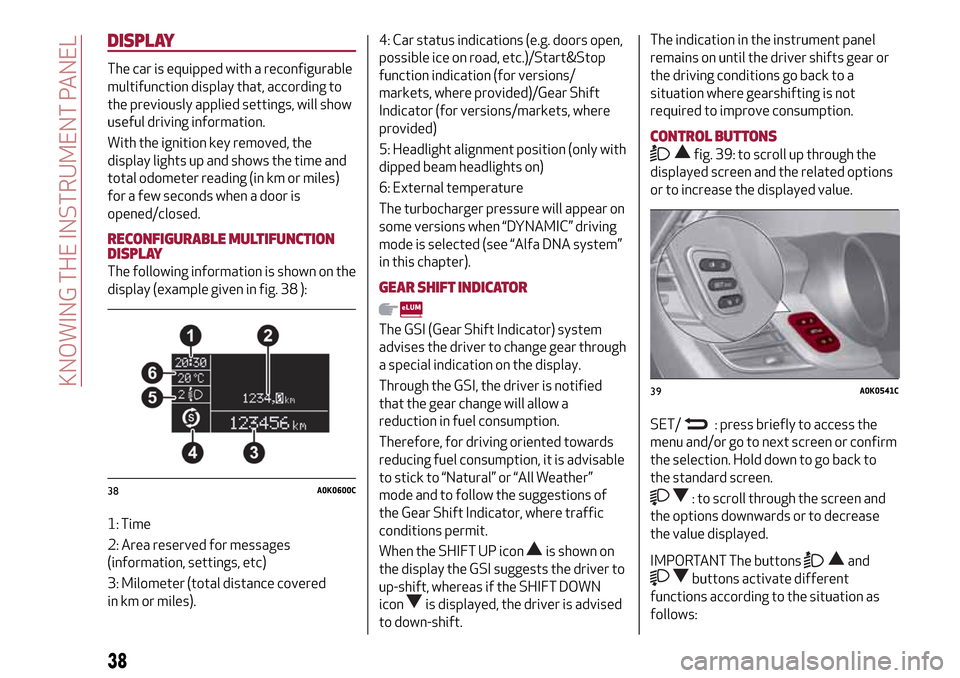
The following information is shown on the
display (example given in fig. 38 ):
1: Time
2: Area reserved for messages
(information, settings, etc)
3: Milometer (total distance covered
in km or miles).4: Car status indications (e.g. doors open,
possible ice on road, etc.)/Start&Stop
function indication (for versions/
markets, where provided)/Gear Shift
Indicator (for versions/markets, where
provided)
5: Headlight alignment position (only with
dipped beam headlights on)
6: External temperature
The turbocharger pressure will appear on
some versions when “DYNAMIC” driving
mode is selected (see “Alfa DNA system”
in this chapter).GEAR SHIFT INDICATOR
The GSI (Gear Shift Indicator) system
advises the driver to change gear through
a special indication on the display.
Through the GSI, the driver is notified
that the gear change will allow a
reduction in fuel consumption.
Therefore, for driving oriented towards
reducing fuel consumption, it is advisable
to stick to “Natural” or “All Weather”
mode and to follow the suggestions of
the Gear Shift Indicator, where traffic
conditions permit.
When the SHIFT UP icon
is shown on
the display the GSI suggests the driver to
up-shift, whereas if the SHIFT DOWN
icon
is displayed, the driver is advised
to down-shift.
The indication in the instrument panel
remains on until the driver shifts gear or
the driving conditions go back to a
situation where gearshifting is not
required to improve consumption.
CONTROL BUTTONS
fig. 39: to scroll up through the
displayed screen and the related options
or to increase the displayed value.
SET/
: press briefly to access the
menu and/or go to next screen or confirm
the selection. Hold down to go back to
the standard screen.
: to scroll through the screen and
the options downwards or to decrease
the value displayed.
IMPORTANT The buttonsand
buttons activate different
functions according to the situation as
follows:
38A0K0600C
39A0K0541C
38
KNOWING THE INSTRUMENT PANEL
Page 41 of 212
within the menu, they allow you to
scroll up or down through the options;
during setting operations, they
increase or decrease values.
MAIN MENU
The menu comprises a series of options
which can be selected using the buttons
andto access the different
selection and setting (Setup) operations
indicated below.
Some options have a submenu. The menu
can be activated by briefly pressing the
SET/ button
.
The menu includes the following items:
MENU
LIGHTING
SPEED WARNING
HEADLIGHT SENSOR (for
versions/markets where provided)
RAIN SENSOR (for versions/markets,
where provided)
TRIP B ACTIVATION
SET TIME
SET DATE
FIRST PAGE (for versions/markets,
where provided)
AUTOCLOSE
MEASUREMENT UNIT
LANGUAGE
BUZZER VOLUME
SEAT BELT BEEP
SERVICE
PASSENGER AIRBAG
DAYTIME RUNNING LIGHTS
ADAPTIVE LIGHTS (for
versions/markets, where provided)
COURTESY LIGHTS
EXIT MENU
Some menu items are shown on the
navigator display in models equipped
with radio-navigation systems (for
versions/markets, where provided).
Selecting an option from the main
menu without a submenu:
press the SET/ buttonbriefly to
select the main menu setting you wish to
change;
press the buttonsor
(with single presses) to select the
new setting;
press the SET/ buttonbriefly to
save the new setting and go back to the
previous main menu option.
Selecting an option from the main
menu with a submenu:
briefly press the SET/ buttonto
display the first submenu option;
press the buttonsor
(with single presses) to scroll
through all the submenu options;
press the SET/ buttonbriefly to
select the displayed submenu option and
to open the relevant settings menu;
press the buttonsor
(with single presses) to select the
new setting for this submenu option;
press the SET/ buttonbriefly to
store the new setting and go back to the
previous submenu option.
39
Page 42 of 212
MENU ITEMS
IMPORTANT If there is anUconnect™
system, some menu items are displayed
and managed by the latter and not the
instrument panel (refer to the
description in the Multimedia chapter or
in the supplements available online).
Menu
Access to the Setup Menu.
Lights
(only with side lights on)
Adjustment (8 levels) of the brightness of
the instrument panel, theUconnect™
system controls (for versions/markets
where provided) and the automatic
climate control system controls (for
versions/markets where provided).
Speed warning
Vehicle speed limit setting (km/h or mph).
When this is exceeded, the driver is
notified by an audible warning signal.
Headlight sensor
(for versions/markets, where provided)
Automatic switch on/off of lights
according to external light conditions.
The dusk sensor sensitivity can be
adjusted according to 3 levels (level
1=minimum sensitivity, level 2=average
sensitivity, level 3=maximum sensitivity).Rain sensor
(for versions/markets, where provided)
Adjustment (4 levels) of the sensitivity of
the rain sensor.
TripB activation
Activation (On) and deactivation (Off) of
Trip B display (partial trip counter). For
more information see the "Trip computer"
section.
Set time
Clock setting through two sub-menus:
“Time” and “Format”.
Set date
Date setting (day - month - year).
First page
(for versions/markets, where provided)
Selection of the information you would
like to see on the main screen. You can
view the date or the trip distance.
Autoclose
Activation of the automatic locking of the
doors on exceeding the speed of
20 km/h.Measurement unit
Unit of measurement setting via three
submenus: “Distances”, “Fuel
consumption” and “Temperature”.
If the set distance unit is "km", the display
allows the fuel consumption unit to be set
as km/l or l/100km. If the set distance
unit is “mi” the fuel consumption unit will
be displayed in “mpg”.
Language
Display language selection.
Warning volume
Adjustment (8 levels) of the volume of
the buzzer which accompanies the
display of failures/warnings.
Seat belt beep
This function can be displayed only after
an Alfa Romeo Dealership has
deactivated the SBR system (see
paragraph “SBR system” in the “Safety”
chapter).
Service
Display of information about km/mileage
intervals or, for versions/markets, where
provided, time intervals for car servicing.
Passenger airbag
Activation/deactivation of front
passenger side airbag and side air bag for
pelvis, chest and shoulder protection -
Side bag
40
KNOWING THE INSTRUMENT PANEL