radio Alfa Romeo Giulietta 2017 User Guide
[x] Cancel search | Manufacturer: ALFA ROMEO, Model Year: 2017, Model line: Giulietta, Model: Alfa Romeo Giulietta 2017Pages: 212, PDF Size: 4.56 MB
Page 183 of 212
Managing an incoming call
The buttons on the display allow the
following phone call functions to be
managed:
To answer a call: press the "Answer"
button or the
button on the steering
wheel controls;
To end a call: press the "Ignore" button
or the
button on the steering wheel
controls;
Ignore;
Put on hold/resume;
Deactivate/activate the microphone;
Transfer the call;
Switch from one call to the other;
Conference/merge two active calls.
Text message reader
To use this function the mobile phone
must support the SMS exchange function
through
Bluetooth®.
If this function is not supported by the
phone, the corresponding
button is
deactivated (grey).
When a text message is received, the
display will show a screen where the
options "Listen", "Call" or "Ignore" can be
selected.
The list of SMS messages received from
the mobile phone can be accessed by
pressing the
button.
NOTE Some mobile phones may not take
the SMS delivery confirmation settings
into account when interfacing withUconnect™. If an SMS message is sent via
Uconnect™, the user could face an
additional cost, without any warning, due
to the SMS delivery confirmation request
sent by the phone. For any problems
related to the above, contact your
telephone service provider.
SMS message options
Default SMS messages are stored in the
system memory and can be sent to
answer a received message or as a new
message:
Yes.
No.
Okay.
I can't talk right now.
Call me.
I'll call you later.
I'm on my way.
Thanks.
I will be late.
Stuck in traffic.
Start without me.
Where are you?
Are you there yet?
I need directions.
I'm lost.
See you later.
I will be 5 (or 10, 15, 20, 25, 30, 45,
60)* minutes late.
See you in 5 (or 10, 15, 20, 25, 30, 45,
60)* minutes.* Only use the numbers listed, otherwise
the system will not take the message.
“APPS” MODE
Press the APPS button on the front panel
to display the following operating
settings:
External temperature
Trip Computer
Clock
Bush
Uconnect™LIVE
Uconnect™LIVE SERVICES
Press the APPS button to access the
Uconnect™LIVEapplications.
The services available depend on the car
configuration and the market.
To use theUconnect™LIVEservices, you
need to download theUconnect™LIVE
app from Google Play or Apple Store and
register using the app or on
www.DriveUconnect.eu.
First access to the vehicle
Once you have launched the
Uconnect™LIVEApp and entered your
details, you have to pair the
Bluetooth®
with your smartphone and the radio, as
described in the "Pairing a mobile phone"
chapter, to access theUconnect™LIVE
services in your vehicle.
When pairing is complete, the connected
services can be accessed by pressing the
Uconnect™LIVEicon on the radio.
181
Page 184 of 212
Before you can use the connected
services, you must first do the
Bluetooth®pairing, then complete the
activation procedure by following the
instructions that appear in the
Uconnect™LIVEapp.
Settings of the Uconnect™ LIVE
services that can be managed through
the radio
From the dedicated radio menu for
Uconnect™LIVE servicesyou can access
the "Settings" section using the l'icon
In this section you can check the
system options and change them to suit
your own preferences.
System updates
If an update for theUconnect™LIVE
system is available while the
Uconnect™LIVEservices are being used,
the user will be informed with a message
on the radio screen.
Connected services that can be
accessed on the vehicle
The Efficient Drive and my:Car
applications were developed to improve
the customer's driving experience,
therefore they are available in all
markets where theUconnect™LIVE
services can be accessed.
If the navigation system is installed in the
radio, accessing theUconnect™LIVE
services enables use of the "Live"
services.Efficient Drive
The Efficient Drive application allows you
to display your driving behaviour in real
time, in order to help you reach a more
efficient driving style as far as
consumption and emissions are
concerned.
Driving style is evaluated by means of
four indices which monitor the following
parameters: acceleration, deceleration,
gearchange, speed
Display of the Efficient Drive
Press the Efficient Drive button to
interact with the function.
A screen will appear on the radio showing
4 indices: Acceleration, Deceleration,
Speed and Gear. These indices are grey
until the system has enough data to
evaluate the driving style. Once sufficient
data are available, the indices will have
5 colours depending on the evaluation:
dark green (very good), light green,
yellow, orange and red (very bad).
In the event of extended inactivity, the
display will show the average of the
indices until that moment (the "Average
index"), then the indices will be coloured
again in real time as soon as the vehicle is
restarted.my:Car
my:Car allows you to keep the "health" of
your vehicle always under control.
my:Car can detect malfunction in real
time and inform the user about the expiry
of the servicing interval. Press the
"my:Car" button to interact with the
application.
The display will show a screen with the
"care:Index" section, which provides all
the detailed information about the status
of the vehicle. Press the "Active
warnings" button to show (if present) the
details of the vehicle's faults which
caused a warning light to switch on.
SETTINGS
Press the SETTINGS button on the front
panel to display the main Settings menu.
NOTE The menu items displayed vary
according to the versions.
Display;
Clock & Date;
Safety/Assistance (for
versions/markets, where provided);
Lights (for versions/markets where
provided);
Doors and Door lock;
Audio;
Phone/Bluetooth;
Radio
Restore Default Settings.
182
MULTIMEDIA
Page 185 of 212
DRIVING MODE (DNA) INFORMATION
ACTIVATION
This function can be used to select
whether to show Alfa DNA messages
("ON") or not ("OFF") on the display.
VOICE COMMANDS
Using voice commands
The
button on the steering wheel
activates the “Phone” voice recognition
mode, there is a "beep" and the display
shows a suggestion screen inviting the
user to say a command.
If the
button is pressed during a
system voice message, it activates the
“Radio/Media” voice recognition mode
that controls the radio and he
USB/iPod/CD and MP3 players.
Please follow the suggestions below to
be sure that the voice commands are
always recognised by the system:
speak at a normal volume;
always wait for the "beep" (warning
sound) before speaking;
if possible, try and keep the noise in
the passenger compartment to a
minimum. It is also advisable to close the
windows and sunroof (for
versions/markets, where provided).
for optimum operation, it is advisable
to close the windows and the sun roof
(for versions/markets, where provided)
to avoid external interference;WARNING Voice commands must always
be given in safe driving conditions, in
compliance with the laws in force in the
country where you are driving and using
the mobile phone correctly.
Multiple choice
In a few specific cases the system cannot
unambiguously identify the given voice
command and asks the user to choose
between a maximum of four alternatives.
The system will propose a numbered list
of the available alternatives, asking the
user to say the associated number.
List of voice commands
GLOBAL voice commands:
HELP
CANCEL
REPEAT
VOICE PROMPTS
PHONE voice commands:
CALL
DIAL
REDIAL
CALL BACK
LAST CALLS
OUTGOING CALLS
MISSED CALLS
INCOMING CALLS
SHOW PHONEBOOK
SEARCH
SHOW MESSAGESTEXT MESSAGE voice commands:
SEND A TEXT MESSAGE TO
SEND TEXT MESSAGE TO
ON
SHOW MESSAGES
HANDS FREE CALLING voice commands:
SEND TO NUMBER
SEND
DISABLE HANDS FREE
MICROPHONE MUTE ON/OFF
RADIO AM/FM/DAB voice commands:
TUNE BY
TUNE TO DAB CHANNEL
MEDIA voice commands:
PLAY TRACK
Page 186 of 212
ANTITHEFT PROTECTION
The system is equipped with an anti-theft
protection system based on the
exchange of information with the
electronic control unit (Body Computer)
on the vehicle.
This guarantees maximum safety and
prevents the secret code from being
entered after the power supply has been
disconnected.
If the check has a positive outcome, the
system will start to operate.
If the comparison codes are not the same
or if the electronic control unit (Body
Computer) is replaced, the system will
ask the user to enter the secret code
according to the procedure described in
the paragraph below.
Entering the secret code
When the system is switched on, if the
code is requested, the display will show
"Please enter Anti-Theft Code" followed
by the screen showing a keypad to enter
the secret code.
The secret code is made up of four digits,
from 0 to 9: to insert the first number of
the code press the corresponding key on
the display. Enter the other code digits in
the same way.After entering the fourth digit, the
system begins operating.
If an incorrect code is entered, the
system displays "Incorrect Code" to
notify the user of the need to enter the
correct code.
After the 3 available attempts to enter
the code, the system displays "Incorrect
Code. Radio locked. Please wait
30 minutes": the waiting time is
displayed. After the text has disappeared
it is possible to start the code entering
procedure again.
Vehicle radio passport
This document certifies ownership of the
system. The vehicle radio passport shows
the system model, serial number and
secret code.
In the event that the radio passport is
lost, contact an Alfa Romeo Dealership,
taking an ID document and the car
ownership documents.
WARNING Keep the vehicle radio
passport in a safe place so that you can
give the information to the relevant
authorities if the system is stolen.
184
MULTIMEDIA
Page 187 of 212
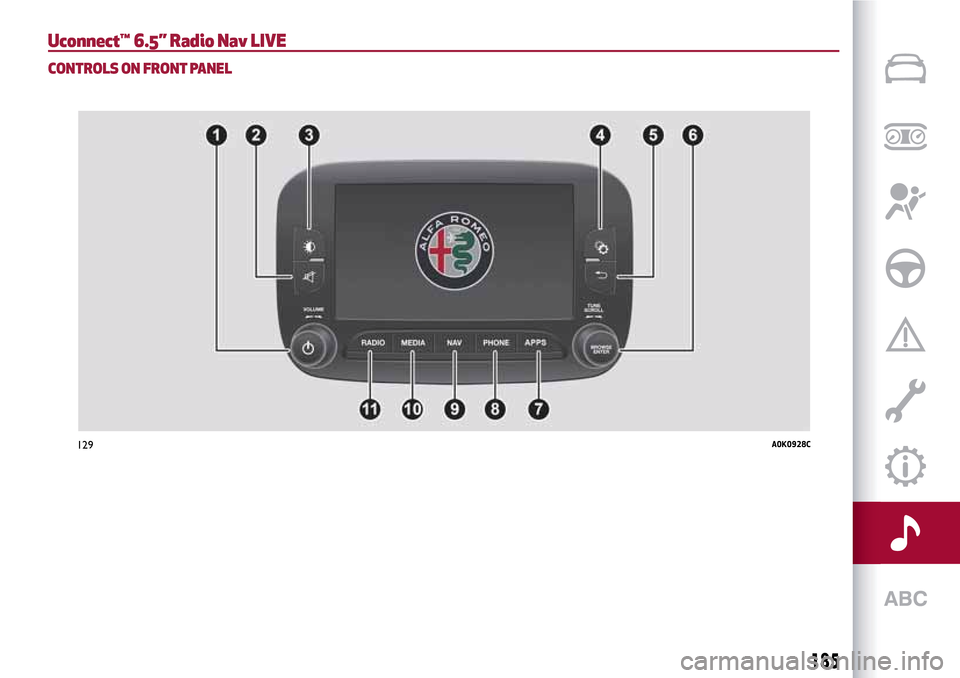
Uconnect™ 6.5” Radio Nav LIVE
CONTROLS ON FRONT PANEL
129A0K0928C
185
Page 188 of 212
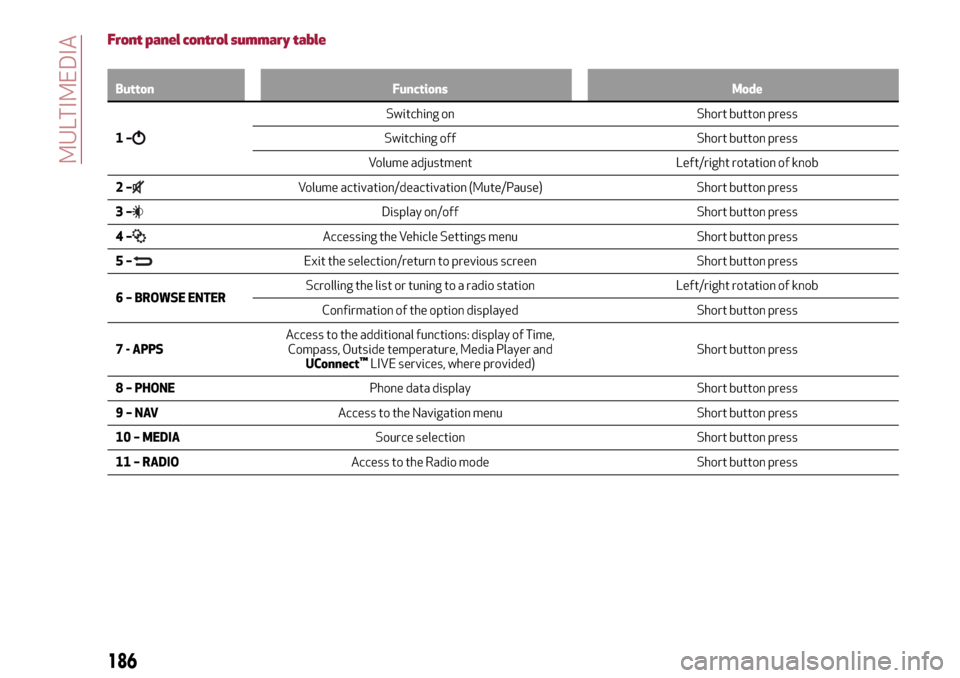
Front panel control summary table
Button Functions Mode
1–
Switching on Short button press
Switching off Short button press
Volume adjustment Left/right rotation of knob
2–
Volume activation/deactivation (Mute/Pause) Short button press
3–
Display on/off Short button press
4–
Accessing the Vehicle Settings menu Short button press
5–
Exit the selection/return to previous screen Short button press
6 – BROWSE ENTERScrolling the list or tuning to a radio station Left/right rotation of knob
Confirmation of the option displayed Short button press
7 - APPSAccess to the additional functions: display of Time,
Compass, Outside temperature, Media Player and
UConnect
™LIVE services, where provided)Short button press
8 – PHONEPhone data display Short button press
9–NAVAccess to the Navigation menu Short button press
10 – MEDIASource selection Short button press
11 – RADIOAccess to the Radio mode Short button press
186
MULTIMEDIA
Page 190 of 212
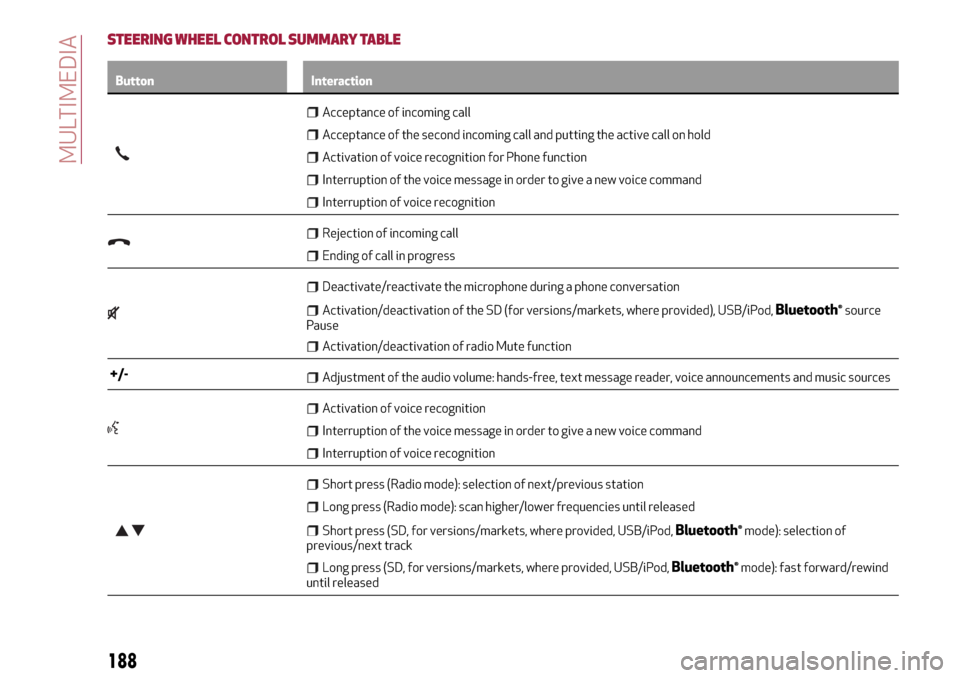
STEERING WHEEL CONTROL SUMMARY TABLE
Button Interaction
Acceptance of incoming call
Acceptance of the second incoming call and putting the active call on hold
Activation of voice recognition for Phone function
Interruption of the voice message in order to give a new voice command
Interruption of voice recognition
Rejection of incoming call
Ending of call in progress
Deactivate/reactivate the microphone during a phone conversation
Activation/deactivation of the SD (for versions/markets, where provided), USB/iPod,Bluetooth®source
Pause
Activation/deactivation of radio Mute function
+/-Adjustment of the audio volume: hands-free, text message reader, voice announcements and music sources
Activation of voice recognition
Interruption of the voice message in order to give a new voice command
Interruption of voice recognition
Short press (Radio mode): selection of next/previous station
Long press (Radio mode): scan higher/lower frequencies until released
Short press (SD, for versions/markets, where provided, USB/iPod,Bluetooth®mode): selection of
previous/next track
Long press (SD, for versions/markets, where provided, USB/iPod,Bluetooth®mode): fast forward/rewind
until released
188
MULTIMEDIA
Page 191 of 212
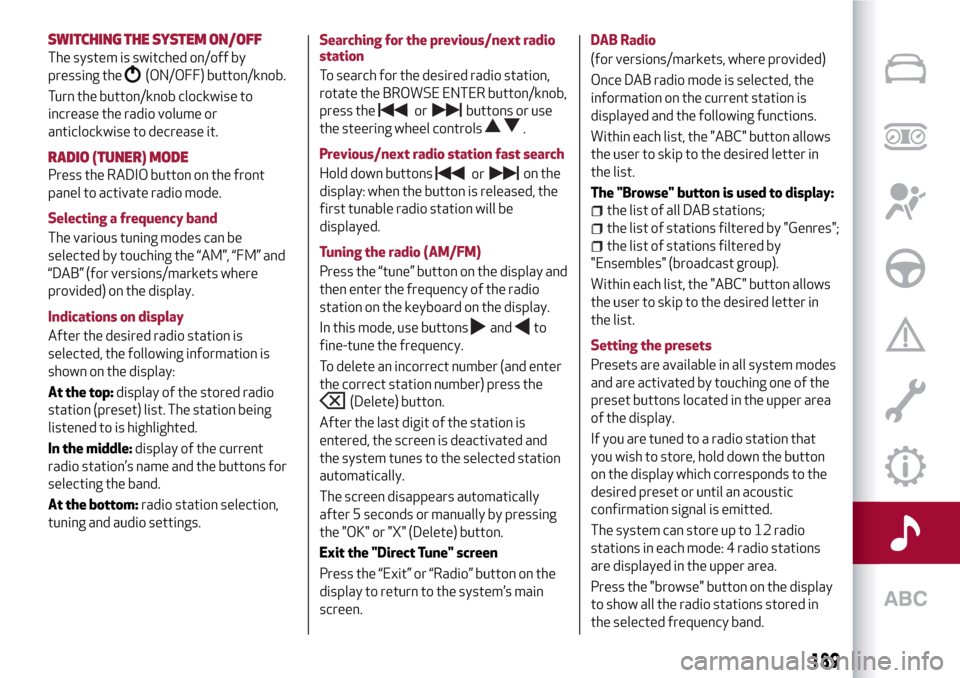
SWITCHING THESYSTEM ON/OFF
The system is switched on/off by
pressing the
(ON/OFF) button/knob.
Turn the button/knob clockwise to
increase the radio volume or
anticlockwise to decrease it.
RADIO (TUNER) MODE
Press the RADIO button on the front
panel to activate radio mode.
Selecting a frequency band
The various tuning modes can be
selected by touching the “AM”, “FM” and
“DAB” (for versions/markets where
provided) on the display.
Indications on display
After the desired radio station is
selected, the following information is
shown on the display:
At the top:display of the stored radio
station (preset) list. The station being
listened to is highlighted.
In the middle:display of the current
radio station’s name and the buttons for
selecting the band.
At the bottom:radio station selection,
tuning and audio settings.Searching for the previous/next radio
station
To search for the desired radio station,
rotate the BROWSE ENTER button/knob,
press thebuttons or use
the steering wheel controls
.
Previous/next radio station fast search
Hold down buttonson the
display: when the button is released, the
first tunable radio station will be
displayed.
Tuning the radio (AM/FM)
Press the “tune” button on the display and
then enter the frequency of the radio
station on the keyboard on the display.
In this mode, use buttons
andto
fine-tune the frequency.
To delete an incorrect number (and enter
the correct station number) press the
(Delete) button.
After the last digit of the station is
entered, the screen is deactivated and
the system tunes to the selected station
automatically.
The screen disappears automatically
after 5 seconds or manually by pressing
the "OK" or "X" (Delete) button.
Exit the "Direct Tune" screen
Press the “Exit” or “Radio” button on the
display to return to the system’s main
screen.DAB Radio
(for versions/markets, where provided)
Once DAB radio mode is selected, the
information on the current station is
displayed and the following functions.
Within each list, the "ABC" button allows
the user to skip to the desired letter in
the list.
The "Browse" button is used to display:
the list of all DAB stations;
the list of stations filtered by "Genres";
the list of stations filtered by
"Ensembles" (broadcast group).
Within each list, the "ABC" button allows
the user to skip to the desired letter in
the list.
Setting the presets
Presets are available in all system modes
and are activated by touching one of the
preset buttons located in the upper area
of the display.
If you are tuned to a radio station that
you wish to store, hold down the button
on the display which corresponds to the
desired preset or until an acoustic
confirmation signal is emitted.
The system can store up to 12 radio
stations in each mode: 4 radio stations
are displayed in the upper area.
Press the "browse" button on the display
to show all the radio stations stored in
the selected frequency band.
189
or
or
Page 192 of 212
Audio
To access the "Audio" menu, press the
"audio" button on the display.
The following adjustments can be carried
out using the "Audio" menu:
"Balance/Fader" (left/right and
front/rear audio balance adjustment);
"Equalizer" (for versions/markets,
where provided): to adjust the bass,
medium and treble settings;
"Volume/Speed" (excluding versions
with Hi-Fi system) speed-dependent
automatic volume adjustment;
"Loudness" (for versions/markets,
where provided): improves audio quality
at low volumes;
"Auto-On Radio": provides the options
of radio on, radio off or restore status
when the ignition key was last turned to
STOP.
MEDIA MODE
This chapter describes the interaction
modes related to operation of the SD
card (for versions/markets, where
provided) and the
Bluetooth®, AUX and
USB/iPod devices.
Press the “select source” button to select
the desired audio source from those
available.Change track (next/previous)
Briefly press the
button or turn the
BROWSE ENTER button/knob clockwise
to play the next track or briefly press the
button or turn the BROWSE ENTER
button/knob anticlockwise to return to
the beginning of the selected track or to
the beginning of the previous track if this
has been played for less than 8 seconds.
Fast forward/rewind through tracks
Press and hold down the
button to
fast forward the selected track or keep
the
button pressed to fast rewind
the track.
Track selection (Browse)
NOTE
Bluetooth®devices do not offer
the possibility of scrolling through tracks
using the above categories.
NOTE This button might be disabled for
some
Apple®devices.
Press the "Browse" button to activate
this function on the source being played.
Turn the BROWSE ENTER button/knob
to select the desired category and then
press the button/knob to confirm the
selection.
Press the "X" button to cancel the
function.Track information display
Press the "Info" button to display the
information on the track being listened to
for devices that support the function.
Press the "X" button to exit the screen.
Shuffle
Press the ">" button then the "Shuffle"
button to play the tracks on the SD card
(for versions/markets, where provided),
or on the USB/iPod or
Bluetooth®
devices in a random order.
Press the "Shuffle" button again to
deactivate the function.
Repeat
Press the ">" button then the "Repeat"
button to activate the function.
Press the "Repeat" button again to
deactivate the function.
Bluetooth® SOURCE
Pairing aBluetooth®deviceactivate theBluetooth®function on
the device;
press the MEDIA button on the front
panel;
if the “Media” source is active, press he
“select resource” button
select theBluetooth®Media source;press the "Add Device" button;
look forUconnect™on theBluetooth®
audio device.
190
MULTIMEDIA
Page 194 of 212
select "Yes" to start the pairing
procedure, then search for the
Uconnect™device on the mobile phone;
when prompted by the mobile phone,
use its keypad to enter the PIN code
shown on the system display or confirm
on the mobile phone the PIN displayed;
from the "Phone" screen you can
always pair a mobile phone by pressing
the "Settings" button: press the "Add
Device" button and proceed as described
above;
select "Yes" or “No” at the request to
pair the mobile phone as the preferred
device;
NOTE After updating the phone software,
for proper operation, it is recommended
to remove the phone from the list of
devices linked to the radio, delete the
previous system pairing also from the list
of Bluetooth devices on the phone and
make a new pairing.
Transferring phone data (phonebook
and recent calls)
If your mobile phone has a function for
sending the phonebook via
Bluetooth®
technology.
Answer "Yes" when asked to copy the
phonebook to the system.
Answer "No" to carry out the operation
later on.Making a phone call
The operations described below can only
be accessed if supported by the mobile
phone in use.
A call can be made by:
selecting theicon (mobile phone
phonebook);
selecting "Recent Calls";
selecting the icon(Keypad);
pressing the "Redial" button.
Handling an incoming call
The buttons on the display allow the
following phone call functions to be
managed:
To answer a call: press the "Answer"
button or the
button on the steering
wheel controls;
To end a call: press the "Ignore" button
or the
button on the steering wheel
controls;
Ignore;
Put on hold/resume;
Deactivate/activate the microphone;
Transfer the call;
Switch from one call to the other;
Conference/merge two active calls.
Text message reader
To use this function the mobile phone
must support the SMS exchange function
throughBluetooth™.If this function is not supported by the
phone, the corresponding
button is
deactivated (grey).
When a text message is received, the
display will show a screen where the
options "Listen", "Call" or "Ignore" can be
selected.
The list of SMS messages received from
the mobile phone can be accessed by
pressing the
button.
NOTE Some mobile phones may not take
the SMS delivery confirmation settings
into account when interfacing with
Uconnect™. If an SMS message is sent via
Uconnect™, the user could face an
additional cost, without any warning, due
to the SMS delivery confirmation request
sent by the phone. For any problems
related to the above, contact your
telephone service provider.
Siri Eyes Free
Siri allows you to use your voice to send
text message, manage media sources,
phone calls and much more. You can keep
your eyes on the road and your hands on
the steering wheel, while using Siri to
perform other useful operations.
Press the
button on the steering wheel
(long press) to activate Siri. When you
hear a double beep you can begin to
interact with Siri.
192
MULTIMEDIA