light Alfa Romeo Giulietta 2017 Manual PDF
[x] Cancel search | Manufacturer: ALFA ROMEO, Model Year: 2017, Model line: Giulietta, Model: Alfa Romeo Giulietta 2017Pages: 212, PDF Size: 4.56 MB
Page 141 of 212
do not keep accessories (e.g. radio,
hazard warning lights, etc.) switched on
for a long time when the engine is not
running;
before performing any operation on
the electrical system, disconnect the
negative battery cable.
IMPORTANT Every time the battery is
disconnected, the steering must be
initialised. This is indicated by the
appearance of the icon
. To carry out
this procedure, simply turn the steering
wheel all the way from one end to the
other or drive in a straight line for about a
hundred metres.
IMPORTANT If the charge level remains
under 50% for a long time, the battery is
damaged by sulphation, reducing its
capacity and efficiency at start-up.
The battery will also be more at risk of
freezing (this can happen as early as
-10°C). Refer to the "Vehicle inactivity"
paragraph in "Starting and driving"
chapter if the vehicle is left parked for a
long time.If, after purchasing the car, you wish to
install electrical accessories which
require permanent electrical supply (e.g.
alarm, etc.) or accessories which
influence the electrical supply
requirements, contact an Alfa Romeo
Dealership, whose qualified staff will
evaluate the overall electrical
consumption.
WARNING
140)Battery fluid is poisonous and
corrosive. Avoid contact with the skin and
eyes. Keep open flames away from the
battery and do not use objects that might
create sparks: risk of explosion and fire.
141)Using the battery with insufficient
fluid irreparably damages the battery and
may cause an explosion.
142)If the vehicle must remain unused for a
long time at a very low temperature, remove
the battery and take it to a warm place, to
avoid freezing.
143)When performing any operation on the
battery or near it, always protect your eyes
with special goggles.
IMPORTANT
47)Incorrect installation of electric and
electronic devices may cause severe damage
to your car. After purchasing your vehicle, if
you wish to install any accessories (e.g.
anti-theft, radio phone, etc.), go to an Alfa
Romeo Dealership, which will suggest the
most suitable devices and advise you
whether a higher capacity battery needs to
be installed.
IMPORTANT
5)Batteries contain substances which are
very dangerous for the environment. For
battery replacement, contact an Alfa Romeo
Dealership.
139
Page 142 of 212
LIFTING THE VEHICLE
If the car needs to be jacked up, go to an
Alfa Romeo Dealership which is equipped
with shop jacks and jack arms.
IMPORTANT Be careful when positioning
the arm of the lift for versions with side
skirts.
BODYWORK
PRESERVING THE BODYWORK
Paint6)48)
Touch up abrasions and scratches
immediately to prevent the formation of
rust.
Maintenance of paintwork consists of
washing the car: the frequency depends
on the conditions and environment where
the car is used. For example, it is
advisable to wash the car more often in
areas with high environmental pollution
or salted roads.
On some versions the car may be
equipped, on request, with an exclusive
opaque paint on the roof which, in order
to be maintained intact, requires special
care: see the instructions in the warning.
49)
To correctly wash the vehicle, follow
these instructions:
if the vehicle is washed remove the
aerial from the roof;
if high pressure jets or cleaners are
used to wash the car, keep a distance of
at least 40 cm from the bodywork to
avoid damage or alteration. Bear in mind
that a build up of water could cause
damage to the car in the long term;
wash the bodywork using a low
pressure jet of water;
wipe a sponge with a slightly soapy
solution over the bodywork, frequently
rinsing the sponge;
rinse well with water and dry with a jet
of air or a chamois leather.
Dry the less visible parts (e.g. door
frames, bonnet, headlight frames, etc.)
with special care, as water may stagnate
more easily in these areas. Do not wash
the car after it has been left in the sun or
with the bonnet hot: this may alter the
shine of the paintwork.
Exterior plastic parts must be cleaned in
the same way as the rest of the vehicle.
IMPORTANT NOTES
Avoid parking under trees; the resin
dropped by trees makes the paintwork
go opaque and increases the possibility
of corrosion.
Bird droppings must be washed off
immediately and thoroughly as the acid
they contain is particularly aggressive.
Windows
Use specific detergents and clean cloths
to prevent scratching or altering the
transparency.
IMPORTANT Wipe the rear window inside
gently with a cloth following the direction
of the filaments to avoid damaging the
heating device.
140
SERVICING AND MAINTENANCE
Page 143 of 212
Front headlights
Use a soft cloth soaked in water and
detergent for washing cars.
IMPORTANT Never use aromatic
substances (e.g. petrol) or ketones (e.g.
acetone) for cleaning the plastic lenses
of the headlights.
IMPORTANT When cleaning with a
pressure washer, keep the water jet at
least 20 cm away from the headlights.
Engine compartment
At the end of every winter, wash the
engine compartment thoroughly, taking
care not to aim the jet of water directly at
the electronic control units or at the
windscreen wiper motors. Have this
operation performed at a specialised
workshop.
IMPORTANT The washing should take
place with the engine cold and the
ignition key in the STOP position. After
the washing operation, make sure that
the various protections (e.g. rubber caps
and guards) have not been removed or
damaged.
IMPORTANT
6)Detergents pollute the environment. Only
wash your vehicle in areas equipped to
collect and treat wastewater from this type
of activity.
IMPORTANT
48)In order to preserve the aesthetic
appearance of the paint abrasive products
and/or polishes should not be used for
cleaning the vehicle.
49)Avoid washing with rollers and/or
brushes in washing stations. Wash the
vehicle only by hand using neutral pH
detergents; dry it with a wet chamois leather.
Abrasive products and/or polishes should
not be used for cleaning the car. Bird
droppings must be washed off immediately
and thoroughly as the acid they contain is
particularly aggressive. Avoid (if at all
possible) parking the vehicle under trees;
remove vegetable resins immediately as,
when dried, it may only be possible to remove
them with abrasive products and/or polishes,
which is highly inadvisable as they could alter
the typical opaqueness of the paint. Do not
use pure windscreen washer fluid for
cleaning the front windscreen and rear
window; dilute it min. 50% with water. Only
use pure screen washer fluid when strictly
necessary due to outside temperature
conditions.
INTERIOR
144) 145) 146)
Periodically check the cleanliness of the
interior, beneath the mats, which could
cause oxidation of the sheet metal.
SEATS AND FABRIC PARTS
Remove dust with a soft brush or a
vacuum cleaner. It is advisable to use a
moist brush on velvet upholstery. Rub the
seats with a sponge moistened with a
solution of water and neutral detergent.
LEATHER SEATS
(for versions/markets, where provided)
Remove the dry dirt with a chamois or
slightly damp cloth, without exerting too
much pressure. Remove any liquid or
grease stains using an absorbent dry
cloth, without rubbing. Then clean with a
soft cloth or buckskin cloth dampened
with water and mild soap. If the stain
persists, use specific products and
observe the instructions carefully.
IMPORTANT Never use alcohol. Make
sure that the cleaning products used
contain no alcohol or alcohol derivatives,
even in small quantities.
141
Page 144 of 212
PLASTIC AND COATED PARTS
Clean interior plastic parts with a damp
cloth (if possible made from microfibre),
and a solution of water and neutral,
non-abrasive detergent. To clean oily or
persistent stains, use specific products
free from solvents and designed to
maintain the original appearance and
colour of the components.
Remove any dust using a microfibre
cloth, if necessary moistened with water.
The use of paper tissues is not
recommended as these may leave
residues.
50)
GENUINE LEATHER PARTS
(for versions/markets, where provided)
Use only water and mild soap to clean
these parts. Never use alcohol or
alcohol-based products. Before using a
specific product for cleaning interiors,
make sure that it does not contain
alcohol and/or alcohol based substances.
WARNING
144)Never use flammable products, such as
petrol ether or rectified petrol to clean the
inside of the car. The electrostatic charges
which are generated by rubbing during the
cleaning operation may cause a fire.145)Do not keep aerosol cans in the car:
they might explode. Aerosol cans must not
be exposed to a temperature exceeding
50°C. When the vehicle is exposed to
sunlight, the internal temperature can
greatly exceed this value.
146)There must be no obstacles on the
floor underneath the pedals; make sure that
mats are always flat and do not interfere
with the pedals.
IMPORTANT
50)Never use alcohol, petrols and
derivatives to clean the dashboard and
instrument panel lens.
142
SERVICING AND MAINTENANCE
Page 160 of 212
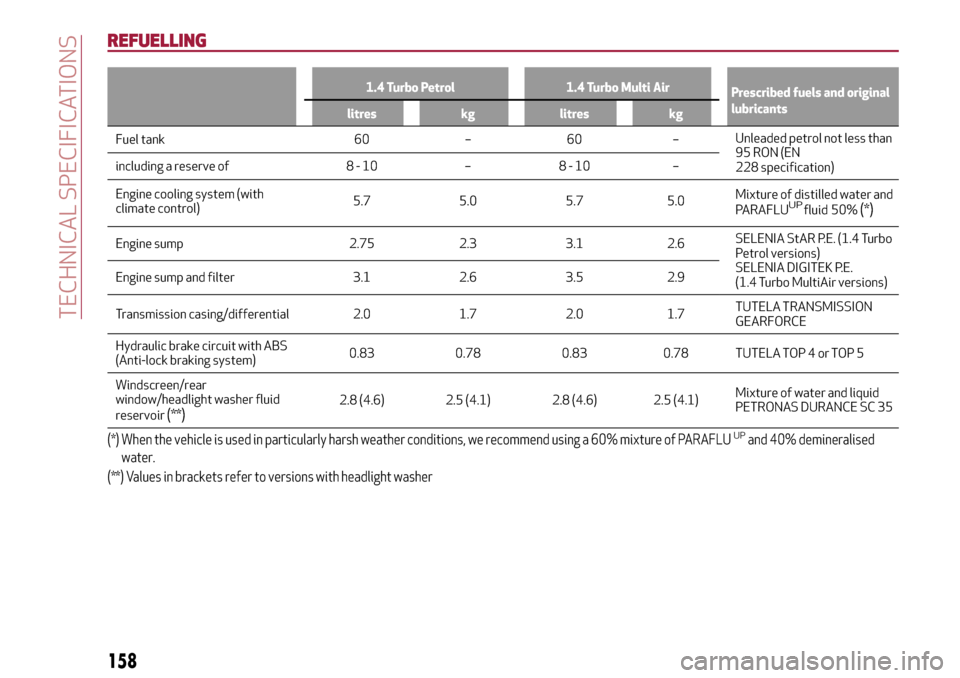
REFUELLING
1.4 Turbo Petrol 1.4 Turbo Multi Air
Prescribed fuels and original
lubricants
litres kg litres kg
Fuel tank 60 – 60 –Unleaded petrol not less than
95 RON (EN
228 specification) including a reserve of 8 - 10 – 8 - 10 –
Engine cooling system (with
climate control)5.7 5.0 5.7 5.0Mixture of distilled water and
PARAFLU fluid
UP50%(*)
Engine sump 2.75 2.3 3.1 2.6SELENIA StAR P.E. (1.4 Turbo
Petrol versions)
SELENIA DIGITEK P.E.
(1.4 Turbo MultiAir versions) Engine sump and filter 3.1 2.6 3.5 2.9
Transmission casing/differential 2.0 1.7 2.0 1.7TUTELA TRANSMISSION
GEARFORCE
Hydraulic brake circuit with ABS
(Anti-lock braking system)0.83 0.78 0.83 0.78 TUTELA TOP 4 or TOP 5
Windscreen/rear
window/headlight washer fluid
reservoir
(**)2.8 (4.6) 2.5 (4.1) 2.8 (4.6) 2.5 (4.1)Mixture of water and liquid
PETRONAS DURANCE SC 35
(*) When the vehicle is used in particularly harsh weather conditions, we recommend using a 60% mixture of PARAFLUUPand 40% demineralised
water.
(**) Values in brackets refer to versions with headlight washer
158
TECHNICAL SPECIFICATIONS
Page 161 of 212
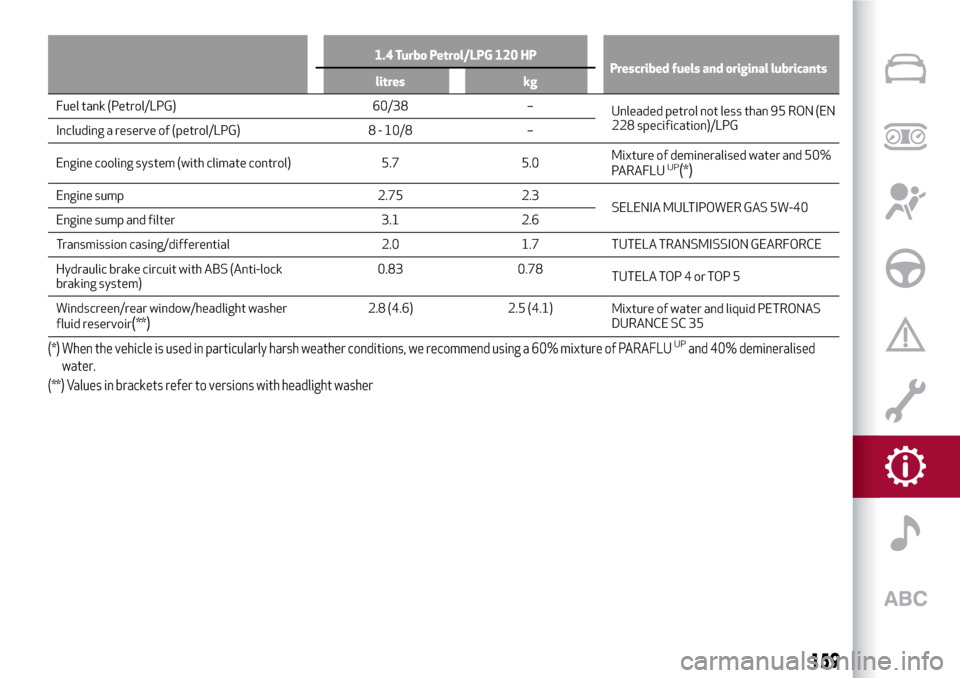
1.4 Turbo Petrol/LPG 120 HP
Prescribed fuels and original lubricants
litres kg
Fuel tank (Petrol/LPG) 60/38 –
Unleaded petrol not less than 95 RON (EN
228 specification)/LPG
Including a reserve of (petrol/LPG) 8 - 10/8 –
Engine cooling system (with climate control) 5.7 5.0Mixture of demineralised water and 50%
PARAFLU
UP(*)
Engine sump 2.75 2.3
SELENIA MULTIPOWER GAS 5W-40
Engine sump and filter 3.1 2.6
Transmission casing/differential 2.0 1.7 TUTELA TRANSMISSION GEARFORCE
Hydraulic brake circuit with ABS (Anti-lock
braking system)0.83 0.78
TUTELA TOP 4 or TOP 5
Windscreen/rear window/headlight washer
fluid reservoir
(**)2.8 (4.6) 2.5 (4.1)
Mixture of water and liquid PETRONAS
DURANCE SC 35
(*) When the vehicle is used in particularly harsh weather conditions, we recommend using a 60% mixture of PARAFLUUPand 40% demineralised
water.
(**) Values in brackets refer to versions with headlight washer
159
Page 162 of 212
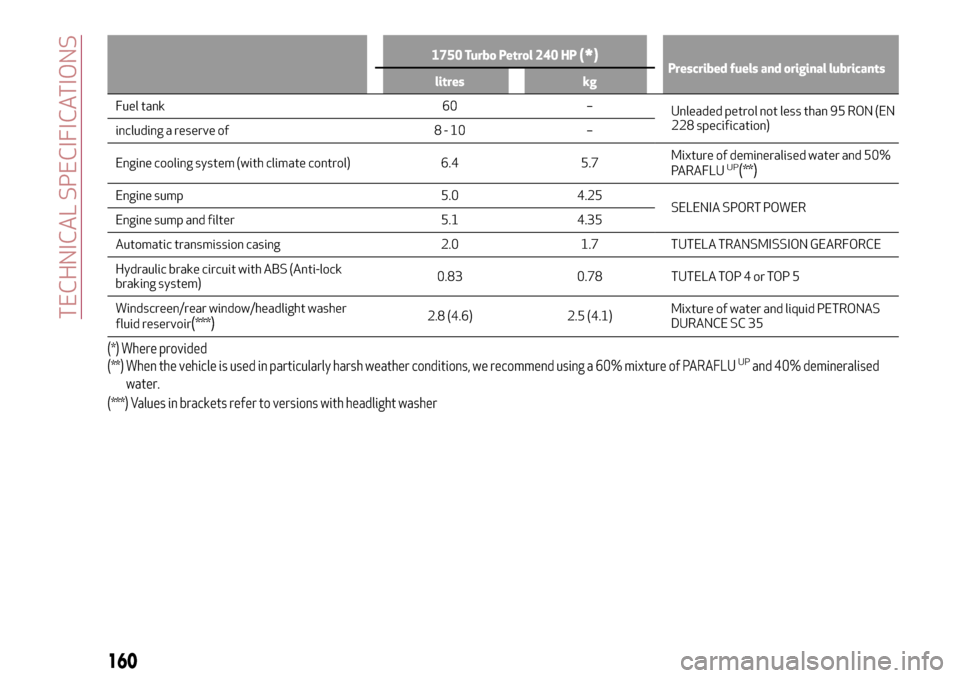
1750 Turbo Petrol 240 HP(*)Prescribed fuels and original lubricants
litres kg
Fuel tank 60 –
Unleaded petrol not less than 95 RON (EN
228 specification)
including a reserve of 8 - 10 –
Engine cooling system (with climate control) 6.4 5.7Mixture of demineralised water and 50%
PARAFLU
UP(**)
Engine sump 5.0 4.25
SELENIA SPORT POWER
Engine sump and filter 5.1 4.35
Automatic transmission casing 2.0 1.7 TUTELA TRANSMISSION GEARFORCE
Hydraulic brake circuit with ABS (Anti-lock
braking system)0.83 0.78 TUTELA TOP 4 or TOP 5
Windscreen/rear window/headlight washer
fluid reservoir
(***)2.8 (4.6) 2.5 (4.1)Mixture of water and liquid PETRONAS
DURANCE SC 35
(*) Where provided
(**) When the vehicle is used in particularly harsh weather conditions, we recommend using a 60% mixture of PARAFLUUPand 40% demineralised
water.
(***) Values in brackets refer to versions with headlight washer
160
TECHNICAL SPECIFICATIONS
Page 163 of 212
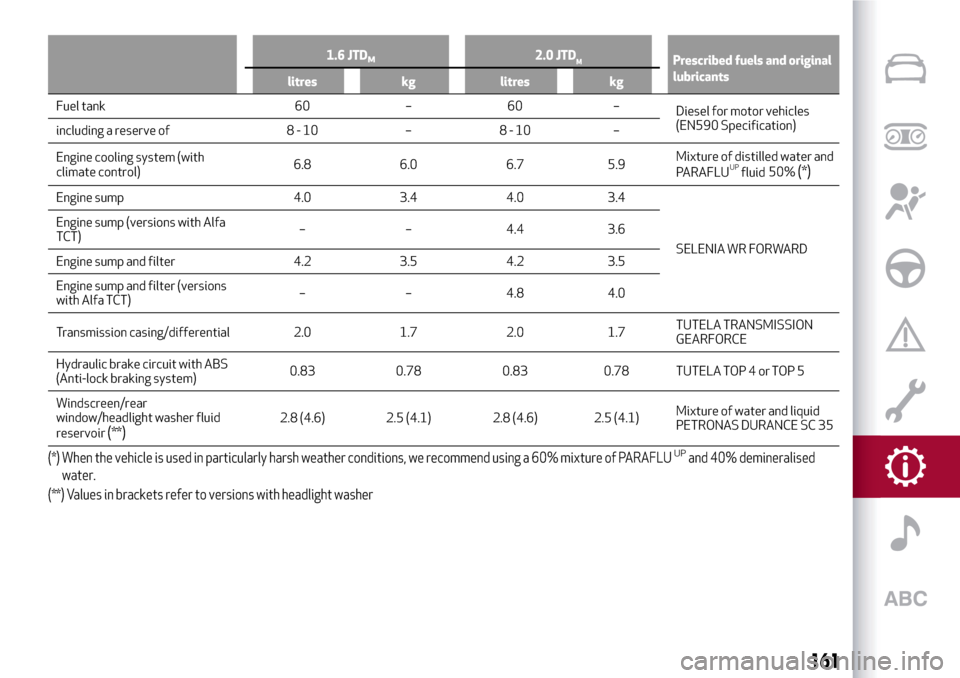
1.6 JTDM2.0 JTDMPrescribed fuels and original
lubricants
litres kg litres kg
Fuel tank 60 – 60 –
Diesel for motor vehicles
(EN590 Specification)
including a reserve of 8 - 10 – 8 - 10 –
Engine cooling system (with
climate control)6.8 6.0 6.7 5.9Mixture of distilled water and
PARAFLU fluid
UP50%(*)
Engine sump 4.0 3.4 4.0 3.4
SELENIA WR FORWARD Engine sump (versions with Alfa
TCT)– – 4.4 3.6
Engine sump and filter 4.2 3.5 4.2 3.5
Engine sump and filter (versions
with Alfa TCT)– – 4.8 4.0
Transmission casing/differential 2.0 1.7 2.0 1.7TUTELA TRANSMISSION
GEARFORCE
Hydraulic brake circuit with ABS
(Anti-lock braking system)0.83 0.78 0.83 0.78 TUTELA TOP 4 or TOP 5
Windscreen/rear
window/headlight washer fluid
reservoir
(**)2.8 (4.6) 2.5 (4.1) 2.8 (4.6) 2.5 (4.1)Mixture of water and liquid
PETRONAS DURANCE SC 35
(*) When the vehicle is used in particularly harsh weather conditions, we recommend using a 60% mixture of PARAFLUUPand 40% demineralised
water.
(**) Values in brackets refer to versions with headlight washer
161
Page 179 of 212
SWITCHING THESYSTEM ON/OFF
The system is switched on/off by
pressing the
(ON/OFF) button/knob.
Turn the button/knob clockwise to
increase the radio volume or
anticlockwise to decrease it.
RADIO (TUNER) MODE
Press the RADIO button on the front
panel to activate radio mode.
Select the band by pressing the
corresponding button: “AM”, “FM” or
“DAB”.
Selecting a frequency band
Briefly press the "AM/FM" button to
switch from AM to FM and vice versa.
If the DAB tuner is available, briefly press
the "AM/FM", "AM/DAB", "FM/DAB"
buttons to select the desired band.
Indications on display
After the desired radio station is
selected, the following information is
shown on the display:
At the top: the list of radio stations
stored (presets) is displayed; the station
currently playing is highlighted.
In the middle: display of the name of the
current radio station and the buttons for
selecting the previous or next radio
station.
At the bottom:radio station selection,
radio band, tuning, track information and
audio settings.Searching for the previous/next radio
station
To search for the desired radio station,
rotate the BROWSE ENTER button/knob,
press the
orbuttons or use
the steering wheel controls
.
When searching forwards, if the system
reaches the end of the band, it will
automatically stop on the station where
the search has started from.
Previous/next radio station fast search
Hold down buttonson the
display: when the button is released, the
first tunable radio station will be
displayed.
Tuning the radio (AM/FM)
Press the "Tune" button on the display
and then enter the frequency of the radio
station using the keypad on the display.
In this mode, use buttons + and – to
fine-tune the frequency.
To delete an incorrect number (and enter
the correct station number) press the
(Delete) button.
After entering the last digit of the
station, the screen is deactivated and the
system tunes automatically to the
station selected (the number of the radio
station is displayed in the "Tune" text
box).The screen disappears automatically
after 5 seconds or manually by pressing
the "OK" or “X” buttons.
Exit the "Direct Tune" screen
Press the "Exit" or "Radio" button on the
display to return to the main system
screen.
DAB Radio
(for versions/markets, where provided)
Once DAB radio mode is selected, the
information on the current station is
displayed and the following functions.
Selection of the previous/next radio
station by:
turning the BROWSE ENTER
button/knob;
briefly pressing theor
buttons on the display;
Steering wheel control press.
Hold down the
buttons to
fast scroll the station list.
The "Browse" button is used to display:
the list of all DAB stations;
the list of stations filtered by "Genres";
the list of stations filtered by
"Ensembles" (broadcast group).
Setting the presets
Presets are available in all system modes
and are activated by touching one of the
preset buttons located in the upper area
of the display.
177
or
or
Page 181 of 212
CD PLAYER
To activate CD mode, insert an audio or
MP3 CD in the relevant slot or press the
MEDIA button on the front panel.
If the CD has already been inserted, press
the "Source" button and then select "CD".
To load the CD, insert it gently into the
slot to activate the motorised loading
system, which will position it correctly
(the "CD" symbol on the display comes
on).
Enter a CD when the system is on, the CD
mode is automatically selected and the
system starts playing the tracks.
Press the button
(EJECT) on the front
panel, with the system on, to eject the CD.
Important notes
The presence of dirt, scratches or
distortions on the CDs may cause
skipping while it is playing and poor
sound quality. Clean every CD thoroughly
removing any fingerprints or dust using a
soft cloth. Hold CDs by the outside edge
and clean them from the middle
outwards; Never use chemical products
(e.g. antistatic, thinner or spray cans) for
cleaning as they could damage the
surface of the CDs. After listening to
them, put the CDs back in their boxes to
avoid damaging them; Do not expose CDs
to direct sunlight, high temperatures or
humidity for long periods.
Bluetooth® SOURCE
Pairing aBluetooth®deviceactivate theBluetooth®function on
the device;
press the MEDIA button on the front
panel;
if the "Media" source is active, press
the "Source" button;
select theBluetooth®Media source;press the "Add Device" button;
look forUconnect™on theBluetooth®
audio device.
when requested by the audio device,
enter the PIN code shown on the system
display or confirm on the device the PIN
displayed;
select “Yes” or “No” when asked if you
want to set the
Bluetooth®audio device
as the favourite.
an audio device can also be paired by
pressing the SETTINGS button on the
front panel and selecting "Phone/
Bluetooth”.
USB/iPod SUPPORT
149)
If a USB/iPod device is inserted with the
system on, this starts playing the tracks
present on the device.
WARNING
149)When inserting a device (USB or iPod)
in the USB port, make sure that it does not
obstruct the operation of the handbrake
lever.
AUX source
150)
When a device is inserted using the AUX
output socket the system starts
reproducing the AUX source connected,
if it is already being played.
Adjust the volume using the
button/knob on the front panel or
using the volume adjustment control on
the connected device.
For the "Audio source selection" function,
see the "Media mode" chapter.
IMPORTANT: the functions of the device
connected to the AUX socket are directly
managed by the device itself.
WARNING
150)When inserting a device in the AUX
socket, make sure that it does not obstruct
the operation of the handbrake lever.
179