buttons Alfa Romeo MiTo 2014 User Guide
[x] Cancel search | Manufacturer: ALFA ROMEO, Model Year: 2014, Model line: MiTo, Model: Alfa Romeo MiTo 2014Pages: 280, PDF Size: 8.79 MB
Page 64 of 280
RAPID WINDOW DEMISTING/
DEFROSTING (MAX-DEF function)Press button F to activate windscreen and side window demisting/
defrosting. The climate control system carries out the following
operations:
❒switches on the air conditioning compressor when climatic
conditions are suitable;
❒deactivates air recirculation;
❒sets maximum air temperature (HI) in both zones;
❒sets fan speed according to the engine coolant temperature;
❒directs air flow to windscreen and front side windows diffusers;
❒activates the heated rear window.
IMPORTANT The MAX-DEF function remains on for about 3 minutes
from when the engine coolant reaches the appropriate temperature.
When the function is active the words FULL AUTO disappear from the
display. With the function active the only possible manual adjustments
are adjusting the fan speed and turning the heated rear window off.
Pressing buttons B, C, F or AUTO switches off the MAX-DEF function
and restores the settings that were present before the function was
activated.HEATED REAR WINDOW
DEMISTING/DEFROSTINGPress the
button to activate heated rear windscreen demisting/
defrosting. This function switches off automatically after about 20
minutes or when the engine is turned off. It is not switched on
automatically the next time the engine is started.For versions/markets where provided, press the
button to activate
demisting/defrosting of door mirrors, heated windscreen (for
versions/markets, where provided) and heated nozzles (for versions/
markets, where provided).
IMPORTANT Do not affix stickers to the inside of the heated rear
window over the heating filaments, to avoid damage that might cause
them to stop working properly.
TURNING THE CLIMATE CONTROL
SYSTEM OFFPress the OFF button.
With climate control off:
❒air recirculation is on, thus isolating the passenger compartment
from the outside;
❒the compressor is off;
❒the fan is off;
❒the heated rear window can be switched on or off;
IMPORTANT The climate control system control unit stores the
temperatures set before the system was switched off and restores them
when any button of the system is pressed (except for button G). If the
function of the pressed button was not active before switching off, that
function will also be activated. If it was active, it will be restored.
To restart the climate control system in fully automatic mode press the
AUTO button.
60GETTING TO
KNOW YOUR CAR
SAFETY
STARTING AND
DRIVING
IN AN EMERGENCY
SERVICING AND
MAINTENANCE
TECHNICAL
SPECIFICATIONS
INDEX
Page 85 of 280
PASSENGER SIDE EMERGENCY FRONT
DOOR LOCKING DEVICEThe front passenger side door has a device to lock it when there is no
current.
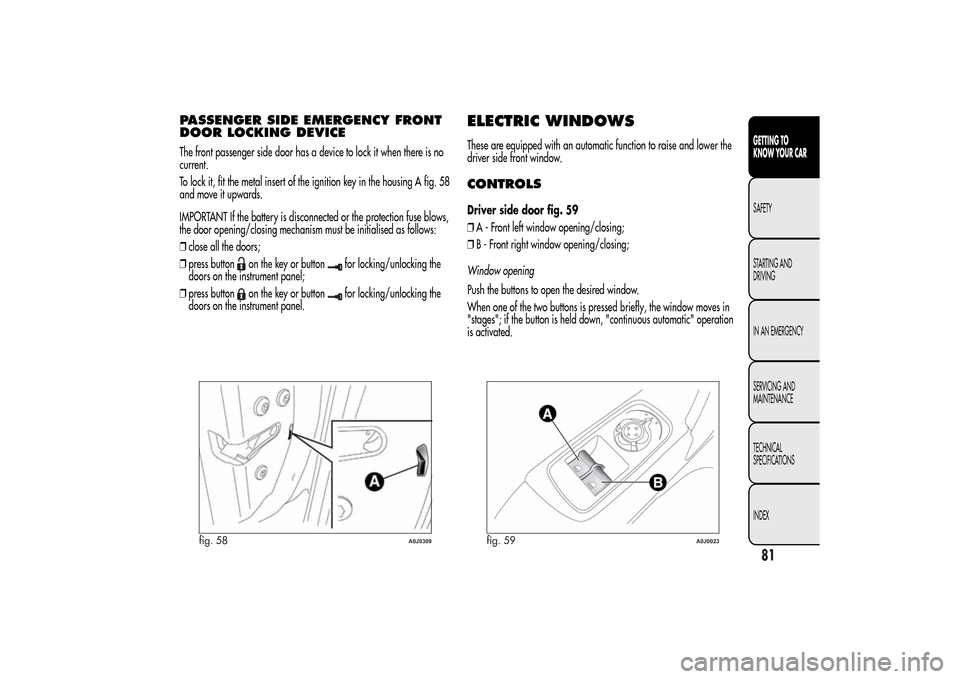
To lock it, fit the metal insert of the ignition key in the housing A fig. 58
and move it upwards.
IMPORTANT If the battery is disconnected or the protection fuse blows,
the door opening/closing mechanism must be initialised as follows:
❒close all the doors;
❒press button
on the key or button
for locking/unlocking the
doors on the instrument panel;
❒press button
on the key or button
for locking/unlocking the
doors on the instrument panel.
ELECTRIC WINDOWSThese are equipped with an automatic function to raise and lower the
driver side front window.CONTROLSDriver side door fig. 59
❒A - Front left window opening/closing;
❒B - Front right window opening/closing;
Window opening
Push the buttons to open the desired window.
When one of the two buttons is pressed briefly, the window moves in
"stages"; if the button is held down, "continuous automatic" operation
is activated.
fig. 58
A0J0309
fig. 59
A0J0023
81GETTING TO
KNOW YOUR CARSAFETY
STARTING AND
DRIVING
IN AN EMERGENCY
SERVICING AND
MAINTENANCE
TECHNICAL
SPECIFICATIONS
INDEX
Page 86 of 280
If the control button is pressed again, the window will stop in the
desired position. If the button is held down for several seconds, the
window raises or lowers automatically (only with ignition key in MAR
position).
Window closing
Lift the buttons to close the desired window.
The window closing stage occurs following the same logics described
for the opening stage.
Passenger side door
The passenger side door is equipped with a button that controls the
opening/closing of the passenger side window.
Continuous automatic operation
(for versions/markets, where provided)
This is activated by pressing one of the two buttons for longer than half
a second. The window will stop when it is fully opened or closed, or
when the button is pressed again:
❒Driver side:raising/lowering.
❒Passenger side:only lowering.
❒Where anti-crush device is present:raising/lowering driver side and
passenger side.
Anti-crush safety device
(for versions/markets, where provided)
The car’s anti-crush function is active as the windows are being raised.This safety system detects the presence of an obstacle during the
window closing travel and intervenes by stopping and reversing the
window travel, depending on its position. This device is also useful
if the windows are activated accidentally by children on board the car.
The anti-crush safety function is active both during the manual and
the automatic operation of the window. When the anti-crush system is
activated, the window travel is immediately interrupted and then
reversed. The window cannot be operated in any way during this time.
IMPORTANT If the anti-crush protection intervenes 5 consecutive times
within a minute or is faulty, the automatic closing operation of the
window is inhibited, only allowing it in steps of half a second with the
button released for the subsequent manoeuvre.
In order to restore the correct operation of the system, the relevant
window must be lowered.
IMPORTANT With ignition key at STOP or removed, the electric
windows remain active for about 3 minutes and are deactivated when
a door is opened.
IMPORTANT With the anti-crush system, when the
button on the
remote control is pressed for longer than 2 seconds the windows will
open, whilst if the
button is pressed for longer than 2 seconds
the windows will close.
The system conforms to the 2000/4/EC standard concerning
the safety of passengers leaning out of the passenger
compartment.
82GETTING TO
KNOW YOUR CAR
SAFETY
STARTING AND
DRIVING
IN AN EMERGENCY
SERVICING AND
MAINTENANCE
TECHNICAL
SPECIFICATIONS
INDEX
Page 90 of 280
Folding the seatsProceed as follows:
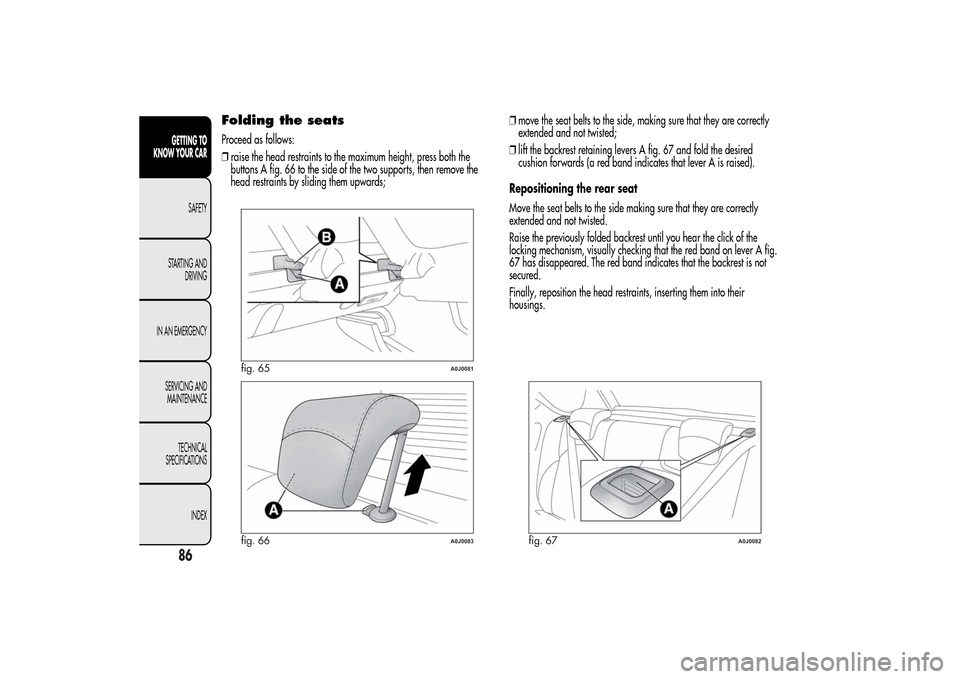
❒raise the head restraints to the maximum height, press both the
buttons A fig. 66 to the side of the two supports, then remove the
head restraints by sliding them upwards;❒move the seat belts to the side, making sure that they are correctly
extended and not twisted;
❒lift the backrest retaining levers A fig. 67 and fold the desired
cushion forwards (a red band indicates that lever A is raised).
Repositioning the rear seat
Move the seat belts to the side making sure that they are correctly
extended and not twisted.
Raise the previously folded backrest until you hear the click of the
locking mechanism, visually checking that the red band on lever A fig.
67 has disappeared. The red band indicates that the backrest is not
secured.
Finally, reposition the head restraints, inserting them into their
housings.
fig. 65
A0J0081
fig. 66
A0J0083
fig. 67
A0J0082
86GETTING TO
KNOW YOUR CAR
SAFETY
STARTING AND
DRIVING
IN AN EMERGENCY
SERVICING AND
MAINTENANCE
TECHNICAL
SPECIFICATIONS
INDEX
Page 94 of 280
HEADLIGHTSLIGHT BEAM DIRECTIONThe correct orientation of the headlights is important for the driver's
comfort and safety as well as for all other road users. This is also
covered by a specific rule of the highway code.
The headlights must be correctly aligned to ensure the best visibility
conditions for yourself and others when driving with lights on. To check
and, if necessary, adjust, contact Alfa Romeo Authorized Services.HEADLIGHT ALIGNMENT CORRECTORThis device works with the ignition key in the MAR position and the
dipped headlights on.
Headlight alignment adjustment
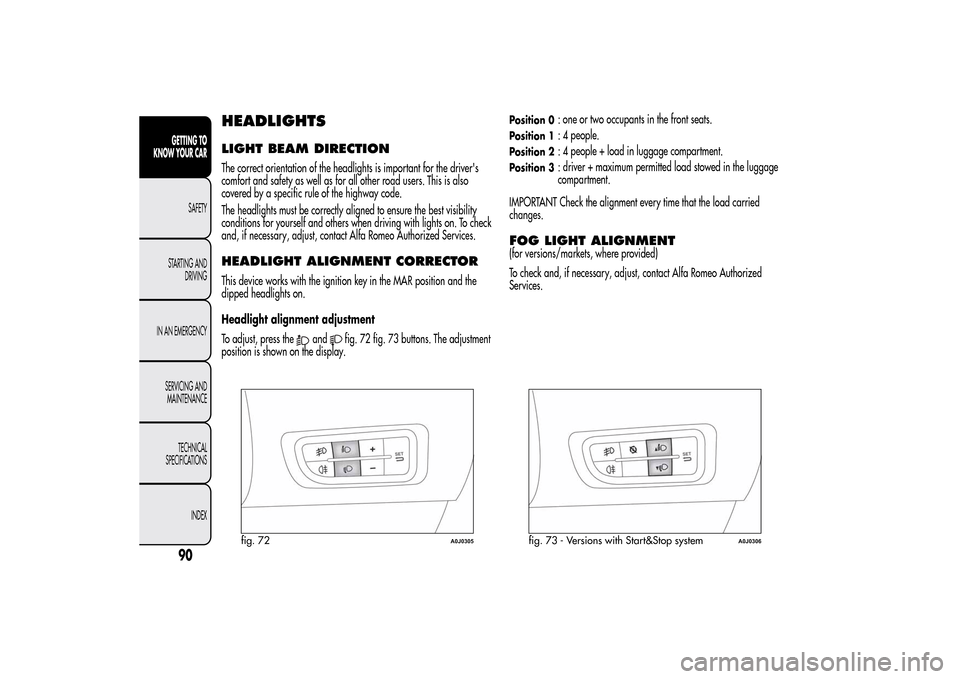
To adjust, press the
and
fig. 72 fig. 73 buttons. The adjustment
position is shown on the display.
Position 0
: one or two occupants in the front seats.
Position 1
: 4 people.
Position 2
: 4 people + load in luggage compartment.
Position 3
: driver + maximum permitted load stowed in the luggage
compartment.
IMPORTANT Check the alignment every time that the load carried
changes.
FOG LIGHT ALIGNMENT(for versions/markets, where provided)
To check and, if necessary, adjust, contact Alfa Romeo Authorized
Services.
fig. 72
A0J0305
fig. 73 - Versions with Start&Stop system
A0J0306
90GETTING TO
KNOW YOUR CAR
SAFETY
STARTING AND
DRIVING
IN AN EMERGENCY
SERVICING AND
MAINTENANCE
TECHNICAL
SPECIFICATIONS
INDEX
Page 241 of 280
TABLE OF CONTENTS
INTRODUCTION ........................................................................... 239
ADVICE ..................................................................................... 239
TECHNICAL CHARACTERISTICS ................................................... 240
BASIC LEVEL SYSTEM.................................................................. 240
QUICK GUIDE............................................................................... 241
GENERAL FUNCTIONS ............................................................... 242
RADIO FUNCTIONS ................................................................... 243
CD FUNCTIONS ......................................................................... 243
STEERING WHEEL CONTROLS ...................................................... 244
GENERAL INFORMATION ............................................................. 245
FUNCTIONS AND ADJUSTMENTS ................................................. 247
SWITCHING ON THE RADIO ...................................................... 247
SWITCHING OFF THE RADIO ...................................................... 247
SELECTING THE RADIO FUNCTIONS ........................................... 247
SELECTING CD FUNCTION ......................................................... 247
AUDIO SOURCE MEMORY FUNCTION ....................................... 247
VOLUME ADJUSTMENT .............................................................. 247
MUTE/PAUSE FUNCTION (zeroing the volume) ........................... 247
AUDIO SETTINGS....................................................................... 248
TONE ADJUSTMENT (bass/treble) ............................................... 248
BALANCE ADJUSTMENT ............................................................. 248
FADER ADJUSTMENT .................................................................. 248
LOUDNESS FUNCTION .............................................................. 249
PRESET/USER/CLASSIC/ROCK/JAZZ FUNCTIONS ...................... 249
USER EQ SETTINGS FUNCTION ................................................. 249
MENU ....................................................................................... 249
AF SWITCHING function ............................................................ 250
TRAFFIC INFORMATION function ................................................ 250
REGIONAL MODE function ........................................................ 251
MP3 DISPLAY function ................................................................ 252SPEED VOLUME function ............................................................ 252
RADIO ON VOLUME function ..................................................... 252
PHONE FUNCTION .................................................................... 253
AUX OFFSET function ................................................................. 253
RADIO OFF function .................................................................. 253
SYSTEM RESET function ............................................................... 253
PHONE SET-UP........................................................................... 254
ANTI-THEFT PROTECTION ........................................................... 254
RADIO (TUNER) ............................................................................ 255
INTRODUCTION......................................................................... 255
FREQUENCY BAND SELECTION.................................................. 255
PRESET BUTTONS ....................................................................... 256
STORING THE LAST STATION LISTENED TO.................................. 256
AUTOMATIC TUNING................................................................. 256
MANUAL TUNING ..................................................................... 256
AUTOSTORE FUNCTION ........................................................... 256
EMERGENCY ALARM RECEPTION ............................................... 257
EON FUNCTION (Enhanced Other Network) ................................ 257
STEREOPHONIC BROADCASTERS ............................................... 257
CD PLAYER ................................................................................... 258
INTRODUCTION......................................................................... 258
SELECTING THE CD PLAYER ........................................................ 258
LOADING/EJECTING A CD ........................................................ 258
DISPLAY INFORMATION ............................................................. 259
TRACK SELECTION (forward/back) ............................................. 259
TRACK FAST FORWARD/REWIND ............................................... 259
PAUSE FUNCTION...................................................................... 259
MP3 CD PLAYER ............................................................................ 260
INTRODUCTION......................................................................... 260
MP3 MODE................................................................................ 260
237SOUND-SYSTEM
Page 246 of 280
GENERAL FUNCTIONSButton Functions Mode
ON/OFFSwitching on Brief button press
Switching off Brief button press
Volume adjustment LH/RH knob rotation
FM ASSelection of radio source FM1, FM2, FM Autostore Brief cyclical button press
AMMW1, MW2 radio source selection Brief cyclical button press
MEDIACD or AUX source selection (for versions/markets, where
provided)Brief cyclical button press
Volume activation/deactivation (MUTE/PAUSE) Brief button press
AUDIOAudio adjustments: low tones (BASS), high tones (TREBLE),
RH/LH balance (BALANCE), front/rear balance (FADER)Menu activation: brief button press
Selection of adjustment type: pressing buttons
or
Adjustment of values: pressing buttons
or
MENUAdvanced functions adjustmentMenu activation: brief button press
Selection of adjustment type: pressing buttons
or
Adjustment of values: pressing buttons
or
242
SOUND-SYSTEM
Page 247 of 280
RADIO FUNCTIONSButton Functions Mode
Radio station search:
- Automatic search
- Manual searchAutomatic search: press buttons
or
(hold down for
fast forward)
Manual search: press buttons
or
(hold down for fast
forward)
123456Store current radio station Long button press for memory preset 1 to 6 respectively
Stored station recall Brief button press for memory preset 1 to 6 respectively
CD FUNCTIONSButton Functions Mode
CD ejection Brief button pressPlay previous/next track Pressing
or
buttons briefly
CD track fast forward/rewind Pressing
or
buttons briefly
Playing previous/next folder (for CD-MP3) Pressing
or
buttons briefly
243SOUND-SYSTEM
Page 248 of 280
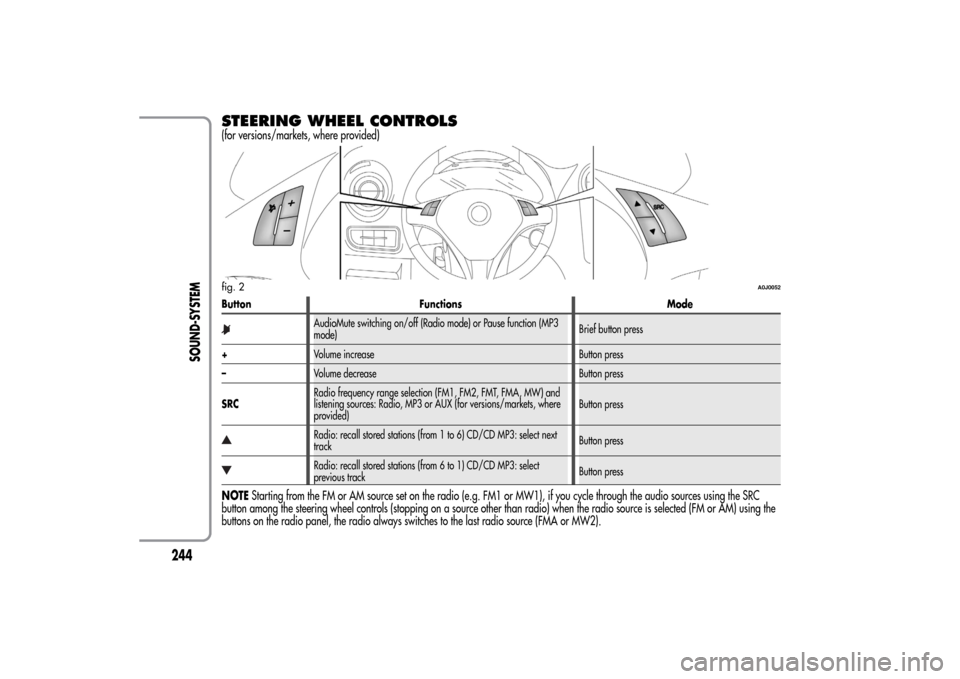
STEERING WHEEL CONTROLS(for versions/markets, where provided)Button Functions Mode
AudioMute switching on/off (Radio mode) or Pause function (MP3
mode)Brief button press
+Volume increase Button press
–Volume decrease Button press
SRCRadio frequency range selection (FM1, FM2, FMT, FMA, MW) and
listening sources: Radio, MP3 or AUX (for versions/markets, where
provided)Button pressRadio: recall stored stations (from 1 to 6) CD/CD MP3: select next
trackButton pressRadio: recall stored stations (from 6 to 1) CD/CD MP3: select
previous trackButton press
NOTEStarting from the FM or AM source set on the radio (e.g. FM1 or MW1), if you cycle through the audio sources using the SRC
button among the steering wheel controls (stopping on a source other than radio) when the radio source is selected (FM or AM) using the
buttons on the radio panel, the radio always switches to the last radio source (FMA or MW2).fig. 2
A0J0052
244
SOUND-SYSTEM
Page 252 of 280
With the Mute function activated, it will be ignored when there is
an incoming traffic alert (if the TA function is activated), or if an
emergency alarm is received. The function will be reactivated when
the alert is over.AUDIO SETTINGSThe functions that can be selected from the audio menu change
depending on the context: AM/FM/CD/AUX (for
versions/markets, where provided).
Press the AUDIO button briefly to change the Audio functions.
After the AUDIO button is first pressed, the display will show the
bass level value for the source activated at that time (e.g. in FM
mode the display will show the wording “FM Bass + 2”).
Use the
or
buttons to scroll through the menu functions. To
change the setting of the function selected use the
or
buttons.
The current status of the function selected will be shown on the
display.
The functions managed by the Menu are:
❒BASS (adjustment of bass tones);
❒TREBLE (adjustment of high tones);
❒BALANCE (right/left balance adjustment);
❒FADER (front/back balance adjustment);
❒LOUDNESS (LOUDNESS function activation/deactivation);
❒EQUALISER (activation and selection of factory-set equaliser
levels);
❒USER EQUALISER (customised equaliser setting).
TONE ADJUSTMENT (bass/treble)Proceed as follows:
❒Use
or
buttons to set the “Bass” or “Treble” in the AUDIO
menu;
❒press theor
button to increase/decrease the bass or
treble.
By pressing the buttons briefly, the levels will change progressively
in steps. By pressing them for longer, the levels will change quickly.
BALANCE ADJUSTMENTProceed as follows:
❒Select the “Balance” setting in the AUDIO menu using the
or
button;
❒press the
button to increase the volume of the right speakers
or the
button to increase the volume of the left speakers.
By pressing the buttons briefly, the levels will change progressively
in steps. By pressing them for longer, the levels will change quickly.
Select the value “
0
” to set the same level for the right and
left audio outputs.
FADER ADJUSTMENTProceed as follows:
❒Select the “Fader” setting in the AUDIO menu using the
or
button;
❒press the
button to increase the sound from the rear speakers
or the
button to increase the sound from the front speakers.
By pressing the buttons briefly, the levels will change progressively
in steps. By pressing them for longer, the levels will change quickly.
248
SOUND-SYSTEM