light Alfa Romeo MiTo 2014 Owner's Guide
[x] Cancel search | Manufacturer: ALFA ROMEO, Model Year: 2014, Model line: MiTo, Model: Alfa Romeo MiTo 2014Pages: 280, PDF Size: 8.79 MB
Page 28 of 280
❒COURTESY LIGHTS
❒MENU EXITSelecting an option from the main
menu without a submenu:❒press the SET/
button briefly to select the main menu setting
you wish to change;
❒press the "+" or "–" buttons (with single presses) to select the new
setting;
❒press the SET/button briefly to save the new setting and go
back to the previous main menu option.
Selecting an option from the main
menu with a submenu:❒briefly press the SET/
button to display the first submenu
option;
❒press the "+" or "–" buttons (with single presses) to scroll through all
the submenu options;
❒briefly press the SET/button to select the displayed submenu
option and to open the relevant settings menu;
❒press the "+" or "–" buttons (with single presses) to select the new
setting for this submenu option;
❒press the SET/
button briefly to save the new setting and go
back to the previous submenu option.
MENU ITEMSNoteWithUconnect™ 5" radio system (for versions/markets where
provided), orUconnect™ 5" Radio Nav system (for versions/
markets, where provided), some Menu items are shown on the display
of the latter and not on the instrument panel display.MenuThis item allows you to access the Setup Menu.
Press the "+" or "−" button to select the various Menu options. Hold
down the SET/
button to return to the standard screen.
Speed Beep (Speed limit)With this function it is possible to set the car speed limit (km/h or
mph); when this limit is exceeded the driver is alerted.
To set the desired speed limit, proceed as follows:
❒briefly press the SET/
button: the display will show the wording
"Speed Beep";
❒press the "−" or "+" button to select speed limit activation ("On") or
deactivation ("Off");
❒if the function is On, press the "+" or "−" button to select the
required speed limit and then press the SET/
button to confirm.
IMPORTANT Setting is possible between 30 and 200 km/h, or 20 and
125 mph, according to the previously set unit. See the "Unit of
Measurement" paragraph described below. The setting will increase/
decrease by five units each time button +/– is pressed. Hold down
the +/– button for fast automatic increase/decrease. Complete the
adjustment with single presses of the button when you approach the
desired value.
24GETTING TO
KNOW YOUR CAR
SAFETY
STARTING AND
DRIVING
IN AN EMERGENCY
SERVICING AND
MAINTENANCE
TECHNICAL
SPECIFICATIONS
INDEX
Page 29 of 280
Briefly press the SET/
button to go back to the menu screen or
hold the button down to go back to the standard screen without saving.
To cancel the setting, proceed as follows:
❒briefly press the SET/
button, "On" will flash in the display;
❒press the − button, the display flashes ("Off");
❒briefly press the SET/button to go back to the menu screen or
hold the button down to go back to the standard screen without
saving.
Headlight sensor (Automatic
headlight/dusk sensor sensitivity
adjustment)(for versions/markets, where provided)
This function enables the headlights to come on or go off depending on
external lighting conditions.
The dusk sensor sensitivity can be adjusted according to 3 levels (level
1= minimum sensitivity, level 2= average sensitivity, level 3= maximum
sensitivity).
The higher the sensitivity set, the lesser is the external light variation
needed to switch the lights on (e.g. with a setting on level 3 at sunset
the headlights come on in advance in relation to levels 1 and 2).
Proceed as follows to set the desired adjustment:
❒press the SET/
button briefly to make the display flash the
previously set level;
❒press the "+" or "−" button to select;
❒briefly press the SET/
button to go back to the menu screen or
hold the button down to go back to the standard screen without
saving.
Rain sensor (Rain sensor sensitivity
adjustment)This function allows you to adjust the rain sensor sensitivity to 4 levels.
To set the required sensitivity level proceed as follows:
❒briefly press the SET/
button, the previously set sensitivity level
will flash on the display;
❒press the "+" or "−" button to adjust;
❒briefly press the SET/button to go back to the menu screen or
hold the button down to go back to the standard screen without
saving.
Activation/Trip B data
(Trip B enablement)This function may be used to activate (On) or deactivate (Off) the Trip B
(partial trip). For further information see “Trip computer”.
Proceed as follows to switch the function on and off:
❒press the SET/
button briefly to make the display flash "On" or
"Off" according to what was previously set;
❒press the "+" or "−" button to select;
❒briefly press the SET/
button to go back to the menu screen or
hold the button down to go back to the standard screen without
saving.
25GETTING TO
KNOW YOUR CARSAFETY
STARTING AND
DRIVING
IN AN EMERGENCY
SERVICING AND
MAINTENANCE
TECHNICAL
SPECIFICATIONS
INDEX
Page 34 of 280
Passenger airbag/side bag (front
passenger side airbag and side bag
for pelvis, chest and shoulder
protection - Side bag -
activation/deactivation)This function is used to activate/deactivate the passenger side air bag.
Proceed as follows:
❒press the SET/
button and, after the message (Bag pass: Off)
(to deactivate) or (Bag pass: On) (to activate) is displayed by
pressing buttons "+" or "−", press the SET/
button again;
❒a confirmation request message will appear on the display;
❒by pressing the "+" or "−" buttons select "Yes" (to confirm the
activation/deactivation) or "No" (to quit);
❒press the SET/
button briefly, a message confirming the
selection will be displayed and you will return to the menu screen or,
pressing the button for longer, you will return to the standard screen
without memorising.
Daytime running lights (DRL)With this function is possible to turn the daytime running lights on and
off.
Proceed as follows to activate or deactivate this function:
❒press the SET/
button briefly to display a submenu;
❒press the SET/button briefly to make the display flash "On" or
"Off" according to what was previously set;
❒press the "+" or "−" button to select;❒press the SET/
button briefly to return to the submenu screen or
hold the button down to return to the main menu screen without
saving;
❒hold the SET/button down again to return to the standard
screen or to the main menu according to where you are in the menu.
Courtesy lights (Activation/
deactivation of “Greeting lights”)(for versions/markets, where provided)
With this function it is possible to turn on the side lights, the number
plate lights and the ceiling lights for approximately 25 seconds when
the doors or boot are opened using the remote control, with the
following exceptions:
❒interruption after 5 seconds from when the door closes
❒interruption after locking using the remote control
❒interruption after a lock or other action using the remote control
Proceed as follows to activate or deactivate this function:
❒press the SET/
button briefly to make the display flash "On" or
"Off" according to what was previously set;
❒press the "+" or "−" button to select;
❒briefly press the SET/
button to go back to the menu screen or
hold the button down to go back to the standard screen without
saving.
30GETTING TO
KNOW YOUR CAR
SAFETY
STARTING AND
DRIVING
IN AN EMERGENCY
SERVICING AND
MAINTENANCE
TECHNICAL
SPECIFICATIONS
INDEX
Page 39 of 280
ALFA ROMEO CODE SYSTEMTo further protect your car from theft, it has been fitted with an engine
immobilising system. It is automatically activated when the ignition
key is removed.
Each key contains an electronic device which modulates the signal
emitted during ignition by an antenna built into the ignition device. The
modulated signal, which changes each time the engine is started, is
the “password”, by means of which the control unit recognises the key
and enables to start the engine.OPERATIONEach time the car is started by turning the ignition key to MAR, the
Alfa Romeo CODE system control unit sends an acknowledgement
code to the engine management control unit to deactivate the inhibitor.
The code is sent only if the Alfa Romeo CODE system control unit has
recognised the code transmitted from the key.
Each time the ignition key is turned to STOP, the Alfa Romeo CODE
system deactivates the functions of the engine management control
unit. If, during starting, the code is not correctly recognised, the
warning light switches on in the instrument panel.
In this case, turn the key to STOP and then to MAR; if it is still locked,
try again with the other keys that come with the vehicle. If you are
still unable to start the engine contact Alfa Romeo Authorized Services.Activation of warning light while driving
❒If the
warning light switches on, this means that the system is
running a self-diagnosis (for example due to a voltage drop).
❒If thewarning light remains on, contact Alfa Romeo Authorized
Services.The electronic components inside the key may be damaged
if the key is subjected to strong shocks.
35GETTING TO
KNOW YOUR CARSAFETY
STARTING AND
DRIVING
IN AN EMERGENCY
SERVICING AND
MAINTENANCE
TECHNICAL
SPECIFICATIONS
INDEX
Page 41 of 280
Press button B fig. 16 only with the key away from your
body, especially your eyes and from objects which could
get damaged (e.g. your clothes). Do not leave the key
unattended to avoid the button being accidentally pressed while it is
being handled, e.g. by a child.
Unlocking the doors and the tailgate
Briefly press button
: for unlocking of doors and luggage
compartment, timed switching-on of internal roof lights and double
flashing of direction indicators (for versions/markets, where provided).
The doors are unlocked automatically if the fuel cut-off system
intervenes.
Once the doors are locked, if one or more doors or the boot are not
closed correctly, the LED and direction indicators start flashing quickly.
Locking the doors and the tailgate
Briefly press button: for locking of doors and luggage
compartment, with switching-off of roof light and single flashing of
direction indicators (for versions/markets, where provided).
If one or more doors are open, the doors will not be locked. This is
indicated by a rapid flashing of the direction indicators (for
versions/markets, where provided). If the luggage compartment is
open, the doors will, however, be locked.
When a speed of over 20 km/h is reached, the doors are
automatically locked if this specific function has been set (only on
versions with multifunction reconfigurable display).When the doors are locked, LED A fig. 17 switches on for a few
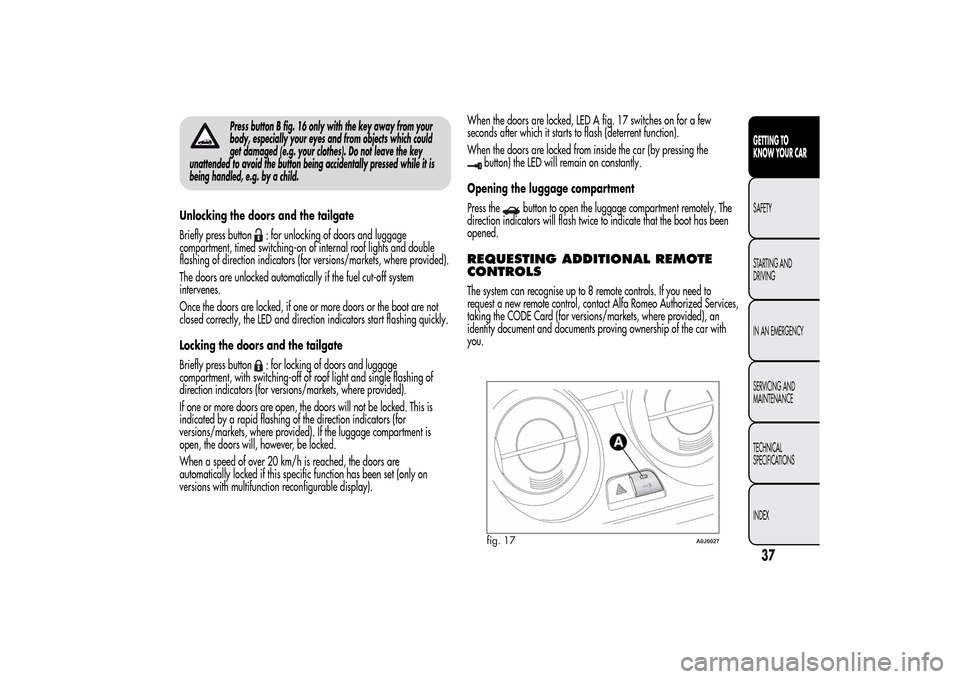
seconds after which it starts to flash (deterrent function).
When the doors are locked from inside the car (by pressing the
button) the LED will remain on constantly.
Opening the luggage compartment
Press the
button to open the luggage compartment remotely. The
direction indicators will flash twice to indicate that the boot has been
opened.
REQUESTING ADDITIONAL REMOTE
CONTROLSThe system can recognise up to 8 remote controls. If you need to
request a new remote control, contact Alfa Romeo Authorized Services,
taking the CODE Card (for versions/markets, where provided), an
identity document and documents proving ownership of the car with
you.
fig. 17
A0J0027
37GETTING TO
KNOW YOUR CARSAFETY
STARTING AND
DRIVING
IN AN EMERGENCY
SERVICING AND
MAINTENANCE
TECHNICAL
SPECIFICATIONS
INDEX
Page 45 of 280
ALARM(for versions/markets, where provided)ALARM ACTIVATIONThe alarm activates in the following cases:
❒wrongful opening of a door/bonnet/luggage compartment
(perimeter protection);
❒wrongful operation of the ignition switch (key turned to MAR);
❒cutting of the battery cables;
❒movement inside the passenger compartment (volumetric protection);
❒anomalous lifting/tilting of the car (for versions/markets, where
provided).
Operation of the alarm is indicated by an acoustic and visual signal
(flashing of the direction indicators for several seconds). The alarm
activation modes may vary according to the market. There is a
maximum number of acoustic/visual cycles. When this is reached the
system returns to normal operation.
IMPORTANT The engine locking function is guaranteed by the Alfa
Romeo CODE, which is automatically activated when the ignition key
is extracted from the ignition switch.
IMPORTANT The alarm is adapted to meet requirements in various
countries.SWITCHING ON THE ALARMWith the doors and bonnet closed and the ignition key either turned to
STOP or removed, direct the key with the remote control towards the
car, then press and release the
button. Except for specific markets,
the system emits a visual and acoustic signal and enables door locking.A self-diagnosis stage precedes the switching on of the alarm: in the
event of faults, the system will generate a further acoustic and/or
visual signal through the LED on the dashboard.
If after the alarm is switched on, a second acoustic signal is emitted
and/or a visual signal via the LED on the dashboard, wait about
4 seconds and switch off the alarm by pressing the
button, check
that the doors, bonnet and luggage compartment are closed correctly
and then reactivate the system by pressing the
button.
If the alarm emits an acoustic signal even when the doors, bonnet and
boot are correctly closed, a fault has occurred in system operation:
in this case, contact Alfa Romeo Authorized Services.
ALARM SELF-ACTIVATION(for versions/markets, where provided)
If the alarm has not been activated using the remote control, once
about 30 seconds have elapsed from when the ignition key was turned
to STOP and a door or the tailgate was last opened and then closed,
the alarm activates automatically.
This is indicated by the LED on the button A fig. 20 lighting up
intermittently and the indications of activation described previously.
To deactivate the alarm, press the
button on the remote control.
The alarm also activates when the doors are closed by turning the
metal insert of the key in the driver side door latch. If the system
self-activates, the doors are not locked.
41GETTING TO
KNOW YOUR CARSAFETY
STARTING AND
DRIVING
IN AN EMERGENCY
SERVICING AND
MAINTENANCE
TECHNICAL
SPECIFICATIONS
INDEX
Page 47 of 280
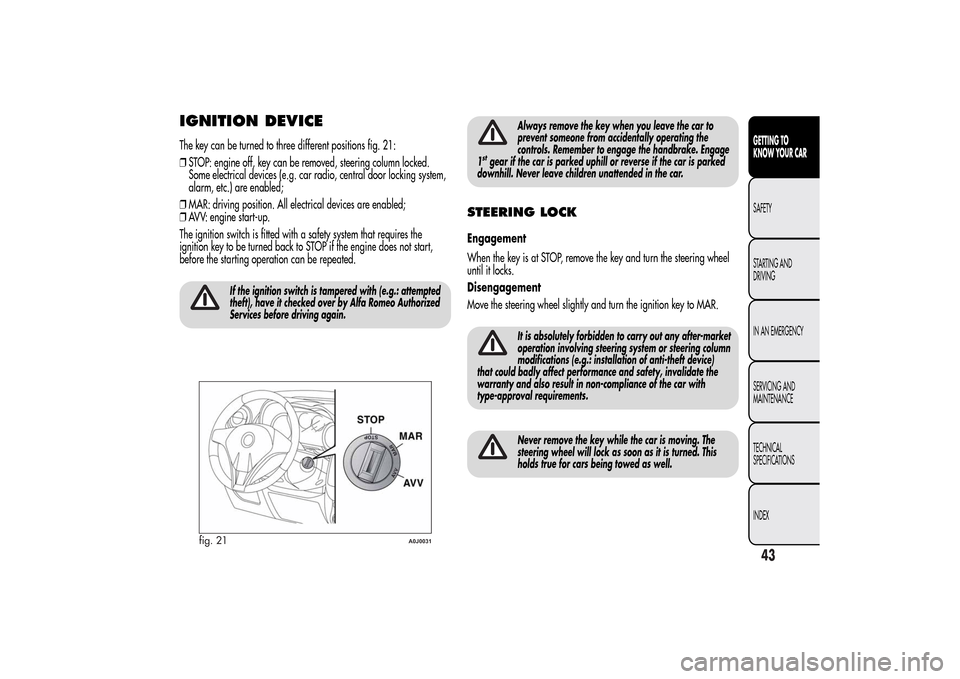
IGNITION DEVICEThe key can be turned to three different positions fig. 21:
❒STOP: engine off, key can be removed, steering column locked.
Some electrical devices (e.g. car radio, central door locking system,
alarm, etc.) are enabled;
❒MAR: driving position. All electrical devices are enabled;
❒AVV: engine start-up.
The ignition switch is fitted with a safety system that requires the
ignition key to be turned back to STOP if the engine does not start,
before the starting operation can be repeated.
If the ignition switch is tampered with (e.g.: attempted
theft), have it checked over by Alfa Romeo Authorized
Services before driving again.
Always remove the key when you leave the car to
prevent someone from accidentally operating the
controls. Remember to engage the handbrake. Engage
1
stgear if the car is parked uphill or reverse if the car is parked
downhill. Never leave children unattended in the car.
STEERING LOCKEngagement
When the key is at STOP, remove the key and turn the steering wheel
until it locks.
Disengagement
Move the steering wheel slightly and turn the ignition key to MAR.
It is absolutely forbidden to carry out any after-market
operation involving steering system or steering column
modifications (e.g.: installation of anti-theft device)
that could badly affect performance and safety, invalidate the
warranty and also result in non-compliance of the car with
type-approval requirements.Never remove the key while the car is moving. The
steering wheel will lock as soon as it is turned. This
holds true for cars being towed as well.
fig. 21
A0J0031
43GETTING TO
KNOW YOUR CARSAFETY
STARTING AND
DRIVING
IN AN EMERGENCY
SERVICING AND
MAINTENANCE
TECHNICAL
SPECIFICATIONS
INDEX
Page 54 of 280
DOOR MIRRORS
As the driver's door mirror is curved, it may slightly
alter the perception of distance.
Mirror adjustment
The mirrors can only be adjusted/folded with the ignition in the MAR
position.
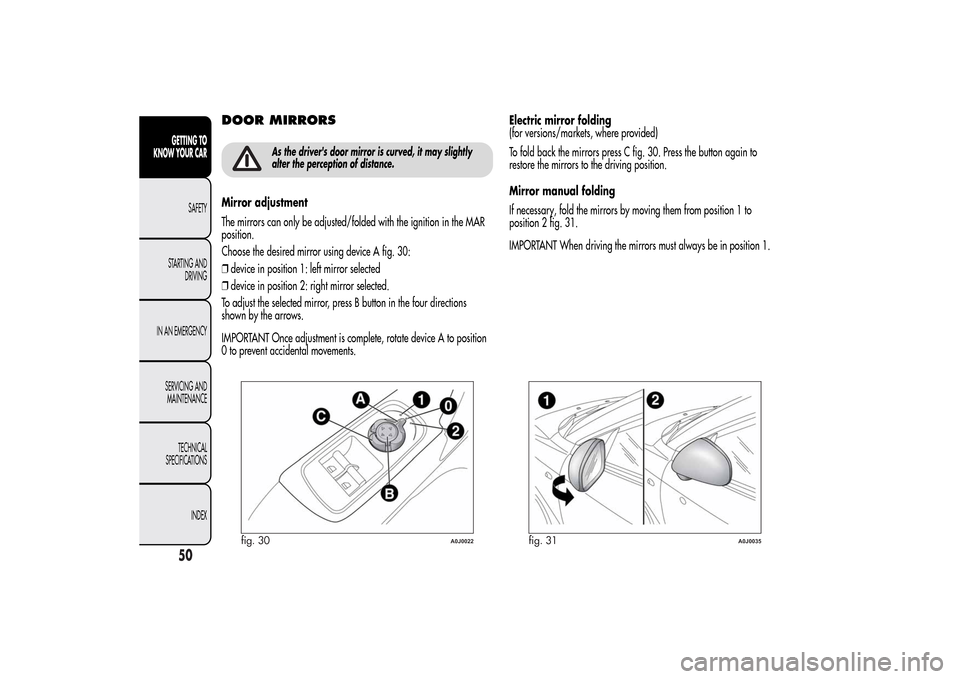
Choose the desired mirror using device A fig. 30:
❒device in position 1: left mirror selected
❒device in position 2: right mirror selected.
To adjust the selected mirror, press B button in the four directions
shown by the arrows.
IMPORTANT Once adjustment is complete, rotate device A to position
0 to prevent accidental movements.Electric mirror folding
(for versions/markets, where provided)
To fold back the mirrors press C fig. 30. Press the button again to
restore the mirrors to the driving position.
Mirror manual folding
If necessary, fold the mirrors by moving them from position 1 to
position 2 fig. 31.
IMPORTANT When driving the mirrors must always be in position 1.
fig. 30
A0J0022
fig. 31
A0J0035
50GETTING TO
KNOW YOUR CAR
SAFETY
STARTING AND
DRIVING
IN AN EMERGENCY
SERVICING AND
MAINTENANCE
TECHNICAL
SPECIFICATIONS
INDEX
Page 61 of 280
❒
to speed up demisting/defrosting of front windows, rear
window and door mirrors;
❒to demist/defrost heated rear window and door mirrors.
During automatic operation, you can change the set temperatures, air
distribution and fan speed at any time by using the relevant buttons
or knobs: the system will automatically change the settings to adjust to
the new requirements.
In this way the climate control system will continue to automatically
manage all functions except for those that have been manually
adjusted. The fan speed is the same in all the zones of the passenger
compartment.
ADJUSTING THE AIR TEMPERATURETurn knob N or H to the right or left to adjust the air temperature: knob
N for the front left area, knob H for the front right area of the
passenger compartment. The set temperatures are shown on the
display.
Press the MONO button to align the air temperature of the two areas:
to set the same temperature, turn knob N.
To return to separate management of air temperature and distribution
between the two areas, turn knob N or H or press the MONO button
again (when the LED on the button is on).
Turn the knobs fully right or left to engage HI (maximum heating) or LO
(maximum cooling) respectively. To deactivate these functions, turn
the temperature knob to the desired temperature.
SETTING THE AIR DISTRIBUTIONBy pressing the buttons (
/
/
), it is possible to set one of the 7
possible air distributions manually:
Air flow to the windscreen and front side window diffusers to
demist/defrost them.Air flow at central and side dashboard vents to ventilate the chest
and the face during the hot season.Air flow to the front and rear footwell diffusers. This air
distribution setting heats the passenger compartment most
quickly, giving a prompt sensation of warmth.
Air flow distributed between footwell vents (hotter air) and
central and side dashboard vents (cooler air). This
distribution setting is useful in spring and autumn on sunny
days.Air flow distributed between footwell diffusers and
windscreen and front side window defrosting/demisting
diffusers. This distribution setting allows the passenger
compartment to warm up efficiently and prevents the
windows from misting up.Air flow distribution between windscreen demisting/
defrosting diffusers and side and central dashboard vents.
This allows air to be sent to the windscreen in conditions
of strong sunlight.
Air flow distribution to all vents on the car.
In FULL AUTO mode, the climate control system automatically manages
air distribution (the LEDs on buttons I and M are off). When set
manually, the air distribution is shown by the LEDs on the selected
buttons.
57GETTING TO
KNOW YOUR CARSAFETY
STARTING AND
DRIVING
IN AN EMERGENCY
SERVICING AND
MAINTENANCE
TECHNICAL
SPECIFICATIONS
INDEX
Page 65 of 280
ADDITIONAL HEATER(only diesel versions)
(for versions/markets, where provided)
This allows the passenger compartment to be heated more quickly in
cold weather conditions. The additional heater turns off automatically
after the required comfort conditions are achieved.
Automatic dual zone climate control system
(for versions/markets, where provided)
The additional heater activates automatically when the ignition key is
turned to MAR-ON.
Manual heater and manual climate control
The additional heater activates automatically when knob N is turned to
the end of the red section and the fan is set to at least 1
stspeed.
IMPORTANT The heater only works if the outside temperature and
engine coolant temperature are low. The heater will not activate if the
battery voltage is too low.
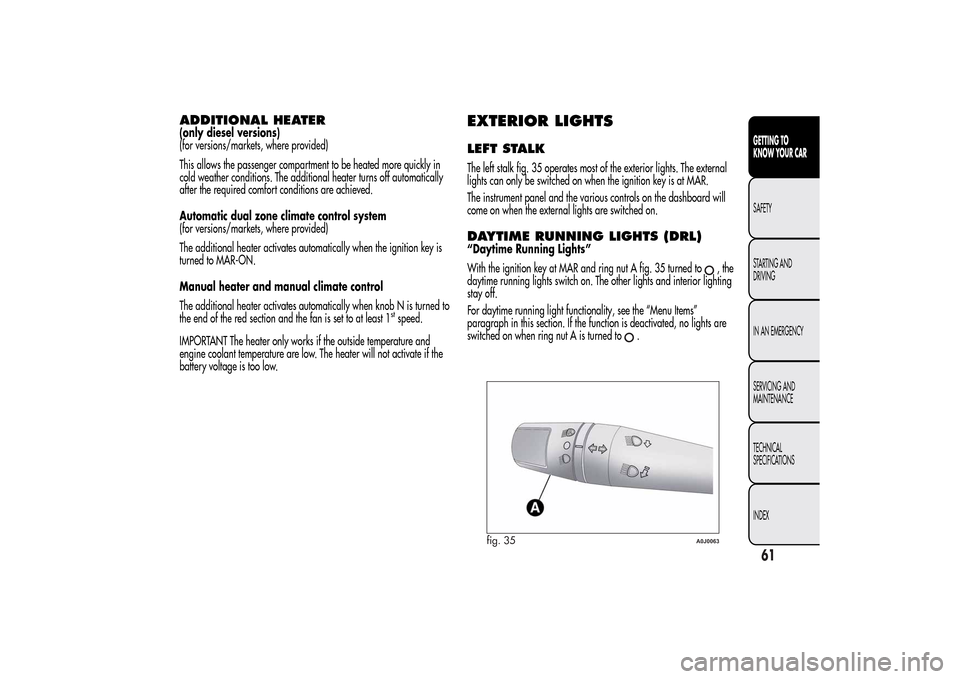
EXTERIOR LIGHTSLEFT STALKThe left stalk fig. 35 operates most of the exterior lights. The external
lights can only be switched on when the ignition key is at MAR.
The instrument panel and the various controls on the dashboard will
come on when the external lights are switched on.DAYTIME RUNNING LIGHTS (DRL)“Daytime Running Lights”
With the ignition key at MAR and ring nut A fig. 35 turned to
,the
daytime running lights switch on. The other lights and interior lighting
stay off.
For daytime running light functionality, see the “Menu Items”
paragraph in this section. If the function is deactivated, no lights are
switched on when ring nut A is turned to
.
fig. 35
A0J0063
61GETTING TO
KNOW YOUR CARSAFETY
STARTING AND
DRIVING
IN AN EMERGENCY
SERVICING AND
MAINTENANCE
TECHNICAL
SPECIFICATIONS
INDEX