light Alfa Romeo MiTo 2014 Owner's Guide
[x] Cancel search | Manufacturer: ALFA ROMEO, Model Year: 2014, Model line: MiTo, Model: Alfa Romeo MiTo 2014Pages: 280, PDF Size: 8.79 MB
Page 66 of 280
SIDE LIGHTS/DIPPED BEAM
HEADLIGHTSWith the ignition key turned to MAR, turn ring nut A fig. 35 to
.
The daytime running lights are switched off and the side lights and
dipped headlights are switched on. The warning light
switches
on on the instrument panel.
PARKING LIGHTSThese lights can only be switched on with ignition key at STOP or
removed, by moving ring nut A first to position
and then to position
.
When the parking lights are switched on, the number plate lights and
the front and rear side lights switch on as well (the daytime running
lights (DRLs) remain off however).
The warning light
switches on on the instrument panel.
When the direction indicator stalk is activated the side for the lights
(left or right) can be selected.
AUTOMATIC LIGHTING CONTROL
(AUTOLIGHT) (Dusk sensor)(for versions/markets, where provided)
This infrared LED sensor, combined with the rain sensor and located on
the windscreen, detects the variations in outside brightness depending
on the light sensitivity set with the Set-up Menu: the greater the
sensitivity, the less external light is required to activate the exterior
lights.Activation
The dusk sensor activates when ring nut A fig. 35 is turned to
.In
this way the side lights and dipped headlights are activated
automatically according to the external light level.
IMPORTANT The sensor is unable to detect the presence of fog.
Therefore under these circumstances, these lights must be turned on
manually.
When the lights are turned on by the sensor, the fog lights (for
versions/markets, where provided) and the rear fog lights may be
turned on.
When the lights are automatically switched off, the front and rear fog
lights (if activated) are also switched off. The next time the lights are
switched on automatically, the fog lights must be reactivated manually
(if required).
With the sensor active, it is possible to flash the headlights but the
main beam headlights cannot be switched on. If you need to turn these
lights on, turn ring nut A to position
and turn the dipped
headlights on.
When the lights have been activated automatically and are then
switched off by the sensor, the dipped beam headlights are switched
off first, followed by the side lights a few seconds later.
If the sensor is activated but is malfunctioning, the side lights and
dipped beam headlights are switched on irrespective of the outside
light level and the sensor failure is indicated on the instrument panel
display.
It is also possible to deactivate the sensor and switch on these lights if
necessary.
62GETTING TO
KNOW YOUR CAR
SAFETY
STARTING AND
DRIVING
IN AN EMERGENCY
SERVICING AND
MAINTENANCE
TECHNICAL
SPECIFICATIONS
INDEX
Page 67 of 280
MAIN BEAM HEADLIGHTSTo activate the main beam headlights, with ring nut A at
, pull the
stalk towards the steering wheel beyond the end of travel position.
The warning light
switches on on the instrument panel.
When the stalk is pulled towards the steering wheel again, beyond the
end of travel position, the main beam headlights deactivate, the
dipped beam headlights reactivate and the warning light
switches
off.
FLASHINGTo do this, pull the stalk towards the steering wheel (unstable position)
regardless of the position of ring nut A.
The warning light
switches on on the instrument panel.
DIRECTION INDICATORSBring the stalk into (stable) position:
❒upwards: activates right direction indicator;
❒downwards: activates left direction indicator.
Warning light
or
will flash in the instrument panel.
The indicators are switched off automatically when the steering wheel
is straightened."Lane change" function
If you want to signal that you are changing lane, hold the left stalk in
the unstable position for less than half a second. The direction indicator
on the selected side flashes 3 times and then switches off automatically.
"FOLLOW ME HOME" DEVICEThis device allows you to illuminate the area in front of the car for a
certain amount of time.
Activation
With the ignition key at STOP or removed, pull stalk A towards the
steering wheel and move it within 2 minutes of the engine switching
off.
At each single movement of the stalk, the lights will remain on for an
extra 30 seconds up to a maximum of 210 seconds; then the lights are
switched off automatically.
The
warning light on the instrument panel will light up (and the
corresponding message will appear on the display) as long as the
function is active.
The light comes on when the stalk is first moved and stays on until the
function is automatically deactivated. Each movement of the stalk
only increases the amount of time the lights stay on.
Deactivation
Keep stalk A pulled towards the steering wheel for more than 2
seconds.
63GETTING TO
KNOW YOUR CARSAFETY
STARTING AND
DRIVING
IN AN EMERGENCY
SERVICING AND
MAINTENANCE
TECHNICAL
SPECIFICATIONS
INDEX
Page 68 of 280
EXTERNAL COURTESY LIGHTSThis function lights up the car and the space in front of it when the
doors are unlocked.
Activation
When the car is parked and the doors are unlocked by pressing thebutton on the remote control (or the luggage compartment is
unlocked by pressing
), the dipped headlights, side lights and
number plate lights are activated.
The lights remain lit for approximately 25 seconds unless the doors
and boot are locked again with the remote control or the doors or boot
are opened and reclosed. In these cases they go out after 5 seconds.
The exterior courtesy lights can be enabled/disabled using the Setup
Menu (see the paragraph “Menu Items” in this chapter).
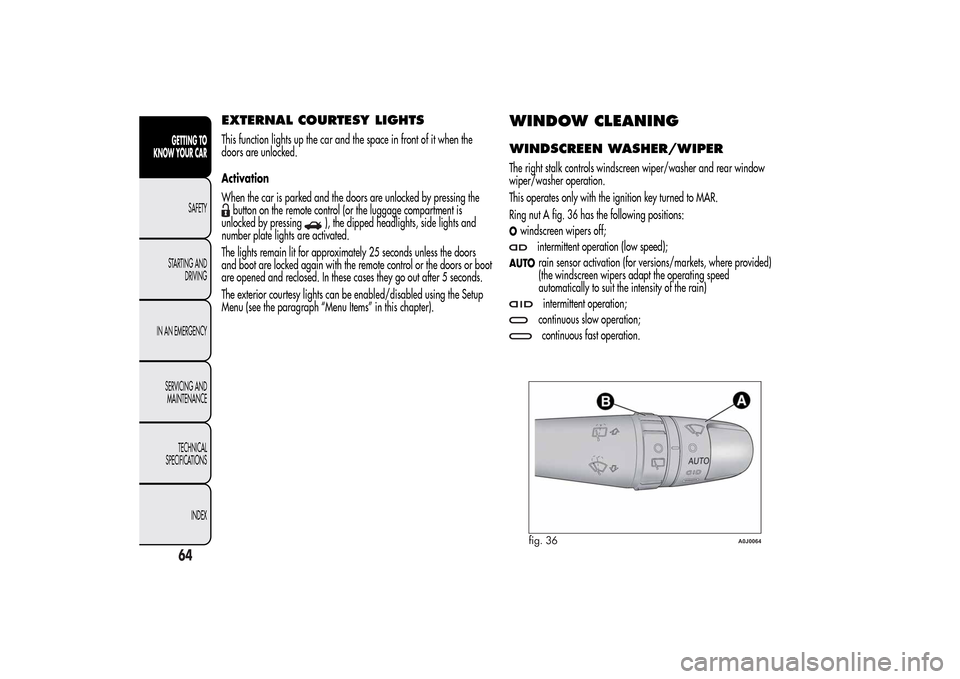
WINDOW CLEANINGWINDSCREEN WASHER/WIPERThe right stalk controls windscreen wiper/washer and rear window
wiper/washer operation.
This operates only with the ignition key turned to MAR.
Ring nut A fig. 36 has the following positions:Owindscreen wipers off;
intermittent operation (low speed);
AUTO
rain sensor activation (for versions/markets, where provided)
(the windscreen wipers adapt the operating speed
automatically to suit the intensity of the rain)intermittent operation;continuous slow operation;continuous fast operation.
fig. 36
A0J0064
64GETTING TO
KNOW YOUR CAR
SAFETY
STARTING AND
DRIVING
IN AN EMERGENCY
SERVICING AND
MAINTENANCE
TECHNICAL
SPECIFICATIONS
INDEX
Page 71 of 280
CRUISE CONTROL(for versions/markets, where provided)GENERAL INFORMATIONThis is an electronically controlled driving assistance device which
allows driving at a chosen speed above 30 km/h on long stretches of
dry, straight roads with few variations (e.g. motorways), without
having to depress the accelerator pedal.
The use of this device on extra-urban roads with traffic is not therefore
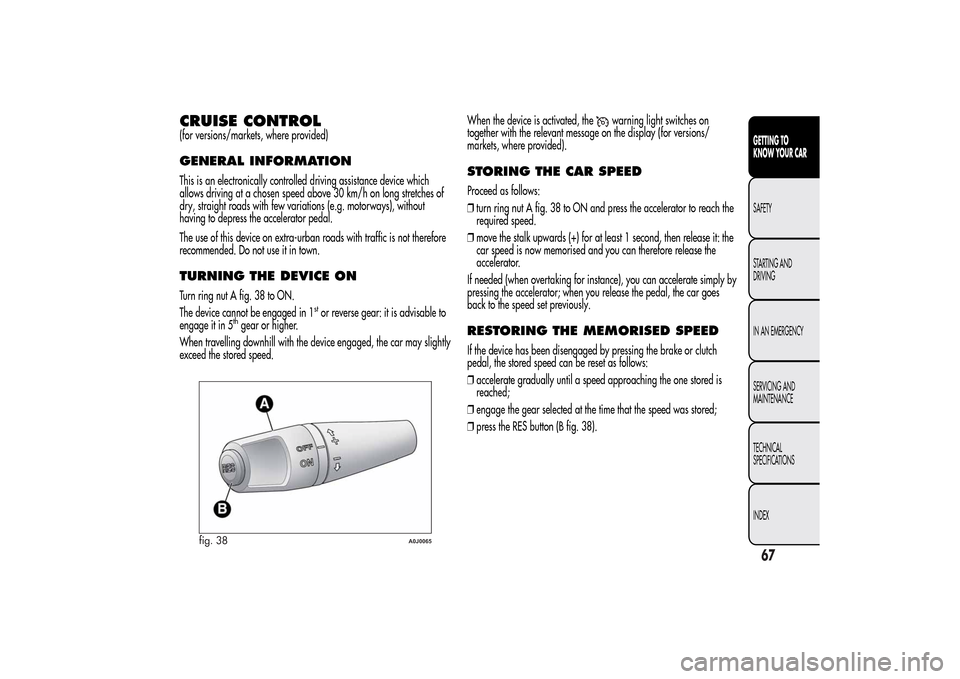
recommended. Do not use it in town.TURNING THE DEVICE ONTurn ring nut A fig. 38 to ON.
The device cannot be engaged in 1
stor reverse gear: it is advisable to
engage it in 5
thgear or higher.
When travelling downhill with the device engaged, the car may slightly
exceed the stored speed.When the device is activated, the
warning light switches on
together with the relevant message on the display (for versions/
markets, where provided).
STORING THE CAR SPEEDProceed as follows:
❒turn ring nut A fig. 38 to ON and press the accelerator to reach the
required speed.
❒move the stalk upwards (+) for at least 1 second, then release it: the
car speed is now memorised and you can therefore release the
accelerator.
If needed (when overtaking for instance), you can accelerate simply by
pressing the accelerator; when you release the pedal, the car goes
back to the speed set previously.RESTORING THE MEMORISED SPEEDIf the device has been disengaged by pressing the brake or clutch
pedal, the stored speed can be reset as follows:
❒accelerate gradually until a speed approaching the one stored is
reached;
❒engage the gear selected at the time that the speed was stored;
❒press the RES button (B fig. 38).
fig. 38
A0J0065
67GETTING TO
KNOW YOUR CARSAFETY
STARTING AND
DRIVING
IN AN EMERGENCY
SERVICING AND
MAINTENANCE
TECHNICAL
SPECIFICATIONS
INDEX
Page 72 of 280
INCREASING THE MEMORISED SPEEDPress the accelerator and store the new speed or move the lever
upwards (+).
Each movement of the stalk corresponds to an increase in speed of
about 1 km/h, while keeping the stalk held upwards will continuously
increase the speed.REDUCING THE MEMORISED SPEEDDeactivate the device and store the new speed or move the lever
downwards (–) until the new speed is reached. It will then be stored
automatically.
Each movement of the lever corresponds to a slight reduction in speed
of about 1 km/h, while keeping the stalk held downwards will
decrease the speed continuously.TURNING THE DEVICE OFFTo disengage the device:
- turn ring nut A fig. 38 to OFF;
or
- switch the engine off;
or
- press the brake pedal, the clutch or the accelerator; in this last case
the system is not effectively disengaged but the system gives priority to
the acceleration request. The device still remains active, without the
need to press the RES button to return to the previous conditions once
acceleration is concluded.Automatic deactivation
The device deactivates automatically in the following cases:
❒if the ABS or ESC systems intervene;
❒with the car speed below the set limit;
❒in the event of system failure.
When travelling with the device active, never move the
gear lever to neutral.If operation is inadequate or the device is faulty, turn
ring nut A fig. 38 to OFF and contact Alfa Romeo
Authorized Services.
68GETTING TO
KNOW YOUR CAR
SAFETY
STARTING AND
DRIVING
IN AN EMERGENCY
SERVICING AND
MAINTENANCE
TECHNICAL
SPECIFICATIONS
INDEX
Page 73 of 280
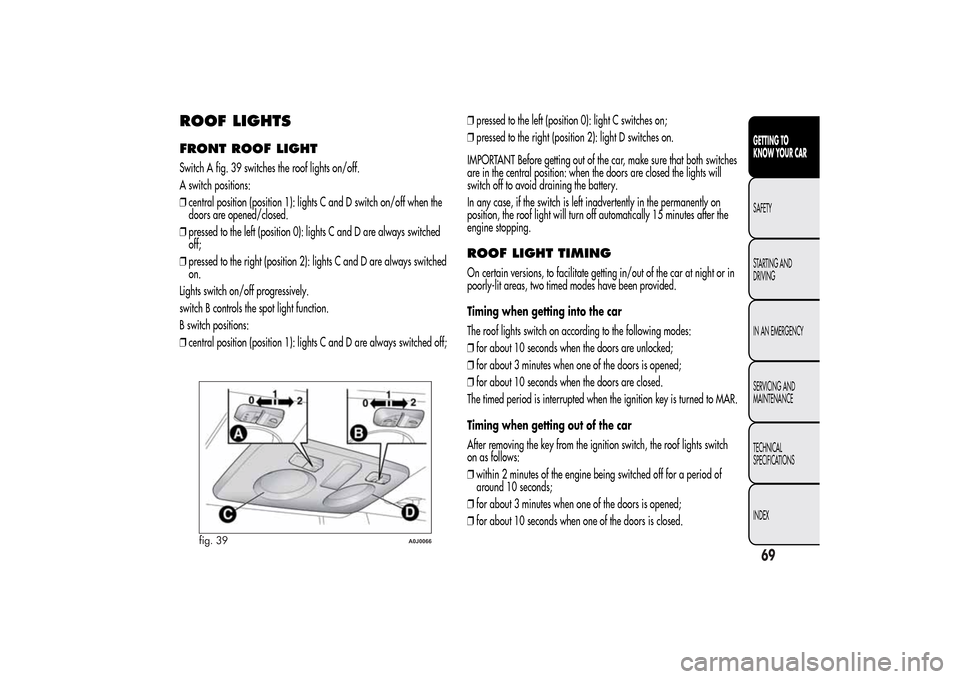
ROOF LIGHTSFRONT ROOF LIGHTSwitch A fig. 39 switches the roof lights on/off.
A switch positions:
❒central position (position 1): lights C and D switch on/off when the
doors are opened/closed.
❒pressed to the left (position 0): lights C and D are always switched
off;
❒pressed to the right (position 2): lights C and D are always switched
on.
Lights switch on/off progressively.
switch B controls the spot light function.
B switch positions:
❒central position (position 1): lights C and D are always switched off;❒pressed to the left (position 0): light C switches on;
❒pressed to the right (position 2): light D switches on.
IMPORTANT Before getting out of the car, make sure that both switches
are in the central position: when the doors are closed the lights will
switch off to avoid draining the battery.
In any case, if the switch is left inadvertently in the permanently on
position, the roof light will turn off automatically 15 minutes after the
engine stopping.
ROOF LIGHT TIMINGOn certain versions, to facilitate getting in/out of the car at night or in
poorly-lit areas, two timed modes have been provided.
Timing when getting into the car
The roof lights switch on according to the following modes:
❒for about 10 seconds when the doors are unlocked;
❒for about 3 minutes when one of the doors is opened;
❒for about 10 seconds when the doors are closed.
The timed period is interrupted when the ignition key is turned to MAR.
Timing when getting out of the car
After removing the key from the ignition switch, the roof lights switch
on as follows:
❒within 2 minutes of the engine being switched off for a period of
around 10 seconds;
❒for about 3 minutes when one of the doors is opened;
❒for about 10 seconds when one of the doors is closed.
fig. 39
A0J0066
69GETTING TO
KNOW YOUR CARSAFETY
STARTING AND
DRIVING
IN AN EMERGENCY
SERVICING AND
MAINTENANCE
TECHNICAL
SPECIFICATIONS
INDEX
Page 74 of 280
The timing stops automatically when the doors are locked.COURTESY LIGHTS(for versions/markets, where provided)
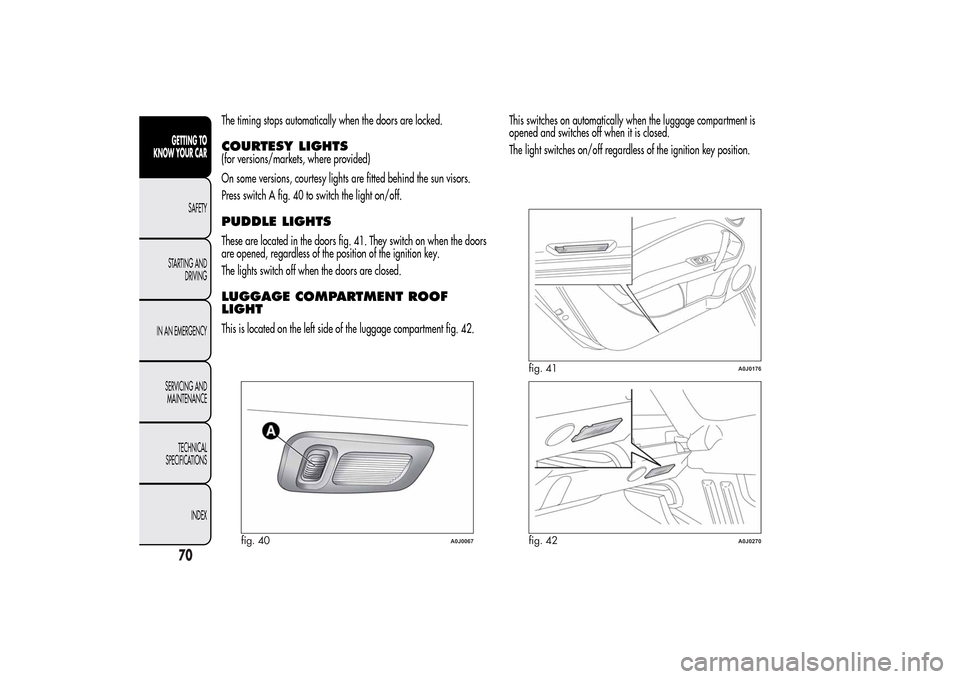
On some versions, courtesy lights are fitted behind the sun visors.
Press switch A fig. 40 to switch the light on/off.PUDDLE LIGHTSThese are located in the doors fig. 41. They switch on when the doors
are opened, regardless of the position of the ignition key.
The lights switch off when the doors are closed.LUGGAGE COMPARTMENT ROOF
LIGHTThis is located on the left side of the luggage compartment fig. 42.This switches on automatically when the luggage compartment is
opened and switches off when it is closed.
The light switches on/off regardless of the ignition key position.
fig. 40
A0J0067
fig. 41
A0J0176
fig. 42
A0J0270
70GETTING TO
KNOW YOUR CAR
SAFETY
STARTING AND
DRIVING
IN AN EMERGENCY
SERVICING AND
MAINTENANCE
TECHNICAL
SPECIFICATIONS
INDEX
Page 75 of 280
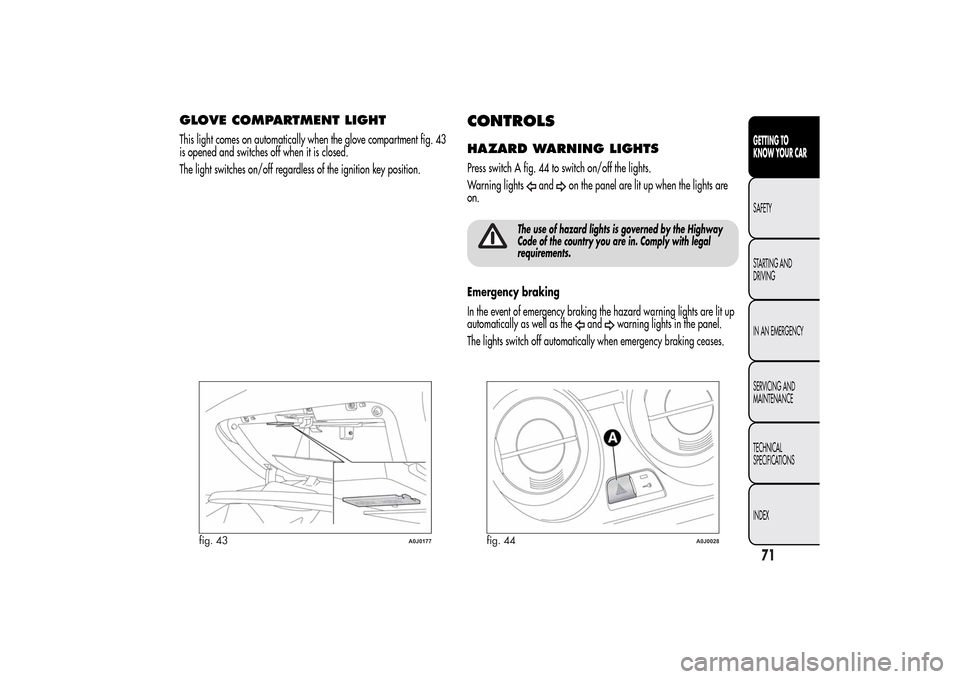
GLOVE COMPARTMENT LIGHTThis light comes on automatically when the glove compartment fig. 43
is opened and switches off when it is closed.
The light switches on/off regardless of the ignition key position.
CONTROLSHAZARD WARNING LIGHTSPress switch A fig. 44 to switch on/off the lights.
Warning lights
and
on the panel are lit up when the lights are
on.
The use of hazard lights is governed by the Highway
Code of the country you are in. Comply with legal
requirements.
Emergency braking
In the event of emergency braking the hazard warning lights are lit up
automatically as well as the
and
warning lights in the panel.
The lights switch off automatically when emergency braking ceases.
fig. 43
A0J0177
fig. 44
A0J0028
71GETTING TO
KNOW YOUR CARSAFETY
STARTING AND
DRIVING
IN AN EMERGENCY
SERVICING AND
MAINTENANCE
TECHNICAL
SPECIFICATIONS
INDEX
Page 76 of 280
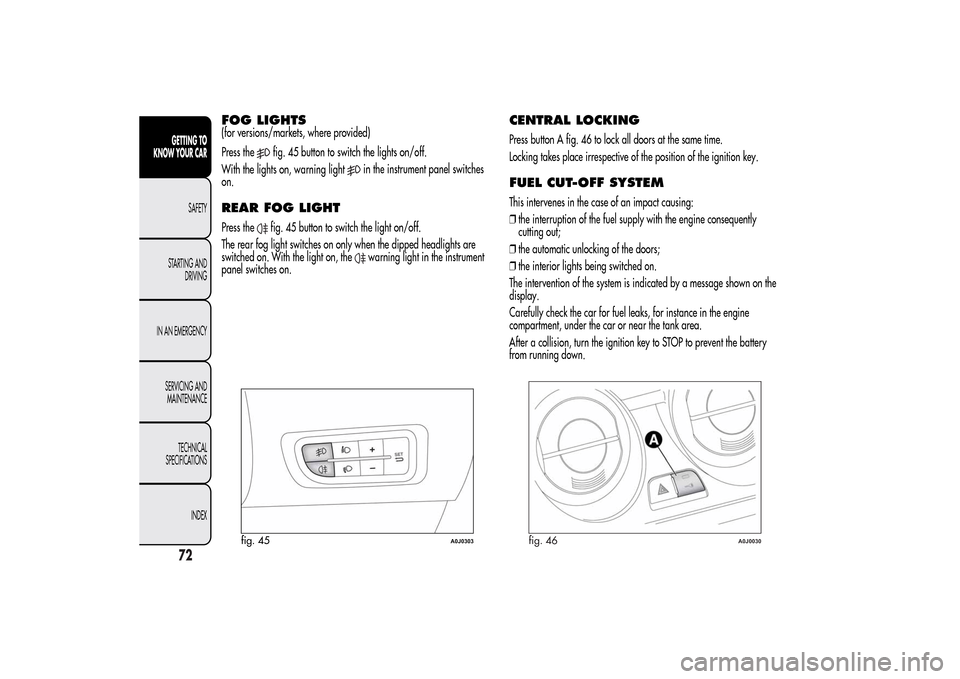
FOG LIGHTS(for versions/markets, where provided)
Press the
fig. 45 button to switch the lights on/off.
With the lights on, warning light
in the instrument panel switches
on.
REAR FOG LIGHTPress the
fig. 45 button to switch the light on/off.
The rear fog light switches on only when the dipped headlights are
switched on. With the light on, the
warning light in the instrument
panel switches on.
CENTRAL LOCKINGPress button A fig. 46 to lock all doors at the same time.
Locking takes place irrespective of the position of the ignition key.FUEL CUT-OFF SYSTEMThis intervenes in the case of an impact causing:
❒the interruption of the fuel supply with the engine consequently
cutting out;
❒the automatic unlocking of the doors;
❒the interior lights being switched on.
The intervention of the system is indicated by a message shown on the
display.
Carefully check the car for fuel leaks, for instance in the engine
compartment, under the car or near the tank area.
After a collision, turn the ignition key to STOP to prevent the battery
from running down.
fig. 45
A0J0303
fig. 46
A0J0030
72GETTING TO
KNOW YOUR CAR
SAFETY
STARTING AND
DRIVING
IN AN EMERGENCY
SERVICING AND
MAINTENANCE
TECHNICAL
SPECIFICATIONS
INDEX
Page 77 of 280
To restore the correct operation of the car, proceed as follows:
❒turn the ignition key to the MAR position;
❒activate the right direction indicator;
❒deactivate the right direction indicator;
❒activate the left direction indicator;
❒deactivate the left direction indicator;
❒activate the right direction indicator;
❒deactivate the right direction indicator;
❒activate the left direction indicator;
❒deactivate the left direction indicator;
❒turn the ignition key to the STOP position.
If, after a collision, you smell fuel or notice leaks from
the fuel system, do not reactivate the system to avoid
fire risk.
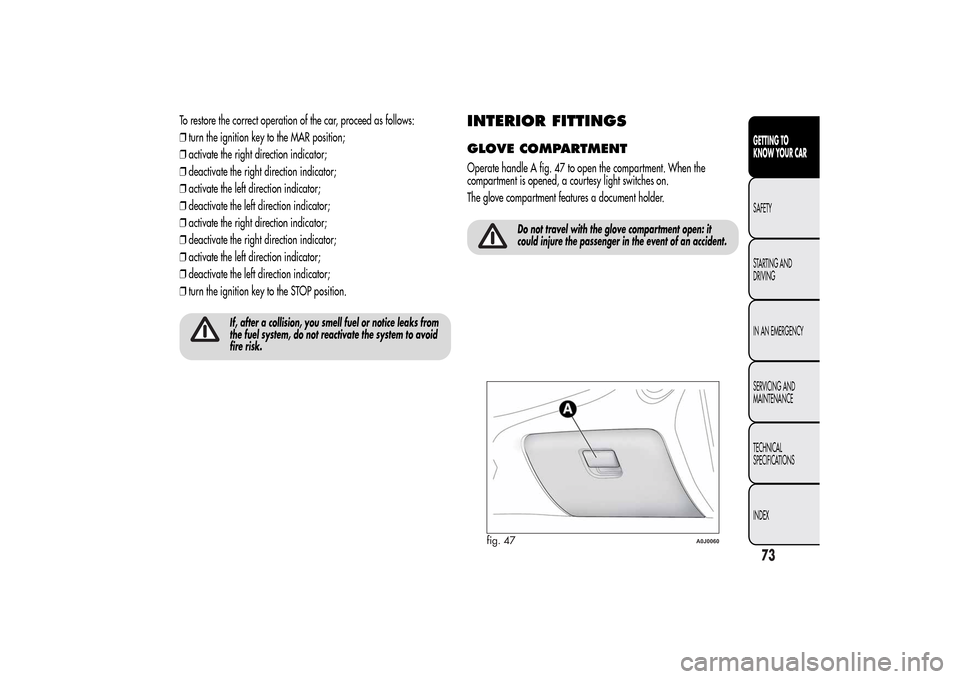
INTERIOR FITTINGSGLOVE COMPARTMENTOperate handle A fig. 47 to open the compartment. When the
compartment is opened, a courtesy light switches on.
The glove compartment features a document holder.
Do not travel with the glove compartment open: it
could injure the passenger in the event of an accident.
fig. 47
A0J0060
73GETTING TO
KNOW YOUR CARSAFETY
STARTING AND
DRIVING
IN AN EMERGENCY
SERVICING AND
MAINTENANCE
TECHNICAL
SPECIFICATIONS
INDEX