key Alfa Romeo MiTo 2014 Repair Manual
[x] Cancel search | Manufacturer: ALFA ROMEO, Model Year: 2014, Model line: MiTo, Model: Alfa Romeo MiTo 2014Pages: 280, PDF Size: 8.79 MB
Page 167 of 280
REPLACING FUSESGENERAL INFORMATIONFuses protect the electrical system: they intervene (blow) in the event of
a failure or improper intervention on the system.
When a device does not work, check the condition of its protective
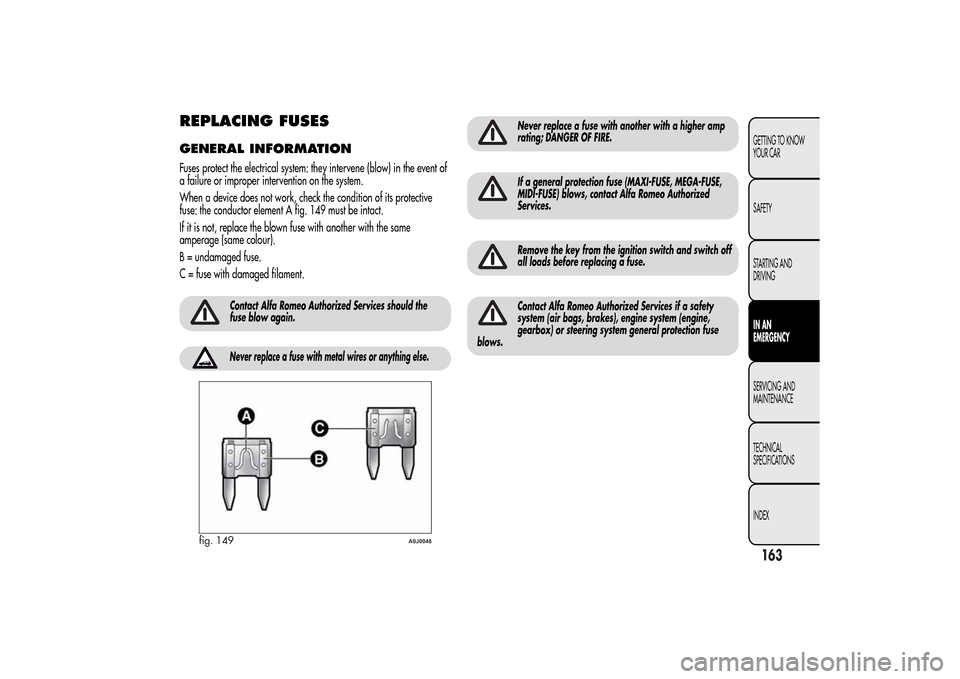
fuse: the conductor element A fig. 149 must be intact.
If it is not, replace the blown fuse with another with the same
amperage (same colour).
B = undamaged fuse.
C = fuse with damaged filament.
Contact Alfa Romeo Authorized Services should the
fuse blow again.Never replace a fuse with metal wires or anything else.
Never replace a fuse with another with a higher amp
rating; DANGER OF FIRE.If a general protection fuse (MAXI-FUSE, MEGA-FUSE,
MIDI-FUSE) blows, contact Alfa Romeo Authorized
Services.Remove the key from the ignition switch and switch off
all loads before replacing a fuse.Contact Alfa Romeo Authorized Services if a safety
system (air bags, brakes), engine system (engine,
gearbox) or steering system general protection fuse
blows.
fig. 149
A0J0048
163GETTING TO KNOW
YOUR CAR
SAFETY
STARTING AND
DRIVINGIN AN
EMERGENCYSERVICING AND
MAINTENANCE
TECHNICAL
SPECIFICATIONS
INDEX
Page 174 of 280
BATTERY RECHARGINGIMPORTANT The battery recharging procedure is given as information
only. Contact Alfa Romeo Authorized Services to carry out this
operation.
IMPORTANT After turning the ignition key to STOP, wait at least 1
minute before disconnecting the battery power supply.
We recommend recharging the battery slowly for approximately 24
hours at low amperage. Charging for a longer time may damage the
battery.VERSIONS WITHOUT Start&Stop
SYSTEM(for versions/markets, where provided)
Charge the battery as follows:
❒disconnect the negative battery terminal;
❒connect the charger cables to the battery terminals, observing the
polarity;
❒turn on the battery charger;
❒when it is recharged, turn the charger off before disconnecting it
from the battery;
❒reconnect the negative battery terminal.
VERSIONS WITH Start&Stop SYSTEMCharge the battery as follows:
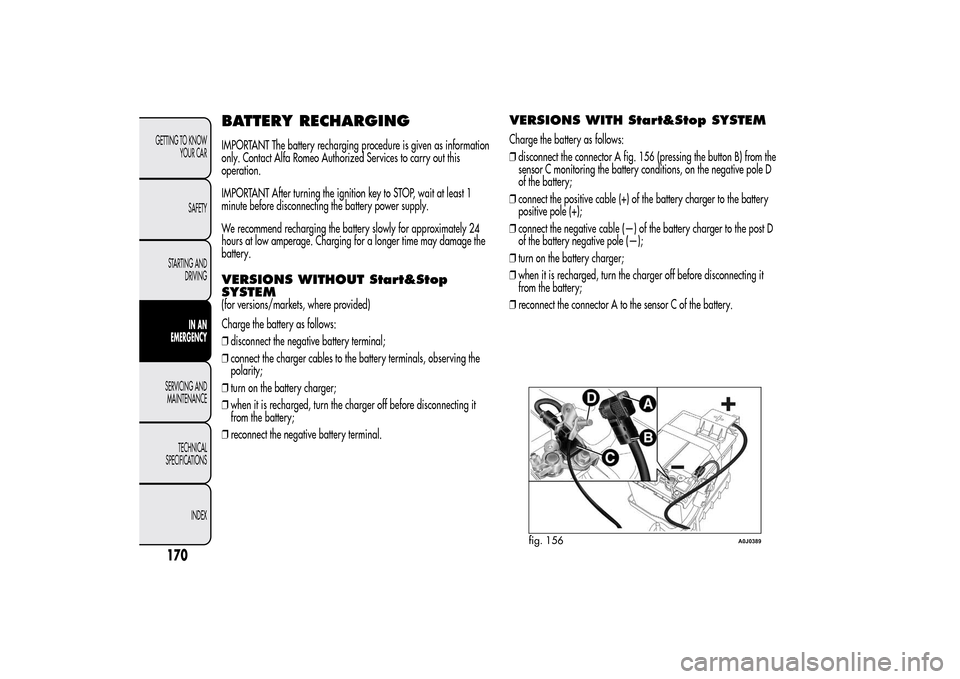
❒disconnect the connector A fig. 156 (pressing the button B) from the
sensor C monitoring the battery conditions, on the negative pole D
of the battery;
❒connect the positive cable (+) of the battery charger to the battery
positive pole (+);
❒connect the negative cable (—) of the battery charger to the post D
of the battery negative pole (—);
❒turn on the battery charger;
❒when it is recharged, turn the charger off before disconnecting it
from the battery;
❒reconnect the connector A to the sensor C of the battery.
fig. 156
A0J0389
170GETTING TO KNOW
YOUR CAR
SAFETY
STARTING AND
DRIVING
IN AN
EMERGENCY
SERVICING AND
MAINTENANCE
TECHNICAL
SPECIFICATIONS
INDEX
Page 175 of 280
RAISING THE CARIf you need to lift the car contact Alfa Romeo Authorized Services, who
will be equipped with a workshop lift.
IMPORTANT Be careful when positioning the arm of the lift for versions
with side skirts.
TOWING THE CARThe tow ring provided with the car is housed in the tool box in the
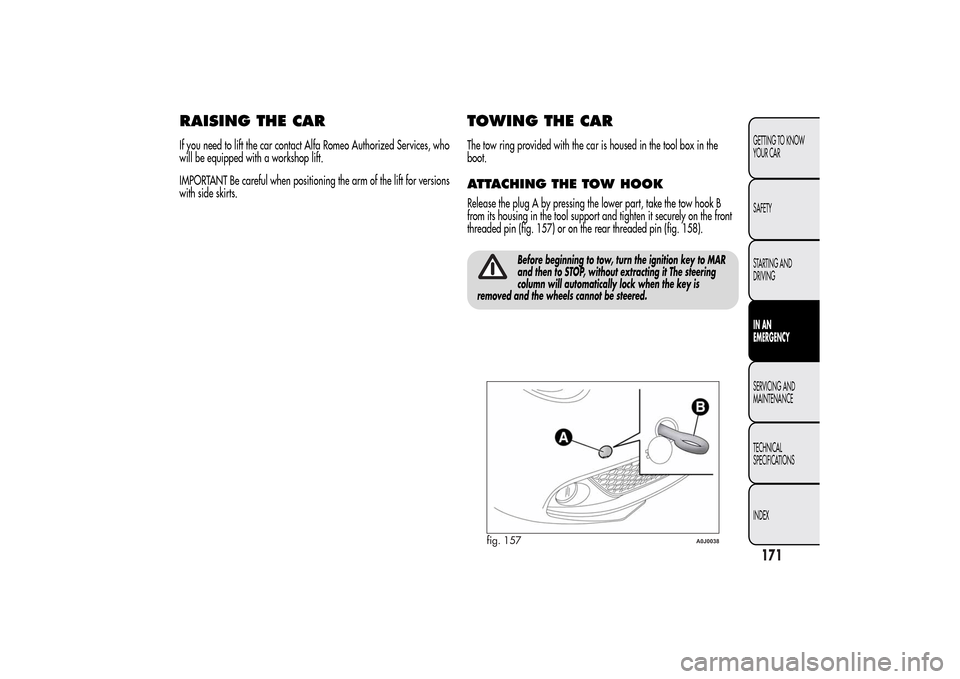
boot.ATTACHING THE TOW HOOKRelease the plug A by pressing the lower part, take the tow hook B
from its housing in the tool support and tighten it securely on the front
threaded pin (fig. 157) or on the rear threaded pin (fig. 158).
Before beginning to tow, turn the ignition key to MAR
and then to STOP, without extracting it The steering
column will automatically lock when the key is
removed and the wheels cannot be steered.
fig. 157
A0J0038
171GETTING TO KNOW
YOUR CAR
SAFETY
STARTING AND
DRIVINGIN AN
EMERGENCYSERVICING AND
MAINTENANCE
TECHNICAL
SPECIFICATIONS
INDEX
Page 195 of 280
Replacing the wiper bladesProceed as follows:
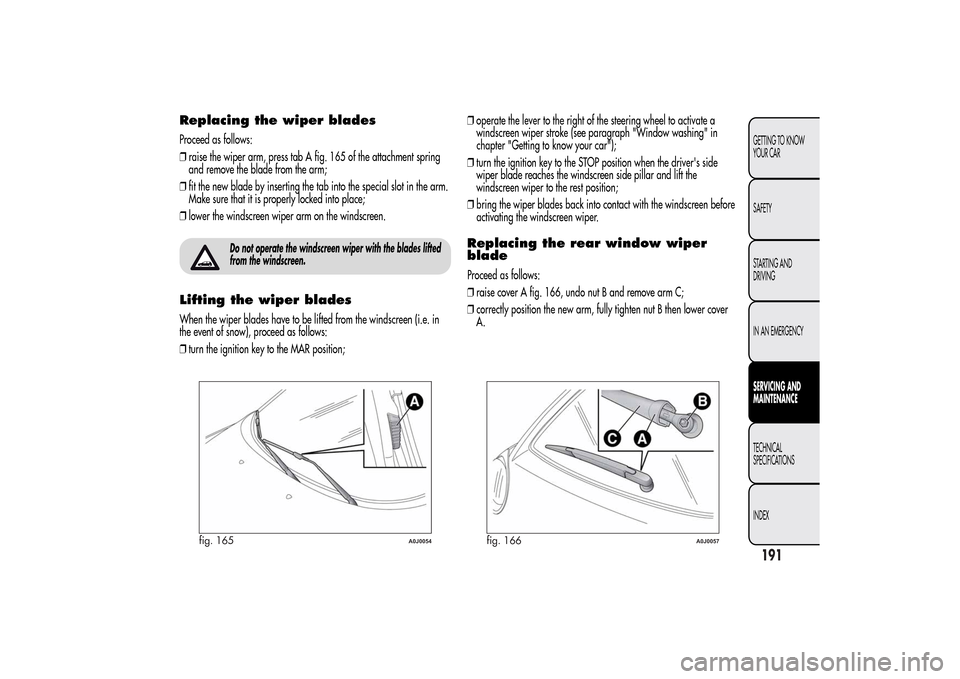
❒raise the wiper arm, press tab A fig. 165 of the attachment spring
and remove the blade from the arm;
❒fit the new blade by inserting the tab into the special slot in the arm.
Make sure that it is properly locked into place;
❒lower the windscreen wiper arm on the windscreen.
Do not operate the windscreen wiper with the blades lifted
from the windscreen.
Lifting the wiper bladesWhen the wiper blades have to be lifted from the windscreen (i.e. in
the event of snow), proceed as follows:
❒turn the ignition key to the MAR position;❒operate the lever to the right of the steering wheel to activate a
windscreen wiper stroke (see paragraph "Window washing" in
chapter "Getting to know your car");
❒turn the ignition key to the STOP position when the driver's side
wiper blade reaches the windscreen side pillar and lift the
windscreen wiper to the rest position;
❒bring the wiper blades back into contact with the windscreen before
activating the windscreen wiper.
Replacing the rear window wiper
bladeProceed as follows:
❒raise cover A fig. 166, undo nut B and remove arm C;
❒correctly position the new arm, fully tighten nut B then lower cover
A.
fig. 165
A0J0054
fig. 166
A0J0057
191GETTING TO KNOW
YOUR CAR
SAFETY
STARTING AND
DRIVING
IN AN EMERGENCYSERVICING AND
MAINTENANCETECHNICAL
SPECIFICATIONS
INDEX
Page 198 of 280
IMPORTANT
Avoid parking under trees; the resin dropped by trees makes the
paintwork go opaque and increases the possibility of corrosion.
Bird droppings must be washed off immediately and thoroughly as the
acid they contain is particularly aggressive.
Windows
Use specific detergents and clean cloths to prevent scratching or
altering the transparency.
IMPORTANT Wipe the inside surface of the rear window gently with a
cloth in the direction of the filaments to avoid damaging the heating
device.
Front headlights
Use a soft, damp cloth soaked in water and detergent for washing
cars.
IMPORTANT Never use aromatic substances (e.g. petrol) or ketenes
(e.g. acetone) for cleaning the plastic lenses of the front headlights.
IMPORTANT When cleaning the car with a pressure washer, keep the
water jet at least 20 cm away from the headlights.
Engine compartment
At the end of every winter, wash the engine compartment thoroughly,
taking care not to aim the jet of water directly at the electronic control
units or at the windscreen wiper motors. Have this operation
performed at a specialised workshop.
IMPORTANT The washing should take place with the engine cold and
the ignition key in the STOP position. After washing, make sure that the
various protective devices (e.g. rubber caps and guards) have not
been removed or damaged.
INTERIORSPeriodically check for water puddles under the mats that could cause
the panels to rust.
Never use flammable products, such as petrol ether or
rectified petrol to clean the inside of the car. The
electrostatic charges which are generated by rubbing
during the cleaning operation may cause a fire.Do not keep aerosol cans in the car: they might
explode. Aerosol cans must not be exposed to a
temperature exceeding 50°C. When the car is exposed
to sunlight, the internal temperature can greatly exceed this
value.
SEATS AND FABRIC PARTSRemove dust with a soft brush or a vacuum cleaner. It is advisable to
use a moist brush on velvet upholstery. Rub the seats with a sponge
soaked in a solution of neutral detergent and water.
194GETTING TO KNOW
YOUR CAR
SAFETY
STARTING AND
DRIVING
IN AN EMERGENCYSERVICING AND
MAINTENANCE
TECHNICAL
SPECIFICATIONS
INDEX
Page 251 of 280
FUNCTIONS AND ADJUSTMENTSSWITCHING ON THE RADIOThe radio switches on when the ON/OFF button is pressed briefly.
When the radio is turned on, the volume is limited to level 20 if it
was set to a higher value when previously used or to level 5 if it
was previously set to value 0 or to Mute/Pause. The previously set
value is maintained in all other cases.
When the radio is switched on with the key extracted from the
ignition, it switches off automatically after about 20 minutes. After
the radio has switched itself off automatically it can be switched on
for a further 20 minutes by pressing the ON/OFF button.SWITCHING OFF THE RADIOBriefly press the ON/OFF button.SELECTING THE RADIO FUNCTIONSBy pressing the FM AS button quickly and repeatedly, the following
audio sources can be selected cyclically:
❒TUNER (“FM1”, “FM2”, “FMA”).
By pressing the AM button briefly and repeatedly, the following
audio sources can be selected cyclically:
❒TUNER (“MW1”, “MW2”).
SELECTING CD FUNCTIONBy pressing the MEDIA button briefly it is possible to select the CD
function.AUDIO SOURCE MEMORY FUNCTIONIf another function (e.g. the radio) is selected whilst listening to a
CD, playback is interrupted and is resumed from the same point
when returning to the CD source.
If another function is selected whilst listening to the radio, the last
station selected is tuned into when returning to Radio mode.VOLUME ADJUSTMENTTo adjust the volume, turn the ON/OFF knob.
If the volume level is changed during the transmission of traffic
news, the new setting will only be maintained until the update is
finished.MUTE/PAUSE FUNCTION
(zeroing the volume)Press the
button briefly to activate the Mute function. The volume
will gradually decrease and the words “RADIO Mute” (in radio
mode) or “PAUSE” (in CD mode) will be displayed.
Press thebutton again to deactivate the Mute function. The
volume will gradually increase until it reaches the level set
previously.
When the volume level is changed using the dedicated controls, the
Mute function is deactivated and the volume is adjusted to the new
level selected.
247SOUND-SYSTEM
Page 257 of 280
PHONE FUNCTION(telephone volume adjustment)
With Speech volume function present in Menu
This function makes it possible to adjust (settings from 1 to 40), by
turning the ON/OFF left knob/button or pressing the
/
buttons, or mute (OFF setting) the volume of the telephone.
The display shows the current function status:
❒“Speech Off”: function deactivated.
❒“Speech volume 23”: function active with volume setting 23.
With Speech volume function not present
on the Menu
When a phone call is received, the audio passes to the car’s audio
system through the radio.
The telephone audio always arrives at a fixed volume, but it can be
adjusted during a conversation using the ON/OFF button/knob.
AUX OFFSET function(alignment of the portable device volume with that of
the other sources)
(for versions/markets, where provided)
This function enables the alignment of the volume of the AUX
source, depending on its own portable player, with that of the
other sources.
To activate the function, press the MENU button and select “AUX
offset”.
Press the
or
buttons to decrease or increase the volume value
(set from–6to+6).
RADIO OFF function(on and off mode)
This function is used to set the radio switching-off mode to one of
two different settings.
To activate the function, use the
or
button.
The selected mode will appear on the display:
❒“00 MIN”: the radio switches off automatically in connection
with the ignition key; the radio switches off automatically as
soon as the key is turned to STOP position;
❒“20 MIN”: the radio switches off independently of the ignition
key; the radio remains switched on for a maximum period of 20
minutes after the key has been turned to STOP position.
SYSTEM RESET functionThis function is used to restore all settings to the factory values.
The options are:
❒NO: no restore intervention;
❒YES: the default parameters will be restored. During this
operation, the word “Resetting” appears on the display. At the
end of the operation, the source does not change and the
previous situation will be displayed.
253SOUND-SYSTEM
Page 262 of 280
CD PLAYERINTRODUCTIONThis section describes the variants regarding the operation of the
CD player: as far as the operation of the radio is concerned, refer
to the description in the “Functions and Adjustments” chapter.SELECTING THE CD PLAYERTo activate the CD player built into the equipment, proceed as
follows:
❒insert a CD with the equipment switched on: the first track will
start to play;
or
❒if a CD has already been loaded, switch on the radio and then
briefly press the CD button to select the “CD” operating mode:
the last track listened to will start to play.
It is advisable to use original CDs to ensure optimum playback. If
CD-R/RWs are used, we recommend using good quality media
mastered at the slowest speed possible.LOADING/EJECTING A CDTo load the CD, insert it gently into the slot to activate the motorised
loading system, which will position it correctly.
The CD can be loaded with radio off and the ignition key turned to
MAR: in this case the radio will remain off. When the radio is
turned on, the last source listened to prior to switching off will be
activated.When a CD is inserted the display will show the symbol “CD-IN”
and the text “CD Reading”. They will remain displayed for the
entire time required for the radio to read the CD tracks. When this
time has elapsed the radio will automatically start to play the first
track.
Press the
button with the radio on to activate the motorised
ejection of the CD. After ejection, the last audio source listened to
before playing the CD will be heard.
If the CD is not removed from the radio, it will automatically be
reloaded about 20 seconds later and the Tuner mode will be
activated (Radio).
The CD cannot be ejected if the radio is off.
If the ejected CD is reloaded without having removed it completely
from the slot, the radio will not switch to the CD source.
Possible error messages
If the CD loaded cannot be read (e.g. a CD ROM has been
inserted or the CD is inserted upside down or there is reading
error) the display will show the text “CD Disc error”.
The CD will then be ejected and the audio source activated prior to
the CD mode selection will be heard.
With an external audio source activated (“TA”, “ALARM” or
“Phone”), the CD that cannot be read will not be ejected until these
functions have ended. At the end, with the CD mode activated, the
display will show the text “CD Disc error” for a few seconds and
then the CD will be ejected.
258
SOUND-SYSTEM
Page 276 of 280
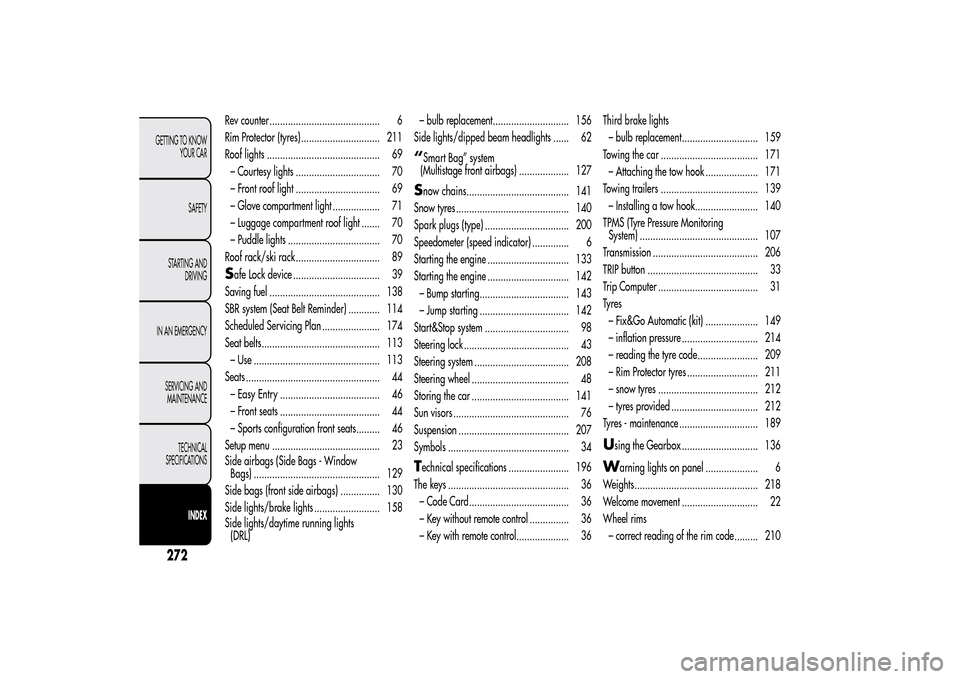
Rev counter .......................................... 6
Rim Protector (tyres) .............................. 211
Roof lights ........................................... 69
– Courtesy lights ................................ 70
– Front roof light ................................ 69
– Glove compartment light .................. 71
– Luggage compartment roof light ....... 70
– Puddle lights ................................... 70
Roof rack/ski rack ................................ 89Safe Lock device ................................. 39
Saving fuel .......................................... 138
SBR system (Seat Belt Reminder) ............ 114
Scheduled Servicing Plan ...................... 174
Seat belts............................................. 113
– Use ................................................ 113
Seats ................................................... 44
– Easy Entry ...................................... 46
– Front seats ...................................... 44
– Sports configuration front seats......... 46
Setup menu ......................................... 23
Side airbags (Side Bags - Window
Bags) ................................................ 129
Side bags (front side airbags) ............... 130
Side lights/brake lights ......................... 158
Side lights/daytime running lights
(DRL)– bulb replacement............................. 156
Side lights/dipped beam headlights ...... 62
“Smart Bag” system
(Multistage front airbags) ................... 127Snow chains....................................... 141
Snow tyres ........................................... 140
Spark plugs (type) ................................ 200
Speedometer (speed indicator) .............. 6
Starting the engine ............................... 133
Starting the engine ............................... 142
– Bump starting.................................. 143
– Jump starting .................................. 142
Start&Stop system ................................ 98
Steering lock ........................................ 43
Steering system .................................... 208
Steering wheel ..................................... 48
Storing the car ..................................... 141
Sun visors ............................................ 76
Suspension .......................................... 207
Symbols .............................................. 34Technical specifications ....................... 196
The keys .............................................. 36
– Code Card...................................... 36
– Key without remote control ............... 36
– Key with remote control.................... 36Third brake lights
– bulb replacement............................. 159
Towing the car ..................................... 171
– Attaching the tow hook .................... 171
Towing trailers ..................................... 139
– Installing a tow hook........................ 140
TPMS (Tyre Pressure Monitoring
System) ............................................. 107
Transmission ........................................ 206
TRIP button .......................................... 33
Trip Computer ...................................... 31
Ty r e s
– Fix&Go Automatic (kit) .................... 149
– inflation pressure ............................. 214
– reading the tyre code....................... 209
– Rim Protector tyres ........................... 211
– snow tyres ...................................... 212
– tyres provided ................................. 212
Tyres - maintenance .............................. 189
U
sing the Gearbox ............................. 136
W
arning lights on panel .................... 6
Weights............................................... 218
Welcome movement ............................. 22
Wheel rims
– correct reading of the rim code ......... 210
27GETTING TO KNOW
YOUR CAR
SAFETY
STARTING AND
DRIVING
IN AN EMERGENCY
SERVICING AND
MAINTENANCE
TECHNICAL
SPECIFICATIONS
INDEX2