Turn Alfa Romeo Stelvio 2018 Repair Manual
[x] Cancel search | Manufacturer: ALFA ROMEO, Model Year: 2018, Model line: Stelvio, Model: Alfa Romeo Stelvio 2018Pages: 276, PDF Size: 5.79 MB
Page 131 of 276
Warning!
Deployed air bags and seat belt
pretensioners cannot protect you in another
collision. Have the air bags, seat belt
pretensioners, and the seat belt retractor
assemblies replaced by an authorized dealer
immediately. Also, have the Occupant
Restraint Controller System serviced as
well.
Note:
Air bag covers may not be obvious in
the interior trim, but they will open
during air bag deployment.
After any collision, the vehicle should
be taken to an authorized dealer
immediately.
Enhanced Accident Response
System
In the event of an impact, if the
communication network remains intact,
and the power remains intact, depending
on the nature of the event, the ORC will
determine whether to have the Enhanced
Accident Response System perform the
following functions:
Cut off fuel to the engine (If Equipped)
Cut off battery power to the electric
motor (If Equipped)
Flash hazard lights as long as the
battery has power
Turn on the interior lights, which
remain on as long as the battery has
power or for 15 minutes from the
intervention of the Enhanced Accident
Response System.
Unlock the power door locks.
Your vehicle may also be designed to
perform any of these other functions in
response to the Enhanced Accident
Response System:
Turn off the Fuel Filter Heater, Turn off
the HVAC Blower Motor, Close the HVAC
Circulation Door
Cut off battery power to the:
– Engine
– Electric Motor (if equipped)
– Electric power steering
– Brake booster
– Electric park brake
– Automatic transmission gear selector
– Horn
– Front wiper
– Headlamp washer pump
Note: After an accident, remember to
cycle the ignition to the STOP
(OFF/LOCK) position and remove the key from the ignition switch to avoid draining
the battery. Carefully check the vehicle
for fuel leaks in the engine compartment
and on the ground near the engine
compartment and fuel tank before
resetting the system and starting the
engine. If there are no fuel leaks or
damage to the vehicle electrical devices
(e.g. headlights) after an accident, reset
the system by following the procedure
described below.
Enhanced Accident Response
System Reset Procedure
After the event occurs, when the system
is active, a message regarding fuel cutoff
is displayed. Turn the ignition switch from
ignition AVV/START or MAR/ACC/ON/
RUN to ignition STOP/OFF/LOCK.
Carefully check the vehicle for fuel leaks
in the engine compartment and on the
ground near the engine compartment and
fuel tank before resetting the system and
starting the engine.
Depending on the nature of the event the
left and right turn signal lights, located in
the instrument panel, may both be
blinking and will continue to blink. In order
to move your vehicle to the side of the
road, you must follow the system reset
procedure.
129
Page 132 of 276
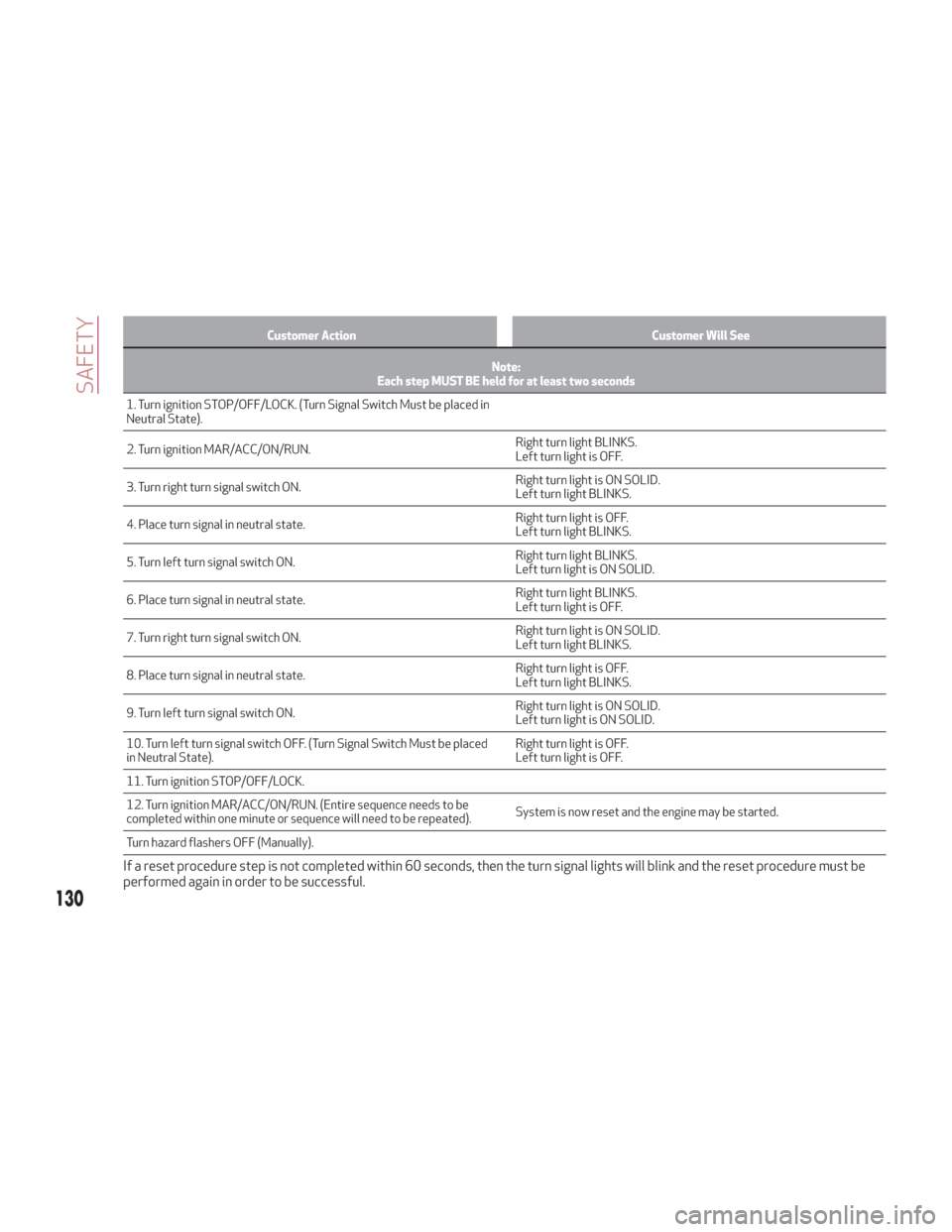
Customer ActionCustomer Will See
Note:
Each step MUST BE held for at least two seconds
1. Turn ignition STOP/OFF/LOCK. (Turn Signal Switch Must be placed in
Neutral
State).
2. Turn ignition MAR/ACC/ON/RUN. Right turn light BLINKS.
Left turn light is OFF.
3. Turn right turn signal switch ON. Right turn light is ON SOLID.
Left turn light BLINKS.
4. Place turn signal in neutral state. Right turn light is OFF.
Left turn light BLINKS.
5. Turn left turn signal switch ON. Right turn light BLINKS.
Left turn light is ON SOLID.
6. Place turn signal in neutral state. Right turn light BLINKS.
Left turn light is OFF.
7. Turn right turn signal switch ON. Right turn light is ON SOLID.
Left turn light BLINKS.
8. Place turn signal in neutral state. Right turn light is OFF.
Left turn light BLINKS.
9. Turn left turn signal switch ON. Right turn light is ON SOLID.
Left turn light is ON SOLID.
10. Turn left turn signal switch OFF. (Turn Signal Switch Must be placed
in Neutral State). Right turn light is OFF.
Left turn light is OFF.
11. Turn ignition STOP/OFF/LOCK.
12. Turn ignition MAR/ACC/ON/RUN. (Entire sequence needs to be
completed within one minute or sequence will need to be repeated). System is now reset and the engine may be started.
Turn hazard flashers OFF (Manually).
If a reset procedure step is not completed within 60 seconds, then the turn signal lights will blink and the reset procedure must be
performed again in order to be successful.
130
SAFETY
Page 144 of 276
If you are required to drive with the
trunk/liftgate/rear doors open, make sure
that all windows are closed and the climate
control BLOWER switch is set at high speed.
DO NOT use the recirculation mode.
If it is necessary to sit in a parked vehicle
with the engine running, adjust your heating
or cooling controls to force outside air into
the vehicle. Set the blower at high speed.
The best protection against carbon
monoxide entry into the vehicle body is a
properly maintained engine exhaust
system.
Whenever a change is noticed in the
sound of the exhaust system, when
exhaust fumes can be detected inside the
vehicle, or when the underside or rear of
the vehicle is damaged, have a competent
mechanic inspect the complete exhaust
system and adjacent body areas for
broken, damaged, deteriorated, or
mispositioned parts. Open seams or
loose connections could permit exhaust
fumes to seep into the passenger
compartment. In addition, inspect the
exhaust system each time the vehicle is
raised for lubrication or oil change.
Replace as required.
Safety Checks You Should Make Inside
The Vehicle
Seat Belts
Inspect the seat belt system periodically,
checking for cuts, frays, and loose parts.
Damaged parts must be replaced
immediately. Do not disassemble or
modify the system.
Front seat belt assemblies must be
replaced after a collision. Rear seat belt
assemblies must be replaced after a
collision if they have been damaged (i.e.,
bent retractor, torn webbing, etc.). If
there is any question regarding seat belt
or retractor condition, replace the seat
belt.
Air Bag Warning Light
The Air Bag warning lightwill turn on
for four to eight seconds as a bulb check
when the ignition switch is first turned to
ON/RUN. If the light is either not on
during starting, stays on, or turns on while
driving, have the system inspected at
your authorized dealer as soon as
possible. After the bulb check, this light
will illuminate with a single chime when a
fault with the Air Bag System has been
detected. It will stay on until the fault is
removed. If the light comes on
intermittently or remains on while
driving, have your authorized dealer
service the vehicle immediately. Refer to
“Occupant Restraint Systems” in “Safety”
for further information.
Defroster
Check operation by selecting the defrost
mode and place the blower control on
high speed. You should be able to feel the
air directed against the windshield. See
your authorized dealer for service if your
defroster is inoperable.
Floor Mat Safety Information
Always use floor mats designed to fit
your vehicle. Only use a floor mat that
does not interfere with the operation of
the accelerator, brake or clutch pedals.
Only use a floor mat that is securely
attached using the floor mat fasteners so
it cannot slip out of position and interfere
with the accelerator, brake or clutch
pedals or impair safe operation of your
vehicle in other ways.
142
SAFETY
Page 145 of 276
Warning!
An improperly attached, damaged, folded, or
stacked floor mat, or damaged floor mat
fasteners may cause your floor mat to
interfere with the accelerator, brake, or
clutch pedals and cause a loss of vehicle
control. To prevent SERIOUS INJURY or
DEATH:
ALWAYS securely attachyour floor
mat using the floor mat fasteners. DO NOT
install your floor mat upside down or turn
your floor mat over. Lightly pull to confirm
mat is secured using the floor mat fasteners
on a regular basis.
ALWAYS REMOVE THE EXISTING FLOOR
MAT FROM THE VEHICLEbefore
installing any other floor mat. NEVER install
or stack an additional floor mat on top of an
existing floor mat.
ONLY install floor mats designed to fit
your vehicle. NEVER install a floor mat that
cannot be properly attached and secured to
your vehicle. If a floor mat needs to be
replaced, only use a FCA approved floor mat
for the specific make, model, and year of
your vehicle.
ONLY use the driver’s side floor mat on
the driver’s side floor area. To check for
interference, with the vehicle properly
parked with the engine off, fully depress the
accelerator, the brake, and the clutch pedal
(if present) to check for interference. If your
floor mat interferes with the operation of
any pedal, or is not secure to the floor,
remove the floor mat from the vehicle and
place the floor mat in your trunk.
ONLY use the passenger’s side floor mat
on the passenger’s side floor area.
ALWAYS make sure objects cannot fall or
slide into the driver’s side floor area when
the vehicle is moving. Objects can become
trapped under accelerator, brake, or clutch
pedals and could cause a loss of vehicle
control.
NEVER place any objects under the floor
mat (e.g., towels, keys, etc.). These objects
could change the position of the floor mat
and may cause interference with the
accelerator, brake, or clutch pedals.
If the vehicle carpet has been removed
and re-installed, always properly attach
carpet to the floor and check the floor mat
fasteners are secure to the vehicle carpet.
Fully depress each pedal to check for
interference with the accelerator, brake, or
clutch pedals then re-install the floor mats.
It is recommended to only use mild soap
and water to clean your floor mats. After
cleaning, always check your floor mat has
been properly installed and is secured to
your vehicle using the floor mat fasteners
by lightly pulling mat.
Periodic Safety Checks You Should
Make Outside The Vehicle
Tires
Examine tires for excessive tread wear
and uneven wear patterns. Check for
stones, nails, glass, or other objects
lodged in the tread or sidewall. Inspect
the tread for cuts and cracks. Inspect
sidewalls for cuts, cracks, and bulges.
Check the wheel nuts for tightness.
Check the tires (including spare) for
proper cold inflation pressure.
Lights
Have someone observe the operation of
brake lights and exterior lights while you
work the controls. Check turn signal and
high beam indicator lights on the
instrument panel.
Door Latches
Check for proper closing, latching, and
locking.
Fluid Leaks
Check area under the vehicle after
overnight parking for fuel, coolant, oil, or
other fluid leaks. Also, if gasoline fumes
are detected or if fuel, or brake fluid
leaks are suspected. The cause should be
located and corrected immediately.
143
Page 149 of 276
Brake switch inactive (brake pedal not
pressed).
Battery at an acceptable charge level.
PANIC button not pushed.
System not disabled from previous
remote start event.
Vehicle alarm system indicator
flashing.
Ignition in the OFF mode (if equipped
with keyless ignition system).
Fuel level meets minimum
requirement.
Remote Start Comfort Systems — If
Equipped
When Remote Start is activated, the
heated steering wheel and driver heated
seat features will automatically turn on in
cold weather.
These features will stay on through the
duration of remote start until the ignition
is cycled to the ON/RUN mode.
Remote Start Windshield Wiper De–Icer
Activation — If Equipped
When remote start is active and the
outside ambient temperature is less than
39°F (4°C), the Windshield Wiper De-Icer
will be enabled. Exiting remote start will
resume previous operation, except if the
Windshield Wiper De-Icer is active.
The Windshield Wiper De-Icer timer and
operation will continue.
Cold Weather Operation
To prevent possible engine damage while
starting at low temperatures, this vehicle
will inhibit engine cranking when the
ambient temperature is less than –22° F
(–30° C) and the oil temperature sensor
reading indicates an engine block heater
has not been used. An externally-
powered electric engine block heater is
available as optional equipment or from
your authorized dealer.
The message “plug in engine heater” will
be displayed in the instrument cluster
when the ambient temperature is below
5° F (–15° C) at the time the engine is
shut off as a reminder to avoid possible
crank delays at the next cold start.
Caution!
Use of the recommended oil and adhering to
the prescribed oil change intervals is
important to prevent engine damage and
ensure satisfactory starting in cold
conditions.
Extended Park Starting
If the vehicle has not been started or
driven for at least 90 days, it is advisable
to follow the indications below. To start the engine, proceed as follows:
1. Briefly push the ignition button
2. If the engine does not start, wait five
seconds and let the starter cool down and
then repeat the starting procedure
3. If the engine does not start after eight
attempts, let the starter cool down for at
least 10 seconds, and then repeat the
starting procedure
If the problem persists, contact your
authorized dealer.
Note:
After prolonged vehicle inactivity,
very difficult starting, that can be noticed
through rapid fatigue of the starter,
might also be due to a partially flat
battery. In this case, refer to "Jump
Starting" in "In Case Of Emergency".
If Engine Fails To Start
Starting the Engine with Key Fob
Battery Run Down or Drained
If the ignition does not respond when the
button is pushed, the key fob battery
might be run down or drained. Therefore,
the system does not detect the presence
of the key fob in the vehicle, and will
display a dedicated message.
In this case, follow the instructions
outlined in "Starting With A Discharged
Key Fob Battery" in the "Getting To Know
Your Vehicle" chapter, and start the
engine normally.
147
Page 152 of 276
Note:Normally, the electric parking
brake is engaged automatically when the
engine is stopped. This function can be
deactivated/activated on the
Information and Entertainment system
by selecting the following items in
sequence on the main menu: "Settings",
"Driver Assistance" and "Automatic
Parking Brake".
In addition to engaging the electric park
brake, along with steering and positioning
chocks in front of the wheels (when on a
steep slope), you must always place the
vehicle in the PARK (P) mode before
leaving.
Should the vehicle battery be faulty, the
battery must be replaced in order to
unlock the electric park brake.
Engaging The Park Brake Manually
Briefly pull the switch located on the
center console to manually engage the
electric park brake when the vehicle is
stationary.
Noise may be heard from the rear of the
vehicle when engaging the electric
parking brake.
A slight movement of the brake pedal
may be detected when engaging the
electric parking brake with the brake
pedal pressed.
With the electric parking brake engaged,
the BRAKE warning light on the
instrument panel and the switch will
illuminate.
Caution!
With the Electronic Parking Brake failure
warning light on, some functions of the
electric parking brake are deactivated. In
this case the driver is responsible for brake
activation and vehicle parking in complete
safety conditions.
If, under exceptional circumstances, the
use of the brake is required with the
vehicle in motion, keep the switch on the
center console pulled as long as the brake
action is necessary.
The BRAKE warning light may turn on
with the hydraulic system temporarily
unavailable; in this case, braking is
controlled by the motors.
The brake lights will also automatically
turn on in the same way as normal braking
with the use of the brake pedal.
Release the switch on the center console
to stop the braking action with the
vehicle in motion.
If, through this procedure, the vehicle is
braked until a speed below 1.9 mph
(3 km/h) is reached and the switch is kept
pulled, the park brake will definitively
engage.
Note: Driving the vehicle with the
electric parking brake engaged, or using
it several times to slow down the vehicle,
may cause severe damage to the braking
system. Disengaging The Electric Park Brake
Manually
In order to manually release the park
brake, the ignition should be in the ON
mode. Press the brake pedal, and then
push the switch on the center console
briefly.
Noise may be heard from the rear of the
vehicle, and a slight movement of the
brake pedal may be detected during
disengagement.
After disengaging the electric parking
brake, the BRAKE warning light on the
instrument panel and the light on the
switch will turn off.
If the BRAKE warning light on the
instrument panel remains on with the
electric parking brake disengaged, this
indicates a fault: in this case, contact an
authorized dealer.
Warning!
Never leave children alone in a vehicle, or
with access to an unlocked vehicle.
Allowing children to be in a vehicle
unattended is dangerous for a number of
reasons. A child or others could be seriously
or fatally injured. Children should be warned
not to touch the park brake, brake pedal or
the gear selector.
150
STARTING AND OPERATING
Page 154 of 276
AUTOMATIC TRANSMISSION
The vehicle can be equipped with an
electronically controlled 8-speed
automatic transmission where gear
shifting automatically takes place,
depending on the vehicle usage
instantaneous parameters (vehicle
speed, grade, and accelerator pedal
position).
The new transmission is an absolute
innovation, as it can match the
Stop/Start system with the traditional
automatic transmissions with built-in
torque converter. For further
information, refer to the “Stop/Start”
section within this chapter.
Manual gear shifting can still occur
thanks to the "Sequential" mode position
for the gear selector.
Warning!
It is dangerous to shift out of PARK or
NEUTRAL if the engine speed is higher than
idle speed. If your foot is not firmly pressing
the brake pedal, the vehicle could
accelerate quickly forward or in reverse.
You could lose control of the vehicle and hit
someone or something. Only shift into gear
when the engine is idling normally and your
foot is firmly pressing the brake pedal.
Unintended movement of a vehicle could
injure those in or near the vehicle. As with all
vehicles, you should never exit a vehicle
while the engine is running. Before exiting a
vehicle, always apply the park brake, shift
the transmission into PARK, and turn the
ignition STOP/OFF. When the ignition is in
the STOP/OFF mode, the transmission is
locked in PARK, securing the vehicle against
unwanted movement.
When leaving the vehicle, always make
sure the ignition is in the STOP/OFF mode,
remove the key fob from the vehicle, and
lock the vehicle.
Never leave children alone in a vehicle, or
with access to an unlocked vehicle. Allowing
children to be in a vehicle unattended is
dangerous for a number of reasons. A child
or others could be seriously or fatally
injured. Children should be warned not to
touch the parking brake, brake pedal or the
transmission gear selector.
Do not leave the key fob in or near the
vehicle (or in a location accessible to
children), and do not leave the ignition in the
AVV or ON mode. A child could operate
power windows, other controls, or move the
vehicle.
Caution!
Damage to the transmission may occur if
the following precautions are not observed:
Shift into or out of PARK or REVERSE
only after the vehicle has come to a
complete stop.
Do not shift between PARK, REVERSE,
NEUTRAL, or DRIVE when the engine is
above idle speed.
Before shifting into any gear, make sure
your foot is firmly pressing the brake pedal.
Display
The following information is shown on the
dedicated area of the display:
In Automatic Mode : the active mode
(P, R, N, D) and with "D" the current gear
number.
152
STARTING AND OPERATING
Page 155 of 276
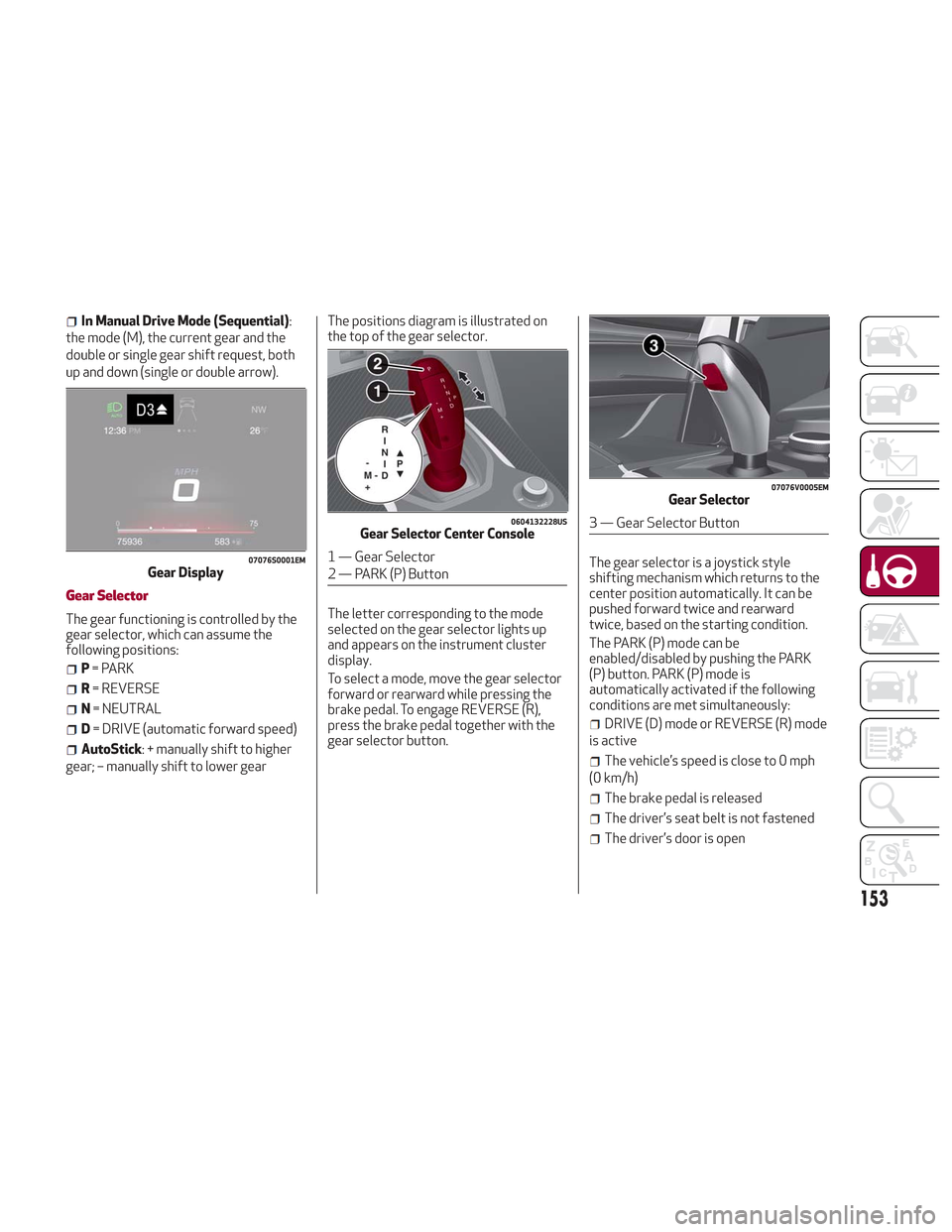
In Manual Drive Mode (Sequential):
the mode (M), the current gear and the
double or single gear shift request, both
up and down (single or double arrow).
Gear Selector
The gear functioning is controlled by the
gear selector, which can assume the
following positions:
P = PARK
R = REVERSE
N = NEUTRAL
D= DRIVE (automatic forward speed)
AutoStick: + manually shift to higher
gear; – manually shift to lower gear The positions diagram is illustrated on
the top of the gear selector.
The letter corresponding to the mode
selected on the gear selector lights up
and appears on the instrument cluster
display.
To select a mode, move the gear selector
forward or rearward while pressing the
brake pedal. To engage REVERSE (R),
press the brake pedal together with the
gear selector button.
The gear selector is a joystick style
shifting mechanism which returns to the
center position automatically. It can be
pushed forward twice and rearward
twice, based on the starting condition.
The PARK (P) mode can be
enabled/disabled by pushing the PARK
(P) button. PARK (P) mode is
automatically activated if the following
conditions are met simultaneously:
DRIVE (D) mode or REVERSE (R) mode
is active
The vehicle’s speed is close to 0 mph
(0 km/h)
The brake pedal is released
The driver’s seat belt is not fastened
The driver’s door is open
07076S0001EMGear Display
0604132228USGear Selector Center Console
1 — Gear Selector
2 — PARK (P) Button
07076V0005EMGear Selector
3 — Gear Selector Button
153
Page 156 of 276
To transition the vehicle into REVERSE
(R) mode from DRIVE (D) mode, or into
DRIVE (D) mode from REVERSE (R)
mode, it is necessary to move the gear
selector by pushing the gear selector
button.
When using AutoStick, activate it by
moving the gear selector from DRIVE (D)
to the left and then forward toward the -
symbol or backward toward the + symbol
and the gear is changed.
To shift out of PARK (P), or to pass from
position NEUTRAL (N) to position DRIVE
(D) or REVERSE (R), the vehicle must be
moving at a low speed or stopped, and
the brake pedal must also be pressed.
Note:
DO NOT accelerate while shifting
from position PARK (P) or NEUTRAL (N)
to another position.
After selecting a gear, wait a few
seconds before accelerating. This
precaution is particularly important with
engine cold.
It is not possible to select NEUTRAL
(N) mode from PARK (P) mode.
Transmission Operating Modes
PARK (P)
The transmission is locked in this mode.
The engine can be started in this mode.
Note: Never try to engage PARK (P)
mode when the vehicle is moving. Before
leaving the vehicle, make sure this mode is engaged (letter P shown on the display
and gear selector) and that the park
brake is engaged.
When parking on a flat surface, first
engage the PARK (P) mode and then
engage the electric park brake.
When parking uphill, before activating
the PARK (P) mode, engage the electric
park brake. Otherwise, it could be
difficult to engage the (P) mode.
To check that the PARK (P) mode is actually
engaged, make sure (P) is illuminated on
the display and on the gear selector.
Warning!
Never use the PARK position as a
substitute for the park brake. Always apply
the park brake fully when parked to guard
against vehicle movement and possible
injury or damage.
Your vehicle could move and injure you
and others if it is not in PARK. Check by
trying to move the gear selector out of
PARK with the brake pedal released. Make
sure the transmission is in PARK before
leaving the vehicle.
It is dangerous to shift out of PARK or
NEUTRAL if the engine speed is higher than
idle speed. If your foot is not firmly pressing
the brake pedal, the vehicle could
accelerate quickly forward or in reverse.
You could lose control of the vehicle and hit
someone or something. Only shift into gear
when the engine is idling normally and your
foot is firmly pressing the brake pedal.
Unintended movement of a vehicle could
injure those in or near the vehicle. As with all
vehicles, you should never exit a vehicle
while the engine is running. Before exiting a
vehicle, always apply the park brake, shift
the transmission into PARK, and turn the
ignition STOP/OFF. When the ignition is in
the STOP/OFF mode, the transmission is
locked in PARK, securing the vehicle against
unwanted movement.
When leaving the vehicle, always make
sure the ignition is in the STOP/OFF mode,
remove the key fob from the vehicle, and
lock the vehicle.
Never leave children alone in a vehicle, or
with access to an unlocked vehicle. Allowing
children to be in a vehicle unattended is
dangerous for a number of reasons. A child
or others could be seriously or fatally
injured. Children should be warned not to
touch the park brake, brake pedal or the
transmission gear selector.
Do not leave the key fob in or near the
vehicle (or in a location accessible to
children), and do not leave the ignition in the
ON mode. A child could operate power
windows, other controls, or move the
vehicle.
154
STARTING AND OPERATING
Page 157 of 276
Caution!
Before moving the transmission gear
selector out of PARK, you must push the
ignition button to cycle from STOP/OFF
mode to the ON mode, and also press the
brake pedal. Otherwise, damage to the gear
selector could result.
DO NOT race the engine when shifting
from PARK or NEUTRAL into another gear
range, as this can damage the drivetrain.
REVERSE (R)
Select this mode only with the vehicle at
a standstill.
NEUTRAL (N)
Use this range when the vehicle is
standing for prolonged periods with the
engine running. The engine may be
started in this range. Apply the electric
park brake and shift the transmission
into PARK (P) if you must leave the
vehicle.
Warning!
Do not coast in NEUTRAL and never turn off
the ignition to coast down a hill. These are
unsafe practices that limit your response to
changing traffic or road conditions. You
might lose control of the vehicle and have a
collision.
DRIVE (D)
Use this mode in normal driving
conditions.
Shifting from DRIVE (D) to PARK (P) or
REVERSE (R) modes must take place
only after releasing the accelerator
pedal, with vehicle at a standstill and
brake pedal pressed.
This mode ensures automatic
engagement of the most suitable gears
for driving needs and maximum fuel
economy in terms of consumption.
In this position, the transmission shifts
the gears automatically, selecting the
most suitable for forward driving among
those available as you go. In this way the
vehicle's optimal driving characteristics
are provided for all conditions.
AutoStick
In the case of frequent shifting (e.g. for
sport driving, when the vehicle is driven
with a heavy load, on slopes, when towing
heavy trailers), it is recommended to use
the AutoStick (sequential shifting) mode
to select and keep a lower fixed ratio.
In these conditions, the use of a lower
gear improves vehicle performance and
prevents overheating.
It is possible to shift from DRIVE (D)
mode to AutoStick mode regardless of
vehicle speed. Activation
Starting from DRIVE (D) mode, to
activate the sequential drive mode, move
the gear selector to the left (– and +
indication of the trim). The gear engaged
will be shown on the display.
Shifting is made by moving the gear
selector forward, toward symbol – or
backward, toward symbol +.
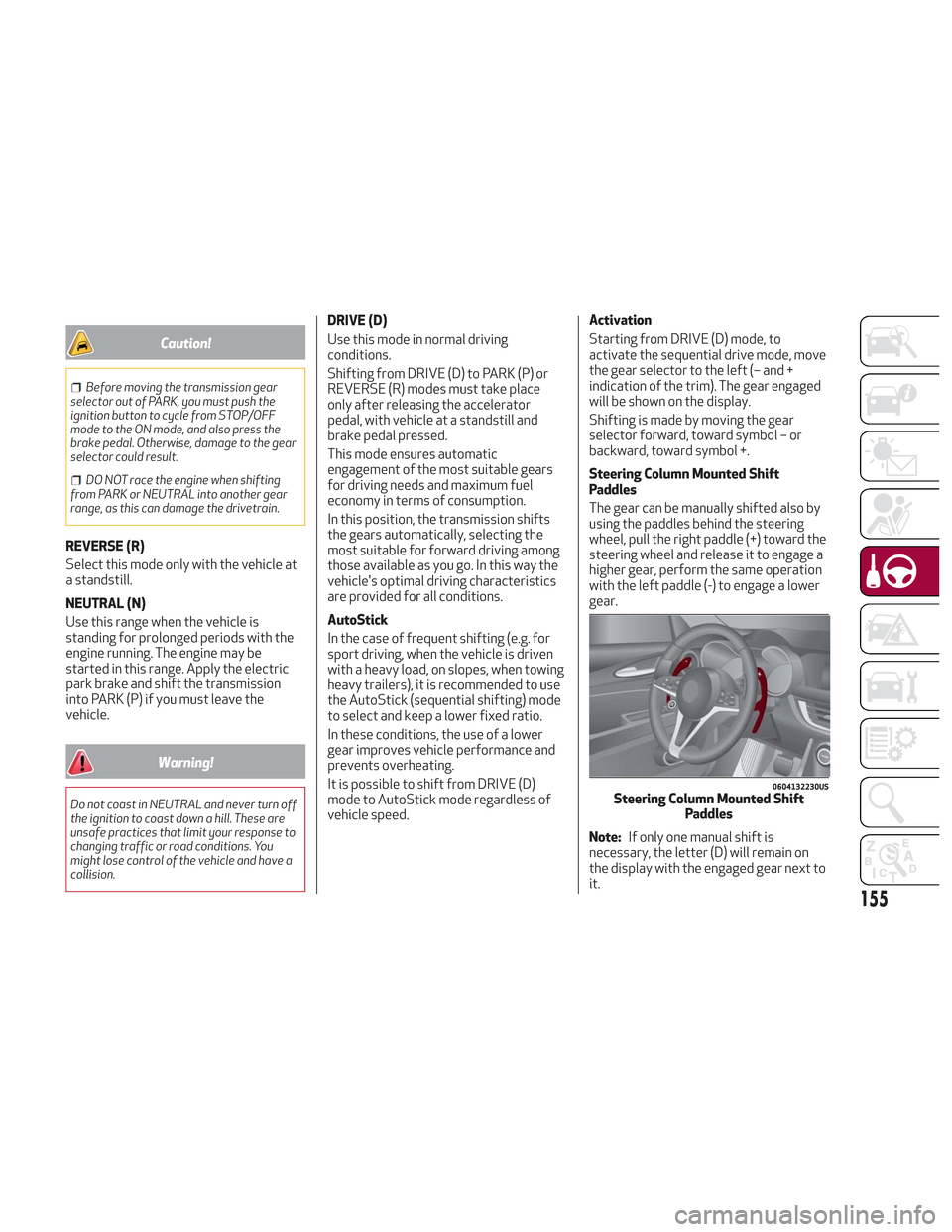
Steering Column Mounted Shift
Paddles
The gear can be manually shifted also by
using the paddles behind the steering
wheel, pull the right paddle (+) toward the
steering wheel and release it to engage a
higher gear, perform the same operation
with the left paddle (-) to engage a lower
gear.
Note:
If only one manual shift is
necessary, the letter (D) will remain on
the display with the engaged gear next to
it.
0604132230USSteering Column Mounted Shift Paddles
155