Drive Alfa Romeo Stelvio 2019 Owner's Manual
[x] Cancel search | Manufacturer: ALFA ROMEO, Model Year: 2019, Model line: Stelvio, Model: Alfa Romeo Stelvio 2019Pages: 244, PDF Size: 4.95 MB
Page 6 of 244
USE OF THE OWNER HANDBOOK
OPERATING INSTRUCTIONS
Each time direction instructions (left/right or forwards/backwards) about the vehicle are given, these must be understood as
regarding an occupant in the driver's seat. Special cases not complying with this rule will be specified as appropriate in the text.
The figures in the Owner Handbook are provided by way of example only: this might imply that some details of the image do not
correspond to the actual arrangement of your vehicle. In addition, the Handbook has been conceived considering vehicles with
steering wheel on the left side; it is therefore possible that on vehicles with steering wheel on the right side, the position or
construction of some controls is not exactly mirror-like with respect to the figure.
To identify the chapter with the information needed you can consult the index at the end of this Owner Handbook.
Chapters can be rapidly identified with dedicated graphic tabs, at the side of each odd page. A few pages further there is a key for
getting to know the chapter order and the relevant symbols in the tabs. There is in any case a textual indication of the current chapter
at the side of each even page.
PRECAUTIONS AND WARNINGS
While reading this Owner Handbook you will find a series ofWARNINGSto prevent procedures that could damage your vehicle.
There are alsoPRECAUTIONSthat must be carefully followed to prevent incorrect use of the components of the vehicle, which could
cause accidents or injuries.
Therefore, allWARNINGSandPRECAUTIONSmust always be followed carefully.
WARNINGSandPRECAUTIONSare recalled in the text with the following symbols:
personal safety;
vehicle safety;
environmental protection.
NOTE These symbols, when necessary, are indicated besides the title or at the end of the line and are followed by a number. That
number recalls the corresponding warning at the end of the relevant section.
Page 11 of 244
In-depth knowledge of your new vehicle starts here.
The handbook that you are reading simply and directly explains
how it is made and how it works.
That’s why we advise you to read it seated comfortably on board,
so that you can see immediately what is described for you.
KNOWING YOUR CAR
INSTRUMENT PANEL............................10
DASHBOARD FOR RIGHT-HAND DRIVE VERSION . . ........11
THEKEYS...................................12
IGNITION DEVICE..............................13
ENGINE IMMOBILIZER...........................14
ALARM.....................................15
DOORS.....................................15
SEATS.....................................19
HEAD RESTRAINTS.............................23
STEERING WHEEL..............................23
REAR VIEW MIRRORS...........................24
EXTERNAL LIGHTS .............................26
INTERIOR LIGHTS..............................31
WINDSCREEN WIPER . ...........................31
CLIMATE CONTROL SYSTEM.......................33
WINDOW WINDERS.............................35
ELECTRIC SUNROOF............................36
BONNET....................................38
LUGGAGE COMPARTMENT TAILGATE..................39
Page 13 of 244
DASHBOARD FOR RIGHT-HAND DRIVE VERSION
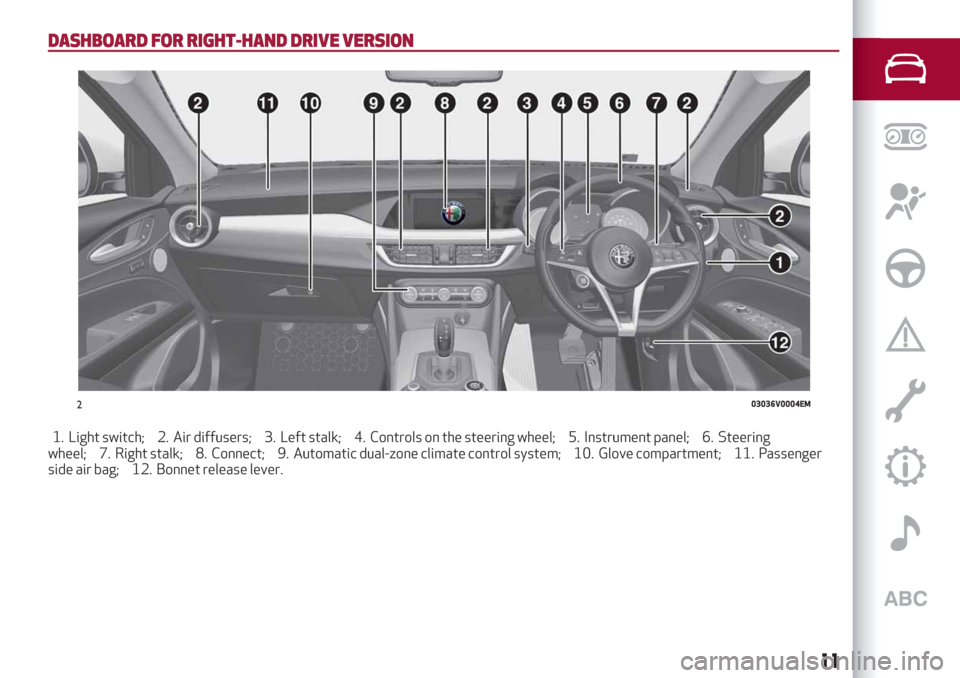
1. Light switch; 2. Air diffusers; 3. Left stalk; 4. Controls on the steering wheel; 5. Instrument panel; 6. Steering
wheel; 7. Right stalk; 8. Connect; 9. Automatic dual-zone climate control system; 10. Glove compartment; 11. Passenger
side air bag; 12. Bonnet release lever.
203036V0004EM
11
Page 14 of 244
THE KEYS
ELECTRONIC KEY
1)
1)
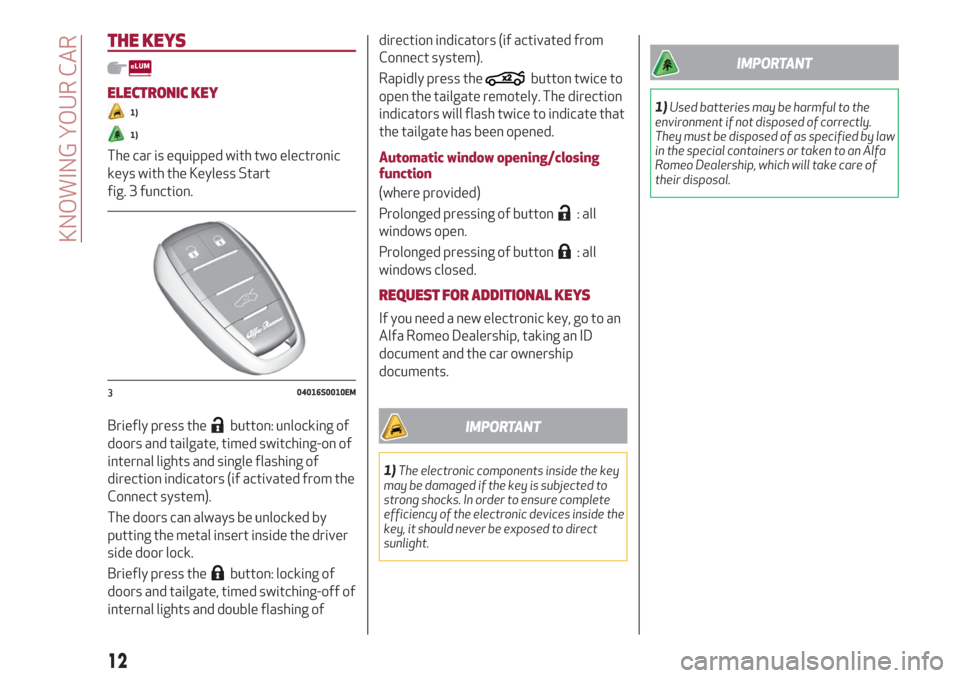
The car is equipped with two electronic
keys with the Keyless Start
fig. 3 function.
Briefly press the
button: unlocking of
doors and tailgate, timed switching-on of
internal lights and single flashing of
direction indicators (if activated from the
Connect system).
The doors can always be unlocked by
putting the metal insert inside the driver
side door lock.
Briefly press the
button: locking of
doors and tailgate, timed switching-off of
internal lights and double flashing ofdirection indicators (if activated from
Connect system).
Rapidly press the
button twice to
open the tailgate remotely. The direction
indicators will flash twice to indicate that
the tailgate has been opened.
Automatic window opening/closing
function
(where provided)
Prolonged pressing of button
: all
windows open.
Prolonged pressing of button
: all
windows closed.
REQUEST FOR ADDITIONAL KEYS
If you need a new electronic key, go to an
Alfa Romeo Dealership, taking an ID
document and the car ownership
documents.
IMPORTANT
1)The electronic components inside the key
may be damaged if the key is subjected to
strong shocks. In order to ensure complete
efficiency of the electronic devices inside the
key, it should never be exposed to direct
sunlight.
IMPORTANT
1)Used batteries may be harmful to the
environment if not disposed of correctly.
They must be disposed of as specified by law
in the special containers or taken to an Alfa
Romeo Dealership, which will take care of
their disposal.
304016S0010EM
12
KNOWING YOUR CAR
Page 15 of 244
IGNITION DEVICE
OPERATION
1) 2) 3) 4) 5)
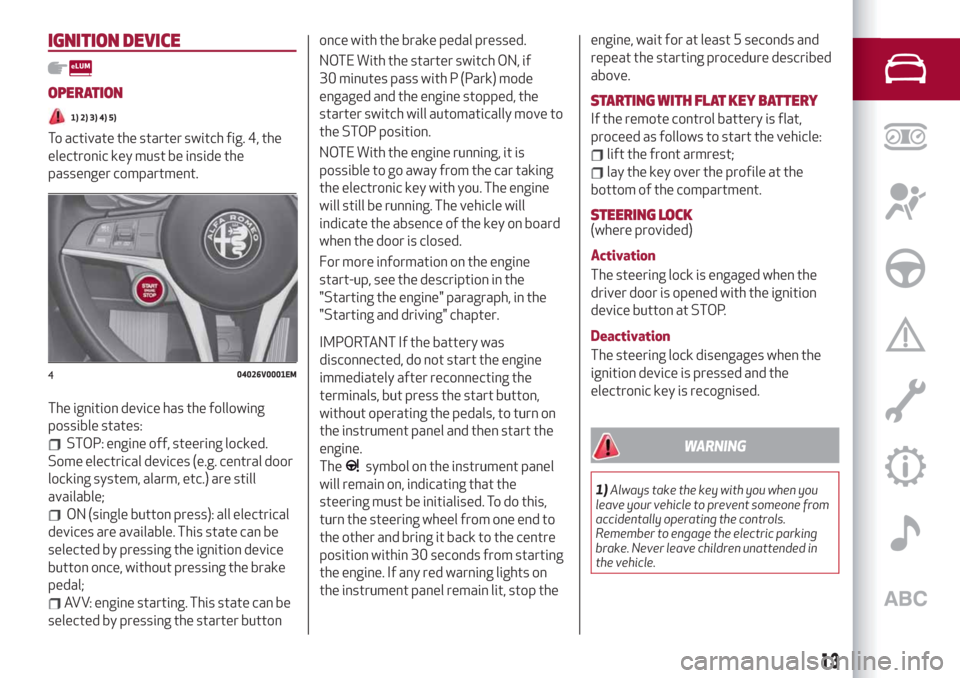
To activate the starter switch fig. 4, the
electronic key must be inside the
passenger compartment.
The ignition device has the following
possible states:
STOP: engine off, steering locked.
Some electrical devices (e.g. central door
locking system, alarm, etc.) are still
available;
ON (single button press): all electrical
devices are available. This state can be
selected by pressing the ignition device
button once, without pressing the brake
pedal;
AVV: engine starting. This state can be
selected by pressing the starter buttononce with the brake pedal pressed.
NOTE With the starter switch ON, if
30 minutes pass with P (Park) mode
engaged and the engine stopped, the
starter switch will automatically move to
the STOP position.
NOTE With the engine running, it is
possible to go away from the car taking
the electronic key with you. The engine
will still be running. The vehicle will
indicate the absence of the key on board
when the door is closed.
For more information on the engine
start-up, see the description in the
"Starting the engine" paragraph, in the
"Starting and driving" chapter.
IMPORTANT If the battery was
disconnected, do not start the engine
immediately after reconnecting the
terminals, but press the start button,
without operating the pedals, to turn on
the instrument panel and then start the
engine.
The
symbol on the instrument panel
will remain on, indicating that the
steering must be initialised. To do this,
turn the steering wheel from one end to
the other and bring it back to the centre
position within 30 seconds from starting
the engine. If any red warning lights on
the instrument panel remain lit, stop theengine, wait for at least 5 seconds and
repeat the starting procedure described
above.
STARTING WITH FLAT KEY BATTERY
If the remote control battery is flat,
proceed as follows to start the vehicle:
lift the front armrest;
lay the key over the profile at the
bottom of the compartment.
STEERING LOCK(where provided)
Activation
The steering lock is engaged when the
driver door is opened with the ignition
device button at STOP.
Deactivation
The steering lock disengages when the
ignition device is pressed and the
electronic key is recognised.
WARNING
1)Always take the key with you when you
leave your vehicle to prevent someone from
accidentally operating the controls.
Remember to engage the electric parking
brake. Never leave children unattended in
the vehicle.
404026V0001EM
13
Page 17 of 244
ALARM
(where provided)
Activation of the alarm triggers the
acoustic warning and the direction
indicators.
IMPORTANT The alarm is adapted to
meet requirements in various countries.
SWITCHING ON THE ALARM
With the doors, bonnet and tailgate
closed and the ignition device turned to
STOP, point the electronic key towards
the vehicle and press and release button
.
Except on some versions for specific
markets, the system produces a visual
and acoustic warning and enables door
locking.
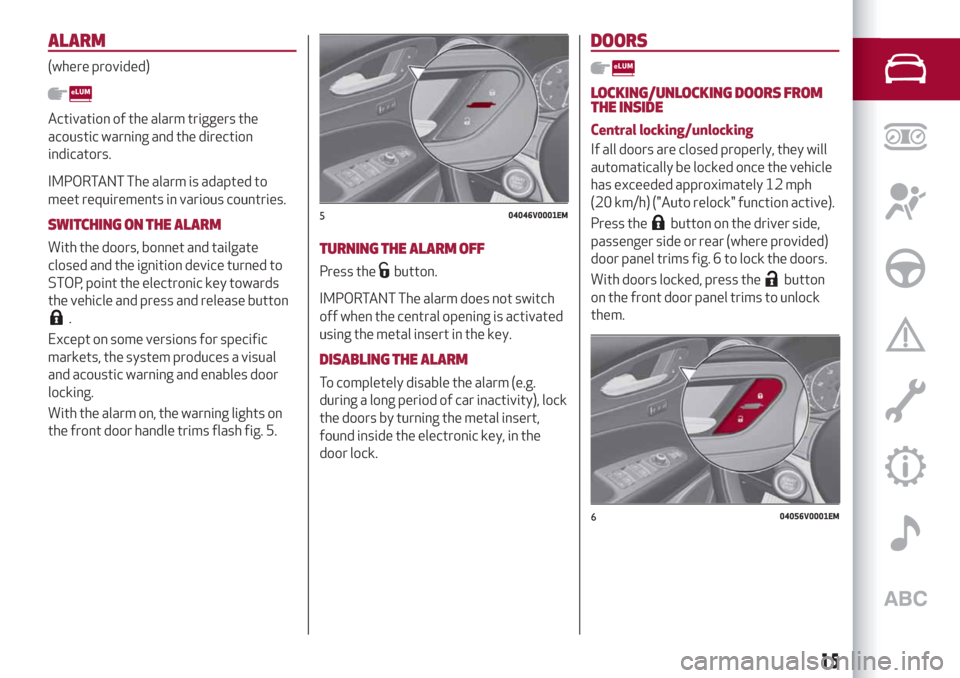
With the alarm on, the warning lights on
the front door handle trims flash fig. 5.
TURNING THE ALARM OFF
Press thebutton.
IMPORTANT The alarm does not switch
off when the central opening is activated
using the metal insert in the key.
DISABLING THE ALARM
To completely disable the alarm (e.g.
during a long period of car inactivity), lock
the doors by turning the metal insert,
found inside the electronic key, in the
door lock.
DOORS
LOCKING/UNLOCKING DOORS FROM
THE INSIDE
Central locking/unlocking
If all doors are closed properly, they will
automatically be locked once the vehicle
has exceeded approximately 12 mph
(20 km/h) ("Auto relock" function active).
Press the
button on the driver side,
passenger side or rear (where provided)
door panel trims fig. 6 to lock the doors.
With doors locked, press the
button
on the front door panel trims to unlock
them.
504046V0001EM
604056V0001EM
15
Page 18 of 244
LOCKING/UNLOCKING DOORS FROM
THE OUTSIDE
Locking from the outside
With the doors closed, press the
button on the key.
In any case, the doors can be locked with
all the doors closed and the tailgate open.
When the button
on the key is
pressed, all the locks are closed, including
that of the open tailgate. The latter will
be locked when it is closed.
2)
Door unlocking from the outside
Press button
on the key.
PASSIVE ENTRY(where provided)
3)
The Passive Entry system can identify
the presence of an electronic key near
the doors and the tailgate.
The system enables the doors (or the
tailgate) to be locked/unlocked without
pressing any buttons on the electronic
key.
The key is detected only after the system
recognizes the presence of a hand in one
of the front handles. If the detected key
is valid, the doors and the tailgate are
unlocked (the elements that open depend
on the Connect system settings).
Where the function is provided, graspingthe handle of the driver's door unlocks
the driver's door only, or all the doors,
depending on the mode set in the
Connect system.
Door locking
To lock the doors, proceed as follows:
make sure that you have the
electronic key and are close to the driver
or passenger side door handle;
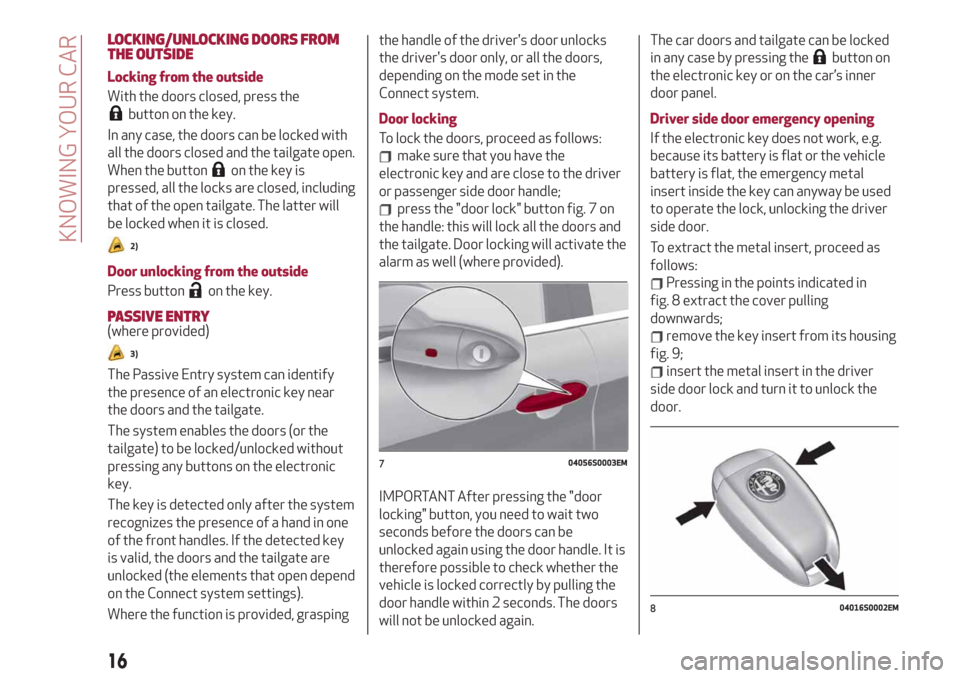
press the "door lock" button fig. 7 on
the handle: this will lock all the doors and
the tailgate. Door locking will activate the
alarm as well (where provided).
IMPORTANT After pressing the "door
locking" button, you need to wait two
seconds before the doors can be
unlocked again using the door handle. It is
therefore possible to check whether the
vehicle is locked correctly by pulling the
door handle within 2 seconds. The doors
will not be unlocked again.The car doors and tailgate can be locked
in any case by pressing the
button on
the electronic key or on the car’s inner
door panel.
Driver side door emergency opening
If the electronic key does not work, e.g.
because its battery is flat or the vehicle
battery is flat, the emergency metal
insert inside the key can anyway be used
to operate the lock, unlocking the driver
side door.
To extract the metal insert, proceed as
follows:
Pressing in the points indicated in
fig. 8 extract the cover pulling
downwards;
remove the key insert from its housing
fig. 9;
insert the metal insert in the driver
side door lock and turn it to unlock the
door.
704056S0003EM
804016S0002EM
16
KNOWING YOUR CAR
Page 20 of 244
UNLOCKING THE DOORS WITH A FLAT
BATTERY
Proceed as follows to unlock the doors if
the car battery is flat.
Rear doors and passenger door
Proceed as follows:
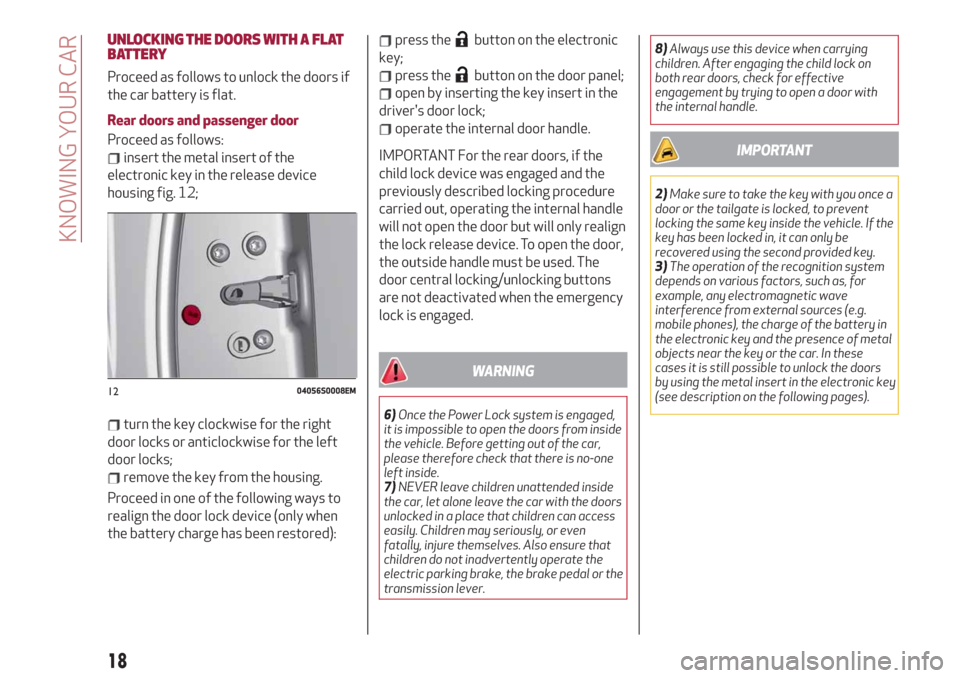
insert the metal insert of the
electronic key in the release device
housing fig. 12;
turn the key clockwise for the right
door locks or anticlockwise for the left
door locks;
remove the key from the housing.
Proceed in one of the following ways to
realign the door lock device (only when
the battery charge has been restored):
press thebutton on the electronic
key;
press thebutton on the door panel;
open by inserting the key insert in the
driver's door lock;
operate the internal door handle.
IMPORTANT For the rear doors, if the
child lock device was engaged and the
previously described locking procedure
carried out, operating the internal handle
will not open the door but will only realign
the lock release device. To open the door,
the outside handle must be used. The
door central locking/unlocking buttons
are not deactivated when the emergency
lock is engaged.
WARNING
6)Once the Power Lock system is engaged,
it is impossible to open the doors from inside
the vehicle. Before getting out of the car,
please therefore check that there is no-one
left inside.
7)NEVER leave children unattended inside
the car, let alone leave the car with the doors
unlocked in a place that children can access
easily. Children may seriously, or even
fatally, injure themselves. Also ensure that
children do not inadvertently operate the
electric parking brake, the brake pedal or the
transmission lever.8)Always use this device when carrying
children. After engaging the child lock on
both rear doors, check for effective
engagement by trying to open a door with
the internal handle.
IMPORTANT
2)Make sure to take the key with you once a
door or the tailgate is locked, to prevent
locking the same key inside the vehicle. If the
key has been locked in, it can only be
recovered using the second provided key.
3)The operation of the recognition system
depends on various factors, such as, for
example, any electromagnetic wave
interference from external sources (e.g.
mobile phones), the charge of the battery in
the electronic key and the presence of metal
objects near the key or the car. In these
cases it is still possible to unlock the doors
by using the metal insert in the electronic key
(see description on the following pages).
1204056S0008EM
18
KNOWING YOUR CAR
Page 21 of 244
SEATS
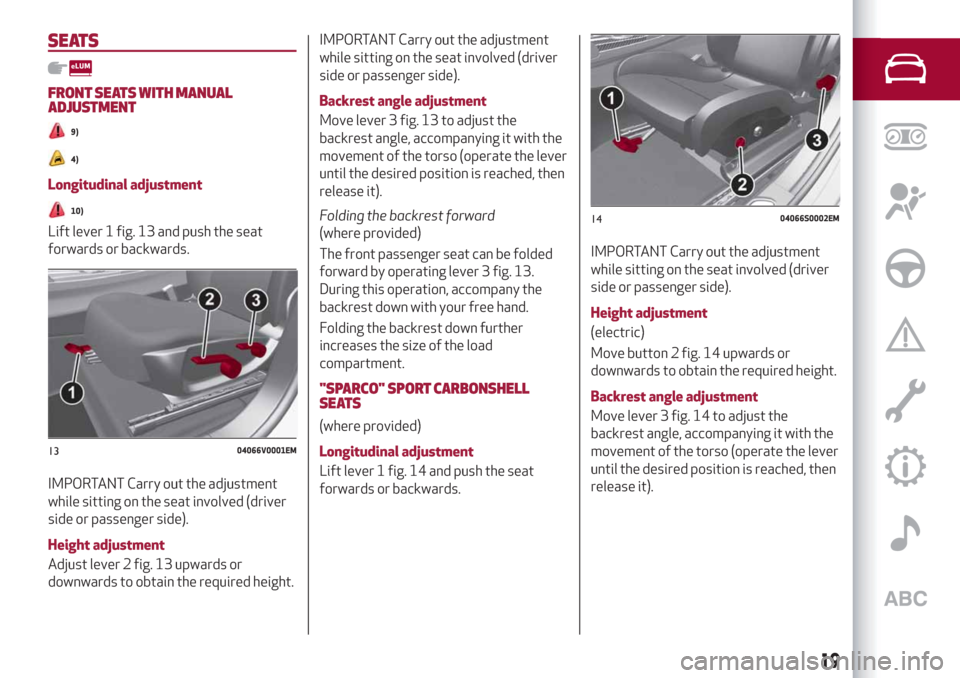
FRONT SEATS WITH MANUAL
ADJUSTMENT
9)
4)
Longitudinal adjustment
10)
Lift lever 1 fig. 13 and push the seat
forwards or backwards.
IMPORTANT Carry out the adjustment
while sitting on the seat involved (driver
side or passenger side).
Height adjustment
Adjust lever 2 fig. 13 upwards or
downwards to obtain the required height.
IMPORTANT Carry out the adjustment
while sitting on the seat involved (driver
side or passenger side).
Backrest angle adjustment
Move lever 3 fig. 13 to adjust the
backrest angle, accompanying it with the
movement of the torso (operate the lever
until the desired position is reached, then
release it).
Folding the backrest forward
(where provided)
The front passenger seat can be folded
forward by operating lever 3 fig. 13.
During this operation, accompany the
backrest down with your free hand.
Folding the backrest down further
increases the size of the load
compartment.
"SPARCO" SPORT CARBONSHELL
SEATS
(where provided)
Longitudinal adjustment
Lift lever 1 fig. 14 and push the seat
forwards or backwards.
IMPORTANT Carry out the adjustment
while sitting on the seat involved (driver
side or passenger side).
Height adjustment
(electric)
Move button 2 fig. 14 upwards or
downwards to obtain the required height.
Backrest angle adjustment
Move lever 3 fig. 14 to adjust the
backrest angle, accompanying it with the
movement of the torso (operate the lever
until the desired position is reached, then
release it).
1304066V0001EM
1404066S0002EM
19
Page 22 of 244
ELECTRICALLY ADJUSTABLE FRONT
SEATS
5)
NOTE The conformation of the seats may
vary according to the versions.
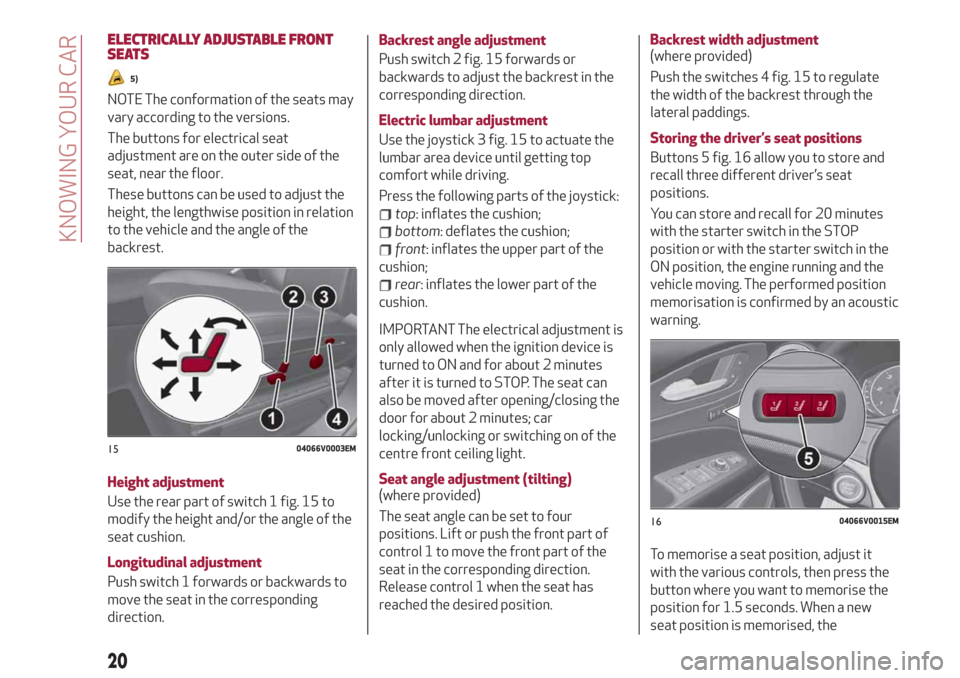
The buttons for electrical seat
adjustment are on the outer side of the
seat, near the floor.
These buttons can be used to adjust the
height, the lengthwise position in relation
to the vehicle and the angle of the
backrest.
Height adjustment
Use the rear part of switch 1 fig. 15 to
modify the height and/or the angle of the
seat cushion.
Longitudinal adjustment
Push switch 1 forwards or backwards to
move the seat in the corresponding
direction.Backrest angle adjustment
Push switch 2 fig. 15 forwards or
backwards to adjust the backrest in the
corresponding direction.
Electric lumbar adjustment
Use the joystick 3 fig. 15 to actuate the
lumbar area device until getting top
comfort while driving.
Press the following parts of the joystick:
top: inflates the cushion;
bottom: deflates the cushion;
front: inflates the upper part of the
cushion;
rear: inflates the lower part of the
cushion.
IMPORTANT The electrical adjustment is
only allowed when the ignition device is
turned to ON and for about 2 minutes
after it is turned to STOP. The seat can
also be moved after opening/closing the
door for about 2 minutes; car
locking/unlocking or switching on of the
centre front ceiling light.
Seat angle adjustment (tilting)
(where provided)
The seat angle can be set to four
positions. Lift or push the front part of
control 1 to move the front part of the
seat in the corresponding direction.
Release control 1 when the seat has
reached the desired position.Backrest width adjustment
(where provided)
Push the switches 4 fig. 15 to regulate
the width of the backrest through the
lateral paddings.
Storing the driver’s seat positions
Buttons 5 fig. 16 allow you to store and
recall three different driver’s seat
positions.
You can store and recall for 20 minutes
with the starter switch in the STOP
position or with the starter switch in the
ON position, the engine running and the
vehicle moving. The performed position
memorisation is confirmed by an acoustic
warning.
To memorise a seat position, adjust it
with the various controls, then press the
button where you want to memorise the
position for 1.5 seconds. When a new
seat position is memorised, the
1504066V0003EM
1604066V0015EM
20
KNOWING YOUR CAR