ABS ALFA ROMEO STELVIO 2023 Owner's Manual
[x] Cancel search | Manufacturer: ALFA ROMEO, Model Year: 2023, Model line: STELVIO, Model: ALFA ROMEO STELVIO 2023Pages: 268, PDF Size: 10.36 MB
Page 149 of 268
147
(Continued)
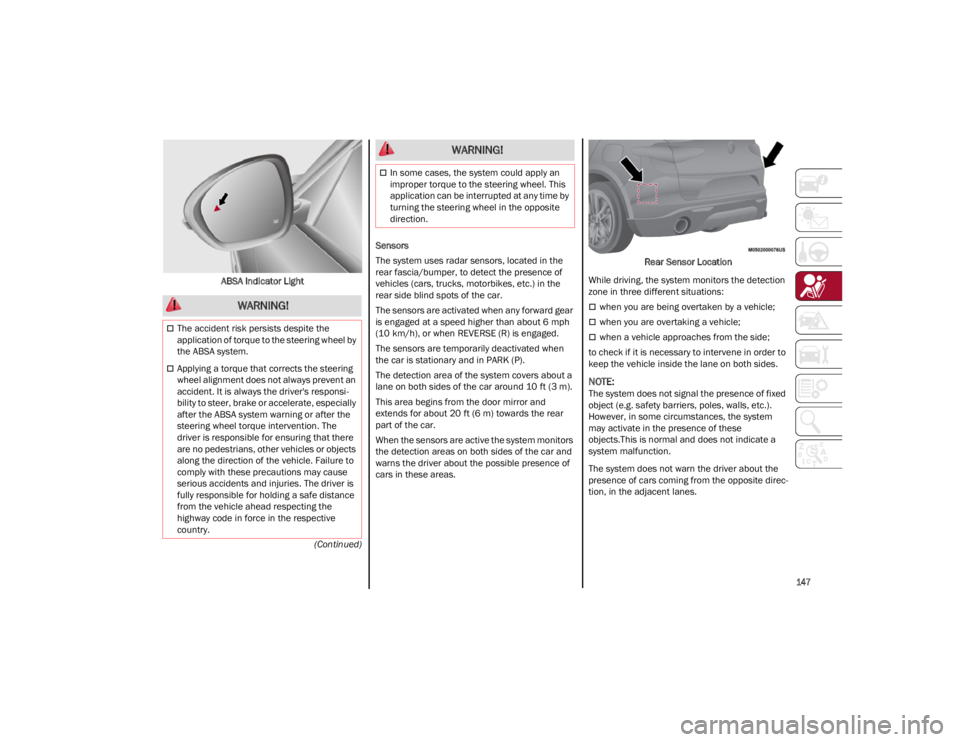
ABSA Indicator Light
Sensors
The system uses radar sensors, located in the
rear fascia/bumper, to detect the presence of
vehicles (cars, trucks, motorbikes, etc.) in the
rear side blind spots of the car.
The sensors are activated when any forward gear
is engaged at a speed higher than about 6 mph
(10 km/h), or when REVERSE (R) is engaged.
The sensors are temporarily deactivated when
the car is stationary and in PARK (P).
The detection area of the system covers about a
lane on both sides of the car around 10 ft (3 m).
This area begins from the door mirror and
extends for about 20 ft (6 m) towards the rear
part of the car.
When the sensors are active the system monitors
the detection areas on both sides of the car and
warns the driver about the possible presence of
cars in these areas. Rear Sensor Location
While driving, the system monitors the detection
zone in three different situations:
when you are being overtaken by a vehicle;
when you are overtaking a vehicle;
when a vehicle approaches from the side;
to check if it is necessary to intervene in order to
keep the vehicle inside the lane on both sides.
NOTE:
The system does not signal the presence of fixed
object (e.g. safety barriers, poles, walls, etc.).
However, in some circumstances, the system
may activate in the presence of these
objects.This is normal and does not indicate a
system malfunction.
The system does not warn the driver about the
presence of cars coming from the opposite direc -
tion, in the adjacent lanes.
WARNING!
The accident risk persists despite the
application of torque to the steering wheel by
the ABSA system.
Applying a torque that corrects the steering
wheel alignment does not always prevent an
accident. It is always the driver's responsi -
bility to steer, brake or accelerate, especially
after the ABSA system warning or after the
steering wheel torque intervention. The
driver is responsible for ensuring that there
are no pedestrians, other vehicles or objects
along the direction of the vehicle. Failure to
comply with these precautions may cause
serious accidents and injuries. The driver is
fully responsible for holding a safe distance
from the vehicle ahead respecting the
highway code in force in the respective
country.
In some cases, the system could apply an
improper torque to the steering wheel. This
application can be interrupted at any time by
turning the steering wheel in the opposite
direction.
WARNING!
23_GU_OM_EN_USC_t.book Page 147
Page 150 of 268
SAFETY
148
Activation/Deactivation
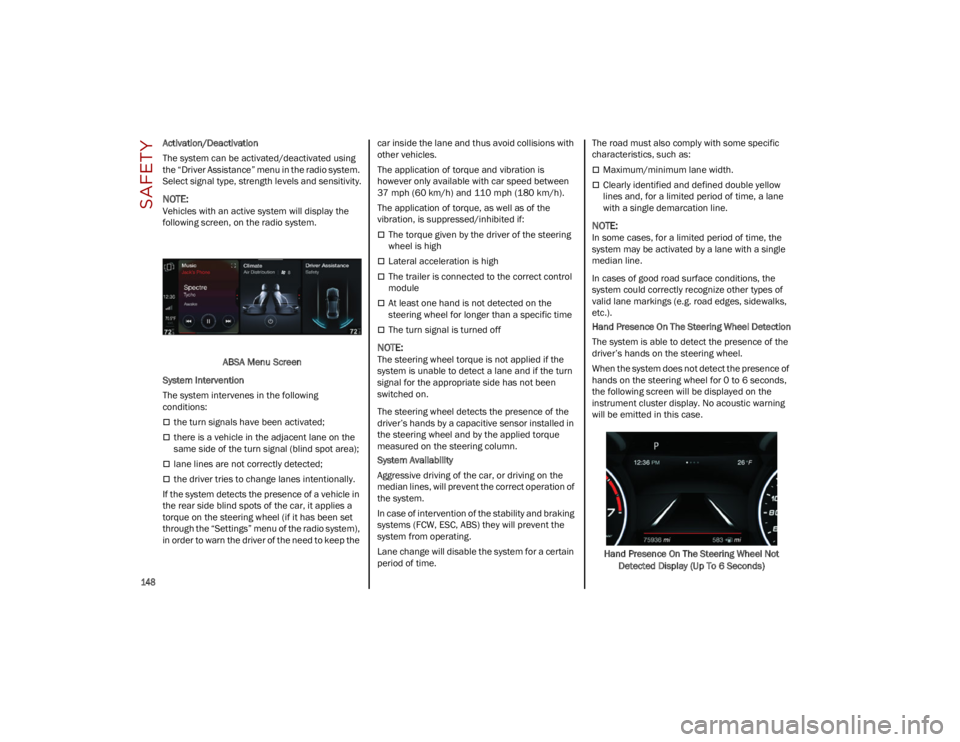
The system can be activated/deactivated using
the “Driver Assistance” menu in the radio system.
Select signal type, strength levels and sensitivity.
NOTE:
Vehicles with an active system will display the
following screen, on the radio system.ABSA Menu Screen
System Intervention
The system intervenes in the following
conditions:
the turn signals have been activated;
there is a vehicle in the adjacent lane on the
same side of the turn signal (blind spot area);
lane lines are not correctly detected;
the driver tries to change lanes intentionally.
If the system detects the presence of a vehicle in
the rear side blind spots of the car, it applies a
torque on the steering wheel (if it has been set
through the “Settings” menu of the radio system),
in order to warn the driver of the need to keep the car inside the lane and thus avoid collisions with
other vehicles.
The application of torque and vibration is
however only available with car speed between
37 mph (60 km/h) and 110 mph (180 km/h).
The application of torque, as well as of the
vibration, is suppressed/inhibited if:
The torque given by the driver of the steering
wheel is high
Lateral acceleration is high
The trailer is connected to the correct control
module
At least one hand is not detected on the
steering wheel for longer than a specific time
The turn signal is turned off
NOTE:
The steering wheel torque is not applied if the
system is unable to detect a lane and if the turn
signal for the appropriate side has not been
switched on.
The steering wheel detects the presence of the
driver’s hands by a capacitive sensor installed in
the steering wheel and by the applied torque
measured on the steering column.
System Availability
Aggressive driving of the car, or driving on the
median lines, will prevent the correct operation of
the system.
In case of intervention of the stability and braking
systems (FCW, ESC, ABS) they will prevent the
system from operating.
Lane change will disable the system for a certain
period of time.The road must also comply with some specific
characteristics, such as:
Maximum/minimum lane width.
Clearly identified and defined double yellow
lines and, for a limited period of time, a lane
with a single demarcation line.
NOTE:
In some cases, for a limited period of time, the
system may be activated by a lane with a single
median line.
In cases of good road surface conditions, the
system could correctly recognize other types of
valid lane markings (e.g. road edges, sidewalks,
etc.).
Hand Presence On The Steering Wheel Detection
The system is able to detect the presence of the
driver’s hands on the steering wheel.
When the system does not detect the presence of
hands on the steering wheel for 0 to 6 seconds,
the following screen will be displayed on the
instrument cluster display. No acoustic warning
will be emitted in this case.
Hand Presence On The Steering Wheel Not Detected Display (Up To 6 Seconds)
23_GU_OM_EN_USC_t.book Page 148
Page 151 of 268
149
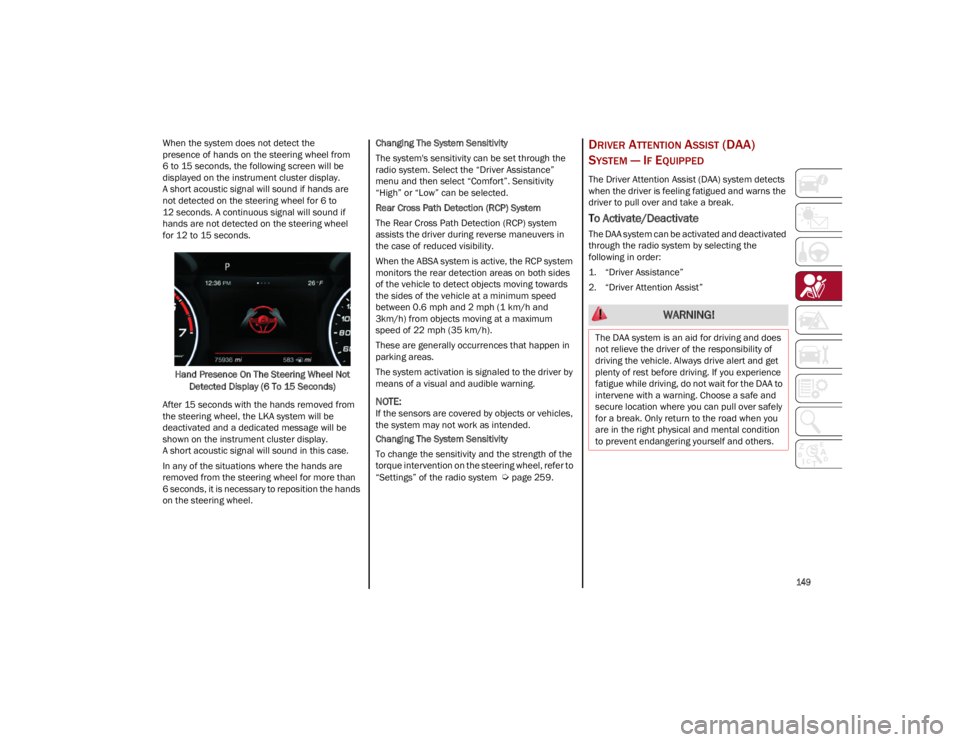
When the system does not detect the
presence of hands on the steering wheel from
6 to 15 seconds, the following screen will be
displayed on the instrument cluster display.
A short acoustic signal will sound if hands are
not detected on the steering wheel for 6 to
12 seconds. A continuous signal will sound if
hands are not detected on the steering wheel
for 12 to 15 seconds.Hand Presence On The Steering Wheel Not Detected Display (6 To 15 Seconds)
After 15 seconds with the hands removed from
the steering wheel, the LKA system will be
deactivated and a dedicated message will be
shown on the instrument cluster display.
A short acoustic signal will sound in this case.
In any of the situations where the hands are
removed from the steering wheel for more than
6 seconds, it is necessary to reposition the hands
on the steering wheel. Changing The System Sensitivity
The system's sensitivity can be set through the
radio system. Select the “Driver Assistance”
menu and then select “Comfort”. Sensitivity
“High” or “Low” can be selected.
Rear Cross Path Detection (RCP) System
The Rear Cross Path Detection (RCP) system
assists the driver during reverse maneuvers in
the case of reduced visibility.
When the ABSA system is active, the RCP system
monitors the rear detection areas on both sides
of the vehicle to detect objects moving towards
the sides of the vehicle at a minimum speed
between 0.6 mph and 2 mph (1 km/h and
3km/h) from objects moving at a maximum
speed of 22 mph (35 km/h).
These are generally occurrences that happen in
parking areas.
The system activation is signaled to the driver by
means of a visual and audible warning.
NOTE:
If the sensors are covered by objects or vehicles,
the system may not work as intended.
Changing The System Sensitivity
To change the sensitivity and the strength of the
torque intervention on the steering wheel, refer to
“Settings” of the radio system
Ú
page 259.
DRIVER ATTENTION ASSIST (DAA)
S
YSTEM — IF EQUIPPED
The Driver Attention Assist (DAA) system detects
when the driver is feeling fatigued and warns the
driver to pull over and take a break.
To Activate/Deactivate
The DAA system can be activated and deactivated
through the radio system by selecting the
following in order:
1. “Driver Assistance”
2. “Driver Attention Assist”
WARNING!
The DAA system is an aid for driving and does
not relieve the driver of the responsibility of
driving the vehicle. Always drive alert and get
plenty of rest before driving. If you experience
fatigue while driving, do not wait for the DAA to
intervene with a warning. Choose a safe and
secure location where you can pull over safely
for a break. Only return to the road when you
are in the right physical and mental condition
to prevent endangering yourself and others.
23_GU_OM_EN_USC_t.book Page 149
Page 152 of 268
SAFETY
150
System Intervention
Using information from the front camera, the
system implements two operating logics:
The first operating logic takes the driving style
into account, observing the road and detecting
to what extent the driver can continue driving
with few lane crossing events.
The second operating logic measures the time
spent behind the wheel with the vehicle speed
above 40 mph (60 km/h) and below 110 mph
(180 km/h). If the “Standard” option is
selected, in these conditions, the “Dozy Driver”
message may appear after three hours of
driving. If the “Early” option is selected and
these conditions occur, the “Dozy Driver”
message will be displayed after two hours
of driving.
NOTE:
If the conditions described previously are not
detected continuously during the entire driving
period, the “Dozy Driver” message may be
displayed later than two or three hours. If the
driving style indicates that the driver is unable to
follow the road trajectory and respect the hori-
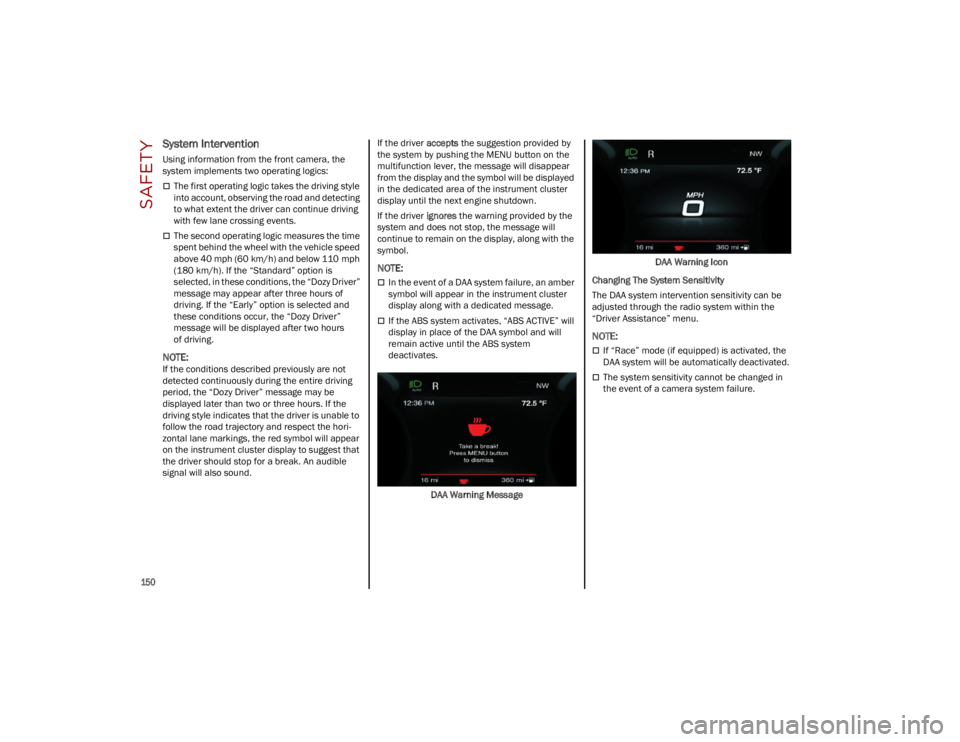
zontal lane markings, the red symbol will appear
on the instrument cluster display to suggest that
the driver should stop for a break. An audible
signal will also sound.If the driver
accepts the suggestion provided by
the system by pushing the MENU button on the
multifunction lever, the message will disappear
from the display and the symbol will be displayed
in the dedicated area of the instrument cluster
display until the next engine shutdown.
If the driver ignores the warning provided by the
system and does not stop, the message will
continue to remain on the display, along with the
symbol.
NOTE:
In the event of a DAA system failure, an amber
symbol will appear in the instrument cluster
display along with a dedicated message.
If the ABS system activates, “ABS ACTIVE” will
display in place of the DAA symbol and will
remain active until the ABS system
deactivates.
DAA Warning Message DAA Warning Icon
Changing The System Sensitivity
The DAA system intervention sensitivity can be
adjusted through the radio system within the
“Driver Assistance” menu.
NOTE:
If “Race” mode (if equipped) is activated, the
DAA system will be automatically deactivated.
The system sensitivity cannot be changed in
the event of a camera system failure.
23_GU_OM_EN_USC_t.book Page 150
Page 155 of 268

153
When the conditions limiting the system
functions end, this will go back to normal and
complete operation. Should the fault persist,
contact an authorized dealer.
System Failure Signaling
If the system turns off and a dedicated message
is shown on the display, it means that there is a
fault with the system.
In this case, it is still possible to drive the vehicle,
but you are advised to contact an authorized
dealer as soon as possible.
Radar Indication Not Available
If conditions are such that the radar cannot
detect obstacles correctly, the system is
deactivated and a dedicated message appears
on the display. This generally occurs in the event
of poor visibility, such as when it is snowing or
raining heavily.
The function of this system can also be
temporarily reduced due to obstructions such as
mud, dirt or ice on the fascia/bumper. In such
cases, a dedicated message will be shown on the
display and the system will be deactivated. This
message can sometimes appear in conditions of
high reflectivity (e.g. tunnels with reflective tiles or
ice or snow). When the conditions limiting the
system functions end, it will go back to normal
and complete operation.
In certain cases, this dedicated message could
be displayed when the radar is not detecting any
vehicles or objects within its view range.
If atmospheric conditions are not the reason
behind this message, check if the sensor is dirty.
It could be necessary to clean or remove any
obstructions in the area.If the message appears frequently, even in the
absence of atmospheric conditions such as snow,
rain, mud or other obstructions, contact an
authorized dealer for a sensor alignment check.
In the absence of visible obstructions, manually
removing the decorative cover trim and cleaning
the radar surface could be required. Have this
operation performed at an authorized dealer.
NOTE:
It is recommended that you do not install devices,
accessories or aerodynamic attachments in front
of the sensor or darken it in any way, as this can
compromise the correct functioning of the
system.
Frontal Collision Alarm With Active Braking —
If Equipped
If this function is selected, the brakes are
operated to reduce the speed of the vehicle in the
event of potential frontal impact.
This function applies an additional braking
pressure if the braking pressure applied by the
driver does not suffice to prevent potential frontal
impact.
The function is active with speed above 2 mph
(4 km/h).
NOTE:
When using an automatic car wash it is recom
-
mended to deactivate the system through the
settings of the radio system. The system may
detect the presence of a car, a wall or another
obstacle and activate. Driving In Special Conditions
In certain driving conditions, system intervention
might be unexpected or delayed. The driver must
therefore be very careful, keeping control of the
vehicle to drive in complete safety.
Driving close to a bend.
The vehicle ahead is leaving a roundabout.
Vehicles with small dimensions and/or not
aligned in the driving lane.
Lane change by other vehicles.
Vehicles traveling at right angles to the vehicle.
NOTE:
In particularly complex traffic conditions, the
driver can deactivate the system manually
through the Information and Entertainment
system.
If the driver presses the brake pedal fully or
makes an excessive steering maneuver during
system operation, the automatic braking
function may deactivate (e.g. to allow a
possible maneuver to avoid the obstacle).
The FCW system is automatically deactivated
when operating in race mode and a warning
message will be displayed on the instrument
cluster.
23_GU_OM_EN_USC_t.book Page 153
Page 167 of 268
165
Front Air Bag Operation
Front Air Bags are designed to provide additional
protection by supplementing the seat belts. Front
air bags are not expected to reduce the risk of
injury in rear, side, or rollover collisions. The front
air bags will not deploy in all frontal collisions,
including some that may produce substantial
vehicle damage — for example, some pole
collisions, truck underrides, and angle offset
collisions.
On the other hand, depending on the type and
location of impact, front air bags may deploy in
crashes with little vehicle front-end damage but
that produce a severe initial deceleration.
Because air bag sensors measure vehicle
deceleration over time, vehicle speed and
damage by themselves are not good indicators of
whether or not an air bag should have deployed.
Seat belts are necessary for your protection in all
collisions, and also are needed to help keep you
in position, away from an inflating air bag.
When the Occupant Restraint Controller (ORC)
detects a collision requiring the front air bags, it
signals the inflator units. A large quantity of
non-toxic gas is generated to inflate the front air
bags.
The steering wheel hub trim cover and the upper
passenger side of the instrument panel separate
and fold out of the way as the air bags inflate to
their full size. The front air bags fully inflate in less
time than it takes to blink your eyes. The front air
bags then quickly deflate while helping to restrain
the driver and front passenger.
Knee Impact Bolsters
The Knee Impact Bolsters help protect the knees
of the driver and front passenger, and position
the front occupants for improved interaction with
the front air bags.
Supplemental Driver And Front
Passenger Knee Air Bags
This vehicle is equipped with a Supplemental
Driver Knee Air Bag mounted in the instrument
panel below the steering column and a Supple-
mental Passenger Knee Air Bag mounted in the
instrument panel below the glove compartment.
The Supplemental Knee Air Bags provide
enhanced protection during a frontal impact by
working together with the seat belts, preten -
sioners, and front air bags.
Supplemental Side Air Bags
Supplemental Seat-Mounted Side Air Bags
(SABs)
This vehicle is equipped with Supplemental
Seat-Mounted Side Air Bags (SABs).
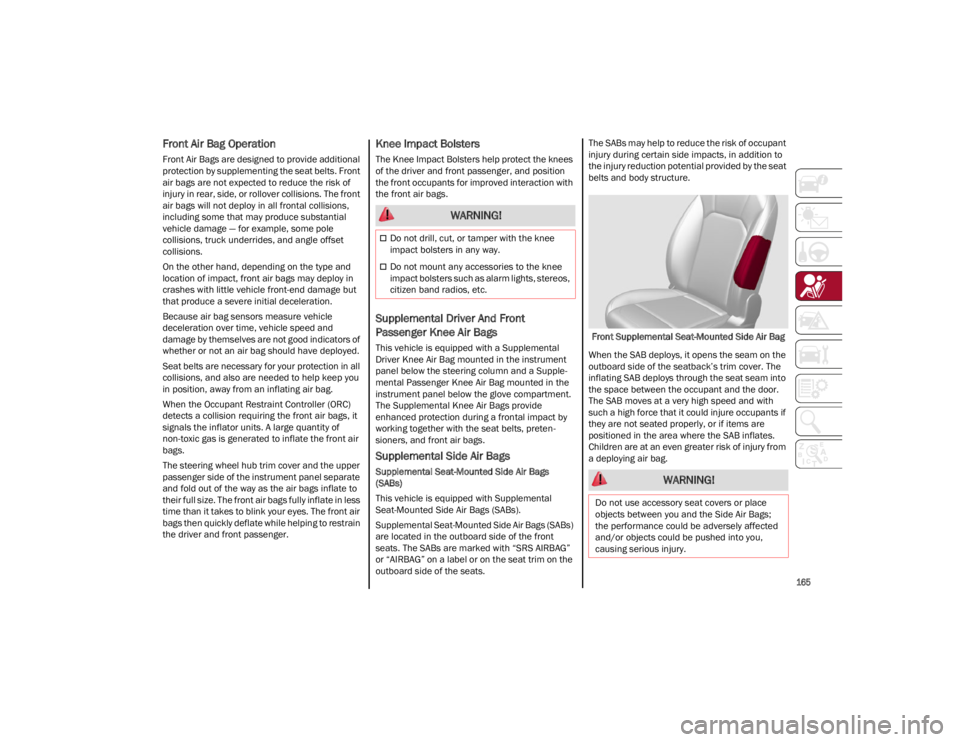
Supplemental Seat-Mounted Side Air Bags (SABs)
are located in the outboard side of the front
seats. The SABs are marked with “SRS AIRBAG”
or “AIRBAG” on a label or on the seat trim on the
outboard side of the seats. The SABs may help to reduce the risk of occupant
injury during certain side impacts, in addition to
the injury reduction potential provided by the seat
belts and body structure.
Front Supplemental Seat-Mounted Side Air Bag
When the SAB deploys, it opens the seam on the
outboard side of the seatback’s trim cover. The
inflating SAB deploys through the seat seam into
the space between the occupant and the door.
The SAB moves at a very high speed and with
such a high force that it could injure occupants if
they are not seated properly, or if items are
positioned in the area where the SAB inflates.
Children are at an even greater risk of injury from
a deploying air bag.
WARNING!
Do not drill, cut, or tamper with the knee
impact bolsters in any way.
Do not mount any accessories to the knee
impact bolsters such as alarm lights, stereos,
citizen band radios, etc.
WARNING!
Do not use accessory seat covers or place
objects between you and the Side Air Bags;
the performance could be adversely affected
and/or objects could be pushed into you,
causing serious injury.
23_GU_OM_EN_USC_t.book Page 165
Page 192 of 268
IN CASE OF EMERGENCY
190
(Continued)
INFLATION PROCEDURE
To use the Tire Service Kit, proceed as follows:
1. Apply the Electric Park Brake.
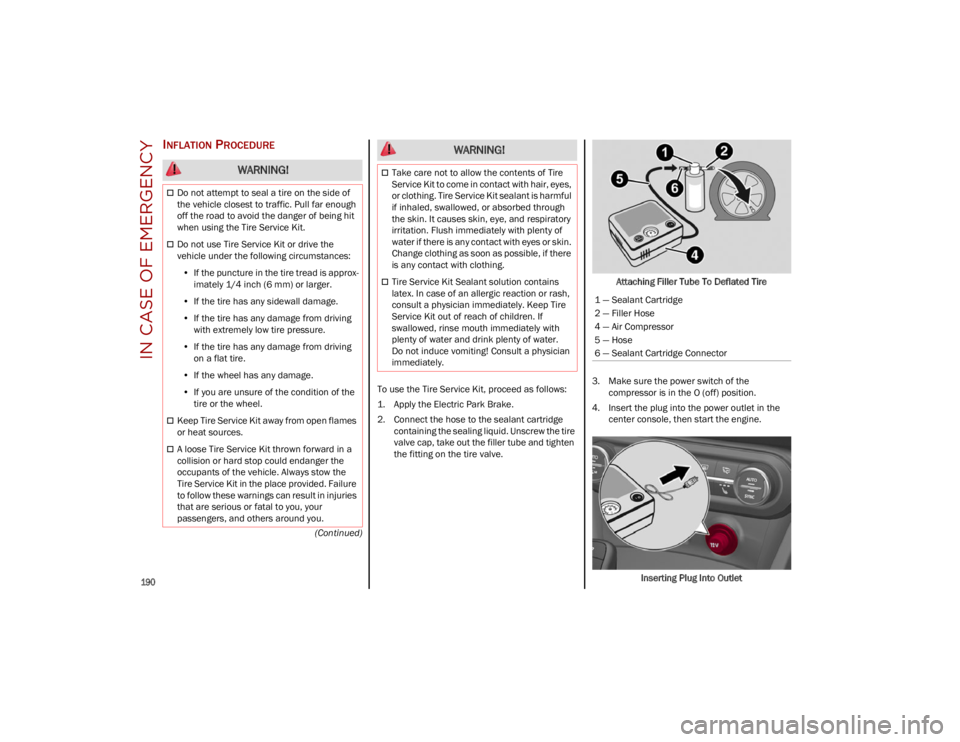
2. Connect the hose to the sealant cartridgecontaining the sealing liquid. Unscrew the tire
valve cap, take out the filler tube and tighten
the fitting on the tire valve. Attaching Filler Tube To Deflated Tire
3. Make sure the power switch of the compressor is in the O (off) position.
4. Insert the plug into the power outlet in the center console, then start the engine.
Inserting Plug Into Outlet
WARNING!
Do not attempt to seal a tire on the side of
the vehicle closest to traffic. Pull far enough
off the road to avoid the danger of being hit
when using the Tire Service Kit.
Do not use Tire Service Kit or drive the
vehicle under the following circumstances:• If the puncture in the tire tread is approx-
imately 1/4 inch (6 mm) or larger.
• If the tire has any sidewall damage.
• If the tire has any damage from driving
with extremely low tire pressure.
• If the tire has any damage from driving
on a flat tire.
• If the wheel has any damage.
• If you are unsure of the condition of the
tire or the wheel.
Keep Tire Service Kit away from open flames
or heat sources.
A loose Tire Service Kit thrown forward in a
collision or hard stop could endanger the
occupants of the vehicle. Always stow the
Tire Service Kit in the place provided. Failure
to follow these warnings can result in injuries
that are serious or fatal to you, your
passengers, and others around you.
Take care not to allow the contents of Tire
Service Kit to come in contact with hair, eyes,
or clothing. Tire Service Kit sealant is harmful
if inhaled, swallowed, or absorbed through
the skin. It causes skin, eye, and respiratory
irritation. Flush immediately with plenty of
water if there is any contact with eyes or skin.
Change clothing as soon as possible, if there
is any contact with clothing.
Tire Service Kit Sealant solution contains
latex. In case of an allergic reaction or rash,
consult a physician immediately. Keep Tire
Service Kit out of reach of children. If
swallowed, rinse mouth immediately with
plenty of water and drink plenty of water.
Do not induce vomiting! Consult a physician
immediately.
WARNING!
1 — Sealant Cartridge
2 — Filler Hose
4 — Air Compressor
5 — Hose
6 — Sealant Cartridge Connector
23_GU_OM_EN_USC_t.book Page 190
Page 207 of 268
205
CHECKING LEVELS — 2.9L ENGINE
ENGINE OIL
The engine oil level can be seen on the
instrument cluster display every time the engine
is started, or on the Information and
Entertainment system display by activating on the
main menu (MENU button) the following
functions in sequence:
1. “Vehicle Information”
2. “Engine Oil”
Check that the oil level is between the MIN and
MAX level on the instrument cluster display using
the 6 notches shown. 1 notch displays the MIN
level and 6 notches displays the MAX level.
NOTE:
Use care when filling under hood fluids such as
engine oil, windshield washer fluid, antifreeze
etc. to minimize spillage onto top of engine. Any
excess fluid that is spilled onto the top of the
engine should be removed using compressed air
or absorbent cloth.
If the oil level is close to or below the MIN mark,
add oil gradually through the filler, (refer to
“Top-Up And Oil Level Indication Update On
Display” in this section) considering that each
notch shown on the display corresponds to
approximately 8.8 fl oz (250 ml).The oil level can also be checked manually on
2.9L Quadrifoglio models.
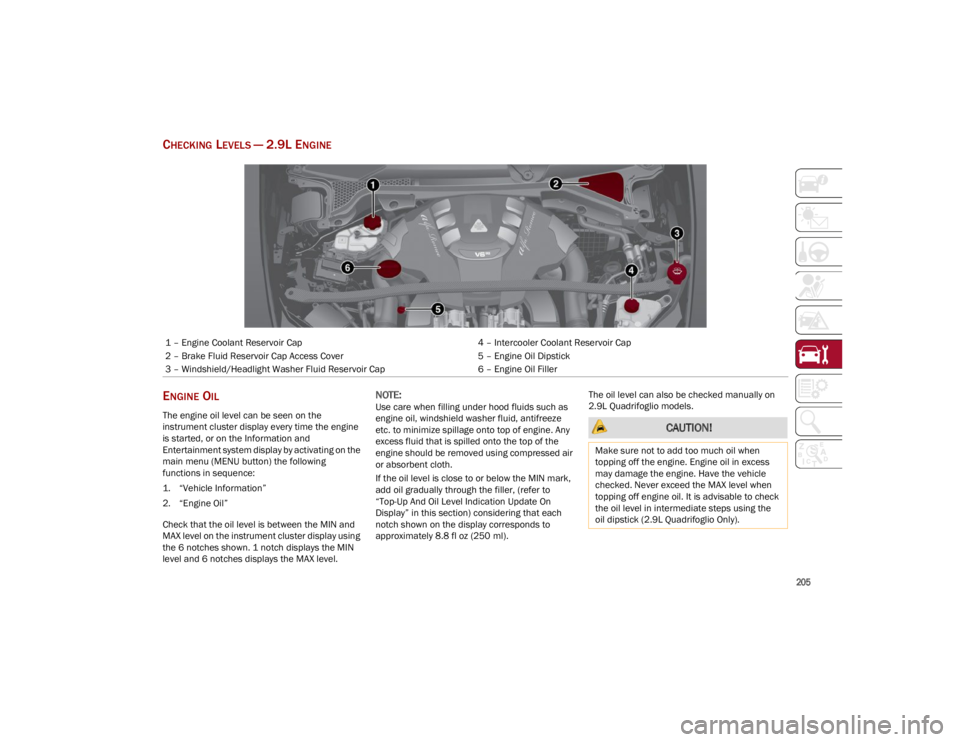
1 – Engine Coolant Reservoir Cap
4 – Intercooler Coolant Reservoir Cap
2 – Brake Fluid Reservoir Cap Access Cover 5 – Engine Oil Dipstick
3 – Windshield/Headlight Washer Fluid Reservoir Cap 6 – Engine Oil Filler
CAUTION!
Make sure not to add too much oil when
topping off the engine. Engine oil in excess
may damage the engine. Have the vehicle
checked. Never exceed the MAX level when
topping off engine oil. It is advisable to check
the oil level in intermediate steps using the
oil dipstick (2.9L Quadrifoglio Only).
23_GU_OM_EN_USC_t.book Page 205
Page 209 of 268
207
NOTE:
Use care when filling under hood fluids such as
engine oil, windshield washer fluid, antifreeze
etc. to minimize spillage onto top of engine.
Any excess fluid that is spilled onto the top of
the engine should be removed using compressed
air or absorbent cloth.
NOTE:
The headlight washers are activated every
10 activations of the windshield washer.
NOTE:
The headlight washing system will not work if the
liquid level is low (situation indicated by the
symbol on the instrument cluster display
Ú
page 70). The windshield washer will keep
working.
On vehicles equipped with headlight washers,
there is a reference notch on the dipstick:
ONLY the windshield/rear window washer oper -
ates with the level below this reference.
BRAKE FLUID
Check that the fluid is at the maximum level. If the
fluid level in the tank is low, contact an authorized
dealer to have the system checked.
AUTOMATIC TRANSMISSION ACTIVATION
S
YSTEM OIL
The transmission control oil level should only be
checked at an authorized dealer.
USEFUL ADVICE FOR EXTENDING THE LIFE
O
F YOUR BATTERY
To avoid draining your battery and make it last
longer, observe the following instructions:
When you park the vehicle, ensure that the
doors and liftgate are closed properly to
prevent any lights from remaining on inside the
passenger's compartment.
Do not keep accessories (e.g. radio, hazard
warning lights, etc.) switched on for a long time
when the engine is not running.
Before performing any operation on the
electrical system, disconnect the negative
battery cable.
If you wish to install electrical accessories after
purchasing the vehicle that require permanent
electrical supply (e.g. alarm, etc.), or accessories
which influence the electrical supply
requirements, contact an authorized dealer,
who’s qualified staff will evaluate the overall
electrical consumption.
NOTE:
After the battery is disconnected, the steering
must be initialized. The Power Steering
Warning Light on the instrument cluster display
switches on to indicate this. To carry out this
procedure, simply turn the steering wheel all the
way from one end to the other, and then turn it
back to the central position.
BATTERY
The battery does not require the electrolyte to be
topped up with distilled water. A periodic check
carried out at an authorized dealer, however, is
necessary to check efficiency.
CAUTION!
If the charge level remains under 50% for a
long time, the battery may be damaged by
sulfation, reducing its capacity and efficiency
during the vehicle start. The battery is also
more prone to the risk of freezing (at
temperatures as high as 14°F (-10°C).
WARNING!
Battery acid is a corrosive solution and can
burn or even blind you. Do not allow battery
acid to contact your eyes, skin, or clothing.
Do not lean over a battery when attaching
clamps. If acid splashes in eyes or on skin,
flush the area immediately with large
amounts of water
Ú
page 192.
Battery gas is flammable and explosive.
Keep flame or sparks away from the battery.
Do not use a booster battery or any other
booster source with an output greater than
12 Volts. Do not allow cable clamps to touch
each other.
Battery posts, terminals, and related
accessories contain lead and lead
compounds. Wash hands after handling.
23_GU_OM_EN_USC_t.book Page 207
Page 215 of 268
213
(Continued)
NOTE:
Before removing the coolant reservoir cap, wait
for the system to cool down.
Topping Up / Draining / Flushing The Engine/
Intercooler Coolant
If the engine coolant (antifreeze) is dirty, have
cleaning and flushing carried out at an authorized
dealer.
For the correct servicing intervals
Ú
page 200.
NOTE:
For topping off, and proper coolant specifi-
cations
Ú
page 252.
Do not use pure water, alcohol-based coolants,
corrosions inhibitors or additional anti-rust
products because they may be incompatible
with the engine coolant and cause the clogging
of the radiator. The use of propylene
glycol-based coolant is also not recommended.
Use care when filling under hood fluids such as
engine oil, windshield washer fluid, antifreeze
etc. to minimize spillage onto top of engine.
Any excess fluid that is spilled onto the top of
the engine should be removed using
compressed air or absorbent cloth. Engine Cooling/Intercooler System Cap
To prevent loss of engine coolant, make sure that
the expansion tank cap is closed. If it is open,
screw it completely until you reach/hear the click.
Periodically check the cap and clean it from any
foreign bodies that may have deposited on the
external surface.
Disposal of Used Coolant
Disposal of engine/intercooler coolant is subject
to legal requirements. Contact the appropriate
body to determine local regulations.
NOTE:
To prevent the fluid from being ingested by
children or animals, do not keep it in open
containers or pour it on the ground. If ingested,
contact a doctor immediately. Eliminate any
traces of fluid from the ground immediately.
When the vehicle stops after a short trip,
steam may be seen coming out from the front
of the hood. This is a normal phenomenon
which is due to the presence of rain, snow or a
lot of moisture on the surface of the radiator.
With engine and system cold, do not top up
with coolant beyond the maximum level
indicated on the reservoir in the engine
compartment.
BRAKING SYSTEM
In order to guarantee the efficiency of the braking
system, periodically check its components; for
this operation, contact an authorized dealer.
For the correct servicing intervals
Ú
page 200.
NOTE:
Driving with your foot resting on the brake pedal
may compromise its efficiency, increasing the risk
of accidents. When driving, never keep your foot
on the brake pedal and don’t put unnecessary
strain on it to prevent the brakes from over
-
heating. Excess pad wear may cause damage to
the braking system.
When an insufficient oil level is detected,
contact an authorized dealer to have the
system checked.
Always keep the cap of the brake fluid reservoir
(in the engine compartment) completely
closed.
Do not use a pressure cap other than the one
specified for your vehicle. Personal injury or
engine damage may result.
WARNING!
WARNING!
Never add coolant with the engine hot or
overheated.
Do not attempt to cool an overheated engine
by loosening or removing the cap. The heat
causes a considerable increase in pressure
in the cooling system.
To prevent damage to the engine, only use
the engine cooling circuit caps provided.
WARNING!
Use only manufacturer's recommended
brake fluid
Ú
page 252. Using the wrong
type of brake fluid can severely damage your
brake system and/or impair its performance.
The proper type of brake fluid for your vehicle
is also identified on the original factory
installed hydraulic master cylinder reservoir.
23_GU_OM_EN_USC_t.book Page 213