ESP ALFA ROMEO STELVIO 2023 Owner's Manual
[x] Cancel search | Manufacturer: ALFA ROMEO, Model Year: 2023, Model line: STELVIO, Model: ALFA ROMEO STELVIO 2023Pages: 268, PDF Size: 10.36 MB
Page 100 of 268
STARTING AND OPERATING
98
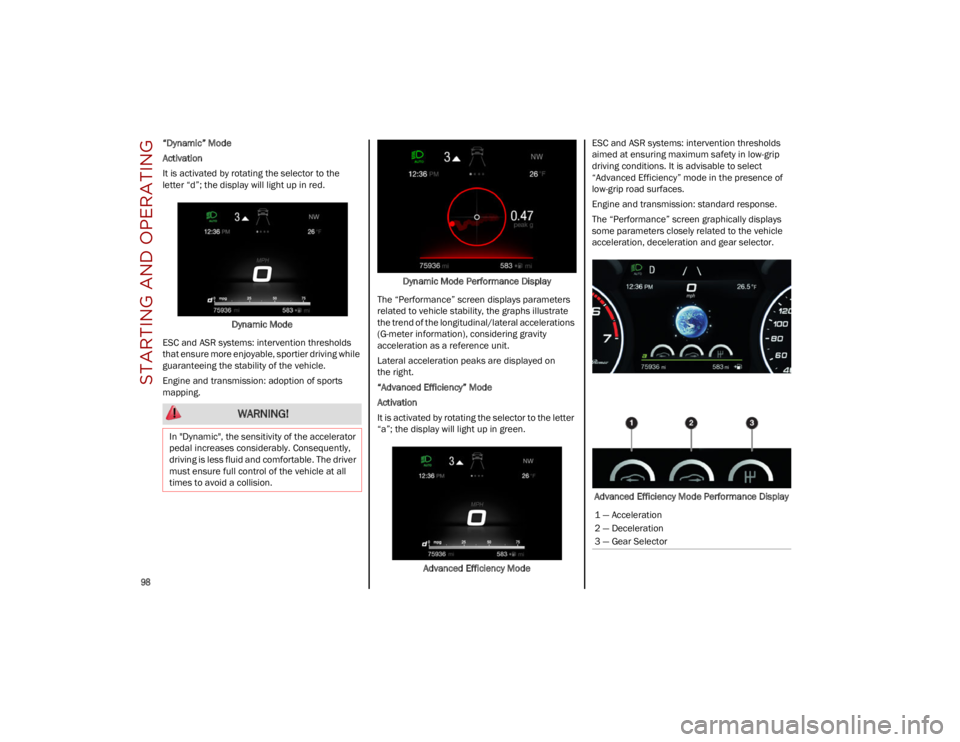
“Dynamic” Mode
Activation
It is activated by rotating the selector to the
letter “d”; the display will light up in red.Dynamic Mode
ESC and ASR systems: intervention thresholds
that ensure more enjoyable, sportier driving while
guaranteeing the stability of the vehicle.
Engine and transmission: adoption of sports
mapping. Dynamic Mode Performance Display
The “Performance” screen displays parameters
related to vehicle stability, the graphs illustrate
the trend of the longitudinal/lateral accelerations
(G-meter information), considering gravity
acceleration as a reference unit.
Lateral acceleration peaks are displayed on
the right.
“Advanced Efficiency” Mode
Activation
It is activated by rotating the selector to the letter
“a”; the display will light up in green.
Advanced Efficiency Mode ESC and ASR systems: intervention thresholds
aimed at ensuring maximum safety in low-grip
driving conditions. It is advisable to select
“Advanced Efficiency” mode in the presence of
low-grip road surfaces.
Engine and transmission: standard response.
The “Performance” screen graphically displays
some parameters closely related to the vehicle
acceleration, deceleration and gear selector.
Advanced Efficiency Mode Performance Display
WARNING!
In "Dynamic", the sensitivity of the accelerator
pedal increases considerably. Consequently,
driving is less fluid and comfortable. The driver
must ensure full control of the vehicle at all
times to avoid a collision.
1 — Acceleration
2 — Deceleration
3 — Gear Selector
23_GU_OM_EN_USC_t.book Page 98
Page 102 of 268
STARTING AND OPERATING
100
STOP/START SYSTEM
The Stop/Start system automatically shuts off
the engine during a vehicle stop if the required
conditions are met. Releasing the brake pedal or
pressing the accelerator pedal will automatically
restart the engine.
The function was designed to increase vehicle
efficiency by reducing fuel consumption, gas
emissions, and sound pollution.
NOTE:
When the Stop/Start system stops the engine,
the power steering is also disabled.
OPERATING MODE
Stopping The Engine
With the vehicle at a standstill and brake pedal
pressed, the Stop/Start system shuts off the
engine if the gear selector is in a position other
than REVERSE (R).
The system does not operate when the gear
selector is in REVERSE (R), in order to make
parking maneuvers easier.
In the event of uphill stops, the Stop/Start system
is disabled to make the “Hill Start Assist” function
available (works only with running engine).
NOTE:
The engine can only be automatically stopped
after having run at about 6 mph (10 km/h). After
an automatic restart, the vehicle only needs to
exceed a speed of 0.3 mph (0.5 km/h) to stop the engine.
Engine stopping is signaled by the symbol
lighting up on the instrument cluster display. Restarting The Engine
To restart the engine, release the brake pedal or,
turn the steering wheel slightly (if equipped).
With the brake pressed and the transmission in
automatic mode DRIVE (D), the engine will restart
by shifting to REVERSE (R), to PARK (P) or to
“AutoStick”
Ú
page 93.
With brake pressed if the gear selector is in
“AutoStick” mode, the engine will restart by
shifting to PARK (P) or by moving the selector
to + or -
Ú
page 93.
SYSTEM MANUAL ACTIVATION/
D
EACTIVATION
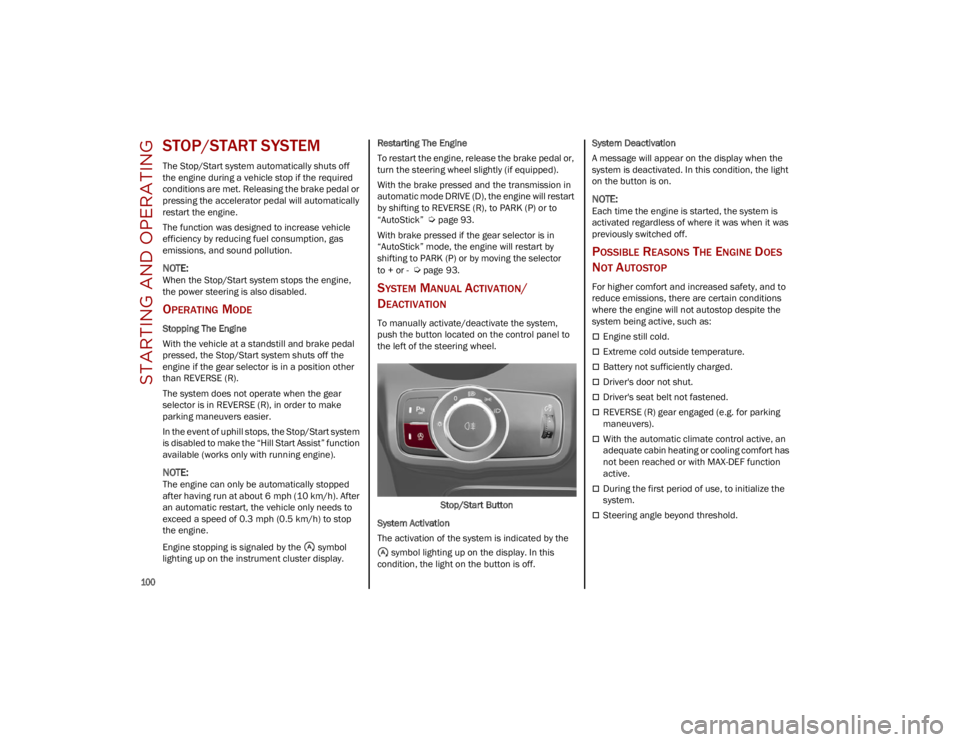
To manually activate/deactivate the system,
push the button located on the control panel to
the left of the steering wheel.
Stop/Start Button
System Activation
The activation of the system is indicated by the symbol lighting up on the display. In this
condition, the light on the button is off. System Deactivation
A message will appear on the display when the
system is deactivated. In this condition, the light
on the button is on.
NOTE:
Each time the engine is started, the system is
activated regardless of where it was when it was
previously switched off.
POSSIBLE REASONS THE ENGINE DOES
N
OT AUTOSTOP
For higher comfort and increased safety, and to
reduce emissions, there are certain conditions
where the engine will not autostop despite the
system being active, such as:
Engine still cold.
Extreme cold outside temperature.
Battery not sufficiently charged.
Driver's door not shut.
Driver's seat belt not fastened.
REVERSE (R) gear engaged (e.g. for parking
maneuvers).
With the automatic climate control active, an
adequate cabin heating or cooling comfort has
not been reached or with MAX-DEF function
active.
During the first period of use, to initialize the
system.
Steering angle beyond threshold.
23_GU_OM_EN_USC_t.book Page 100
Page 107 of 268
105
(Continued)
ADAPTIVE CRUISE CONTROL (ACC)
The Adaptive Cruise Control (ACC) is a driver
assist system that combines the Cruise Control
functions with controlling the distance from the
vehicle ahead. ACC will adjust the vehicle speed
up to the preset speed to maintain a distance
with the vehicle ahead. ACC increases the driving
convenience provided by Cruise Control while
traveling on highways and major roadways.
However, it is not a safety system and not
designed to prevent collisions. The Cruise Control
function performs differently
Ú
page 103.
ACC will allow you to keep Cruise Control engaged
in light to moderate traffic conditions without the
constant need to reset your Cruise Control. ACC
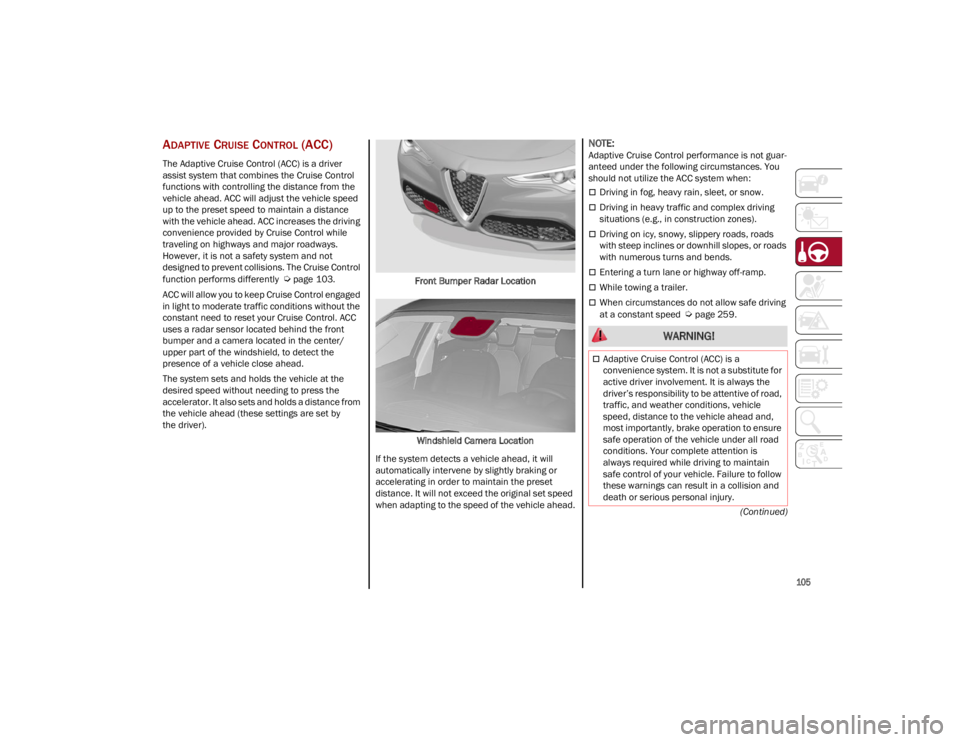
uses a radar sensor located behind the front
bumper and a camera located in the center/
upper part of the windshield, to detect the
presence of a vehicle close ahead.
The system sets and holds the vehicle at the
desired speed without needing to press the
accelerator. It also sets and holds a distance from
the vehicle ahead (these settings are set by
the driver). Front Bumper Radar Location
Windshield Camera Location
If the system detects a vehicle ahead, it will
automatically intervene by slightly braking or
accelerating in order to maintain the preset
distance. It will not exceed the original set speed
when adapting to the speed of the vehicle ahead.
NOTE:
Adaptive Cruise Control performance is not guar -
anteed under the following circumstances. You
should not utilize the ACC system when:
Driving in fog, heavy rain, sleet, or snow.
Driving in heavy traffic and complex driving
situations (e.g., in construction zones).
Driving on icy, snowy, slippery roads, roads
with steep inclines or downhill slopes, or roads
with numerous turns and bends.
Entering a turn lane or highway off-ramp.
While towing a trailer.
When circumstances do not allow safe driving
at a constant speed
Ú
page 259.
WARNING!
Adaptive Cruise Control (ACC) is a
convenience system. It is not a substitute for
active driver involvement. It is always the
driver’s responsibility to be attentive of road,
traffic, and weather conditions, vehicle
speed, distance to the vehicle ahead and,
most importantly, brake operation to ensure
safe operation of the vehicle under all road
conditions. Your complete attention is
always required while driving to maintain
safe control of your vehicle. Failure to follow
these warnings can result in a collision and
death or serious personal injury.
23_GU_OM_EN_USC_t.book Page 105
Page 110 of 268
STARTING AND OPERATING
108
(Continued)
To Resume
Once the system has been canceled but not
deactivated, to resume a previously set speed,
simply push the RES/SET switch upward and
remove your foot from the accelerator to recall it.
The system will be set to the last stored speed.
Setting The Distance Between Vehicles
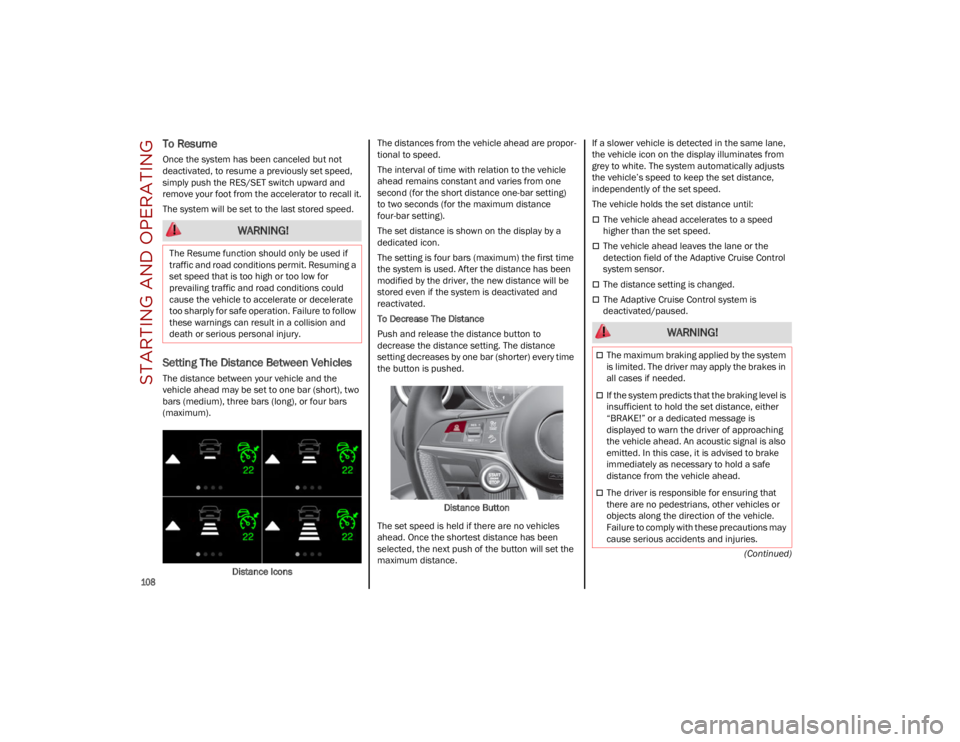
The distance between your vehicle and the
vehicle ahead may be set to one bar (short), two
bars (medium), three bars (long), or four bars
(maximum).Distance Icons The distances from the vehicle ahead are propor
-
tional to speed.
The interval of time with relation to the vehicle
ahead remains constant and varies from one
second (for the short distance one-bar setting)
to two seconds (for the maximum distance
four-bar setting).
The set distance is shown on the display by a
dedicated icon.
The setting is four bars (maximum) the first time
the system is used. After the distance has been
modified by the driver, the new distance will be
stored even if the system is deactivated and
reactivated.
To Decrease The Distance
Push and release the distance button to
decrease the distance setting. The distance
setting decreases by one bar (shorter) every time
the button is pushed.
Distance Button
The set speed is held if there are no vehicles
ahead. Once the shortest distance has been
selected, the next push of the button will set the
maximum distance. If a slower vehicle is detected in the same lane,
the vehicle icon on the display illuminates from
grey to white. The system automatically adjusts
the vehicle’s speed to keep the set distance,
independently of the set speed.
The vehicle holds the set distance until:
The vehicle ahead accelerates to a speed
higher than the set speed.
The vehicle ahead leaves the lane or the
detection field of the Adaptive Cruise Control
system sensor.
The distance setting is changed.
The Adaptive Cruise Control system is
deactivated/paused.
WARNING!
The Resume function should only be used if
traffic and road conditions permit. Resuming a
set speed that is too high or too low for
prevailing traffic and road conditions could
cause the vehicle to accelerate or decelerate
too sharply for safe operation. Failure to follow
these warnings can result in a collision and
death or serious personal injury.
WARNING!
The maximum braking applied by the system
is limited. The driver may apply the brakes in
all cases if needed.
If the system predicts that the braking level is
insufficient to hold the set distance, either
“BRAKE!” or a dedicated message is
displayed to warn the driver of approaching
the vehicle ahead. An acoustic signal is also
emitted. In this case, it is advised to brake
immediately as necessary to hold a safe
distance from the vehicle ahead.
The driver is responsible for ensuring that
there are no pedestrians, other vehicles or
objects along the direction of the vehicle.
Failure to comply with these precautions may
cause serious accidents and injuries.
23_GU_OM_EN_USC_t.book Page 108
Page 111 of 268
109
Overtake Aid
When driving with ACC engaged and following a
vehicle at a speed greater than 45 mph
(70 km/h), the system will provide an additional
acceleration up to the ACC set speed to assist in
passing the vehicle. This additional acceleration
is triggered when the driver utilizes the left turn
signal and will only be active when passing on the
left hand side.
The system detects the direction of traffic
automatically when the vehicle passes from left
hand traffic to right hand traffic. In this case, the
overtaking assist function is only active when the
reference vehicle is overtaken on the right. The
additional acceleration is deactivated when the
driver uses the right direction indicator and
returns to the original lane.
Stop And Go Function
The Stop and Go operating strategy allows you to
maintain a safe distance from the vehicle ahead
until the vehicle has completely stopped.
In the event that the ACC system brings your
vehicle to a standstill while following the vehicle
in front, if the vehicle in front starts moving within
two seconds of your vehicle coming to a
standstill, your vehicle will resume motion without
the need for any driver action.If the vehicle in front does not start moving within
two seconds of your vehicle coming to a
standstill, the driver will have to push the RES/
SET switch upward to restart.
Deactivation
The system is deactivated and the set speed is
canceled if:
The on/off button is pushed (when the system
is on or paused)
The ignition is placed in the OFF position
RACE mode is activated (Quadrifoglio models)
The system is canceled (the set speed and
distance are stored):
When the system is paused
Ú
page 106
When the conditions shown in the “Activating
Adaptive Cruise Control (ACC)” section occur
Ú
page 106
Limited Operation Warning
If the dedicated message is shown on the display,
a condition limiting the Adaptive Cruise Control
operation may have occurred.
This could be due to an obstruction of the
vehicle’s sensor or camera. It could also be due to
a fault in the system. If an obstruction is detected,
clean the area of the windshield opposite the
interior rearview mirror, where the camera is located, as well as the area of the front fascia/
bumper where the sensor is located. Then check
that the message has disappeared.
When the conditions limiting the system
functions end, normal operation will resume.
Should the fault persist, contact an authorized
dealer.
Precautions While Driving With ACC
In certain driving situations, ACC may have
detection issues. In these cases, ACC may brake
late or unexpectedly. The driver needs to stay
alert and may need to intervene. The following
are examples of these types of situations:
Towing A Trailer
Towing a trailer is not recommended when using
ACC.
Offset Driving
ACC may not detect a vehicle in the same lane
that is offset from your direct line of travel, or a
vehicle merging in from a side lane. There may
not be sufficient distance to the vehicle ahead.
The offset vehicle may move in and out of the line
of travel, which can cause your vehicle to brake or
accelerate unexpectedly.
Turns And Bends
When driving on a curve with ACC engaged, the
system may increase or decrease the vehicle
speed for stability, with no vehicle ahead
detected. Once the vehicle is out of the curve, the
system will resume your original set speed. This is
a part of normal ACC system functionality.
NOTE:
On tight turns ACC performance may be limited.
The driver is fully responsible for holding a
safe distance from the vehicle ahead
respecting the highway code in force in the
respective country.
WARNING!
WARNING!
When the ACC system is resumed, the driver
must ensure that there are no pedestrians,
vehicles or objects in the path of the vehicle.
Failure to follow these warnings can result in a
collision and death or serious personal injury.
23_GU_OM_EN_USC_t.book Page 109
Page 116 of 268
STARTING AND OPERATING
114
(Continued)
LIMITED SYSTEM AVAILABILITY/
O
PERATION
System Availability
External factors and conditions may affect the
proper operation of HAS, such as:
Narrow, winding, curvy streets
Poor visibility (due to heavy rain, snow, fog,
etc.)
Front lights of oncoming vehicles or direct
sunlight or shade
Damage or obstructions caused by mud, ice,
snow, etc.
Bumper damaged or not aligned
Interference with other equipment that causes
electromagnetic waves
Presence of roadwork/road construction sites
If the indications given by the navigation
system (if any) of the radio system are not yet
ready and/or if the navigation system is
recalculating the route
System Limited Operation
HAS may have limited or reduced functionality
when one of the following conditions occur:
Lane markings are not clear or in conditions of
poor visibility (e.g. in heavy rain, snow,
fog, etc.)
Either the camera or radar are damaged,
covered, or obstructed (e.g. by mud, ice,
snow, etc.)
When driving on hills or roads with narrow
bends
Near highway toll booths
When the highway entrance or exit is wider
than 20 ft (6 m)
If the camera is exposed to glare caused by
reflections or direct sunlight
If the navigation system information is
unavailable or being recalculated
NOTE:
If the vehicle approaches a bend that is too
narrow with respect to the current speed,
HAS will disable.
If damage to the windshield occurs, have the
windshield replaced by an authorized dealer
as soon as possible.
TRAFFIC JAM ASSIST (TJA)
SYSTEM — IF EQUIPPED
The Traffic Jam Assist (TJA) system can be
activated on all road types. The system uses a
camera and radar sensors located on front
fascia/bumper to detect lane markings and keep
the vehicle in the center of the lane.
When the system is unable to detect lane
markings, it will still operate using surrounding
traffic. This can occur in congested traffic
scenarios, when the vehicles ahead or
surroundings obstruct the visibility of the lane
markings. When the speed is below 12 mph
(20 km/h), the system can use a lock-on strategy
that allows the vehicle to automatically follow the
vehicle ahead.
The TJA system combines Adaptive Cruise Control
(ACC) functions with Lane Departure Warning
functions to maintain vehicle speed and steering
wheel behavior.
WARNING!
To prevent serious injury or death:
Always remain alert and be ready to take
control of the vehicle in the event that HAS
disables.
Always keep your hands on the steering
wheel when HAS is activated.
Maintain a safe distance from other vehicles
and pay attention to traffic conditions.
ALWAYS obey traffic laws and pay attention
to the road. ALWAYS drive safely with your
hands on the steering wheel. You have full
responsibility and assume all risks related to
the use of the features and applications in
this vehicle. Only use the features and
applications when it is safe to do so. Failure
to do so may result in an accident involving
serious injury or death.
WARNING!
23_GU_OM_EN_USC_t.book Page 114
Page 119 of 268
117
(Continued)
If the driver’s hands are not returned to the
steering wheel after a period of time, a deacti
-
vation message will appear on the instrument
cluster display and the steering wheel control will
be deactivated.
Once the symbol on the display turns grey, the
system is no longer active and the driver must
take control of the vehicle. At this time, the
Adaptive Cruise Control (ACC) system and Lane
Departure Warning system will also be disabled.
When the TJA system is active, the Lane Keeping
Assist (LKA)/Lane Departure Warning (LDW)
systems (if equipped) will be temporarily
disabled. When TJA is not active, the LKA system
(
Ú
page 125) and LDW system (
Ú
page 123) will
remain active.
LIMITED SYSTEM AVAILABILITY/
O
PERATION
System Availability
Performance of the TJA system may be affected
by the following factors:
Narrow, winding, curvy streets
Lane boundaries that are not clear or in
conditions of poor visibility (e.g. heavy rain,
snow, fog, etc.)
If the camera is exposed to glare from direct
sunlight or headlights of an oncoming vehicle
If the camera or sensor is damaged, covered,
or obstructed (e.g. by mud, ice, snow, etc.)
The bumper is damaged or misaligned
Interference with other equipment causes
electromagnetic waves
Construction sites
If the indications given by the navigation
system of the radio system are not yet ready or
if the system is recalculating
System Limited Operation
The TJA system may have limited or reduced
functionality when one of the following conditions
occurs:
Lane boundaries are not clear or in conditions
of poor visibility (e.g. in heavy rain, snow,
fog, etc.)
Either the camera or radar are damaged,
covered, or obstructed (e.g. by mud, ice,
snow, etc.)
When driving on hills or narrow bends
Near highway toll booths
When the highway entrance or exit is more
than 20 ft (6 m) wide
If the camera is exposed to glare from
reflections or direct sunlight
NOTE:
If damage to the windshield occurs, have the
windshield replaced by an authorized dealer as
soon as possible.
If the vehicle approaches a bend that is too
narrow with respect to the current speed, the
TJA system will deactivate.
TRAFFIC SIGN
RECOGNITION (TSR)
SYSTEM — IF EQUIPPED
The Traffic Sign Recognition (TSR) system uses a
camera mounted on the windshield to detect
recognizable road signs such as:
Speed limits
No passing zones
Signs indicating the end of the situations
indicated above
If the camera does not detect valid speed limits,
the radio system navigation system may suggest
unregulated speed limits. WARNING!
To prevent serious injury or death:
Always remain alert and be ready to take
control of the car in the event that the
TJA system disables.
Always keep your hands on the steering
wheel when the TJA system is activated.
Maintain a safe distance from other vehicles
and pay attention to traffic conditions.
The TJA system should only be used as a
driving aid. The driver must always pay
attention to their surroundings when the
system is operating and be ready to take
control of the vehicle at any time.
Do not place any objects on the steering
wheel (e.g. steering wheel covers) which
could interfere with the hand detection
sensor on the steering wheel.
WARNING!
23_GU_OM_EN_USC_t.book Page 117
Page 122 of 268
STARTING AND OPERATING
120
If the speed set by the ACC system is the same as
the speed detected by the TSR system, the speed
limit indicator on the instrument cluster display
will be highlighted with a green circle.
1 — Suggested Speed Higher Than Current Speed
2 — Suggested Speed Lower Than Current Speed1 —Road Sign Recognized
PARKSENSE FRONT/REAR
PARK ASSIST SYSTEM —
IF EQUIPPED
The ParkSense system provides visual and
audible indications of the distance between the
rear, and if equipped, the front fascia/bumper
and a detected obstacle when backing up or
moving forward (e.g. during a parking maneuver).
The vehicle brakes may be automatically applied
and released when performing a reverse parking
maneuver if the system detects a possible
collision with an obstacle.
When the REVERSE gear is engaged and the
system is on, the front and rear sensors are
activated. If the vehicle moves from REVERSE to
a forward gear, the rear sensors are deactivated,
while the front sensors remain active until the
speed of 9 mph (15 km/h) is exceeded.
NOTE:
In certain operating conditions, the system could
start detecting an obstacle only after the vehicle
has moved slightly (a few inches).
WARNING!
Drivers must be careful when backing up even
when using the ParkSense system. Always
check carefully behind your vehicle, and be
sure to check for pedestrians, animals, other
vehicles, obstructions, or blind spots before
backing up. You are responsible for the safety
of your surroundings and must continue to pay
attention while backing up. Failure to do so
can result in serious injury or death.
CAUTION!
The ParkSense system is only a parking aid
and it is unable to recognize every obstacle,
including small obstacles. Parking curbs
might be temporarily detected or not
detected at all. Obstacles located above or
below the sensors will not be detected when
they are in close proximity.
The vehicle must be driven slowly when using
the ParkSense system in order to be able to
stop in time when an obstacle is detected. It
is recommended that the driver looks over
his/her shoulder when using the ParkSense
system.
23_GU_OM_EN_USC_t.book Page 120
Page 123 of 268
121
PARKSENSE SENSORS
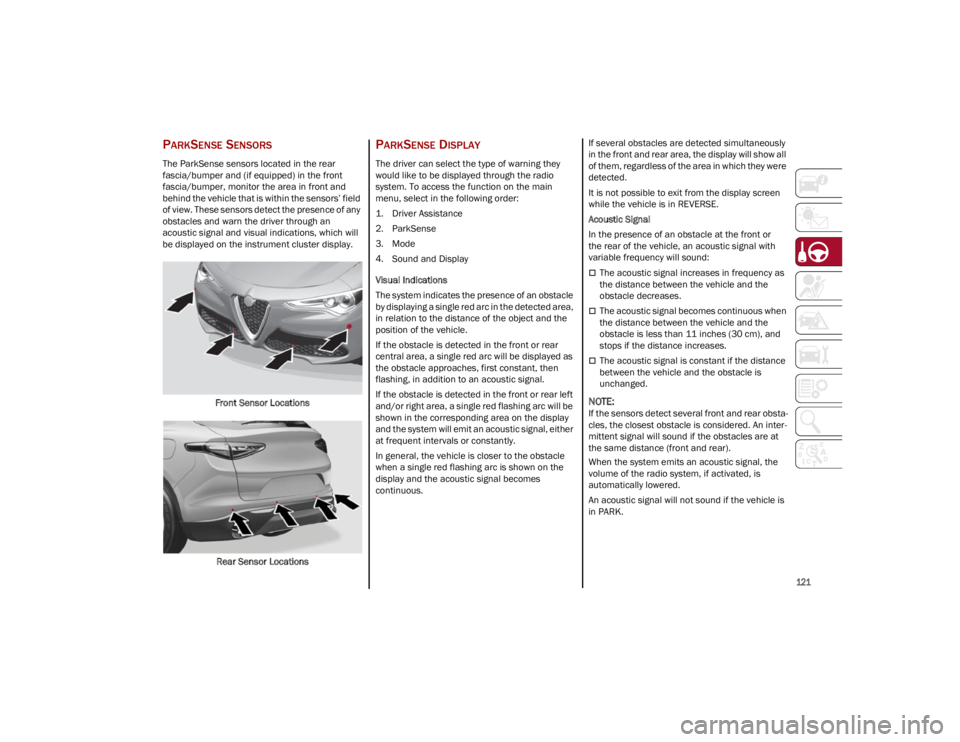
The ParkSense sensors located in the rear
fascia/bumper and (if equipped) in the front
fascia/bumper, monitor the area in front and
behind the vehicle that is within the sensors’ field
of view. These sensors detect the presence of any
obstacles and warn the driver through an
acoustic signal and visual indications, which will
be displayed on the instrument cluster display.Front Sensor Locations
Rear Sensor Locations
PARKSENSE DISPLAY
The driver can select the type of warning they
would like to be displayed through the radio
system. To access the function on the main
menu, select in the following order:
1. Driver Assistance
2. ParkSense
3. Mode
4. Sound and Display
Visual Indications
The system indicates the presence of an obstacle
by displaying a single red arc in the detected area,
in relation to the distance of the object and the
position of the vehicle.
If the obstacle is detected in the front or rear
central area, a single red arc will be displayed as
the obstacle approaches, first constant, then
flashing, in addition to an acoustic signal.
If the obstacle is detected in the front or rear left
and/or right area, a single red flashing arc will be
shown in the corresponding area on the display
and the system will emit an acoustic signal, either
at frequent intervals or constantly.
In general, the vehicle is closer to the obstacle
when a single red flashing arc is shown on the
display and the acoustic signal becomes
continuous. If several obstacles are detected simultaneously
in the front and rear area, the display will show all
of them, regardless of the area in which they were
detected.
It is not possible to exit from the display screen
while the vehicle is in REVERSE.
Acoustic Signal
In the presence of an obstacle at the front or
the rear of the vehicle, an acoustic signal with
variable frequency will sound:
The acoustic signal increases in frequency as
the distance between the vehicle and the
obstacle decreases.
The acoustic signal becomes continuous when
the distance between the vehicle and the
obstacle is less than 11 inches (30 cm), and
stops if the distance increases.
The acoustic signal is constant if the distance
between the vehicle and the obstacle is
unchanged.
NOTE:
If the sensors detect several front and rear obsta
-
cles, the closest obstacle is considered. An inter -
mittent signal will sound if the obstacles are at
the same distance (front and rear).
When the system emits an acoustic signal, the
volume of the radio system, if activated, is
automatically lowered.
An acoustic signal will not sound if the vehicle is
in PARK.
23_GU_OM_EN_USC_t.book Page 121
Page 124 of 268
STARTING AND OPERATING
122
ENABLING AND DISABLING PARKSENSE
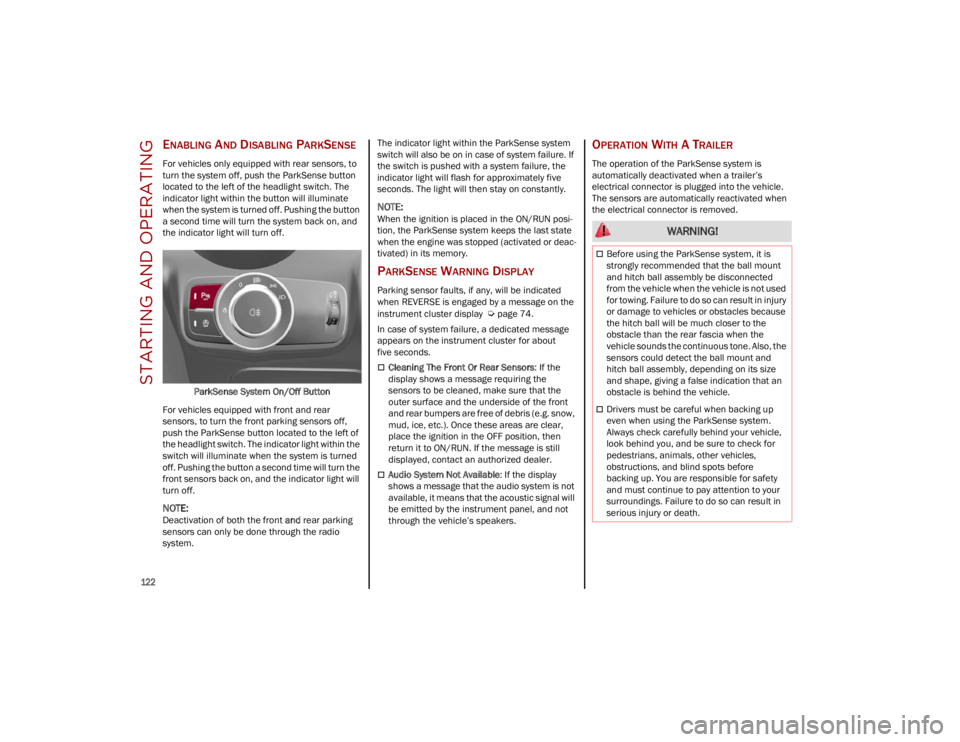
For vehicles only equipped with rear sensors, to
turn the system off, push the ParkSense button
located to the left of the headlight switch. The
indicator light within the button will illuminate
when the system is turned off. Pushing the button
a second time will turn the system back on, and
the indicator light will turn off.ParkSense System On/Off Button
For vehicles equipped with front and rear
sensors, to turn the front parking sensors off,
push the ParkSense button located to the left of
the headlight switch. The indicator light within the
switch will illuminate when the system is turned
off. Pushing the button a second time will turn the
front sensors back on, and the indicator light will
turn off.
NOTE:
Deactivation of both the front and rear parking
sensors can only be done through the radio
system. The indicator light within the ParkSense system
switch will also be on in case of system failure. If
the switch is pushed with a system failure, the
indicator light will flash for approximately five
seconds. The light will then stay on constantly.
NOTE:
When the ignition is placed in the ON/RUN posi
-
tion, the ParkSense system keeps the last state
when the engine was stopped (activated or deac -
tivated) in its memory.
PARKSENSE WARNING DISPLAY
Parking sensor faults, if any, will be indicated
when REVERSE is engaged by a message on the
instrument cluster display
Ú
page 74.
In case of system failure, a dedicated message
appears on the instrument cluster for about
five seconds.
Cleaning The Front Or Rear Sensors : If the
display shows a message requiring the
sensors to be cleaned, make sure that the
outer surface and the underside of the front
and rear bumpers are free of debris (e.g. snow,
mud, ice, etc.). Once these areas are clear,
place the ignition in the OFF position, then
return it to ON/RUN. If the message is still
displayed, contact an authorized dealer.
Audio System Not Available : If the display
shows a message that the audio system is not
available, it means that the acoustic signal will
be emitted by the instrument panel, and not
through the vehicle’s speakers.
OPERATION WITH A TRAILER
The operation of the ParkSense system is
automatically deactivated when a trailer’s
electrical connector is plugged into the vehicle.
The sensors are automatically reactivated when
the electrical connector is removed.
WARNING!
Before using the ParkSense system, it is
strongly recommended that the ball mount
and hitch ball assembly be disconnected
from the vehicle when the vehicle is not used
for towing. Failure to do so can result in injury
or damage to vehicles or obstacles because
the hitch ball will be much closer to the
obstacle than the rear fascia when the
vehicle sounds the continuous tone. Also, the
sensors could detect the ball mount and
hitch ball assembly, depending on its size
and shape, giving a false indication that an
obstacle is behind the vehicle.
Drivers must be careful when backing up
even when using the ParkSense system.
Always check carefully behind your vehicle,
look behind you, and be sure to check for
pedestrians, animals, other vehicles,
obstructions, and blind spots before
backing up. You are responsible for safety
and must continue to pay attention to your
surroundings. Failure to do so can result in
serious injury or death.
23_GU_OM_EN_USC_t.book Page 122