seats AUDI A3 2015 User Guide
[x] Cancel search | Manufacturer: AUDI, Model Year: 2015, Model line: A3, Model: AUDI A3 2015Pages: 288, PDF Size: 71.46 MB
Page 63 of 288
-Always store objects in the luggage com
partment and use suitable straps, partic
ularly with heavy objects.
- When you transport heavy objects, al
ways remember that a change in the cen
ter of gravity may result in a change in
the vehicle's handling characteristics .
- Follow all warnings
q page 121, Driving
safety.
(D Tips
The tire pressure must be adjusted to the
load -see the tire pressure sticker located
on the driver's side B-pillar.
General information
_& WARNING
Refer to the chapter Driving Safely
qpage 121, Driving safety for important
information, tips, s uggestions and warn
ings that you should read and fo llow for
your own safety and the safety of your pas sengers.
Increasing the size of the luggage
compartment
The rear seat backrests can be folded forward
either separately or together .
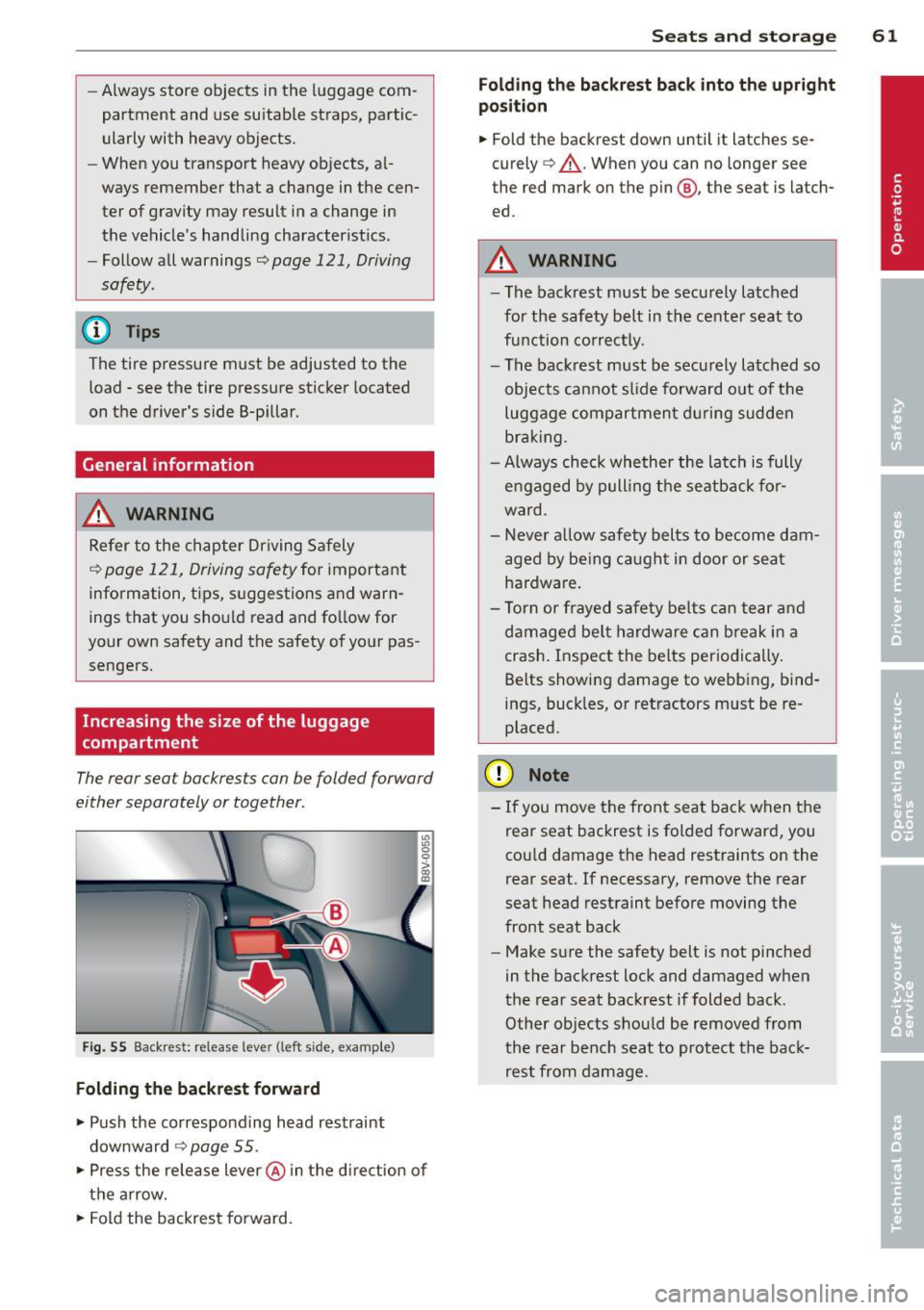
Fig. 55 Backrest: release lever (left sid e, e)(ample)
Folding the backrest forward
.,. Push the corresponding head restraint
downward
¢ page 55 .
.,. Press the release lever @in the d irection of
the arrow .
.,. Fold the backrest forward.
Seats and storage 61
Folding the backrest back into the upright
position
.,. Fold the backrest down until it latches se
curely
q _&. . When you can no longer see
the red mark on the pin @, the seat is latch
ed.
A WARNING
-- The backrest must be securely latched
for the safety belt in the center seat to
function correctly. -
-The backrest must be securely latched so
objects cannot slide forward out of the
luggage compartment during sudden
braking .
- Always check whether the latch is fully
engaged by pulling the seatback for
ward .
- Never allow safety belts to become dam
aged by being caught in door or seat
hardware .
- Torn or frayed safety belts can tear and
damaged be lt hardware can break in a
crash. Inspect the belts periodically.
Belts showing damage to webbing, bind
ings, buck les, or retractors must be re
placed.
(D Note
- If you move the front seat back when the
rear seat backrest is folded forward, you
cou ld damage the head restraints on the
rear seat. If necessary, remove the rear
seat head restraint before moving the
front seat back
- Make sure the safety belt is not pinched
in the backrest lock and damaged when
the rear seat backrest if folded back.
Other objects should be removed from
the rear bench seat to protect the back
rest from damage.
Page 64 of 288
62 Seats and storage
Tie-downs and cargo net
The cargo net* prevents small objects from
sliding.
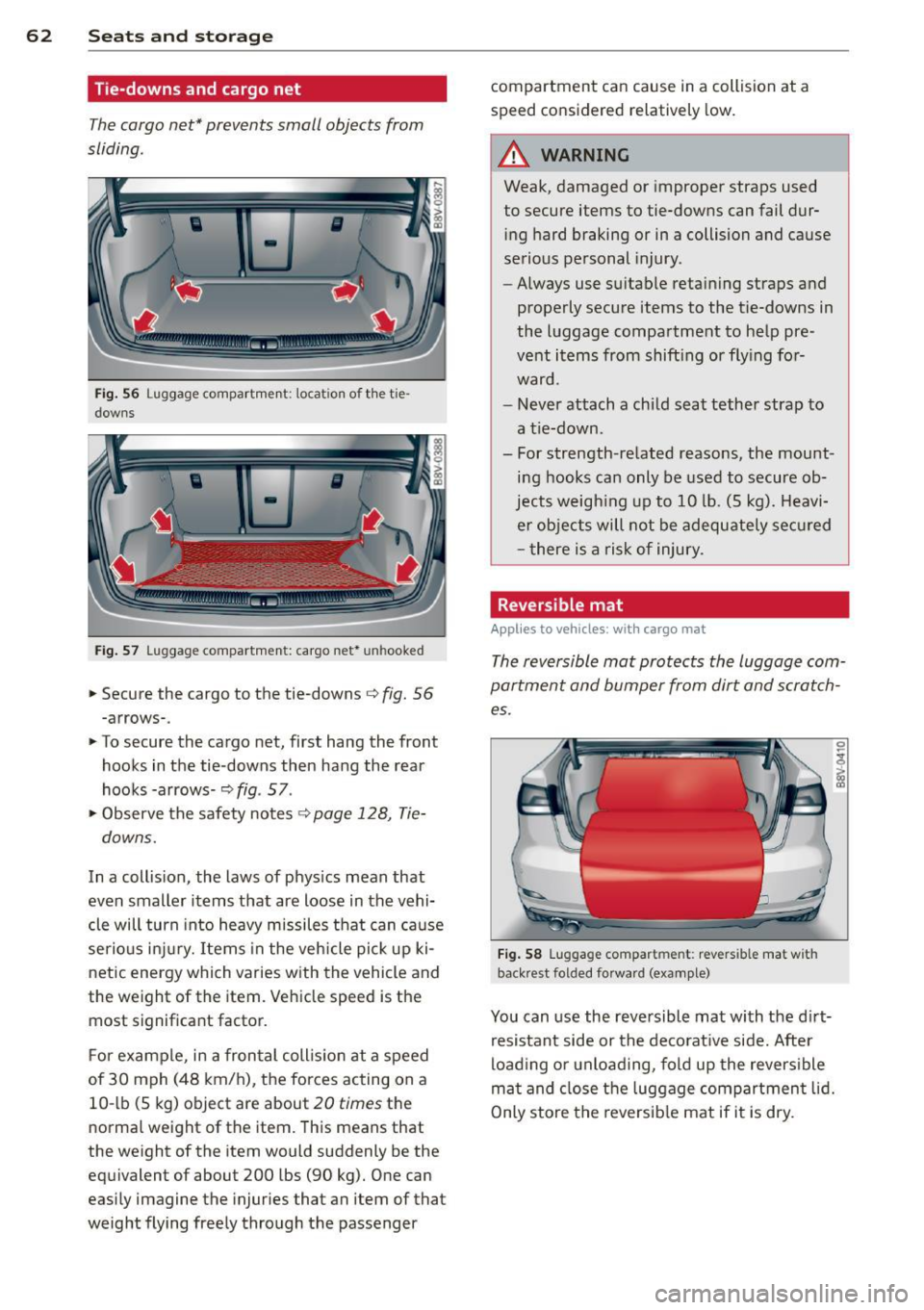
Fi g. 56 Luggage compartment: locatio n of the tie
downs
Fig . 57 Luggage compartment: cargo net* unhooked
.. Secure the cargo to the tie-downs¢ fig. 56
-arrows-.
.. To secure the cargo net, first hang the front
hooks in the tie-downs then hang the rear
hooks -arrows-~
fig. 57 .
"' Observe the safety notes ¢
page 128, Tie
downs.
In a collis ion, the laws of phys ics mean that
even smaller items that are loose in the vehi
cle will turn into heavy missiles that can ca use
serio us inj ury. Items in the vehicle pick up ki
netic energy which varies with the vehicle and
the weight of the item. Vehicle speed is the
most signif icant factor.
F or example, in a fron tal coll is io n at a speed
of 30 mph (48 km/h), the forces acting on a
10 -lb (S kg) object are about
20 times the
normal weight of the item. This means that
the weight of the item would suddenly be the
eq uivalent of about 200 lbs (90 kg). One can
eas ily imagine the injuries that an item of that
weight flying freely through the passenger compartment can cause in a collision at a
speed considered relatively
low.
_&, WARNING
-
Weak, damaged or improper straps used
to secure items to tie-downs can fail dur
i ng hard braking or in a collision and cause
se rious personal injury.
- Always use s uitable retaining straps and
properly secure items to the tie-downs in
the luggage compartment to he lp pre
vent items from shift ing or fly ing for
ward.
- Never attach a chi ld seat tether strap to
a tie-down.
- For strength-related reasons, the mount ing hooks can only be used to secure ob
jects w eigh ing up to 10 lb. (S kg). Heavi
e r objects will not be adequate ly se cu red
- there is a ris k of injury.
Reversible mat
Applies to veh icles: w ith cargo mat
The reversible mat protects the luggage com
partment and bumper from dirt and scratch es.
F ig . 58 Luggage compartment: revers ible mat with
back rest folded forward (examp le)
You can use the reversible mat with the d irt
resistant side or the deco rat ive side. After
load ing or unload ing, fold up the revers ible
m at and close t he luggage compartment lid.
Only store the reversib le mat if it is dry .
Page 65 of 288
Pass-through
Applies to vehicles: wit h pass -thro ug h
•
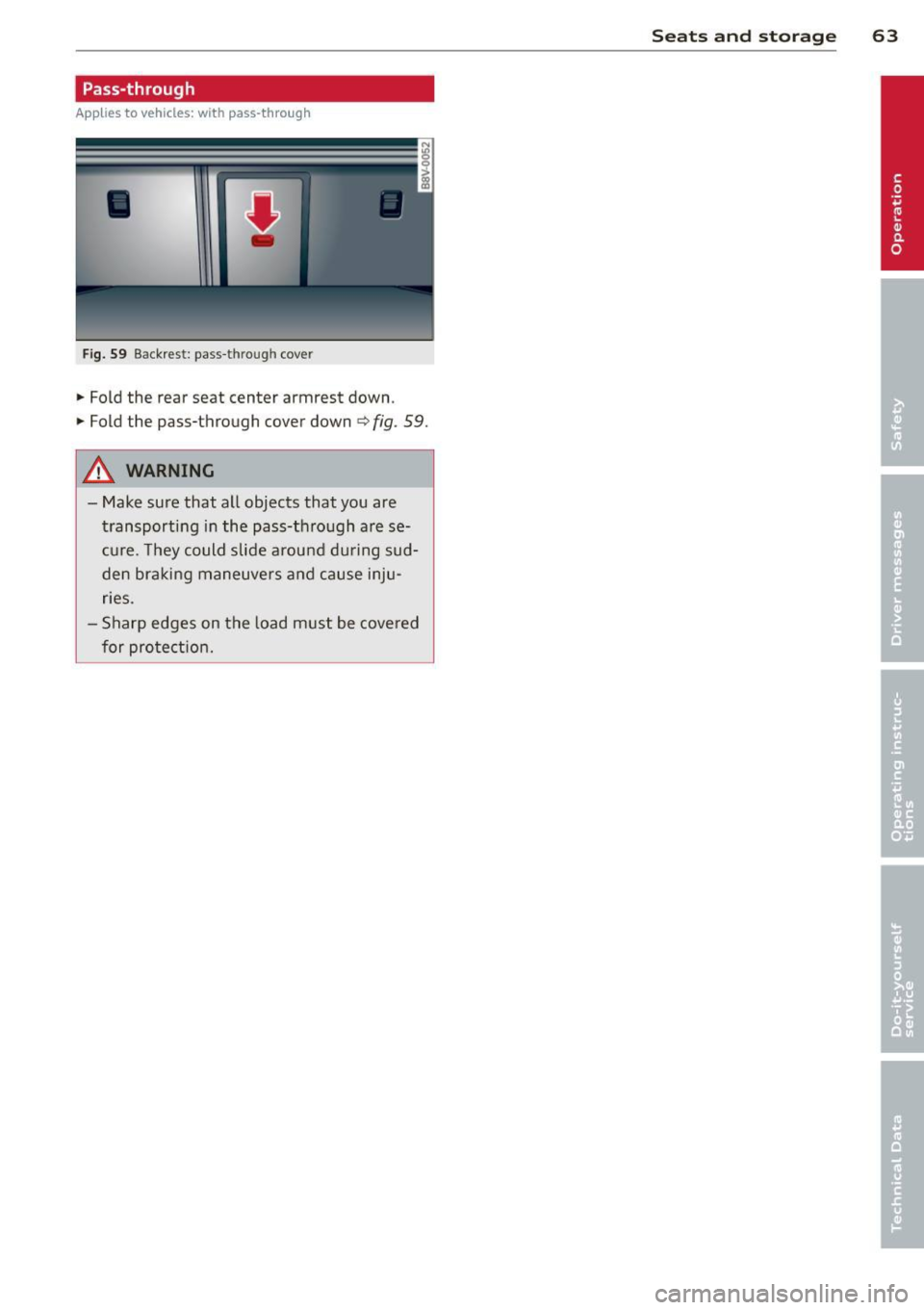
Fig. 59 Backrest : pass -t h roug h cove r
• Fold the rear seat center armrest down .
• Fold the pass-through cover down
<=> fig . 59.
A WARNING
-Make sure that all objects that you are
transporting in the pass-through are se
cure. They could slide around during sud
den braking maneuvers and cause inju
ries .
- Sharp edges on the load must be covered
for protection.
-
Seats and storage 63
Page 68 of 288
66 Warm and cold
Foot vents are located under the front seats
to heat the rear of the vehicle.
l= I Switching recirculation mode on and
off
I n recirculation mode, the air inside the vehi
cle is circu lated and filtered. This prevents the
unfiltered air outside the vehicle from enter
ing the vehicle interior. We recommend
switching recirculation mode on when driving
through a tunnel or when sitt ing in traffic
~ & .
Automatic climate control system controls
Ap plies to vehicles: with a uto mat ic climate contro l system
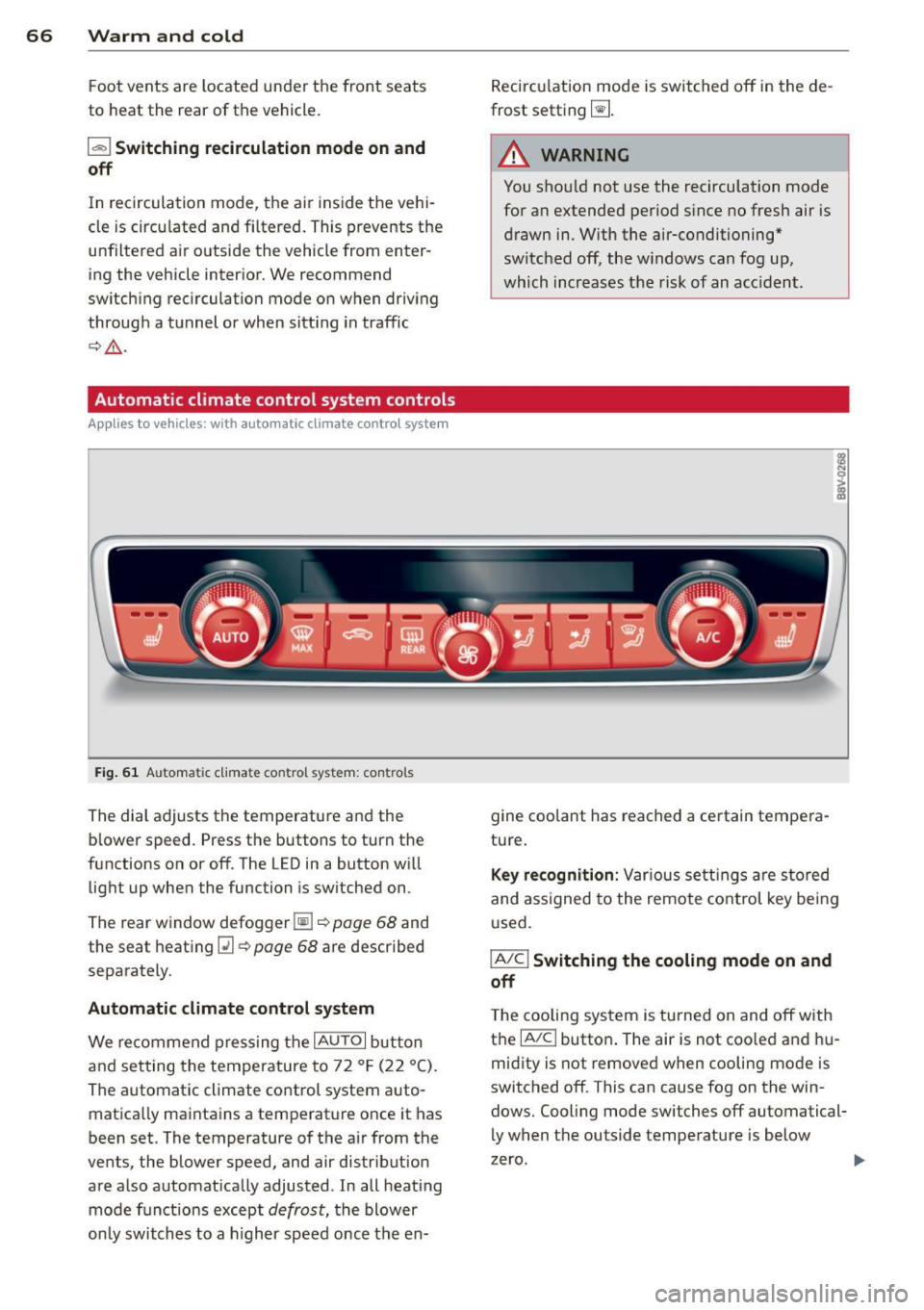
Fig. 61 Au toma tic climate contro l system : cont rols
The dial adjusts the temperature and the
blower speed. Press the buttons to turn the
functions on or off. The LED in a button will
light up when the function is switched on .
The rear window defogger~~
page 68 and
the seat heating
[ii~ page 68 are described
separately.
Automatic climate control system
We recommend pressing the IAU TO I button
and setting the temperature to 72 °F (22 °C).
The automatic climate control system auto
matically maintains a temperature once it has
been set. The temperature of the air from the
vents, the blower speed, and air distr ibution
are also automatically adjusted . In all heat ing
mode funct ions except
defrost, the blower
only switches to a higher speed once the en- Recirculation
mode is switched off in the de
frost setting ~-
.&_ WARNING
-
You shou ld not use the recirculation mode
for an extended period s ince no fresh air is
drawn in. With the air-conditioning*
switched off, the w indows can fog up,
which increases the risk of an acc ident.
gine coolant has reached a certain tempera
ture.
Key recognition: Var ious settings are stored
and assigned to the remote control key being
used.
IA/CI Switching the cooling mode on and
off
T he cooling system is turned on and off with
the
IA/Cl button . The air is not coo led and hu
midity is not removed when cooling mode is
switched off . This can cause fog on the win
dows. Cooling mode switches off automatical
ly when the outside temperature is below
zero .
Page 69 of 288
IAUTO I Switching automatic mode on and
off
The automatic mode is turned on using the
IAUTOI button. AUTO mode switches off once
a button in the climate control system is pressed. Automatic mode maintains a con
stant temperature inside the vehicle . Air tem
perature, a irflow and air distribution are con
trolled automat ica lly. When automatic mode
is act ive, p ress ing the
IAUTOI button briefly
activates "eco" mode*
1>. In "eco" mode*, all
settings are lowered slightly to save fue l.
When in "eco" mode*, eco is shown in the dis
p lay. To exit "eco" mode*, press the
!AUTO I
button again.
I• I • I Setting the temperature
The temperature can be adjusted individually
for the driver and front passenger using the
dials . Temperatures between 60 ° F (+16 °C)
and 84 °F (+28 °C) can be set. Outside of this
range,
Lo or Hi will appear in the climate con
trol system display. In both settings, the cli mate control runs with constantly at the max
imum cooling or heati ng level. The tempera
ture is not regu lated .
Synchronization: By pressing the !AU TO I but
ton for two seconds, the temperature setting
for the driver is transferred to the front pas
senger's side. This applies a temperature
change to the front passenge r's side.
~ Adjusting the blower
To prevent the windows from fogging over,
the blower should always run at a low speed.
You can adjust the volume of air generated by
the blower to your preference. To have the
blower regulated automatically, press the
IAUTOI button.
Adjusting the air distribution
The air distribution is adjusted with the 121, ~
and IE:! buttons. To have the air distribut ion
regulated automatically, press the
!AU TO I but
ton .
l) This fu nct io n is not availab le in all coun tries.
Warm and cold 67
T he round air vents in the cockpit are adjusta
ble ¢ page 68.
T o keep the windows from fogging in damp
weathe r, we recommend open ing the side air
vents and tilting them to the side
¢ page 68, Adjusting the air vents .
Foot vents are located under the front seats
and adjustable vents on the end of the center
console to heat the rear of the vehicle.
I "" MAX ! Switching the defroster on and off
The windshield and side windows are defrost
ed or cleared of condensation as quickly as
possible. The maximum amount of air flows
main ly from the vents below the windshield.
Recircu lation mode switches off. The tempera
ture is controlled automatically . In the ~ set
ting, the
! A/C l cooling mode switches on auto
matically, depending on the outside air tem
perature.
The
! AUTO I button switches the defroster off.
l"""I Switching recirculation mode on and
off
The recircu lation mode can be turned on man
ually or automatically* .
- Switching manual rec irculat ion mode on and
off: Press the
1 - 1 button. The LED light up
when switched on .
- Automatic* recircu lation mode: The recircu
lation mode must be activated in the MMI.
Select:
! MENUI button> Systems contro l
button or
Car systems > AC > Auto recircu
lation .
The air quality sensor that is de
signed for diesel and gasoline exhaust auto
matically switches the recirculation mode
on or off depending on the level of pollu
tants in the outside air.
In recirculation mode, the air inside the vehi-
cle is circulated and filtered. This prevents the unfiltered air outside the veh icle from enter-
i ng the veh icle interior . We recommend
switching recirculation mode on when driving
IJ,-•
Page 71 of 288
The seat heating switches automatically from
setting 3 to setting 2 after 10 minutes.
When seat heat ing should not be
sw it ch ed on
Do not turn the seat heating on under the fol
l owing circumstances:
- T he seat is unocc upied.
- The seat is covered w ith a seat cover .
- The seat is covered w ith a child seat.
- The seat is damp or wet.
A WARNING
Individua ls with reduced sensitivity to pain
or temperature could develop burns when
using the seat heating function. To reduce
the risk of injury, these individuals should
no t use sea t heat ing.
{[) Note
To avo id damage to the heating elements
in the seats, do not kneel on the seats o r
place heavy loads on a small area of the
seat.
{D) Tips
- The setting for the seat heating on the
drive r's side is assigned to the key that is
i n use.
- If the front passenger's seat heating is
turned on, it will not turn on again au to
ma tically if more than 10 m inutes have
passed between sw itching the ign ition
off and switching it on again.
Warm and c old 69
•
Page 123 of 288
Driving safety
General notes
Safe driving habits
Please remember -safety first!
This chapter contains important information,
tips, instructions and warnings that you need
to read and observe for your own safety, the
safety of your passengers and others . We have
summarized here what you need to know
about safety belts, airbags, ch ild restraints as
well as child safety. Your safety is fo r us
priori
ty number 1.
Always observe the information
and warnings in this sect ion - for yo ur own
safety as well as that of your passengers.
The information in this section app lies to all
model ve rsions of your vehicle . Some of the
feat ures described in this sections may be
standard equipment on some models, or may
be optional equipment on others. If you are
not sure, ask your authorized Audi dea ler.
A WARNING
- Always make sure that you follow the in
struct ions and heed the WARNINGS in
this Manual. It is in your interest and in
the interest of your passengers.
- Always keep the complete Owner's Liter
ature in your Audi when you lend or sell
your vehicle so that this important infor
mation will always be ava ilable to the
dr iver and passengers.
- Always keep the Owner's literature handy
so that you can find it eas ily if you have
questions.
- Always adjust your speed to the weather
traffic and conditions. Follow the speed
limits.
- Always drive in such a way that you can
stop your vehicle safely .
- Always adjust your speed to the general
flow of traffic. Fo llow the speed limits.
Dri ving sa fe ty 12 1
Safety equipment
The safety features are part of the occupant
restraint system and work together to help
reduce the risk of injury in a wide variety of
accident situations.
Your safety and the safety of your passengers
should not be left to chance . Advances in
techno logy have made a variety of features
available to help reduce the risk of injury in an
acc ident. The following is a list of just a few of
the safety features in yo ur Audi :
- sophisticated safety be lts fo r driver and all
passenger seating posit ions,
- safety belt pretens ioners for the front seats,
- safety belt he ight adjustment systems for
the front seats ,
- front airbags,
- knee airbags for the front seats*
- side airbags in the front seats and outer rear
seats*,
- side curtain airbags with ejection mitigation
features,
- specia l LATCH anchorages for child re-
straints,
- head restraints for each seating position,
- adjustab le steering col umn.
- Pre sense basic* (preventat ive passenger
protection)
These ind iv idual safety features, can work to
gether as a system to he lp protect you and
you r passenge rs in a wide range of accide nts .
T hese features canno t work as a system if
they a re not always cor rectly adjus ted and co r
r ect ly used.
Saf ety is e ve ryb ody 's res ponsibil ity!
Important things to do before driving
Safety is everybody's job ! Vehicle and occu
pant safety always depends on the informed and careful driver.
For your safety and the safety of your passen
gers,
b efor e dr iving alwa ys:
.,. Make sure that all lig hts and signals are op
erati ng correctly . •
•
•
Page 124 of 288
122 Driving safety
• Make sure that the tire pressure is correct.
• Make sure that all windows are clean and af
ford good visib ility to the outside .
• Secure a ll luggage and other items carefully
r:=:> page 60, r:=:> page 58.
• Make sure that noth ing can interfere wit h
the pedals.
• Adjust front seat , head restraint and mirrors
correctly for your he ight.
• Instruct passengers to adjust the head re
stra ints according to their height.
• Make sure to use the right child restraint
correct ly to protect children
r:::;, page 166,
Child Safety .
• Sit properly in your seat and make sure that
your passengers do the same
r=:> page 53,
Front seats.
• Fasten your safety belt a nd wear it properly .
Also instruct your passengers to fasten th eir
safety belts properly
r:::;.page 131 .
What impairs driving safety?
Safe driving is directly related to the condi
tion of the vehicle, the driver as well as the
driver 's ability to concentrate on the rood
without being distracted.
The driver is respons ible for the safety of the
vehicle and all of its occupants.
If your ability
to drive is impa ired, safety r isks for everybody
in the vehicle increase and yo u also become a
hazard to everyone else on the road
r:::;, &,.
Therefore:
• Do not let yourself be dis tracted by passe n
gers or by using a cellular telephone.
• NEVER drive when your driving ability is im
paired (by medications, alcohol, drugs, etc.).
• Observe all traffic laws, rules of the road
and speed limits and plain common sense.
• ALWAYS adjust your speed to road, traffic
and weather condit ions .
• Take frequent breaks on long trips . Do not
dr ive for more than two hours at a stretc h.
• Do NOT drive when you are t ired, under
pressure or when you are st ressed.
A WARNING
-Impaired dr iving safety increases the risk
of ser ious personal injury and death when
ever a vehicle is being used.
Proper occupant
seating positions
Proper seating position for the driver
The proper driver seating position is impor
tant for safe, relaxed driving.
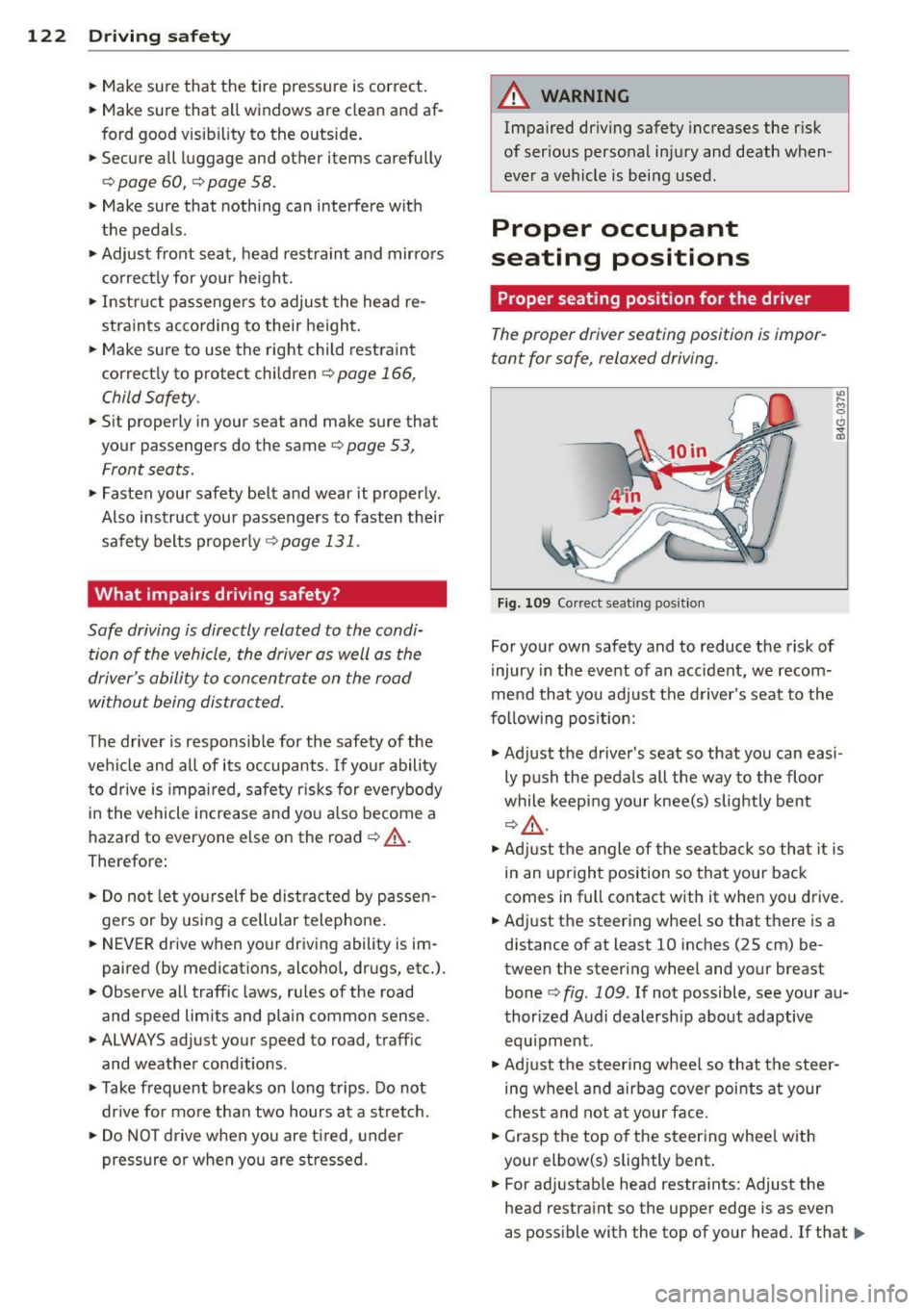
Fig . 109 Correct seat ing posit ion
For your own safety and to reduce the risk of
injury in the event of an accident, we recom
mend that you adjust the driver's seat to the
following position:
.,. Adjust the driver's seat so that you can easi
ly push the pedals all the way to the floor
while keeping your knee(s) slightly bent
r:::;,A .
.,. Adjust the angle of the seatback so that it is
in an upright position so that your back
comes in full contact with it when you drive.
• Adj ust the steering wheel so that there is a
distance of at least 10 inches (25 cm) be
tween the steering wheel and your breast
bone
c:::> fig. 109 . If not possible, see your au
thorized Audi dealersh ip about adaptive
equ ipment .
.. Adjust the steering wheel so that the steer
ing wheel and airbag cover points at your
chest and not at your face.
• Grasp the top of the steering whee l with
your elbow(s) slightly bent .
• For adjustable head restraints: Adjust the
head restraint so the upper edge is as even
as possible with the top of your head. If that..,_
Page 125 of 288
is not possible, try to adjust the head re
straint so that it is as close to this position
as possible. Move the head restraint so that
it is as close to the back of the head as pos
sible.
.. Fasten and wear safety belts correctly
Q page 134.
.. Always keep both feet in the footwell so
that you are in control of the vehicle at all
times.
For detailed information on how to adjust the
driver's seat, see
Q page 54 .
.&, WARNING
Drivers who are unbelted, out of position
or too close to the airbag can be seriously
injured by an airbag as it unfolds. To help
reduce the risk of serious personal injury:
- Always adjust the driver's seat and the
steering wheel so that there are at least
10 inches (25 cm) between your breast
bone and the steering wheel.
- Always adjust the driver's seat and the
steering wheel so that there are at least
4 inches (10 cm) between the knees and
the lower part of the instrument panel.
- Always hold the steering wheel on the
outside of the steering wheel rim with
your hands at the 9 o'clock and 3 o'clock positions to help reduce the risk of per
sonal injury if the driver's airbag inflates.
- Never hold the steering wheel at the
12 o'clock position or with your hands at
other positions inside the steering wheel
rim or on the steering wheel hub. Hold
ing the steering wheel the wrong way
can cause serious injuries to the hands,
arms and head if the driver's airbag in
flates.
- Pointing the steering wheel toward your
face decreases the ability of the supple
mental driver's airbag to protect you in a
collision.
- Always sit in an upright position and nev
er lean against or place any part of your
body too close to the area where the air
bags are located.
-
Driving safety 123
-Before driving, always adjust the front
seats properly and make sure that all passengers are properly restrained.
- For adjustable head restraints: before
driving, always also adjust the head re
straints properly.
- Never adjust the seats while the vehicle is moving. Your seat may move unexpect
edly and you could lose control of the ve hicle.
- Never drive with the backrest reclined or
tilted far back! The farther the backrests are tilted back, the greater the risk of in
jury due to incorrect positioning of the safety belt and improper seating posi
tion.
- Children must always ride in child seats
Q page 166. Special precautions apply
when installing a child seat on the front
passenger seat ¢
page 140.
Proper seating position for the front
passenger
The proper front passenger seating position
is important for safe, relaxed driving.
For your own safety and to reduce the risk of
injury in the event of an accident, we recom
mend that you adjust the seat for the front
passenger to the following position:
.. Adjust the angle of the seatback so that it is
in an upright position and your back comes
in full contact with it whenever the vehicle is
moving.
.. For adjustable head restraints: adjust the
head restraint so the upper edge is as even
as possible with the top of your head. If that
is not possible, try to adjust the head re
straint so that it is as close to this position
as possible
¢ page 125. Move the head re
straint so that it is as close to the back of
the head as possible .
.. Keep both feet flat on the floor in front of
the front passenger seat.
.. Fasten and wear safety belts correctly
¢page 134.
•
•
•
Page 126 of 288
124 Driving safety
For detailed information on how to adjust the
front passenger's seat, see ¢
page 53.
A WARNING
Front seat passengers who are unbelted,
out of position or too close to the airbag
can be seriously injured or killed by the air
bag as it unfolds. To help reduce the risk of
serious personal injury:
- Passengers must always sit in an upright
position and never lean against or place
any part of their body too close to the
area where the airbags are located.
- Passengers who are unbelted, out of po
sition or too close to the airbag can be
seriously injured by an airbag as it un
folds with great force in the blink of an
eye.
- Always make sure that there are at least
10 inches (25 cm) between the front
passenger's breastbone and the instru
ment panel.
- Always make sure that there are at least
4 inches (10 cm) between the front pas
senger's knees and the lower part of the
instrument panel.
- Each passenger must always sit on a seat
of their own and properly fasten and
wear the safety belt belonging to that
seat.
- Before driving, always adjust the front
passenger seat properly .
- For adjustable head restraints: before
driving, always also adjust the head re
straints properly.
- Always keep your feet on the floor in
front of the seat. Never rest them on the
seat, instrument panel, out of the win
dow, etc. The airbag system and safety
belt will not be able to protect you prop
erly and can even increase the risk of in
jury in a crash .
- Never drive with the backrest reclined or
tilted far back! The farther the backrests are tilted back, the greater the risk of in
jury due to incorrect positioning of the
safety belt and improper seating posi
tion. -
Children must always ride in child seats
¢
page 166. Special precautions apply
when installing a child seat on the front passenger seat
c> page 140.
Proper seating positions for passengers
in rear seats
Rear seat passengers must sit upright with
both feet on the floor consistent with their
physical size and be properly restrained whenever the vehicle is in use.
To reduce the risk of injury caused by an incor
rect seating position in the event of a sudden
braking maneuver or an accident, your pas
sengers on the rear bench seat must always
observe the following:
"" For adjustable head restraints: adjust the
head restraint so the upper edge is as even
as possible with the top of your head. If that
is not possible, try to adjust the head re
straint so that it is as close to this position
as possible
¢ page 125.
.,. Keep both feet flat in the footwell in front of
the rear seat.
.,. Fasten and wear safety belts properly
¢page 134.
.,. Make sure that children are always properly
restrained in a child restraint that is appro
priate for their size and age¢
page 166.
A WARNING
Passengers who are improperly seated on
the rear seat can be seriously injured in a
crash.
- Each passenger must always sit on a seat
of their own and properly fasten and
wear the safety belt belonging to that
seat.
- Safety belts only offer maximum protec
tion when the safety belts are properly positioned on the body and securely
latched. By not sitting upright, a rear
seat passenger increases the risk of per
sonal injury from improperly positioned
safety belts!