tow AUDI A3 2015 User Guide
[x] Cancel search | Manufacturer: AUDI, Model Year: 2015, Model line: A3, Model: AUDI A3 2015Pages: 288, PDF Size: 71.46 MB
Page 62 of 288
60 Seats and st o rage
loading the roof rack
Always distribute loads evenly . Make sure
anything on the roof rack is securely tied
down.
,. Always distribute the loads on the roof rack
evenly .
,. Always attach items to the roof rack securely
before you d rive off.
The maximum perm iss ible roof we ight is
165 lb (75 kg ). The roof weight is the total of
the we ight of the roof rack, the attachments
and the cargo you are carry ing. You m ust also
not exceed the maximum load weight for the
roof rack you are using.
When us ing a roof rack system which has a
l owe r load carry ing capac ity, you must not use
up the total max imum pe rm issib le load carry
i ng capac ity specified above. Instead, you
should load the roof rack system only to the
maximum capacity specified by the manufac
turer of the roof rack system.
A WARNING
Weak, damaged or improper straps used
to secure items to the roof rack can fail
during hard braking or in a collision and
cause se rious personal injury .
- Make sure the roof rack is insta lled exact
ly as specified above¢
page 59.
-Always use suitable mounting straps for
securing items to the roof rack to help
prevent items from shift ing o r fly ing for
ward.
- Items on the roof rack must always be sec urely mounted.
- The use of a roof rack can negative ly af
fect the way a vehicle handles . Ca rgo
that is larg e, heavy, bulky, long o r flat
will have a g reater negative influence on
the vehicle's aerodynamics, center of
gravity and overal l handling. Always
dr ive slowly, avo id sudden braking and
maneuvers when transporting cargo on
the roof of your vehicle.
- Never exceed the maxim um permissible
load carrying capacity of the roof of your
veh icle, the permissible axle weights and
the permissible total weight of your vehi cle ¢
page 265, Weights.
@ For the sake of the env ironment
As a result of the increased wind resist
ance created by a roof rack, your vehicle is
us ing fuel unnecessarily . So
remove the
r oof rack after using it .
Luggage compartment
loading luggage compartment
Luggage items must be stowed securely.
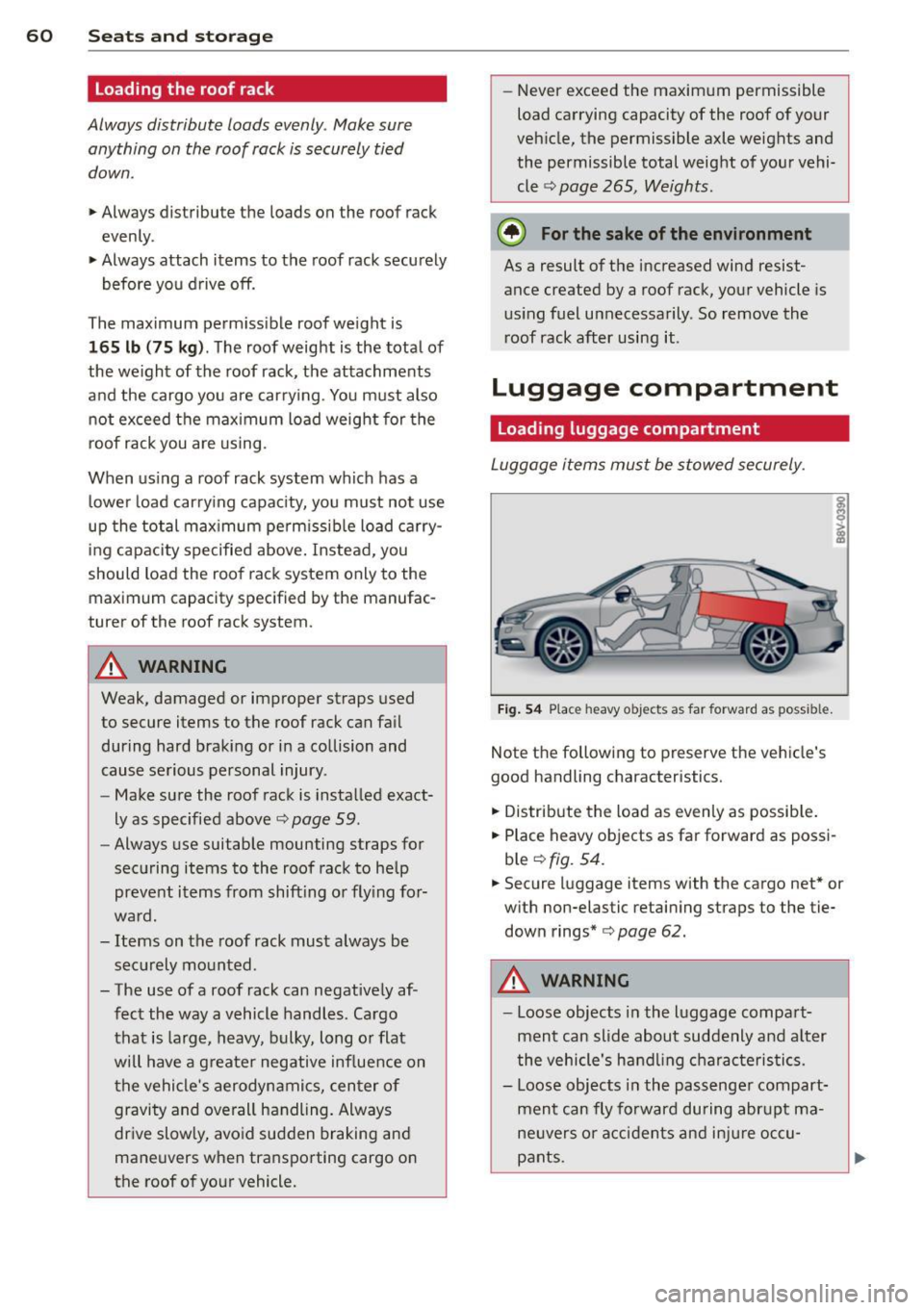
Fig . 5 4 Place heavy objects as far forward as possible.
Note the following to preserve the vehicle's
good handling characteristics.
,. Distribute the load as even ly as possib le.
,. Place heavy objects as far forward as possi
ble ¢
fig. 54.
,. Secure luggage items with the cargo net* or
w ith non-elastic retaining straps to the tie
down rings*
¢page 62.
A WARNING
-Loose objects in the l uggage compart
ment can slide about suddenly and a lter
the vehicle's hand ling cha racteristics.
- Loose objects in the passenge r compart
ment can fly forward during abr upt ma
ne uvers o r acci dents and inj ure occu
pants.
-
Page 73 of 288
~ To engage the steering wheel lock, turn the
whee l until it locks when the ignition key is
removed .
~ To release the steering wheel lock, insert
the key in the ignition lock and turn the key
in the -direction of the arrow- while turning
the steering wheel.
Switching the ignition on and off
~ To switch the ignition on, turn the ignition
key to position
(D .
~ To switch the ignition off, turn the ignition
key to position @.
Starting the engine
Your vehicle is equipped with launch contro l.
As soon as you have turned the ign ition key to
position @, the engine will start automatical
ly.
~ Press the brake peda l and move the se lector
l ever to the P or N pos ition.
~ Turn the key briefly to position @. The igni
t ion key automatically returns to position
@. Do not press the accelerator pedal when
doing this.
Major electrical equ ipment switches off tem
porarily when starting the engine.
If the engine does not start immediately, stop
the starting procedure by turning the ignit ion
key to position @and repeat after 30 sec
onds .
Automatic start malfunction
If the Ila indicator light turns on (gasoline en
gine) and the message
Engine start system
malfunction. Please contact Service
appears,
there is an automatic start malfunction.
To start the engine, hold the ignition key in position @until the engine runs.
D rive to an autho rized Audi dea ler or qualified
repair facility immediately to have the ma l
function corrected.
A WARNING
- Never allow the engine to run in confined
spaces -there is a r isk of asphyxiation.
Driving 71
- Never remove the ignition key from the
ignit ion lock while the vehicle is mov ing.
Otherwise the steering lock will engage
and you will not be able to steer the vehi
cle.
- The brake booster and power steering
only work when the eng ine is running. If
the engine is off, you have to use more
force when stee ring or braking. Because
you cannot steer and bra ke as you usual
ly would, this could lead to crashes and
serious inju ries .
- Always take the vehicle key with you
when leaving the vehicle, even for a
short period of time . This applies partic
ular ly when c hildren remain in the vehi
cle. Otherwise the children could start
the engine or operate electrical equip
ment such as power windows.
(D Note
- Avoid high engine speed, full th rottle,
and heavy engine load as long as the en
gine has not reached operating tempera
ture yet. You could damage the engine.
- The engine cannot be started by pushing or towing the vehicle.
@ For the sake of the environment
Do not let the engine run while parked to
warm up. Begin driving immediately. This
reduces unnecessary emissions.
(D Tips
-If it is difficult to turn the key to position
(D, turn the steering wheel back and
forth slightly to release the steer ing
wheel lock.
-After starting a cold engine, there may be a brief period of increased no ise be
cause the oil pressure must first build up
in the hydraulic valve adjusters. This is
normal and not a cause for concern.
- If the battery is disconnected and recon
nected, you have to hold t he ignition key
in posit ion
(D for five seconds fo r the en-
gine to start.
Ill>
•
Page 75 of 288
Starting and stopping
the engine (vehicles
with a convenience key)
St t· th · ith the
button
Applies to vehicles: with convenience key
The I START ENGINE STOPI button switches
the ignition on and starts the engine.
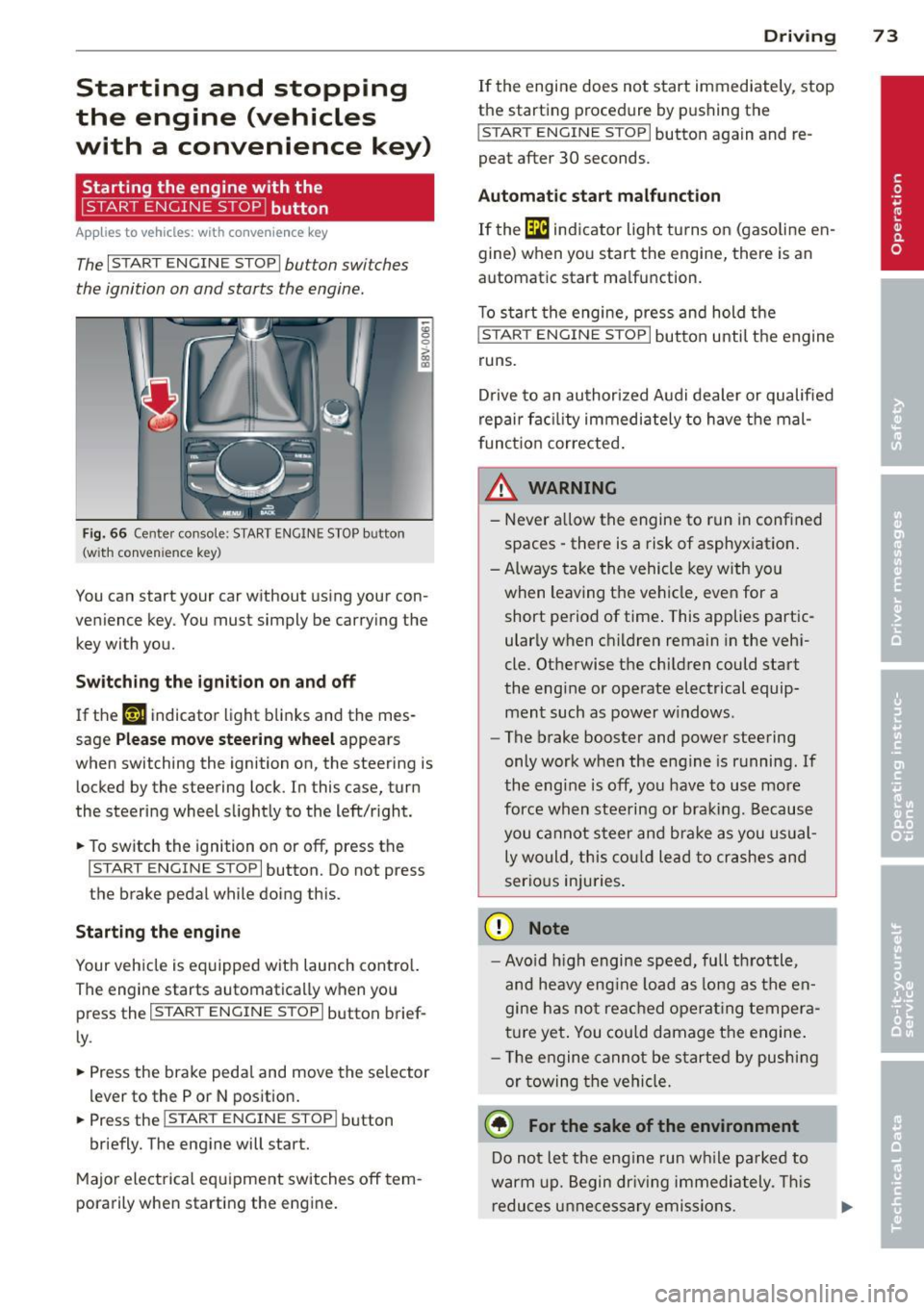
Fig. 66 Cente r console: START ENGINE STOP button
(w ith conven ience key)
You can start your car without using your con
venience key. You must simply be carrying the
key with you.
Switching the ignition on and off
If the '-r, ij indicator light blinks and the mes
sage
Please move steering wheel appears
when switching the ignition on, the steering is
locked by the steering lock. In this case, turn
the steering wheel slightly to the left/right.
.. To switch the ignition on or
off, press the
I START ENGINE STOP I button. Do not press
the brake pedal while doing this.
Starting the engine
Your vehicle is equipped with launch control.
The engine starts automatically when you
press the
I START ENGINE STOP I button brief
ly.
.. Press the brake pedal and move the selector
lev er to the P or N position .
.. Press the
I START ENGINE STOPI button
briefly. The engine will start.
Major electrical equipment switches
off tem
porarily when starting the engine.
Driving 73
If the engine does not start immediately, stop
the starting procedure by pushing the
I START ENGINE STOP I button again and re
peat after 30 seconds.
Automatic start malfunction
If the [m ind icator light turns on (gasoline en
gine) when you start the engine, there is an
automat ic start ma lfunction.
To start the engine, press and hold the
I START ENGINE STOP I button until the engine
runs.
Drive to an authorized Audi dealer or qualified
repair fac ility immediately to have the mal
function corrected.
_& WARNING
-Never allow the engine to run in confined
spaces -there is a risk of asphyxiation.
- Always take the vehicle key with you
when leaving the vehicle, even for a short period of time . This applies partic
ularly when children remain in the vehi
cle. Otherwise the children could start
the engine or operate electrical equip ment such as power windows.
- The brake booster and power steering
only work when the engine is running.
If
the eng ine is off, you have to use more
force when steering or braking. Because
you cannot steer and brake as you usual
ly would, this could lead to crashes and
serious injuries.
(D Note
- Avoid high engine speed, full throttle,
and heavy eng ine load as long as the en
gine has not reached operating tempera
ture yet. You could damage the engine.
- Th e engine cannot be started by pushing
or towing the vehicle.
@ For the sake of the environment
Do not let the eng ine run while parked to
warm up. Begin driv in g immediately . This
reduces unnecessary emissions.
Page 82 of 288
80 Driving
@ Tips
-The cruise control system is idea l for
stretches with speed limits . The driver is
responsible for adhering to the correct
speed.
- The cruise control remains active when
shifting gears.
- The brake lights turn on when the brakes
are activated.
Switching on
Applies to vehicles: with c ruise cont ro l syste m
0
f
~
0
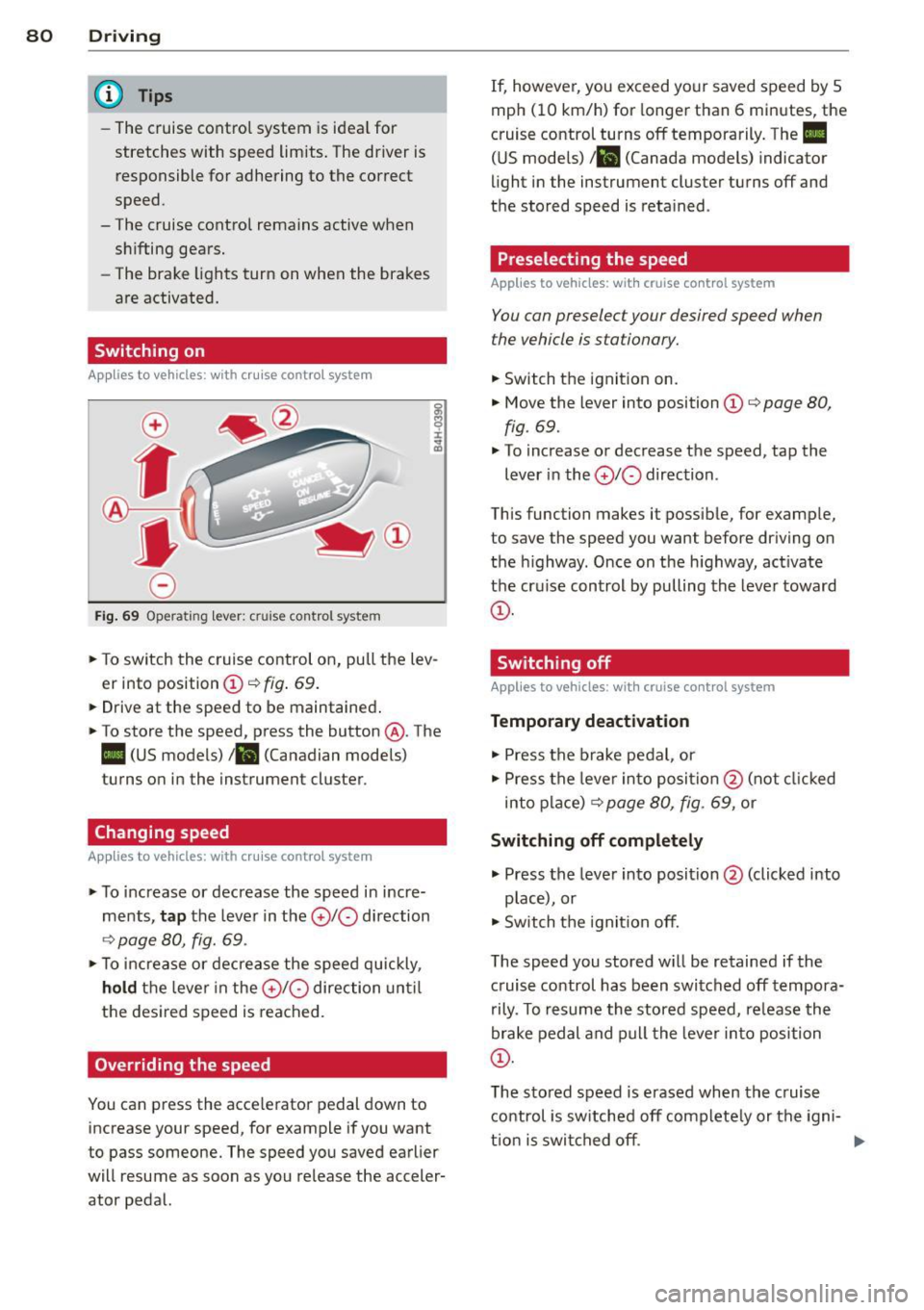
Fig. 69 Operating lever: cruise control system
., To switch the cruise control on, pull the lev
er into position
CD ¢ fig . 69.
... Drive at the speed to be maintained .
., To store the speed, press the button @. The
II (US models) !Bl (Canadian models)
turns on in the instrument cluster.
Changing speed
Applies to vehicles: with cruise contro l syste m
., To increase or decrease the speed in incre
ments,
tap the lever in the 010 direction
¢ page 80, fig. 69 .
., To increase or decrease the speed quickly,
hold the lever in the 010 direction until
the desired speed is reached.
Overriding the speed
You can press the acce lerator pedal down to
increase your speed, for example if you want
to pass someone. The speed you saved earlier
will resume as soon as you release the acceler
ator pedal. If, however, you exceed your saved speed by
5
mph (10 km/h) for longer than 6 minutes, the
cruise control turns off temporarily. The
II
(US models) 1 81 (Canada models) indicator
light in the instrument cluster turns off and
the stored speed is retained .
Preselecting the speed
Applies to vehic les: wit h cruise co ntrol system
You can preselect your desired speed when
the vehicle is stationary.
., Switch the ignit ion on .
., Move the lever into position
CD ¢ page 80,
fig . 69.
., To increase or decrease the speed, tap the
lever in the
010 direction .
This function makes it possible, for example,
to save the speed you want before driving on
the highway . Once on the h ighway, act ivate
the cru ise control by pulling the lever toward
CD -
Switching off
App lies to vehicles: wi th cruise co n trol system
Temporary deactivation
., Press the brake pedal, or
., Press the lever into position @(not clicked
into place)
¢ page 80, fig. 69, or
Switching off completely
., Press the lever into position@(clicked into
p lace), or
., Switch the igni tion off.
The speed you stored w ill be retained if the
c ruise control has been switched off tempora
rily . To resume the stored speed, re lease the
brake pedal and pull the lever into position
CD.
The stored speed is erased when the cruise
control is switched off complete ly or the igni-
t ion is switched off. ..,
Page 86 of 288
84 Audi adaptive cruise control
Adaptive cruise control
Description
Applies to vehicles: with Audi adaptive cruise co ntrol
)
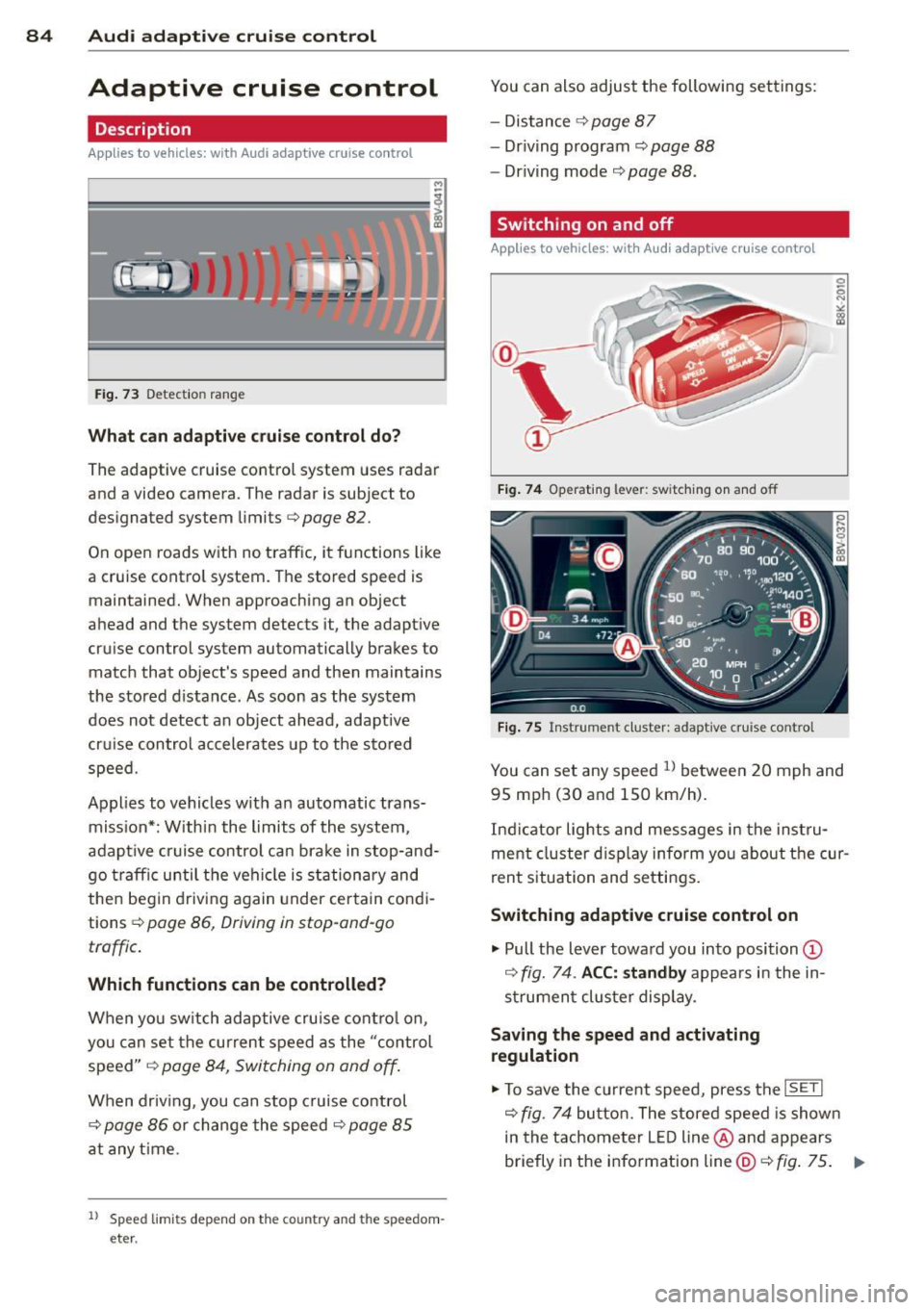
Fig. 73 Detect ion range
What can ad apti ve crui se contr ol do ?
The adaptive cruise contro l system uses radar
and a video camera. The radar is subject to
designated system limits¢
page 82.
On open roads with no traffic, it functions like
a cruise contro l system. The stored speed is
maintained. When approaching an object
ahead and the system detects it, the adapt ive
cru ise control system automatically brakes to
match that object's speed and then maintains
the stored d istance. As soon as the system
does not detect an object ahead, adaptive
cr uise contro l accelerates up to the stored
speed.
Applies to vehicles w ith an automatic trans
miss ion*: Within the limits of the system,
adap tive cr uise control ca n bra ke in stop-and
go traffic until t he vehi cle is station ary and
then begin driving again under cer tain condi
tions ¢
page 86, Driving in stop-and-go
traffic .
Which functions can be controlled?
When you sw itch adaptive cru ise con tro l on,
you can set the cu rren t speed as the "control
speed"
¢ page 84, Switching on and off .
When driving, you can stop cruise co ntrol
¢
page 86 or change the speed ¢ page 85
at any t ime.
l ) Speed lim its depend on t he cou ntry and t he speedom
eter .
You can also adjust the following settings:
- Distance
¢ page 87
-Dr iv ing program¢ page 88
-Dr iving mode ¢ page 88.
Switching on and off
App lies to vehicles: wit h Audi adapt ive cr uise contro l
Fig . 74 Operating lever: switc hing on and off
Fig. 75 Instrument cluster: adaptive cruise control
You can set any speed ll betwee n 20 mph and
95 mp h (30 and 150 km/h).
In dicator lights and mess ages in the ins tru
ment cluster d isp lay inform yo u about t he cur
r en t situation and settings.
Switching adaptive cruise control on
"' Pull the lever towa rd you into position (D
¢ fig. 74 . ACC: standb y appea rs in the in
s trumen t cluster display.
Saving the speed and activating
regulation
"' To save the current speed, press the !SETI
¢fig. 74 butto n. The stored speed is show n
in the tachometer L ED line @and appears
briefly in the information line@¢
fig. 75 . .,..
Page 89 of 288
.. To resume cruise control, release the lever
or take your foot off the acce lerator pedal.
Interrupting cruise control while driving
.. Move the lever into position @. The mes
sage
ACC: standby appears . Or
.. press the brake pedal.
.. To resume the stored speed, move the lever
into position @.
Interrupting cruise control when stopped
Applies to vehicles w ith an automatic trans
mission:
.,. Push the lever away from you into position
@ . The message
ACC: standby appears.
.. To resume cruise control, press the brake
pedal and pull the lever toward you into po
sition @.
_& WARNING
It is dangerous to activate cruise contro l
and resume the stored speed when the
current road, traffic or weather conditions
do not permit th is . This could result in a
crash .
Setting the distance
Appl ies to vehicles: with Audi adaptive cruise co ntrol
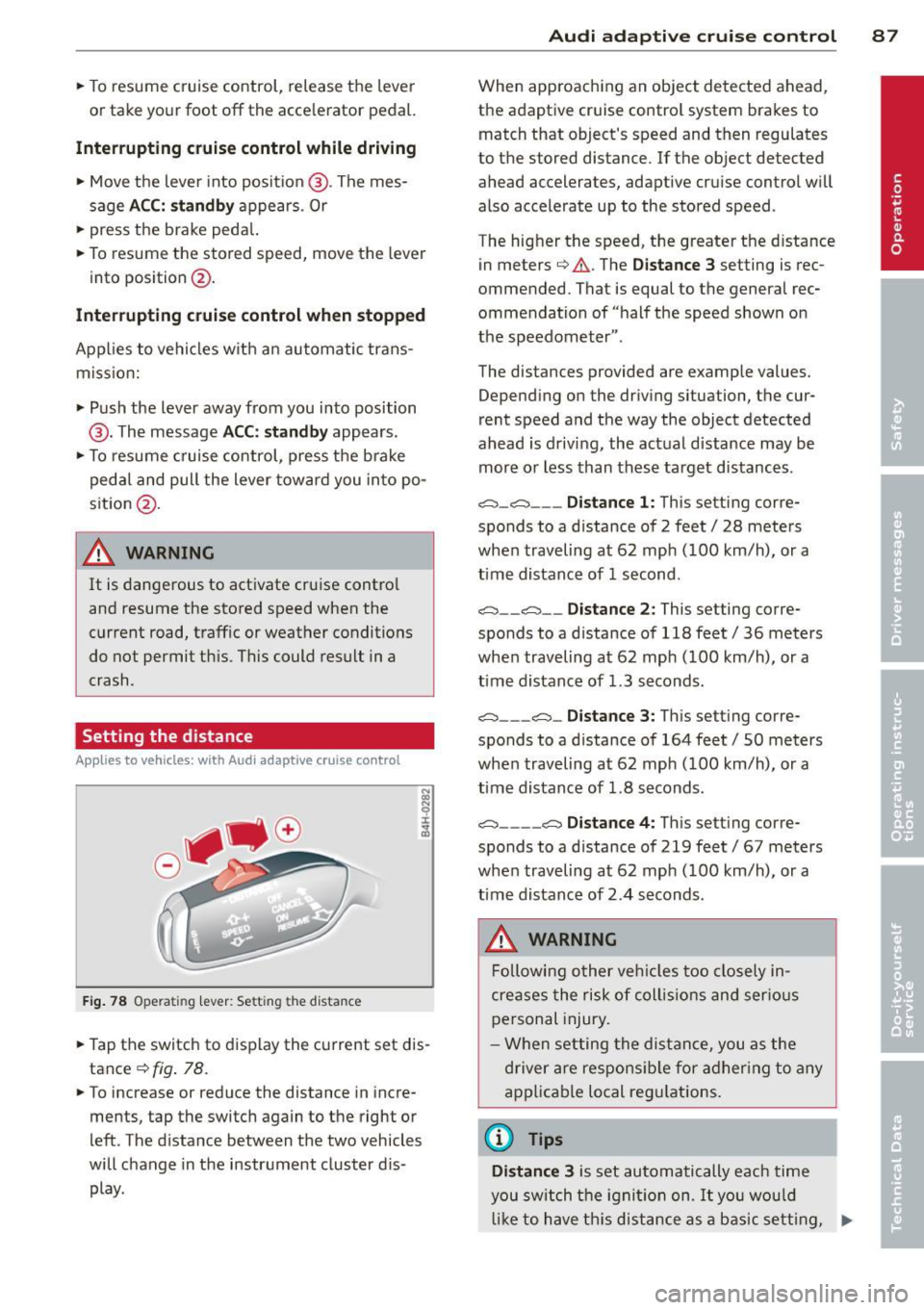
Fig. 78 Opera tin g lev er: Se tting the d ista nce
-
.. Tap the switch to display the current set dis
tance
¢ fig . 78.
.. To increase or reduce the distance in incre
ments, tap the switch again to the right or
left . The distance between the two vehicles
will change in the instrument cluster d is
play .
Audi adaptive cruise control 87
When approaching an object detected ahead,
the adaptive cruise control system brakes to
match that object's speed and then regulates
to the stored distance . If the object detected
ahead accelerates, adaptive cru ise control w ill
also accelerate up to the stored speed .
The hig her the speed, the greater the distance
in meters ¢
A. The Distance 3 setting is rec
ommended. That is equal to the general rec
ommendation of "half the speed shown on
the speedometer ".
The distances provided are example values. Depending on the driving situation, the cur
rent speed and the way the object detected
ahead is driving, the actual distance may be
more o r less than these target distances .
o:;:::::,_o:;:::::, ___ Distance 1: This setting corre-
sponds to a d istance of 2 feet/ 28 meters
when traveling at 62 mph (100 km/h), or a
time distance of 1 second .
o:;:::::, __ o:;:::::, __ Distance 2: This setting corre
sponds to a d istance of 118 feet/ 36 meters
when traveling at 62 mph (100 km/h), or a
time distance of 1.3 seconds.
o:;:::::, ___ o:;:::::,_ Distance 3: This setting corre-
sponds to a d istance of 164 feet/ 50 meters
when traveling at 62 mph (100 km/h), or a
time distance of 1.8 seconds.
o:;:::::, ____ o:;:::::, Distance 4: This setting corre-
sponds to a d istance of 219 feet/ 67 meters
when traveling at 62 mph (100 km/h), or a
time distance of 2 .4 seconds.
_& WARNING
Following other vehicles too closely in
cre ases the risk of collisions and serious
personal injury.
- When setting the distance, you as the
driver are responsible for adhering to any
applicable local regulations .
(D Tips
Distance 3
is set automatically each time
you switch the ignition on.
It you would
like to have th is distance as a basic setting, .,..
Page 100 of 288
98 Audi side assist
Audi side assist
Side assist
Description
App lies to vehicles: with Audi side assist
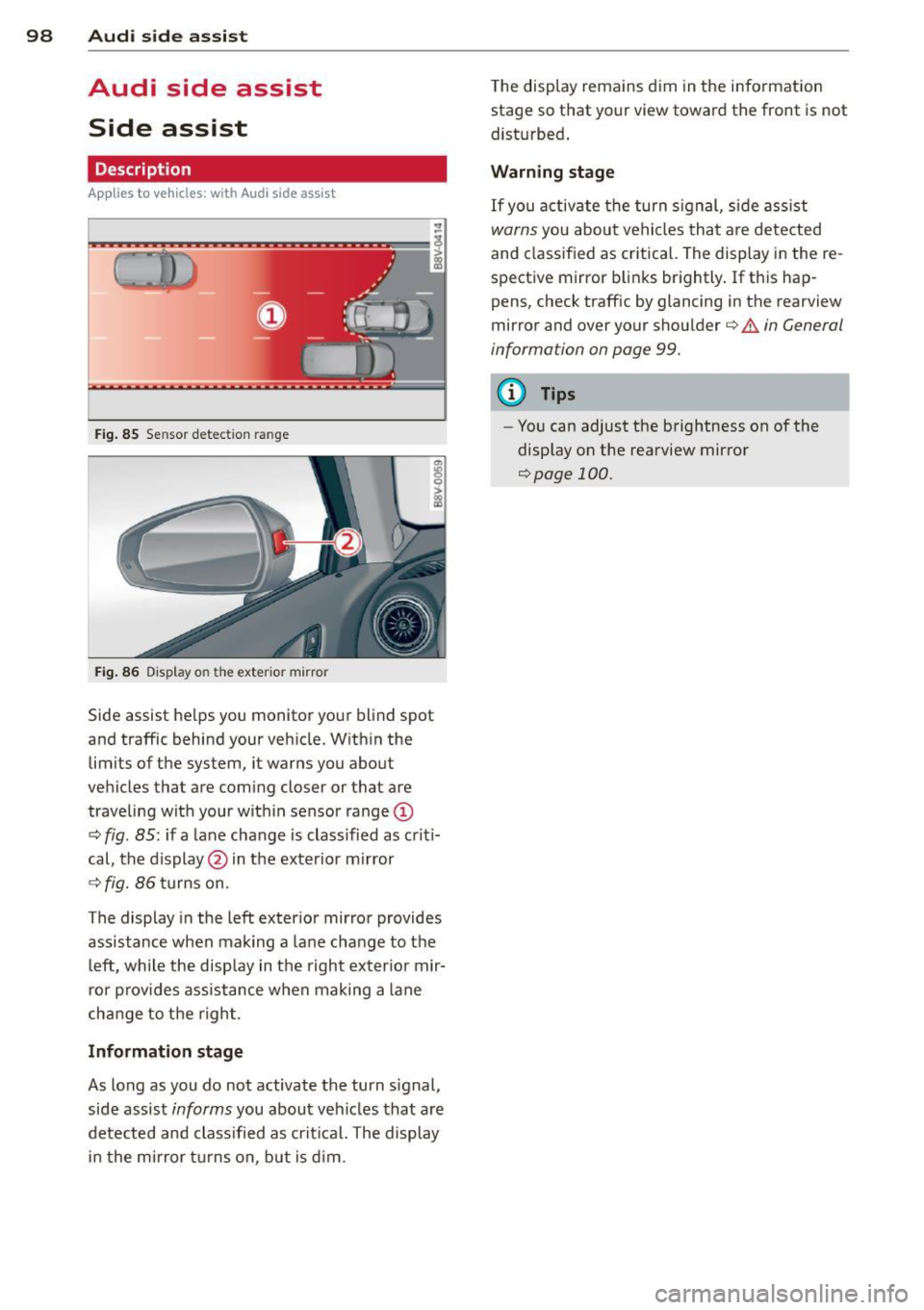
Fig . 85 Se nsor detect ion ra nge
Fig. 86 Display o n the exte rior mirror
Side assist helps you monitor your blind spot
and traffic behind your vehicle. Within the
limits of the system, it warns you about
vehicles that are coming closer or that are
traveling with your within sensor range@
c:> fig. 85: if a lane change is classified as criti
cal, the display@in the exterior mirror
c:> fig. 86 turns on.
The display in the left exterior mirror provides
assistance when mak ing a lane change to the
left, while the display in the right exterior mir
ror provides assistance when making a lane
change to the right.
Information stage
As long as you do not activate the turn signal,
side assist
informs you about vehicles that are
detected and class ified as critical. The display
in the mirror turns on, but is dim. The
display remains dim in the information
stage so that your view toward the front is not
disturbed .
Warning stage
If you activate the turn signal, side assist
warns you about vehicles that are detected
and class ified as critical. The display in the re
spective mirror blinks brightly. If this hap
pens, check traffic by glancing in the rearview
mirror and over your shoulder
c:> .&. in General
information on page 99.
(D Tips
- You can adjust the brightness on of the
display on the rearview mirror
c:>page 100.
Page 110 of 288
108 Automatic transmi ssion
Stopp ing /p ar kin g
If the selec tor lever is not in the P position
when you open the driver's door, the vehicle
could ro ll. In vehicles with a convenience key*,
the message:
Shift to P , other wise vehi cle
c a n roll away . Doo rs do not lo ck if le ver not
in
P appears. You will also hear a warning
tone .
"' Press and ho ld the brake pedal¢.&_ .
"' Set the parking brake.
"'Se lect the P selector lever pos ition.
St opp ing on an incline
• Always press the brake pedal to hold the ve
hicle in p lace and prevent it from "rolling
back" ¢ .&_ . Do
n ot try to prevent the vehi
cle from "roll ing back" when a gear is en
gaged by increasing the eng ine speed ¢(D.
Starting on an inclin e in vehicl es wi th out
Hill Hold*
"' Set the parking brake.
"' With the driving gear selected, press the ac
celerator pedal carefully . The parking brake
will release automat ically if your safety belt
is fastened.
St arting on an incl ine i n vehicle s with Hill
Hold*
"' With the driving gear selected, remove your
foot from the brake pedal and press the ac cele rato r pedal ¢
page 78, Hill hold.
Under certain circumstances, (such as driving
in the mountains or towing a tra iler), it may
be usefu l to sw itch temporarily to the manual
shift p rogram in o rder to adjust the gears to
the dr iving condit ions by ha nd
¢ page 110.
When parking on a level surface, simply place
the selector lever in the P pos ition. On in
clines , activate the parking bra ke first and
then move the selector lever to the P pos it ion
¢ page 76 . This prevents the locking mecha
nism from being loaded too heavi ly and will
make it easier to move the selector lever out
of the P position.
A WARNING
- The vehicle can also roll when the engine
is stopped.
- Unintended vehicle movement can cause
serious injury.
- Never leave your vehicle with the engine running while in gear. If you must leave
your veh icle when the engine is running,
set the parking brake and move these
lector lever to the P position .
- Power is still transferred to the wheels
when the engine is runn ing at idle. To
p revent the vehicle from "c reeping", you
must keep you r foot on the brake when
the engine is running and the selector lever is in the D, So r R position or "tip
tronic" mode is selected .
- Do not inadvertently press the ac celera
tor peda l when the vehicle is stationary.
Otherwise the vehicle wi ll start to move
immediate ly, even if the parking brake is
set. Th is could result in a crash.
- Do not press the accelerator pedal when
changing the se lector lever position
while the veh icle is stationary and the
engine is running.
- Never engage the se lector level positions
R or P while dr iv ing. It could cause a
crash .
- Before driving down a steep slope, re
duce your speed and shift into a lower
gear with "tiptronic" .
- Do not ride the brakes or press the brake
pedal too often or too long when driving
downhill . Constant braking causes the
brakes to overheat and substantially re
duces braking pe rformance, increases
b rak ing distan ce or c auses complete fa il
ure of the brake system.
- I f you must stop on an in cl ine, always
hold the vehicle i n place with the foot
brake or park ing brake to p revent it from
rolling back .
- Never hold the vehicle on an incline with
a slipping clutch . The clutch opens auto
matica lly when it becomes too hot from
Page 111 of 288
the overload. The ml indicator light
turns on and a message appears
Q page 111 when the clutch is overload
ed .
-If the engine must remain running, never
have any driving position engaged when
checking under the hood . Make sure the
selector lever has securely engaged and
is locked in P with the parking brake set
Q page 210. Otherwise, any increase in
engine speed may set the vehicle in mo
tion, even with the parking brake set.
(y Note
- When stopping on an incline, do not try
to hold the vehicle in place by pressing
the accelerator pedal while a driving gear
is selected. This can cause the automatic
transmission to overheat and can dam
age it. Set the parking brake or press the
brake pedal to prevent the vehicle from
rolling.
- Allowing the vehicle to roll when the en
gine is stopped and th@ selector lever is
in the N position will damage the auto
matic transmission because it is not lu
bricated under those circumstances .
- The transmission can overheat and be
damaged under certain driving and traf
fic conditions such as frequent starts,
creeping for a long time , or stop-and-go
traffic. When the
ml or . indicator
light turns on, stop the vehicle at the
next opportunity and let the transmis
sion cool
r::!> page 111.
-Allowing the vehicle to roll when the en
gine is stopped will damage the S tronic
transmission because it is not lubricated
<=> page 261, Emergency towing with
commercial tow truck .
For safety reasons, the parking brake re
leases automatically only when the driver's
door is closed and driver's safety belt is
fastened.
Automatic transmission 109
Hill descent control
App lies to vehicles : wi th S tronic tra nsmi ssio n
Hill descent control assists the driver when
driving down inclines .
Hill descent control is activated when these
lector lever is in the D or S position and you
press the brake pedal. The transmission auto
matically selects a gear that is suitable for the
incline. Hill descent control tries to maintain
the speed achieved at the time of braking,
within physical and technical limitations. If
may still be necessary to adjust the speed
with the brakes . Because hill descent control
cannot sh ift down farther than 3rd gear, it
may be necessary to shift into tiptronic mode
in very steep areas. In this case, shift into 1st
or 2nd gear in tiptronic mode to use the en gine's braking force to relieve the brakes .
Hill descent control switches off once the in
cline levels out or you press the accelerator
pedal.
On vehicles with a cruise control system*
Q page 79, hill descent control is also activat
ed when the speed is set.
A WARNING
-
-
Hill descent control cannot overcome
physical limitations, so it may not be able
to maintain a constant speed under all
conditions. Always be ready to apply the brakes .
•
Page 113 of 288
Launch Control-Program
App lies to vehicles: with launch control
The Launch Control Program enables maxi
mum acceleration.
Requirement : The engine must be at operat
ing temperature and the steering wheel must
not be turned .
.. With the engine running, press the
!~ OFFI
button briefly one time 1).
.. Pull the selector lever back out of the 0/S
position briefly to select the S position, or
press it toward the right into the tipt ronic
pos it ion or select the
d ynamic dr iv ing mode
i n drive select*
~page 102.
.. Press the brake peda l firmly with your left
f oot and hold it all the way down for at least
1 second.
.. At the same time, press the gas peda l all the
way down with your right foot unti l the en
gine reaches and stays at a high RPM level.
.. Remove your left foot from the brake.
A WARNING
- Always adapt your driving to the traffic
flow.
- Only use Launch Cont ro l when road and
t raff ic conditions a llow it and other driv
ers wi ll not be endangered or impacted
by you r driving and the veh icle's acceler
ation.
- Please note tha t the dr ive whee ls can
spin and the vehicle can break away
when sport mode is switched on, espe
c ially when the road is sl ippery.
- Once the vehi cle has started moving,
press the
I ~ OFF I button br iefly to turn
the sport mode off.
(j) Tips
- The transm ission tempe rat ure may in
crease significantly after using the
l ) In vehicles with a dr iver info rmat ion system, an ESC
light in the in stru m ent cl us ter stays on contin uo usly
and the m essage
Stabilizatio n cont rol (ESC): spor t.
Warning! Restricted stability
appears temporarily.
Automa tic tran sm iss ion 11 1
Launch Control Program . If that hap
pens, the program may not be availab le
for a few m inutes. It will be ava ilable
again after a cool-down per iod.
- When accelerating using the Launch
Contro l Program, all vehicle parts are
subject to heavy loads. Th is can lead to
increased wear .
Emergency mode
Applies to vehicles: with S tronic transm ission
In the event of a system malfunction, there is
an emergency program.
If all of the selector lever positions are high
li ghted with a light backgro und in the instru
ment cluster d isplay, there is a system mal
funct ion and the S tronic transmission is run
ning in the emergency program . The vehicle
can still be driven in emergency mode, but on
ly w ith reduced speed and not in all gears. In
some cases, the veh icle
c ann ot driv e in re
v e rs e .
(D Note
If the transmission runs in emergency
mode, drive to your author ized Audi dealer
or q ua lified repa ir facil ity immed iate ly to
have the ma lf u nction corrected.
Transmission malfunction
• Tran smiss ion malfuncti on! Please stop
the vehicle and select P
T here is a malfunction in the transmiss ion .
Park the vehicle securely and do not continue
driv ing. See your authorized A udi dealer or
qualified repair facility.
• Transmi ssion overh eatin g! Plea se stop
the vehicle!
The transm iss io n is too hot and can become
damaged . Stop and let the transmission cool .,.
•